Repository navigation
Guide geo databases
When a visitor arrives, the tracker only sees an IP address. A geo database turns the IP into facts: the country, region and city, the provider (ISP) and network (ASN), whether the IP belongs to a data center, a VPN or a proxy.
Without one:
- reports show no countries;
- country filters in streams cannot decide and simply do not vote;
- cloaking sees every visitor as Unknown — with a country filter on, that sends all traffic to the safe page;
- data-center, ISP and VPN detection in cloaking is switched off.
So install a database before your first campaign. It takes a minute.
| Database | Gives | Cost | What you need |
|---|---|---|---|
| Sypex Geo City Lite | Country, region, city | Free | Nothing — one click |
| MaxMind GeoLite2 City + ASN | City, provider and ASN | Free | A free MaxMind account: Account ID + License key |
| IP2Location LITE DB11 | Country, city, coordinates, ZIP, time zone | Free | A free IP2Location account: download token |
| IP2Location ASN LITE | Provider / network | Free | The same token |
| IP2Proxy LITE PX12 | VPN, proxy, Tor, data center, residential, fraud score | Free | The same token |
| Paid versions (IP2Location DB4, IP2Proxy PX12 commercial, MaxMind GeoIP2…) | Better accuracy | Paid | Upload the file manually |
Recommended set: Sypex (country) + MaxMind GeoLite2 ASN (providers) + IP2Proxy PX12 (VPN/proxy). With it, every cloaking layer works.
| Banner | Meaning |
|---|---|
| No geo database installed | Nothing is installed — install Sypex now |
| Only the basic Sypex Geo database is connected | Countries work, but cloaking has no provider, data-center or VPN data. Add MaxMind and IP2Location |


Press Install Sypex Geo (free) on the banner, or ⚙ → Geo Databases → Update in the Sypex row. The installer also does it on a fresh server.
- Register at maxmind.com (free).
- In your MaxMind account: Manage License Keys → Generate new license key. Note the Account ID and the key.
- ⚙ → Geo Databases: paste MaxMind Account ID and MaxMind License Key, press Save Keys.
- Press Update in the GeoLite2 City and GeoLite2 ASN rows.
- Register at lite.ip2location.com (free).
- Copy the download token from your account.
- Paste it into IP2Location Download Token, Save Keys, then Update in the DB11, ASN LITE and PX12 rows.
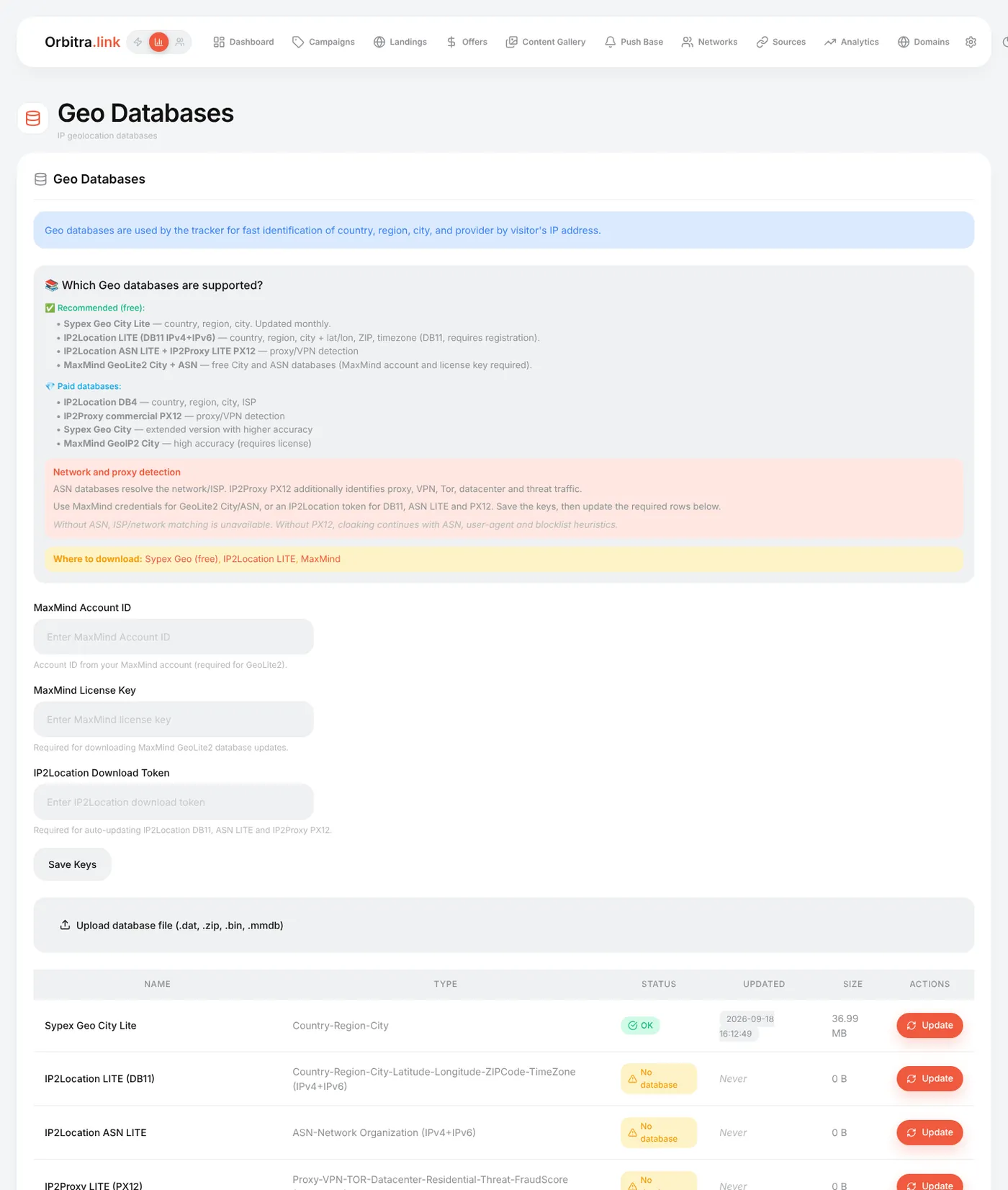
Each row shows Status, the date of the last update and the size. A database that failed to download shows the error.
Upload database file accepts .dat, .bin, .mmdb or a .zip with one of them — for paid databases or a server without internet.
Databases are refreshed monthly by a background job (cli/geo_update.php, installed automatically). MaxMind and IP2Location update only when their keys are saved. Update in a row refreshes it right away.
- Open a campaign test link with
&_dbg=1— the trace shows the country it detected for you. -
&_geo=DEoverrides the country for testing even without a database. - Clicks in ⚙ → Logs → Traffic show the country; the click card shows ISP and ASN when those databases are present.
⚙ → Geo profiles are named country lists — EU, CIS, Tier 1, or your own. Insert them into country filters with one click instead of typing 27 countries.
Reference: Administration → Geo databases, Cloaking.