Repository navigation
Releases: gamergodggpwnd/NotHomeView
Release list
Update Release v1.5

NotHomeView v1.5: live camera tiles, bigger Home Screen tiles, a voice assistant and easier editing
Everything that's new since v1.31.1. This update was built as "1.32.0" and is published as v1.5.
HACS users: HACS compares version numbers, and v1.5 counts as lower than v1.31.x, so HACS may not show it as an update. To install it, open NotHomeView in HACS → ⋮ → Redownload → pick v1.5, then reload your browser.
Home Screen
- Bigger tiles (4 × 6). Photos, the camera tile, the music tile and other extra tiles can now be two tiles wide and two rows tall. Drag a tile's corner down in arrange mode, pick the size from its ⋯ menu, or set it in the card editor.
- Calendar sizes. The calendar can be Full · 2 rows (as before), Full · 1 row, a two wide tile (three days), a two wide, 2 rows tile (three days on top, the next three below) or a small Up next tile. Change it with the calendar's resize corner or ⋯ menu in arrange mode, or in the editor.
- Everything lines up. Tiles on the row below line up exactly with the apps and tiles above them, and tiles of the same size are always the same height.
- Arrange the Home Screen right on the dashboard (admins): long-press the Home Screen, then tap an app or tile for its ⋯ menu (Edit, Move, size, Duplicate, Delete), hold and drag to move, or drag a corner to resize.
- In landscape, 5 to 8 apps sit in two rows so they line up with the tiles beside them.
- Tapping a Now Playing tile opens the full Music player.
- Animated weather header (optional): the Weather popup can open on an animated sky that matches the weather, with a night sky after sunset.
Cameras
- Always live (while on screen). A camera tile can now play its live video the whole time it's on screen. It stops when you scroll away, the page is hidden, the screensaver runs or the large view is open, keeps the last picture while it reconnects, and can pause after a set time without a touch. Each device can choose its own setting from the large view.
- No more "Reconnecting…" loops. The Home Screen no longer redraws the camera tile every 30 seconds, moving or resizing a tile starts exactly one new stream, and when Google Nest says "too many requests" the tile simply waits a minute instead of giving up.
- Camera tiles show a small label (e.g. Nest, Ring), chips with the time of the last doorbell or motion event, and a Talk button. By default Nest tiles show a preview picture with Tap for live view (to respect Google's stream limits), unless you choose Always live.
- The camera tile's saved last picture never shows up in Photos or the screensaver.
Voice assistant (optional)
- Assistant popup for any Home Assistant Assist pipeline: tap the mic beside your avatar, speak or type. Replies can be spoken, and weather and calendar questions show small answer cards.
- Floating orb instead of a full screen: an animated orb shows when it's listening, thinking or speaking; tap it for the chat.
- Keeps listening until you're done: after each reply the mic opens again; say "thank you", tap outside or stay quiet to end. It waits for a short pause (adjustable) so you can think mid-sentence.
- Quiet mode per device (Off / On / Auto by volume, Focus or quiet hours): answers appear as a caption instead of being spoken.
- Wake word "Hey Jarvis" per device (off by default): runs entirely in the browser, no audio leaves the device. Not available on iPhone / iPad.
- Timers that work in the browser: "set a pasta timer for 12 minutes" opens a full-screen countdown with pause, cancel and +1 minute, and a chime at the end.
- Chat history per device (keep forever, or 1 day to 30 days, with Clear).
- Spoken replies now play on iPhone and iPad, and errors from the pipeline or AI service are shown as short, clear notes.
Photos
- Album links as a photo source: show a shared Google Photos, iCloud or OneDrive album on the Photos tile and in the screensaver (the screensaver, and Google Photos on the tile, need the small optional helper integration included in this repository; iCloud and OneDrive work on the tile without it).
- The gallery's Add photos button offers Upload photos or Add album link.
Room and device pages
- Arrange mode: long-press a page to move, resize, duplicate, delete or edit tiles without Home Assistant's edit mode.
- Resize by dragging a corner, snapping to the tile sizes each card supports.
- Named pages: page dots can become named tabs, and a link can open a page by name.
- Edit pencil in popups (admins): opens the editor of the card a popup belongs to.
- Edit mode keeps tiles bright with their own controls, and the edit controls use the same frosted-glass look.
Setup
- People who already use NotHomeView get a one-time notification offering to build a fresh NotHomeView dashboard from their devices (added as a new dashboard; existing ones aren't changed). The notification link now opens a page where the setup dialog works.
Fixes
- The card editor scrolls normally again on phones.
- The page selector hides again after you leave edit mode.
- A cancelled long-press no longer swallows the next tap, and iOS no longer shows "Save to Photos" on a long-press of a tile.
- Assistant pipelines without text-to-speech or speech-to-text work without errors.
- Gallery thumbnails from other sites no longer cause console errors.
Credits
The "Hey Jarvis" wake word model comes from openWakeWord by David Scripka, licensed CC BY-NC-SA 4.0 (non-commercial). Speech feature models: Apache-2.0. ONNX Runtime Web: MIT. Details in dist/wakeword/README.md.
NotHomeView v1.31.2
NotHomeView v1.31.2: the "build a dashboard" offer for existing users
New features
- Already using NotHomeView? You get the offer too. If you already have a dashboard with the NotHomeView Home Screen card, Home Assistant's notification bell (not a phone push) now shows a one-time notification for administrators: "Want a fresh NotHomeView dashboard built from your devices? It's added as a new dashboard; your current dashboards aren't changed." Its Build a new NotHomeView dashboard link opens the setup dialog; press Add to create it (at
/nothome-view, or the next free address) or No to say no thanks. Either way the notification goes away and isn't shown again. - No popup for existing users: the "Add NotHomeView?" dialog still opens by itself only on fresh installs (when there's no NotHomeView dashboard yet). Existing users only see the notification, and only once per user.
- You can still build one any time: Create NotHomeView dashboard in the Home Screen card editor, or
NotHomeView.setup()in the browser console.
Bug fixes
- The notification's link opens the setup dialog reliably. It used to point at
/lovelace/0, which on recent Home Assistant versions can open Home Assistant's own Home overview, where NotHomeView isn't loaded and the dialog couldn't appear. It now opens your NotHomeView dashboard (or the dashboard you were on when the notification was made). - If Home Assistant couldn't list the dashboards, the setup now stays quiet instead of assuming a NotHomeView dashboard exists.
Update through HACS (the file is still dist/homeview-cards.js), then refresh your browser or app (clear the cache on phones and tablets). The browser console shows HOMEVIEW-CARDS 1.31.2. If HACS still offers an older version, open NotHomeView in HACS and use ⋮ › Update information first.
🔔 Get notified of new releases: add the NotHomeView Updates bot and it will message you whenever a new NotHomeView version comes out.
NotHomeView v1.31.1
NotHomeView v1.31.1: bug fixes (setup popup, full-height popups, tap-to-edit)
New features
- "NotHomeView is installed" notification. Administrators also get a notification in Home Assistant's notification bell (not a phone push). It offers to add the NotHomeView dashboard: its Add the NotHomeView dashboard link opens the setup dialog, or you can use Create NotHomeView dashboard in the Home Screen card editor later. It's created once and goes away by itself after you press Add or No.
- The link works anywhere in Home Assistant: any address with
?nothomeview_setup=1opens the setup dialog for an administrator.
Bug fixes
- The "Add NotHomeView?" dialog now appears reliably on the first page load after installing for administrators. It starts as soon as Home Assistant is connected, on any page, and no longer waits for a dashboard view to show.
- The dialog was skipped too eagerly. Now:
- only a kiosk mode that is active on that screen right now hides it (kiosk-mode or Wallpanel actually hiding the header,
?kiosk, Fully Kiosk). Having kiosk-mode or Wallpanel installed, or hiding the sidebar yourself, no longer counts; - a dashboard only counts as "already there" if the setup created it (
/nothome-view,/nothome-view-2…) or if it uses the NotHomeView Home Screen card. A dashboard that just has "NotHomeView" in its name, or only uses the Page Grid card, no longer blocks it; - "already there" is no longer remembered, so deleting that dashboard brings the offer back. Pressing No is still remembered (in that browser and in your user profile).
- only a kiosk mode that is active on that screen right now hides it (kiosk-mode or Wallpanel actually hiding the header,
- Popups now reach the top of the screen. On dashboards with the NotHomeView Home Screen card, every popup (Home Screen sheets, the room picker, calendar events, browser_mod popups and Home Assistant's own more-info dialogs) now opens full height, keeps its content below the status bar / notch, and closes with a swipe down from the top (or anywhere while its content is scrolled to the top). To get the old floating popups back, turn off Full-height popups in the Home Screen card editor (
full_height_popups: false). - Device pages can be edited with the visual editor, one tile at a time. In the dashboard's edit mode every tile on a device page now has an outline; tap a tile and the editor opens straight on that tile's own settings: pick a different entity, rename it, change its icon, what a tap does, or its size. The Page Grid editor now shows your tiles as a grid of buttons (tap one to edit it, Move, Duplicate, Remove, Add tile, New page), and the page layout options (rows, columns, theme, gestures) are folded away underneath. No YAML needed.
Update through HACS (the file is still dist/homeview-cards.js), then refresh your browser or app (clear the cache on phones and tablets). The browser console shows HOMEVIEW-CARDS 1.31.1. If HACS still offers an older version, open NotHomeView in HACS and use ⋮ › Update information first.
🔔 Get notified of new releases: add the NotHomeView Updates bot and it will message you whenever a new NotHomeView version comes out.
NotHomeView v1.31.0
NotHomeView v1.31.0: first-run setup
New features
- "Add NotHomeView?" on first run. After you install NotHomeView and open any dashboard as an administrator, a small glass dialog (Day and Night look) asks: Would you like to add new dashboard "NotHomeView" to your dashboard list?
- Add creates a new NotHomeView dashboard. It shows up in the sidebar and in Settings › Dashboards at
/nothome-view, or/nothome-view-2if that address is taken. It is filled automatically from your own Home Assistant and laid out like the NotHomeView example dashboard:- a Home Screen: greeting with your name and avatar, four app icons (Home plus Security, Music and Weather when you have them), a Photos tile, a Now Playing tile, a new House tile and a full-width Calendar with the weather. Until you add photos, a soft wallpaper is shown behind it;
- a Home page with a thermostat, a clock, the garage door, lights, music, scenes, the calendar, a TV, a camera, people, locks and rooms;
- pages for Lights, Climate (thermostats, fans, temperature and humidity), Security (cameras, alarm, locks, door / window / motion sensors), Media, Garage / covers, Calendar and Rooms (one page per area);
- every page has the chips row on top (Hub, Home, Rooms, Climate, Calendar, Security, a "Lights on" count, lights that are on and thermostats) and big glass tiles in pages that follow the Night / Day / Auto theme (Auto by default, following the sun).
- The tiles come from your entities, devices and areas, grouped by type and area. Hidden, disabled, unavailable and configuration / diagnostic entities are skipped, and pages with nothing on them are left out.
- It only uses NotHomeView cards and Home Assistant's built-in cards, so it works even without browser_mod, Wallpanel, card-mod or button-card.
- When it's done, you can open it straight away. Your other dashboards are not changed.
- Add creates a new NotHomeView dashboard. It shows up in the sidebar and in Settings › Dashboards at
- No is remembered, both in that browser and in your Home Assistant user profile, so you won't be asked again.
- You won't be asked if you're not an administrator, on wall tablets / kiosk screens, or when you already have a NotHomeView dashboard.
- Create NotHomeView dashboard button at the bottom of the Home Screen card editor, to bring the dialog back any time.
- Browser console helpers:
NotHomeView.setup()opens the dialog,NotHomeView.dryRun()shows the dashboard it would create without saving anything, andNotHomeView.resetSetup()forgets your earlier answer. - New card: NotHomeView House (
custom:homeview-house-card). A drawn house with labels for the weather, the garage door, how many lights are on, a thermostat and a lock. Only the labels for the entities you set are shown. The windows light up when lights are on after dark, the garage door follows its state, and in a Home Screen tile with Sky background it sits over the live sky. - Home Screen card: new
wallpaperoption (any CSS background, such as a colour or a gradient), shown when there are no photos. Newfull_width: trueoption (also on the Page Grid card) that makes the page use the whole window without the example's style template. - Chips card: a chip can count how many of a list of entities are on (
count_entities), so a "Lights on" chip doesn't need a helper sensor.
Bug fixes
- None in this release. Everything else is the same as v1.30.7.
Update through HACS (the file is still dist/homeview-cards.js), then refresh your browser or app (clear the cache on phones and tablets). The browser console shows HOMEVIEW-CARDS 1.31.0.
🔔 Get notified of new releases: add the NotHomeView Updates bot and it will message you whenever a new NotHomeView version comes out.
NotHomeView v1.30.7
NotHomeView v1.30.7 — card bundle homeview-cards.js 1.30.7 (the previous release, v1.0.1, shipped build 1.12.0). From now on the GitHub version follows the bundle version.
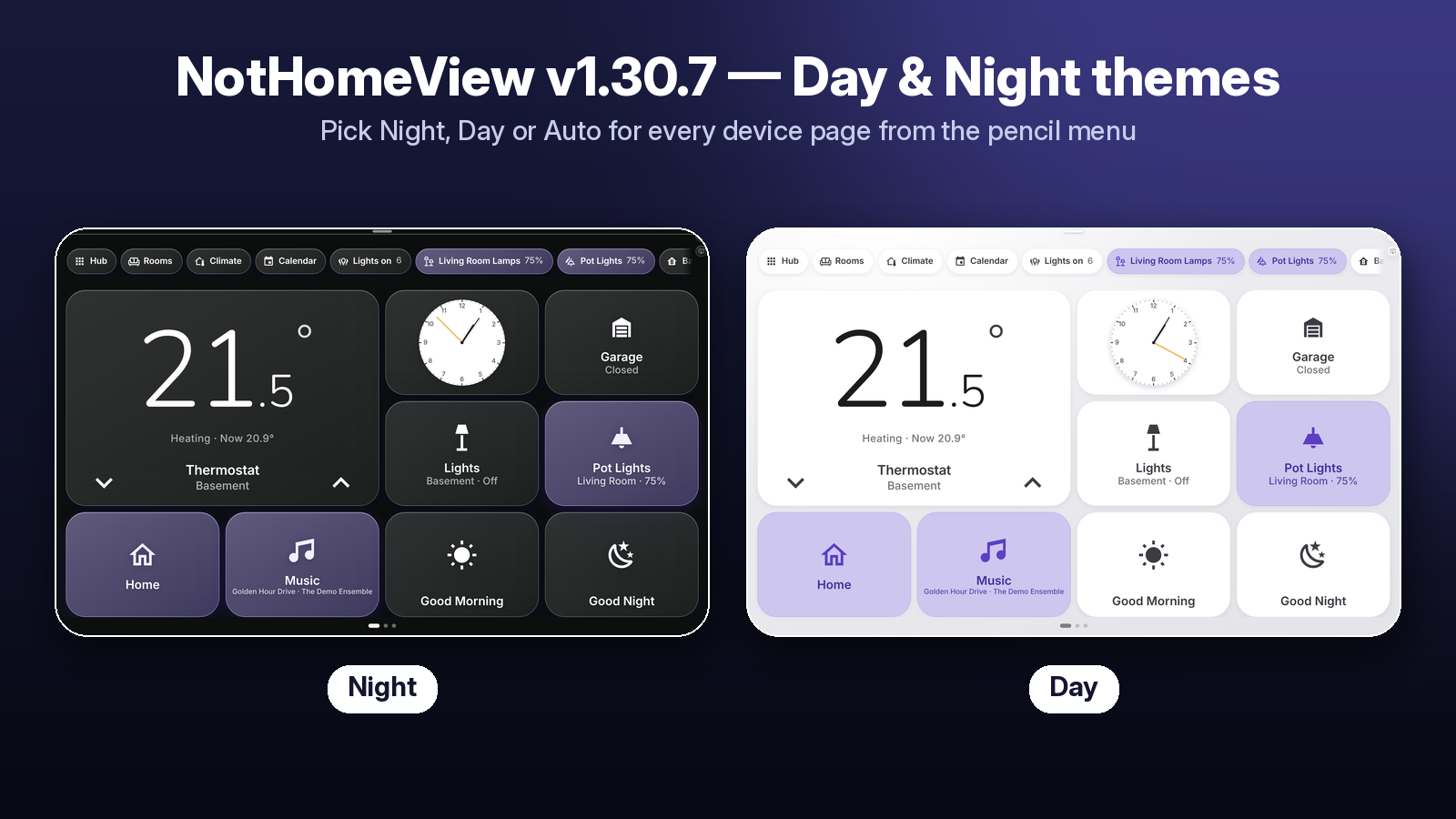
New features
- Device pages theme: Night / Day / Auto — pick it from the ✏️ pencil menu (Device pages theme) or the Home Screen card's editor. Auto follows the sun. A Page Grid can override it for its own page.
- NotHomeView Home Screen (Hub card): greeting, app icons, Photos widget, Now Playing, calendar and weather over a frozen, blurred photo background.
- Screensaver pauses on the Home Screen and starts again only when it is enabled and the Home Screen is closed.
- Photo viewer with Previous / Next (and swipe), View Gallery popup with Add photos (upload into the screensaver folder).
- Garage chooser popup: open door 1, door 2 or both, with live state.
- Wallpanel‑missing hint on the Home Screen and in the card editors.
- New cards: Home Screen (Hub), Chips (with Rooms picker), Page Grid, Page Break, TV, TV Player, Calendar, Garage Chooser.
- New example dashboard
examples/homeview-example-sections.yaml: the full NotHomeView layout with generic placeholder entities, editable in the visual editor.
Bug fixes / performance
- The Rooms popup now opens in front of device pages shown as sheets; Escape closes only the top popup.
- Smoother 25 s photo rotation: the next photo is downloaded and decoded before it is shown.
- Faster gallery opening and Previous / Next (download queue, decoded‑image cache, thumbnails).
- The default background blur scales with the transparency slider.
- Swiping the Home Screen away can no longer start a screensaver that is turned off.
- The Day theme also applies to device pages opened as sheets from the Home Screen.
Requirements
Required: Wallpanel, card-mod, browser_mod (recommended).
Optional: kiosk-mode, button-card, layout-card, auto-entities.
After updating in HACS, refresh the browser (clear the cache on phones and tablets). Screenshots are from a demo setup with made‑up entities and generated placeholder photos.
NotHomeView v1.0.1

a4f1975  cursoragent
Cursor Agent
HACS validation workflow and repository metadata; no card changes.
NotHomeView v1.0.0
7202ff0
cursoragent
Cursor Agent
First public release of NotHomeView (card bundle homeview-cards.js, internal build 1.12.0).
- 14 cards, all with visual editors and in the card picker as "NotHomeView …":
Thermostat, Entity, Light, Garage, Group, Scene, Music, Navigation, Now Playing, Camera, Battery, People,
Screensaver Settings, Edit Button. - Size dropdown on every grid card (2 × 3, 2 × 6, 4 × 6, Custom; Camera adds 4 × 3 Tall; People 2 × 3 / 4 × 6),
content scales with the size (compact thermostat, compact Now Playing). - Battery card: glass bar with big %, green / yellow / red, charging bolt (auto‑detected or chosen).
- People card: Find My style avatar tile, zone or street + city, optional badge, map popup.
- Camera card: live or snapshot, glass state buttons, full‑screen / window popup with swipe to close.
- Now Playing card / Music popup with speaker picker and volume.
- Edit button: glass pencil fixed in a corner, plus a screensaver button that opens a Wallpanel settings popup
(enable, idle time, photo source, interval, fade, clock 12 / 24 h and show / hide, screen options); Save writes only the
changedwallpanel:keys. - Horizontal pages use native CSS scroll‑snap (no snap‑back on iOS) and remember the current page.
- Step-by-step README with walkthrough pictures (taken from a demo dashboard with made-up entities).
- Themes HomeView Glass and HomeView Light, the
homeview_styleshelper template and two example dashboards
(layout‑card band and native sections).