Repository navigation
Releases: gaurav8936/oneroof
Release list
One Roof 2.0.3 — Ready for anyone: a safe first run, a setup guide, a readable Home

- New users start every agent in Manual (LAB-2169). On a new Mac each agent asks before it edits a file or runs a
command until you choose Auto or Full in Settings › Permissions. If you used One Roof before, nothing changes: your
agents keep the mode they had. - Setup never uses your home folder (LAB-2167). If there is no
~/Projects, Setup asks you to choose the folder
that holds your code or press Create ~/Projects, and only then goes on. One Roof never lists your home folder's
contents as repos, so macOS no longer asks about Desktop, Documents or Downloads. Labels name your real folder. - A setup guide in Help (LAB-2141). Help › One Roof Help › Setup guide explains every setup step and every setting
that changes what One Roof does: where it starts, what changes if you change it, and which choices act on their own,
use your agent accounts, run on a schedule, go online or change another program's files. - Home's overnight timeline reads at a glance (LAB-2198). The strip shows only dots (hover one for its name and
time). Under it: What went wrong (each failure once), What to do next (up to three steps, with buttons) and
Ran fine (repeats folded, such as "Cost watch ×12"). - Projects without Linear (LAB-2168) shows only the Connect Linear card, with no error above it.
- Evals (LAB-2170): the Draft banner is one calm line, the badge is blue instead of the "needs you" red, and two
menu entries that only led to "coming later" are hidden. - Small fixes from a full visual check (LAB-2139) of every place in Daylight, Graphite and Midnight at 1280, 1440
and 1700 wide: Evals tabs no longer wrap at 1280, the selected filter chip is readable in dark looks, Home's memory
headline agrees with Resources, and long names no longer run off the timeline or Resources. - Privacy (LAB-2140, LAB-2164): the app and its bundled Agentic Engineering deck carry no build paths, personal
names, e-mail addresses or private folder names, and the release check now fails if any appear. No keys or tokens
were ever in the app or the repository.
One Roof 2.0.1 — Walkthrough fixes: smooth History, a cleaner Inbox, performance budgets on every place
-
History scrolls smoothly (LAB-2105). A hard fling deep into History froze for up to 1.1 s; now the longest pause
is under 30 ms, and History opens in about 80 ms instead of 650. Only the lines on screen are built, dates are
formatted once, sorting and filtering run in the background, and new moments wait until you stop scrolling. -
Every place has a performance budget (LAB-2115). The release gate now opens every place, flings its list down
and back and opens it again on a copy of a real profile; a place that is slower than its budget stops the release. -
The Inbox shows only what is current (LAB-2110, LAB-2082). Two tabs: Inbox and Decided (what you
answered, newest first, 50 at a time, searchable, each with Open conversation). The Action log is gone: View ›
Decided (⇧⌘I) opens Decided, and the always-allow rules moved to Settings › Permissions. -
Tell sessions apart at a glance (LAB-2109, LAB-2107). Each Inbox block has a coloured session card: its name,
what it is about, agent and account, window, folder and age. Each session keeps one colour everywhere: its Inbox
card and block edge, its Decided rows and its History card, where every row also names its session. -
Critical asks stand out (LAB-2112). When an agent is blocked until you act (a permission prompt, a menu, a plan,
a stopped loop, a halted run), its block gets a bold red border and "Needs your decision" and sorts first; the rail
badge turns red only then. A finished turn that only keeps the conversation going stays calm. -
History shows what you answered (LAB-2106). A reply you typed in the agent's own terminal is recorded in your
words, and every History card and answer has Open conversation ↗ (a closed session shows its moments in History). -
No more screen furniture as moments (LAB-2108). Claude Code's subagent panel, "esc to interrupt", "Back to
bottom" and repeated Finished or Done lines no longer appear in History or the Inbox. -
History moved to the bottom of the rail (LAB-2114), below Evals; it keeps ⌃⌘9.
-
Projects (LAB-2101, LAB-2103, LAB-2102). A completed project opens with its done tickets shown, and Show done is
always there. Projects re-reads Linear when it opens, every 5 minutes while visible and on ↻, and says when it last
did. A new Settings › Linear pane connects and tests your key, shows the recommended setup and lets you map your
own state and label names; nothing from a tracker is ever bundled with the app. -
Loops (LAB-2099, LAB-2100). A loop's journal links open the report. Loops that need setup (fleet sweep, site
prober, visual diff, cost watch, security audit) say "not configured" instead of pass, with what is missing. -
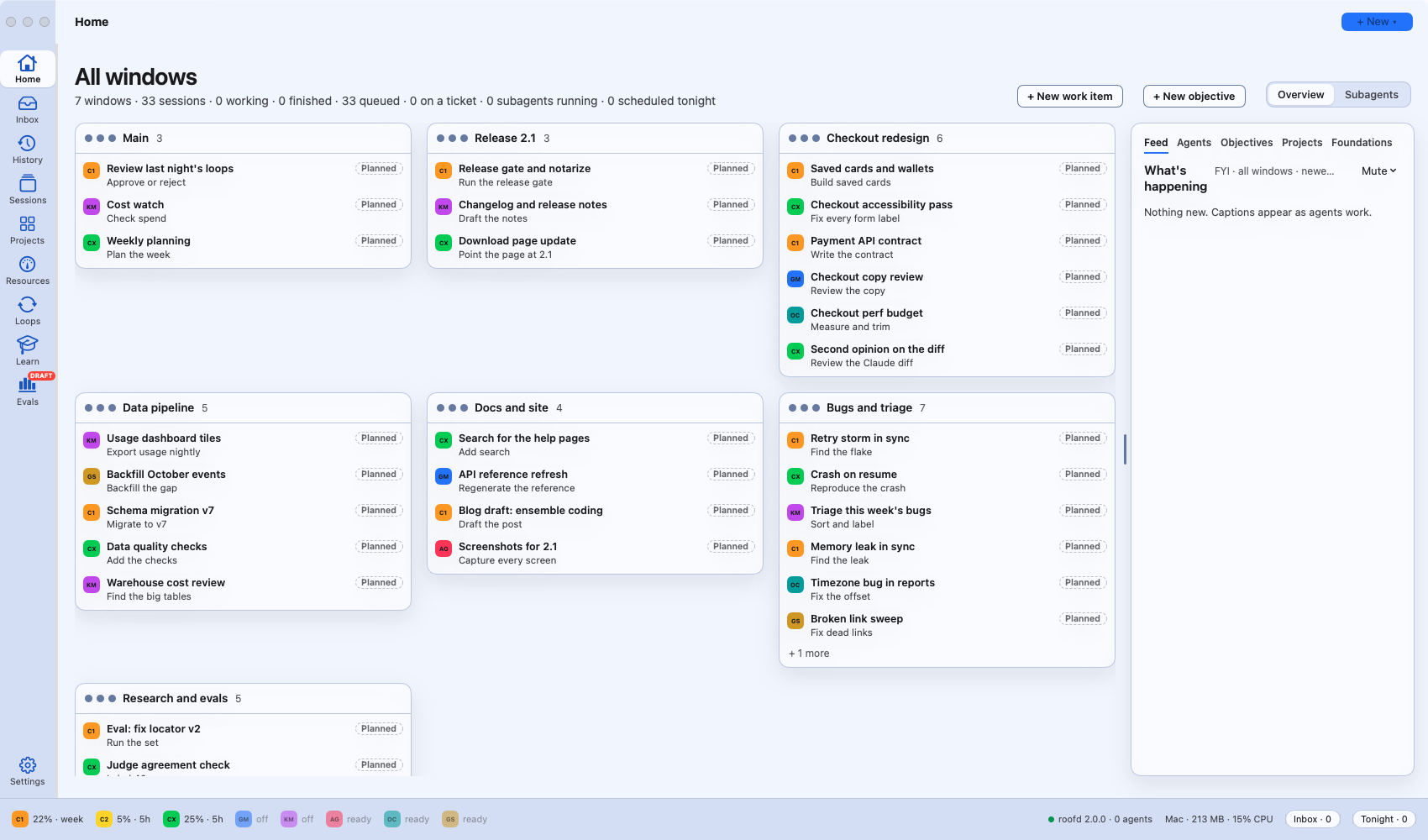
Home is a morning front page (LAB-2098). Built from your own data: what needs you, the lead finding and side
stories, what to decide now, and an overnight river of sessions, loops, releases and asks. All windows and Subagents
are one switch away, unchanged. It opens faster than the old Home (about 60 ms). -
Evals says where its data comes from (LAB-2117). Every benchmark shows its source and licence; gated Hugging Face
sets (HLE, GAIA, LiveCodeBench Pro, XSTest) stay locked until you sign in with your own account in Settings › Evals
and accept their terms. One Roof never ships a dataset or a token. Evals is still a draft. -
Evals › How to (LAB-2113): a first tab that walks through what Evals is for and how to use each part.
-
AI voices are labelled (LAB-2116). Every narrated player says "Narration: AI-generated voice (OpenAI
text-to-speech)". -
Papers (LAB-2059): the timeline from the Learn hub now keeps an even month axis with a sticky ruler, zooms and
scrolls, and has a Full view.
One Roof 2.0
One window for every coding agent you run, and for keeping up with them.
One Roof is a free, open-source Mac app for people who run several coding agents at once: Claude Code, Codex, Gemini CLI, Kimi, Antigravity, OpenCode and Goose. Each agent runs in its own real terminal, and One Roof gives you one place to see them all, answer what they ask, keep their context, watch your Mac, run work overnight, and learn in the minutes in between.
2.0 is the biggest release so far: every screen was reviewed and redesigned around what you actually do all day.
⬇ Download the latest One Roof for Mac (2.0.1, with the fixes below) · Website · Why I built it
What's new in 2.0
Inbox: everything that needs you, in one place
(was "Needs you")
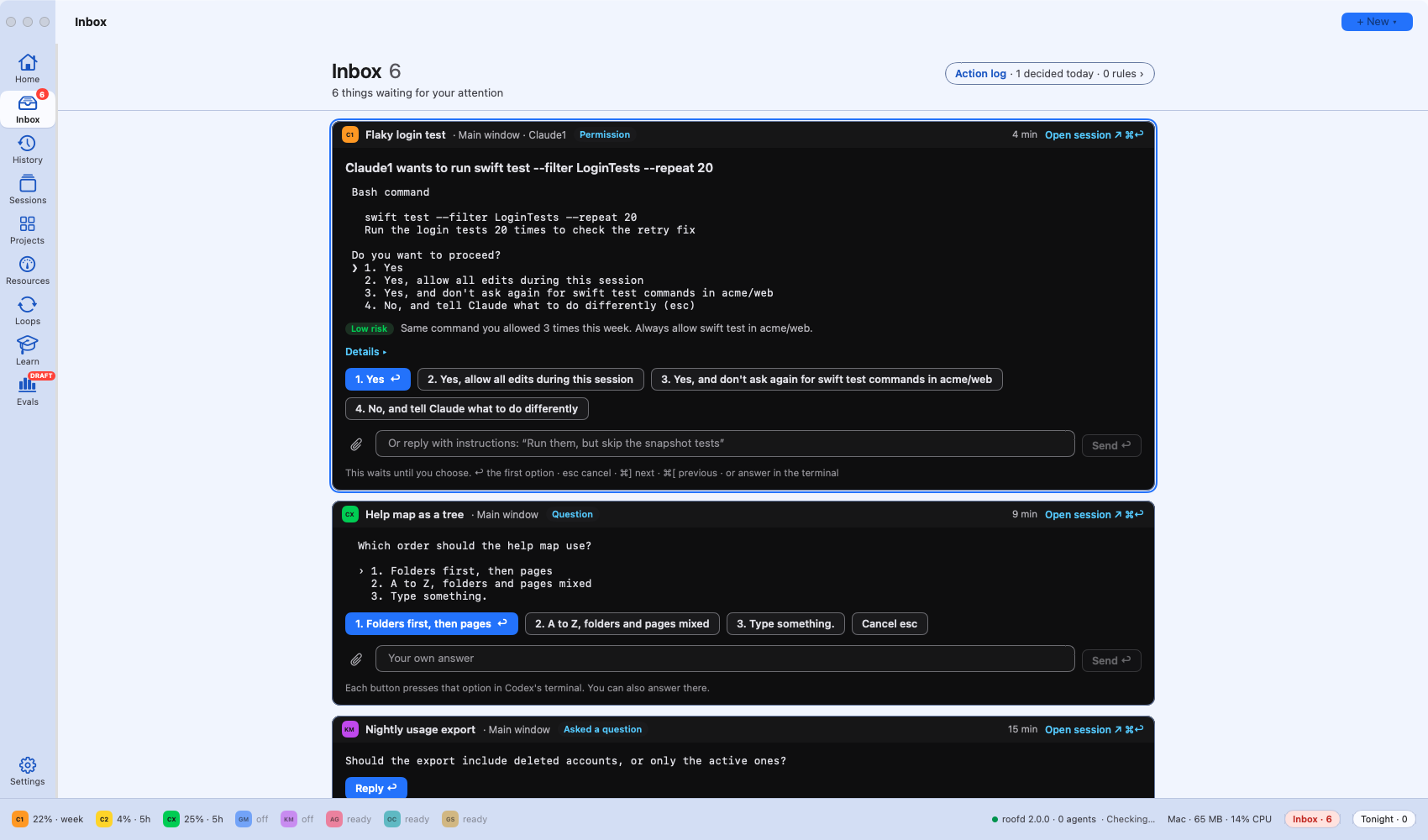
When an agent stops to ask permission, offers a menu or ends its turn with a question, it lands in the Inbox: one block per session, newest first. Press a number to pick an option, type a reply, or drop in an image, all without leaving what you were doing. Sessions with nothing for you stay out of the way ("5 other sessions working").
History: what happened while you were away
(was "Scroll")
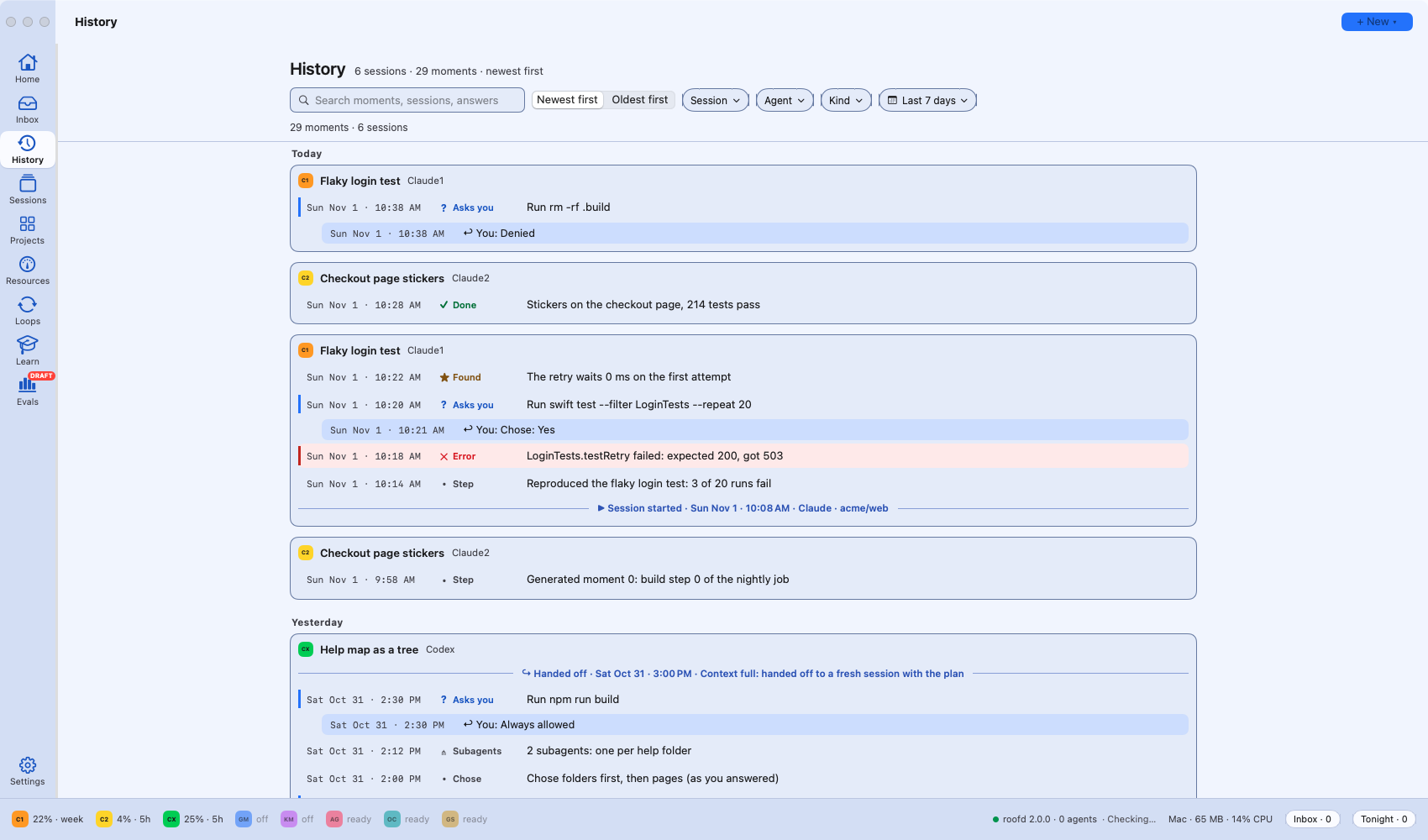
A read-only record of every session's important moments, newest first, under day headings: what each agent asked and what you answered, errors in red, handoffs and finished turns. Search it and filter by session, agent, kind and date. It keeps 30 days (up from 7).
Projects: your tracker, by status
(was "Work")
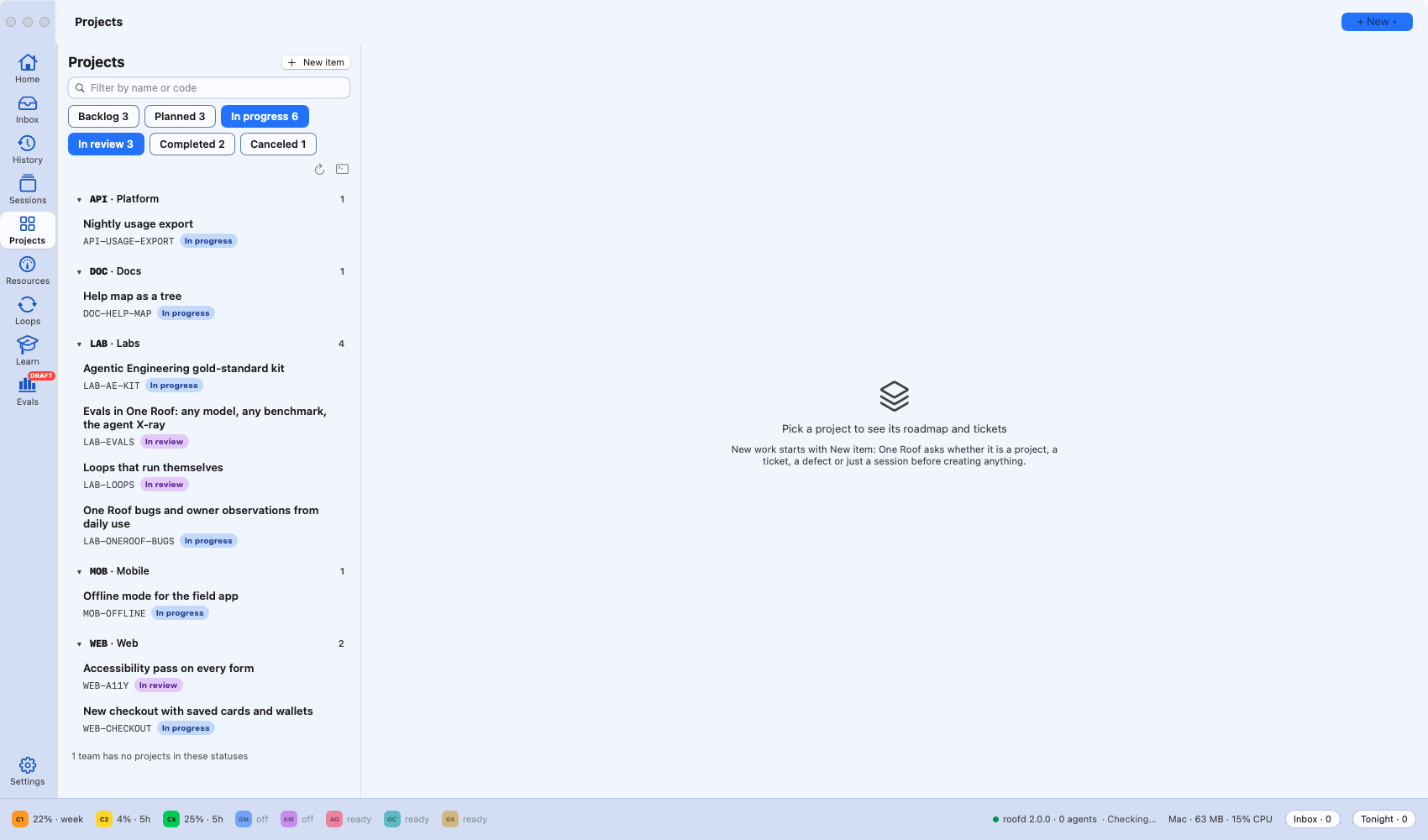
Your Linear teams and their projects (connect a Linear API key in Settings), filtered by status (Backlog, Planned, In progress, In review, Completed, Canceled). A project's page shows its roadmap and tickets, and any ticket can start a session.
Resources: what is using your Mac
(was "Machine")
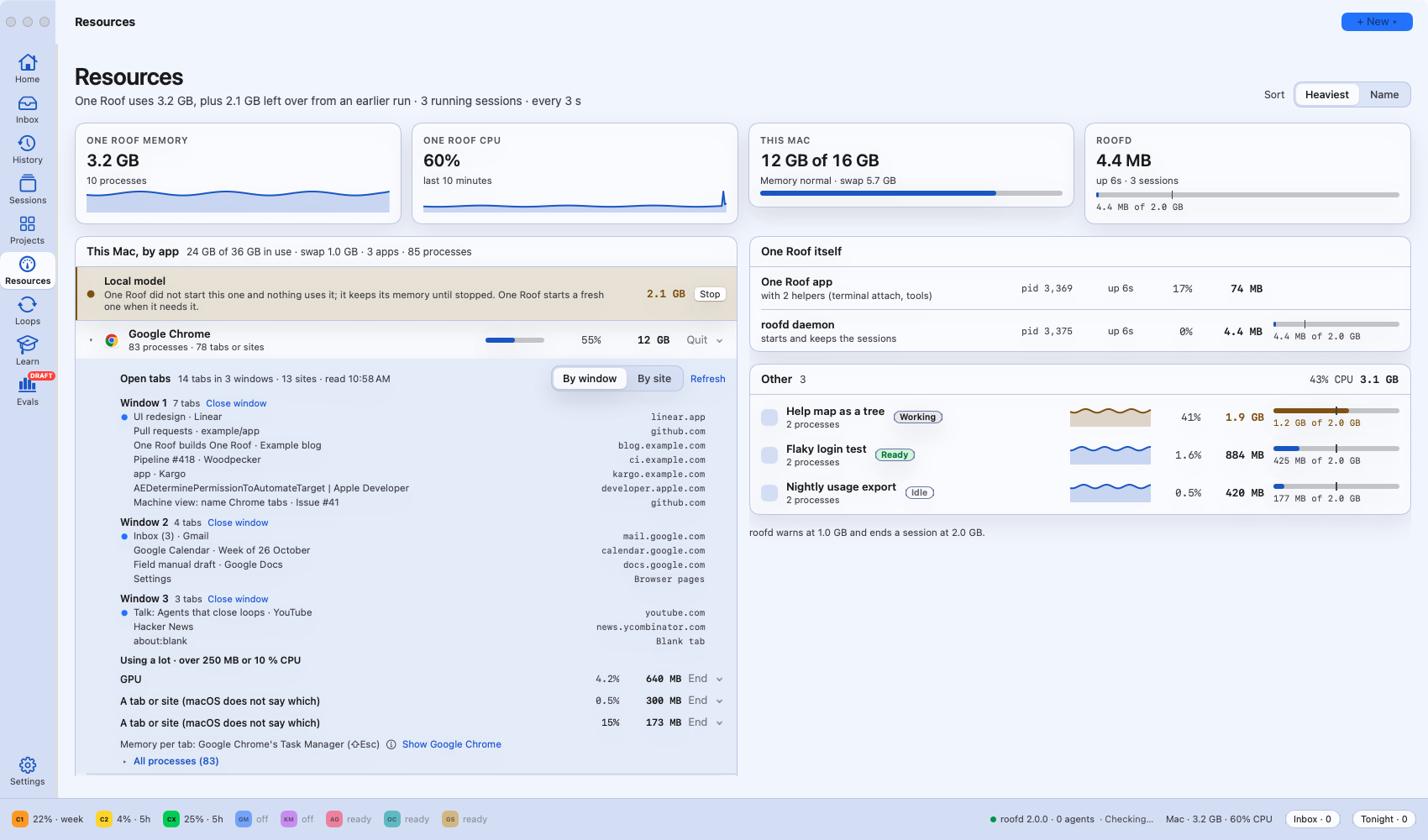
See what One Roof, each session and every other app use, with memory pressure and CPU over time. New: open Chrome or Safari to see their windows and tabs, find the heavy ones, and close a tab or a whole window from here.
Loops: work that runs by itself, grouped by kind
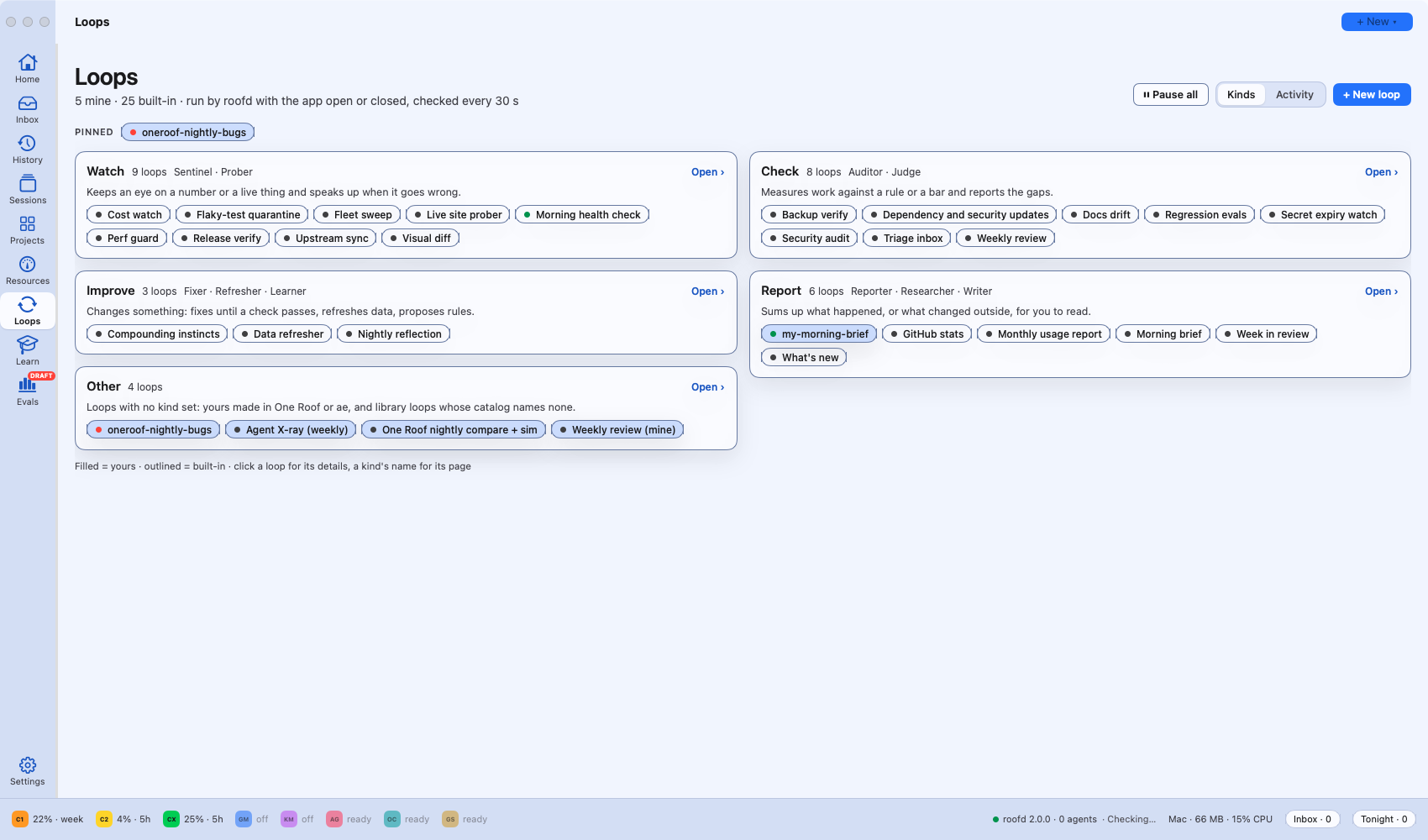
Loops now open on four kinds (Watch, Check, Report, Improve), with every loop one click away and its details in a card. A stopped loop says plainly "Off".
Learn: papers and a place to start
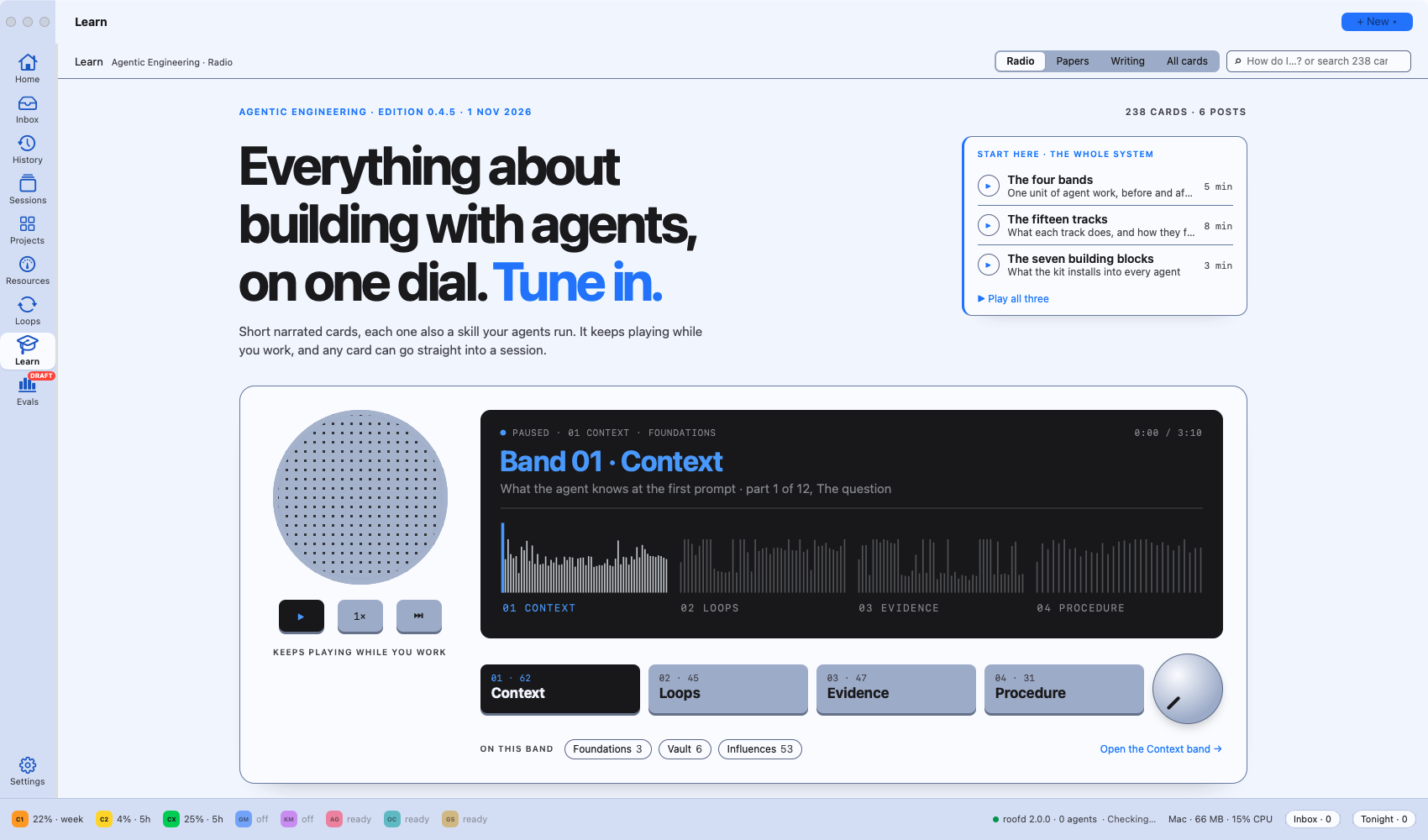
Learn gets a Papers tab: 50 papers that shaped AI agents, on a timeline, every one narrated. Start here opens with the four bands, fifteen tracks and seven building blocks, a few minutes each.
Easier to read, everywhere
One contrast pass across every look (Daylight, Graphite, Midnight and the pastels): small grey text and thin edges are now clearly readable. The seat list shows each agent's usage in words and a visible bar. The button at the foot of the rail is now Settings (the one-click looks moved to Settings › Appearance).
A preview: Evals (draft)
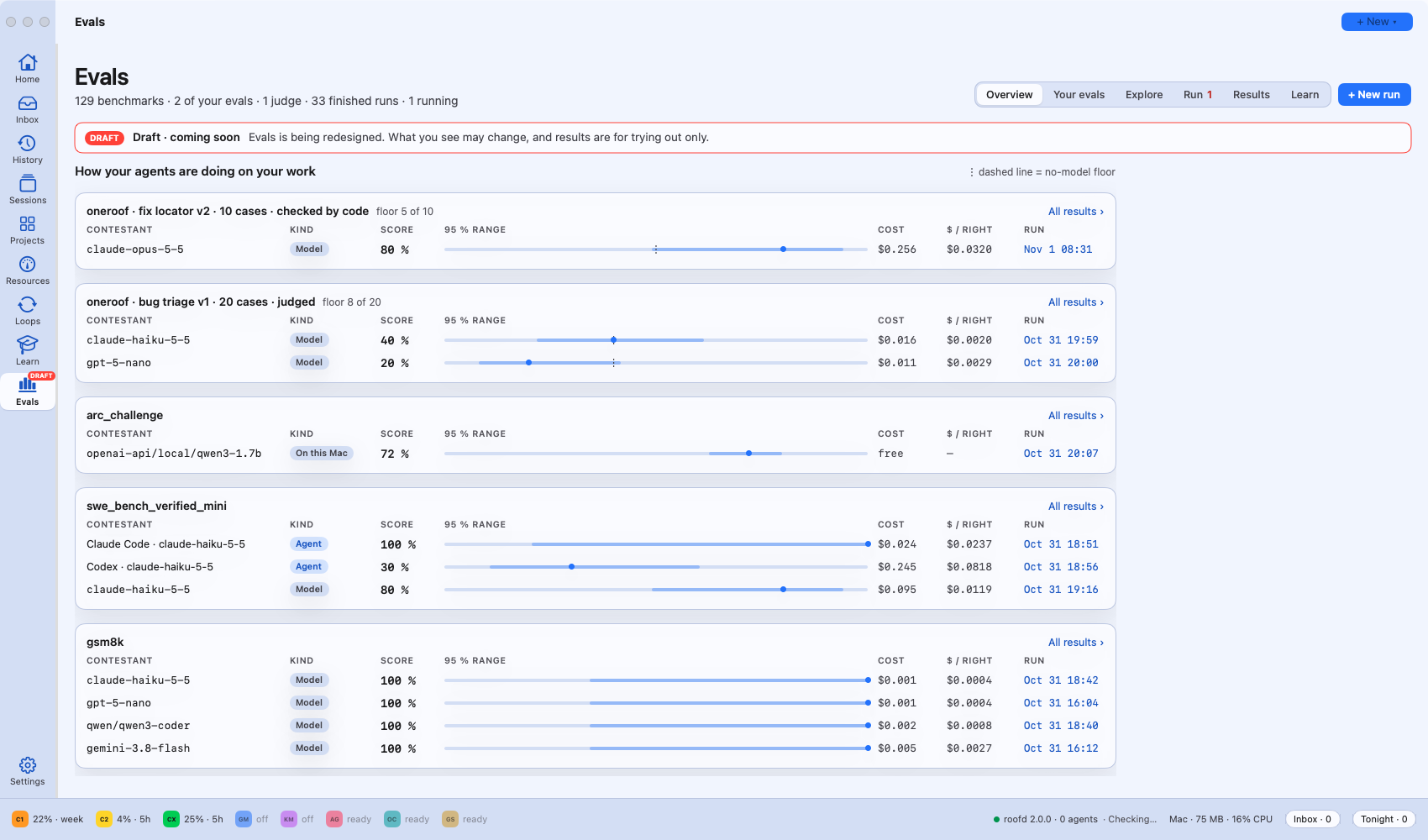
Evals is marked Draft · coming soon. It is being redesigned and results are for trying out only. It lets you test models and coding agents on public benchmarks and, more usefully, on questions built from your own repository's fixed bugs, with every score shown with its range so you can tell a real difference from noise.
Renamed places
Your shortcuts carry over.
| Before | Now |
|---|---|
| Needs you | Inbox |
| Scroll | History |
| Work | Projects |
| Machine | Resources |
| Look (rail button) | Settings |
Also new since 1.9.33
If you are coming from an earlier version, these arrived in 1.9.34 to 1.9.37:
- Every new session knows what the others are doing. Before it starts, an agent gets a short brief: the other sessions and what they are on, releases in progress, today's work. Works for Claude, Codex, Kimi, Antigravity, OpenCode and Goose.
- More accounts per agent. Add a second Claude, Codex, Gemini or Kimi account in Settings › Seats & accounts; each keeps its own sign-in.
- Full permission mode next to Manual, Plan and Auto, using each agent's own flags.
- Open-weight models for OpenCode and Goose: 14 models checked with both agents, with prices, through Fireworks, OpenRouter or Together.
- Loops get a home, with outcomes to approve in the morning and loops you can describe in plain words.
Install or update
You need: a Mac with Apple silicon, macOS 14 or later, git, and at least one coding agent installed and signed in (claude, codex, kimi, gemini or agy).
- Download the latest One-Roof zip above (2.0.1 today), unzip it, and move One Roof.app to Applications (replace the old one if you are updating).
- Open it. It is signed and notarized by Apple, so it opens like any other app.
- Updating? Your running agents keep working while you swap the app: their sessions live outside it and reconnect when One Roof opens again.
Free and open source under the MIT licence.
Fixed in 2.0.1
- History scrolls smoothly: a fast scroll deep into History no longer freezes, and History opens in about 80 ms.
- Every screen has a speed budget, checked before each release on a large real profile.
- The Inbox shows only what is current, with a Decided tab for what you answered.
See the 2.0.1 release notes for the full list.
Full technical changelog for 2.0.0
-
Evals is a draft, coming soon (LAB-2072). The Evals place carries a Draft tag on the rail, "Evals · Draft" in the
menu and palette, and a "Draft · coming soon" banner on every tab and the run sheet: it is being redesigned, what you
see may change, and results are for trying out only. Shortcuts set on Evals carry over. -
Readable everywhere (LAB-2071). One contrast pass on the shared colours of every theme (Daylight, Graphite,
Midnight and the pastels): small grey text now reads at 4.5:1 or more, card and control edges at 3:1, and hairlines
you can see. Each page below then fixed what was left. -
Places say what they hold (LAB-2039, LAB-2040, LAB-2049). Machine is now Resources, Work is now Projects,
and the button at the foot of the rail is Settings with a gear (it was Look; the one-click looks are in
Settings › Appearance). Shortcuts set under the old names keep working. -
Seats you can read (LAB-2041). The seat list on the rail shows each agent's mark as large as the place icons, its
use in words and a bar you can see, with a tooltip each. -
Learn: Papers and Start here (LAB-2057, LAB-2058, LAB-2059). Learn gets a Papers tab: 50 papers that shaped
agents, on a timeline that grows from Foundations, every one narrated. The four bands, fifteen tracks and seven
building blocks open the Learn home as Start here; the Radio plays the four bands only. -
Needs you is now the Inbox (LAB-2042, LAB-2043). One column of dark, terminal-style blocks, one per session that
needs you, newest at the top, each answered in place: every option the prompt shows (1–9 and Return press them), a
multi-line reply with pasted, dropped or attached images (the agent gets their paths), Set aside and Close session for
a finished turn, plans and loop items in their own blocks, Decided at the foot, Open session ↗ (⌘↩). Sessions with
nothing for you are hidden and counted ("5 other sessions working"). The name is Inbox in the rail (a tray icon that
fills when something waits), the View menu (⌘I, ⌃⌘2), the dock pill, the menu bar and help; shortcuts you set under
Needs You or Decisions carry over. A session's state is still called Needs you. -
Scroll is now History (LAB-2044, LAB-2045, LAB-2046). Its own place right under the Inbox on the rail (⌃⌘9, View ›
History; the other places keep ⌃⌘1–8): the read-only record of every session's important moments, newest first, with
no Reply, Open or answer buttons (an open ask says "Waiting in the Inbox"). Every line has its date and time under day
headings; each kind has its own colour, glyph and word (errors red and tinted, asks with a blue bar, your answers as
their own indented rows, handovers as dividers), each session's run of moments is its own card, all at 4.5:1 in
Daylight, Graphite and Midnight. Search, sort and filters by session, agent, kind and date range, with chips; new
handover kinds (session started and closed, handoff written, release started and finished); closed and deleted
sessions keep their moments and names; kept 30 days (was 7); a "N new ↑" pill. Single · Grid · Wall arrange
terminals only; a window saved with Scroll opens as Single, and a shortcut set on Scroll moves to History. -
The Action log (LAB-2047, LAB-2048). Pinned in the Inbox header ("Action log · 555 decided today · 74 rules ›",
View › Action Log, Search). Two tabs instead of two side-by-side cards: Decisions, one list newest first with date
and time, session, ask and answer, search and date range, session and answer filters, and a click opens the whole ask
with the options it showed and the one you chose (stored from 2.0.0 on; decisions are kept for good); Rules, where
the only remove lives, worded "Stop noting t...
One Roof 1.9.37 — Your own evals: questions from your repo's real bugs, a model as judge with its agreement measured, a second framework beside Inspect
- Your evals (LAB-1995).
roof eval evalset build --repo <repo>turns a repo's own fix history into a versioned
question set: each question is a real bug report (the Linear issue) and the source files as they were before the fix,
and the model names the files to change, checked by code against the real fix. Listed first in the catalog, priced
and run at its own size, with a no-model floor beside it (guessing the most-fixed files). From One Roof's own
history: 20 bugs; Haiku 5.5 finds the right file for 80 % of them, the floor is 40 %. - A model as judge, with its agreement measured (LAB-1996). For answers code can't check,
roof eval judge
builds a judge from your rubric and checks it against labels it never saw, from three sources kept apart: yours
(label in the terminal), code (a fact it can check, e.g. the note points at a file the fix changed) and a stronger
model applying the rubric (shown as that model's labels, never as yours). Results show the agreement next to every
judged score: overall, on good answers and on bad ones. Pairwise judging asks both orders; a judge grading its own
answers, or the model that made the labels, is flagged. First judge, GPT-5 mini on 40 triage notes about One Roof
bugs: agrees 70 % with Sonnet's labels but fails only half of the bad notes, so it is not trusted yet. - Two frameworks, one benchmark (LAB-1997).
roof eval lmevalruns EleutherAI's lm-evaluation-harness (MIT) on
the same local model, recorded as a normal run beside Inspect's. On ARC-Challenge with Qwen3-1.7B on this Mac the
same 100 questions score 72 % in Inspect and 64 % in lm-eval; Learn › Two frameworks, one benchmark explains why. - A run never depends on the folder it was started from (LAB-1993). A coding-agent run started from a release
worktree that was removed mid-run finished every question but was marked failed; runs now work in their own folder,
and a complete, scored log counts as done even if closing fails.
One Roof 1.9.36 — Evals: run any model on any benchmark, read every score with its range; coding agents on SWE-bench; the agent X-ray
- Evals place (⌃⌘8, LAB-EVALS). One Roof installs the eval engine (Inspect AI, MIT) into its own folder with one
button, then lists every benchmark it knows (129) with a "Start here" shelf of 24 that each teach something: what a
benchmark measures, its size, what it needs (Docker, internet, a Hugging Face sign-in) and what 50 questions cost on
a few models. - Run sheet with the cost before you start. Pick tasks and models, questions, attempts and temperature; each run
shows its estimate (the model, the benchmark's grader model, and cloud sandbox time) and cannot start over its cap.
Runs queue in the background and keep going when One Roof closes; cancel keeps what finished, resume picks up. - Results you can trust. A model × benchmark grid where every score carries its 95 % range (dashed when there are
fewer than 30 questions), "Compare two runs" that says when a difference is only noise, every question with the
answer, the expected answer and the full transcript, cost per correct answer, and CSV/JSON export. - Learn evals. A free guided first run and plain explanations of accuracy, ranges, pass@k, contamination, a model
as the grader, the harness and chance level, beside the numbers they explain. Help: Evals. - Where code runs. Benchmarks that execute code run on this Mac's Docker, or in a cloud sandbox (Daytona or Modal)
with nothing installed here. - Coding agents as the subject. Claude Code, Codex, Gemini CLI, Kimi, OpenCode or Antigravity can be the agent
under test on SWE-bench and other agent benchmarks, so "Claude Code on Haiku" and "Haiku alone" are separate,
comparable runs. First result: Claude Code on Haiku 5.5 solved a SWE-bench Verified task for $0.024. - Agent X-ray (
roof eval xray). How much of each agent's code survives (churn, reverts, fix-ups), how often it
needed you (asks per session, wait for your answer), and what its work would cost on the API. Every agent session
now carries ONEROOF_AGENT, so a commit hook can sign each agent's commits. - Keys stay yours: One Roof stores only the path of a key file you chose, never the key, and hides key fragments in
errors.
One Roof 1.9.35 — Every session knows what the others are doing; Learn grows (new people, deep dives, papers); more accounts per agent
- Cross-session memory (LAB-1971). When you start a session while other work is running, the agent gets a short
brief before it does anything: the other sessions and what they are on, releases or deploys in progress, today's
commits and worktrees, the issues in flight and your milestone messages. It works across agents: Claude, Codex,
Kimi and Antigravity get it from the kit's session-start hook, and OpenCode and Goose now get it in their opening
message. Facts only, about a second, and silent when nothing else is running. - Learn: the shared page does everything the old screens did (LAB-1893), then the old screens go (LAB-1894). The
Radio follows One Roof's player, Listen follows the scene that is playing, Transcript has Play from here, posts open
in an in-app reader with your Learn folders, By folder shows the real folders with previews and Open in Terminal,
and search uses One Roof's ranking. - Learn: new people, deep dives and papers. Twelve new narrated people in two themes, Pioneers of deep learning
and The road to the language model (LAB-1966). An optional Deep dive on a person's card opens a narrated
walk-through with worked examples, starting with Jason Liu (LAB-1967). A new Papers track, starting with ReAct
and Lost in the Middle, each traced to the paper's own tables and figures (LAB-1964). - Add as many accounts per agent as you need (LAB-1999). Settings › Seats & accounts: + Add account for Claude,
Codex, Gemini and Kimi (Codex 2, Gemini 3 …), each with its own folder and a one-time sign-in command; rename or
remove (the folder is kept). Antigravity, OpenCode and Goose stay on one account: their CLIs cannot keep a second
sign-in apart. - The bottom bar follows what is set up (LAB-1998). Every agent and account you use shows there (Antigravity,
OpenCode, Goose and added accounts too), and Settings › Seats & accounts › Bottom bar switches each one off. - Clearer icons (LAB-2002): the rail and the toolbar's place icons are bigger and in the accent colour; labels and
widths are unchanged. - Toolbar on one colour (LAB-1938), Gallery opens at its top, loop views and Scroll checked in every theme
(LAB-1939, LAB-1951). - Loop notifications only when they matter (LAB-1940): a loop round notifies you when it needs you or a command
fails, never for a finished turn. - Release tests never touch your loops (LAB-2001): test copies use a scratch folder, and the release gate fails if
a run changed your loop definitions.
One Roof 1.9.34 — Loops & all: loops leave the session list and get a home; Full permission mode; verified open-source models; Scroll
- Loops get their own home (LAB-LOOPS). Loop runs no longer show in the session list, its counts, search or Needs
you: "session" now means one you started (LAB-1933). The Loops page shows runs, every outcome a loop produced, and a
per-loop drill-down where you approve or reject each one (LAB-1918, LAB-1941). Needs you gains Loops · Today:
what the loops staged overnight, with Approve → open PR, Apply, Open or Dismiss right there (LAB-1919), and a loop
that stopped shows as a loop item, never a session (LAB-1866). A real loop editor with tall, resizable fields
and help per field (LAB-1920); describe a loop in plain words and an agent drafts it, with a preview of the first
run, examples by kind, and Session › Make This a Loop… (LAB-1921); a Gallery of loop kinds with real samples
(LAB-1922). Your own*.loop.yamlloops now show (LAB-1843). New triggers: when quiet and on an event
(LAB-1369, LAB-1865). Approving loop work gates it (its check + a judge) before a PR is opened (LAB-1867). Each
loop's definition and run state are now separate files, so definitions can live in git (LAB-1942). roofd writes
every run to the outcome ledger and sends one Slack alert when a loop stops (LAB-1848, LAB-1917). - Full permission mode (LAB-1935). Settings › Permissions adds Full (never asks) next to Manual, Plan and
Auto, using each CLI's own no-prompt flag. Antigravity starts in Full. Each mode's flags are editable, with
Reset. Help: what each agent's Auto still asks. - Settings fields look editable (LAB-1934). Model and Extra arguments under Seats & accounts were editable but
drawn as plain grey text; they are real fields now. - Verified open-source coding models for OpenCode and Goose (LAB-1929, LAB-1930). Fireworks and OpenRouter join
Together. The New session picker lists 14 open-weight coding models, each checked with both agents (reply, a real
tool call, memory), with its price. - Hosted sessions can start at ~/Projects (LAB-1931), like every other agent; private folders inside it stay
protected from reads and edits. - The title never sits under the toolbar (LAB-1932). The window title keeps its own space, shortens or hides
instead of overlapping, and a check covers every view, rail state and width. The Needs you list column can be
dragged wider or narrower. - Scroll (LAB-1831). Needs you keeps a Decided history, and a Scroll layout (beside Single · Grid · Wall) shows
every session's important moments in one feed, where you can answer and reply. - Download page counts visits. The download page sends a cookie-less count of visits and download
clicks to our own counter. No cookies, nothing personal stored, never slows a download. - Faster releases (LAB-1903): one build, tested and signed as-is, judged against the previous release side by side.
One Roof 1.9.33 — Needs you shows every option; nothing covers the terminal; finished turns wait for you; OpenCode and Goose ready to use
- Nothing covers the terminal any more (LAB-1907). The approval card that sat over an agent's prompt hid the
agent's own options. Every agent shows its choices on screen and takes a click or a key there, so the card is gone
from the terminal (hidden, not deleted: it can come back if it is wanted). A quiet "Needs you" line stays in the
pane's header. - Needs you shows every option the prompt shows (LAB-1839). Not only Allow once / Always allow / Deny: one button
per option, in the prompt's order and words (Antigravity's four, Kimi's four, Codex's three, Goose's four), each
pressing that option's own key. An option that takes your words ("No, and tell Claude what to do differently")
sends what is in the reply box. "Always" options are still remembered as rules. - A question offers its own answers (LAB-1607). Claude's question menus show as the agent drew them, with their
own choices and "Your own answer", no risk badge and no Allow / Deny. Esc cancels, for every agent. - Gemini's sign-in menu, in plain words (LAB-1825). It is read as a menu (Sign in with Google · Use Gemini API
Key · Vertex AI), and when the screen says Google no longer supports the sign-in, Needs you says so and points to
an API key or Antigravity, instead of a High-risk Allow once that brought the same menu back. - A finished turn waits in Needs you (LAB-1827). When an agent finishes and it is your turn, Needs you shows what
it said last, a box for your next message, Set aside (leaves the list, keeps the session) and Close
session. It leaves when you reply here or in the terminal. Works for Goose and OpenCode too, read off their
screens. - OpenCode and Goose, set up and checked end to end (LAB-1803). Both replied and kept their context on a real
Together GLM-5.3-Flash session in this release; their prompts show in Needs you with all their options; Goose's
Deny and OpenCode's Reject work from there. The kit's OpenCode learn and Goose corpus checks pass (LAB-1790,
LAB-1792). - The menu bar's Needs you list shows Allow only for permission prompts; a finished turn or a menu opens instead.
One Roof 1.9.32 — hosted coding with OpenCode and Goose; the rail stretches
- Hosted coding: OpenCode and Goose (LAB-1799, LAB-1803). Two new agents that run here while the model runs at a
provider you choose (no local model or GPU). Settings › Hosted coding saves a connection: the exact model ID, a
credential file (never the key itself), prices and spending ceilings per session and per connection. Their own
permission prompts stay manual and show in Needs you; scheduled runs stay inside the ceilings. - The rail stretches (LAB-1829). Drag its edge right to make Home · Needs you · Sessions… wider (up to 132 pt,
room for longer labels), back left to its narrowest, or further to fold it away. Each window keeps its width.
(1.9.31's rail took a left drag but not a right one.)
One Roof 1.9.31 — Gemini needs an API key; Focus only where it applies; the rail drags; one list of loops; loop checks; shared Learn
- Picking Gemini says it needs an API key (LAB-1826). Google no longer lets Gemini CLI sign in with a personal
Google account, so "Sign in with Google" fails and asks again. The New session panel now says so when you pick
Gemini (set GEMINI_API_KEY, or use Antigravity, one click away), and Gemini's card says "API key only". - Focus and Single · Grid · Wall show only in Sessions (LAB-1828). Elsewhere (Learn, Home, Needs you…) they changed
nothing but the dock, so the toolbar no longer shows them there. - The rail drags closed and back open (LAB-1829). Drag its edge left to fold Home · Needs you · Sessions… away
(the places then sit in the toolbar), and drag from the window's left edge to bring it back; View › Rail does the
same. The window remembers it. The Sessions column still drags closed and open on its own. - One list of loops: Built-in and Mine (LAB-1663). The Loops page shows the loops that come with the Agentic
Engineering kit (labelled Built-in, always off until you switch one on) next to your own (Mine). You can change a
built-in loop (your copy is kept apart; remove it to go back to the original) or copy one as your own with + New loop. - A loop's check copied out of a terminal no longer fails every night (LAB-1846). A check pasted with the
terminal's box edge or a sentence after it ("│ bash check.sh. The script passes when …") could not run, so the loop
failed and stopped. Saving now drops what the copy added, the editor says why a check can't run before you save it,
and a run with such a check stops at once with that reason. - Learn shows the shared Agentic Engineering page (LAB-1762). The same page every site shows, saved inside the app
so it works offline and updates with each release. The classic Learn screens are one toggle away.