Repository navigation
Releases
v0.3.1

Fixed
- Home no longer displays "Error: see settings" just because part of a bridge snapshot is unavailable while navigation still works.
- Settings retain the capability diagnostics and bridge connection errors. Failed commands still alert the pressed key, and a complete loss of data still shows an error.
Thanks @guygregory for reporting #9 and sharing the screenshots and logs. This patch is ready for you to test. It addresses the misleading Home status for partial capability failures, not an established cause of bridge disappearance.
Install
Download and open com.haflidif.copilot.streamDeckPlugin to update the plugin to 0.3.1.0 on Windows or macOS. The bundled 15-key profile is included. The separate copilot-companion.streamDeckProfile is available if you need to import the layout.
No bridge implementation changes are included. If installing the optional bridge from source, use tag v0.3.1 to match this plugin release.
Validation
npm run validate: passed, including type checking and all 86 tests.npm run release: passed, including Elgato validation and packaging.- Physical Stream Deck testing of this patch has not been performed.
Changes: #11
Contributors

Assets 4
v0.3.0
v0.3.0: macOS support and Squad teams
Copilot Companion now supports Windows and macOS, with Squad member detection on the Agents pages.
macOS support
- Use Copilot Companion on macOS 13 or later with Stream Deck software 6.6 or later and a supported 15-key Stream Deck.
- Browse projects and sessions, open the selected session in Copilot, and see live values through Companion device integration.
- Install the updated optional session bridge for the Agents page, Squad detection and bridge-backed controls.
- Hold to talk dictates into the session open in the app. Working, Needs you and Finished indicators include the green flash and confetti.
- Fix live session values being unavailable when no bridge is running. This fix also applies on Windows.
Squad teams
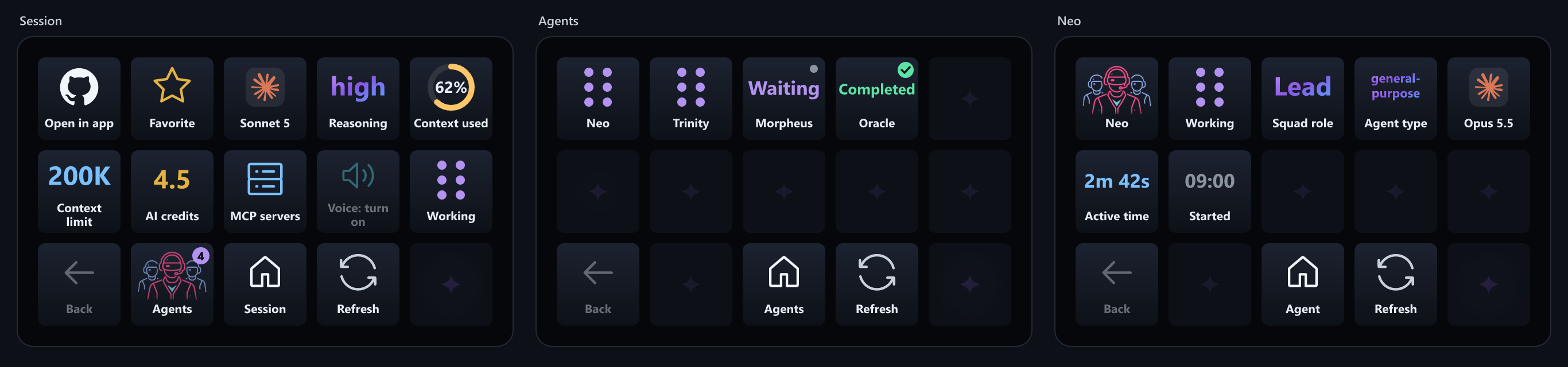
- The Agents key shows the Squad logo when the session's working folder contains
.squad/team.mdor the older.ai-team/team.md. - Match task names such as
neo-implto the roster and show the member's name instead of the task name. - Open a member's page for the Squad logo, roster role, runtime status, model and active time.
- Standalone Squad CLI connections are not included.
Install or update
Download com.haflidif.copilot.streamDeckPlugin and double-click it. The separate copilot-companion.streamDeckProfile is available if you need to import the layout again; keep your existing profile if it already works.
If you use the bridge, update your existing checkout to the matching release tag:
git fetch origin --tags
git checkout v0.3.0
npm ci
npm run extension:install
Reload extensions or restart open Copilot sessions after installation. Enable Companion device integration in the app's settings. Hold to talk needs the app's voice model installed. For a first installation and macOS troubleshooting, see Install and set up.
Included changes
- Squad logo, detection, member names and roles: #6.
- macOS support, the no-bridge live-values fix and stable installation docs: #7.
Thanks
A big thank you to @janegilring for requesting macOS support and testing it on his Mac mini M4! His testing helped catch the missing live values and bridge pairing path mismatch, and he confirmed installation, opening sessions, live values, bridge discovery, hold-to-talk dictation and the status changes, including confetti. See #1 for the testing thread.
Contributors

Assets 4
v0.3.0-beta.2

Second test build of experimental macOS support. Thanks to @janegilring for the first round of testing on a Mac mini M4 in #1.
Fixed
- Live session values without the bridge. Model, Reasoning, Context used, Context limit and AI credits showed Unavailable for the session open in the app when no session bridge was running. These values come from the app's Companion device integration and now show up without the bridge. This affected Windows too, but only when no bridge was running.
Confirmed on macOS so far
- The plugin installs and the Copilot Companion profile can be selected.
- Open in app switches to the right session.
- The Copilot app on macOS writes the Companion device integration files, so projects and sessions come through.
- Live session values: Model, Reasoning, Context used, Context limit and AI credits.
- The optional session bridge and the Agents page, when the bridge is built from
feature/macos-support.
Still to test on macOS
- Hold to talk
- Working, Needs you and Finished status changes
Install
Download com.haflidif.copilot.streamDeckPlugin below and double-click it. It replaces the earlier build. See Install and set up for the macOS notes.
If you want the optional session bridge on a Mac, build it from the feature/macos-support branch, not main. The bridge on main (0.2.0) uses a different folder on macOS, so the plugin can't find it and Agents shows Unavailable.
git checkout feature/macos-support
npm ci
npm run extension:install
Then restart the open Copilot session or reload extensions.
This is a pre-release. The latest stable release is still v0.2.0.
Contributors
Assets 4
v0.3.0-beta.1
This is a test build for macOS. It is a pre-release, so it is not marked as the latest version. On Windows there is no reason to switch from v0.2.0.
What's new
macOS support (experimental). The plugin can now be installed on macOS 13 or later. (#1)
- Open in app opens the session link with
openon a Mac. - Bridge pairing files are kept in
~/Library/Application Support/CopilotStreamDeck/bridges. - The README has a new macOS section with what is known and what still needs checking.
It has not been run on a Mac yet. It is still unknown whether the Copilot app on macOS offers the Companion device integration experiment and handles ghapp:// session links.
Help test it
If you have a Mac and a Stream Deck, please try it and share how it went on #1. The test checklist is in that issue.
Install
- Download
com.haflidif.copilot.streamDeckPluginbelow and double-click it. - Accept the bundled profile when Stream Deck offers it, then select Copilot Companion.
- In the GitHub Copilot app, turn on Companion device integration (Settings, Experiments).
The optional session bridge is installed from source: check out the v0.3.0-beta.1 tag, then run npm ci and npm run extension:install.
v0.2.0
Monitor subagents from the deck
Every session page now has an Agents key next to Back. You can see your session's subagents and what they are doing without switching to the app. (#2)
- The Agents key shows how many subagents the session has. Its agent icon pulses while any of them is working.
- The Agents list shows animated Working tiles, plus separate Waiting, Completed, Failed and Cancelled states. Waiting means the agent is idle and can take another assignment.
- Press an agent to see its status, type, model name (for example GPT-5.6 Sol) and active time.
- The view is read-only. Prompts, responses and raw error messages are never sent to the deck.
The README navigation GIF, screenshots and feature list now show the Agents page. (#3, #4)
Install or update
- Download
com.haflidif.copilot.streamDeckPluginbelow and double-click it to install or update. - Agent monitoring needs the updated per-session extension bridge. Run
npm run extension:installfrom source, then reload extensions in your Copilot session. Without the bridge, the Agents key shows Unavailable. - New users can import
copilot-companion.streamDeckProfileto get the ready-made 15-key layout.
See the README for details and known limitations. Squad roster support is planned.
Unofficial project, not affiliated with GitHub, Microsoft or Elgato. The Copilot companion and task APIs are experimental and may change.
Pull requests
- #2 Add read-only subagent monitoring
- #3 Show the Agents page in the README GIF and screenshots
- #4 Mention the Agents key in the README overview
Changes: v0.1.1...v0.2.0
v0.1.1
Ready-made 15-key profile
No more dragging the dashboard action onto every key. This release bundles a Copilot Companion profile for the original Stream Deck and MK.2, with all 15 keys configured.
- Stream Deck offers the bundled profile during plugin installation. Accept it, then select Copilot Companion in the profile dropdown.
- Your existing profiles are preserved, and installation does not automatically switch away from your current layout.
- The profile stays editable and contains no personal connection settings, device IDs or application paths.
- Existing users can download and double-click
copilot-companion.streamDeckProfileseparately. If your current Copilot layout already works, keep using it.
Also changed
- The README now opens with a navigation GIF showing Sleeping, Working, Psst!, project browsing, session details and finish confetti.
- Added optional Smart Profiles setup instructions so Stream Deck can switch to the Copilot layout when GitHub Copilot is in the foreground. Choose the app once in Preferences > Profiles > Application, then close or minimize the Stream Deck configuration windows.
- Screenshot and GIF generation now share demo data and use a local SVG renderer, without requiring headless Edge.
Install or update
- Download
com.haflidif.copilot.streamDeckPluginbelow and double-click it to install or update. - Accept the bundled profile if you want the ready-made layout, or keep your existing profile.
- In GitHub Copilot, enable the experimental Companion device integration setting.
The optional per-session extension bridge is still installed from source. See the README for setup and known limitations.
Unofficial project, not affiliated with GitHub, Microsoft or Elgato. The Copilot companion API is experimental and may change.
Changes: v0.1.0...v0.1.1
v0.1.0
First release of the unofficial Stream Deck companion for the GitHub Copilot app.
Install
- Download
com.haflidif.copilot.streamDeckPluginbelow and double-click it. - In the Copilot app, turn on Companion device integration (experimental).
- Create a new Stream Deck profile and drag Copilot Companion > Dashboard tile (15-key) onto all 15 keys.
Works on Windows with a 15-key Stream Deck (original or MK.2) and Stream Deck 6.6 or later.
What's in it
- Home, projects, sessions, pinned, chats and MCP views with animated status tiles and project colours
- Session view with model and reasoning picker, context ring, AI credits and MCP toggles
- Answer Copilot's questions and push to talk from the deck
- Copilot on the Home key works, sleeps, says Psst! when you're needed and sweats when context is nearly full
- Confetti when a session finishes, and a sparkle wave across empty keys
Not affiliated with or endorsed by GitHub, Microsoft or Elgato. See NOTICE.md.