Repository navigation
Releases
hdslaveOS 0.8.2-hdslave.3 + MPC plug-ins

Install hdslaveOS on your MPC Sample
Download hdslaveOS and all 11 plug-ins in one ZIP
For a first install, this is the only download you need. Extract it on your computer and open START-HERE.txt. The SD-Card folder beside it contains the files to copy.
-
Prepare your MPC and card. Use firmware 1.3.0.12, 1.4.0.7, or 1.4.0.8. On firmware 1.4, open the stock MPC app’s Settings → DEV ENHANCEMENTS (BETA) and turn on Developer Mode. Back up the microSD card on your computer.
-
Copy the OS. Choose the row for your card. “Top level” means the first window you see when you open the card in Finder or File Explorer.
Your card What to copy Regular card (direct boot) Move any existing top-level autorunfolder andautorun.shfile to your computer for safekeeping. Open the extractedSD-Cardfolder. Copy both theautorunfolder and the separateautorun.shfile to the top level of the card. You should seeautorun.shas soon as you open the card.Card that already uses SampleBoot On the card, create autorun/mods/hdslaveOS 0.8.2-hdslave.3/. Open the extractedSD-Card/autorun/folder and copy its contents there. Check thatautorun.jsonsits directly inside the new version folder. Keep the card’s existing top-level launcher. -
Copy the plug-ins. If the card has no
Melodeefolder, copySD-Card/Melodeeto the top level. If it already exists, open or createMelodee/Plugins/hdslave/on the card. Copy the files inside the extractedSD-Card/Melodee/Plugins/hdslave/into that folder, replacing matching plug-in files. Your projects and samples stay in place. Check forMelodee/Plugins/hdslave/hdslave Nexus.clapon the card. -
Start hdslaveOS. Eject the card, insert it into the powered-off MPC Sample and turn it on. The stock app appears first. On firmware 1.4, choose Yes at the autorun prompt. If you use SampleBoot, turn the encoder to hdslaveOS 0.8.2-hdslave.3 and push it.
-
Try a sound. In hdslaveOS, hold PAD BANK and press a pad for an empty track. Choose Plugin, open hdslave, select Nexus and push the encoder. Press SAMPLE to open Stage and play a pad.
If the stock app stays on screen, check your firmware and the paths in step 2. If Nexus is missing, check the path in step 3. To boot the stock app again, power off, remove the card and restart.
Make your first beat with the illustrated quickstart
Separate downloads
If you only need one component, use the OS-only ZIP or the 11-plug-in ZIP. These ZIPs open directly to autorun and autorun.sh, or to Melodee, respectively. Use the same card destinations above. The .sha256 files are optional download checks, and GitHub’s source archives are for building from source.
Slink 0.6.1 for MPC Sample
Both the complete SD-card installer and the separate 11-plug-in ZIP now include Slink 0.6.1. Select hdslave Slink and open Stage → Panel for the wider chrome title and satin-chrome knobs. Existing projects use the same plug-in filename. This refresh updates the plug-in payload and its archive checksums. The OS build is still 0.8.2-hdslave.3.
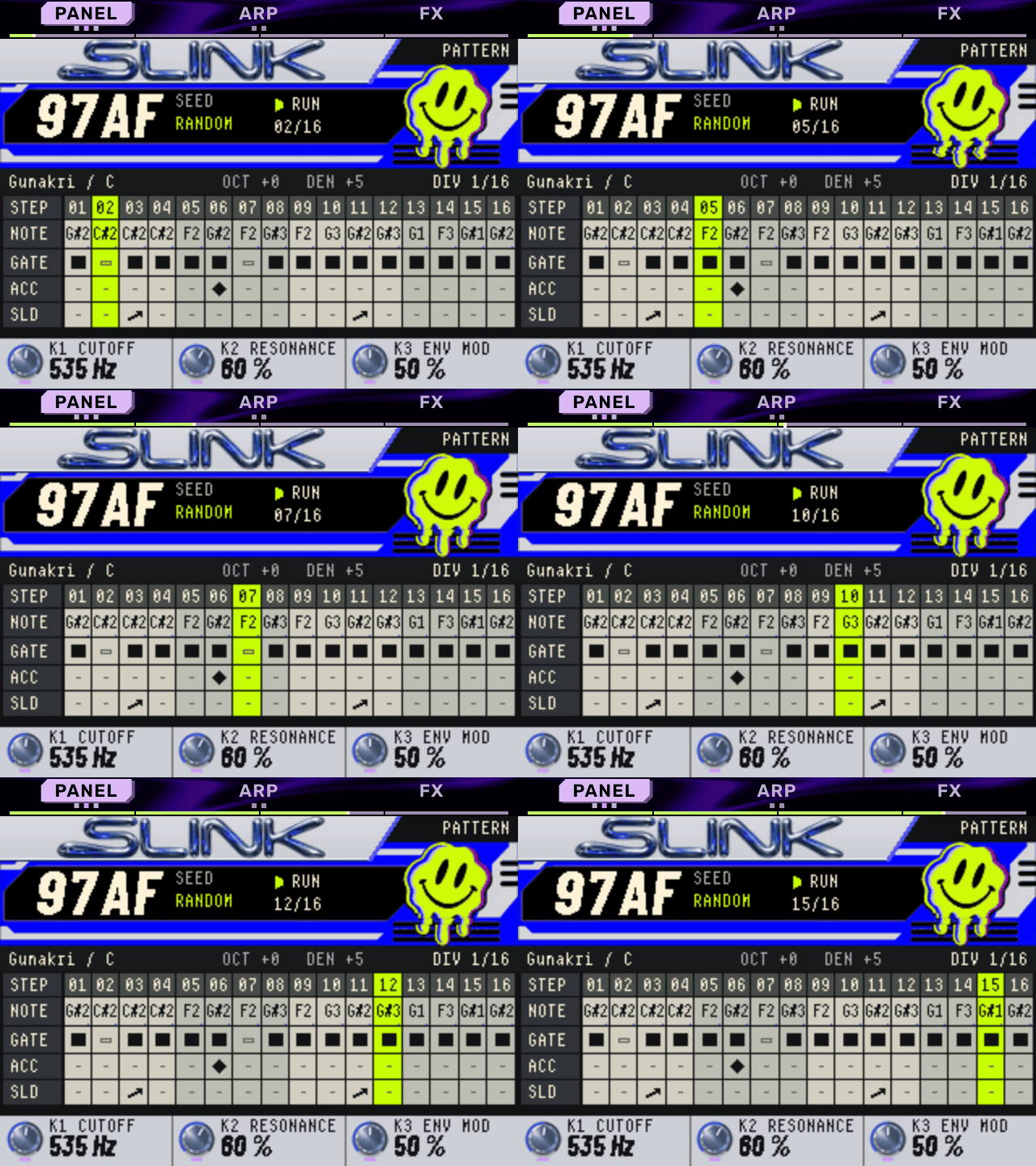
11-plug-in collection release · Slink-only download
Reverie 0.6.1
The complete installer and the 11-plug-in ZIP both include Reverie 0.6.1. New tracks start on Velvet Night, the first of 46 original progressions. For an existing track, open Stage → Chords, set Mood to Off, set Bank to Original, and turn Prog. All 18 Mood overrides retain their voicings. Both downloads include an updated plug-in manifest and SHA-256 checksum.
Changes in 0.8.2-hdslave.3
On Anvil’s STEPS panel, K1 and K2 now take over the pitch and velocity of the selected step. A small turn starts from that step’s value in Scaled mode. Knob takeover also follows edits made with the data wheel. The fix is in hdslaveOS and applies to plug-in panels that reassign a knob. To get it on an existing installation, install the OS-only ZIP or the complete installer.
The release also includes the Deep Freeze playback fix for tempo changes during unloading and the dark selection edge in Settings. The collection includes Slink 0.6.1 and Reverie 0.6.1 with its restored Original progression bank. Existing projects keep their plug-in paths.
hdslaveOS is based on Melodee 0.8.2 by Kerem Kiliç (Ellic Studio). The unsigned MPC build passed the ARM64 software tests, including Scaled, Pickup and Instant takeover. The Anvil check used the packaged host and plug-in. Physical MPC confirmation of the fix is pending.
The source tag pins sample-base and ellic-core. The plug-in archives include their licences and the source revisions and SHA-256 hashes for all eleven plug-ins in MPC-PLUGINS.tsv.
hdslaveOS 0.8.2 + MPC plug-ins for Akai MPC Sample
Install hdslaveOS on your MPC Sample
Download hdslaveOS and all 11 plug-ins in one ZIP
For a first install, this is the only download you need. Extract it on your computer and open START-HERE.txt. The SD-Card folder beside it contains the files to copy.
-
Prepare your MPC and card. Use firmware 1.3.0.12, 1.4.0.7, or 1.4.0.8. On firmware 1.4, open the stock MPC app’s Settings → DEV ENHANCEMENTS (BETA) and turn on Developer Mode. Back up the microSD card on your computer.
-
Copy the OS. Choose the row for your card. “Top level” means the first window you see when you open the card in Finder or File Explorer.
Your card What to copy Regular card (direct boot) Move any existing top-level autorunfolder andautorun.shfile to your computer for safekeeping. Open the extractedSD-Cardfolder. Copy both theautorunfolder and the separateautorun.shfile to the top level of the card. You should seeautorun.shas soon as you open the card.Card that already uses SampleBoot On the card, create autorun/mods/hdslaveOS 0.8.2-hdslave.1/. Open the extractedSD-Card/autorun/folder and copy its contents there. Check thatautorun.jsonsits directly inside the new version folder. Keep the card’s existing top-level launcher. -
Copy the plug-ins. If the card has no
Melodeefolder, copySD-Card/Melodeeto the top level. If it already exists, open or createMelodee/Plugins/hdslave/on the card. Copy the files inside the extractedSD-Card/Melodee/Plugins/hdslave/into that folder, replacing matching plug-in files. Your projects and samples stay in place. Check forMelodee/Plugins/hdslave/hdslave Nexus.clapon the card. -
Start hdslaveOS. Eject the card, insert it into the powered-off MPC Sample and turn it on. The stock app appears first. On firmware 1.4, choose Yes at the autorun prompt. If you use SampleBoot, turn the encoder to hdslaveOS 0.8.2-hdslave.1 and push it.
-
Try a sound. In hdslaveOS, hold PAD BANK and press a pad for an empty track. Choose Plugin, open hdslave, select Nexus and push the encoder. Press SAMPLE to open Stage and play a pad.
If the stock app stays on screen, check your firmware and the paths in step 2. If Nexus is missing, check the path in step 3. To boot the stock app again, power off, remove the card and restart.
Make your first beat with the illustrated quickstart
Separate downloads
If you only need one component, use the OS-only ZIP or the 11-plug-in ZIP. These ZIPs open directly to autorun and autorun.sh, or to Melodee, respectively. Use the same card destinations above. The .sha256 files are optional download checks, and GitHub’s source archives are for building from source.
Reverie 0.6.1
The complete installer and the 11-plug-in ZIP both include Reverie 0.6.1. New tracks start on Velvet Night, the first of 46 original progressions. For an existing track, open Stage → Chords, set Mood to Off, set Bank to Original, and turn Prog. All 18 Mood overrides retain their voicings. Both downloads include an updated plug-in manifest and SHA-256 checksum.
About this release
hdslaveOS tracks Melodee 0.8.2 by Kerem Kiliç (Ellic Studio). This unsigned release for the Akai MPC Sample includes the Mixer update and the matching bundle of 11 ARM64 CLAP plug-ins.
Mixer changes
- Mixer opens with the channel strips side by side, including stereo meters, faders, and mute and solo indicators.
- Hold + to open the selected channel’s card and hold − to return to the strips. The view slides between them.
- Tap + or − to move through the selected block. Mixer actions occur on release so a tap and a hold can use the same controls.
Audio runs at 44.1 kHz.
Verification
All 74 OS tests and four core tests passed in the Linux ARM64 build. The Mixer renders, stripped executable self-test, and package integrity checks passed. The self-test and DSP hashes matched the preceding hdslaveOS release. At the original OS release, all 11 rebuilt plug-ins matched their prior binary hashes and passed the screen checks. All 29 CLAPs in the staged card layout loaded and played. The plug-in ZIP records source commits and binary digests in MPC-PLUGINS.tsv. Physical MPC testing remains pending.
hdslaveOS is AGPL-3.0. The tag contains the OS source and pins its sample-base and ellic-core dependencies. Bundled component licences are included with the downloads.
Slink plug-in update
The acid synth shipped here as TB-MPC-3-P-0 is now Slink. Update it in place using the MPC Sample ZIP from Slink 0.6.0 or the MPC plug-in collection with Slink. Both preserve the device filename used by existing projects.
hdslaveOS 0.8.1 + MPC plug-ins for Akai MPC Sample
hdslaveOS tracks Melodee 0.8.1 by Kerem Kiliç (Ellic Studio). This unsigned build for the Akai MPC Sample includes the refreshed screenshots, the 0.8.1 Mixer, and the matching bundle of 11 ARM64 CLAP plug-ins.
What's included
- The Mixer has channel strips and eight submixes, with routing for individual kit pads.
- Deep Freeze keeps playback going when the tempo changes and rejoins the existing print when the original tempo returns during thaw.
- Support for firmware 1.4.0.8, alongside 1.3.0.12 and 1.4.0.7.
- All 11 MPC plug-ins were rebuilt, including Reverie 0.6.0. Open native instrument screens from Stage → PANEL. Cortex Filter supports both its full screen and FX rack strip.
- The plug-in ZIP includes each binary’s source commit and SHA-256 in
MPC-PLUGINS.tsv.
Install
Back up the card. For SampleBoot, put the contents of the OS ZIP’s autorun/ into autorun/mods/hdslaveOS 0.8.1-hdslave.4/. Copy the plug-in ZIP’s Melodee/ into the card’s existing Melodee/ folder so saved projects keep their plug-in paths. For a direct boot, copy both autorun/ and autorun.sh from the OS ZIP to the card root.
The OS ZIP installs by hand. On firmware 1.4, enable Developer Mode. Audio runs at 44.1 kHz on firmware 1.4. See the installation guide.
Verification
In the Linux ARM64 build container, 74 OS tests and four core tests passed. The base suite passed 65 tests and skipped 13 under its fixture rules. The stripped binary self-test, comparison against the preceding 0.8.1 build’s audio hashes, and package checks passed. All 29 CLAPs in the staged card layout loaded and played. The 11 bundled plug-ins passed screen checks, including the Cortex Filter full panel and FX strip. Physical MPC testing remains pending.
hdslaveOS is AGPL-3.0. The release tag contains the OS source and pins its sample-base and ellic-core dependencies. Bundled component licences are included with the downloads.
hdslaveOS 0.7.1 + MPC plug-ins for Akai MPC Sample
hdslaveOS tracks Melodee 0.7.1 by Kerem Kiliç (Ellic Studio). This build includes the HDSLAVE list selection fix, the Freeze relaunch tempo fix, and an updated MPC plug-in bundle built against Melodee’s 0.7 screen extension. Both downloads are for the Akai MPC Sample.
What's included
- HDSLAVE list selections use an even highlight while selected tiles retain their top edge.
- Deep Freeze checks the tempo at handoff and relaunch so an incompatible print does not replace playback.
- All 11 MPC plug-ins have been rebuilt together. Cortex Filter has both its full panel and an FX rack strip.
- Nexus adds velocity-to-timbre routing. MoonBass starts with Split Mode at C1–F3. TB-MPC-3-P-0 adds tempo-synced sine LFOs for pitch in Tone and filter cutoff in Voice, with Tuning just above Volume.
- The plug-in ZIP includes each binary’s source commit and SHA-256 in
MPC-PLUGINS.tsv.
Install
Back up your card and install the OS and plug-in ZIPs as a pair. For SampleBoot, put the contents of the OS ZIP’s autorun/ into autorun/mods/hdslaveOS 0.7.1-hdslave.13/. Copy the plug-in ZIP’s Melodee/ into the card’s existing Melodee/ folder so saved projects keep the same plug-in paths. For a direct boot without SampleBoot, copy both autorun/ and autorun.sh from the OS ZIP to the card root.
The OS ZIP is unsigned and installs by hand. The matching plug-ins use the Melodee 0.7 screen extension. Keep the previous pair together if you need to roll back. Firmware 1.4.0.7 requires Developer Mode and runs at 44.1 kHz. See the installation guide for supported firmware and setup.
Verification
Verified in the Linux ARM64 build container. All 70 OS tests and four core tests passed, along with the stripped binary self-test, DSP reference hashes, and package checks. All 29 CLAPs in the staged card layout loaded and played. The 11 bundled plug-ins passed screen checks, including the Cortex Filter full panel and FX strip. Physical MPC testing remains pending.
hdslaveOS is AGPL-3.0. The release tag contains the OS source and pins its sample-base and ellic-core dependencies. Bundled component licences are included with the downloads.
hdslaveOS v0.1 (MPC Sample)
hdslaveOS v0.1 (tracking Melodee v0.6.4 / v0.6.4-hdslave.5, built from 24ad071) is hdslave's fork of Melodee by Kerem Kiliç (Ellic Studio), a 16-track groovebox for the Akai MPC Sample (firmware 1.3.0.12).
Not yet tested on an MPC. Every automated check below passed, but no hardware run of this build has been done yet. Back up your SD card first.
Highlights in v0.1
- CLAP Synth & FX PANEL screens: Plug-in instruments and effects with their own
320×218custom screen (all 11 hdslave CLAP plug-ins, including hdslave Cortex Filter in the FX rack) open their interactive custom page on the MPC screen. Push the FX slot and pickPANEL. The wheel, encoder push,−/+andK1–K3control it;B1(BACK) returns to the slot. - MIDI Multi channel mode: A MIDI track's
CHANNELgoes past 16 toMulti. Pads 1–16 send Middle C on MIDI channels 1–16 for triggering multi-channel drum machines. - User synth presets across projects: On a plug-in synth track,
Shift + Sample Selectsaves the patch underPRESETS → User Presetsacross projects on the same card. - Sidechain follows drum track mute: Muting a drum track also mutes its selected pad's sidechain send to the master compressor.
- HDSLAVE theme: Starts in the
HDSLAVEpalette on a new SD card (switchable inSettings › SCREEN › Palette).
Install (unsigned, manual copy)
- Back up your SD card.
- Unzip
hdslaveOS-MPC-Sample-v0.1-unsigned.zip. It holds oneautorunfolder. Copy it to the top of the card, or into a boot menu's OS folder such as SampleBoot'sautorun/mods/hdslaveOS 0.6.4-hdslave.5/. Do not edit anything inside it. - For the 11 companion hdslave CLAP synths, drum machines, and effects, grab
hdslave-MPC-Sample-Plugins-v0.1.zipfrom hdslave-MPCSample-Synths-and-Drum-Machines v0.1 (or for desktop DAWs on macOS & Windows, see hdslave-Synths-and-drum-machines-Mac-Win).
Verified
Checked inside the Linux arm64 build container from 24ad071 (core at afa930b):
- All 57 app tests and 4 core tests passed.
- Audio self-test passed on the stripped release binary (
0249be4b45e024f1...). - 3,000 random control moves found no failures.
- All 400 screen renders and boot animation renders clean.
- End-to-end checks of
PANELwith Cortex Filter passed 35/35; MIDI Multi channel routing passed 9/9;clap_checkloaded and played all 11 staged hdslave CLAP plug-ins (0 failed). - All 53 files in the zip match
RELEASE.sha256.
SHA-256 of hdslaveOS-MPC-Sample-v0.1-unsigned.zip:
ad0a56bce5540703b8802c0389c198375b5ce52c7970f64f64908081d52b958a
Credits and licence
Melodee is the work of Kerem Kiliç (Ellic Studio). hdslaveOS is licensed under AGPL-3.0. The boot film is hdslaveOS's own (see THIRD_PARTY.md). Licences for bundled components are in autorun/melodee/licenses/.
hdslaveOS v0.6.4-hdslave.5
hdslaveOS is hdslave's fork of Melodee by Kerem Kiliç (Ellic Studio), a 16-track groovebox for the Akai MPC Sample (firmware 1.3.0.12), tracking Melodee v0.6.4. Built from commit 24ad071.
Not yet tested on an MPC. Every automated check below passed, but no hardware run has been done. Back up your card first.
New in this build
- FX slot PANEL: a plug-in effect with its own screen (such as hdslave Cortex Filter) opens that screen from the FX rack. Push the slot and pick PANEL. The wheel, encoder push, − / + and K1–K3 control it. B1 (BACK) returns to the same slot.
- MIDI Multi channel: a MIDI track's CHANNEL goes past 16 to Multi. Pads 1–16 send Middle C on MIDI channels 1–16, for triggering a drum machine.
- Save synth presets: on a plug-in synth track, Shift + Sample Select saves the patch. It appears under PRESETS → User Presets in any project on the same card. On kit tracks the shortcut still saves the sample, or the bank in the sample browser.
- Sidechain follows mute: muting a drum track also mutes its selected pad's sidechain send to the master compressor.
- HDSLAVE theme: hdslaveOS starts in HDSLAVE on a new SD card, or when an older settings file holds the previous NIGHT default. Choose NIGHT in Settings › SCREEN › Palette to keep it.
Install (unsigned, by hand only)
- Back up the card.
- Unzip. It holds one
autorunfolder. Copy it to the top of the card, or into a boot menu's OS folder such as SampleBoot'sautorun/mods/hdslaveOS 0.6.4-hdslave.5/. Don't edit anything inside it.
This package has no update signature, so Melodee's built-in updater won't take it. See autorun/melodee/README.txt in the zip for the full instructions.
Verified
The checks ran from a clean checkout of 24ad071 with the core submodule at afa930b, inside the Linux arm64 build container:
- All 57 app tests and 4 core tests passed.
- The sound self-test passed, including on the stripped release binary.
- 3,000 random control moves found no failures.
- All 400 screen renders were clean, and the boot animation renders.
- End-to-end checks of PANEL with Cortex Filter passed 35/35. Checks of MIDI Multi channel routing passed 9/9.
- All 53 files in the zip match
RELEASE.sha256.
SHA-256 of the zip: ad0a56bce5540703b8802c0389c198375b5ce52c7970f64f64908081d52b958a
Credits and licence
Melodee is the work of Kerem Kiliç (Ellic Studio). hdslaveOS is AGPL-3.0, and the source is this tag. The boot film is hdslaveOS's own (see THIRD_PARTY.md). Licences for the bundled components are in autorun/melodee/licenses/.