Repository navigation
Align feature is slow and a new Feature request #1266


|
Stefan,
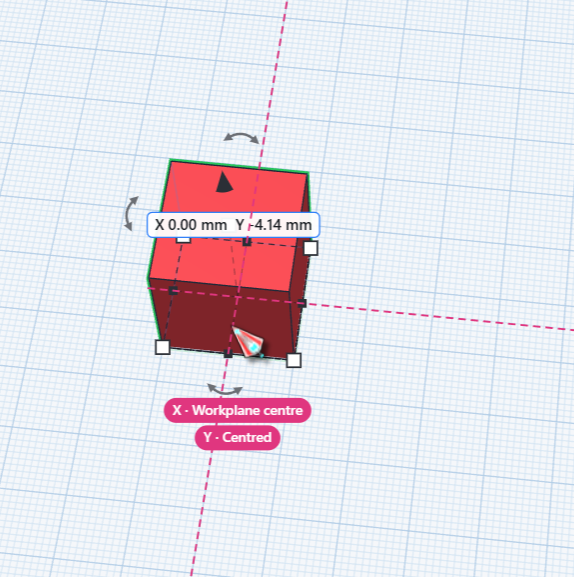
Onto the FEATURE REQUEST Is it possible to have a new shape snap to the center\center of the workplane? Also along those lines, if you are dragging a new shape, have it show the X & Y axis lines, I hate to continue to bring up Simpcad, but something like this: |
Replies: 1 comment 1 reply

|
@Cowski4444 thanks for the detailed description, it made this easy to find. To turn smoothly, a twisted box is cut into many thin bands (about 40,000 points for 180°), and when the align tool opened it worked all of that out again about twenty times instead of once per part. Now it does it once, so the tool comes up right away with twisted parts too. And yes: when you drag a shape, it now also snaps to the centre of the workplane, and the pink guide lines show when it sits there on X and on Y. Hold Alt to drag without snapping. Both come with the next update. |

|
@Cowski4444 both are out now in layerling 1.138.0. |


@Cowski4444 thanks for the detailed description, it made this easy to find. To turn smoothly, a twisted box is cut into many thin bands (about 40,000 points for 180°), and when the align tool opened it worked all of that out again about twenty times instead of once per part. Now it does it once, so the tool comes up right away with twisted parts too.
And yes: when you drag a shape, it now also snaps to the centre of the workplane, and the pink guide lines show when it sits there on X and on Y. Hold Alt to drag without snapping. Both come with the next update.