Repository navigation

Replies: 1 comment 6 replies

|
@Gpic2030 good idea, that makes the small parts much easier to read. With the next update there's a new switch in the workspace settings, Dimension boxes in axis colours: when it's on, each box gets a light background in the colour of its arrow, red for X, green for Y and blue for Z. It's off by default, so nothing changes unless you want it. And if layerling is useful to you, you can support the project here. Thank you! |

|
Thanks for the notice. I updated and tried the changes. Very visual and the colors works. Easy to locate the correct dimension boxes on the fly. Great work and it is appreciated. I did see one thing that generated a question for me and it was the Z Endpoint box is inside the volume of the part. Is there a way to shift it outside the base volume like the other dimensions boxes. I am a longtime user and volunteer instructor for 3D modeling for younger beginners using Tinkercad. It is good but Layerling is really a next level for Boys and Girls Club. |

|
@Gpic2030 thank you, I'm glad the colours help, and it's great to hear layerling is used with the young learners at the Boys and Girls Club. I want to be sure which box you mean. Is it the Z number of the corner ruler (the one with the Endpoint / Midpoint switch), or the height box of the selected body? A screenshot with the box circled would help me a lot. |
|
Yes, that is it. Sorry I seem to not be able to get a screen shot that will transfer. I have tried several methods to get something that will transfer like screen shots, and copy save and paste. Also please remember this is just and observation not a request for a bug or anything. You have limited time. |
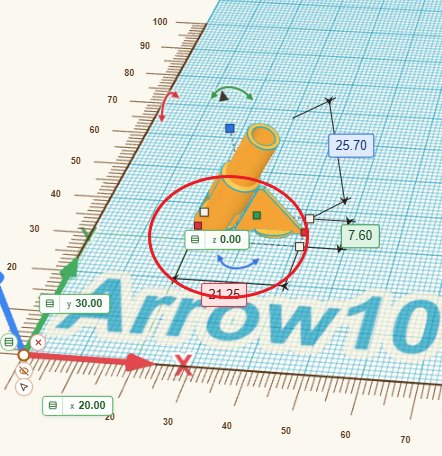
|
@Gpic2030 thank you, the picture shows it clearly, and no need to apologise. It's the height box of the corner ruler: at height 0 it sits right on the corner of the part and covers it. With the next update it steps out beside the part, so it no longer sits on top of it. |
|
@Gpic2030 it's out in layerling 1.145.0: at height 0 the framing square's height number now steps out beside the part instead of lying on it. |


Uh oh!
There was an error while loading. Please reload this page.
When creating a small object, the dimensions are sometimes hard to identify which is which without zooming in. Would it be possible or make sense to have the background in the dimension box match the X, Y, Z arrows colors. Maybe as a setting to turn on or off. It seems to me it might make it quicker to select the right dimension to change.
All reactions