Repository navigation
.STEP file handling #830


|
I have a STEP file that has 6 pieces. I open the same STEP file in layerling. I click "Separate Parts". Can layerling be modified to use the names in the STEP file? |
Replies: 4 comments 20 replies

|
@ssmeier-gmail thank you for the bug report, the STEP file inside it showed both answers. Why 5 parts: layerling imports a STEP file as one body. Separate parts then splits that body's mesh into the pieces that hang together, and pieces that touch count as one. Your left and right body halves lie against each other, so they stay one part; the two wheels and the two axles come apart. Bambu Studio's "Split to Objects" uses the six solids the file defines instead, so it finds six. Why the names are missing: the import reads the shapes from the STEP file, but not the part names stored with them, so the parts are numbered after the file name. Two ways around it for now:
|

|
@henmedia , are you planning to implement multi solid / multibody step / stp import and export with proper solid name tree structure handling? I like very much your CAD and the only thing stopping me to fully migrate to it is this. The best way I know to migrate a complex 3D project with multiple bodies / solids. made in other CAD programs, is to export in step file and then import that file in the new application. I believe many will appreciate implementing such functionality, and it will add enormous value to your baby. If you (or someone else) have other suggestions, please share your opinion. Also let me know if you need help testing beta versions, I can help. |

|
@ValSimDim thank you for the kind words. Today layerling reads a STEP file as one body, so several solids and their names do not come in as a tree: "Separate parts" afterwards splits that body into the pieces that hang together, and you rename them by hand. Export is further along, it writes every body as a part of its own in one STEP assembly. Reading the solids, their names and the structure of a file as separate objects is not built, and it would be a larger change, so I want to see how many others need it. It would help to know which CAD program your projects come from and roughly how many bodies they have. Meanwhile, if each solid is exported as a STEP file of its own, each one comes in under its file name. If you'd like to support the project, a small donation is very welcome. |

|
@henmedia, thank you for the reply. I'm using DSM (Design Spark Mechanical) and FreeCad, and I also designed myself (vibecoded) a small windows program for designing shelfs and stands. Some of my designs have over 200 solids. I'll attach here a screenshot from FreeCad so you can see how it retains the solids colors and name tree structure (cant attach the STEP file itself, not supported here) 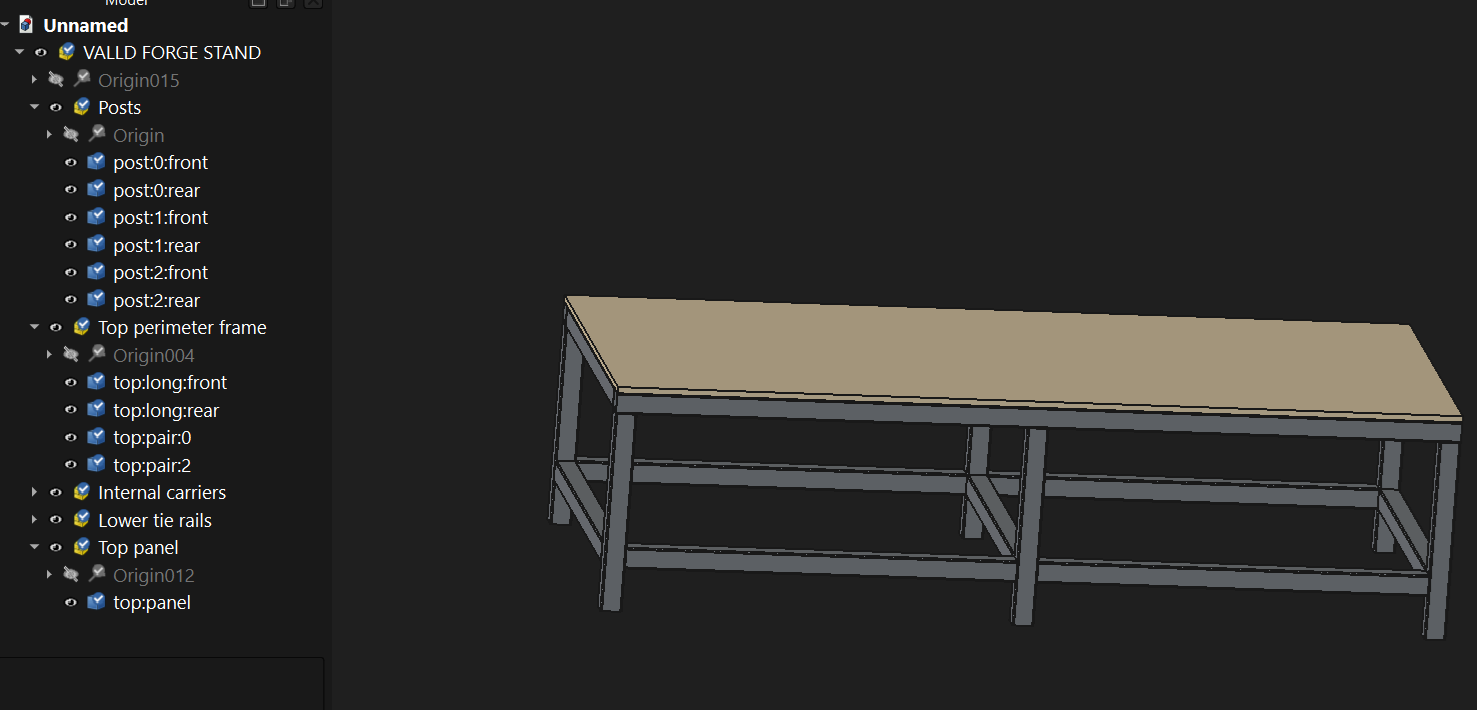
|
|
And I just made a small donation, you deserve it! |
|
@ValSimDim thank you, the screenshot makes it clear: the solids, their names, the groups and the colours. And thank you very much for the donation, it is very welcome. To put it in context: layerling is a simple CAD program in the browser for designing parts for 3D printing, made for beginners, hobby makers, schools and families, in the spirit of Tinkercad but with exact CAD bodies. Most designs there have a handful of parts, so working with 200 separate solids is unusual for it, and a file like yours is beyond what it was built for. I do understand your wish, and it helps to see how you work. GitHub does not take a .step file, but it takes a .zip. If you zip the STEP file of one of your designs and attach it here, I can see what layerling makes of it. |
|
Same stand sample, so you can play with it. It's a clean simple design, all parts touch but not overlap. |
|
@ValSimDim thank you for testing so many files, glad it works for you. Yes, this is the right place. Please send me the file by mail, I'll keep it private. My guess is that in this file several solids sit together under one entry, for example all the screws of one part, and layerling makes one part per entry. With your file I can check that and split them into single parts. |

|
@ValSimDim I want to know where I can buy this table, it looks AMAZING! 😆 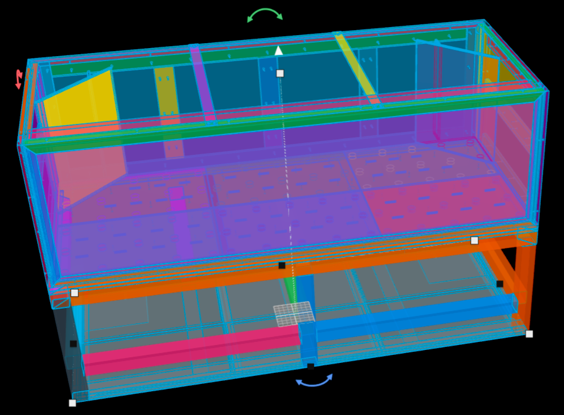
|
|
@ValSimDim thank you for the file, it showed the cause right away. Your stand holds 85 entries, and many of them carry several bodies, all the screws of a part under one entry, so layerling made one part of each entry. Now every body becomes a part of its own, numbered after its entry: your file comes in as all 390 parts, in about 5 seconds. The colours come along too, each body in the colour your file gives it. And a STEP export from layerling no longer makes the colours paler in the file. The grouping into your assembly tree is not there yet, the parts still lie side by side. This comes with the next update. |
|
@ValSimDim it's out in 1.116.1: every body of a STEP file now becomes a part of its own, each in the colour the file gives it, and a STEP export keeps the colours as they show. Your stand comes in as all 390 parts. Thank you for the file, it made the cause easy to find. |
Thank to Stefan it doesn't look so amazing anymore. Now it looks correct :-). It's not a table, but a whole stand and hybrid 1700 liters aquarium on top of it that I designed and will hopefully build one day. 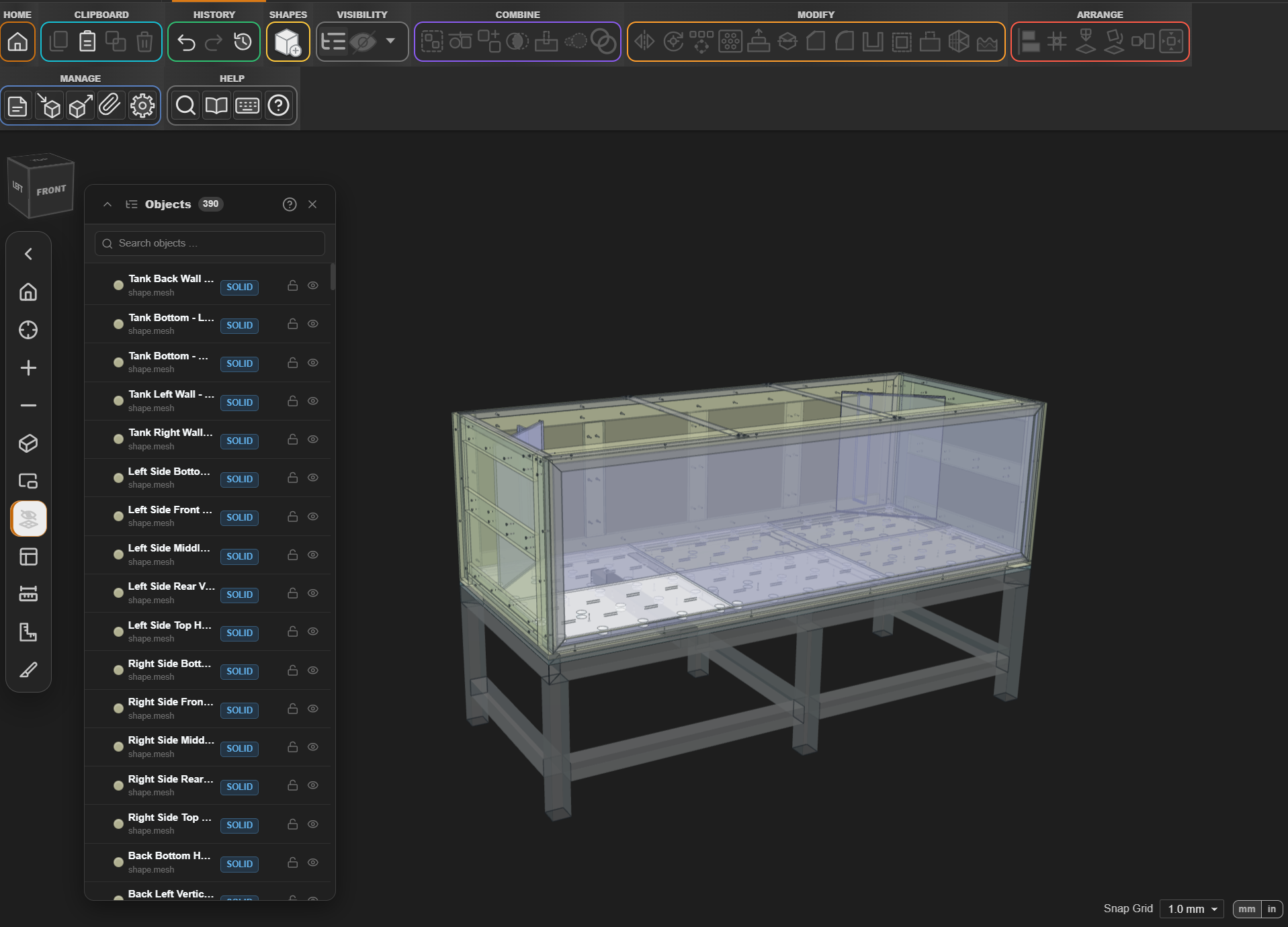
|
|
@ValSimDim great to see your stand come in with all 390 parts and its colours, thank you for showing it. A 1700 litre aquarium is quite a project, good luck with the build. |
|
@henmedia I have no idea how you manage to do so much so quickly, and even have time to be kind to others! Thank you for everything you've done so far! I guess the only thing left for perfect STEP integration is the object grouping. It's especially useful for making groups of objects/solids visible/invisible at ones in big models with many parts . I guess my next task is to start learning Layering as quick as I can! I'm sure it will take me much longer that you can make improvements and enhancements, so I better start immediately :-) |
|
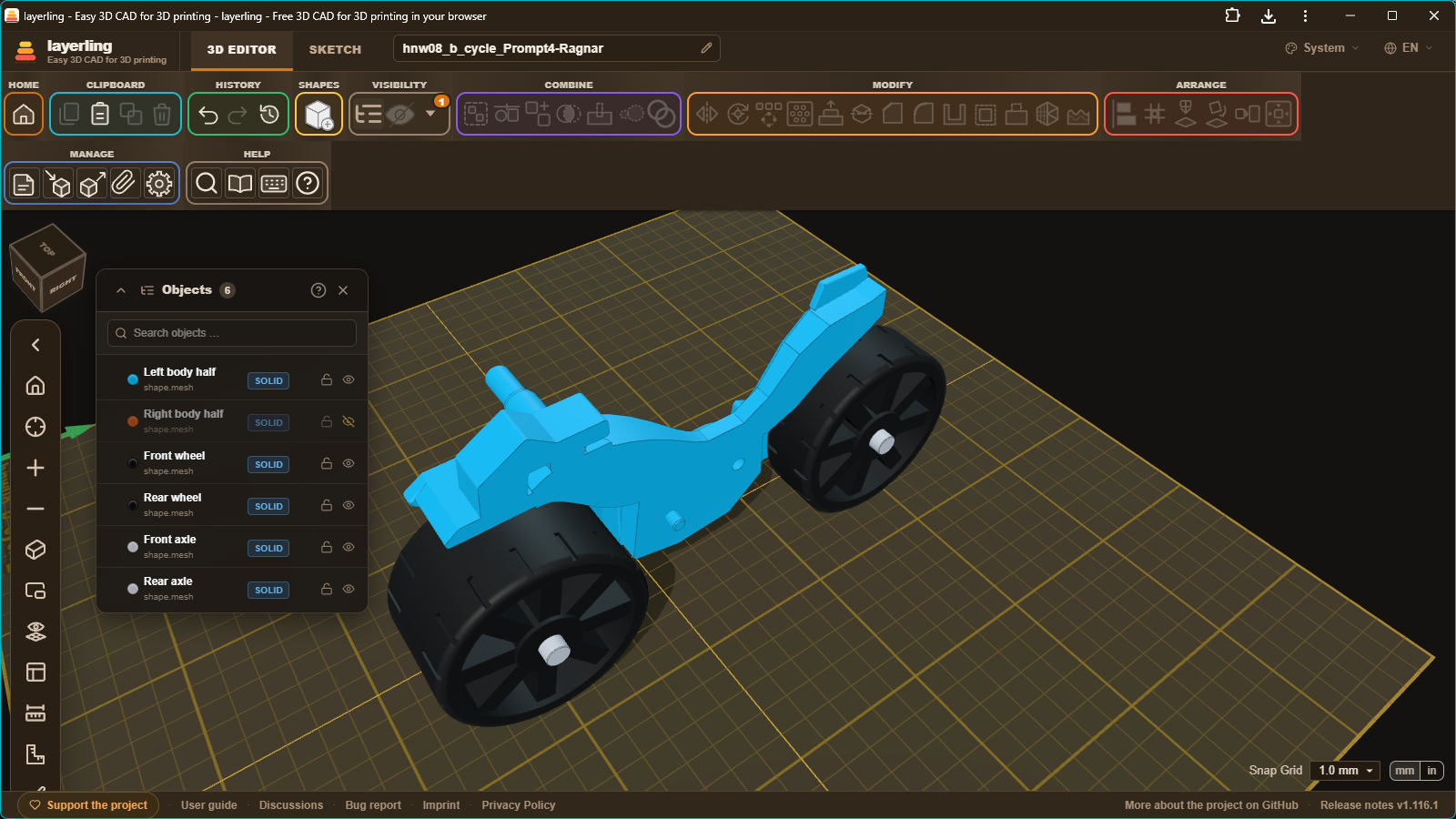
Wonderful. My toy motorcycle .STEP file now comes in with 6 pieces that keep the same object names. I will "Close with comment", "Close as resolved". |
|
@henmedia I hope you didn't forgot the tree name grouping for the parts in a STEP file. |
|
@ValSimDim no, I didn't forget it, it's in layerling 1.135.1: https://github.com/henmedia/layerling/releases/tag/v1.135.1. An assembly of a STEP file now comes in as a bundle under its name, and an assembly inside it as a bundle inside the bundle. So you can hide or move a whole assembly at once. Thank you for the reminder. |
|
Stefan, this is incredible! All good now! Thank you! |
|
@henmedia , I just noticed, the grouping is actually physically grouping the parts now, it's not only the names grouped. So now instead of 390 parts I have 7, but at the same time the number of solids is bigger - for example each screw is a separate solid. I don't know if it's intentional or a bug, can you please take a look and advice - see a screenshot 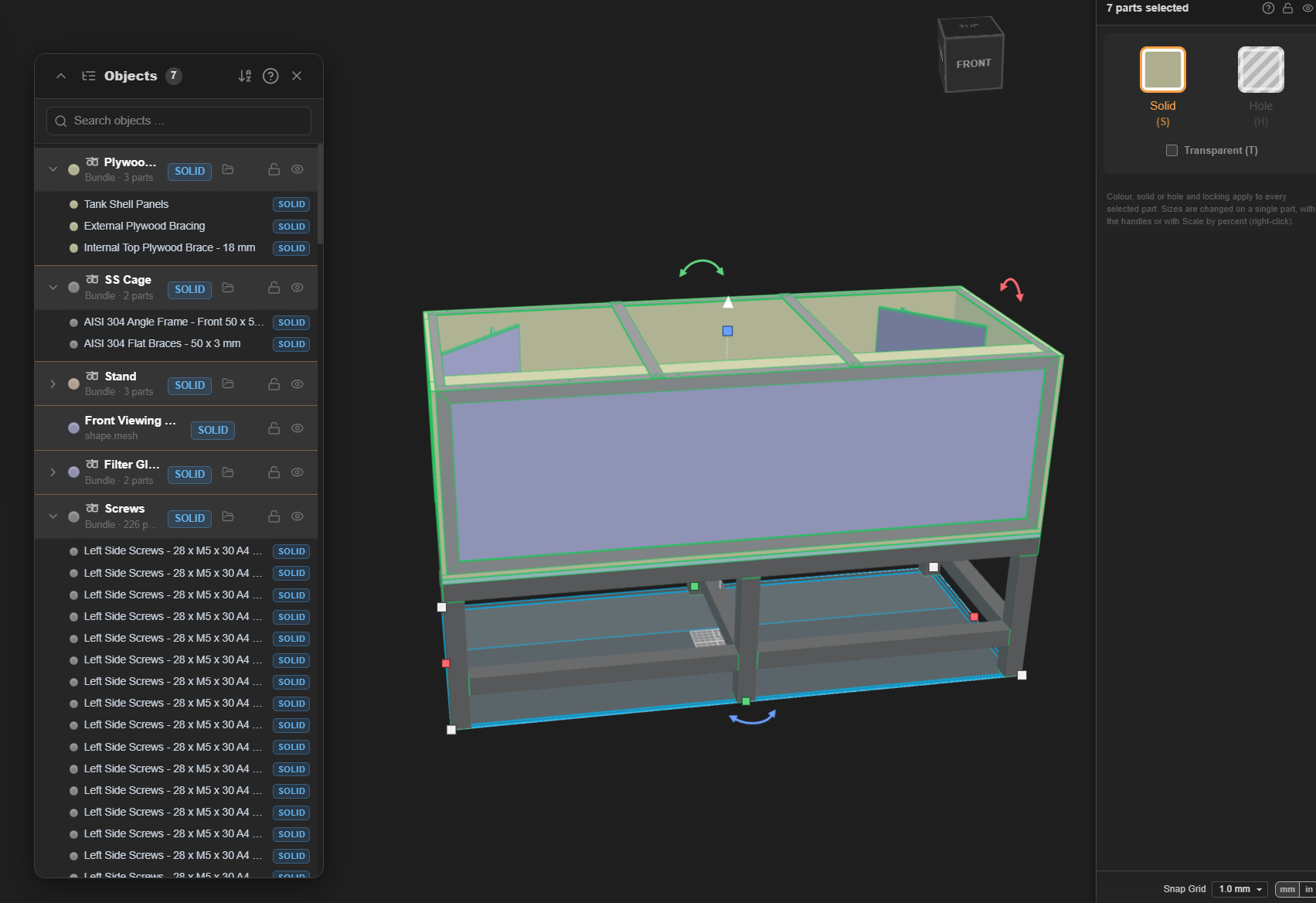
|
|
@ValSimDim it's intentional, and nothing was lost or added. Your file still comes in as the same 390 parts as before, now sorted into the assemblies of your file; the 7 in the object list counts only the top entries. A bundle doesn't merge anything: every part inside stays its own body with its own name and colour. A double click opens a bundle to work on a single part, and Ungroup gives its parts back side by side. The screws were separate bodies before too, since 1.116.1: an entry like "Left Side Screws - 28 x M5 x 30 A4" holds 28 screws, and layerling makes each of them a part, numbered 1 to 28. You see them now because the Screws bundle lists everything inside it. |


@ValSimDim it's out in 1.116.1: every body of a STEP file now becomes a part of its own, each in the colour the file gives it, and a STEP export keeps the colours as they show. Your stand comes in as all 390 parts. Thank you for the file, it made the cause easy to find.