Repository navigation
Releases
hyperCut v0.2.4

hyperCut v0.2.4 gives the spectral pitchmap dedicated KEY, SCALE and MODE presets, with the piano editor reserved for custom scales.
What changed
- Three key dropdowns. KEY picks the root, SCALE picks Major, Melodic Minor, Pentatonic or Custom, and MODE picks the mode of the selected family.
- Major and melodic-minor modes. Major offers Ionian, Dorian, Phrygian, Lydian, Mixolydian, Aeolian and Locrian. Melodic Minor offers Melodic Minor, Dorian #2, Lydian Augmented, Lydian Dominant, Mixo b6, Locrian #2, Altered and Phrygian Dominant.
- Piano editor only for Custom. The keyboard appears only when Custom is selected; clicking a key adds or removes that note. MODE is disabled for Pentatonic and Custom.
- Sessions stay compatible. The custom scale is a new parameter appended at the end of the list, and all existing scale indices still select the same scale and sound.
The header wordmark still reads hyperCut in the website's Space Grotesk with the six-stop gradient, and now shows v0.2.4 underneath. See the full changelog. Licensed under GPL v3.
HyperCut v0.2.3
hyperCut v0.2.3 is a visual refresh of the editor: rotary range controls, clearer layouts, new filter/crush shaping, and a brighter trance-gate envelope.
What changed
- Circular min/max knobs. Per-slice ranges are now rotary knobs with a Serum-style modulation arc, dual handles, a live pointer for the slice playing now, and exact values in a tooltip. Labels and readouts sit below each knob.
- Live knob rotation. Random per-slice values and trance-gate envelope depths rotate their pointers as audio plays.
- Horizontal region slider. The pitchmap REGION control is a log-frequency spectrum slider with two draggable edges and a live marker.
- Filter drive and crusher shaping. FILTER gains a saturation control beside RESONANCE. CRUSH gains dry/wet MIX and POST LP, both transparent by default, and its visualiser now shows one waveform cycle.
- Animated segmented selectors. The gate RATE selector now matches SUBDIVISION, with the highlighted value sliding into place.
- Unified theme gradients. Accent controls use the website's full six-stop gradient in every skin and theme.
- Gate envelope polish. The automation line has a gradient bloom and a 25% fill, the unfilled area is transparent over a pure black/white inset, flat gates keep their square-wave edge visible, and the playhead is a glowing dot with no selected-cell outline.
- Brand-consistent header logo. The wordmark reads hyperCut in the website's Space Grotesk Bold, with the full six-stop gradient across "hyper" and the release version shown underneath.
All new parameters are appended at the end of the parameter list, so existing sessions keep working. See the full changelog. Licensed under GPL v3.
HyperCut v0.2.2
Installers: Windows .exe, Linux .deb + .AppImage, macOS .pkg + .dmg. Each release also includes a .zip with every plugin format. See the README for installing.
HyperCut v0.2.1
HyperCut v0.2.1 fixes Ableton Live one-shot parameter clicks and restores the v0.1 preset browser artwork inside the fixed-size popup.
What changed
- Ableton Live parameter clicks fixed. One-shot edits such as the algorithm selector now go straight through
setParameterValue()instead of a begin/perform/end gesture collapsed into one message batch, which Ableton discarded. Verified in Ableton Live 13 and REAPER. - Preset browser artwork restored. The v0.1 sidebar styling is back inside the fixed, non-resizing popup.
The Windows VST3 in this release is the build validated in Ableton Live and REAPER.
Downloads
Each zip contains VST3, CLAP, LV2, VST2 and the standalone app. See the full changelog. Licensed under GPL v3.
HyperCut v0.2

HyperCut v0.2 fixes the Windows VST3 UI clicks and simplifies the preset browser.
What changed
- Windows VST3 clicks fixed. Some hosts deliver a mouse press and release in the same idle cycle. Dear ImGui derives clicks from the button state at
NewFrame()time, so those clicks were lost. Presses that arrive between frames are now held until the next frame renders, then released, so the top dark/light toggle and the algorithm selector respond on the first click. Verified in REAPER. - Preset browser is a dropdown. Clicking the preset name opens a searchable popup instead of sliding a sidebar and resizing the host window. The plugin window keeps a fixed size and layout scaling uses the visible window.
- HiDPI mouse coordinates. Mouse and scroll positions are divided by the DPF auto-scale factor when auto-scaling is active.
- Safer frame timing. The ImGui frame delta is clamped and never negative.
- Reproducible source. The patched submodules now point to
hexamorphical/DPFandhexamorphical/DPF-Widgetsbranches carrying the fixes.
Downloads
Each zip contains VST3, CLAP, LV2, VST2 and the standalone app. The Windows build in this release is the build that was tested in REAPER.
See the full changelog. Licensed under GPL v3.
HyperCut v0.1 beta
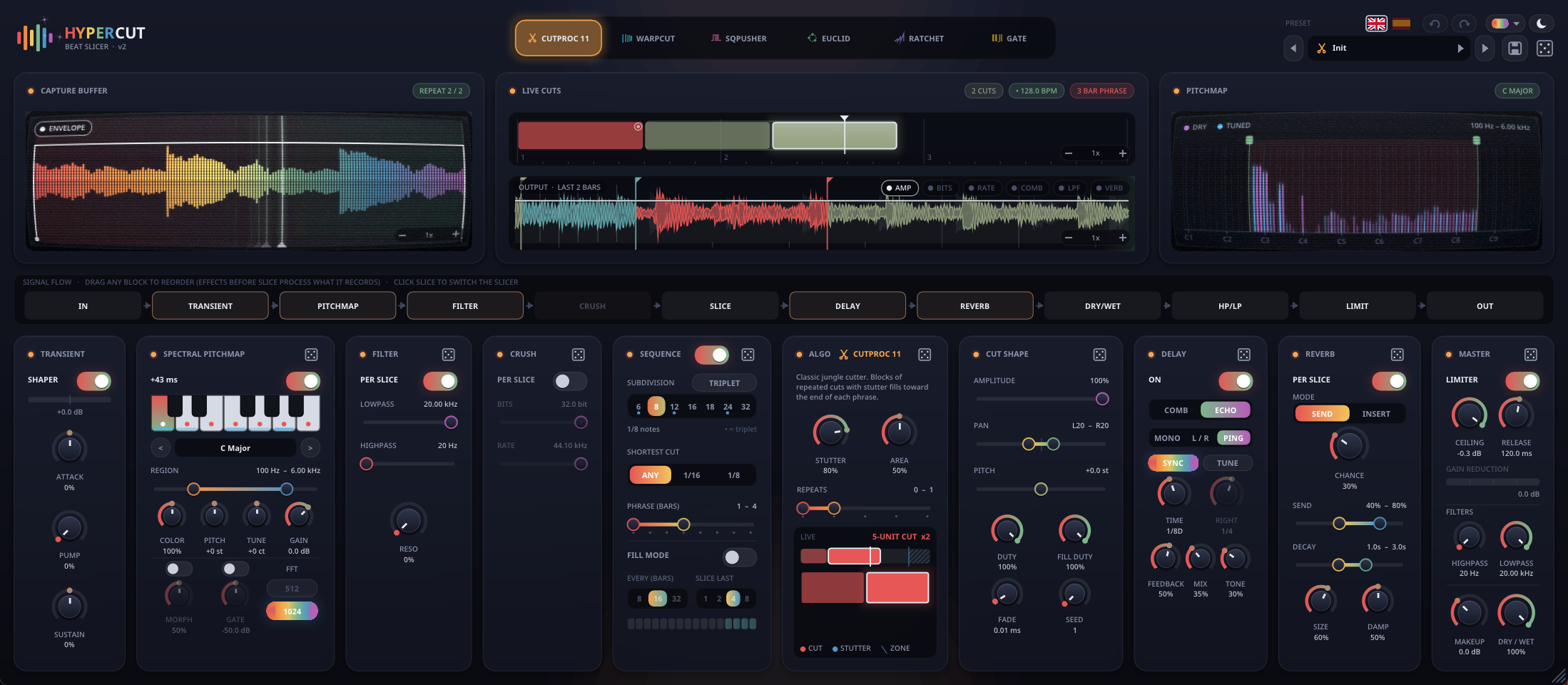
First public beta of HyperCut, a live beat slicer, trance gate and glitch multi-effect. It is a fork of
Livecut (through its DPF port),
which is based on Nick Collins' BBCut for SuperCollider.
Downloads
One zip per system, each with every format (VST3, CLAP, LV2, VST2 and the standalone app):
- Linux x86_64
HyperCut-linux-x86_64.zip. Needs glibc 2.35 or newer (Ubuntu 22.04, Debian 12,
Fedora 36 or newer), OpenGL and X11. - Windows x64
HyperCut-windows-x64.zip. Windows 10 or 11. Not code-signed, so SmartScreen may warn. - macOS universal
HyperCut-macos-universal.zip(Intel + Apple Silicon, 10.15+). Not notarized, so
after copying a plugin runxattr -dr com.apple.quarantine <path to the plugin>once.
The README lists the install folders for every format.
SHA256SUMS.txt has the checksums.
The Linux build is the one in daily use. The Windows and macOS builds come from GitHub Actions and have not been
tested on real hardware yet. Reports in Issues are welcome.
What's in it
- 6 slicing algorithms: CutProc 11, WarpCut and SQPusher from Livecut, plus Euclid, Ratchet and a
trance gate. - Trance gate:
- a drawable one-bar step sequencer;
- ties, by drag-painting;
- per-step attack, decay and curve envelopes (mouse wheel, right-drag, shift-drag);
- the envelope can also drive a lowpass and a highpass;
- rates from 1/4T to 1/32, or random patterns.
- Effects, all reorderable in the signal flow, the slicer included:
- transient shaper;
- spectral pitchmap (key / scale);
- per-slice filter, bitcrusher and reverb throws;
- delay with a per-slice comb mode and a tempo-synced stereo echo (mono / L-R / ping-pong, up to 2 bars or 4 s);
- TUNE, which snaps delay times to notes of the scale.
- Master section: dry/wet, highpass and lowpass, lookahead limiter, makeup gain.
- Real-time visualisers: capture buffer, live cuts and output lanes, pitchmap analyzer, algorithm monitor.
- Interface:
- 16 colour themes in dark and light;
- English and Spanish;
- 8 factory presets by hexamorphical, plus Init, in a preset browser;
- undo / redo and dice;
- resizable, with sparks out of the logo on every chop.
See the README for every feature in detail.
Beta notes
- Parameters are only ever added at the end, so projects saved with this beta keep working in later versions.
- HyperCut has its own plugin ID: it sits next to LiveCut instead of replacing it. Old LiveCut settings carry over
parameter for parameter. - Please report problems in Issues.
Licensed under the GNU GPL v3.