Repository navigation
Releases: idk-arsh/multiterm
Release list
MultiTerm 1.1.0

A new interface. Same engine underneath.
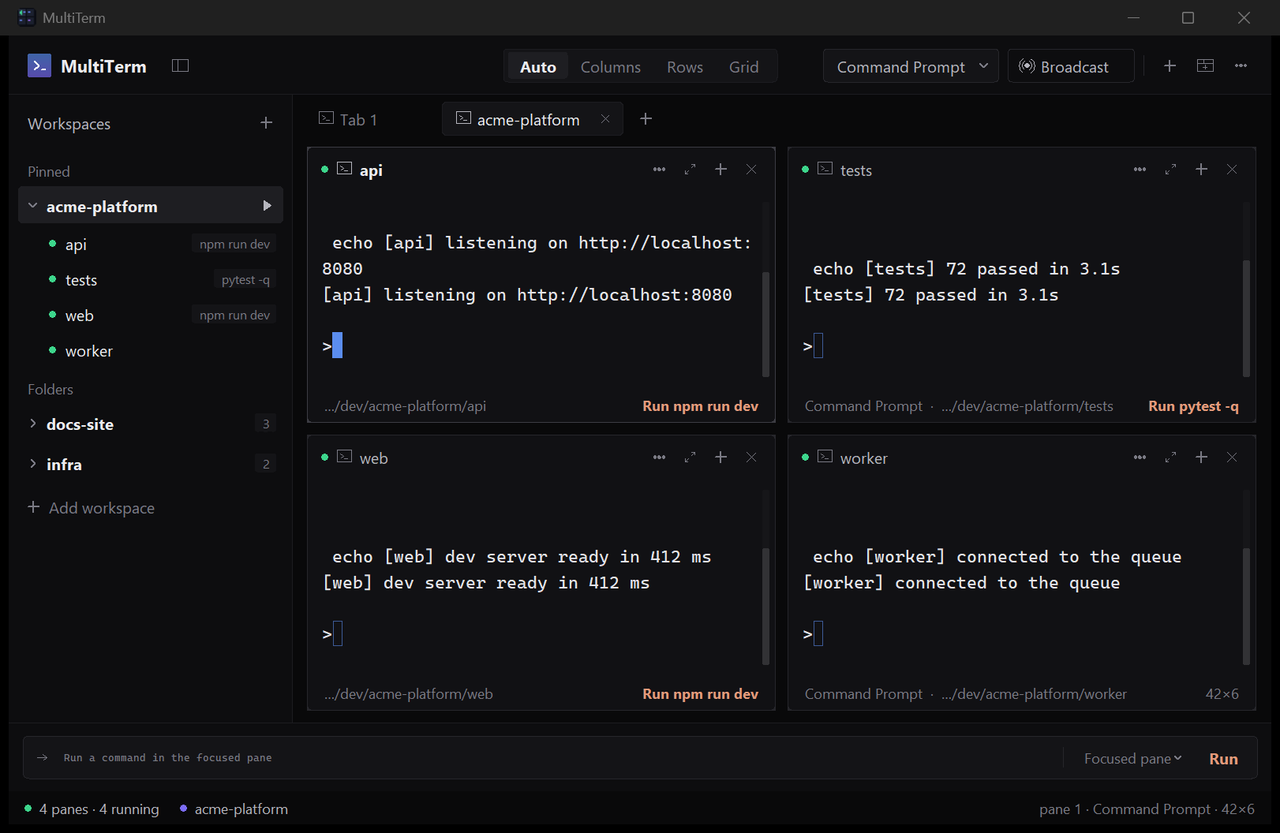
Pane cards. Every pane is a rounded card with a hairline border that brightens on focus. The header shows a status dot, the folder name, what is running in it, and four controls: menu, maximise, split, close. The footer shows the shell and folder and, when the folder has a startup command, a Run action that fires it again. An exited shell shows its exit code and a Restart action there.
Sidebar. Pinned and Folders sections. Right-click a workspace to pin it. A green dot marks every folder that has a terminal open. Startup commands show as grey chips. Hidden and system junctions in a home folder no longer appear.
Top bar. Auto / Columns / Rows / Grid as a text switch in the middle; shell picker, Broadcast, new pane, new tab and menu on the right.
Command bar. One field, with the target picker and Run inside it.
Per-pane menu. Restart, clear, find, split right or down, maximise, copy folder path, set the startup command, close.
Also: the sidebar toggle moved to the top bar, the pane gap is wider, gradients and glows are gone.
Windows 10 and 11. Single exe, no installer, nothing written outside %APPDATA%\MultiTerm. Settings and workspaces from 1.0.0 carry over.
Open good first issues if you want to contribute: mouse reporting (#1), wide characters (#2), a new theme (#3), reflow on resize (#4), clickable URLs (#5).
MultiTerm 1.0.0
First release.
A multi-pane terminal workspace for Windows 10 and 11. Single executable, no installer, no account, no telemetry. Nothing is written outside %APPDATA%\MultiTerm.
What is in it:
- Workspaces: point it at a project folder and the folders inside become panes. Reopen it and they come back in the same layout.
- Startup commands per folder: right-click a folder, set what it runs. Opening the workspace starts the project.
- Broadcast typing: one keystroke goes to every pane in the tab.
- Freeform panes: drag any divider, split right or down, maximise, snap back to a preset.
- Find in pane, overlay scrollbar, jump to latest, copy chip.
- Command Prompt, Windows PowerShell, PowerShell 7, Git Bash, WSL and Python are found automatically.
How to run: download MultiTerm.exe and double-click it. SmartScreen will warn because the binary is not code signed; choose More info, then Run anyway. If you would rather not run an unsigned exe, the repo runs from source with pip install pywinpty and python main.py.
Known limits are listed in the README.
sha256 of MultiTerm.exe: e10f46bda7a1602560eed96697d8b9e5cebc97571e40caa135c5e29f079857c9