Repository navigation

A new interface. Same engine underneath.
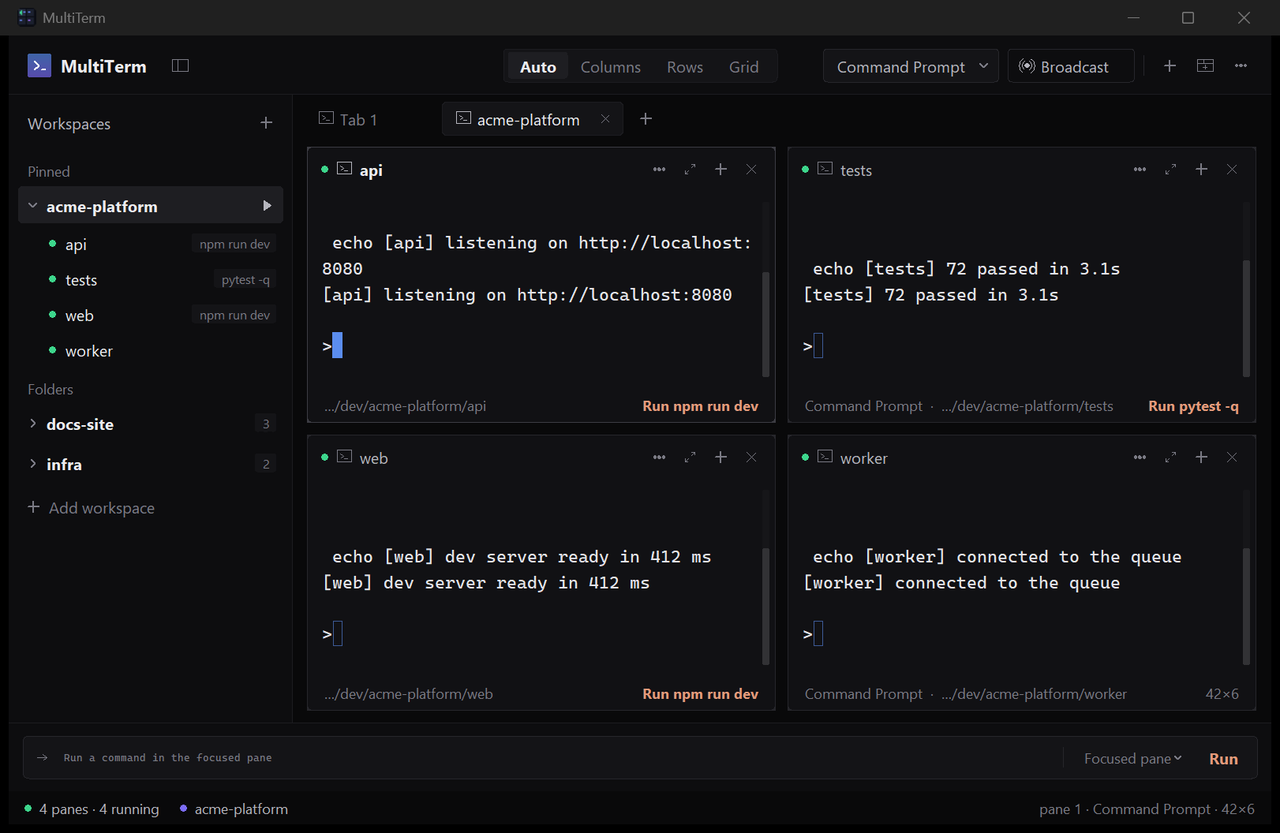
Pane cards. Every pane is a rounded card with a hairline border that brightens on focus. The header shows a status dot, the folder name, what is running in it, and four controls: menu, maximise, split, close. The footer shows the shell and folder and, when the folder has a startup command, a Run action that fires it again. An exited shell shows its exit code and a Restart action there.
Sidebar. Pinned and Folders sections. Right-click a workspace to pin it. A green dot marks every folder that has a terminal open. Startup commands show as grey chips. Hidden and system junctions in a home folder no longer appear.
Top bar. Auto / Columns / Rows / Grid as a text switch in the middle; shell picker, Broadcast, new pane, new tab and menu on the right.
Command bar. One field, with the target picker and Run inside it.
Per-pane menu. Restart, clear, find, split right or down, maximise, copy folder path, set the startup command, close.
Also: the sidebar toggle moved to the top bar, the pane gap is wider, gradients and glows are gone.
Windows 10 and 11. Single exe, no installer, nothing written outside %APPDATA%\MultiTerm. Settings and workspaces from 1.0.0 carry over.
Open good first issues if you want to contribute: mouse reporting (#1), wide characters (#2), a new theme (#3), reflow on resize (#4), clickable URLs (#5).