Repository navigation
Releases
XM4 Control 2.4.0

What's new in 2.4.0
- English and French interface. The app follows the Windows display language; App > Language switches it right away, no restart needed.
- The
xm4command line speaks the Windows display language too, and acceptsxm4 ambient 10 voiceas well asvoix.
Control your Sony WH-1000XM4 headphones from Windows 11, without the Sony mobile app: noise cancelling modes, equalizer, mic and every headset setting, right from the system tray. In English and French.
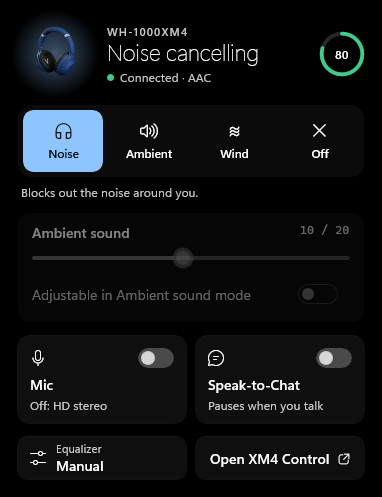
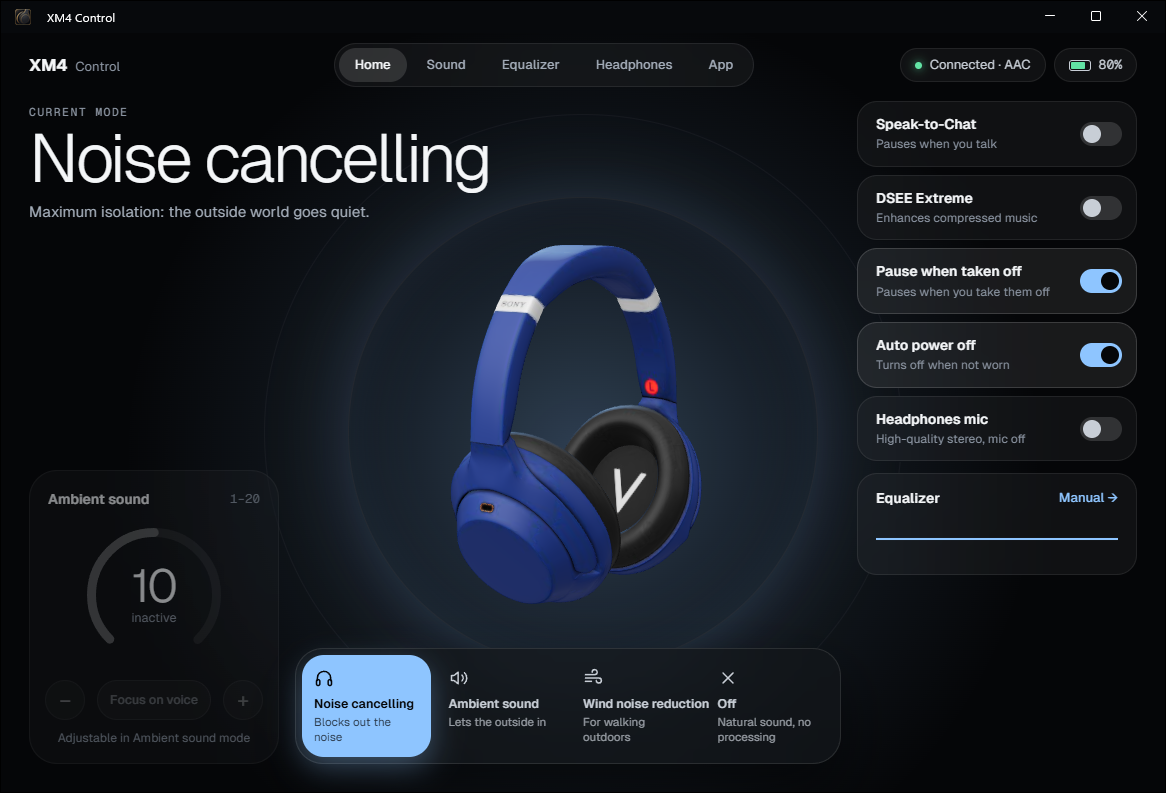
Features
- Tray icon: a macOS-style battery showing the headphones' charge, red at 20% and below, empty and dimmed when the headphones aren't connected. White or black to match the taskbar theme, sharp at every display scale.
- Flyout above the clock (click the icon): current mode and battery, noise cancelling / ambient sound / wind / off, ambient sound level, Mic and Speak-to-Chat switches, quick access to the equalizer.
- Main window (double-click the icon): 3D headphones, quick settings, Sound, Equalizer, Headphones and App pages.
- Equalizer: Sony presets, Clear Bass and 5 bands you adjust with the mouse (drag or scroll wheel).
- Stereo during calls: the Mic switch turns off the Windows Hands-Free profile, so the headphones stay in high-quality stereo. No more mono "phone call" sound when Teams or Discord opens the microphone.
- Global shortcut
Ctrl + Alt + N: noise cancelling → ambient sound → off, from any app. - Headphone settings: NC Optimizer, Speak-to-Chat (sensitivity, timeout), DSEE Extreme, pause when taken off, automatic power off, touch panel, voice guidance.
- Low battery alert at 20%, start with Windows.
- English and French: follows the Windows display language, or pick one in the App page.
- Command line
xm4for scripts.
Installation
- Pair the headphones in Settings > Bluetooth & devices.
- Download
Xm4Control.exebelow, put it in a folder of your own (for example%LOCALAPPDATA%\Programs\XM4 Control) and run it. Nothing else to install: the exe bundles .NET, and the main window uses WebView2, which ships with Windows 11. - On first launch, Windows SmartScreen may show "Windows protected your PC" because the exe isn't signed: More info > Run anyway.
- Windows 11 puts new icons in the hidden area (the
^arrow). To keep the battery visible: Settings > Personalization > Taskbar > Other system tray icons.
The app connects to the headphones on its own as soon as Windows sees them connected. Start with Windows is turned on in the App page of the main window.
Usage
| Action | Result |
|---|---|
| Click the icon | Quick flyout |
| Double-click the icon | Main window |
| Right-click the icon | Menu: modes, mic, settings, quit |
Ctrl + Alt + N |
Next mode |
| Run the exe again | Opens the main window of the app already running |
Closing the main window frees its memory: the app stays in the system tray.
Command line
xm4.exe works without the app, in the Windows display language:
xm4 status                 headphones status
xm4 nc                     noise cancelling
xm4 ambient [1-20] [voice] ambient sound (level, focus on voice)
xm4 wind | off             wind noise reduction / off
xm4 eq BassBoost           equalizer preset
xm4 dsee|s2c|pause|autooff|touch|voice on|off
xm4 mic off                stereo without the headphones mic (mic on to undo)
xm4 list                   paired Bluetooth devices and connection state
The headphones accept only one control connection at a time: while the app is running, the command line can't connect to them, except xm4 mic and xm4 list, which go through Windows.
Good to know
- With the mic off, the headphones no longer reconnect to the PC on their own: they reconnect through the Hands-Free profile, which the option turns off. Reconnect them from Quick Settings (Bluetooth > WH-1000XM4) or Settings > Bluetooth & devices.
- The headphones can't be used while charging: they disconnect from the PC, and the icon shows an empty battery.
- Tested with a WH-1000XM4 on firmware 2.9.0. The app only looks for this model: the WH-1000XM5 and other Sony headphones aren't supported.
- If something goes wrong,
Xm4Control.exe --logwrites the exchanges with the headphones to%LOCALAPPDATA%\Xm4Control\trace.log.
Updating
Quit the app (right-click the icon > Quit), replace Xm4Control.exe with the new version and run it again. Your settings are kept.
Uninstalling
- If the mic is off, turn it back on first (flyout, Mic switch): otherwise the Hands-Free profile stays disabled in Windows.
- Turn off Start with Windows (App page), then quit the app.
- Delete the exe, and the
%APPDATA%\Xm4Control(settings) and%LOCALAPPDATA%\Xm4Control(main window data) folders.
Files
| File | Contents |
|---|---|
Xm4Control.exe |
The app (about 40 MB, self-contained) |
xm4.exe |
The command line (about 38 MB, self-contained) |
Windows 11, 64-bit. Independent project under the MIT license, not affiliated with Sony. Version française du README.