Repository navigation
How to remove a car from the integration? #1429


|
First of all: Thank you for this very helpful integration. |
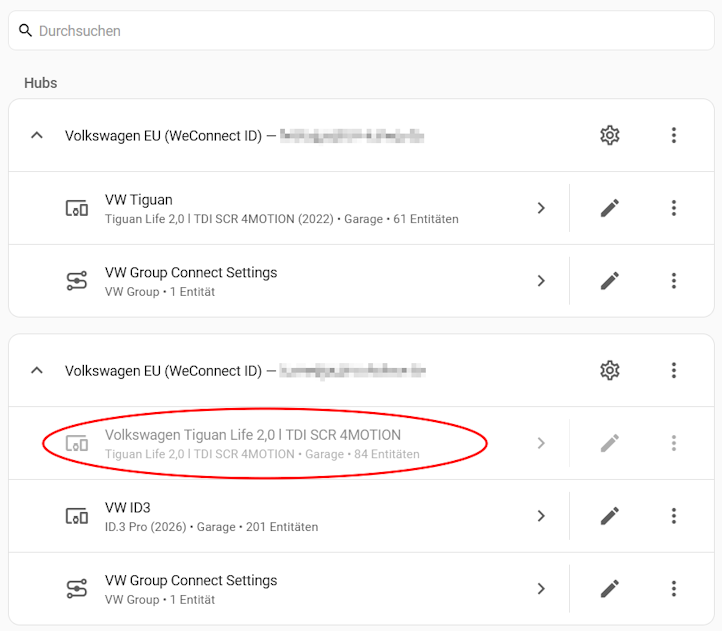
Replies: 3 comments 1 reply

|
@kalwados — thank you, and this is a fair question because the integration does not make it obvious. Short answer: disabling the device (which you did) stops it being polled, but to make the phantom car disappear from the wrong hub you delete the device, and whether it stays gone depends on why it showed up. Why the Tiguan appeared on the ID.3 hub. The integration lists whatever cars the logged-in account can see in its garage. If your ID.3 account has ever been granted access to the Tiguan — even just as a secondary user — VW returns it in that account's garage, and the integration creates a device for it. That is almost certainly what happened here, rather than anything you did wrong in Home Assistant. How to remove it. Two steps, in order:
So: try Delete first. If it sticks, you are done. If it reappears, the two accounts are linked to both cars on VW's side, and unlinking there is the only durable fix. Either way your data is unaffected — the ID.3 and the Tiguan on their correct hubs keep working exactly as they do now. |
|
Hi @kalwados, I need to correct my reply of 22 September. I wrote that Home Assistant only offers Delete for a device the integration is no longer actively providing. That is wrong. Home Assistant only lets users delete a device from the UI if the integration implements async_remove_config_entry_device. This integration does not implement it, so Delete is not offered for its devices, whether or not VW still returns the car. I also wrote that after a restart the integration prunes the device automatically. From reading the code, that may not happen: the clean-up only removes a device for a car that was in the data of an earlier update in the same running session. After a restart, a car that is no longer reported may never enter the data, so nothing would remove its device. This is not confirmed live; it is based on reading the code. So removing the car's access in the VW app is not a way to make Delete appear. If you changed anything in the VW app because of my reply, that was unnecessary work, and I am sorry for that. My explanation of why the Tiguan appeared on the ID.3 hub was a guess, not something I can see from here. This reply was drafted with AI assistance and checked by me before posting. I deliberately let it write in plain, everyday language so it is easier to read — and in your own language where that helps. |

|
Hello Prash,
Don't worry. I did not do any changes in the VW apps; I just live with duplicated but deactivated cars in the Home Assistant integration. |
|
@kalwados, 5.6.0 is out and lets you delete such a device yourself: https://github.com/its-me-prash/vwgroup-connect-ha/releases/tag/v5.6.0 On the device page, "Delete" now appears when the car's VIN is neither in the entry's current data nor in its vehicle list. A car that the account still lists keeps its device, also when you switched it off, so for your duplicated cars it depends on whether the account behind that entry still lists them. While the entry is not loaded, nothing can be deleted. This was tested with unit tests and has not been tried on a car. This reply was drafted with AI assistance and checked by me before posting. I deliberately let it write in plain, everyday language so it is easier to read — and in your own language where that helps. |


@kalwados — thank you, and this is a fair question because the integration does not make it obvious. Short answer: disabling the device (which you did) stops it being polled, but to make the phantom car disappear from the wrong hub you delete the device, and whether it stays gone depends on why it showed up.
Why the Tiguan appeared on the ID.3 hub. The integration lists whatever cars the logged-in account can see in its garage. If your ID.3 account has ever been granted access to the Tiguan — even just as a secondary user — VW returns it in that account's garage, and the integration creates a device for it. That is almost certainly what happened here, rather than anything you did wrong in…