Repository navigation
Releases
MPC Commander addin v1.3.2

The plugins MPC loads, with their own skins, and MPC's transport, in a desktop app (through an SSH tunnel by default).
Requirements
- A Gen2 MPC OS standalone device (aarch64: Live III, One G2, Key(s) G2). The installer refuses anything else.
- Root shell access (SSH) to the device. Stock MPC OS doesn't offer this; you need a modded unit.
- Installing addins this way is unofficial: back up first, use at your own risk.
Install
- Unzip, then copy the whole folder to the device, e.g.
scp -r MPC-Commander-addin-1.3.2 root@<device-ip>:/tmp/ - Run it:
ssh root@<device-ip> sh /tmp/MPC-Commander-addin-1.3.2/install.sh
The installer copies the addin into /data/mpc-addins/commander/, adds mpc_commander_addin.so to the LD_PRELOAD list of MPC's service
and restarts MPC (save your project first). The list is extended, never replaced: other addins and the
libraries the firmware preloads stay. Where no writable file sets the list (the unit is on the read-only root), one
drop-in shared by every addin sets it, /etc/systemd/system/<service>.service.d/90-mpc-addins.conf. Re-run the
installer after a firmware update. -y skips the question, -n leaves the restart to you.
Settings are in /data/mpc-addins/commander/mpc_commander_addin.conf; an upgrade keeps your edits.
It listens on the device only. From your computer: ssh -L 6730:127.0.0.1:6730 root@, then connect the MPC Commander desktop app to localhost:6730 (bind and port are in mpc_commander_addin.conf). For transport and MIDI, enable the MPC Commander port in MPC's MIDI preferences: as an input (with Receive MMC on) and as an output with clock sync and Send MMC.
Uninstalling and the file list are in INSTALL.md inside each zip.
Built by GitHub Actions from 28cdf64 with mpc-vst-plugins@dbe1f2b.
MPC Commander addin v1.3.1
Installer update for MPC OS 3.10.1. The addin is unchanged from 1.3.0; only the bundled installer is new (open-mpc/mpc-vst-plugins at dbe1f2b).
- Fixes "Read-only file system" under
/etc/systemd/system/acvs.service.d/when installing or updating on 3.10.1. - Gen1 with Akai's user access on (e.g. Key 37):
/etcis a read-only overlay stacked on a writable one; the drop-in is written in the writable layer and persists across reboots (open-mpc/mpc-vst-plugins#834). - Gen2 (e.g. Live III):
/etcis read-only, so the addin loads through a/rundrop-in./runis cleared at every reboot; the Addin Restore patch (Plugin Manager → PATCHES) puts it back at start-up.
Already have Commander? Reinstall it (Plugin Manager or the installer app): an addin installed from an older release keeps its older installer.
The plugins MPC loads, with their own skins, and MPC's transport, in a desktop app (through an SSH tunnel by default).
Requirements
- A Gen2 MPC OS standalone device (aarch64: Live III, One G2, Key(s) G2). The installer refuses anything else.
- Root shell access (SSH) to the device. Stock MPC OS doesn't offer this; you need a modded unit.
- Installing addins this way is unofficial: back up first, use at your own risk.
Install
- Unzip, then copy the whole folder to the device, e.g.
scp -r MPC-Commander-addin-1.3.1 root@<device-ip>:/tmp/ - Run it:
ssh root@<device-ip> sh /tmp/MPC-Commander-addin-1.3.1/install.sh
The installer copies the addin into /data/mpc-addins/commander/, adds mpc_commander_addin.so to the LD_PRELOAD list of MPC's service
and restarts MPC (save your project first). The list is extended, never replaced: other addins and the
libraries the firmware preloads stay. Where no writable file sets the list (the unit is on the read-only root), one
drop-in shared by every addin sets it, /etc/systemd/system/<service>.service.d/90-mpc-addins.conf. Re-run the
installer after a firmware update. -y skips the question, -n leaves the restart to you.
Settings are in /data/mpc-addins/commander/mpc_commander_addin.conf; an upgrade keeps your edits.
It listens on the device only. From your computer: ssh -L 6730:127.0.0.1:6730 root@, then connect the MPC Commander desktop app to localhost:6730 (bind and port are in mpc_commander_addin.conf). For transport and MIDI, enable the MPC Commander port in MPC's MIDI preferences: as an input (with Receive MMC on) and as an output with clock sync and Send MMC.
Uninstalling and the file list are in INSTALL.md inside each zip.
Built by GitHub Actions from 55a805a with mpc-vst-plugins@dbe1f2b.
MPC Commander addin v1.3.0
The plugins MPC loads, with their own skins, and MPC's transport, in a desktop app (through an SSH tunnel by default).
Requirements
- A Gen2 MPC OS standalone device (aarch64: Live III, One G2, Key(s) G2). The installer refuses anything else.
- Root shell access (SSH) to the device. Stock MPC OS doesn't offer this; you need a modded unit.
- Installing addins this way is unofficial: back up first, use at your own risk.
Install
- Unzip, then copy the whole folder to the device, e.g.
scp -r MPC-Commander-addin-1.3.0 root@<device-ip>:/tmp/ - Run it:
ssh root@<device-ip> sh /tmp/MPC-Commander-addin-1.3.0/install.sh
The installer copies the addin into /data/mpc-addins/commander/, adds mpc_commander_addin.so to the LD_PRELOAD list of MPC's service
and restarts MPC (save your project first). The list is extended, never replaced: other addins and the
libraries the firmware preloads stay. Where no writable file sets the list (the unit is on the read-only root), one
drop-in shared by every addin sets it, /etc/systemd/system/<service>.service.d/90-mpc-addins.conf. Re-run the
installer after a firmware update. -y skips the question, -n leaves the restart to you.
Settings are in /data/mpc-addins/commander/mpc_commander_addin.conf; an upgrade keeps your edits.
It listens on the device only. From your computer: ssh -L 6730:127.0.0.1:6730 root@, then connect the MPC Commander desktop app to localhost:6730 (bind and port are in mpc_commander_addin.conf). For transport and MIDI, enable the MPC Commander port in MPC's MIDI preferences: as an input (with Receive MMC on) and as an output with clock sync and Send MMC.
Uninstalling and the file list are in INSTALL.md inside each zip.
Built by GitHub Actions from 3fac707 with mpc-vst-plugins@9ca502a.
MPC Commander desktop app 1.1.0
The desktop half of MPC Commander: the plugins running on your MPC, drawn with their own skins on the computer, with every knob live in both directions.
Needs
- The Commander addin on the device: commander-addin-v1.2.0 (any addin that speaks the same protocol number works).
- Linux x86_64.
Run
sha256sum -c mpc-commander-1.1.0-linux-x86_64.tar.gz.sha256
tar xzf mpc-commander-1.1.0-linux-x86_64.tar.gz
cd mpc-commander-1.1.0-linux-x86_64 && ./commander --host localhost   # through an SSH tunnel to port 6730
In 1.1.0
- Compact parameters: a plugin without its own skin can show one row per parameter (name, a bar to drag, the value) instead of knob cards; the choice is kept per plugin.
MPC Commander addin v1.2.0
New in 1.2.0
- MPC Sample: the addin runs in the Sample's
MPC Sampleprocess and finds its settings and open project. - Browser UI: the plugins' panels and MPC's transport in a browser, as well as in the desktop app.
- MPC Sample rack (with mpc-addin-sample-rack): add, remove and turn plugins on or off from the browser. With rack 0.3.0, ON/OFF on a running plugin acts at once (until MPC restarts; Apply writes it into the project).
- Compact parameters: a Cards/Compact switch per plugin: one row per parameter (name, a bar to drag, the value).
- Works alongside another addin that wraps plugins (the Sample rack), in either load order.
The plugins MPC loads, with their own skins, and MPC's transport, in a desktop app (through an SSH tunnel by default).
Requirements
- A Gen2 MPC OS standalone device (aarch64: Live III, One G2, Key(s) G2). The installer refuses anything else.
- Root shell access (SSH) to the device. Stock MPC OS doesn't offer this; you need a modded unit.
- Installing addins this way is unofficial: back up first, use at your own risk.
Install
- Unzip, then copy the whole folder to the device, e.g.
scp -r MPC-Commander-addin-1.2.0 root@<device-ip>:/tmp/ - Run it:
ssh root@<device-ip> sh /tmp/MPC-Commander-addin-1.2.0/install.sh
The installer copies the addin into /data/mpc-addins/commander/, adds mpc_commander_addin.so to the LD_PRELOAD list of MPC's service
and restarts MPC (save your project first). The list is extended, never replaced: other addins and the
libraries the firmware preloads stay. Where no writable file sets the list (the unit is on the read-only root), one
drop-in shared by every addin sets it, /etc/systemd/system/<service>.service.d/90-mpc-addins.conf. Re-run the
installer after a firmware update. -y skips the question, -n leaves the restart to you.
Settings are in /data/mpc-addins/commander/mpc_commander_addin.conf; an upgrade keeps your edits.
It listens on the device only. From your computer: ssh -L 6730:127.0.0.1:6730 root@, then connect the MPC Commander desktop app to localhost:6730 (bind and port are in mpc_commander_addin.conf). For transport and MIDI, enable the MPC Commander port in MPC's MIDI preferences: as an input (with Receive MMC on) and as an output with clock sync and Send MMC.
Uninstalling and the file list are in INSTALL.md inside each zip.
Built by GitHub Actions from 2082e12 with mpc-vst-plugins@a0dda4f.
MPC Commander addin v1.1.1
The plugins MPC loads, with their own skins, and MPC's transport, in a desktop app (through an SSH tunnel by default).
Requirements
- A Gen2 MPC OS standalone device (aarch64: Live III, One G2, Key(s) G2). The installer refuses anything else.
- Root shell access (SSH) to the device. Stock MPC OS doesn't offer this; you need a modded unit.
- Installing addins this way is unofficial: back up first, use at your own risk.
Install
- Unzip, then copy the whole folder to the device, e.g.
scp -r MPC-Commander-addin-1.1.1 root@<device-ip>:/tmp/ - Run it:
ssh root@<device-ip> sh /tmp/MPC-Commander-addin-1.1.1/install.sh
The installer copies the addin into /data/mpc-addins/commander/, adds mpc_commander_addin.so to the LD_PRELOAD list of MPC's service
and restarts MPC (save your project first). The list is extended, never replaced: other addins and the
libraries the firmware preloads stay. Where no writable file sets the list (the unit is on the read-only root), one
drop-in shared by every addin sets it, /etc/systemd/system/<service>.service.d/90-mpc-addins.conf. Re-run the
installer after a firmware update. -y skips the question, -n leaves the restart to you.
Settings are in /data/mpc-addins/commander/mpc_commander_addin.conf; an upgrade keeps your edits.
It listens on the device only. From your computer: ssh -L 6730:127.0.0.1:6730 root@, then connect the MPC Commander desktop app to localhost:6730 (bind and port are in mpc_commander_addin.conf). For transport and MIDI, enable the MPC Commander port in MPC's MIDI preferences: as an input (with Receive MMC on) and as an output with clock sync and Send MMC.
Uninstalling and the file list are in INSTALL.md inside each zip.
Built by GitHub Actions from 8f34ee4 with mpc-vst-plugins@8e266ce.
MPC Commander addin v1.1.0
The plugins MPC loads, with their own skins, and MPC's transport, in a desktop app (through an SSH tunnel by default).
What's new in 1.1.0
- A Gen2 (aarch64) build, alongside the Gen1 (armv7) one (#3).
- Preload chaining fix:
dlsym(RTLD_NEXT)now searches the libraries loaded after the caller first, so Commander sits safely next to other addins that wrap the same functions (#1).
Requirements
- An MPC OS standalone device. Pick the zip for yours:
mpc-armv7: Gen1 (MPC Live/Live II, One, X, Key 61/37, Force)mpc-aarch64: Gen2 (Live III, One G2, Key(s) G2), new in this release and not yet tested on a device
The installer refuses the wrong one.
- Root shell access (SSH) to the device. Stock MPC OS doesn't offer this; you need a modded unit.
- Installing addins this way is unofficial: back up first, use at your own risk.
Install
- Unzip, then copy the whole folder to the device, e.g.
scp -r MPC-Commander-addin-1.1.0 root@<device-ip>:/tmp/ - Run it:
ssh root@<device-ip> sh /tmp/MPC-Commander-addin-1.1.0/install.sh
The installer copies the addin into /data/mpc-addins/commander/, adds mpc_commander_addin.so to the LD_PRELOAD list of MPC's service
and restarts MPC (save your project first). The list is extended, never replaced: other addins and the
libraries the firmware preloads stay. Where no writable file sets the list (the unit is on the read-only root), one
drop-in shared by every addin sets it, /etc/systemd/system/<service>.service.d/90-mpc-addins.conf. Re-run the
installer after a firmware update. -y skips the question, -n leaves the restart to you.
Settings are in /data/mpc-addins/commander/mpc_commander_addin.conf; an upgrade keeps your edits.
It listens on the device only. From your computer: ssh -L 6730:127.0.0.1:6730 root@, then connect the MPC Commander desktop app to localhost:6730 (bind and port are in mpc_commander_addin.conf). For transport and MIDI, enable the MPC Commander port in MPC's MIDI preferences: as an input (with Receive MMC on) and as an output with clock sync and Send MMC.
Uninstalling and the file list are in INSTALL.md inside each zip.
Built by GitHub Actions from a39c2d7 with mpc-vst-plugins@1acb45c.
MPC Commander desktop app 1.0.0
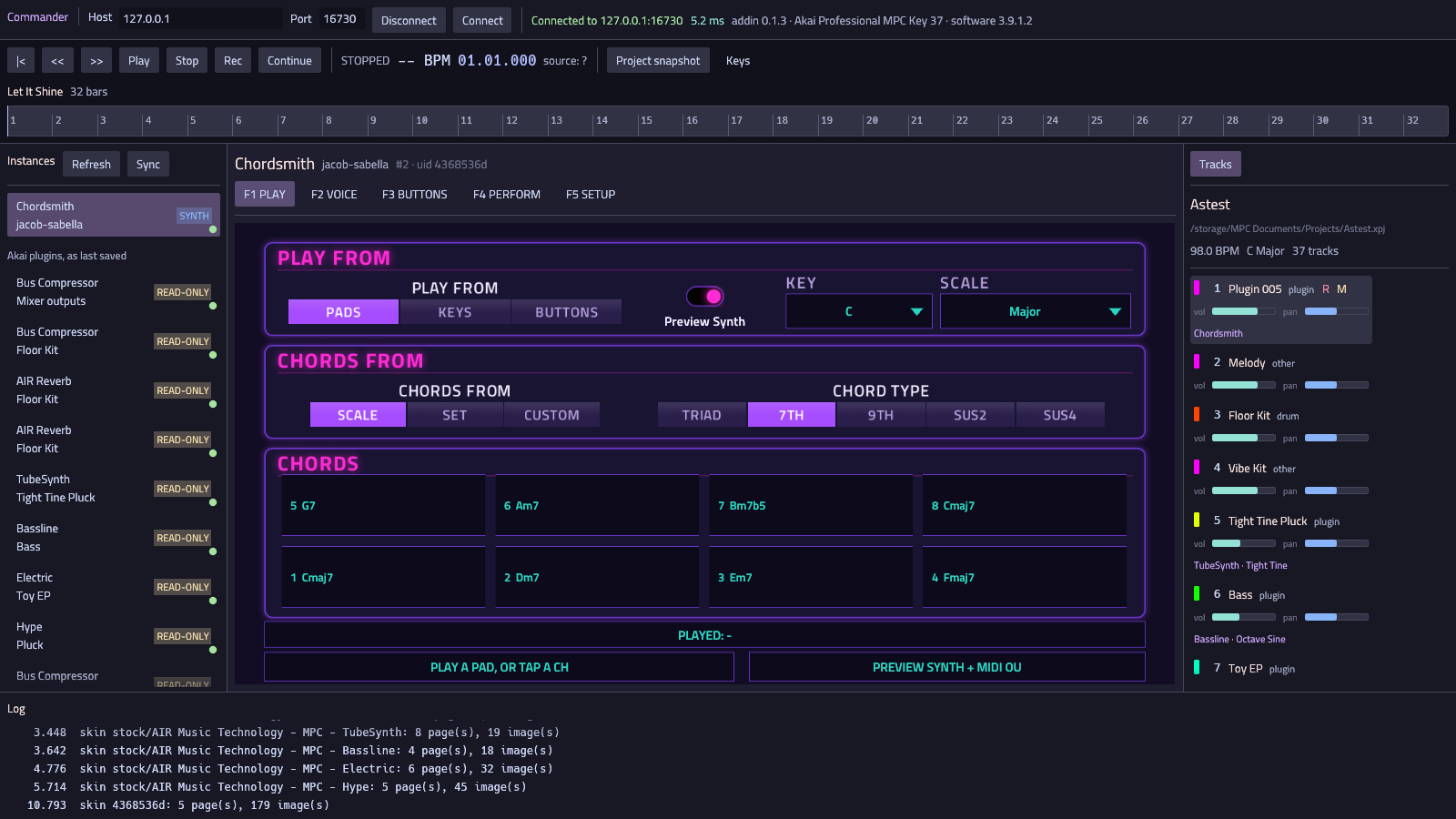
The desktop half of MPC Commander: the plugins running on your MPC, drawn with their own skins on the computer, with every knob live in both directions.
Needs
- The Commander addin on the device: commander-addin-v1.0.0 (any addin that speaks the same protocol number works).
- Linux x86_64.
Run
sha256sum -c mpc-commander-1.0.0-linux-x86_64.tar.gz.sha256
tar xzf mpc-commander-1.0.0-linux-x86_64.tar.gz
cd mpc-commander-1.0.0-linux-x86_64 && ./commander --host localhost   # through an SSH tunnel to port 6730
In 1.0.0
- Catalog plugins: the skin from the plugin's own folder, or a generic knob panel; changes go to MPC and MPC's changes come back.
- Akai's stock plugins are listed with a READ-ONLY badge, a banner and a tag on the panel: their values are as of the last project save, and the app doesn't send changes to them. Change them on the MPC, then press Sync.
MPC Commander addin 1.0.0
The plugins MPC loads, with their own skins, and MPC's transport, in a desktop app (through an SSH tunnel by default).
Requirements
- A first-generation MPC OS standalone device (32-bit ARM: Force, MPC Live / Live II, One, X, Key 61 and Key 37).
- Root shell access (SSH) to the device. Stock MPC OS doesn't offer this; you need a modded unit.
- Installing addins this way is unofficial: back up first, use at your own risk.
Install
- Unzip, then copy the whole folder to the device, e.g.
scp -r MPC-Commander-addin-1.0.0 root@<device-ip>:/tmp/ - Run it:
ssh root@<device-ip> sh /tmp/MPC-Commander-addin-1.0.0/install.sh
The installer copies the addin into /data/mpc-addins/commander/, adds mpc_commander_addin.so to the LD_PRELOAD list of MPC's service
and restarts MPC (save your project first). The list is extended, never replaced: other addins and the
libraries the firmware preloads stay. Where no writable file sets the list (the unit is on the read-only root), one
drop-in shared by every addin sets it, /etc/systemd/system/<service>.service.d/90-mpc-addins.conf. Re-run the
installer after a firmware update. -y skips the question, -n leaves the restart to you.
Settings are in /data/mpc-addins/commander/mpc_commander_addin.conf; an upgrade keeps your edits.
It listens on the device only. From your computer: ssh -L 6730:127.0.0.1:6730 root@, then connect the MPC Commander desktop app to localhost:6730 (bind and port are in mpc_commander_addin.conf). For transport and MIDI, enable the MPC Commander port in MPC's MIDI preferences: as an input (with Receive MMC on) and as an output with clock sync and Send MMC.
Uninstalling and the file list are in INSTALL.md inside the zip.
Built by GitHub Actions from cd72c01 with mpc-vst-plugins@a4b8f86.
MPC Commander addin v0.1.3
The plugins MPC loads, with their own skins, and MPC's transport, on a desktop app over the network.
Requirements
- A first-generation MPC OS standalone device (32-bit ARM: Force, MPC Live / Live II, One, X, Key 61 and Key 37).
- Root shell access (SSH) to the device. Stock MPC OS doesn't offer this; you need a modded unit.
- Installing addins this way is unofficial: back up first, use at your own risk.
Install
- Unzip, then copy the whole folder to the device, e.g.
scp -r MPC-Commander-addin-0.1.3 root@<device-ip>:/tmp/ - Run it:
ssh root@<device-ip> sh /tmp/MPC-Commander-addin-0.1.3/install.sh
The installer copies the addin into /data/mpc-addins/commander/, adds mpc_commander_addin.so to the LD_PRELOAD list of MPC's service
and restarts MPC (save your project first). The list is extended, never replaced: other addins and the
libraries the firmware preloads stay. Where no writable file sets the list (the unit is on the read-only root), one
drop-in shared by every addin sets it, /etc/systemd/system/<service>.service.d/90-mpc-addins.conf. Re-run the
installer after a firmware update. -y skips the question, -n leaves the restart to you.
Settings are in /data/mpc-addins/commander/mpc_commander_addin.conf; an upgrade keeps your edits.
It listens on the device only. From your computer: ssh -L 6730:127.0.0.1:6730 root@, then connect the MPC Commander desktop app to localhost:6730 (bind and port are in mpc_commander_addin.conf). For transport and MIDI, enable the MPC Commander port in MPC's MIDI preferences: as an input (with Receive MMC on) and as an output with clock sync and Send MMC.
Uninstalling and the file list are in INSTALL.md inside the zip.
Built by GitHub Actions from 8c4a60d with mpc-vst-plugins@83c6cbd.