Repository navigation
Releases
MPC Sample Scale Mode 1.2.0

MPC Sample Scale Mode 1.2.0. Hold 16 Levels (about a second) to turn Scale on or off; with Scale on, the 16 Levels slots play a scale, shown on the SCALE page.
Changes since 1.1.0:
- The page is Scale. A hold turns Scale and the SCALE page on together, and the next hold turns both off: MPC's screen comes straight back (it used to linger a few seconds, and closing the page with the dial left Scale on). A dial press now exits Scale too. If another page took the screen while Scale is on, a hold brings the SCALE page back.
- Input lock. While Scale is on, buttons and knobs no longer reach MPC, so nothing changes MPC's screen or parameters under the page (before, the knobs moved the sample's trim and other settings). The pads, 16 Levels, Shift, the transport (Rec, Overdub, Stop, Play, Play Start), notes 84-87 and the page's own keys, dial and K1-K3 still work.
lock_input=0turns the lock off;pass_noteslists the buttons that get through. Each control kept from MPC is logged with its note. padctl raw [n]logs the raw control-surface input to MPC's journal.
Checked on an MPC Sample, firmware 1.3.0.12 (2026-11-09): the hold toggle and the input lock, by hand and with injected presses. Notes 84-87 are believed to be the bank buttons; not confirmed yet.
Needs mpc-addin-sample-draw-handler 1.0.1 or later for the page. The installer's LD_PRELOAD drop-in on the Sample is on /run, so reinstall after a reboot (or restore it from the SD card's autorun).
MPC Sample Scale Mode 1.1.0
MPC Sample Scale Mode (was Enable Scale Mode). Hold 16 Levels (about a second) to turn Scale on or off. With Scale on, the 16 Levels slots play a scale instead of their usual steps. A short press is still a normal 16 Levels press, and Shift+16 Levels still cycles the Type.
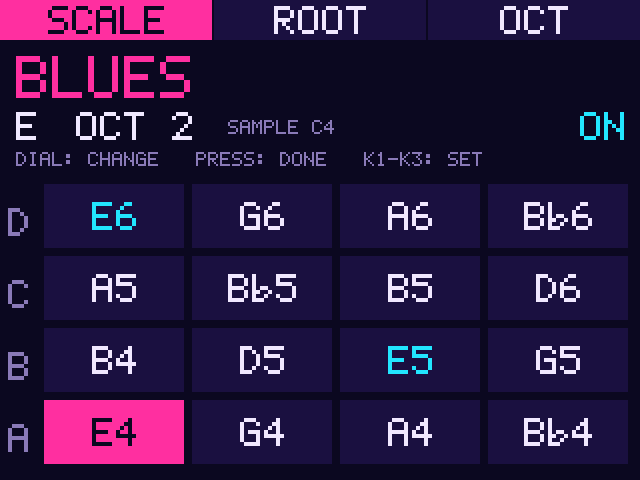
Holding 16 Levels also opens a SCALE page. It shows the notes every slot plays and lights the one you hit; the soft keys pick scale, root or octave, the dial changes it, K1-K3 set them directly, and a dial press closes it. It stays up while Scale is on.
Needs mpc-addin-sample-draw-handler 1.0.1 or later for the page. Without it, the hold still toggles Scale.
Upgrading from Enable Scale Mode 0.x: the addin was renamed, so uninstall the old one first: sh /data/mpc-addins/enable-scalemode/uninstall.sh. While the old one is loaded, this one stays off and says so in MPC's log. Settings start fresh.
Changes since 1.0.0:
- Always by ear.
detect_pitch=always(orpadctl detect always) listens to every sample, not only untagged ones, and the note heard wins over the file's tag: for samples tagged with the wrong note. Checked on a Moog lead tagged D that sounds C#: with root A, slot 0 sounded G# by the tag and A by ear. A sample with no clear pitch keeps MPC's root note either way. detect_pitchtakesuntagged(the default, as in 1.0.0),alwaysoroff(0/1/2 still work);padctl detectshows or sets it and saves it to the conf.
Tested on an MPC Sample, firmware 1.3.0.12 (2026-11-06): the device test passes 19 of 19 from this zip, with every slot's pitch and the pad latency measured from the USB audio. The installer's LD_PRELOAD drop-in on the Sample is on /run, so reinstall after a reboot.
MPC Sample Scale Mode 1.0.0
MPC Sample Scale Mode (was Enable Scale Mode). Hold 16 Levels (about a second) to turn Scale on or off. With Scale on, the 16 Levels slots play a scale instead of their usual steps. A short press is still a normal 16 Levels press, and Shift+16 Levels still cycles the Type.
Holding 16 Levels also opens a SCALE page. It shows the notes every slot plays and lights the one you hit; the soft keys pick scale, root or octave, the dial changes it, K1-K3 set them directly, and a dial press closes it. It stays up while Scale is on.
Needs mpc-addin-sample-draw-handler 1.0.1 or later for the page. Without it, the hold still toggles Scale.
Upgrading from Enable Scale Mode 0.x: the addin was renamed, so uninstall the old one first: sh /data/mpc-addins/enable-scalemode/uninstall.sh. While the old one is loaded, this one stays off and says so in MPC's log. Settings start fresh.
Changes since 0.3.0:
- Untagged samples are listened to. A WAV with no note in it gets MPC's default root, 60, so the addin checks every 60 by ear: in the background it reads the sample's audio (from memory, or from its WAV file when MPC streams it from disk), finds its pitch, and starts the scale from that note. The page shows SAMPLE BY EAR. Samples with no clear pitch (most drums, noise, dense chords) keep 60; an 808-style kick gets its tail's note. The first hit of a new sample still plays from 60, every hit after it from the note heard.
- A note tagged in the file (anything but 60) is still used as MPC has it.
detect_pitch=0in the conf turns it off;padctl hearshows the pitch heard in the last sample played.tests/pitch_detect_test.c: host test of the detection on made-up sounds and any WAVs given.
Tested on an MPC Sample, firmware 1.3.0.12 (2026-11-06): the device test passes 18 of 18 from this zip, with every slot's pitch and the pad latency measured from the USB audio. The installer's LD_PRELOAD drop-in on the Sample is on /run, so reinstall after a reboot.
MPC Sample Scale Mode 0.3.0
MPC Sample Scale Mode (was Enable Scale Mode). Hold 16 Levels (about a second) to turn Scale on or off. With Scale on, the 16 Levels slots play a scale instead of their usual steps. A short press is still a normal 16 Levels press, and Shift+16 Levels still cycles the Type.
Holding 16 Levels also opens a SCALE page. It shows the notes every slot plays and lights the one you hit; the soft keys pick scale, root or octave, the dial changes it, K1-K3 set them directly, and a dial press closes it. It stays up while Scale is on.
Needs mpc-addin-sample-draw-handler 1.0.1 or later for the page. Without it, the hold still toggles Scale.
Upgrading from Enable Scale Mode 0.x: the addin was renamed, so uninstall the old one first: sh /data/mpc-addins/enable-scalemode/uninstall.sh. While the old one is loaded, this one stays off and says so in MPC's log. Settings start fresh.
Changes since 0.2.0:
- Starts from the sample's own note. Scale reads the root note MPC keeps for the sample (the WAV's
smpltag, or 60 = C when untagged, editable in MPC) instead of assuming C, so the scale lands on the chosen root for any sample. The page shows it as SAMPLE. - No lag from the page. It refreshed the whole screen 16 times a second, which made pads up to 80 ms late (18 ms on average). It now sends only what changes; measured from the USB audio, neither the page nor Scale adds a delay.
- Hits recorded into a sequence keep their scale notes and play back at those pitches.
- The page stays up while Scale is on.
- Renamed to
sample-scalemode(repo mpc-addin-sample-scalemode) like the other MPC Sample addins. padctl latandtests/latency_check.py(latency),tests/pitch_check.py(every slot's pitch),tests/device_test.shruns all of it on a Sample over SSH;padctlprints long replies whole.
Tested on an MPC Sample, firmware 1.3.0.12 (2026-11-06). The installer's LD_PRELOAD drop-in on the Sample is on /run, so reinstall after a reboot.
Enable Scale Mode 0.2.0
Prerelease. MPC Sample only.
Hold 16 Levels (about a second) to turn Scale on or off. With Scale on, the 16 Levels slots play a scale (Blues on C3 by default) instead of their usual steps. A short press is still a normal 16 Levels press, and Shift+16 Levels still cycles the Type.
Holding 16 Levels also opens a SCALE page on the screen. It shows every slot's note and lights the one you play. The soft keys pick scale, root or octave, the dial changes it, and K1-K3 set them directly. The page gives the screen back to MPC about 4 seconds after the last input or pad hit. Changes are saved and survive a restart.
Needs mpc-addin-sample-draw-handler 0.5.0 or later for the page. Without it, the hold still toggles Scale.
Changes since 0.1.1:
- Scale is no longer a step in the Shift+16 Levels Type cycle; holding 16 Levels toggles it instead (
scale_slotis gone; newhold_msandpagesettings). - The SCALE page.
- Saving settings keeps the rest of the conf file.
tests/device_test.shruns the whole sequence on a Sample over SSH.
Tested on an MPC Sample, firmware 1.3.0.12 (2026-11-06). The installer's LD_PRELOAD drop-in on the Sample is on /run, so reinstall after a reboot.
Enable Scale Mode 0.1.1
Scale as a 16 Levels Type on the MPC Sample. Replaces 0.1.0, whose build blocked the 16 Levels button.
Use: press 16 Levels, then Shift+16 Levels until Scale: it comes one press after the native Type with value 1, and the next press returns to the native cycle. The 16 slots (4 pads x 4 banks) then play the chosen scale. There's no popup for Scale yet; padctl status shows scale_on=1.
Changes since 0.1.0
- Hooks the 16 Levels Type cycle and inserts Scale; the pad remap only applies while Scale is selected (0.1.0 gated on the wrong field)
- The PadPerform bool patch is off by default (
padperform_patch=1to enable): it made the Sample boot in Pad Perform, which blocks 16 Levels - Default
octave_offset=2: bank A starts at the root (Blues/C3: C3, Eb3, F3, F#3) - The
padctlsocket starts reliably;padctlstays executable after install
Known limitations
- Which native Type value (0-2) is Tune, Velocity or Filter isn't mapped yet;
padctlprints numbers - Slots need a sample on the pad
- No on-screen scale settings (the firmware's dialogue needs a touchscreen): use
padctlor the conf file - On the Sample, the installer's
LD_PRELOADdrop-in is on/run(tmpfs): reinstall after a reboot
Checked on device (MPC Sample, firmware 1.3.0.12, 2026-11-06): installed from this zip with install.sh; all three hooks and the padctl socket came up. Shift+16 Levels stepped Type 0 -> 2 -> 1 -> Scale -> 0, and in Scale the pads played Blues offsets 0 to +30 across the 16 slots, with the other Types untouched. That pad run used the same Scale code in the build just before the socket fix.
Enable Scale Mode 0.1.0
First prerelease: Scale for 16 Levels on the MPC Sample. Superseded soon; read the known issue below.
Known issue in this build: it forces the PadPerform bool, which makes the Sample boot with Pad Perform active and blocks the 16 Levels button, and its pad remap doesn't follow the 16 Levels Type. The fix (Scale as a Shift+16 Levels Type, bool patch off by default) is on main and is being tested on hardware for the next prerelease.
What it does: hooks the note mapping function with a PACIASP trampoline and repitches the 16 Levels slots through scale tables; padctl CLI for scale, root and octave; settings persist across restarts.
Scales: Chromatic, Major, Minor, Harmonic Minor, Dorian, Blues, Phrygian, Mixolydian. Default Blues/C3, octave_offset 2 (bank A: C3, Eb3, F3, F#3).
Known limitations:
- Pads need samples assigned: the firmware skips note mapping for empty pads
- No on-screen scale settings (the firmware's dialogue needs a touchscreen); use padctl over SSH or the conf file
Checked on device (MPC Sample, 2026-11-06): install.sh installs, adds the .so to LD_PRELOAD and restarts MPC; padPerformButton and the bool were found and patched (the Sample has no generation gate to patch); the hook fires on pad presses; settings persist across MPC restarts.