Repository navigation
Releases
Leaf 0.2.2

Leaf 0.2.2 fits better into your desktop and is safer with documents from others.
New
- Share (File › Share): the Windows share sheet, Copy file to paste the PDF into Explorer, Outlook, Teams or a
chat, Email… with the PDF attached, and Show in folder. If the document has unsaved changes, Leaf asks
whether to save first or share a copy of the current state. - Right-click menus. The page has one, and text selections, comments, links, the comments panel, attachments and
recent files have new ones. Highlight or redact selected text, add a note where you clicked, rotate or extract
that page, reply to a comment, copy a link, and more. - Combine with Leaf. Select several PDFs in File Explorer, right-click, and choose Combine with Leaf (under
Show more options on Windows 11) to get one new document. Edit with Leaf opens a PDF directly. From the command
line:leaf --merge a.pdf b.pdf. KDE Dolphin gets a service menu too. - Make Leaf your default PDF app. The installer registers Leaf with Windows, so it's listed in Default apps and
in "How do you want to open this?", but it doesn't change your default by itself. Settings › System › Make Leaf
the default PDF app takes you to the right place. On Linux it sets it withxdg-mimeafter asking. - Jump list: right-click Leaf on the taskbar for New window.
Security
- Links in PDFs can no longer start programs, scripts or shortcuts, or reach network shares (which could leak
your Windows sign-in hash). Risky link types such asms-msdt:andsearch-ms:are refused. Web, email, phone and
map links work as before, and links to other apps ask with a warning first. - Attachments disguised as documents (e.g.
invoice.exe.) are caught. Opened or saved attachments are marked as
downloaded, so Windows SmartScreen and Office Protected View apply to them. - For AI agents (MCP and agent link): network paths are refused in every spelling, and "copies never overwrite"
now also holds against races and symlinks. - Also: OCR language downloads only follow secure (https) redirects, crafted metadata can no longer freeze Leaf
on save, the Linux style cache moved out of the shared/tmp, and an all-users (admin) install goes to Program
Files.
Downloads
| File | For |
|---|---|
Leaf-0.2.2-windows-x64-setup.exe |
Windows 10/11 x64 installer (recommended): per-user, no admin prompt |
Leaf-0.2.2-windows-x64.zip |
Windows portable: unzip anywhere and run Leaf.exe. leaf-cli.exe is the command-line version. |
Leaf-0.2.2-x86_64.AppImage |
Linux x86_64: chmod +x, then run it |
leaf-0.2.2-linux-x86_64.tar.gz |
Linux x86_64 app folder, plus the desktop entry, metadata, icons and the Dolphin service menu (AUR/Flatpak) |
Linux needs glibc 2.34 or newer and libOpenGL.so.0 (libopengl0 on Debian/Ubuntu). The builds aren't code-signed
yet; on Windows, SmartScreen may warn: choose More info › Run anyway. SHA256SUMS.txt lists the checksums.
License
AGPL-3.0-or-later. The source for this build is the v0.2.2 tag.
Leaf 0.2.1
A bug-fix release for 0.2.0. Everyone on 0.2.0 should update.
Fixed
- High CPU use while idle. With the new look, Leaf kept one CPU core busy (about 95%) even when doing nothing.
Idle use is now 0%. - Menu commands stuck disabled. After startup, Presentation, the page view modes and night mode could stay
greyed out after opening a document, and Focus mode could come up without its floating toolbar. - Focus mode with full screen or a presentation. Turning these on and off in different orders could leave the
window with no menu bar or toolbar, or show both the toolbars and the floating bars. - Closing in full screen made the next window start without its toolbar.
- Keyboard shortcuts dialog. The shortcut fields were squeezed to a few pixels, so shortcuts couldn't be read
or changed. - Clipped dialog buttons. The main button in some dialogs (such as Browse… when signing, or Recognize in OCR)
had its text cut off. - Settings after a theme switch. Switching between light and dark with Settings open left its notes hard to read.
- Start screen. It no longer reads file information from disk on every repaint, which could stall on slow
network drives.
Downloads
| File | For |
|---|---|
Leaf-0.2.1-windows-x64-setup.exe |
Windows 10/11 x64 installer (recommended): per-user, no admin prompt |
Leaf-0.2.1-windows-x64.zip |
Windows portable: unzip anywhere and run Leaf.exe. leaf-cli.exe is the command-line version. |
Leaf-0.2.1-x86_64.AppImage |
Linux x86_64: chmod +x, then run it |
leaf-0.2.1-linux-x86_64.tar.gz |
Linux x86_64 app folder, plus the desktop entry, metadata and icons (AUR/Flatpak) |
Linux needs glibc 2.34 or newer and libOpenGL.so.0 (libopengl0 on Debian/Ubuntu). The builds aren't code-signed
yet; on Windows, SmartScreen may warn: choose More info › Run anyway. SHA256SUMS.txt lists the checksums.
License
AGPL-3.0-or-later. The source for this build is the v0.2.1 tag.
Leaf 0.2.0
Superseded by 0.2.1, which fixes high CPU use while idle and menu commands that could stay disabled. Please use 0.2.1.
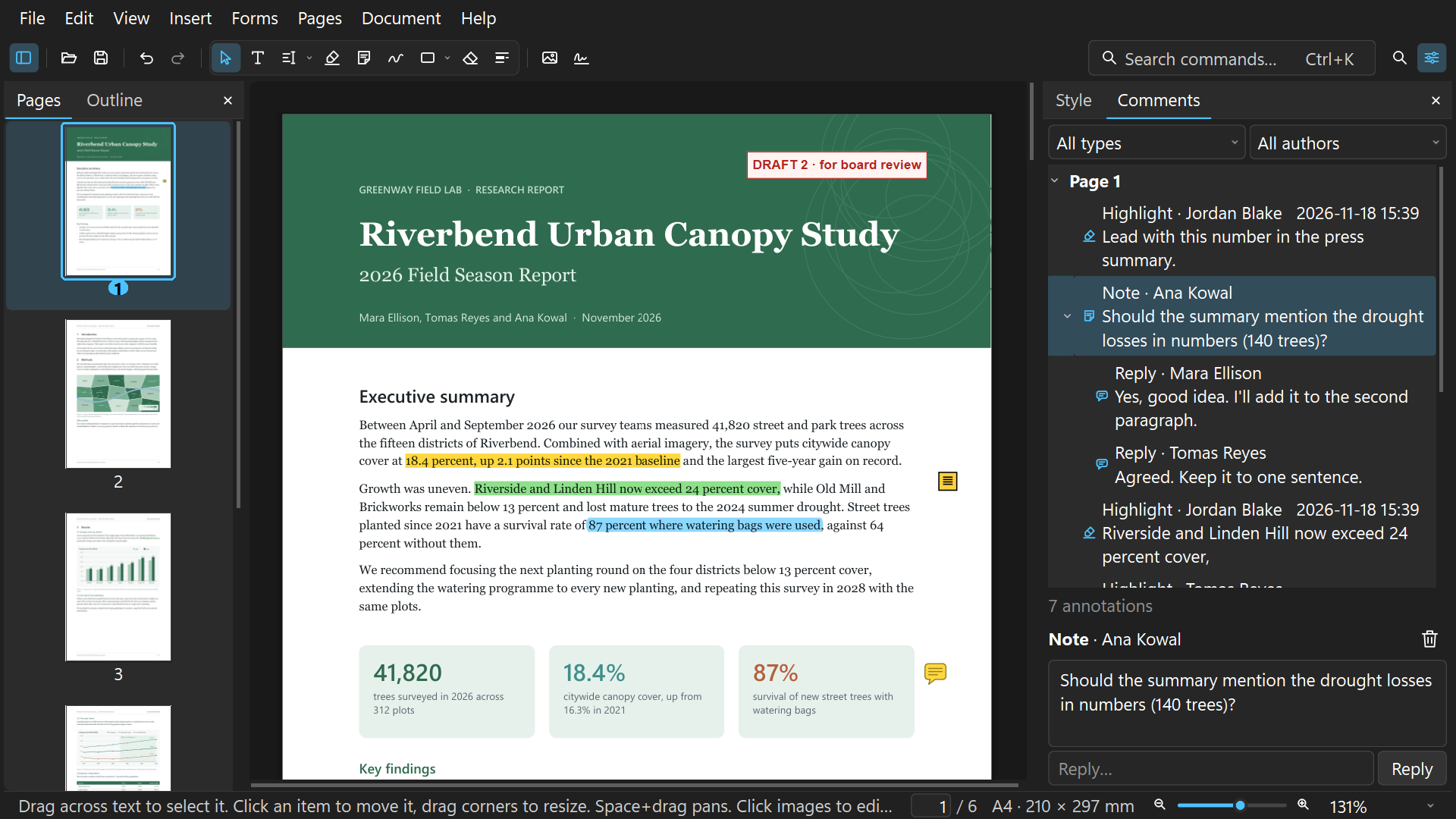
Leaf 0.2.0 brings a new look and a Windows installer.
New
- A new look. Follows Windows 11: rounded panels and tool groups, your Windows accent color, a matching title
bar and Windows 11's system font. Light and dark follow your system setting. All text meets WCAG AA contrast. - Start screen. "Pick up where you left off" shows your recent files as page previews.
- Focus mode (View › Focus mode, or Ctrl+Shift+F). Hides the menus, toolbars and panels. A floating toolbar and a
page/zoom bar slide away while you read. Alt or F10 shows the menu, and Esc leaves Focus mode. - "Search commands… Ctrl+K" box in the toolbar.
- Windows installer. Installs for your user only, with no admin prompt, and adds Leaf to Open with for PDFs
without changing your default PDF app.
Fixed
- The first pages of a document could take several seconds to appear, or stay blank, after opening.
- The command palette's grey shortcut text was too faint to read easily.
Downloads
| File | For |
|---|---|
Leaf-0.2.0-windows-x64-setup.exe |
Windows 10/11 x64 installer (recommended) |
Leaf-0.2.0-windows-x64.zip |
Windows portable: unzip anywhere and run Leaf.exe. leaf-cli.exe is the command-line version. |
Leaf-0.2.0-x86_64.AppImage |
Linux x86_64: chmod +x, then run it |
leaf-0.2.0-linux-x86_64.tar.gz |
Linux x86_64 app folder, plus the desktop entry, metadata and icons (AUR/Flatpak) |
Linux needs glibc 2.34 or newer and libOpenGL.so.0 (libopengl0 on Debian/Ubuntu).
Notes:
- The builds aren't code-signed yet. On Windows, SmartScreen may warn: choose More info › Run anyway.
- There's no macOS build in this release.
SHA256SUMS.txtlists the checksums of these files.
License
AGPL-3.0-or-later, the same as the MuPDF engine Leaf is built on. The source for this build is the v0.2.0 tag.
Leaf 0.1.0
First public build of Leaf, a fast PDF editor that runs entirely on your computer. Nothing is uploaded anywhere.
What it does
- View and read: smooth scrolling, thumbnails, outline, search, spreads, night mode.
- Annotate: highlights, notes, shapes, ink with pen pressure, text boxes, and editing existing annotations.
- Forms: fill forms, sign them with a drawn or image signature, and flatten.
- Edit text and images: change existing text in place, and replace or move images.
- Pages: reorder, rotate, insert, delete, crop and split, and merge files.
- Redact: content is really removed, not just covered.
- Digital signatures: PAdES signatures, with sign and verify.
- OCR: make scans searchable. English is built in, and more languages download on request.
- Also: reduce file size, compare two PDFs, find and replace, print, export.
- For scripts and agents: a command line (
leaf-cli) and an MCP server (leaf mcp). See docs/agents.md.
Downloads
| File | For |
|---|---|
Leaf-0.1.0-windows-x64.zip |
Windows 10/11 x64. Unzip anywhere and run Leaf.exe. leaf-cli.exe is the command-line version. |
Leaf-0.1.0-x86_64.AppImage |
Linux x86_64. chmod +x it, then run it. |
leaf-0.1.0-linux-x86_64.tar.gz |
Linux x86_64 app folder, plus the desktop entry, AppStream metadata and icons. Used by the AUR and Flatpak packages. |
Linux needs glibc 2.34 or newer and libOpenGL.so.0 (libopengl0 on Debian/Ubuntu).
Notes:
- The builds aren't code-signed yet. On Windows, SmartScreen may warn: choose More info › Run anyway.
- There's no macOS build in this release.
SHA256SUMS.txtlists the checksums of these files.
License
AGPL-3.0-or-later, the same as the MuPDF engine Leaf is built on. The source for this build is the v0.1.0 tag.