Repository navigation
Home
Your portfolio, live in the macOS menu bar.
Stockbar is a native macOS app that shows your portfolio total and individual stock prices in the menu bar, with a main window for holdings, charts, risk and allocation analysis, price alerts, backups and settings. It runs on macOS 15.4 or later. It is written in Swift 6 (SwiftUI and AppKit), stores its data locally in Core Data, fetches market data through a bundled Python helper, and updates itself with Sparkle.
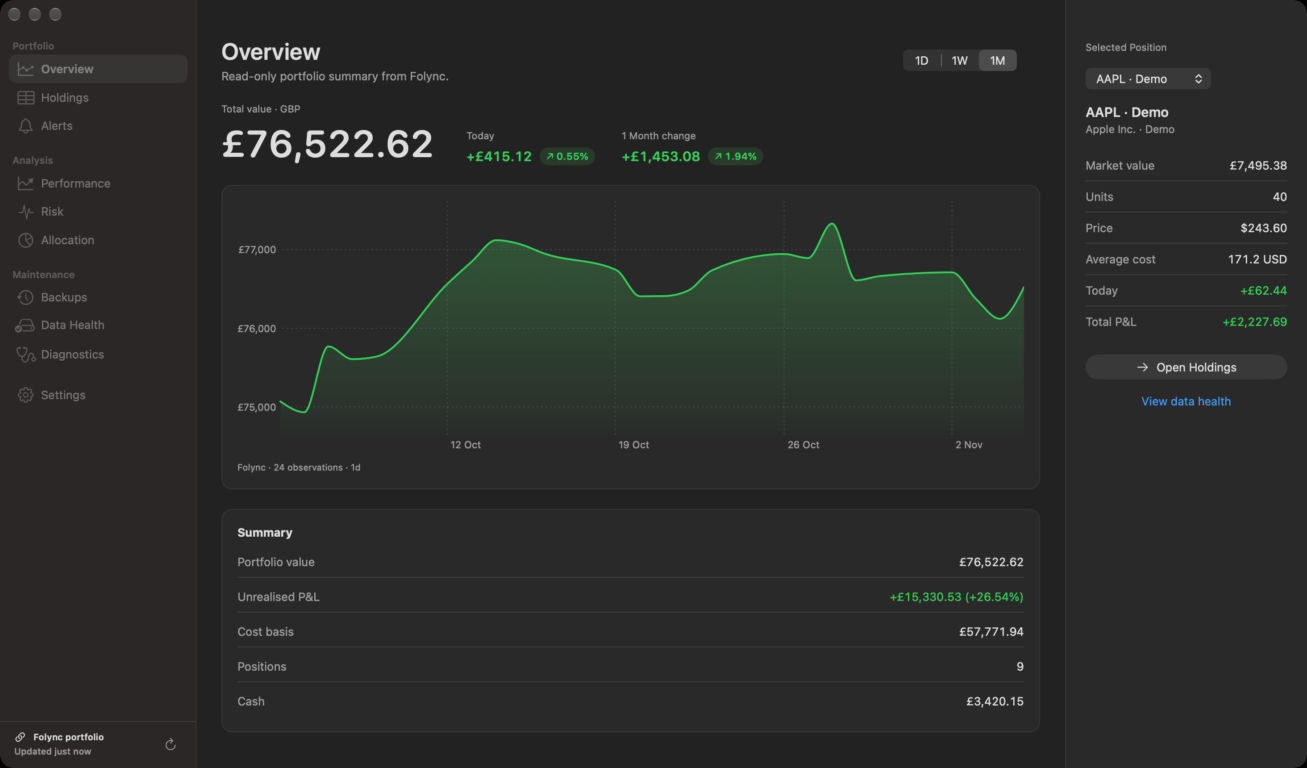
Overview, showing a fictional demo portfolio.
This wiki describes Stockbar 3.8.2. Where a page describes behaviour that changed in 3.8.0, 3.8.1 or 3.8.2, it says so.
- People who hold shares and want to see them at a glance. Enter your holdings by hand, or link a read-only Trading 212 account, or use a self-hosted Folync instance as the source.
- People with UK listings. Pence (GBX) are handled once, at the point the price arrives. See Getting Started.
- People who care where their data goes. Nothing leaves your Mac except the ticker symbols sent to market-data providers and the update check. See Privacy and Security.
- Developers who want to read, build or contribute. The developer pages start at Architecture.
| If you want to... | Read |
|---|---|
| Install Stockbar | Installation |
| Add your first holdings | Getting Started |
| Understand the menu bar items and popovers | Menu Bar |
| Find your way around the main window | Main Window |
| Fix something that has stopped working | Troubleshooting and FAQ |
Using Stockbar
| Page | What it covers |
|---|---|
| Installation | Download, first launch, Open Anyway, Python setup, building from source |
| Getting Started | First holdings, symbol formats, watchlist, currencies |
| Menu Bar | The portfolio item, stock items, popovers, visibility |
| Main Window | Every sidebar section, the View menu and keyboard shortcuts |
| Portfolio and Holdings | The Holdings table, editing, sources that coexist |
| Alerts | Price alerts and notifications |
| Charts and Analytics | Performance, Risk and Allocation |
| Trading 212 | Read-only broker sync |
| Folync | A self-hosted portfolio source |
| Market Data and Python | Providers, API keys, Python setup, refresh behaviour |
| Settings Reference | Every setting, its default and what it does |
| Updates and Channels | Stable, Testing and Experimental |
| Backups, Export and Import | Daily backups, moving to another Mac |
| Privacy and Security | What is stored, what is sent, how it is protected |
| Troubleshooting | Symptoms and fixes |
| FAQ | Short answers |
| Release History | One paragraph per version |
For developers
| Page | What it covers |
|---|---|
| Architecture | Components, data flow, source ownership |
| Development | Commands, tests, isolation rules, the acceptance harness |
| Branches and Releases |
testing, main, experimental, how builds are made |
| Performance and Benchmarks | The benchmark scripts and the experimental log |
- The Folync portfolio chart appears at once. The portfolio popover and the Overview draw the history saved from Folync's last answer straight away, marked Checking Folync, and update when Folync replies. See Menu Bar.
- "Couldn't reach Folync". When Folync doesn't answer, a period with nothing saved says so instead of asking for more stored history, and the log records why. See Troubleshooting.
- Total P&L against net deposits. With Folync as the portfolio source, total P&L in the portfolio popover and the Overview is measured by default against the money you paid in less what you took out. That is the figure Folync shows as "What if not investing". Settings → General → Measure P&L Against switches back to the cost of the shares you hold. See Menu Bar.
- "Updated" shows when a price was fetched, not when Stockbar received it from the helper's cache.
- Price alerts save their last checked prices once per refresh.
3.8.0 is a release about memory and processor use, plus a new update channel.
- Less idle memory. About 20% lower in the project's benchmark.
- Faster history loading at launch.
- About half the processor time in each price refresh.
- Quit Python Helper When Idle is now on by default. The idle helper quits after 90 seconds; with the switch off it is kept for 15 minutes.
- Roll Digits When Figures Change, a new switch.
- An Experimental update channel.
- A fix for popover chart lines doubling back across a gap in time.
The figures come from benchmarks on made-up data, not from real portfolios. See Release History and Performance and Benchmarks.
- Latest release and all releases
- Issues
- Source repository
- Documents in the repository, which this wiki is written from. If you find the wiki, the documents and the app disagreeing, please open an issue.
- Security policy