Repository navigation

Replies: 13 comments 17 replies

|
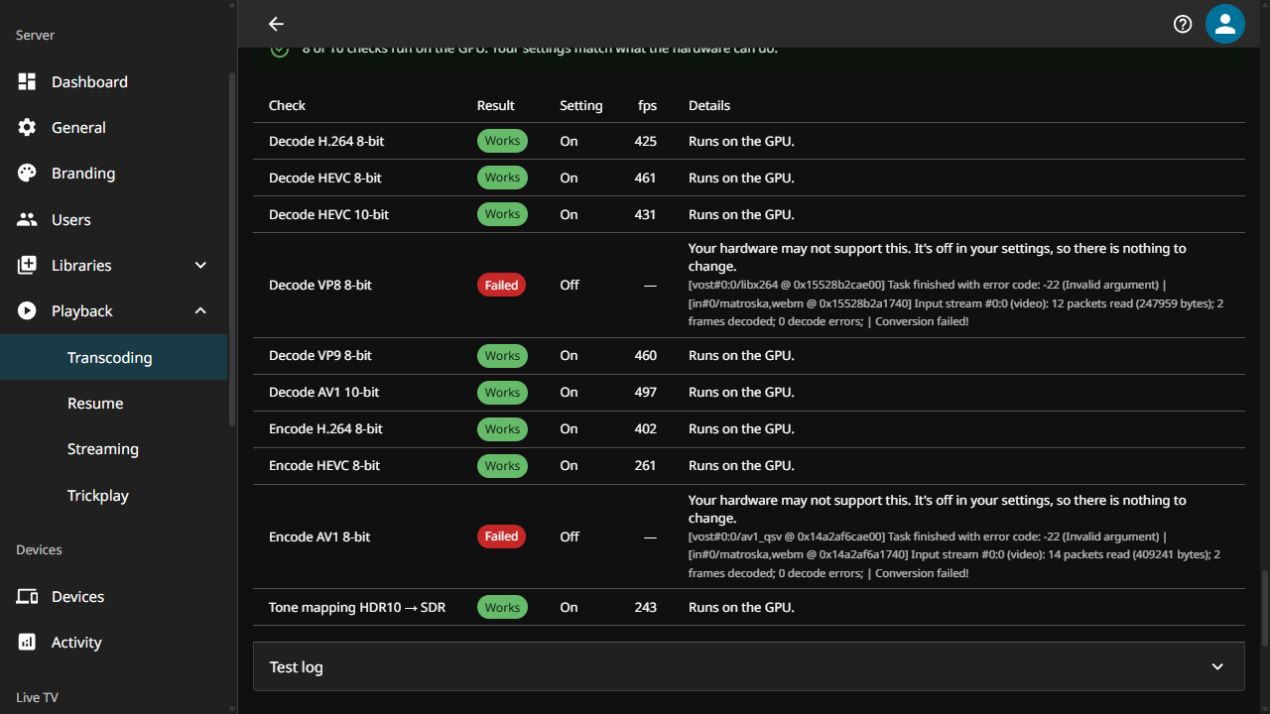
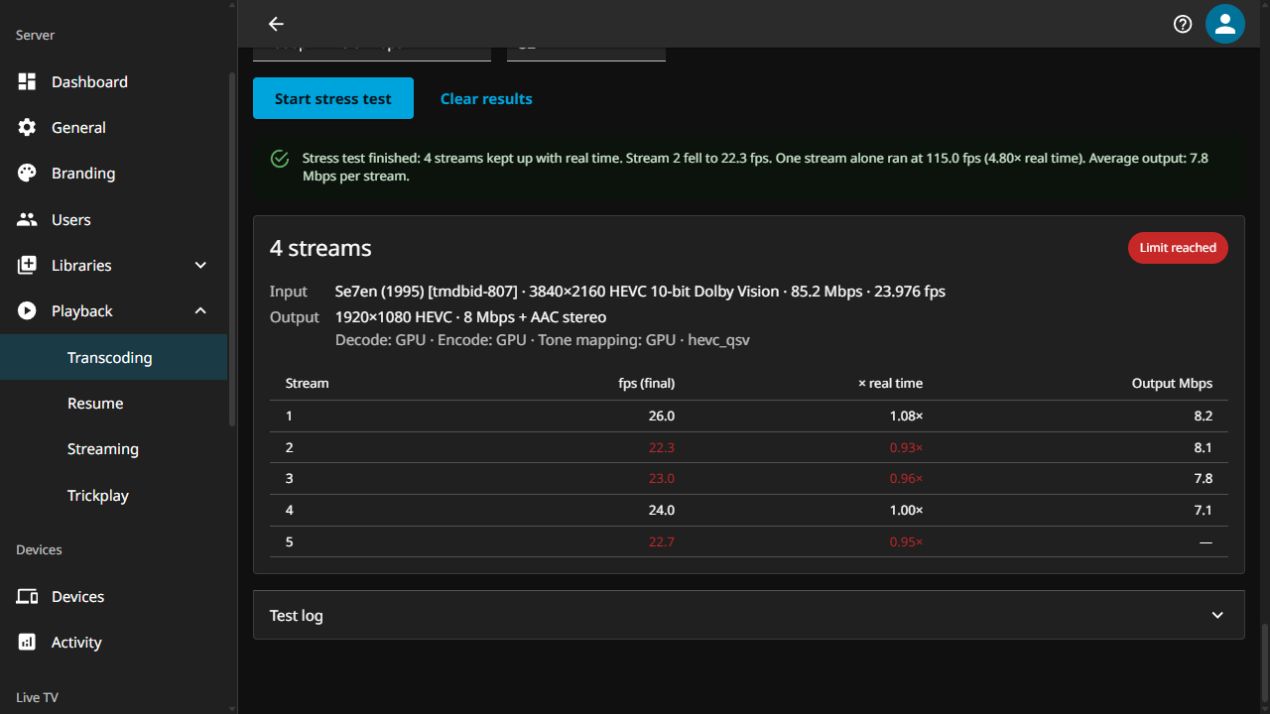
Adding an Intel Quick Sync / Unraid data point. Both the compatibility check and stress tests completed on my i7-12700K / UHD 770 setup. Environment
Tests were started and collected through the admin Compatibility check
The driver advertises AV1 decoding ( Stress testsSame input for both runs: a Se7en UHD remux, 3840×2160, HEVC 10-bit, Dolby Vision with HDR10, 23.976 fps, approximately 85.2 Mbps source bitrate. Both outputs were 1920×1080 at 8 Mbps, with AAC stereo audio. Both runs reported hardware decoding, hardware encoding and hardware tone mapping.
Maximum streams was set to 32, so neither result hit the configured cap. Both stopped with Feedback / potentially confusing output
The production server and test instance were healthy after testing, and the test instance had no remaining FFmpeg processes. Compatibility check — full test logH.264 stress test — full test logHEVC stress test — full test log |

|
Thank you for the thorough test and results! I will take this back and investigate |
|
Alright I've had a chance to review this. First of all, thanks again!! @DBSimoes this led straight to multiple fixes:
If you have a few minutes, a re-run on :latest - it would be great to confirm it all looks good on your end. |

|
Retested the updated Image pulled November 3, 2026: Compatibility fixes confirmed
Also checked the later Intel tone-mapping changes: with VPP enabled, HDR tone mapping passes using Updated stress testsSame sample and output settings as the original report: 3840×2160 HEVC 10-bit, Dolby Vision with HDR10, 23.976 fps, approximately 85.2 Mbps; outputs 1920×1080 at 8 Mbps, AAC stereo, hardware decoding/encoding/tone mapping. Maximum streams: 32. This build uses 100% of source frame rate, with a reported threshold of 23.98 fps and
These remain single short ramp runs, rather than sustained or repeated capacity measurements. Full logs follow. ScreenshotsCompatibility check with production settings
HEVC stress test at the 100% frame-rate threshold
Baseline compatibility checkAV1 encoding and VP8 decoding enabled in test instanceHEVC encoding off, VPP off / OpenCL tone mappingH.264 stress test, 100% thresholdHEVC stress test, 100% threshold |

Environment:
QSV SettingsEnable hardware decoding: H264, HEVC, MPEG2, VP8, VP9, HEVC 10bit, HEVC RExt 8/10bit Compatibility Check
Compatibility Check - Full logStress Test (The Batman, 4K HEVC 10bit HDR10):
Stress Test - Full logVAAPI:Enable hardware decoding: H264, HEVC, MPEG2, VP8, VP9, HEVC 10bit, HEVC RExt 8/10bit Compatibility Test:
Compatibility Check - Full logStress Test (The Batman, 4K HEVC 10bit HDR10):
Stress Test - Full logStress Test (The Batman, 4K HEVC 10bit HDR10), Turning off Tone Mapping:
Stress Test - Full logMy findings:VAAPI seems to have slightly better compatibility (e.g., tone mapping) and throughput (fps) compared to QSV, but VAAPI struggles to handle multiple streams that need tone mapping. The compatibility check seems to say the setting for AV1 8bit encode is enabled (On), but I didn't have it turned on for my testing. After restarting the server and testing VAAPI again, the compatibility test said VAAPI wasn't able to handle tone mapping anymore. I'm not sure what happened there. I'd be more than happy to test again with other settings and other files. *** Edit ***New Test with build 3cf182621-66ab809e6QSV & VAAPI had similar results, so I'll only post the new QSV test. Both had trouble with av1.mkv creation and testing (even with the setting off). Compatibility Test:
Compatibility Check - Full logResultsThe Tone Mapping check seems to be working better, but the AV1 clip is still unable to be made. If it helps, here are the encoders and decoders that are found via Jellyfin logs: Available Encoders and Decoders |
|
Amazing, @EliasV21 thanks for running both QSV and VAAPI, super useful! Here's what explains what you saw:
Your stress results is particularly interesting because it highlights tone mapping differences on certain hardware.. If you get a chance:
|

|
Thank you for the explanations! I appreciate the detail. I pulled the latest release at the time of your comment, restarted Jellyfin, and tested QSV and VAAPI again. Both had similar results, so I've pasted the QSV logs at the bottom of my original comment. Let me know if I can test more. |

Stress Test:
Output: 1920×1080 HEVC · 8 Mbps + AAC stereoDecode: GPU · Encode: GPU · Tone mapping: none · hevc_vaapi Input: RoboCop · 3840×2160 HEVC 10-bit Dolby Vision · 99.3 Mbps · 23.976 fps Output: 1920×1080 HEVC · 8 Mbps + AAC stereoDecode: GPU · Encode: GPU · Tone mapping: GPU · hevc_vaapi Output: 1920×1080 H.264 · 8 Mbps + AAC stereoDecode: GPU · Encode: GPU · Tone mapping: GPU · h264_vaapi Input: Alien · 1920×1080 H.264 8-bit SDR · 33.9 Mbps · 23.976 fps Output: 1920×1080 H.264 · 8 Mbps + AAC stereoDecode: GPU · Encode: GPU · Tone mapping: none · h264_vaapi I try to find some time in the next days to test the 9070 XT on my main machine. |
|
@TheMelmacian Ooh AMD - Nice! This is the first AMD datapoint so it's a big help.
A few questions:
Also, if you ever have time, a run on your 9070 XT would be really welcome. It's a newer AMD card with hardware AV1 encoding, so it would fill a big gap.. also curious as to its performance. |

|
Yeah, after a restart tone mapping worked. |

|
I made the HWA jellyfin server and also wrote a whitepaper on the test methodology: https://github.com/JPVenson/Jellyfin.HardwareVisualizer/blob/main/HWA-Client-Whitepaper.md this testing scheme also has a provision for quick testing and should be the bases of any load testing of gpus, you can for now skip the uploading part though. is the important part for you. |
|
Hello @JPVenson ! Very exciting to have you take a look at this and offer your insight. Thank you for pointing me to that whitepaper.. I've read it and I really appreciate the hard work it took to build it and document it. I've taken this feedback most seriously, and drilled into the details of both methodologies to figure out how to proceed. I've edited the body of the proposal addressing this directly, but I'll include exaclty what I adopted and what was kept different (and why). What I adopted: (all in the changelog):
What I didn't (and why): As I read it, the MUSTs define what an HWA client has to do so results can be submitted and compared. This test never submits anything and therefore doesn't have to conform to a schema or standard in the same way. It's meant to tell an operator what their own server can do as it's configured today. So I kept a few things that only make sense for the explicit purpose of this feature. Please tell me if I misunderstood your guidance. These were the big drivers:
I realize that the numbers aren't comparable across machines like HWA's are, and your fixed files and arguments are the right call for a hardware database. I see the two as complementary, not competing, which is why I proposed a future idea where there is an explicit HWA mode for cross-platform benchmarking. I think keeping it out of these first PRs is a good move so as to not complicate the effort and so that the changes stay relatively small. Quick question: I couldn't find the quick testing method, was there somewhere else I should look? ALso, the hwa.jellyfin.org link seems to be down, is it coming back up? Lastly, a huge thank you. I hope to gain your support with this so that we give the community a huge win for QoL.. And happy to work together on making the hwa mode happen in the future if that's something you'd like. |

|
Adding an Intel VAAPI Arc A380 / Unraid data point. Both the compatibility check and stress tests completed on my Ryzen 9 5900x / Arc 380 setup. Environment
Compatibility check
Stress testsSame input for both runs: a Samsara UHD Stream, 3840×2160, AV1 10-bit, Dolby Vision with HDR10, 23.976 fps, approximately 28 Mbps source bitrate. Both outputs were 1920×1080 at 8 Mbps, with AAC stereo audio. Both runs reported hardware decoding, hardware encoding and hardware tone mapping.
Maximum streams was set to 24, so neither result hit the configured cap. Both stopped with Conclusion
I replaced my main Jellyfin server for testing this and was stable thoughout. Compatibility check — full test logForgot to take these down during the runs so the numbers may be slightly different. H.264 stress test — full test logHEVC stress test — full test log |
|
Excellent! Thank you for this. I've made some changes since - feel free to test again if you can with the latest. Especially interested in how the 90% vs 100% turns out for you. |

|
Been looking at intel_gpu_top and it's failing due to VRAM limitations :) |
|
I'm adding a new data point for NVENC. Environment:
NVENC SettingsEnabled hardware decoding: H264, HEVC, MPEG2, VC1, VP8, VP9, AV1, HEVC 10bit, VP9 10bit, HEVC RExt 8/10bit Compatibility Check
Compatibility Check - Full logStress Test (The Batman, 4K HEVC 10bit HDR10 67.2Mbps > 1080p H.264 8Mbps):
Stress Test - Full logStress Test (The Batman, 4K HEVC 10bit HDR10 67.2Mbps > 1080p H.264 8Mbps), Tone Mapping Off:
Stress Test - Full logResults:NVENC has good encoder, decoder, and tonemapping compatibility, as well as throughput (fps). The Stress Tests seemed to fail after a few streams even though the fps remained high. |
Update:Using the latest pull Stress Test (The Batman, 4K HEVC 10bit HDR10 67.2Mbps > 1080p H.264 8Mbps):
Stress Test - Full logStress Test (The Batman, 4K HEVC 10bit HDR10 67.2Mbps > 4K HEVC 20Mbps):
Stress Test - Full log |
|
Hello @EliasV21 - Thanks fo your valuable tests! This helped highlight some potential bugs with how this handles NVENC reporting in particular.. A few things: 1) the 4k run shows the driver limit detection working fine. 2) the 1080p was mislabeled - the hint suggested the session limit at 4 streams but we know that was not true due to the other session (4k @10). I had the option to keep adding hints to make errors easier to understand, or to make it more pure by showing only ffmpeg's real errors. I went with the second. The result now shows ffmpeg's actual error lines, or says "ffmpeg printed no error", and its other output stays in the log. This should prevent mislabeling, instead of the test guessing a cause when ffmpeg gives none. SO please try it again and report back if you can - that'd be helpful (also try the same test with tine mapping off). Thanks! |
Update - NVENC:Using the latest pull I've added GPU utilization results at the bottom of each stress test. I'm unable to view encoder sessions via Stress Test (The Batman, 4K HEVC 10bit HDR10 67.2Mbps > 1080p H.264 8Mbps), Tone Mapping - ON:
Stress Test - Full logGPU UtilizationStress Test (The Batman, 4K HEVC 10bit HDR10 67.2Mbps > 1080p H.264 8Mbps), Tone Mapping - OFF:
Stress Test - Full logGPU UtilizationStress Test (The Batman, 4K HEVC 10bit HDR10 67.2Mbps > 4k HEVC 20Mbps), Tone Mapping - ON:
Stress Test - Full logGPU UtilizationStress Test (The Batman, 4K HEVC 10bit HDR10 67.2Mbps > 4k HEVC 20Mbps), Tone Mapping - OFF:
Stress Test - Full logGPU Utilization |
Additional Details:I went ahead and remuxed the video file by removing the Dovi Enhanced Layer and replacing Dolby Vision 7.6 with 8.1. Stress Test (The Batman, 4K HEVC 10bit HDR10 67.2Mbps > 1080p H.264 8Mbps), Tone Mapping - ON, DV 7.6:
Stress Test - Full logGPU UtilizationStress Test (The Batman, 4K HEVC 10bit Dolby Vision 65.2Mbps > 1080p H.264 8Mbps), Tone Mapping - ON, DV 8.1:
Stress Test - Full logGPU Utilization |

|
Test results from four machines, with the same build everywhere (server
Runs disturbed by something outside the test (shared host disks, a production transcode, a display mode change) are listed under each table with the reason instead of being dropped silently. What I found@albarago, thanks for this, it was easy to test from end to end. Across my four machines (RTX 3060 on Linux, RTX 3080 on Windows native and WSL 2, UHD 730, M4 Pro; full results below) the check rows were right everywhere: VP8 decode and AV1 encode failed exactly where the hardware lacks them, and the tone mapping row followed the VPP and VideoToolbox settings. Results were also repeatable (12/12/12 on the 3060, 8/9/9 and 15/15 on the M4 Pro). A few things I could reproduce and pin down, from most to least useful: 1. The driver limit is detected nowhere, because the message is cut before it is checkedOn both NVIDIA cards (driver 610.57.04 on Linux, 630.20 on Windows) the 13th stream dies two seconds after it starts and the run ends as a failed stream, not as ffmpeg then prints about ten more error lines, and 2. The compatibility check fps include ffmpeg's start-up, which is huge on the first pass
On Windows the first pass wrote 7.6 MB into the NVIDIA compute cache and the second wrote nothing, so it looks like CUDA kernel compilation. A "24 fps" tone mapping row on a 3080 reads like "can't do real time". Reading the rate from ffmpeg's own progress output, or running one warm-up clip before timing, would avoid it. 3. Full VRAM looks like a performance limitOn the 10 GB RTX 3080 each 4K Dolby Vision stream tone mapped to 1080p took about 690 MB, so 12 streams put the card at 9.8 to 9.9 GB. In one run every stream froze at 0 fps at the 12th stream (VRAM 9.84 GB, GPU at 100 %, encoder near 0 %), and the result read "stream 8 fell to 3.6 fps". Logging VRAM from 4. A container without its GPU gets per-codec "turn off" adviceDocker without 5. Smaller things
Results per machineNVIDIA RTX 3060, Linux (Docker in a Proxmox LXC)Environment
Compatibility checkThree passes: the first one ever, the first one after a restart of the container, and the next one.
The results are right (AV1 encode fails, Ampere has no AV1 encoder), but the fps of the first pass, and again after every restart of the container, are far too low: 13 to 19 fps for H.264 decode and 22 to 23 fps for tone mapping, then 256 and 282 fps on the next pass. See finding 2 above. Stress tests
The limit here is the driver, not the GPU. Every clean 1080p run stopped at 12 streams because the 13th stream died two seconds after it started, while the 12 others were running at about 2x real time each (around 600 fps combined, VRAM at 9 GB of 12). I reproduced it by hand: with 12 The host shares its disks and CPU with other services, so I logged I/O wait. When the host's disks stalled, every stream dropped to 0 fps at the same time; those runs are left out, and rerun where I could. Stress test log, 1080p H.264 (run 1)Manual check: 12 h264_nvenc sessions open, then a 13thIntel UHD 730, Linux (same host)Environment
Compatibility check
The rows themselves look right: VP8 decode and AV1 encode fail, which this GPU can't do, and the tone mapping row follows the saved setting ( Stress tests
One Docker detail that cost me some time: the render node inside the container has to keep the kernel's name. Passing the iGPU's Stress test log, QSV 1080p H.264 (run 1)NVIDIA RTX 3080, Windows 11 (native build and Docker WSL 2)Environment
Compatibility check
Same first pass effect as on Linux: H.264 decode 32 then 236 fps, tone mapping 24 then 252 fps, native, minutes apart. The first pass wrote 7.6 MB into the driver's compute cache ( Stress tests, native
Stress tests, Docker WSL 2
Two different limits show up on this card:
The 4K HEVC run stopped at 10 streams on both this card and the RTX 3060, which fits both GA102 and GA106 having the same NVENC. Two WSL 2 runs are left out because every stream stopped when the monitor went to sleep or woke up during the run (the display mode changed at the same second). That happened twice, so it may be worth knowing for anyone running Jellyfin on a desktop with a monitor attached. Native stress test log, VRAM full at the 12th stream (run 1)Apple M4 Pro, macOS (native build)Environment
Compatibility check
No first pass effect here, unlike NVIDIA and Intel, apart from tone mapping (117 then 151 fps). The tone mapping row follows the setting: Stress tests
The Mac gave the cleanest runs: the three 1080p H.264 runs gave 8, 9 and 9, and the streams shared the load evenly (each stream's median between 23 and 25 fps at the limit). HEVC output held 15 streams against 8 to 9 for H.264, which matches the compatibility check where Stress test log, 1080p HEVC (run 1)Happy to rerun anything on these machines with a newer build. I used AI to help run these tests through the API, read the logs and format this comment. |
|
Awesome. Thank you for the thorough tests! Ive used your feedback to harden this, please test again if possible. @Gauvino |
|
@albarago How about adding a 2160p AV1 and 1080p AV1 preset to the stress test? During my test of the 9070 XT, I saw that at some point multiple streams dropped slightly below the threshold. The individual streams recovered in less than 5s, so the stress test kept running. But it took multiple minutes until the streams had a 12s window without any drops to create a new stream. Here it took 174 seconds, so nearly 3 minutes from starting stream 15 to starting stream 16: In this case it took over 7 minutes (467 seconds) from starting stream 14 until stream 15 could be started: CPU: AMD Ryzen 9 5950X Compatibility check
Stress Test:RoboCop (1987) · 3840×2160 HEVC 10-bit Dolby Vision · 99.3 Mbps · 23.976 fpsOutput: 3840×2160 HEVC · 20 Mbps + AAC stereo Decode: GPU · Encode: GPU · Tone mapping: GPU · hevc_vaapi Output: 1920×1080 HEVC · 8 Mbps + AAC stereo Decode: GPU · Encode: GPU · Tone mapping: GPU · hevc_vaapi Output: 1920×1080 H.264 · 8 Mbps + AAC stereo Decode: GPU · Encode: GPU · Tone mapping: GPU · h264_vaapi Alien (1979) · 1920×1080 H.264 8-bit SDR · 33.9 Mbps · 23.976 fpsOutput: 1920×1080 HEVC · 8 Mbps + AAC stereo Decode: GPU · Encode: GPU · Tone mapping: none · hevc_vaapi Output: 1920×1080 H.264 · 8 Mbps + AAC stereo Decode: GPU · Encode: GPU · Tone mapping: none · h264_vaapi CPU: AMD Ryzen 9 5950X Compatibility check
Stress TestRoboCop (1987) · 3840×2160 HEVC 10-bit Dolby Vision · 99.3 Mbps · 23.976 fpsOutput: 3840×2160 HEVC · 20 Mbps + AAC stereo Decode: GPU · Encode: GPU · Tone mapping: GPU · hevc_amf Output: 1920×1080 HEVC · 8 Mbps + AAC stereo Decode: GPU · Encode: GPU · Tone mapping: GPU · hevc_amf Output: 1920×1080 H.264 · 8 Mbps + AAC stereo Decode: GPU · Encode: GPU · Tone mapping: GPU · h264_amf Dune: Part One (2021) · 3840×2160 HEVC 10-bit Dolby Vision · 69.8 Mbps · 23.976 fpsOutput: 3840×2160 HEVC · 20 Mbps + AAC stereo Decode: GPU · Encode: GPU · Tone mapping: GPU · hevc_amf Output: 1920×1080 HEVC · 8 Mbps + AAC stereo Decode: GPU · Encode: GPU · Tone mapping: GPU · hevc_amf Output: 1920×1080 H.264 · 8 Mbps + AAC stereo Decode: GPU · Encode: GPU · Tone mapping: GPU · h264_amf Alien (1979) · 1920×1080 H.264 8-bit SDR · 33.9 Mbps · 23.976 fpsOutput: 1920×1080 HEVC · 8 Mbps + AAC stereo Decode: GPU · Encode: GPU · Tone mapping: none · hevc_amf Output: 1920×1080 H.264 · 8 Mbps + AAC stereo Decode: GPU · Encode: GPU · Tone mapping: none · h264_amf |

|
Adding another data point here, this time NVIDIA RTX 2000 Ada on Unraid. Really like this feature, thanks for putting the work in! Setup
I ran the test image as a seperate container next to my normal Jellyfin, on port 8097 with a fresh config and the movie folder mounted read-only. My regular Jellyfin wasn't doing anything during the runs. Compatibility checkHardware acceleration set to NVENC, everything passed:
Compatibility check logStress testsI did three runs, all with the same output: 1080p H.264 8 Mbps + AAC stereo, with decode, encode and tone mapping all on the GPU. Run 1: Akira (3840×2160 HEVC 10-bit HDR10, 98.1 Mbps remux) Akira logRun 2: Pulp Fiction (3840×1632 HEVC 10-bit Dolby Vision / HDR10, 28.5 Mbps) Pulp Fiction (HEVC) logRun 3: the same Pulp Fiction, re-encoded to AV1 The other 15 were still at 1.45–2.47× real time. Pulp Fiction (AV1) logSo on this card the real limit for runs 2 and 3 is VRAM, not speed. I checked by hand with the same ffmpeg pipeline: one HEVC stream needs roughly 550–690 MiB, an AV1 stream about 720–850 MiB. That's about 30% more per AV1 decoder, which fits nicely with 22 vs 15 streams in 16 GB.
Things I noticed
Happy to run it again on a newer build if that helps! Disclaimer: Text is written by myself, most of the data analyzation have been done with the help of Claude. |
regarding point 4: The Compatibility Check is to test if a feature is supported by the GPU and selected API, not necessarily to test performance. regarding point 3: Yeah the Stress Test result table could be improved. How about adding a Optional we could also add
|
|
Hello @criscrafter , awesome testing - thanks! I've made some updates and further bug fixes (see changelog) - would you mind retesting? |

Environment
Part 1: Compatibility Check ResultsRan multiple passes (cold & warm):
Part 2: Stress Test ResultsScenario A: Heavy 4K Dolby Vision / HDR10 Transcode
Scenario B: 1080p HEVC Transcode
Feedback & Observations
|
|
Retested on the latest image. Same card, same settings, same files as above. Short version: the memory detection works great! Both runs that ran out of VRAM now end with the orange GPU memory full badge and ffmpeg's actual
In the HEVC run the actual cause is now visible too. Before, the error text was cut off right in the middle ( Two small things I noticed:
Thanks for the quick fixes! Akira retest logPulp Fiction (HEVC) retest logPulp Fiction (AV1) retest log |

Proxmox LXC (Quadro P2000)Proxmox Host
Jellyfin LXC
NVENC Hardware Acceleration, AV1 and VP8 off. Test Server in DockerI was having issues installing the docker container with the listed commands so I asked root@jellyfin:~# docker pull ghcr.io/albarago/jellyfin-transcode-test:latest
docker run -d --name jellyfin-transcode-test -p 8097:8096 \
-v jellyfin-transcode-test-config:/config \
-v jellyfin-transcode-test-cache:/cache \
-v '/media/library/movies/':/media:ro \
--gpus all \
ghcr.io/albarago/jellyfin-transcode-test:latest
latest: Pulling from albarago/jellyfin-transcode-test
Digest: sha256:4819253a6734755bf41dbf1ba82d183e8d5d5b51b10d389e41f810ab9d150791
Status: Image is up to date for ghcr.io/albarago/jellyfin-transcode-test:latest
ghcr.io/albarago/jellyfin-transcode-test:latest
079c6d38b53880a0d9fc3506085c548bdf8a339bfd657e66a60a8af5b91fecaa
docker: Error response from daemon: failed to create task for container: failed to create shim task: OCI runtime create failed: runc create failed: unable to start container process: error during container init: error running prestart hook #0: exit status 1, stdout: , stderr: Auto-detected mode as 'legacy'
nvidia-container-cli: mount error: failed to add device rules: unable to find any existing device filters attached to the cgroup: bpf_prog_query(BPF_CGROUP_DEVICE) failed: operation not permitted
Run 'docker run --help' for more information
This is a known problem when you run Docker with What’s going wrong: with Then gave me the below to run grep -n no-cgroups /etc/nvidia-container-runtime/config.toml
sed -i 's/^#\?no-cgroups = .*/no-cgroups = true/' /etc/nvidia-container-runtime/config.toml docker run -d --name jellyfin-transcode-test -p 8097:8096 \
-v jellyfin-transcode-test-config:/config \
-v jellyfin-transcode-test-cache:/cache \
-v /media/library/movies/:/media:ro \
--gpus all \
-e NVIDIA_DRIVER_CAPABILITIES=all \
--device /dev/nvidia0 \
--device /dev/nvidiactl \
--device /dev/nvidia-uvm \
--device /dev/nvidia-uvm-tools \
ghcr.io/albarago/jellyfin-transcode-test:latestThis worked, and I was able to install and run the container root@jellyfin:~# docker image inspect --format '{{.Created}}' ghcr.io/albarago/jellyfin-transcode-test:latest
2026-11-05T15:52:40.602726357ZCompatibility Check
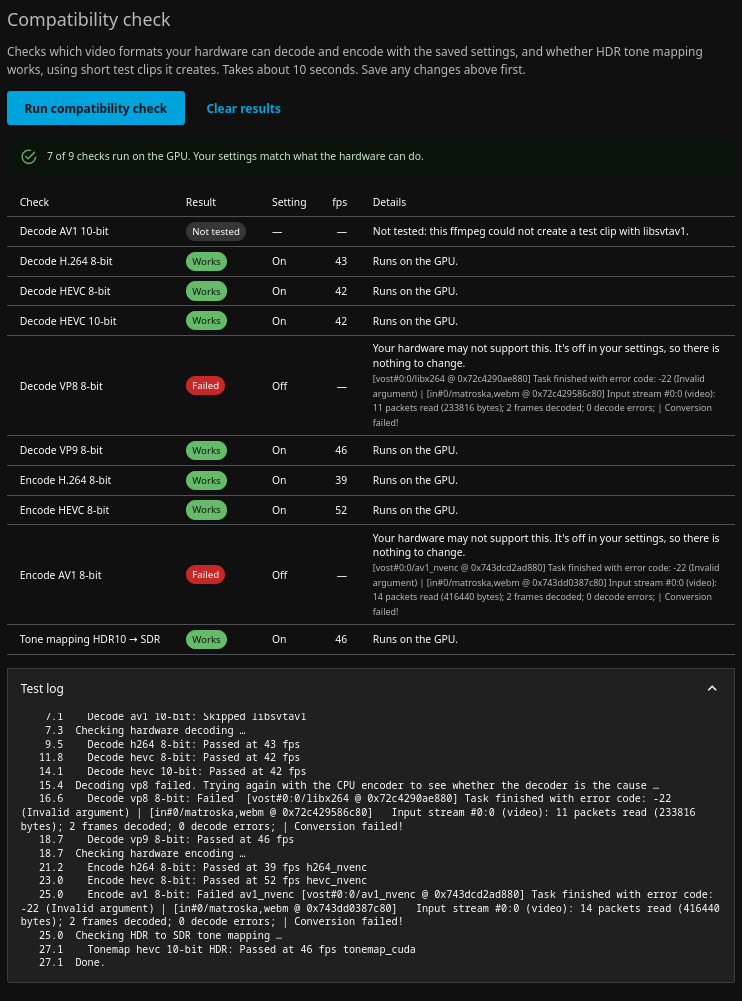
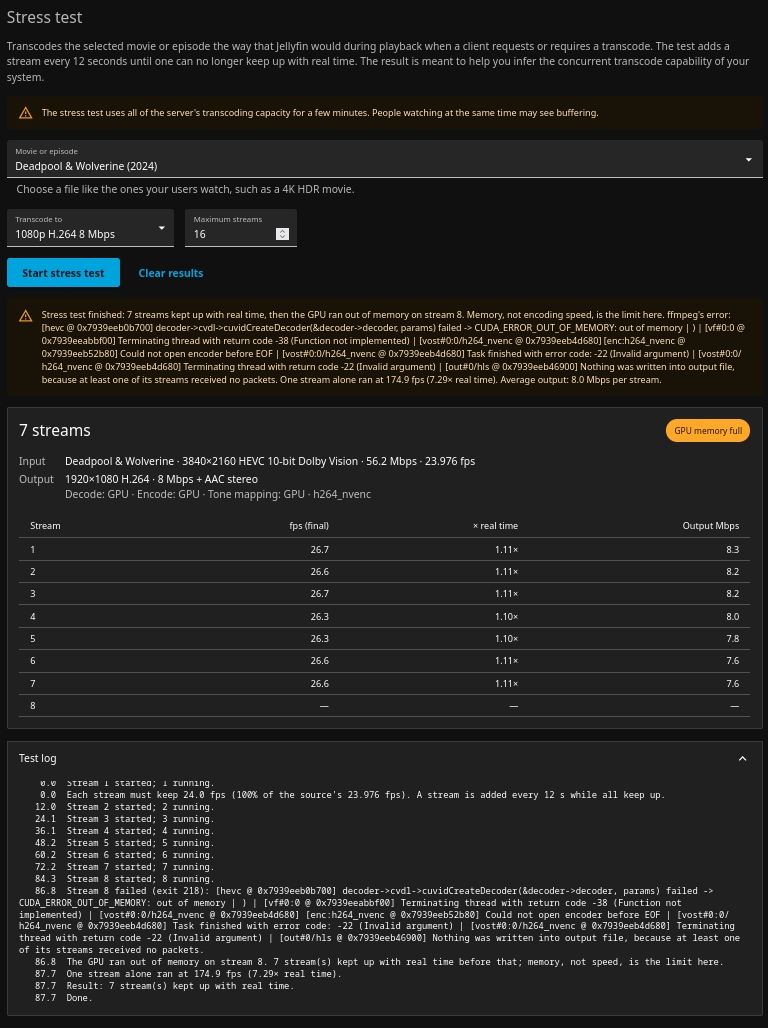
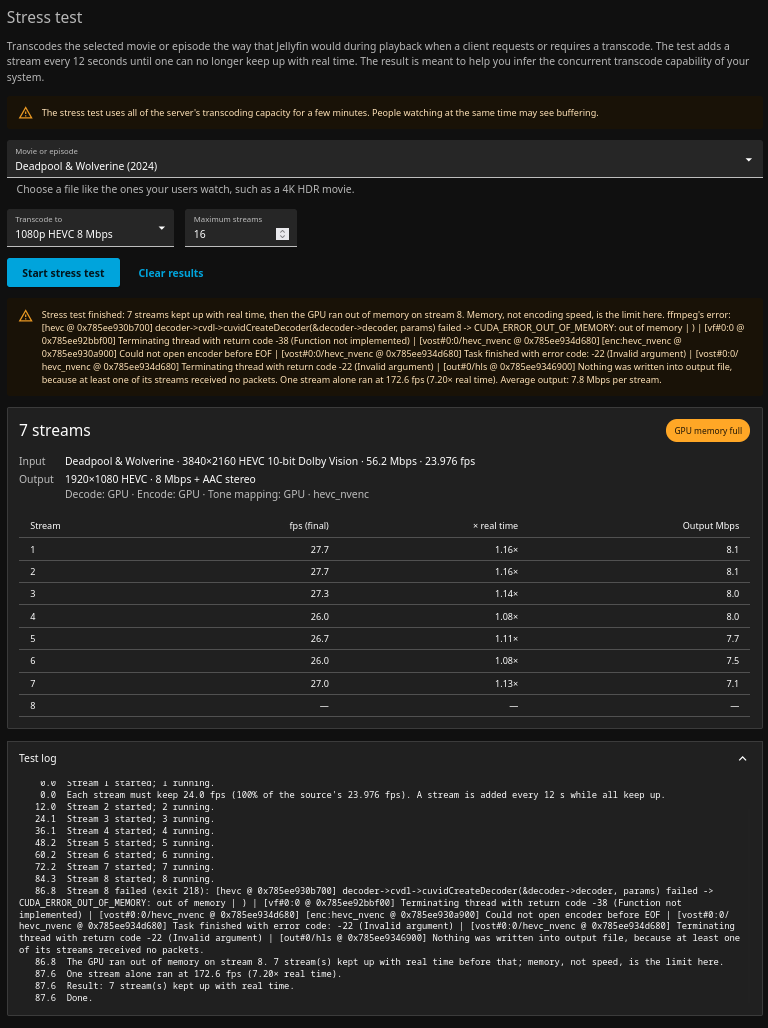
Stress Test 1Deadpool and Wolverine (2024) - 4k HEVC 20FPS
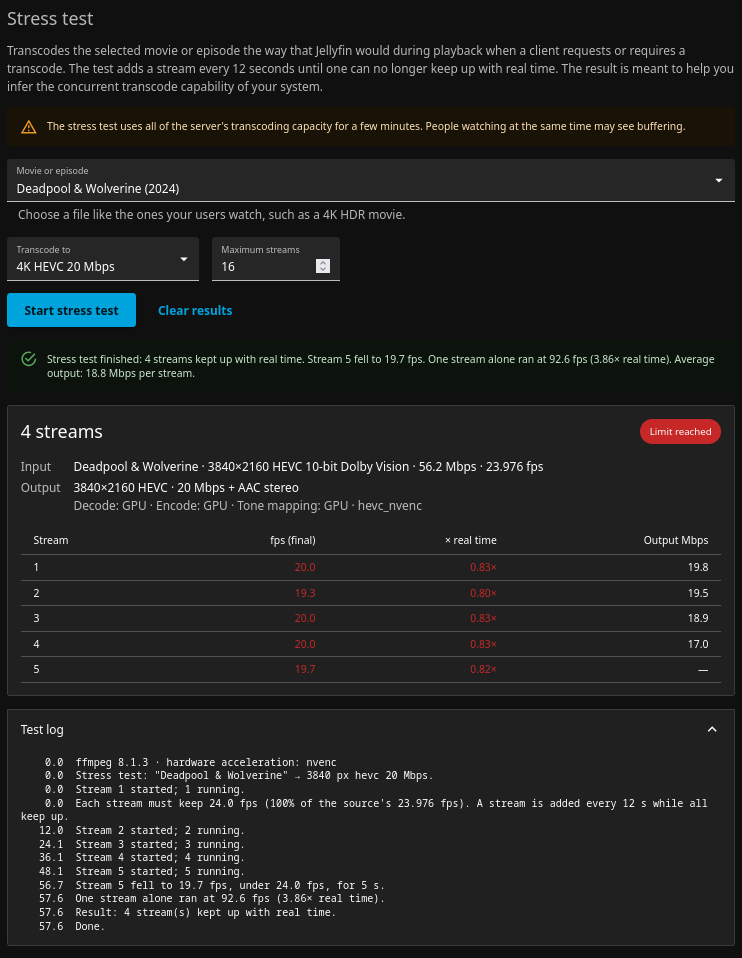
Stress Test 2Deadpool and Wolverine (2024) - 1080p H.264 8 Mbps Reached 7 Streams and then received the error below:
Stress Test 3Deadpool and Wolverine (2024) - 1080p HEVC 8 Mbps Reached 7 Streams and then received the error below:
|

Environment
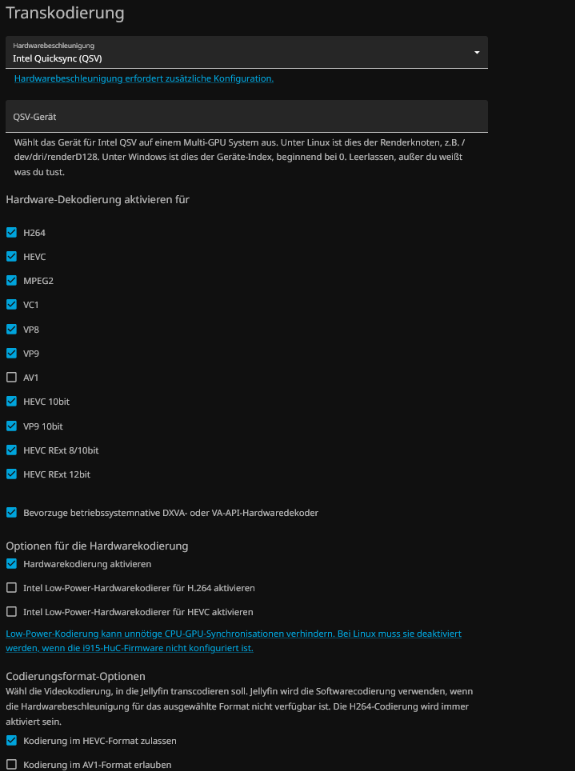
Compatibility check
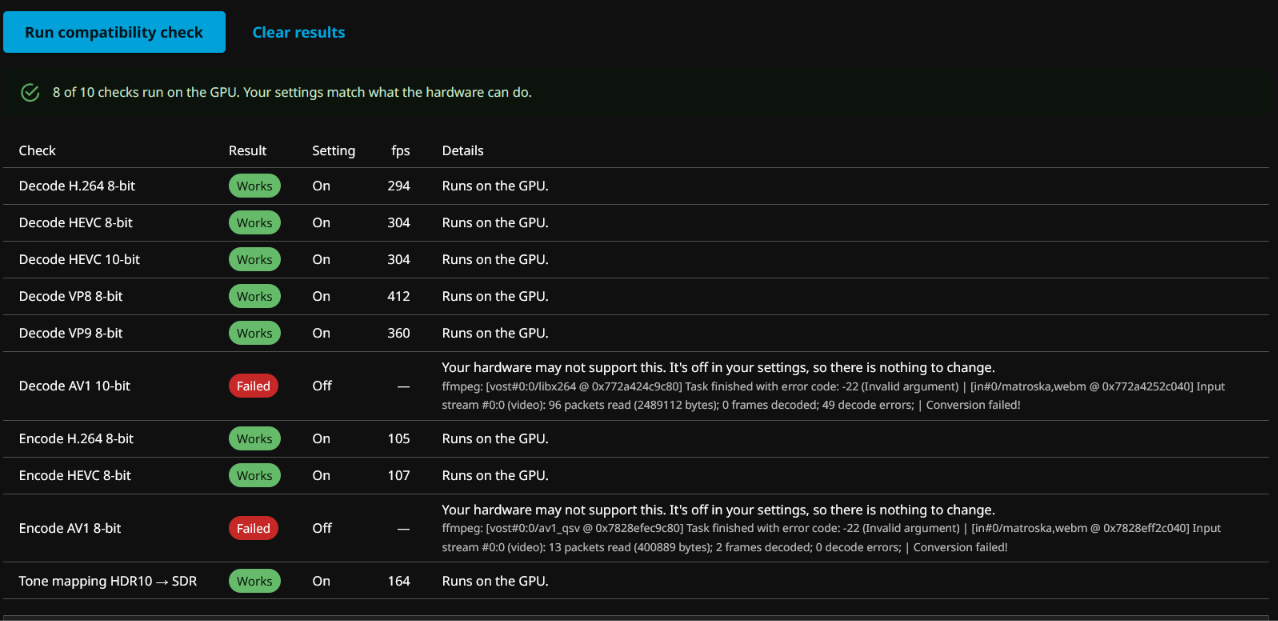
Stress testInput: jellyfin-250-mbps sample, 3840×2160 HEVC 10-bit SDR, 250.1 Mbps, 29.97 fps → 1920×1080 H.264 8 Mbps ( Result: 2 streams kept up. The run ended when stream 2 fell to 27.0 fps (0.90×) for 5 s with 3 streams running; the configured maximum (16) was not reached. A single stream alone ran at 82.0 fps (2.74× real time). Average output 8.9 Mbps per stream. Single run, not repeated.
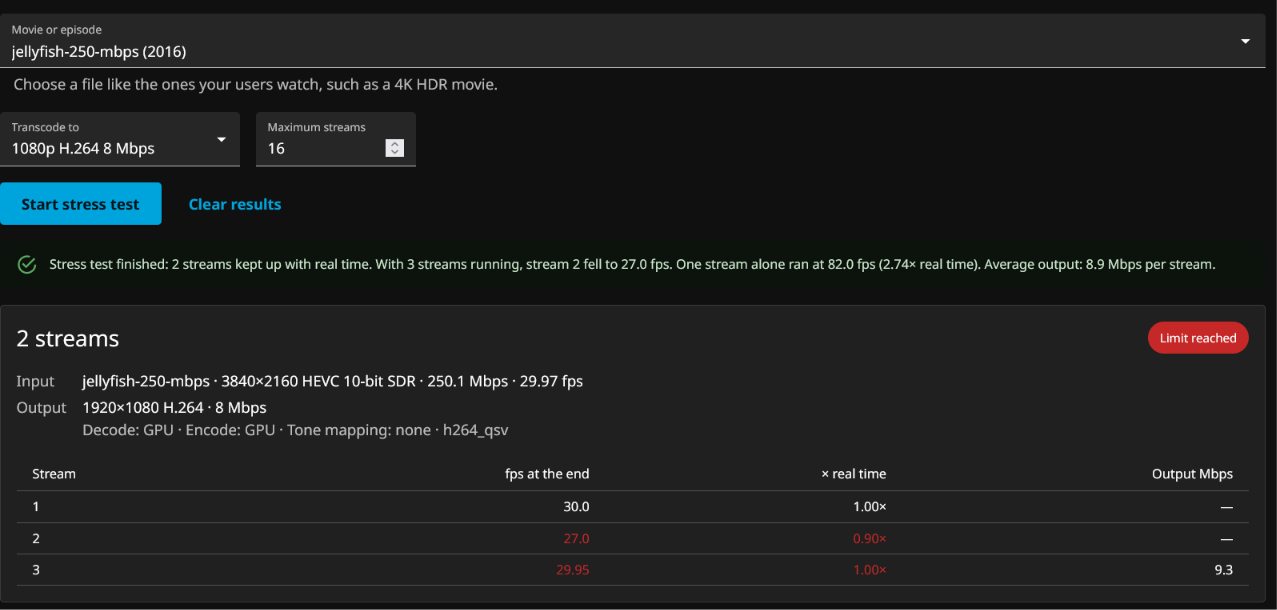
Feedback
Compatibility check logStress test logvainfo |


Uh oh!
There was an error while loading. Please reload this page.
Uh oh!
There was an error while loading. Please reload this page.
Updates / Edits
Since there's been a lot of support in testing and suggestions I was going to strikethrough all the changes. Nonetheless, for clarity and ease of reading I wont strikethrough - instead, I've made a changelog to carefully track the changes:
https://github.com/albarago/jellyfin-transcode-test/blob/main/CHANGELOG.md
I'm making targeted edits to the body of this proposal as well, for accuracy and in light of new information (thanks everyone!). The biggest one: after JPVenson's feedback, the stress test threshold changed from 90% to 100% of real time, and it now follows the HWA tool's methodology where it makes sense (see "Aligning with HWA's methodology" below).
Problem Statement
As a server operator, I've always desired a built-in method to test hardware acceleration (HWA). Today, Jellyfin operators have no built-in way to know whether their HWA settings work, or how many streams their server can serve concurrently. The only automatic check,
EncoderValidator, runs at startup and confirms that ffmpeg contains the hardware encoders and filters. It never runs a transcode. The "Enable hardware decoding for" boxes are ticked by hand, and nothing tells the operator whether those choices match their hardware.As a result, operators find problems in one of two ways:
intel_gpu_top,nvtopor Task Manager while it plays.Both happen after the fact, and some failures stay hidden. ffmpeg can silently fall back to the CPU, so playback "works" but uses far more resources than the operator expects. A wrongly ticked codec only fails when someone plays that format. Even a correct setup gives no idea of headroom, unless you try to do math based on the fps. An operator can't reliably tell whether the server handles 2 streams or 12 until real users load it.
There is clear demand for this. "Automatically test hardware transcoding" has 427 votes and is marked planned (#450). Discussion #17126 describes almost this exact button. My standalone tool, JF_hw_stress, drew enough interest that I started on a core version. Since this discussion opened, it has picked up 31 upvotes, volunteers have tested it on NVIDIA, Intel and AMD hardware I don't own, and the Reddit post got 200+ upvotes in less than 24 hours.
The goal: an operator presses one button to confirm the saved settings actually work, and another to learn how many streams the server can really serve. Both run inside the server, using the same code real playback uses, before any user hits a problem. No additional tools/clients/software or plugins. All done in minutes.
Proposed change
I ran several versions of this idea and tested time and time again, iterating to try to get it right not just from the technical standpoint but from a UI design and ease of use / intuitive feel for all of us who operate servers.. So here is what I came up with:
I propose that we integrate two new sections inside the transcoding panel of the dashboard. They should be at the bottom after the save button because they directly test what was saved so the flow made sense to me.
Fast facts about the compatibility check:
ffmpeg's software encoders, so it works with any library even if you don't have real media. The generator is testsrc2.
"Turn off VP8 under 'Enable hardware decoding for'". If a format is off and fails, it reads as "your hardware may not support this" instead of an error.
Fast facts about the stress test:
for 5 s ends the test; the result is the last count that kept up. Includes a configurable maximum (default 16, up to 64).
next stream, input and output description, per-stream fps, "x real time" speed and output bitrate.
single_worker_speed), in the result and the test log.Aligning with HWA's methodology
After feedback from JPVenson (creator of the HWA tool - thanks!), I didn't want to create a new standard, so I've followed the HWA client whitepaper wherever its rules carry over:
single_worker_speed).performance,failed_timeoutorfailed_nvenc_limit, using HWA's names.The whitepaper's rules are written for HWA clients, whose results get submitted to hwa.jellyfin.org and compared across machines. This test doesn't submit anything. Its job is to answer "what can this server do, as configured", so I only changed the parts that would stop it from doing that:
EncodingHelper/HlsCommandBuilder, same as real playbackWhat this costs: these numbers can't be compared across machines the way HWA's can. HWA's fixed files and arguments are the right design for a hardware database, so the two really do different jobs.
Possible idea for the future: We can create a "HWA mode" that runs HWA's standard test files through Jellyfin's pipeline and exports results in the survey JSON format. That would give numbers comparable with HWA and real-pipeline commands. I'd keep it out of the first PRs. @JPVenson, would that be useful to you? hwa.jellyfin.org returned 502 when I checked.
How it works
Disclaimer: I would probably split this into multiple PRs but here is the gist
Important notes:
Transcoding/Testendpoints (POST start, GET status, DELETE stop or clear). One test at a time, the web page polls once a second, so no new WebSocket message types or SDK subscription changes. The status reports aSurveyFailureReasonusing HWA's names.Results so far
In my limited testing (I only have two mac machines) I was pleasantly surprised by how this came out (and also by how powerful a fanless macbook air is!!)
Note: my numbers, and testers' rows not marked "at 100%", were measured with the old 90% threshold. At 100% they come in lower: on the same M5, 12 streams became 8-10.
Important
I've only tested VideoToolbox, since that's all I have. Others have kindly tested (thanks!)
Update: NVIDIA, Intel and AMD have now been tested by others:
*The RTX 5080 run ended when stream 9 couldn't start, not because streams fell behind. A re-run on the fixed build is pending.
The Arc A380 is the strongest result so far: 20+ streams of 4K AV1 Dolby Vision with tone mapping. In one of those runs all streams dropped to 0 fps at once; it turned out the GPU ran out of VRAM. Both NVIDIA cards stopped at the driver's 12-session limit, not their real capacity. Even the low-power N5095 handled multiple streams of 4K HDR to 1080p. Their reports also led to a round of fixes (see the changelog). Thanks all!
How this relates to other work
Below are some related pieces I found during research. Key point is that this checks what the saved settings actually do and measures headroom, which complements capability detection. I'm fully aligned to working with other ideas or changing my approach to work better for everyone, but, I think this is a great start.
EncodingHelperpieces with null output, not the full HLS playback command.A few more notes:
Questions for maintainers
Testing on other hardware
More NVIDIA results would help, especially to confirm the "Driver limit" detection now works on a real card. More AMD results are welcome too, since only one AMD GPU has been tested so far.
Test image and instructions: https://github.com/albarago/jellyfin-transcode-test
(
ghcr.io/albarago/jellyfin-transcode-test:latest, amd64 and arm64, built on jellyfin/jellyfin:unstable)What changed between builds: tester changelog
AI assistance
I dabble in developing projects on my spare time, but this would not have been possible for me to implement on my own, (unfortunately). I leveraged Kiro with varying models to help me figure out how real playback / transcoding pipelines work and how the UI works and how to integrate my ideas into it as seamlessly as possible.
Thank you for reading - I love this project and I'm happy to contribute to it.
All reactions