Repository navigation
Releases
RAQIA SDR Airband Scanner 1.0.10

✈ RAQIA SDR Airband Scanner 1.0.10 · Windows, macOS and Linux · English, Español, 中文, 日本語
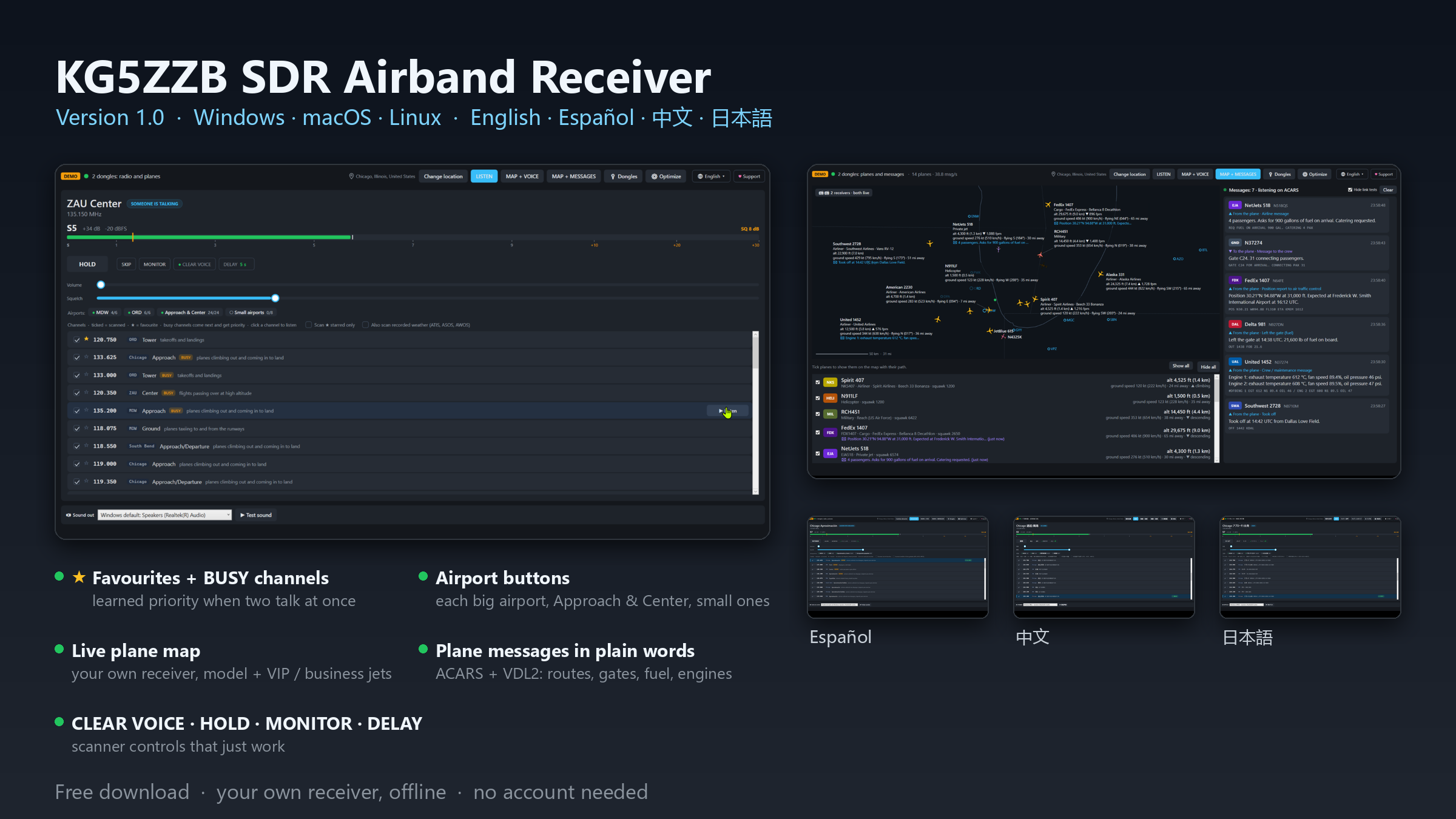
Listen to pilots and controllers, see the planes around you on a live map and read their messages in plain words, all from your own SDR receiver. Free download. The scanner and the plane map are free, for good. For the first 30 days every extra is switched on too; after that, CLEAR VOICE, HOLD, MONITOR, DELAY and plane messages are an optional upgrade inside the app.
→ Full tour, every screen and all the features on the project page

What it does
Three big buttons, three things to do:
| 🎧 LISTEN | ✈ MAP | ✉ MESSAGES |
|---|---|---|
 |
 |
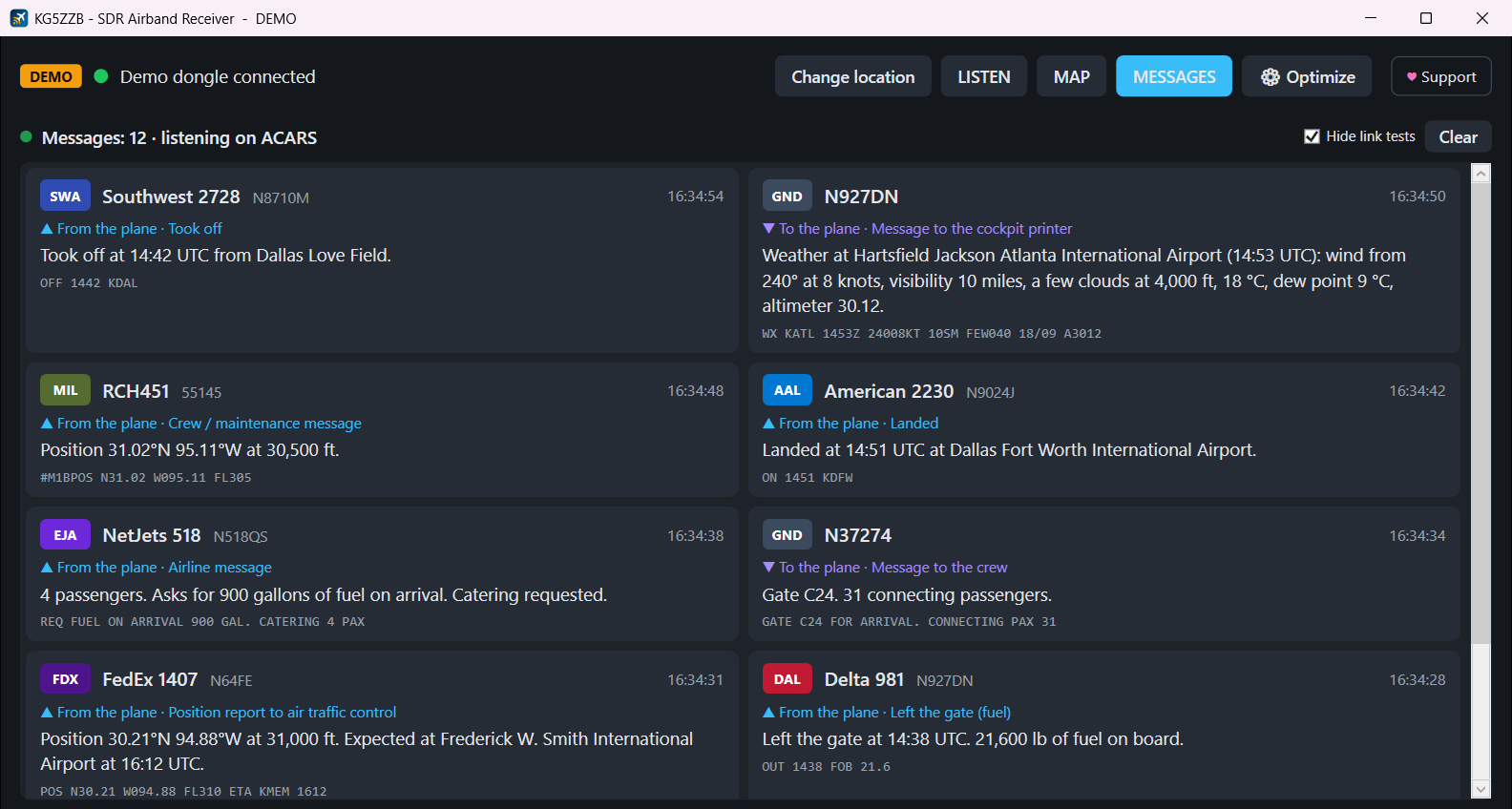 |
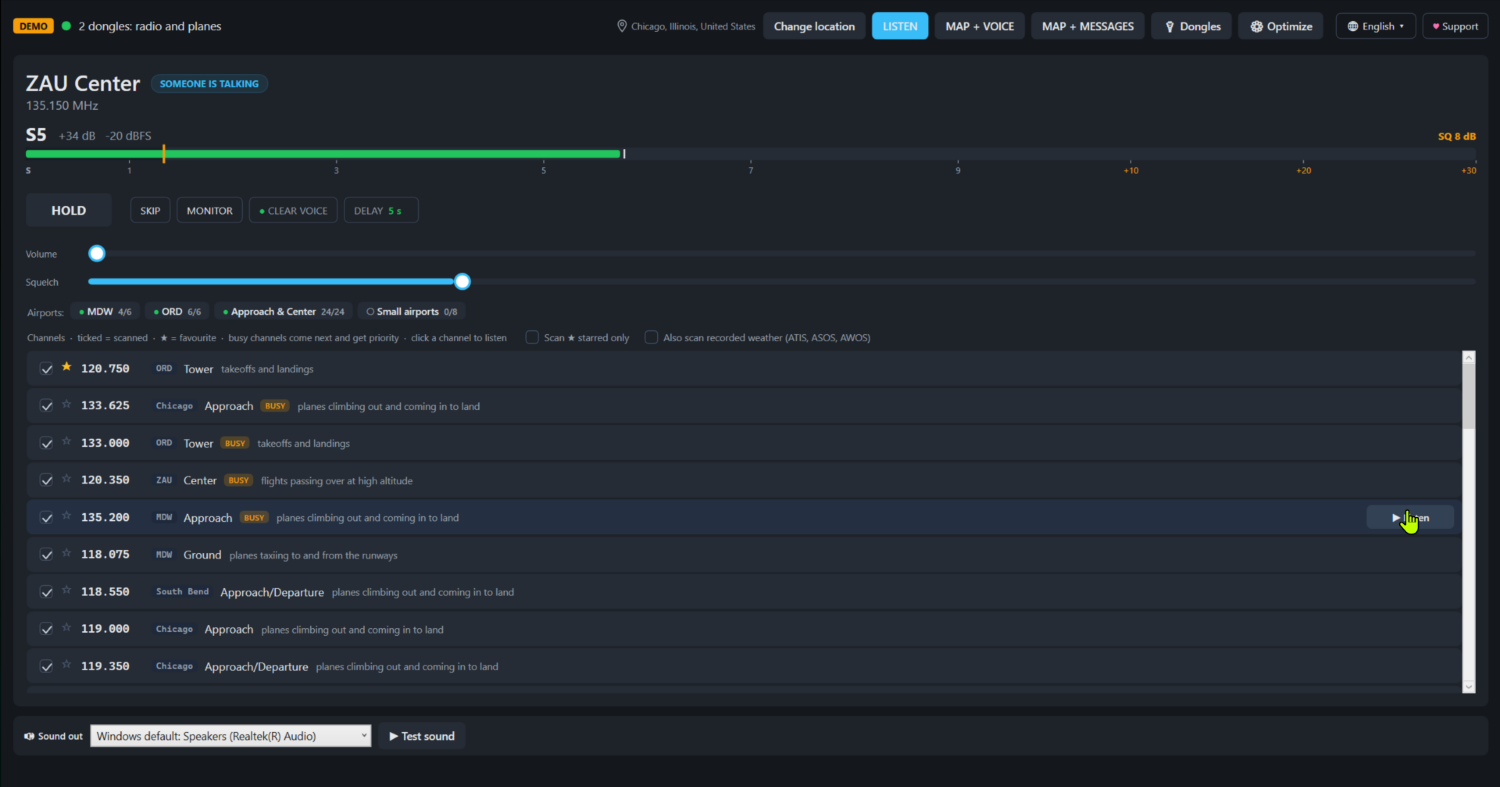
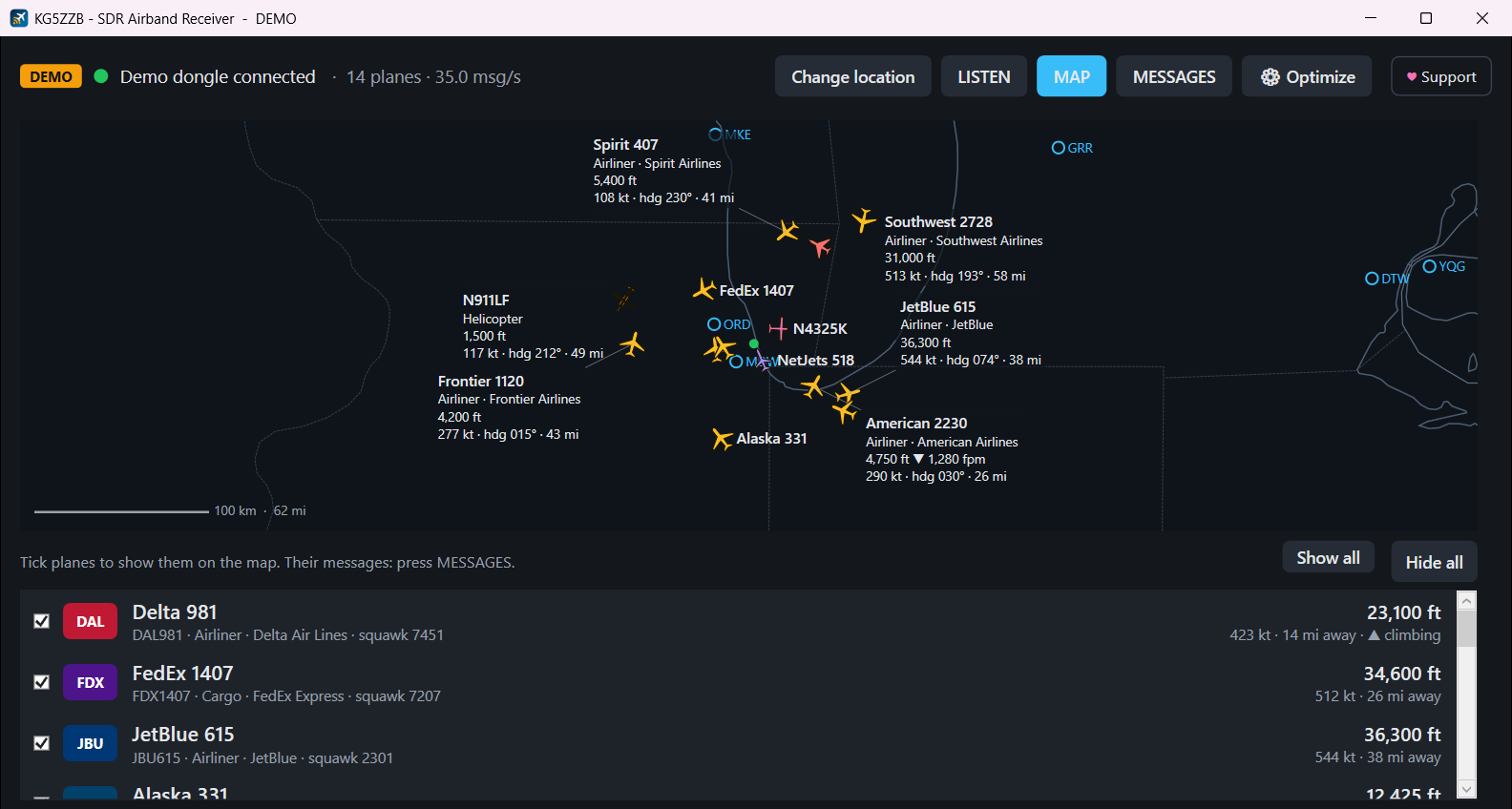
| Scans the airband and stops when a pilot talks. The channels of the airports around you are found for you; airport buttons, busy channels first, CLEAR VOICE, HOLD and MONITOR. | A live map of the planes around you, from your own receiver: flight, airline, aircraft model, altitude and speed. | The ACARS and VDL2 messages planes send, in plain words: fuel, gates, passengers, engine data, takeoff times. |
Works with RTL-SDR (R820T, R820T2, R828D, R860 tuners), SDRplay, Airspy and HackRF One (beta) · Android phones, tablets and TV: RAQIA Airband for Android
New in 1.0.10
- A new name: RAQIA SDR Airband Scanner. Same app, same features. Your settings, channels and full-version key carry over: just unzip the new version and open it.
- New website: raqia.jeyp.net. The old address forwards there.
- Windows, macOS and Linux.
New in 1.0.9
- A much cleaner CLEAR VOICE. The hiss between words is now almost gone, even on weak, distant planes, and the voices stay natural, not robotic. The receiver measures how much hiss each transmission carries right from its first word, so the cleaning starts at once.
- Add your own frequencies. Press + Add frequency in the channel list, type the frequency (and a name if you like) and it is scanned like the others. Your channels are marked MINE and can be removed with ✕. 25 kHz and 8.33 kHz channels.
- HackRF One support (beta).
- The scanner no longer stops on empty channels next to a very strong nearby station.
- The squelch uses the S-meter scale. The slider covers the whole meter, and its setting reads in S-units, like the needle.
- The version number is in the window title.
- Status and error messages can be selected and copied with the mouse.
- Two receivers that report the same serial number each keep their own job, and the app starts even without a sound device (Windows).
- Windows, macOS and Linux.
New in 1.0.7
- Every message card says what it is. Long messages that planes send in several parts are joined into one card, and a card shows clearly when parts are still missing.
- One card per flight. The newest message of each flight is on top, with its earlier messages one click away.
- See what the receiver is listening to: ACARS or VDL2, with their frequencies, and a short explanation of how the app takes turns between them.
- Long messages arrive whole. The app stays on a channel group while a message is still coming in, and longer where planes are busy.
- Signal strength on every message.
- Select and copy the text of any message with the mouse.
- Automatic protection against very strong nearby stations. When a station close to you is too strong for the receiver, the app lowers the sensitivity by itself and raises it again when it's quiet. If even that isn't enough, a short tip explains the cause and the fix in plain words.
- Windows, macOS and Linux.
New in 1.0.6
- Plane messages anyone can read. A short key explains the arrows and badges. Position reports say how far the plane is from you and how high it is, airports show their name and city, and times are in your own clock.
- See how fresh the data is. Every message, every plane in the list and every label on the map shows how long ago it was heard: "now", "12 s ago", "3 min ago".
- More messages read worldwide: airline names for more than 1,100 airlines, more position-report formats, text written by crews shown as it is, and encrypted messages marked as such. Routine link messages and ground-station beacons are hidden by default.
- Clearer voice. CLEAR VOICE now also turns down electrical spike noise before the sound is made.
- No more bang when someone starts talking: the sound fades in smoothly when the squelch opens.
New in 1.0.5
- Plug in and listen. With no receiver plugged in, the app says so in large, easy-to-read letters, and the radio starts by itself as soon as you plug one in.
- Mac: nothing extra to install. The USB library the dongle needs now comes inside the app.
- SDRplay made clear: when SDRplay's free driver is missing, one button takes you to its download page.
- A cleaner window title, and a friendly reminder a few days before your 30 days of extras end.
New in 1.0.4
- Clearer after the first 30 days. The app now tells you once, the first time you open it after the 30 days, which extras moved to the full version. The Messages screen explains it too.
New in 1.0.3
- Unlock the extras on every computer. Press ★ Full version in the app, paste your key and press Unlock: it now works the same way on Windows, macOS and Linux.
- Clearer messages when a key can't be used, in all four languages.
New in 1.0.2
- The channel list shows what is being scanned. Channels you switch off, and small airports you haven't turned on, no longer fill the list; the airport buttons bring them back.
- "Scan ★ starred + BUSY only": one tick box scans just your favourites and the busiest channels.
New in 1.0
- 🌐 Four languages: English, Español, 中文 and 日本語. The app picks your computer's language; change it any time with the 🌐 button.
- 🍎🐧 macOS and Linux downloads next to Windows.
- ★ Favourites and BUSY channels. Star the channels you love; the app learns which channels talk the most, keeps them right after your favourites and gives them priority when two talk at the same time.
- Airport buttons. One click scans or skips a whole airport, Approach & Center, or all the small airports (off by default).
- Complete US channel lists from FAA data: every tower and ground split, approach sectors and center sites. Ground channels only for airports close enough to hear.
- "Scan ★ starred only" and "Also scan recorded weather (ATIS, ASOS, AWOS)" tick boxes.
- A calmer channel list: it never jumps while you scroll or point at it; clear ON AIR / STATIC / HOLDING / LISTENING pills.
- CLEAR VOICE (louder, crisper pilots) and DELAY that cycles 2 / 5 / 8 / 15 s / off.
- Your exact spot: type your town, paste coordinates from Google Maps (right-click your house), or your grid locator (like FN31pr).
- Planes: aircraft model for 459,000+ aircraft worldwide, ★ VIP jet and business jet tags, more plane messages in plain words.
Download
| File | For |
|---|---|
RAQIA-SDR-Airband-Scanner-1.0.10-windows-x64.zip |
Windows 10/11, 64-bit. Unzip the whole folder and run RAQIA-SDR-Airband-Scanner.exe; keep libusb-1.0.dll and the airspy folder next to it. |
RAQIA-SDR-Airband-Scanner-1.0.10-macos-arm64.zip |
Mac with Apple silicon (M1, M2, M3, M4). |
RAQIA-SDR-Airband-Scanner-1.0.10-macos-x64.zip |
Mac with an Intel processor. |
RAQIA-SDR-Airband-Scanner-1.0.10-linux-x64.tar.gz |
64-bit Linux with a desktop. |
First start
- Windows: unzip anywhere, plug in your receiver, start the app. The app isn't code-signed yet: if Windows says "Windows protected your PC", click More info → Run anyway. A brand-new RTL-SDR dongle: press 🔧 Set up dongle when the app asks (one time only).
- Mac: unzip, move the app to Applications and open it. The app is signed and notarized by Apple, so macOS only asks once to confirm it was downloaded from the internet.
- Linux: see
README-LINUX.txt(one udev rule so your user can open the dongle, then./RAQIA-SDR-Airband-Scanner). - Plug in your receiver: the radio starts by itself.
Receivers: RTL-SDR dongles with an R820T, R820T2, R828D or R860 tuner (Nooelec NESDR SMArt, RTL-SDR Blog V3/V4 and similar). SDRplay, Airspy and HackRF One support is in beta.
Receive only; check your local laws before listening to aviation radio. Licenses: LICENSE.txt and THIRD-PARTY-NOTICES in each download.
♥ Like it? Support the project on Ko-fi.
📬 Get updates by email · 💬 Report a problem or ask a question
Into ham radio, RF, SDR or aviation? **[Let's connect on LinkedI...
RAQIA Airband for Android 1.0.9 · phones, tablets and Android TV
📱📺 RAQIA Airband for Android 1.0.9: phones, tablets and Android TV
Hear pilots and air traffic controllers near you and see the planes around you, with an RTL-SDR dongle plugged into your phone, tablet or Android TV. Free download, with every feature for the first 30 days.
Download: RAQIA-Airband-Android-1.0.9.apk (57 MB) below. One file for phones, tablets and TVs.
New in 1.0.9
- A new name: RAQIA Airband (the app was called KG5ZZB Airband). It installs over the old version and keeps your settings.
- 🎙 New CLEAR VOICE: pilots and controllers sound louder and clearer, with less hiss between words.
- + Add frequency: add any airband frequency by hand from the ⋮ menu (with an optional name) and remove it again at any time.
- Better scanning near strong stations: the scanner no longer stops on the edge of a strong nearby signal.
- Easier problem reports: if the app ever closes on its own, the reason is written to its log file, and dongle messages on the start screen can be selected and copied.
New in 1.0.6
- Clear start screen: with no dongle plugged in, the app says in large letters that it is waiting for your SDR dongle, and the radio starts by itself as soon as you plug it in.
- A friendly reminder a few days before your 30 days of full features end.
New in 1.0.5
- Every feature for your first 30 days: Clear voice, Hold, Say again, plane messages in plain words and plane details on the map. After 30 days, Listen and the plane map stay free.
New in 1.0.4
- Fixed: the app closed right after opening ("keeps stopping") in 1.0.2 and 1.0.3.
- If a device has no usable sound output, the app now keeps running (map and messages still work) instead of closing.
- Tested on Android 14, 15 and 16: first start, city search, Listen, Map, Messages, reopening the app and "Use my location".
New in 1.0.3
- 📱 Tablets: turn the tablet sideways and the tabs move to the left side; Listen shows the channel on one side and the big button on the other.
- 📺 Android TV / Google TV: the app appears on the TV home screen and works with the remote: the arrows move between buttons, OK presses them. On the Map, ◀ ▶ step from plane to plane (each one shows its card) and ▲ ▼ zoom in and out. The radio keeps playing while you browse the map.
- Phones stay upright as before.
What you get (free, for good)
- 🎧 Listen: finds the airports near you and scans their tower, ground, approach and center channels. It stops by itself when someone talks and goes back to scanning. Skip a busy channel with one tap. Keeps playing with the screen off.
- ✈ Map: the planes around you on a map, received by your own antenna (ADS-B, 1090 MHz), with airliners, business jets, small planes, helicopters and military aircraft in their own icons and colours.
- Languages: English, Español, 日本語, 中文 (follows your device's language).
- Built-in dongle driver: no extra driver app needed.
Full version (all included for the first 30 days): Clear voice, Hold, Say again, plane messages in plain words, and plane details on the map.
What you need
| Device | Android 8.0 or newer: a phone, a tablet, or an Android TV / Google TV device |
| USB | USB host support (USB OTG). Phones and tablets: a USB-C or micro-USB OTG adapter. TVs: a free USB port, or a USB-C hub with its own power |
| Processor | 64-bit ARM, 32-bit ARM or x86-64 (one file for all) |
| Receiver | An RTL-SDR dongle (RTL2832U) with an R820T, R820T2, R828D or R860 tuner: Nooelec NESDR SMArt v4 / v5, NESDR Mini 2+, NESDR Nano 2+ / 3, RTL-SDR Blog V3 and V4, and other sticks with these tuners |
| Antennas | An airband antenna (118–137 MHz) for Listen; a 1090 MHz antenna for the Map |
Not supported on Android: RTL-SDR sticks with an E4000, FC0012, FC0013 or FC2580 tuner (for example the NESDR XTR), and SDRplay, Airspy and HackRF receivers (those work in the Windows, macOS and Linux versions).
Install (about one minute, only the first time)
Apps downloaded from a website instead of the Google Play Store need a few extra taps. This is Android's normal safety step for every such app.
Phone or tablet
- Open this page on the phone or tablet and tap RAQIA-Airband-Android-1.0.9.apk below. If the browser warns that the file might be harmful, tap Download anyway.
- When the download finishes, tap it (in the notification, or open Files → Downloads and tap the file).
- Android says your browser isn't allowed to install apps. Tap Settings, switch on Allow from this source, then tap the back arrow and tap Install.
- Google Play Protect may ask to scan the app. Tap Scan app and wait a few seconds (or tap More details → Install anyway). Then tap Open.
- In the app, tap Use my location (or Search for a city).
- Plug in the dongle with the USB OTG adapter. When Android asks whether RAQIA Airband may use the USB device, tap OK.
Updating later: tap the new .apk and Install; steps 3 and 4 are usually not needed again and your settings stay.
Android TV / Google TV
- Install a downloader app from the TV's app store, or copy the
.apkto a USB stick. - Open the
.apkwith it and allow that app to install unknown apps when the TV asks. - Start RAQIA Airband from the home screen, search your city, plug the dongle into the TV's USB port and confirm with OK.
Privacy
The app has no internet permission: it collects nothing and sends nothing. It asks for your rough location only if you tap "Use my location", to pick the airports near you, and keeps it on your device. Privacy policy
Permissions: approximate location (optional), notifications and background audio (to keep listening with the screen off), and access to the USB dongle you plug in.
Legal
Free to use. All rights reserved © 2026 RAQIA. Listening to air traffic is legal in the US, but not everywhere: check your local law. The app is provided as is, without warranty.
SHA-256: 3562637191be572a882034b11be1fb7b78333daf65ca6d3f1e96dec7db53f0b0
📬 Get updates by email · 💬 Report a problem or ask a question
Into ham radio, RF, SDR or aviation? Let's connect on LinkedIn.
KG5ZZB SDR Airband Receiver 1.0.9
✈ Version 1.0.9 · Windows, macOS and Linux · English, Español, 中文, 日本語
Listen to pilots and controllers, see the planes around you on a live map and read their messages in plain words, all from your own SDR receiver. Free download. The scanner and the plane map are free, for good. For the first 30 days every extra is switched on too; after that, CLEAR VOICE, HOLD, MONITOR, DELAY and plane messages are an optional upgrade inside the app.
→ Full tour, every screen and all the features on the project page
What it does
Three big buttons, three things to do:
| 🎧 LISTEN | ✈ MAP | ✉ MESSAGES |
|---|---|---|
|
|
|
| Scans the airband and stops when a pilot talks. The channels of the airports around you are found for you; airport buttons, busy channels first, CLEAR VOICE, HOLD and MONITOR. | A live map of the planes around you, from your own receiver: flight, airline, aircraft model, altitude and speed. | The ACARS and VDL2 messages planes send, in plain words: fuel, gates, passengers, engine data, takeoff times. |
Works with RTL-SDR (R820T, R820T2, R828D, R860 tuners), SDRplay, Airspy and HackRF One (beta) · Android phones, tablets and TV: KG5ZZB-Airband-Android-1.0.6.apk
New in 1.0.9
- A much cleaner CLEAR VOICE. The hiss between words is now almost gone, even on weak, distant planes, and the voices stay natural, not robotic. The receiver measures how much hiss each transmission carries right from its first word, so the cleaning starts at once.
- Add your own frequencies. Press + Add frequency in the channel list, type the frequency (and a name if you like) and it is scanned like the others. Your channels are marked MINE and can be removed with ✕. 25 kHz and 8.33 kHz channels.
- HackRF One support (beta).
- The scanner no longer stops on empty channels next to a very strong nearby station.
- The squelch uses the S-meter scale. The slider covers the whole meter, and its setting reads in S-units, like the needle.
- The version number is in the window title.
- Status and error messages can be selected and copied with the mouse.
- Two receivers that report the same serial number each keep their own job, and the app starts even without a sound device (Windows).
- Windows, macOS and Linux.
New in 1.0.7
- Every message card says what it is. Long messages that planes send in several parts are joined into one card, and a card shows clearly when parts are still missing.
- One card per flight. The newest message of each flight is on top, with its earlier messages one click away.
- See what the receiver is listening to: ACARS or VDL2, with their frequencies, and a short explanation of how the app takes turns between them.
- Long messages arrive whole. The app stays on a channel group while a message is still coming in, and longer where planes are busy.
- Signal strength on every message.
- Select and copy the text of any message with the mouse.
- Automatic protection against very strong nearby stations. When a station close to you is too strong for the receiver, the app lowers the sensitivity by itself and raises it again when it's quiet. If even that isn't enough, a short tip explains the cause and the fix in plain words.
- Windows, macOS and Linux.
New in 1.0.6
- Plane messages anyone can read. A short key explains the arrows and badges. Position reports say how far the plane is from you and how high it is, airports show their name and city, and times are in your own clock.
- See how fresh the data is. Every message, every plane in the list and every label on the map shows how long ago it was heard: "now", "12 s ago", "3 min ago".
- More messages read worldwide: airline names for more than 1,100 airlines, more position-report formats, text written by crews shown as it is, and encrypted messages marked as such. Routine link messages and ground-station beacons are hidden by default.
- Clearer voice. CLEAR VOICE now also turns down electrical spike noise before the sound is made.
- No more bang when someone starts talking: the sound fades in smoothly when the squelch opens.
New in 1.0.5
- Plug in and listen. With no receiver plugged in, the app says so in large, easy-to-read letters, and the radio starts by itself as soon as you plug one in.
- Mac: nothing extra to install. The USB library the dongle needs now comes inside the app.
- SDRplay made clear: when SDRplay's free driver is missing, one button takes you to its download page.
- A cleaner window title, and a friendly reminder a few days before your 30 days of extras end.
New in 1.0.4
- Clearer after the first 30 days. The app now tells you once, the first time you open it after the 30 days, which extras moved to the full version. The Messages screen explains it too.
New in 1.0.3
- Unlock the extras on every computer. Press ★ Full version in the app, paste your key and press Unlock: it now works the same way on Windows, macOS and Linux.
- Clearer messages when a key can't be used, in all four languages.
New in 1.0.2
- The channel list shows what is being scanned. Channels you switch off, and small airports you haven't turned on, no longer fill the list; the airport buttons bring them back.
- "Scan ★ starred + BUSY only": one tick box scans just your favourites and the busiest channels.
New in 1.0
- 🌐 Four languages: English, Español, 中文 and 日本語. The app picks your computer's language; change it any time with the 🌐 button.
- 🍎🐧 macOS and Linux downloads next to Windows.
- ★ Favourites and BUSY channels. Star the channels you love; the app learns which channels talk the most, keeps them right after your favourites and gives them priority when two talk at the same time.
- Airport buttons. One click scans or skips a whole airport, Approach & Center, or all the small airports (off by default).
- Complete US channel lists from FAA data: every tower and ground split, approach sectors and center sites. Ground channels only for airports close enough to hear.
- "Scan ★ starred only" and "Also scan recorded weather (ATIS, ASOS, AWOS)" tick boxes.
- A calmer channel list: it never jumps while you scroll or point at it; clear ON AIR / STATIC / HOLDING / LISTENING pills.
- CLEAR VOICE (louder, crisper pilots) and DELAY that cycles 2 / 5 / 8 / 15 s / off.
- Your exact spot: type your town, paste coordinates from Google Maps (right-click your house), or your grid locator (like FN31pr).
- Planes: aircraft model for 459,000+ aircraft worldwide, ★ VIP jet and business jet tags, more plane messages in plain words.
Download
| File | For |
|---|---|
KG5ZZB-SDR-Airband-Receiver-1.0.9-windows-x64.zip |
Windows 10/11, 64-bit. Unzip the whole folder and run KG5ZZB-SDR-Airband-Receiver.exe; keep libusb-1.0.dll and the airspy folder next to it. |
KG5ZZB-SDR-Airband-Receiver-1.0.9-macos-arm64.zip |
Mac with Apple silicon (M1, M2, M3, M4). |
KG5ZZB-SDR-Airband-Receiver-1.0.9-macos-x64.zip |
Mac with an Intel processor. |
KG5ZZB-SDR-Airband-Receiver-1.0.9-linux-x64.tar.gz |
64-bit Linux with a desktop. |
First start
- Windows: unzip anywhere, plug in your receiver, start the app. The app isn't code-signed yet: if Windows says "Windows protected your PC", click More info → Run anyway. A brand-new RTL-SDR dongle: press 🔧 Set up dongle when the app asks (one time only).
- Mac: unzip, move the app to Applications and open it. The app is signed and notarized by Apple, so macOS only asks once to confirm it was downloaded from the internet.
- Linux: see
README-LINUX.txt(one udev rule so your user can open the dongle, then./KG5ZZB-SDR-Airband-Receiver). - Plug in your receiver: the radio starts by itself.
Receivers: RTL-SDR dongles with an R820T, R820T2, R828D or R860 tuner (Nooelec NESDR SMArt, RTL-SDR Blog V3/V4 and similar). SDRplay, Airspy and HackRF One support is in beta.
Receive only; check your local laws before listening to aviation radio. Licenses: LICENSE.txt and THIRD-PARTY-NOTICES in each download.
♥ Like it? Support the project on Ko-fi.
📬 Get updates by email · 💬 Report a problem or ask a question
Into ham radio, RF, SDR or aviation? Let's connect on LinkedIn.
KG5ZZB SDR Airband Receiver 1.0.7
✈ Version 1.0.7 · Windows, macOS and Linux · English, Español, 中文, 日本語
Listen to pilots and controllers, see the planes around you on a live map and read their messages in plain words, all from your own SDR receiver. Free download. The scanner and the plane map are free, for good. For the first 30 days every extra is switched on too; after that, CLEAR VOICE, HOLD, MONITOR, DELAY and plane messages are an optional upgrade inside the app.
→ Full tour, every screen and all the features on the project page
What it does
Three big buttons, three things to do:
| 🎧 LISTEN | ✈ MAP | ✉ MESSAGES |
|---|---|---|
|
|
|
| Scans the airband and stops when a pilot talks. The channels of the airports around you are found for you; airport buttons, busy channels first, CLEAR VOICE, HOLD and MONITOR. | A live map of the planes around you, from your own receiver: flight, airline, aircraft model, altitude and speed. | The ACARS and VDL2 messages planes send, in plain words: fuel, gates, passengers, engine data, takeoff times. |
Works with RTL-SDR (R820T, R820T2, R828D, R860 tuners), SDRplay and Airspy · Android phones, tablets and TV: KG5ZZB-Airband-Android-1.0.6.apk
New in 1.0.7
- Every message card says what it is. Long messages that planes send in several parts are joined into one card, and a card shows clearly when parts are still missing.
- One card per flight. The newest message of each flight is on top, with its earlier messages one click away.
- See what the receiver is listening to: ACARS or VDL2, with their frequencies, and a short explanation of how the app takes turns between them.
- Long messages arrive whole. The app stays on a channel group while a message is still coming in, and longer where planes are busy.
- Signal strength on every message.
- Select and copy the text of any message with the mouse.
- Automatic protection against very strong nearby stations. When a station close to you is too strong for the receiver, the app lowers the sensitivity by itself and raises it again when it's quiet. If even that isn't enough, a short tip explains the cause and the fix in plain words.
- Windows, macOS and Linux.
New in 1.0.6
- Plane messages anyone can read. A short key explains the arrows and badges. Position reports say how far the plane is from you and how high it is, airports show their name and city, and times are in your own clock.
- See how fresh the data is. Every message, every plane in the list and every label on the map shows how long ago it was heard: "now", "12 s ago", "3 min ago".
- More messages read worldwide: airline names for more than 1,100 airlines, more position-report formats, text written by crews shown as it is, and encrypted messages marked as such. Routine link messages and ground-station beacons are hidden by default.
- Clearer voice. CLEAR VOICE now also turns down electrical spike noise before the sound is made.
- No more bang when someone starts talking: the sound fades in smoothly when the squelch opens.
New in 1.0.5
- Plug in and listen. With no receiver plugged in, the app says so in large, easy-to-read letters, and the radio starts by itself as soon as you plug one in.
- Mac: nothing extra to install. The USB library the dongle needs now comes inside the app.
- SDRplay made clear: when SDRplay's free driver is missing, one button takes you to its download page.
- A cleaner window title, and a friendly reminder a few days before your 30 days of extras end.
New in 1.0.4
- Clearer after the first 30 days. The app now tells you once, the first time you open it after the 30 days, which extras moved to the full version. The Messages screen explains it too.
New in 1.0.3
- Unlock the extras on every computer. Press ★ Full version in the app, paste your key and press Unlock: it now works the same way on Windows, macOS and Linux.
- Clearer messages when a key can't be used, in all four languages.
New in 1.0.2
- The channel list shows what is being scanned. Channels you switch off, and small airports you haven't turned on, no longer fill the list; the airport buttons bring them back.
- "Scan ★ starred + BUSY only": one tick box scans just your favourites and the busiest channels.
New in 1.0
- 🌐 Four languages: English, Español, 中文 and 日本語. The app picks your computer's language; change it any time with the 🌐 button.
- 🍎🐧 macOS and Linux downloads next to Windows.
- ★ Favourites and BUSY channels. Star the channels you love; the app learns which channels talk the most, keeps them right after your favourites and gives them priority when two talk at the same time.
- Airport buttons. One click scans or skips a whole airport, Approach & Center, or all the small airports (off by default).
- Complete US channel lists from FAA data: every tower and ground split, approach sectors and center sites. Ground channels only for airports close enough to hear.
- "Scan ★ starred only" and "Also scan recorded weather (ATIS, ASOS, AWOS)" tick boxes.
- A calmer channel list: it never jumps while you scroll or point at it; clear ON AIR / STATIC / HOLDING / LISTENING pills.
- CLEAR VOICE (louder, crisper pilots) and DELAY that cycles 2 / 5 / 8 / 15 s / off.
- Your exact spot: type your town, paste coordinates from Google Maps (right-click your house), or your grid locator (like FN31pr).
- Planes: aircraft model for 459,000+ aircraft worldwide, ★ VIP jet and business jet tags, more plane messages in plain words.
Download
| File | For |
|---|---|
KG5ZZB-SDR-Airband-Receiver-1.0.7-windows-x64.zip |
Windows 10/11, 64-bit. Unzip the whole folder and run KG5ZZB-SDR-Airband-Receiver.exe; keep libusb-1.0.dll and the airspy folder next to it. |
KG5ZZB-SDR-Airband-Receiver-1.0.7-macos-arm64.zip |
Mac with Apple silicon (M1, M2, M3, M4). |
KG5ZZB-SDR-Airband-Receiver-1.0.7-macos-x64.zip |
Mac with an Intel processor. |
KG5ZZB-SDR-Airband-Receiver-1.0.7-linux-x64.tar.gz |
64-bit Linux with a desktop. |
First start
- Windows: unzip anywhere, plug in your receiver, start the app. The app isn't code-signed yet: if Windows says "Windows protected your PC", click More info → Run anyway. A brand-new RTL-SDR dongle: press 🔧 Set up dongle when the app asks (one time only).
- Mac: unzip, move the app to Applications and open it. The app is signed and notarized by Apple, so macOS only asks once to confirm it was downloaded from the internet.
- Linux: see
README-LINUX.txt(one udev rule so your user can open the dongle, then./KG5ZZB-SDR-Airband-Receiver). - Plug in your receiver: the radio starts by itself.
Receivers: RTL-SDR dongles with an R820T, R820T2, R828D or R860 tuner (Nooelec NESDR SMArt, RTL-SDR Blog V3/V4 and similar). SDRplay and Airspy support is in beta.
Receive only; check your local laws before listening to aviation radio. Licenses: LICENSE.txt and THIRD-PARTY-NOTICES in each download.
♥ Like it? Support the project on Ko-fi.
📬 Get updates by email · 💬 Report a problem or ask a question
Into ham radio, RF, SDR or aviation? Let's connect on LinkedIn.
KG5ZZB SDR Airband Receiver 1.0.6
✈ Version 1.0.6 · Windows, macOS and Linux · English, Español, 中文, 日本語
Listen to pilots and controllers, see the planes around you on a live map and read their messages in plain words, all from your own SDR receiver. Free download. The scanner and the plane map are free, for good. For the first 30 days every extra is switched on too; after that, CLEAR VOICE, HOLD, MONITOR, DELAY and plane messages are an optional upgrade inside the app.
→ Full tour, every screen and all the features on the project page
What it does
Three big buttons, three things to do:
| 🎧 LISTEN | ✈ MAP | ✉ MESSAGES |
|---|---|---|
|
|
|
| Scans the airband and stops when a pilot talks. The channels of the airports around you are found for you; airport buttons, busy channels first, CLEAR VOICE, HOLD and MONITOR. | A live map of the planes around you, from your own receiver: flight, airline, aircraft model, altitude and speed. | The ACARS and VDL2 messages planes send, in plain words: fuel, gates, passengers, engine data, takeoff times. |
Works with RTL-SDR (R820T, R820T2, R828D, R860 tuners), SDRplay and Airspy · Android phones, tablets and TV: KG5ZZB-Airband-Android-1.0.6.apk
New in 1.0.6
- Plane messages anyone can read. A short key explains the arrows and badges. Position reports say how far the plane is from you and how high it is, airports show their name and city, and times are in your own clock.
- See how fresh the data is. Every message, every plane in the list and every label on the map shows how long ago it was heard: "now", "12 s ago", "3 min ago".
- More messages read worldwide: airline names for more than 1,100 airlines, more position-report formats, text written by crews shown as it is, and encrypted messages marked as such. Routine link messages and ground-station beacons are hidden by default.
- Clearer voice. CLEAR VOICE now also turns down electrical spike noise before the sound is made.
- No more bang when someone starts talking: the sound fades in smoothly when the squelch opens.
New in 1.0.5
- Plug in and listen. With no receiver plugged in, the app says so in large, easy-to-read letters, and the radio starts by itself as soon as you plug one in.
- Mac: nothing extra to install. The USB library the dongle needs now comes inside the app.
- SDRplay made clear: when SDRplay's free driver is missing, one button takes you to its download page.
- A cleaner window title, and a friendly reminder a few days before your 30 days of extras end.
New in 1.0.4
- Clearer after the first 30 days. The app now tells you once, the first time you open it after the 30 days, which extras moved to the full version. The Messages screen explains it too.
New in 1.0.3
- Unlock the extras on every computer. Press ★ Full version in the app, paste your key and press Unlock: it now works the same way on Windows, macOS and Linux.
- Clearer messages when a key can't be used, in all four languages.
New in 1.0.2
- The channel list shows what is being scanned. Channels you switch off, and small airports you haven't turned on, no longer fill the list; the airport buttons bring them back.
- "Scan ★ starred + BUSY only": one tick box scans just your favourites and the busiest channels.
New in 1.0
- 🌐 Four languages: English, Español, 中文 and 日本語. The app picks your computer's language; change it any time with the 🌐 button.
- 🍎🐧 macOS and Linux downloads next to Windows.
- ★ Favourites and BUSY channels. Star the channels you love; the app learns which channels talk the most, keeps them right after your favourites and gives them priority when two talk at the same time.
- Airport buttons. One click scans or skips a whole airport, Approach & Center, or all the small airports (off by default).
- Complete US channel lists from FAA data: every tower and ground split, approach sectors and center sites. Ground channels only for airports close enough to hear.
- "Scan ★ starred only" and "Also scan recorded weather (ATIS, ASOS, AWOS)" tick boxes.
- A calmer channel list: it never jumps while you scroll or point at it; clear ON AIR / STATIC / HOLDING / LISTENING pills.
- CLEAR VOICE (louder, crisper pilots) and DELAY that cycles 2 / 5 / 8 / 15 s / off.
- Your exact spot: type your town, paste coordinates from Google Maps (right-click your house), or your grid locator (like FN31pr).
- Planes: aircraft model for 459,000+ aircraft worldwide, ★ VIP jet and business jet tags, more plane messages in plain words.
Download
| File | For |
|---|---|
KG5ZZB-SDR-Airband-Receiver-1.0.6-windows-x64.zip |
Windows 10/11, 64-bit. Unzip the whole folder and run KG5ZZB-SDR-Airband-Receiver.exe; keep libusb-1.0.dll and the airspy folder next to it. |
KG5ZZB-SDR-Airband-Receiver-1.0.6-macos-arm64.zip |
Mac with Apple silicon (M1, M2, M3, M4). |
KG5ZZB-SDR-Airband-Receiver-1.0.6-macos-x64.zip |
Mac with an Intel processor. |
KG5ZZB-SDR-Airband-Receiver-1.0.6-linux-x64.tar.gz |
64-bit Linux with a desktop. |
First start
- Windows: unzip anywhere, plug in your receiver, start the app. The app isn't code-signed yet: if Windows says "Windows protected your PC", click More info → Run anyway. A brand-new RTL-SDR dongle: press 🔧 Set up dongle when the app asks (one time only).
- Mac: unzip, move the app to Applications and open it. The app is signed and notarized by Apple, so macOS only asks once to confirm it was downloaded from the internet.
- Linux: see
README-LINUX.txt(one udev rule so your user can open the dongle, then./KG5ZZB-SDR-Airband-Receiver). - Plug in your receiver: the radio starts by itself.
Receivers: RTL-SDR dongles with an R820T, R820T2, R828D or R860 tuner (Nooelec NESDR SMArt, RTL-SDR Blog V3/V4 and similar). SDRplay and Airspy support is in beta.
Receive only; check your local laws before listening to aviation radio. Licenses: LICENSE.txt and THIRD-PARTY-NOTICES in each download.
♥ Like it? Support the project on Ko-fi.
📬 Get updates by email · 💬 Report a problem or ask a question
Into ham radio, RF, SDR or aviation? Let's connect on LinkedIn.
KG5ZZB SDR Airband Receiver 1.0.5
✈ Version 1.0.5 · Windows, macOS and Linux · English, Español, 中文, 日本語
Listen to pilots and controllers, see the planes around you on a live map and read their messages in plain words, all from your own SDR receiver. Free download. The scanner and the plane map are free, for good. For the first 30 days every extra is switched on too; after that, CLEAR VOICE, HOLD, MONITOR, DELAY and plane messages are an optional upgrade inside the app.
→ Full tour, every screen and all the features on the project page
What it does
Three big buttons, three things to do:
| 🎧 LISTEN | ✈ MAP | ✉ MESSAGES |
|---|---|---|
|
|
|
| Scans the airband and stops when a pilot talks. The channels of the airports around you are found for you; airport buttons, busy channels first, CLEAR VOICE, HOLD and MONITOR. | A live map of the planes around you, from your own receiver: flight, airline, aircraft model, altitude and speed. | The ACARS and VDL2 messages planes send, in plain words: fuel, gates, passengers, engine data, takeoff times. |
Works with RTL-SDR (R820T, R820T2, R828D, R860 tuners), SDRplay and Airspy · Android phones, tablets and TV: KG5ZZB-Airband-Android-1.0.6.apk
New in 1.0.5
- Plug in and listen. With no receiver plugged in, the app says so in large, easy-to-read letters, and the radio starts by itself as soon as you plug one in.
- Mac: nothing extra to install. The USB library the dongle needs now comes inside the app.
- SDRplay made clear: when SDRplay's free driver is missing, one button takes you to its download page.
- A cleaner window title, and a friendly reminder a few days before your 30 days of extras end.
New in 1.0.4
- Clearer after the first 30 days. The app now tells you once, the first time you open it after the 30 days, which extras moved to the full version. The Messages screen explains it too.
New in 1.0.3
- Unlock the extras on every computer. Press ★ Full version in the app, paste your key and press Unlock: it now works the same way on Windows, macOS and Linux.
- Clearer messages when a key can't be used, in all four languages.
New in 1.0.2
- The channel list shows what is being scanned. Channels you switch off, and small airports you haven't turned on, no longer fill the list; the airport buttons bring them back.
- "Scan ★ starred + BUSY only": one tick box scans just your favourites and the busiest channels.
New in 1.0
- 🌐 Four languages: English, Español, 中文 and 日本語. The app picks your computer's language; change it any time with the 🌐 button.
- 🍎🐧 macOS and Linux downloads next to Windows.
- ★ Favourites and BUSY channels. Star the channels you love; the app learns which channels talk the most, keeps them right after your favourites and gives them priority when two talk at the same time.
- Airport buttons. One click scans or skips a whole airport, Approach & Center, or all the small airports (off by default).
- Complete US channel lists from FAA data: every tower and ground split, approach sectors and center sites. Ground channels only for airports close enough to hear.
- "Scan ★ starred only" and "Also scan recorded weather (ATIS, ASOS, AWOS)" tick boxes.
- A calmer channel list: it never jumps while you scroll or point at it; clear ON AIR / STATIC / HOLDING / LISTENING pills.
- CLEAR VOICE (louder, crisper pilots) and DELAY that cycles 2 / 5 / 8 / 15 s / off.
- Your exact spot: type your town, paste coordinates from Google Maps (right-click your house), or your grid locator (like FN31pr).
- Planes: aircraft model for 459,000+ aircraft worldwide, ★ VIP jet and business jet tags, more plane messages in plain words.
Download
| File | For |
|---|---|
KG5ZZB-SDR-Airband-Receiver-1.0.5-windows-x64.zip |
Windows 10/11, 64-bit. Unzip the whole folder and run KG5ZZB-SDR-Airband-Receiver.exe; keep libusb-1.0.dll and the airspy folder next to it. |
KG5ZZB-SDR-Airband-Receiver-1.0.5-macos-arm64.zip |
Mac with Apple silicon (M1, M2, M3, M4). |
KG5ZZB-SDR-Airband-Receiver-1.0.5-macos-x64.zip |
Mac with an Intel processor. |
KG5ZZB-SDR-Airband-Receiver-1.0.5-linux-x64.tar.gz |
64-bit Linux with a desktop. |
First start
- Windows: unzip anywhere, plug in your receiver, start the app. The app isn't code-signed yet: if Windows says "Windows protected your PC", click More info → Run anyway. A brand-new RTL-SDR dongle: press 🔧 Set up dongle when the app asks (one time only).
- Mac: unzip, move the app to Applications and open it. The app is signed and notarized by Apple, so macOS only asks once to confirm it was downloaded from the internet.
- Linux: see
README-LINUX.txt(one udev rule so your user can open the dongle, then./KG5ZZB-SDR-Airband-Receiver). - Plug in your receiver: the radio starts by itself.
Receivers: RTL-SDR dongles with an R820T, R820T2, R828D or R860 tuner (Nooelec NESDR SMArt, RTL-SDR Blog V3/V4 and similar). SDRplay and Airspy support is in beta.
Receive only; check your local laws before listening to aviation radio. Licenses: LICENSE.txt and THIRD-PARTY-NOTICES in each download.
♥ Like it? Support the project on Ko-fi.
📬 Get updates by email · 💬 Report a problem or ask a question
Into ham radio, RF, SDR or aviation? Let's connect on LinkedIn.
KG5ZZB Airband for Android 1.0.6 · phones, tablets and Android TV
📱📺 KG5ZZB Airband for Android 1.0.6: phones, tablets and Android TV
Hear pilots and air traffic controllers near you and see the planes around you, with an RTL-SDR dongle plugged into your phone, tablet or Android TV. Free download, with every feature for the first 30 days.
Download: KG5ZZB-Airband-Android-1.0.6.apk (59 MB) below. One file for phones, tablets and TVs.
New in 1.0.6
- Clear start screen: with no dongle plugged in, the app says in large letters that it is waiting for your SDR dongle, and the radio starts by itself as soon as you plug it in.
- A friendly reminder a few days before your 30 days of full features end.
New in 1.0.5
- Every feature for your first 30 days: Clear voice, Hold, Say again, plane messages in plain words and plane details on the map. After 30 days, Listen and the plane map stay free.
New in 1.0.4
- Fixed: the app closed right after opening ("keeps stopping") in 1.0.2 and 1.0.3.
- If a device has no usable sound output, the app now keeps running (map and messages still work) instead of closing.
- Tested on Android 14, 15 and 16: first start, city search, Listen, Map, Messages, reopening the app and "Use my location".
New in 1.0.3
- 📱 Tablets: turn the tablet sideways and the tabs move to the left side; Listen shows the channel on one side and the big button on the other.
- 📺 Android TV / Google TV: the app appears on the TV home screen and works with the remote: the arrows move between buttons, OK presses them. On the Map, ◀ ▶ step from plane to plane (each one shows its card) and ▲ ▼ zoom in and out. The radio keeps playing while you browse the map.
- Phones stay upright as before.
What you get (free, for good)
- 🎧 Listen: finds the airports near you and scans their tower, ground, approach and center channels. It stops by itself when someone talks and goes back to scanning. Skip a busy channel with one tap. Keeps playing with the screen off.
- ✈ Map: the planes around you on a map, received by your own antenna (ADS-B, 1090 MHz), with airliners, business jets, small planes, helicopters and military aircraft in their own icons and colours.
- Languages: English, Español, 日本語, 中文 (follows your device's language).
- Built-in dongle driver: no extra driver app needed.
Full version (all included for the first 30 days): Clear voice, Hold, Say again, plane messages in plain words, and plane details on the map.
What you need
| Device | Android 8.0 or newer: a phone, a tablet, or an Android TV / Google TV device |
| USB | USB host support (USB OTG). Phones and tablets: a USB-C or micro-USB OTG adapter. TVs: a free USB port, or a USB-C hub with its own power |
| Processor | 64-bit ARM, 32-bit ARM or x86-64 (one file for all) |
| Receiver | An RTL-SDR dongle (RTL2832U) with an R820T, R820T2, R828D or R860 tuner: Nooelec NESDR SMArt v4 / v5, NESDR Mini 2+, NESDR Nano 2+ / 3, RTL-SDR Blog V3 and V4, and other sticks with these tuners |
| Antennas | An airband antenna (118–137 MHz) for Listen; a 1090 MHz antenna for the Map |
Not supported on Android: RTL-SDR sticks with an E4000, FC0012, FC0013 or FC2580 tuner (for example the NESDR XTR), and SDRplay and Airspy receivers (those work in the Windows, macOS and Linux versions).
Install (about one minute, only the first time)
Apps downloaded from a website instead of the Google Play Store need a few extra taps. This is Android's normal safety step for every such app.
Phone or tablet
- Open this page on the phone or tablet and tap KG5ZZB-Airband-Android-1.0.6.apk below. If the browser warns that the file might be harmful, tap Download anyway.
- When the download finishes, tap it (in the notification, or open Files → Downloads and tap the file).
- Android says your browser isn't allowed to install apps. Tap Settings, switch on Allow from this source, then tap the back arrow and tap Install.
- Google Play Protect may ask to scan the app. Tap Scan app and wait a few seconds (or tap More details → Install anyway). Then tap Open.
- In the app, tap Use my location (or Search for a city).
- Plug in the dongle with the USB OTG adapter. When Android asks whether KG5ZZB Airband may use the USB device, tap OK.
Updating later: tap the new .apk and Install; steps 3 and 4 are usually not needed again and your settings stay.
Android TV / Google TV
- Install a downloader app from the TV's app store, or copy the
.apkto a USB stick. - Open the
.apkwith it and allow that app to install unknown apps when the TV asks. - Start KG5ZZB Airband from the home screen, search your city, plug the dongle into the TV's USB port and confirm with OK.
Privacy
The app has no internet permission: it collects nothing and sends nothing. It asks for your rough location only if you tap "Use my location", to pick the airports near you, and keeps it on your device. Privacy policy
Permissions: approximate location (optional), notifications and background audio (to keep listening with the screen off), and access to the USB dongle you plug in.
Legal
Free to use. All rights reserved © 2026 KG5ZZB. Listening to air traffic is legal in the US, but not everywhere: check your local law. The app is provided as is, without warranty.
SHA-256: ff6839b9a6cb79ade07fd5314ba903e8c53983103c90b212bc577e4cdaff5965
📬 Get updates by email · 💬 Report a problem or ask a question
Into ham radio, RF, SDR or aviation? Let's connect on LinkedIn.
KG5ZZB SDR Airband Receiver 1.0.4
✈ Version 1.0.4 · Windows, macOS and Linux · English, Español, 中文, 日本語
Listen to pilots and controllers, see the planes around you on a live map and read their messages in plain words, all from your own SDR receiver. Free download. The scanner and the plane map are free, for good. For the first 30 days every extra is switched on too; after that, CLEAR VOICE, HOLD, MONITOR, DELAY and plane messages are an optional upgrade inside the app.
New in 1.0.4
- Clearer after the first 30 days. The app now tells you once, the first time you open it after the 30 days, which extras moved to the full version. The Messages screen explains it too.
- The demo shows exactly what your version includes.
New in 1.0.3
- Unlock the extras on every computer. Press ★ Full version in the app, paste your key and press Unlock: it now works the same way on Windows, macOS and Linux.
- Clearer messages when a key can't be used, in all four languages.
New in 1.0.2
- The channel list shows what is being scanned. Channels you switch off, and small airports you haven't turned on, no longer fill the list; the airport buttons bring them back.
- "Scan ★ starred + BUSY only": one tick box scans just your favourites and the busiest channels.
New in 1.0
- 🌐 Four languages: English, Español, 中文 and 日本語. The app picks your computer's language; change it any time with the 🌐 button.
- 🍎🐧 macOS and Linux downloads next to Windows.
- ★ Favourites and BUSY channels. Star the channels you love; the app learns which channels talk the most, keeps them right after your favourites and gives them priority when two talk at the same time.
- Airport buttons. One click scans or skips a whole airport, Approach & Center, or all the small airports (off by default).
- Complete US channel lists from FAA data: every tower and ground split, approach sectors and center sites. Ground channels only for airports close enough to hear.
- "Scan ★ starred only" and "Also scan recorded weather (ATIS, ASOS, AWOS)" tick boxes.
- A calmer channel list: it never jumps while you scroll or point at it; clear ON AIR / STATIC / HOLDING / LISTENING pills.
- CLEAR VOICE (louder, crisper pilots) and DELAY that cycles 2 / 5 / 8 / 15 s / off.
- Your exact spot: type your town, paste coordinates from Google Maps (right-click your house), or your grid locator (like FN31pr).
- Planes: aircraft model for 459,000+ aircraft worldwide, ★ VIP jet and business jet tags, more plane messages in plain words.
Download
| File | For |
|---|---|
KG5ZZB-SDR-Airband-Receiver-1.0.4-windows-x64.zip |
Windows 10/11, 64-bit. Unzip the whole folder and run KG5ZZB-SDR-Airband-Receiver.exe; keep libusb-1.0.dll and the airspy folder next to it. |
KG5ZZB-SDR-Airband-Receiver-1.0.4-macos-arm64.zip |
Mac with Apple silicon (M1, M2, M3, M4). |
KG5ZZB-SDR-Airband-Receiver-1.0.4-macos-x64.zip |
Mac with an Intel processor. |
KG5ZZB-SDR-Airband-Receiver-1.0.4-linux-x64.tar.gz |
64-bit Linux with a desktop. |
First start
- Windows: unzip anywhere, plug in your receiver, start the app. The app isn't code-signed yet: if Windows says "Windows protected your PC", click More info → Run anyway. A brand-new RTL-SDR dongle: press 🔧 Set up dongle when the app asks (one time only).
- Mac: unzip, move the app to Applications and open it. The app is signed and notarized by Apple, so macOS only asks once to confirm it was downloaded from the internet. Needs
brew install libusb; seeREADME-MAC.txt. - Linux: see
README-LINUX.txt(one udev rule so your user can open the dongle, then./KG5ZZB-SDR-Airband-Receiver). - No receiver yet? Press ▶ Try the demo.
Receivers: RTL-SDR dongles with an R820T, R820T2, R828D or R860 tuner (Nooelec NESDR SMArt, RTL-SDR Blog V3/V4 and similar). SDRplay and Airspy support is in beta.
Receive only; check your local laws before listening to aviation radio. Licenses: LICENSE.txt and THIRD-PARTY-NOTICES in each download.
♥ Like it? Support the project on Ko-fi.
KG5ZZB SDR Airband Receiver 1.0.3
✈ Version 1.0.3 · Windows, macOS and Linux · English, Español, 中文, 日本語
Listen to pilots and controllers, see the planes around you on a live map and read their messages in plain words, all from your own SDR receiver. Free download. The scanner and the plane map are free, for good. For the first 30 days every extra is switched on too; after that, CLEAR VOICE, HOLD, MONITOR, DELAY and plane messages are an optional upgrade inside the app.
New in 1.0.3
- Unlock the extras on every computer. Press ★ Full version in the app, paste your key and press Unlock: it now works the same way on Windows, macOS and Linux.
- Clearer messages when a key can't be used, in all four languages.
New in 1.0.2
- The channel list shows what is being scanned. Channels you switch off, and small airports you haven't turned on, no longer fill the list; the airport buttons bring them back.
- "Scan ★ starred + BUSY only": one tick box scans just your favourites and the busiest channels.
New in 1.0
- 🌐 Four languages: English, Español, 中文 and 日本語. The app picks your computer's language; change it any time with the 🌐 button.
- 🍎🐧 macOS and Linux downloads next to Windows.
- ★ Favourites and BUSY channels. Star the channels you love; the app learns which channels talk the most, keeps them right after your favourites and gives them priority when two talk at the same time.
- Airport buttons. One click scans or skips a whole airport, Approach & Center, or all the small airports (off by default).
- Complete US channel lists from FAA data: every tower and ground split, approach sectors and center sites. Ground channels only for airports close enough to hear.
- "Scan ★ starred only" and "Also scan recorded weather (ATIS, ASOS, AWOS)" tick boxes.
- A calmer channel list: it never jumps while you scroll or point at it; clear ON AIR / STATIC / HOLDING / LISTENING pills.
- CLEAR VOICE (louder, crisper pilots) and DELAY that cycles 2 / 5 / 8 / 15 s / off.
- Your exact spot: type your town, paste coordinates from Google Maps (right-click your house), or your grid locator (like FN31pr).
- Planes: aircraft model for 459,000+ aircraft worldwide, ★ VIP jet and business jet tags, more plane messages in plain words.
Download
| File | For |
|---|---|
KG5ZZB-SDR-Airband-Receiver-1.0.3-windows-x64.zip |
Windows 10/11, 64-bit. Unzip the whole folder and run KG5ZZB-SDR-Airband-Receiver.exe; keep libusb-1.0.dll and the airspy folder next to it. |
KG5ZZB-SDR-Airband-Receiver-1.0.3-macos-arm64.zip |
Mac with Apple silicon (M1, M2, M3, M4). |
KG5ZZB-SDR-Airband-Receiver-1.0.3-macos-x64.zip |
Mac with an Intel processor. |
KG5ZZB-SDR-Airband-Receiver-1.0.3-linux-x64.tar.gz |
64-bit Linux with a desktop. |
First start
- Windows: unzip anywhere, plug in your receiver, start the app. The app isn't code-signed yet: if Windows says "Windows protected your PC", click More info → Run anyway. A brand-new RTL-SDR dongle: press 🔧 Set up dongle when the app asks (one time only).
- Mac: unzip, move the app to Applications, then right-click → Open the first time (it isn't notarized by Apple). Needs
brew install libusb; seeREADME-MAC.txt. - Linux: see
README-LINUX.txt(one udev rule so your user can open the dongle, then./KG5ZZB-SDR-Airband-Receiver). - No receiver yet? Press ▶ Try the demo.
Receivers: RTL-SDR dongles with an R820T, R820T2, R828D or R860 tuner (Nooelec NESDR SMArt, RTL-SDR Blog V3/V4 and similar). SDRplay and Airspy support is in beta.
Receive only; check your local laws before listening to aviation radio. Licenses: LICENSE.txt and THIRD-PARTY-NOTICES in each download.
♥ Like it? Support the project on Ko-fi.
KG5ZZB SDR Airband Receiver 1.0.2
✈ Version 1.0.2 · Windows, macOS and Linux · English, Español, 中文, 日本語
Listen to pilots and controllers, see the planes around you on a live map and read their messages in plain words, all from your own SDR receiver. Free download. The scanner and the plane map are free, for good. For the first 30 days every extra is switched on too; after that, CLEAR VOICE, HOLD, MONITOR, DELAY and plane messages are an optional upgrade inside the app.
New in 1.0.2
- The channel list shows what is being scanned. Channels you switch off, and small airports you haven't turned on, no longer fill the list; the airport buttons bring them back.
- "Scan ★ starred + BUSY only": one tick box scans just your favourites and the busiest channels. The channel count and the scan time above the list follow it.
- The window title shows "Full features: N days left".
New in 1.0
- 🌐 Four languages: English, Español, 中文 and 日本語. The app picks your computer's language; change it any time with the 🌐 button.
- 🍎🐧 macOS and Linux downloads next to Windows.
- ★ Favourites and BUSY channels. Star the channels you love; the app learns which channels talk the most, keeps them right after your favourites and gives them priority when two talk at the same time.
- Airport buttons. One click scans or skips a whole airport, Approach & Center, or all the small airports (off by default).
- Complete US channel lists from FAA data: every tower and ground split, approach sectors and center sites. Ground channels only for airports close enough to hear.
- "Scan ★ starred only" and "Also scan recorded weather (ATIS, ASOS, AWOS)" tick boxes.
- A calmer channel list: it never jumps while you scroll or point at it; clear ON AIR / STATIC / HOLDING / LISTENING pills.
- CLEAR VOICE (louder, crisper pilots) and DELAY that cycles 2 / 5 / 8 / 15 s / off.
- Your exact spot: type your town, paste coordinates from Google Maps (right-click your house), or your grid locator (like FN31pr).
- Planes: aircraft model for 459,000+ aircraft worldwide, ★ VIP jet and business jet tags, more plane messages in plain words.
Download
| File | For |
|---|---|
KG5ZZB-SDR-Airband-Receiver-1.0.2-windows-x64.zip |
Windows 10/11, 64-bit. Unzip the whole folder and run KG5ZZB-SDR-Airband-Receiver.exe; keep libusb-1.0.dll and the airspy folder next to it. |
KG5ZZB-SDR-Airband-Receiver-1.0.2-macos-arm64.zip |
Mac with Apple silicon (M1, M2, M3, M4). |
KG5ZZB-SDR-Airband-Receiver-1.0.2-macos-x64.zip |
Mac with an Intel processor. |
KG5ZZB-SDR-Airband-Receiver-1.0.2-linux-x64.tar.gz |
64-bit Linux with a desktop. |
First start
- Windows: unzip anywhere, plug in your receiver, start the app. The app isn't code-signed yet: if Windows says "Windows protected your PC", click More info → Run anyway. A brand-new RTL-SDR dongle: press 🔧 Set up dongle when the app asks (one time only).
- Mac: unzip, move the app to Applications, then right-click → Open the first time (it isn't notarized by Apple). Needs
brew install libusb; seeREADME-MAC.txt. - Linux: see
README-LINUX.txt(one udev rule so your user can open the dongle, then./KG5ZZB-SDR-Airband-Receiver). - No receiver yet? Press ▶ Try the demo.
Receivers: RTL-SDR dongles with an R820T, R820T2, R828D or R860 tuner (Nooelec NESDR SMArt, RTL-SDR Blog V3/V4 and similar). SDRplay and Airspy support is in beta.
Receive only; check your local laws before listening to aviation radio. Licenses: LICENSE.txt and THIRD-PARTY-NOTICES in each download.
♥ Like it? Support the project on Ko-fi.