Repository navigation
Releases
Mod 0.10.2 · Bot 0.17.1

🧩 Mod 0.10.2
- Tidier
settings.ini: the[Game]section is only written when you've set something in it, and/admin diagnosticsonly lists it then. Nothing changes on your server unless you used it, and if you did, your value is kept.
🤖 Bot 0.17.1
- Fewer pinned cards by default: the extra download card is now opt-in. The command list and the link card are unchanged.
- Includes 0.17.0's daily anonymous install count (turn it off with
BOT_TELEMETRY=false, see the 0.17.0 notes).
🛠️ Also in this release
- The installer (
install.sh) checks your answers: world names of up to 16 characters, a valid port and real Discord user IDs. It no longer asks for max players, and Ctrl+C only skips the wait for the bot. - Mod builds track header changes, so a rebuild never links stale objects.
⬆️ Updating
Press Update now on the DM, or run /admin update. The bot restarts by itself; the new mod loads at your next server restart (or /server restart). Nothing in your .env needs changing.
Questions or bugs: /admin contact, or joaosilvajs on Discord. Enjoying it? ☕ Support me on Ko-fi
Mod 0.10.1 · Bot 0.17.0 · installer fixes
🛠️ Installer fixes
No bot or mod changes: installed servers have nothing to update, and you won't get an update DM for this one.
install.sh
- Checks your answers: world names of up to 16 characters (the game cuts longer ones, and players couldn't find the world), a valid port, and real Discord user IDs (not your name).
- No more max players question: the game's limit is 6 and isn't a setting.
--reconfigurekeeps your world password unless you change it (-clears it).- Ctrl+C while waiting for the bot to join skips the wait and still shows the summary.
- Runs fine from
/rootand when piped without a terminal;--helpworks offline.
Mod build
- The
Makefilenow tracks headers, so changing one rebuilds everything that uses it, with no stale objects. The installer does one clean build to start fresh.
⬆️ Updating
Nothing to do. New installs get these fixes automatically:
curl -fsSLO https://raw.githubusercontent.com/joaopmsilva/RSDWServerAPI/main/install.sh && sudo bash install.shQuestions or bugs: /admin contact, or joaosilvajs on Discord. Enjoying it? ☕ Support me on Ko-fi
Mod 0.10.1 · Bot 0.17.0
📊 Bot 0.17.0: counting servers
Once a day the bot now sends a small, anonymous "still running" ping, so I can see how many servers use this and which versions they're on. That tells me where to spend time.
What's sent, and nothing else:
- a random id made on your machine (not tied to your server, Discord or anyone)
- the bot, mod and game versions
- the OS (like
ubuntu-24.04) and Node's major version MAX_PLAYERSand whetherBOT_UPDATE_AUTOis on
No server names, no Discord info, no players, and no IP addresses are stored. The collector is open source in stats/.
Don't want it? Add BOT_TELEMETRY=false to the bot's .env and restart the bot.
🧩 Mod 0.10.1
Unchanged.
⬆️ Updating
Press Update now on the DM, or run /admin update. Nothing in your .env needs changing.
Questions or bugs: /admin contact, or joaosilvajs on Discord. Enjoying it? ☕ Support me on Ko-fi
Mod 0.10.1 · Bot 0.16.0
🚀 One command to a full server
New install.sh: a fresh Ubuntu or Debian box becomes a Dragonwilds server with the mod and the Discord bot, from a few questions (Player ID, server name, Discord bot token, your Discord ID).
curl -fsSLO https://raw.githubusercontent.com/joaopmsilva/RSDWServerAPI/main/install.sh && sudo bash install.shIt handles:
- packages and Node.js
- steamcmd and the game server
- building the mod
- the bot and its systemd services
- hourly backups and a daily update and restart
- the firewall
Run it again any time to update. See the Quick start.
🤖 Bot 0.16.0
- Makes its own channels: with no channels configured, the bot creates a category with #server-info, #server-status, #game-chat, #activity, #deaths, #bot-commands and #link-your-character as soon as it's invited. Existing setups are left as they are.
- Crossplay invite code on the status board's How to join, only when crossplay is on.
- No more false carry-over alerts after a restart: characters coming back with what the last save had (a restart rolls them back) no longer count as gains.
- Shorter command list, with the admin commands moved to
/helpfor admins and a one-time admin guide DM. /admin contactto message the developer, also on the update DMs.
🧩 Mod 0.10.1
Unchanged. Each release now also carries a ready-made librsdwapi.so, built on glibc 2.28, so it loads on any Linux the game runs on.
⬆️ Updating
Press Update now on the DM, or run /admin update. Nothing in your .env needs changing. The new settings AUTO_CHANNELS and GUILD_ID only matter for new installs.
Questions or bugs: /admin contact, or joaosilvajs on Discord. Enjoying it? ☕ Buy me a coffee
Mod 0.10.1 · Bot 0.15.0
Discord bot 0.15.0 (mod 0.10.1, unchanged): the bot now updates itself, so this is the last update you need to install by hand.
⬆️ Updates from Discord
- You'll get a DM when a new release is out. Every 6 hours the bot checks this repository's latest release against its own version and your running mod's. When either is behind, every admin in
ADMIN_USER_IDSgets a DM with what changed and two buttons: Update now and Skip this version. /admin updateshows the same card whenever you want to check.- Update now:
- Bot: downloads the release, checks the new code before swapping it in, keeps the current version in
data/previous-bot/, installs packages if they changed, and restarts. Your.envanddata/are kept. - Mod: built from source when the server has
makeandg++(asdeploy/update-mod.shdoes), otherwise the ready-madelibrsdwapi.sofrom the release is downloaded. It's swapped in safely and loads at the next server start;/server restartloads it now. - The game server is never restarted by an update.
- Bot: downloads the release, checks the new code before swapping it in, keeps the current version in
- Prefer it hands-off? Set
BOT_UPDATE_AUTO=trueand new releases install on their own, with a DM afterwards saying what was done.
New settings, all optional: BOT_UPDATE_CHECK, BOT_UPDATE_HOURS, BOT_UPDATE_AUTO, BOT_UPDATE_REPO, MOD_FILE (see CONFIG.md).
Note
The bot has to run under systemd (as in deploy/rsdw-bot.service) so it comes back up after updating itself. A bot running from a git checkout won't replace its own files; git pull instead.
Install this one
- Bot: run
deploy/upload.ps1 -Bot. From here on, updates come to you on Discord. - Mod: unchanged since 0.10.1;
librsdwapi.sois attached again for convenience.
Mod 0.10.1 · Bot 0.14.1
Mod 0.10.1 and Discord bot 0.14.1: a fix for the mod switching itself off after a game update, and real item names in the bot.
Important
On the latest game build the mod could start with chat, kick, give, deaths, kills and penguins all off. Update the mod if /api/diagnostics shows gameThread · no native server RPC available to pump from.
Mod
- Keeps looking for its game-thread hook. The engine can report ready before
PlayerController's functions have loaded, and the mod only looked for its hook once. When that look failed, it stopped starting up, so player events, deaths, kills, penguins and chat stayed off until the next restart. It now retries for up to five minutes. If the hook never turns up, only kick and give are disabled; everything else runs.
Bot
- Item names come from the game. The bot ships with the in-game name of every item (read from the game 1.0.2 files), so
/admin giveand/itemfind items by the name players see. Vestiges show what they teach: "Commemorative Coin (Vestige · teaches Amulet of Glory)". Items that share a name get a short detail to tell them apart. Carry-over alerts use the same names. Items added in later patches fall back to a name worked out from their id.
Install or update
- Mod: download
librsdwapi.sobelow, or build it on the VPS withdeploy/upload.ps1 -Mod. It loads at the next server start. - Bot: run
deploy/upload.ps1 -Bot.
Mod 0.10.0 · Bot 0.14.0
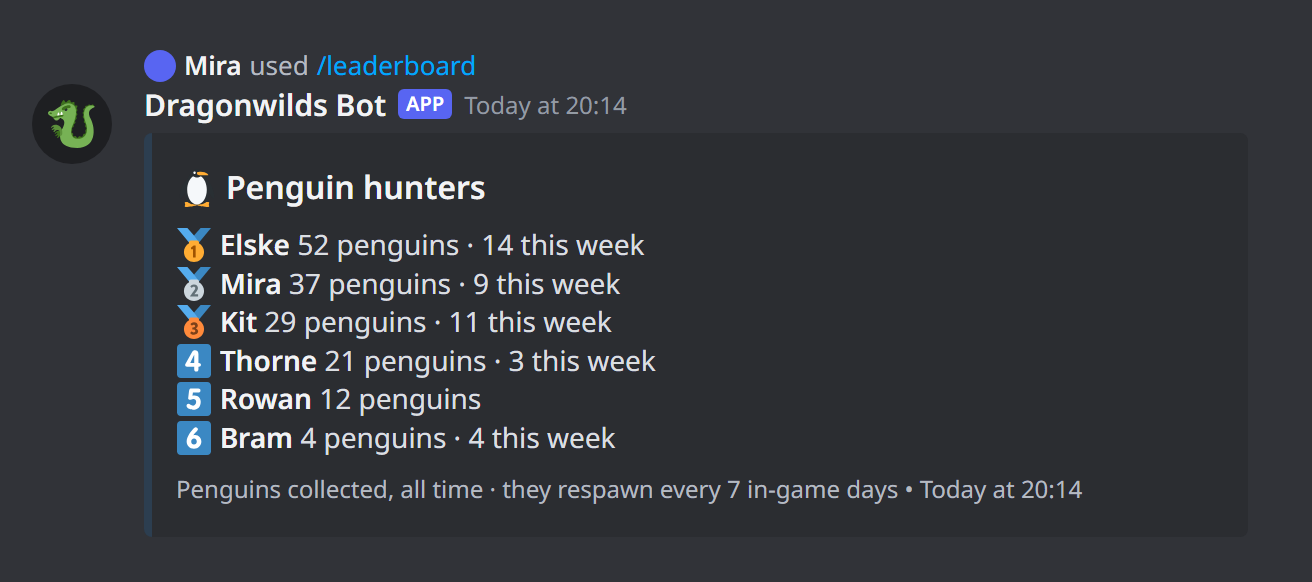
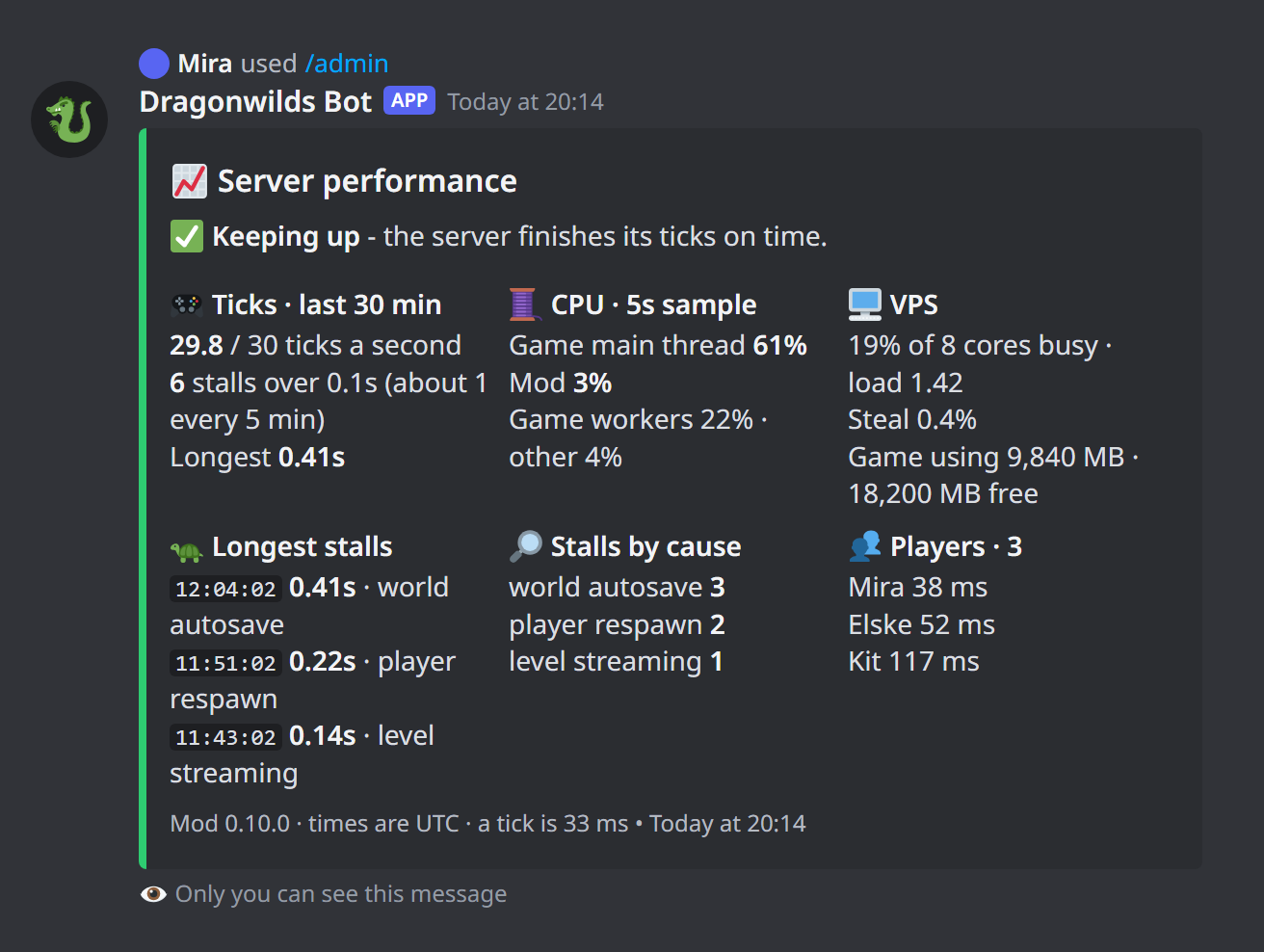
Mod 0.10.0 and Discord bot 0.14.0, for game patch 1.0.2: a penguin hunt leaderboard, health and deaths working again, crash fixes, and everything since 0.7.3.
Important
Patch 1.0.2 broke health and death tracking in older mod builds. Update the mod to get them back.
For players
- 🐧
/leaderboard penguins: everyone ranked by Killer Gentoo Penguins found, with this week's haul. Each penguin counts once per character./meshows your own count. - Death messages say what killed you: "killed by a Giant Rat", and a fall off the map reads "fell out of the world".
- Quest completions are posted next to level-ups.
/questsfollows the wiki's quest list: done out of the total for main and side quests, what's in progress, where the next main quest starts, and what's left by region in story order. Umbral Sands quests and A Reel Downer are included./levels,/meand the leaderboards count quests from the same wiki list.- Item names in
/itemand alerts come from the wiki ("Garou Chit", not "Garou"). - Longer linked-chest range: builds that use far chests are no longer refused (see
LinkedStorageRadiusbelow).
For admins
/admin performance: the server's real tick rate and longest stalls over the last 30 minutes with their likely cause, CPU per thread, VPS load and memory, and player pings.- Carry-over alerts: admins get a DM when a character comes back with items, XP or quests it didn't earn on this server. Tune with
CARRYOVER_MIN_ITEMSandCARRYOVER_MIN_XP. - The players' client-mod installer can be pinned in the commands channel (
CLIENT_MOD_ZIP). - The in-game clock is gone from the status board.
Mod
- 1.0.2: health, the skill component and attribute arrays are looked up by name, with updated SDK offsets as the fallback.
- Penguins: reads each penguin's
CollectedByPlayerIdsevery 10 s and sends apenguinevent per new (penguin, character) pair. - Crash fixes: a use-after-free in the game-thread job queue (the cause of the recent crashes), a safer chat hook, and vtable pages keep their own protection. The mod no longer starts inside Sentry's crash handler.
- Lighter on the server: one player scan per tick shared by everything (
TickSeconds, default 3), cached world pointer, faster memory checks. The mod's thread is namedrsdwapi. [Game] LinkedStorageRadiusinsettings.iniis applied on start. The Linux server doesn't readUserGame.ini, so this is the only way to raise it.- Death events carry their cause. Players report inventory and personal chest;
leaveand the newarriveevents carry what a character left or came back with. crash.logrecords more about the crash.
Install or update
- Mod: download
librsdwapi.sobelow, or build it on the VPS withdeploy/upload.ps1 -Mod. It loads at the next server start. - Bot: run
deploy/upload.ps1 -Bot.
Mod 0.7.3 (kills fixed)
Kill tracking now works.
- Fixed: kills weren't counted. The game handles a creature's death in its own code, which skips the function the mod was hooking. The mod now watches for creatures that have just died and reads who killed them, following spells and arrows back to the player. Each kill is counted once.
- Safety: this method only reads the game's memory and never calls game functions.
Kills count from the moment this version is running. The bot is unchanged (0.9.0); /kills and /leaderboard kills show the results.
Mod 0.7.2 (crash fix)
Use this instead of 0.7.0. Mod 0.7.0 crashes the server as soon as a player is in game.
- Fixed: reading quest, perk and creature names called a game function with an argument it could not pass, which crashed the server. That call is off. Names come from the bot matching against the wiki.
- Everything else in 0.7.0 is unchanged: kill tracking, creature types, and quest and journal totals.
The bot is unchanged (0.9.0).
Mod 0.7.0 · Bot 0.9.0
Warning
This mod build crashes the server when a player joins. Use 0.7.2 instead.
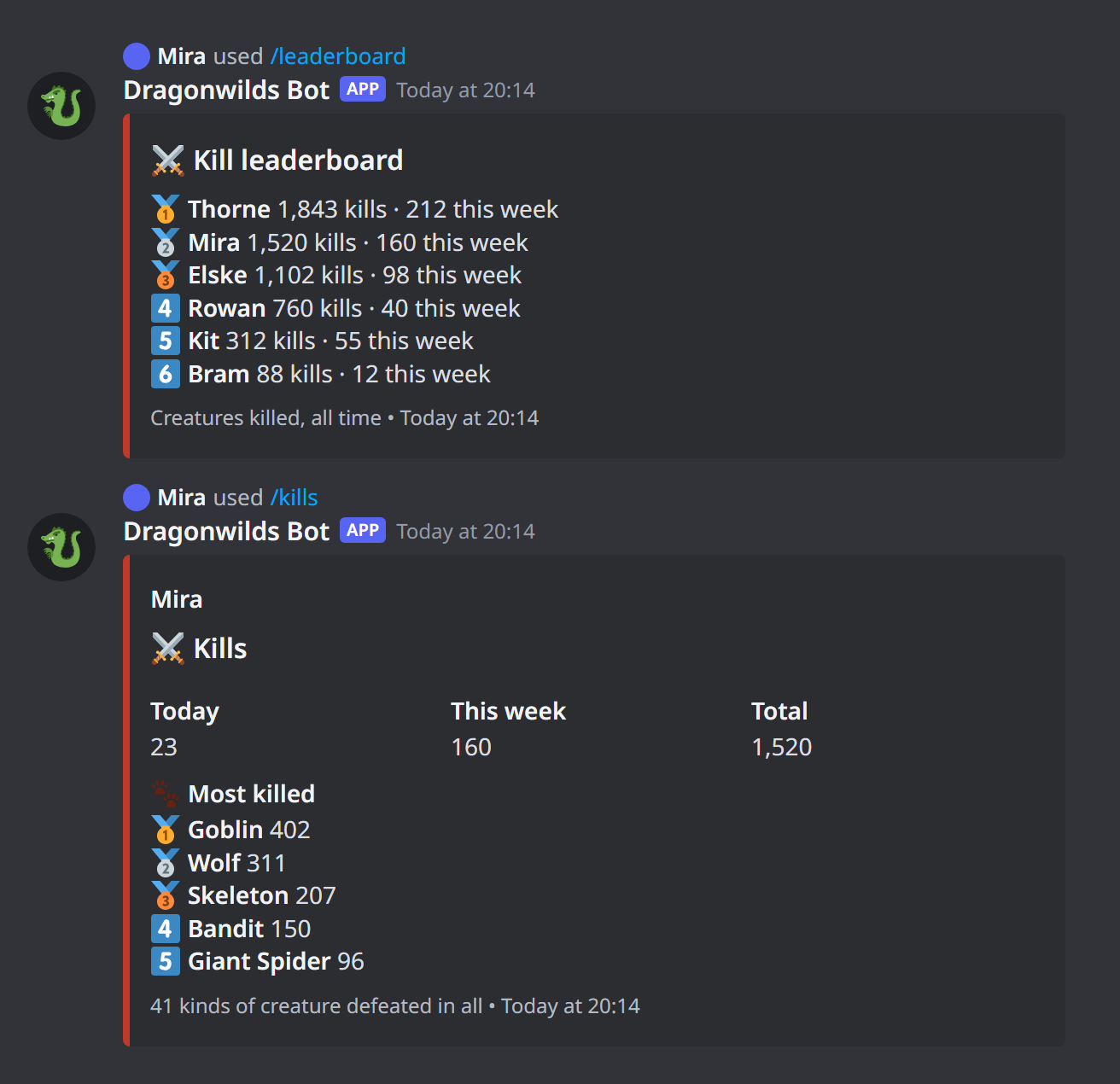
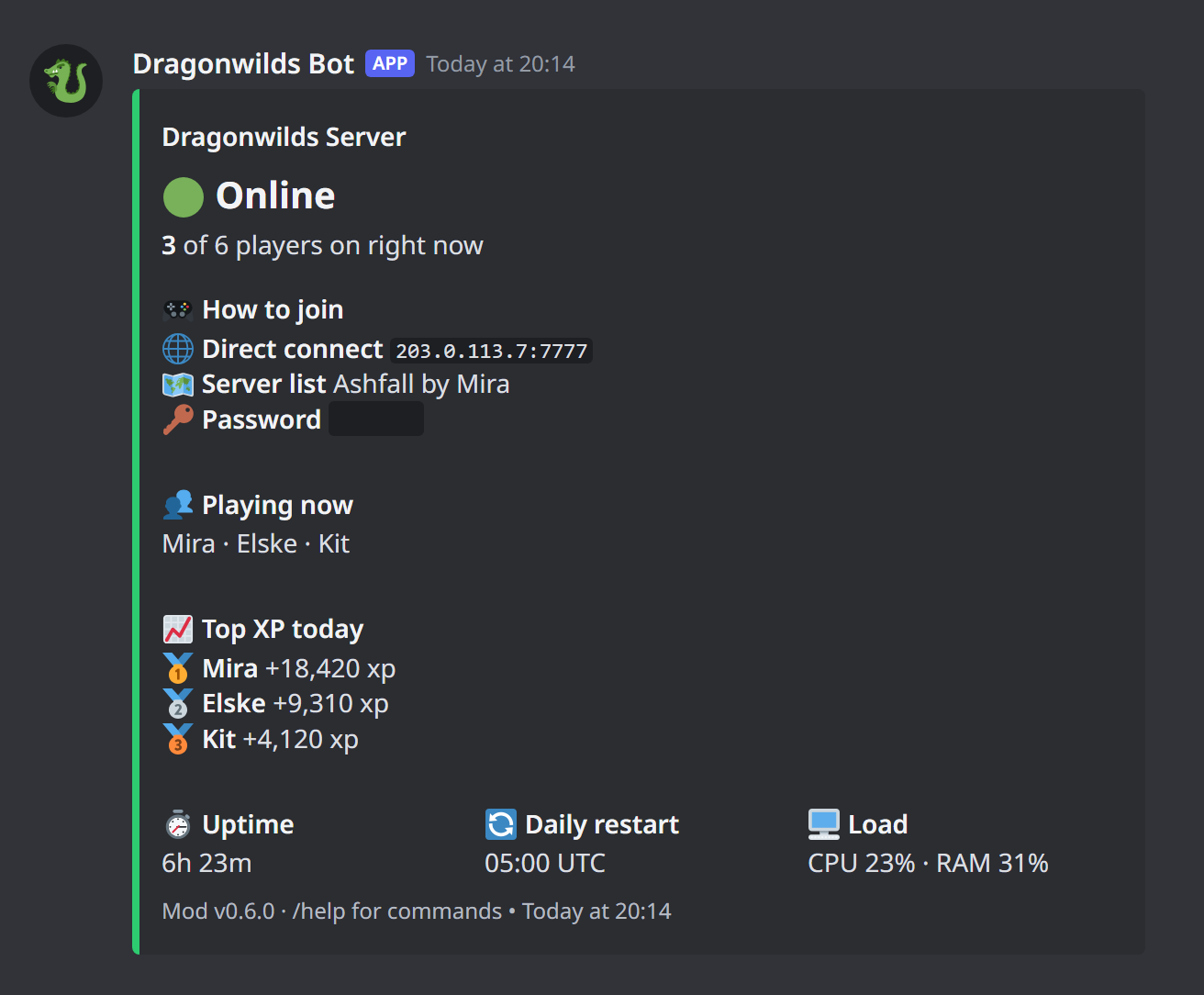
Mod 0.7.0 and Discord bot 0.9.0: creature kills, cleaner leaderboards and a roomier status board.
For players
/kills [player]: creatures killed today, this week and of all time, plus their most-killed creatures. With no name it shows the kill leaderboard. Creature names match the wiki's monster list./leaderboardsub-commands:total,skill <skill>,questsandkills. Quests are no longer mixed into the skill list.- Rank badges: places 4 to 10 show 4️⃣ to 🔟 so they line up with 🥇🥈🥉 on every board.
/me: now includes your kills.- Status board: more space between sections, and the World field is gone.
Mod
- Hooks the game's own "creature killed" function (
ProgressComponent.OnAIKilled). Each kill a player makes, including with a spell or arrow, goes out as akillevent with the creature's in-game name and whether it's a boss. /api/playersaddscreatureTypes: how many kinds of creature each player has killed./api/diagnosticsadds akillHookcheck.
Kills are counted from the moment this mod is running, so earlier kills aren't included.
Install or update
- Mod: download
librsdwapi.sobelow, or build it on the VPS withdeploy/upload.ps1 -Mod. - Bot: run
deploy/upload.ps1 -Bot.