Repository navigation
Releases
Releases · justinh-rahb/retrograde
Retrograde v2.1.0

AFC filament management is the lead feature in Retrograde 2.1.
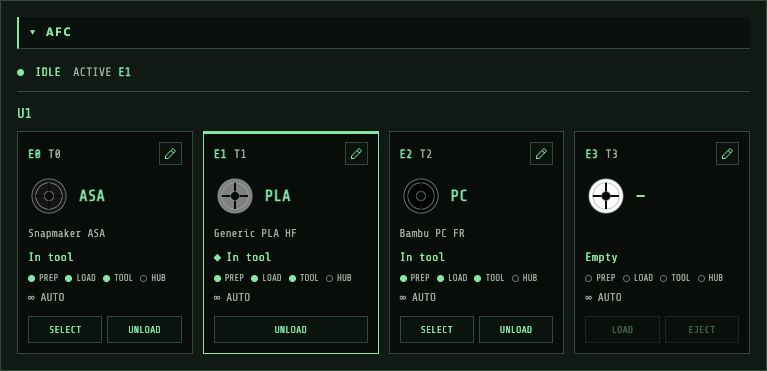
Read-only capture from the Snapmaker U1 AFC-Lite compatibility layer. AFC documentation.
Added
- AFC filament management: automatically detected, collapsible and rearrangeable dashboard panel with grouped units/lanes, filament colours and materials, tool mappings, active-lane and sensor state, hubs, buffers and toolchanger status. Disable it per printer in Settings → Panels.
- Capability-aware AFC load/select/unload/eject, filament editing, tool mapping, runout backup, toolchanger selection/docking, lights and message clearing. Movement actions require confirmation and fresh idle/ready checks.
- HTML iframe cameras and Moonraker webcam import, retaining per-camera settings and unloading embedded players when hidden, collapsed or off-screen.
- Klipper recovery prompt with Restart and Firmware Restart while Klipper is stopped, plus dedicated restart API routing for standalone macros and console commands.
Fixed
- Show only filament lanes advertised in
AFC.lanes; exclude internal drive/selector mechanisms and empty units from the panel and lane command targets. - Preserve literal AFC mapping validation so valid entries such as
T1can be submitted. - Give long G-code and AFC scripts up to ten minutes to acknowledge; keep reads bounded, refresh AFC state after a failure and never replay uncertain commands.
- Keep ordinary controls disabled until Klipper reports ready; avoid unavailable object queries on startup errors and ignore stale initialization responses.
- Serialize power-status polling and suppress repeated background timeout notifications.
Documentation
- Lead with AFC features and a fresh panel screenshot captured read-only from the U1's live AFC-Lite status.
- Put the release install command at the top of the website, simplify copy and add hosted documentation, including separate build and development-server instructions.
Upgrade notes
- Existing settings exports and Moonraker preferences remain compatible. No printer configuration changes are required.
- AFC controls appear only for commands advertised by the connected printer. The U1 screenshot uses its AFC-Lite compatibility layer; real AFC hardware behavior has not been exercised by this release's automated or read-only validation. Advanced AFC calibration/configuration, Spoolman catalogue browsing and print-start material assignment remain outside the panel's current scope.
- Validation: 75 automated tests, both themes, live read-only U1 status and iframe cameras, plus Klipper recovery against a loopback simulator. No live movement, heating or restart was performed during validation.
Retrograde v2.0.1

Fixed
- Only top-level view navigation adds history entries; settings tabs and file directories update the current entry, and closing an app-opened view consumes its entry.
- Include Hosts in URL navigation and restore it on browser Back/Forward and reload.
- Canonicalize legacy Hosts links and invalid settings routes without inserting extra history entries.
- Keep top-level views exclusive and cancel pending UI navigation when browser history changes.
- Make the file directory route authoritative so asynchronous directory responses cannot rewrite a restored URL or path.
Added
- Per-printer heading-font selection in Settings → Interface: theme default, system sans, system monospace, Orbitron and Share Tech Mono.
- Persist heading-font preferences through existing settings import/export and Moonraker synchronization while keeping numeric readout typography separate.
Retrograde v2.0.0
Changed
- Rename the application to Retrograde with a new favicon and refreshed documentation site.
- Make Flight v2 the default interface; retain the original v1 theme with
APP_THEME=retro. - Store printer and interface preferences per Moonraker host, with local caching and explicit conflict resolution.
- Replace repeated camera image requests with a persistent MJPEG stream parsed and decoded in a worker. Bound pending frames to avoid accumulated latency.
Added
- Add, edit, switch and remove multiple Moonraker host profiles.
- Moonraker-backed settings, legacy and workspace import/export, and build-time settings defaults.
- Collapsible panels with saved state and explicit drag/keyboard layout controls, including separate arrangements for compact and wide screens.
- Direct numeric temperature/fan controls and reset actions, plus absolute X/Y/Z entry with fresh state, homing, travel-limit and coordinate-offset checks.
- Live motor-enable and homing indicators, with nozzle/bed direction pictograms for Z jogging.
- File filtering, metadata and thumbnail previews, downloads, sequential uploads and print history.
- Optional per-camera scanlines and configurable display-rate limits.
- Regression tests, frontend CI, and documentation-only GitHub Pages deployment.
Fixed
- Reconnect after disconnection, focus changes and device resume; bound RPC lifetimes and isolate stale connections across hosts.
- Keep camera traffic stopped when collapsed, offscreen, in a hidden tab or removed; cancel pending retries on shutdown and ignore stale player callbacks.
- Integrate browser navigation with URL updates, back/forward, reload restoration and directory deep links.
- Retain slicer layer counts and improve elapsed, remaining and completion-time estimates.
- Preserve G-code modes during manual movement and extrusion; reject cold extrusion and unhomed jogging.
- Keep chamber sensors visible when hiding host/MCU monitors, including case-insensitive Klipper configuration lookup.
- Respect configured output scaling/PWM and the active extruder; show additional fan and filament state.
- Improve dialog focus, small-screen layouts, file-browser density, control alignment and connection dialog buttons.
- Keep build diagnostics out of the normal production interface.
Upgrade notes
- Existing settings exports remain supported. Host connection lists stay in the browser; printer and UX settings sync through the existing
retro_cnc_panelMoonraker database namespace. - The installer reuses existing
retro-cnc-paneldirectories and nginx configuration. New installations useretrograde. - MJPEG worker rendering requires fetch access to the camera. Unsupported browsers or cross-origin cameras without CORS use a persistent native MJPEG image; display-rate limiting and FPS reporting are unavailable in that fallback.
- See the frontend audit for remaining advanced parity gaps.
Retro CNC Panel v1.2.2
Changelog
Added
- Camera System:
- WebRTC Support: Added native support for low-latency WebRTC streams via
go2rtcandcamera-streamerprotocols. - Stream Type: New configuration option to toggle between MJPEG (default), WebRTC (go2rtc), and WebRTC (camera-streamer).
- Smart Streaming: Automatically pauses active streams or switches to snapshots when tab is hidden or panel is out of view to save bandwidth.
- Optimized Loading: Switched from polling to recursive request-chaining (congestion control) to prevent network flooding for MJPEG streams.
- FPS Counter: Improved stability and readability using exponential smoothing and throttled display updates. (MJPEG only)
- WebRTC Support: Added native support for low-latency WebRTC streams via
- Settings Modal / Sysinfo tab:
- Moved "About" details (build version, git tag/commit links, repository link) and the embedded
SystemInfocomponent into this tab. - The
SystemInfosection now displays runtime and diagnostics data, including host OS, CPU, memory, Klipper host software, and MCU firmware versions.
- Moved "About" details (build version, git tag/commit links, repository link) and the embedded
- Console (Debug):
- Added additional console status message updates when the debug flag is enabled.
Changed
- Print Status Panel:
- Layer tracking now prioritizes slicer-provided layer information from
SET_PRINT_STATS_INFOcommand when available, falling back to Z position-based calculation when not provided. This ensures accurate layer counts when slicers properly send layer data while maintaining compatibility with slicers that don't.
- Layer tracking now prioritizes slicer-provided layer information from
Fixed
- Navigation / History:
- Fixed an issue where the browser History API could add a new history entry for every page content change.
Commits
- Fix Moonraker API call to use combined path parameter by @justinh-rahb in #12
- Expand documentation with comprehensive feature list and UI updates by @justinh-rahb in #13
- Update cruise ratio parameter to minimum_cruise_ratio for newer Klipper by @justinh-rahb in #16
- Reorder settings sections in SettingsModal for better UX by @justinh-rahb in #17
- Add reprint and clear functionality for completed print jobs by @justinh-rahb in #18
- Add print completion controls and improve installer file serving by @justinh-rahb in #19
- Add CameraPanel component by @justinh-rahb in #21
- Add build version information injection and display in Settings Modal by @justinh-rahb in #22
- Add retro-styled dial gauges for speed and flow monitoring by @justinh-rahb in #23
- fix: Synchronize Speed and Extrusion Factor sliders by @justinh-rahb in #26
- Update docs by @justinh-rahb in #25
- v1.2.1 by @justinh-rahb in #28
- Add system information display in settings modal by @justinh-rahb in #29
- Calculate current layer from Z position instead of parsing status by @justinh-rahb in #30
- Prioritize slicer-provided layer info with Z-position fallback by @justinh-rahb in #31
- Refactor system info display with improved grid layout by @justinh-rahb in #32
- Add DEBUG flag to console logs and fix browser navigation by @justinh-rahb in #33
Full Changelog: v1.0.0...v1.2.2
Contributors

justinh-rahb
Assets 4
Retro CNC Panel v1.2.1
Fixed
- Installer script:
- Fixed issue where the root $HOME variable was inserted into the Nginx config file instead of the actual home directory path of the user running the script.
Retro CNC Panel v1.2.0
Added
- File Access:
- Added dedicated "Files" button to the Global Header for quick access from any screen.
- File Browser can now be opened during active prints (view-only), allowing file management and inspection without interrupting the job.
- File Management:
- Full file capabilities in File Browser: Delete (files & directories), Rename, Move, and Create New Folder.
- Double-click to enter directories, single-click to select for actions.
- UI Improvements:
- Tabbed Settings: Settings Modal now organized into 5 logical tabs (General, Interface, Macros, Panels, Cameras) to reduce scrolling and improve navigability.
- Modal Scroll Lock: Background page scrolling is now locked when any modal is open (Settings, Connection, File Picker, Confirmation dialogs).
- Temperature Panel improvements
- Autoscale Graph: Graph Y-axis now dynamically scales to the highest visible temperature (plus 10% buffer), improving visibility for lower-temp prints (e.g., PLA at 200°C vs 300°C max).
- Interactive Cursor: Hovering over the graph now displays a vertical cursor and a floating tooltip showing exact temperature values for all sensors at that specific time point.
- Hide Monitors: New setting to hide passive temperature sensors (like Raspberry Pi or MCU temps) from the graph and list, focusing only on heaters (Bed, Extruder).
- Hide Graph: Option to completely hide the temperature graph for a compact view.
- Settings Integration: New "TEMPERATURE DISPLAY" section in Settings Modal to toggle these features. Preserves user preferences.
Changed
- Settings UX:
- Relocated "Save" button in Settings Modal to the header bar for quicker access.
- Updated "Save" button style to match other action buttons (orange gradient).
- Standardized "Close" button style across Settings and File Picker modals.
- File Browser UX:
- Relocated "Upload" button to the header for consistency.
- Reorganized footer actions to accommodate new file management tools in a clearer layout.
- Visuals:
- Improved modal positioning: Settings and File Picker modals now have a fixed top offset to prevent vertical jumping during content resizing.
- Consistent modal width for Settings and File Picker.
Fixed
- Speed Factor and Extrusion Factor sliders now properly sync with the printer
- Sliders now send M220 (speed) and M221 (extrusion) G-code commands when changed
- Previously, slider changes only updated local UI state and were immediately overwritten by subscription updates from Moonraker
- RetroSlider component updated to use local value + change event pattern instead of direct store binding
- Added
setSpeedFactor()andsetExtrusionFactor()functions to machineStore
- Step increments (jog distance, extrude amount/speed, z-offset increment) now persist across page reloads via localStorage
- MiscPanel fan speed control for named fans
- Correctly extracts fan name from Moonraker key (removes "fan_generic "prefix)
- Sends proper SET_FAN_SPEED command with extracted fan name
- Remove unused print status handling functions from PrintStatusPanel fixing broken build
Retro CNC Panel v1.1.0
Added
- Power Device Control integration with Moonraker's device_power plugin
- Icon button in header (middle position) for toggling power device on/off
- Settings dropdown to select device: OFF (hidden), AUTO (recommended), or specific device
- AUTO mode automatically selects device named "printer" or first available device
- Real-time status updates via websocket notifications with 5-second polling fallback
- Visual states: green glow when on, grey when off, disabled when locked during print
- Orange hover effect with fill-up circle animation
- Configurable confirmation dialog for power toggle (enabled by default)
- Tooltip displays device name and current status
- Graceful error recovery with automatic status re-fetch on API failures
- Respects
locked_while_printingflag to prevent power-off during active prints - Default setting is OFF (button hidden) until user enables in settings
- Confirmation dialogs for critical print actions (configurable in Settings)
- Pause, Cancel, and Start Print actions can each require user confirmation
- Generic "Are you sure?" confirmation modal with configurable button text
- Cancel confirmation enabled by default, others optional
- Start Print confirmation applies to both new prints and reprints
- Settings in Print Control Macros section to enable/disable each confirmation type
- Retro-styled dial gauges for speed and flow monitoring
- Semi-circular SVG gauges with smooth spring-physics animated needles and green/orange/red color zones
- EMA filtering and Motion One spring animations for buttery-smooth needle movement with natural acceleration/deceleration
- Speed gauge displays live toolhead velocity, flow gauge shows volumetric flow rate (mm³/s)
- Exact digital readouts with smooth visual indicators
- Configurable max rates, redline thresholds, and zone percentages in Settings Modal
- Optional graphics-only mode: hide gauge graphics and show only numeric values with larger font size (36px vs 24px)
- Side-by-side layout in Print Status Panel
- Layer progress display in Print Status Panel
- Shows current layer and total layers during printing (e.g., "LAYER: 45/120")
- Fetches layer count from file metadata on print start
- Estimates current layer from print progress percentage
- Automatically resets when print completes
- Build version information injection and display
- Git commit hash and tag information injected during build process
- About section in Settings Modal displaying version/commit with GitHub links
- Automatic fallback to "dev" when git information unavailable
- TypeScript declarations for build-time variables
- Repository field added to package.json for proper GitHub linking
- Camera Panel for MJPEG stream display
- Support for multiple cameras with compact switching buttons
- Configurable stream URL and snapshot URL per camera
- Aspect ratio options (16:9, 4:3, 1:1, 21:9) with proper container sizing
- Flip horizontal/vertical and rotation controls (0°, 90°, 180°, 270°)
- Live FPS counter overlay (optional per camera)
- CSS transform support for camera orientation adjustments
- Camera settings section in Settings Modal with enable/disable toggles
- Auto-refresh MJPEG stream support for adaptive MJPEG from ustreamer/camera-streamer
- Panel positioned in right column above Temperature Panel
- Camera selector buttons integrated into bottom info bar for space efficiency
Changed
- Print Status Panel filename display now uses flexible width to show more of the filename
- File picker is now accessible whenever machine is not actively printing (previously only when no file loaded)
Fixed
- Camera switching reliability issues in Camera Panel
- Camera selection now persists to localStorage, surviving page reloads and component re-mounts
- Eliminated race condition between user selection and reactive fallback logic
- Decoupled stream URL updates from camera selection reactive chain to prevent unintended resets
- Added per-camera configurable target refresh rate (default 5 FPS) with dynamic interval adjustment
- Refresh interval now updates automatically when switching between cameras with different refresh rates
- Camera selection now only falls back to first camera when saved camera is deleted/disabled, not on every reactive update
- Switching cameras now works reliably on first click without requiring multiple toggles
- Flow rate display now clamps negative values to zero during retraction moves (prevents confusing negative flow rates)
- Export settings filename now uses format
<machine title>-<date>.jsoninstead of hardcoded prefix - Page title now dynamically reflects the user's configured machine title from settings
- Unified notification styling: persistent and dismissable errors now use the same visual style (persistent errors still have pulsing animation)
- Default connection IP now auto-detects from the page hostname (falls back to
localhostif unavailable) instead of hardcoded192.168.2.241 - Clear and Reprint buttons now also appear when print is CANCELLED (not just COMPLETE)
- Preserves filename for reprint functionality on both COMPLETE and CANCELLED statuses
- Allows users to clear cancelled prints or immediately restart them
Fixed
- Current layer count now updates in real-time during active prints
- Layer estimate now recalculates continuously based on progress percentage
- Previously only calculated once when layer was 0, causing stale display
- RetroGauge infinite loop causing "maximum update depth exceeded" error
- Fixed
$effectto track previous value and only update when value actually changes - Prevents infinite loop from reading and writing the same state
- Fixed
Retro CNC Panel v1.0.0
⚠️ Installer Issue
The one-line curl installer currently has an issue with interactive prompts.
Instead of using:
curl -sSL https://justinh-rahb.github.io/moonraker-cnc/install.sh | bashPlease download and run the installer directly:
curl -sSL -o install.sh https://justinh-rahb.github.io/moonraker-cnc/install.sh
bash install.sh
This will be fixed in a future update.
Added
- Settings import/export functionality with JSON file download and upload
- Support for
minimum_cruise_ratioparameter in Machine Limits Panel for newer Klipper versions (auto-detects and falls back tomax_accel_to_decelfor legacy versions) - Clear and Reprint buttons to print status panel when print completes
- Clear button resets print status to idle state
- Reprint button immediately restarts the same print job
- Track lastCompletedFilename in machineStore for reprint functionality
- Add startPrint and clearPrintStatus functions to machineStore
Changed
- Rearranged settings modal sections to align with main UI panel order (Print Control, Filament, Console, Temperature Presets, Macro Panels)
- Improved installer to automatically serve files with Python http.server when nginx is unavailable or declined
- Better nginx prompts with clearer messaging
- Automatic fallback to Python file server
- Provides immediate access URL and server management commands
- Uninstaller now also stops running Python servers
Fixed
- Console panel scroll to bottom behavior for proper auto-scrolling
- File Picker Modal various issues for improved stability
- Moonraker API call to use combined path parameter for correct file operations
Documentation
- Expanded project documentation
Retro CNC Panel v0.3.3
Fixed
- File Picker Modal: Fixed directory navigation by using correct Moonraker API path format (path must include root prefix like "gcodes/subdir")
Retro CNC Panel v0.3.2
Fixed
- File Picker Modal: Fixed issue with double-clicking files to start print not working on built versions (worked in dev mode)