Repository navigation
Releases
Harappa 1.2.1

日本語
Harappa 1.2.1 ── 水がちゃんと流れるようになりました。
- 水が流れない不具合を修正:1.2.0 では、滝の水の幕、小川の流れの筋と白い早瀬、水面の波紋が止まったままでした。水のノードグループが使われるたびに作り直され、フレームを秒に変えるドライバーも消えていたのが原因です。いまは一度だけ作られるので、タイムラインに合わせて水が動きます。水を足したり変えたりするたびに、すべての水のノードグループを作り直すこともなくなりました。
- 水の時間がフレームごとに進むことをテストで確かめるようにしました。
1.2.0 をお使いの方は上書きインストールしてください。作ってあるシーンは、ファイルを開き直すと水が流れ始めます。
インストール:下の harappa-1.2.1.zip をダウンロード(解凍しない)→ Blender › 編集 › プリファレンス › エクステンションを入手 › 右上の ⌄ › ディスクからインストール…。Blender 5.0 以降(EEVEE、5.2 LTS と 5.3 で動作確認済み)。
無料・商用OK。アドオンを再配布・改変するときは NOTICE.md のクレジット表記が必要です。作った画像や動画にはクレジットは不要です。
English
Harappa 1.2.1 — the water flows again.
- Fixed: still water. In 1.2.0 the waterfall sheet, the flow lines and white rapids on streams and the ripples on the water stood still. The water's node groups were rebuilt every time they were used, which also dropped the driver that turns frames into seconds. They are now built once, so the water moves with the timeline, and adding or editing water no longer rebuilds every water node group.
- Tests now check that the water's time advances from frame to frame.
If you have 1.2.0, install over it. Scenes you already made start flowing when you reopen the file.
Install: download harappa-1.2.1.zip below (don't unzip) → Blender › Edit › Preferences › Get Extensions › ⌄ › Install from Disk…. Blender 5.0+ (EEVEE; tested on 5.2 LTS and 5.3).
Free, commercial use included. Redistributing or modifying the add-on requires keeping the attribution in NOTICE.md. Images and videos you make need no credit.
Full list: CHANGELOG.md
Harappa 1.2.0
日本語
Harappa 1.2.0「水辺と天気」 ── 池・小川・滝・雨を、ワンクリックで原っぱに。
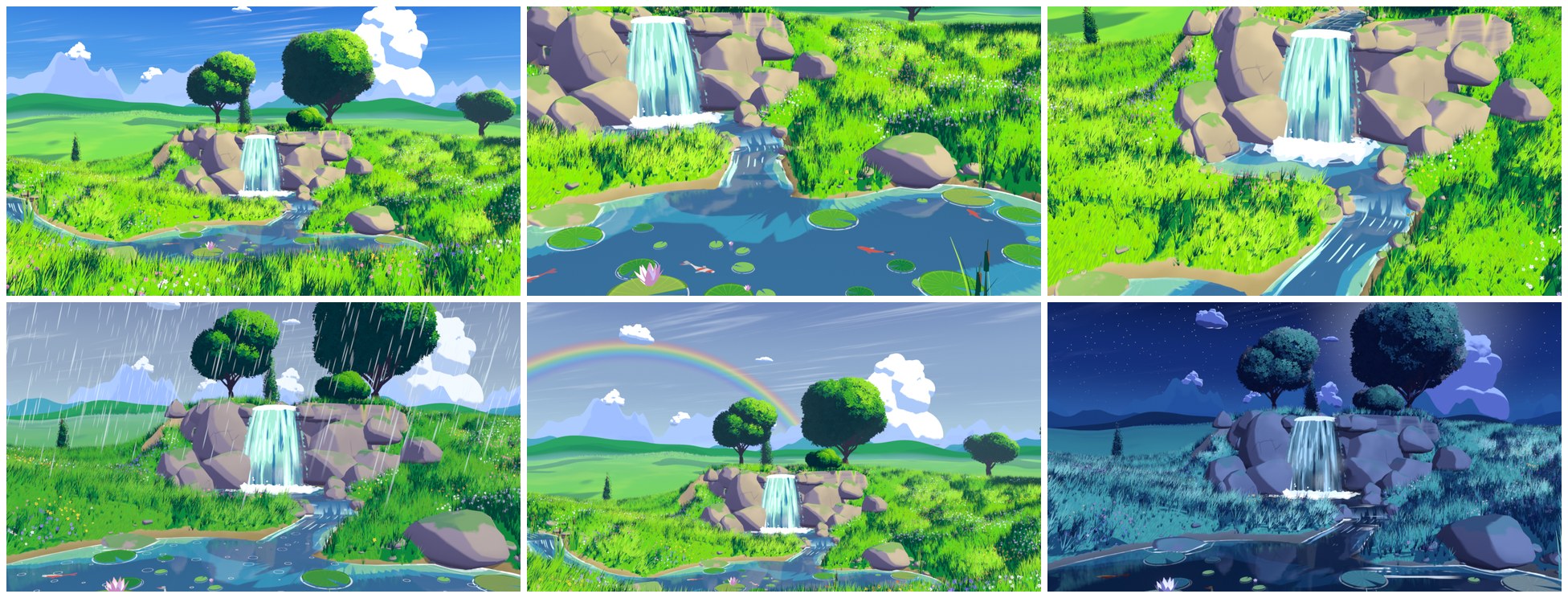
- 水辺:池を追加・小川を追加・滝を追加・岩を追加。自分で描いたカーブも水にできます。水は草原に自分で底を掘り、岸のまわりの草は自動でよけます。トゥーン調の水面は季節と画風に合わせて変わります。
- 自然のルール:水は低い方へ流れます。池は縁のいちばん低い所まで満ちてそこからあふれ、斜面に浮くことはありません。滝つぼは斜面に掘り込まれ、石の並んだ切れ目からあふれた水が、淵と小さな落ち込みの段々になって下ります。池の近くまで描いた小川は自動で池につながります。
- 池の生きもの:睡蓮の葉と花、葦、岸の小石、ときどき跳ねる鯉、浮かぶ小舟。秋には落ち葉が岸に寄ります。
- 天気:晴れ・くもり・雨・嵐を季節の上に重ねられます。雨はカメラについてくるか、決めた場所だけに。虹、夕暮れと夜のホタル、昼のトンボも。
- カメラ内だけに草:カメラに映る範囲だけに草と花を生やします。絵は1画素も変わらず、草の数は半分〜5分の1に。
- パネル:「選択中の水・滝・岩・舟」が選んだものに合わせて開き、細かい設定は「詳細」にまとまっています。UI は日本語・English・简体中文・한국어。
インストール:下の harappa-1.2.0.zip をダウンロード(解凍しない)→ Blender › 編集 › プリファレンス › エクステンションを入手 › 右上の ⌄ › ディスクからインストール…。Blender 5.0 以降(EEVEE、5.2 LTS と 5.3 で動作確認済み)。上書きインストールできます。
無料・商用OK。アドオンを再配布・改変するときは NOTICE.md のクレジット表記が必要です。作った画像や動画にはクレジットは不要です。
English
Harappa 1.2.0 "Waterside & Weather" — ponds, streams, waterfalls and rain for your meadow, in one click.
- Waterside: Add Pond, Add Stream, Add Waterfall, Add Rock, or turn your own curves into water. Water digs its own bed into the meadow and the grass makes room along the bank. The toon water follows every season and paint style.
- Rules of nature: water runs downhill. A pond fills to the lowest point of its rim and spills out there; it never hangs above the slope. A waterfall's plunge pool is dug into the hillside, and the water spilling through its stone-lined notch steps down as small pools and drops. A stream drawn up to a pond joins it by itself.
- Pond life: water lilies, reeds, pebbles on the bank, koi that now and then leap out, a floating rowboat. In autumn, fallen leaves drift to the banks.
- Weather: Clear Sky, Cloudy, Rain and Storm as a layer over the season. Rain follows the camera or falls only where you put it. A rainbow, fireflies at dusk and night, dragonflies by day.
- Grass Only in Camera View: grass and flowers grow only where the camera sees. The picture doesn't change by a pixel; the grass count drops to a half to a fifth.
- Panels: Active Water, Waterfall, Rock and Boat open for the selected thing, with finer settings under More. UI in Japanese, English, Simplified Chinese and Korean.
Install: download harappa-1.2.0.zip below (don't unzip) → Blender › Edit › Preferences › Get Extensions › ⌄ › Install from Disk…. Blender 5.0+ (EEVEE; tested on 5.2 LTS and 5.3). Installing over an older version works the same way.
Free, commercial use included. Redistributing or modifying the add-on requires keeping the attribution in NOTICE.md. Images and videos you make need no credit.
Full list: CHANGELOG.md
Harappa 1.1.2
日本語
Harappa 1.1.2 ── 平面ひとつから、ワンクリックで原っぱに。
- 小さな平面は丘に:「追加 › 平面」で作った平面(10 m 未満)を選んで「アニメの草原にする」を押すと、これまでは 2 m の芝生になって、カメラからは草が見えませんでした。いまはその平面がその場で 40 m のゆるやかな丘になり、すぐに原っぱが見えます(Ctrl+Z で平面に戻せます。オペレーターパネルの「小さい平面は丘に」でオフにもできます)。
- 自分の地面は変えません:形を作り込んだ小さな地面はそのまま。ステータスバーと「選択中の草原」パネルで「地面が小さいので草は一画だけ。30 m 以上に拡大してください」と知らせます。
- README を正確に:ボタンひとつで草・花・空、木はもうひとつのボタンで(冒頭の一文が木もワンクリックと読めていたのを直しました)。地面の大きさの目安を FAQ に追加。
インストール:下の harappa-1.1.2.zip をダウンロード(解凍しない)→ Blender › 編集 › プリファレンス › エクステンションを入手 › 右上の ⌄ › ディスクからインストール…。Blender 5.0 以降(EEVEE)。上書きインストールできます。
無料・商用OK。アドオンを再配布・改変するときは NOTICE.md のクレジット表記が必要です。作った画像や動画にはクレジットは不要です。
English
Harappa 1.1.2 — from one plane to a meadow in one click.
- A small plane becomes the hill: Make Anime Meadow on a plane from Add › Plane (under 10 m) used to grow a 2 m lawn the camera couldn't even see. Now the plane turns into the 40 m rolling hill where it stands, and the meadow is right there (Ctrl+Z brings the plane back; Small Plane to Hill in the operator panel turns it off).
- Your own ground is never reshaped: a small ground you modelled stays as it is; the status bar and the Active Meadow panel say it gives only a patch of grass and to scale it to 30 m or more.
- README, accurately: one click makes the grass, flowers and sky, and trees are one more click (the first line read as if trees came with the same click). Ground-size advice added to the FAQ.
Install: download harappa-1.1.2.zip below (don't unzip) → Blender › Edit › Preferences › Get Extensions › ⌄ › Install from Disk…. Blender 5.0+ (EEVEE). Installing over an older version works the same way.
Free, commercial use included. Redistributing or modifying the add-on requires keeping the attribution in NOTICE.md. Images and videos you make need no credit.
Full list: CHANGELOG.md
Harappa 1.1.1
日本語
Harappa 1.1.1 ── 自分のモデルを、ボタンひとつで原っぱになじませる。
- 原っぱになじませる:読み込んだキャラクターや建物の影が真っ黒になるときは、モデルを選んで「原っぱになじませる」を押すだけ(「草にこれをよけさせる」のすぐ下。インポートしたモデルの親の空オブジェクトを選んでも大丈夫です)。原っぱと同じ塗り方になり、光と影の色は季節・画風・ルック・鮮やかさ・コントラスト・遠くのかすみに合わせて変わります。切り抜きの穴や光るマテリアルはそのまま。元のマテリアルはファイルに残っていて、「元の見た目に戻す」でいつでも戻せます。
- 影が黒くなっていた理由:Harappa のマテリアルは光と影を色として描いているので、シーンにはオブジェクトを照らす環境光がありません。ふつうのマテリアルは太陽の光しか受けず、日の当たらない面が真っ黒になっていました。
- AI エージェント用コマンドに
--blend--unblendを追加。
インストール:下の harappa-1.1.1.zip をダウンロード(解凍しない)→ Blender › 編集 › プリファレンス › エクステンションを入手 › 右上の ⌄ › ディスクからインストール…。Blender 5.0 以降(EEVEE)。1.1.0 の上から同じ手順で上書きできます。
無料・商用OK。アドオンを再配布・改変するときは NOTICE.md のクレジット表記が必要です。作った画像や動画にはクレジットは不要です。
English
Harappa 1.1.1 — blend your own models into the meadow with one click.
- Blend Into Meadow: if an imported character or building gets pitch-black shadows, select it and click Blend Into Meadow (right under Make Grass Avoid It; selecting an imported model's empty parent works too). It is painted the way the meadow is, and its light and shade follow the season, paint style, Look, Vividness, Picture Contrast and the distance haze. Cut-out holes and glowing materials are kept. Its own materials stay in the file; Original Look brings them back at any time.
- Why the shadows were black: Harappa's materials paint their own light and shade, so the scene gives objects no ambient light. An ordinary material got the sun alone, and every face the sun missed went black.
- New agent CLI options:
--blend,--unblend.
Install: download harappa-1.1.1.zip below (don't unzip) → Blender › Edit › Preferences › Get Extensions › ⌄ › Install from Disk…. Blender 5.0+ (EEVEE). Installing over 1.1.0 works the same way.
Free, commercial use included. Redistributing or modifying the add-on requires keeping the attribution in NOTICE.md. Images and videos you make need no credit.
Full list: CHANGELOG.md
Harappa 1.1.0
日本語
Harappa 1.1.0 ── 空も雲も山も描き直して、草原を「自分の絵」にできるようになりました。
新しい見た目
- 空と雲と山並み:カメラに合わせて塗り直される空のグラデーション、太陽と巻雲。雲は1つずつ動かせる立体の積雲(明るい頂、青い影、平らな底、逆光の金色のふち)。遠くには3層の山並み。
- 鮮やかな6つの季節:夏・春・夕焼け(逆光)・秋・月夜・霧の朝をアニメ背景らしく塗り直しました。「鮮やかさ」「全体のコントラスト」は季節を変えても保たれます。
- 画風が空・雲・葉っぱにも:くっきりセルは大きなブロック、絵画風は細かい筆のタッチ、やわらかパステルは軽い空。
- 9つの木の形:桜・松・柳・ポプラが仲間入り。「木を植える」は主役の丸い木を画面の3分の1に置きます。
- ディテールレベル:速い/バランス/最高。
自分好みに
- 草原に塗る:草(道を作る/草を生やす)・花(花畑/なし)・草の高さ(2倍まで/刈り込み)・色(陽だまり、枯れ草)の4つのレイヤーを Blender のブラシで。Ctrl+Z も効き、季節やシャッフルを変えても塗った内容は残ります。
- よけるオブジェクト:キャラクターを選んで「草にこれをよけさせる」。草と花がよけ、ベンチや橋の下ではすぐ下まで伸びます。動いても草がチラつきません。
- このオブジェクトの色:草原・木・雲・山ごとに色相・彩度・明るさと固有の色。「この木の花」で桜の木もすぐ。
- マイルック:色・光・空・画風を小さな JSON に保存して、どのファイルにも適用・共有。
- AI エージェント用コマンドにも
--paint--avoid--preset-file--save-presetなどを追加。 - Blender 5.0 / 5.1 / 5.2 LTS / 5.3 でテスト済み。1.0 のシーンも色を保ったまま開けます。
インストール:下の harappa-1.1.0.zip をダウンロード(解凍しない)→ Blender › 編集 › プリファレンス › エクステンションを入手 › 右上の ⌄ › ディスクからインストール…。Blender 5.0 以降(EEVEE)。1.0 を入れている場合も同じ手順で上書きできます。
無料・商用OK。アドオンを再配布・改変するときは NOTICE.md のクレジット表記が必要です。作った画像や動画にはクレジットは不要です。
English
Harappa 1.1.0 — a repainted sky, clouds and mountains, and a meadow you can make your own.
A new look
- Sky, clouds and mountains: a sky gradient that refits to the camera, a sun disc and cirrus; solid cumulus clouds you can move one by one (lit tops, blue shade, flat bases, golden rims against the sun); three layers of distant mountains.
- Vivid seasons: all six repainted in clear anime colour; golden hour is backlit. Vividness and Picture Contrast survive season changes.
- Paint styles reach the sky, clouds and leaves.
- Nine tree shapes: cherry blossom, Japanese pine, willow and poplar join the family; Plant Trees puts a round focal tree on a third.
- Detail Level: Fast / Balanced / Best.
Make it yours
- Paint the Meadow: Grass (Make Path / Grow Grass), Flowers (flower beds / none), Grass Height (up to ×2 / mown) and Colour (sunlit patches, dry spots) with Blender's own brush. Ctrl+Z works; seasons and Shuffle keep what you painted.
- Avoid Objects: select a character and click Make Grass Avoid It. Grass and flowers make room, grow up to just below benches and bridges, and never flicker as things move.
- This Object's Colour: hue, saturation, brightness and an own colour per meadow, tree, cloud or mountain range; Blossom on This Tree for an instant cherry.
- My Looks: save colours, light, sky and paint style as a small JSON file; apply and share it anywhere.
- New agent CLI options:
--paint,--fill,--avoid,--preset,--preset-file,--save-preset. - Tested on Blender 5.0, 5.1, 5.2 LTS and 5.3; scenes made with 1.0 open with their colours.
Install: download harappa-1.1.0.zip below (don't unzip) → Blender › Edit › Preferences › Get Extensions › ⌄ › Install from Disk…. Blender 5.0+ (EEVEE). Installing over 1.0 works the same way.
Free, commercial use included. Redistributing or modifying the add-on requires keeping the attribution in NOTICE.md. Images and videos you make need no credit.
Full list: CHANGELOG.md
Harappa 1.0.0
日本語
Harappa(原っぱ)最初のリリースです。 なにもない丘が、ボタンひとつでアニメ背景の原っぱに。
- ワンクリック「アニメの草原にする」:草・花・アニメの空・雲・遠くの丘・太陽・カメラまで自動で用意。草は一本ずつ風にそよぎ、光と影は大きな「草のかたまり」で塗り分けます。
- アニメの木:丸い木・背の高い木・桜のような木・茂み・針葉樹。「木を植える」でまとめて植えられ、形・高さ・シードを変えるとその場で作り直します。
- 道を塗る:頂点ペイントで黒く塗ったところが道になります。
- 6 つの季節 × 4 つの画風:夏の草原、春の花、夕暮れの金色、秋の紅葉、月夜、霧の朝 × アニメ背景、絵画風、くっきりセル、やわらかパステル。
- シャッフル:押すたびに色・木の形・雲・花・太陽の角度が変わります(バリエーション番号で再現可能)。
- 葉っぱにする:どんなメッシュも茂みや生け垣に。
- キャラクターをよけて生える草:草と花のモディファイアーの Avoid にコレクションを入れると、その下には草が生えず、まわりの草は短くなって外側へ倒れます。寝ころぶキャラクターが草にうもれて見え、草がモデルを突き抜けません。
- パネルは日本語・英語・中国語・韓国語に自動対応(🌐メニューでも切り替え可)。
- AI エージェント対応:「AGENTS.md に従って Harappa をインストールして、アニメ背景みたいな原っぱと木を作って」と頼むだけ。
インストール:下の harappa-1.0.0.zip をダウンロード(解凍しない)→ Blender › 編集 › プリファレンス › エクステンションを入手 › 右上の ⌄ › ディスクからインストール…。Blender 5.0 以降(EEVEE)。
無料・商用OK。アドオンを再配布・改変するときは NOTICE.md のクレジット表記が必要です。作った画像や動画にはクレジットは不要です。
English
First release of Harappa. A bare hill → an anime-background meadow in one click.
- One click, "Make Anime Meadow": grass, flowers, an anime sky, painted clouds, far hills, a key sun and a camera. Every tuft sways in the wind, and light and shadow fall in big painted clumps.
- Anime trees: round, tall, wide (cherry), bush and conifer. Plant Trees scatters them; shape, height and seed rebuild a tree live.
- Paint Path: vertex-paint black where the path goes.
- 6 seasons × 4 paint styles: Summer Meadow, Spring Blossom, Golden Hour, Autumn Leaves, Moonlit Night, Misty Morning × Anime Background, Painterly, Crisp Cel, Soft Pastel.
- Shuffle: every click changes colours, tree shapes, clouds, flowers and the sun angle (reproducible variation number).
- Make Foliage: any mesh becomes a bush or a hedge.
- Grass that grows around your characters: put a collection into the Avoid input of the grass and flower modifiers; nothing grows under those objects, and grass beside them gets shorter and leans away, so a character lying in the meadow looks nestled in it with no blades through the model.
- The panel follows Blender's language: English, 日本語, 简体中文, 한국어 (or pick one in the 🌐 menu).
- AI-agent ready: just say "Follow AGENTS.md to install Harappa and make an anime-background meadow with trees".
Install: download harappa-1.0.0.zip below (don't unzip) → Blender › Edit › Preferences › Get Extensions › ⌄ › Install from Disk…. Blender 5.0+ (EEVEE).
Free, commercial use included. Redistributing or modifying the add-on requires keeping the attribution in NOTICE.md. Images and videos you make need no credit.