Repository navigation

v6.13.5 (2026-11-20)
Docs: Publish with BrewPage
What changed for you
- The publish runner keeps owner keys and management links in protected files and never prints them. If you decline workspace history,
--no-save --receipt-dirwrites the private receipt to a folder you choose. - A publish counts as done only when the server answer and the saved receipt agree, and site ZIP checks use the exact paths inside the archive.
New: Claude Code mods. Type ++r before your request and Claude reviews each significant change, double-checks every finding and fixes only the confirmed ones. Watch it in the console (GIF) · Prompt placeholders
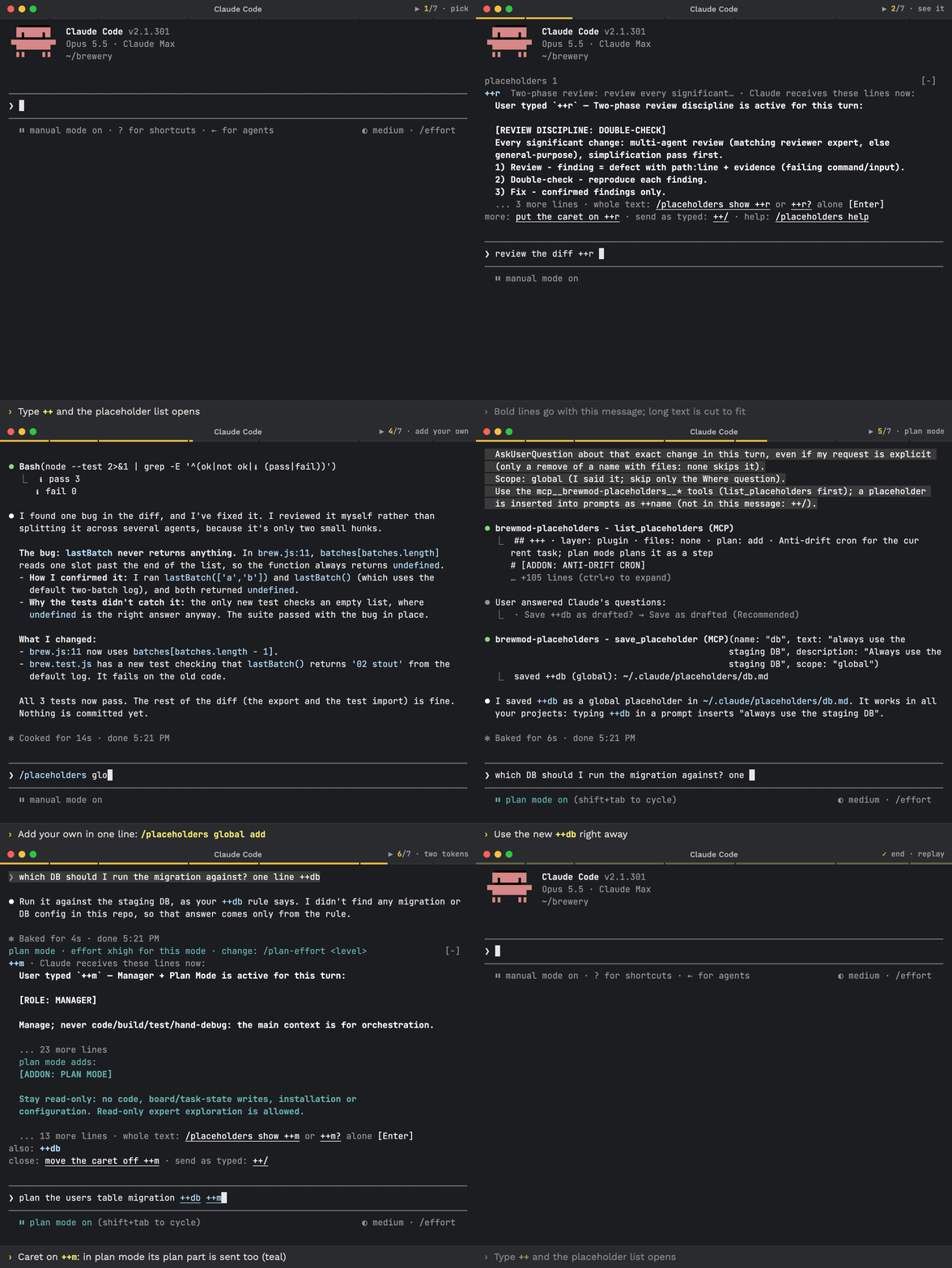
❗ Update Claude Code first: the mods need Claude Code 2.1.301 or newer. Run claude update, restart Claude Code (exit, run claude), check with claude --version.
Update with Claude: paste this prompt into Claude Code
Check `claude --version`. Below 2.1.301 (the mods need it), run `claude update`, then stop and tell me to restart Claude Code and paste this prompt again. Otherwise run `claude plugin list` and note the installed brewcode plugin and mod versions. To update to the latest release (v6.13.5 or newer): if brewtools is installed, run `/brewtools:plugin-update` and show me its report; if not, read https://raw.githubusercontent.com/kochetkov-ma/claude-brewcode/main/UPDATE.md and follow it. Then explain in plain words what changed (the report's "What changed for you", else the sections of https://raw.githubusercontent.com/kochetkov-ma/claude-brewcode/main/RELEASE-NOTES.md for every version newer than the one I had), recommend what I should try first, and tell me to type `/reload-plugins` and, in each project, `/brewcode:setup-status upgrade`.
How to update and use it well: UPDATE.md · Recommended flow
Update by hand (Claude Code):
claude --version
claude update      # if it is older; restart Claude Code afterwards
claude plugin marketplace update claude-brewcode
claude plugin update <name>@claude-brewcode   # once per installed plugin: brewmod-placeholders, brewmod-plan-effort, brewmod-reminders, brewcode, brewdoc, brewtools, brewui
Or run /brewtools:plugin-update: it updates the installed plugins and mods, offers the missing mods and plugins once and prints what changed for you. Either way, finish with /reload-plugins and, in each project, /brewcode:setup-status upgrade (it brings the setups generated there current).
Install (Claude Code 2.1.301 or newer), then run /reload-plugins. A paste-in prompt for the same commands: Install in 30 seconds.
claude plugin marketplace add https://github.com/kochetkov-ma/claude-brewcode
claude plugin install brewmod-placeholders@claude-brewcode   # prompt shortcuts: ++r, ++m, your own
claude plugin install brewmod-plan-effort@claude-brewcode    # higher effort while Claude plans
claude plugin install brewmod-reminders@claude-brewcode      # durable reminders that survive sessions
claude plugin install brewcode@claude-brewcode
claude plugin install brewdoc@claude-brewcode
claude plugin install brewtools@claude-brewcode
claude plugin install brewui@claude-brewcode
Docs: Getting started · Mods · Prompt placeholders · Plan-mode effort · Reminders · brewcode.app