Repository navigation
Releases
v0.9.0

You can now take a session off the board, and stop the process of one that nothing else can reach.
Released 2026-11-09.
What's changed
- Remove from the board. Each card has a × in its corner when you hover over it or focus it (Remove at the end of the row in the List view). It asks whether to Hide from Board or End Process.
- Hide leaves the session running and takes its card off the board. The card comes back by itself if the session does anything new. Hidden sessions stay hidden after a restart.
- End Process is for orphans: a session still running in a process you can no longer get to, such as a desktop-app chat that was closed while it waited for input. It stops that process and hides the card. Only a process the board has confirmed belongs to that session can be stopped, never a reused process ID. The conversation stays on disk and can still be resumed.
- Hidden sessions aren't counted in the waiting and working totals, the column counts or the status bar. N hidden in the toolbar shows them again, dimmed, each with Unhide.
Full changelog: v0.8.1...v0.9.0
Install or update
These install the latest release:
Windows (PowerShell):
irm https://raw.githubusercontent.com/kratner/agent-sessions-dashboard/main/scripts/install.ps1 | iexmacOS / Linux:
curl -fsSL https://raw.githubusercontent.com/kratner/agent-sessions-dashboard/main/scripts/install.sh | shThe installer verifies the download's SHA-256 checksum, then installs it with the code command.
This version specifically: download agent-sessions-dashboard-0.9.0.vsix below, then run code --install-extension agent-sessions-dashboard-0.9.0.vsix --force.
After installing or updating, run Developer: Reload Window in VS Code. From 0.5.0 on, the extension checks for new releases itself and offers to update.
v0.8.1
The board no longer goes stale when it sits untouched for a while: cards keep up with what your sessions are doing without closing and reopening the dashboard.
Released 2026-11-08.
What's changed
- Regular resend. VS Code sends the board the full session list every 15 seconds, not only when something changes, so a missed update is corrected within seconds.
- Self-heal. If the board hears nothing for 40 seconds while it's on screen, it asks for the latest state. Coming back to the board (focusing it) also asks.
- Never stuck. A session check that hasn't finished after a minute is abandoned and started again, instead of holding up every later update.
- Better logs. The Agent Sessions output log now notes each change in session counts ("6 (busy 2, idle 4)"), updates VS Code couldn't deliver, and any self-heal, so a stale board can be traced.
Full changelog: v0.8.0...v0.8.1
Install or update
These install the latest release:
Windows (PowerShell):
irm https://raw.githubusercontent.com/kratner/agent-sessions-dashboard/main/scripts/install.ps1 | iexmacOS / Linux:
curl -fsSL https://raw.githubusercontent.com/kratner/agent-sessions-dashboard/main/scripts/install.sh | shThe installer verifies the download's SHA-256 checksum, then installs it with the code command.
This version specifically: download agent-sessions-dashboard-0.8.1.vsix below, then run code --install-extension agent-sessions-dashboard-0.8.1.vsix --force.
After installing or updating, run Developer: Reload Window in VS Code. From 0.5.0 on, the extension checks for new releases itself and offers to update.
v0.8.0
The List view's columns can now be resized, reordered, hidden and added to.
Released 2026-11-06.
What's changed
- Resizable columns. Drag a column's right edge to resize it; double-click the edge to reset it. With the edge focused, the arrow keys resize it too (Shift for bigger steps). Session takes whatever width is left, and if the columns are wider than the panel, the list scrolls sideways.
- Columns menu. The Columns button at the end of the header row shows or hides each column and moves it up or down. Reset columns goes back to the defaults.
- New optional columns: Last prompt, Path (the full folder path), Agent and Started. They start hidden. While Last prompt is shown, a search no longer adds the matching prompt under the session title.
- Your layout is saved across workspaces and restarts.
Full changelog: v0.7.4...v0.8.0
Install or update
These install the latest release:
Windows (PowerShell):
irm https://raw.githubusercontent.com/kratner/agent-sessions-dashboard/main/scripts/install.ps1 | iexmacOS / Linux:
curl -fsSL https://raw.githubusercontent.com/kratner/agent-sessions-dashboard/main/scripts/install.sh | shThe installer verifies the download's SHA-256 checksum, then installs it with the code command.
This version specifically: download agent-sessions-dashboard-0.8.0.vsix below, then run code --install-extension agent-sessions-dashboard-0.8.0.vsix --force.
After installing or updating, run Developer: Reload Window in VS Code. From 0.5.0 on, the extension checks for new releases itself and offers to update.
v0.7.4
The new name now runs all the way through: settings, the GitHub repository and the links. Your settings carry over by themselves.
Released 2026-11-06.
What's changed
- Settings are now
agentSessions.*(wereagentWorkspace.*). On first start, any values you set under the old names are copied to the new ones, in user and workspace settings; a value already set under a new name is left alone. The old entries stay in settings.json, inactive, and can be deleted. - The GitHub repository is now kratner/agent-sessions-dashboard. Old links redirect, and copies installed from a
.vsixstill find new releases. - Commands and the dashboard tab use the new IDs (
agentSessions.openDashboardand so on). If you bound a key to an old command ID, rebind it.
Full changelog: v0.7.3...v0.7.4
Install or update
These install the latest release:
Windows (PowerShell):
irm https://raw.githubusercontent.com/kratner/agent-sessions-dashboard/main/scripts/install.ps1 | iexmacOS / Linux:
curl -fsSL https://raw.githubusercontent.com/kratner/agent-sessions-dashboard/main/scripts/install.sh | shThe installer verifies the download's SHA-256 checksum, then installs it with the code command.
This version specifically: download agent-sessions-dashboard-0.7.4.vsix below, then run code --install-extension agent-sessions-dashboard-0.7.4.vsix --force.
After installing or updating, run Developer: Reload Window in VS Code. From 0.5.0 on, the extension checks for new releases itself and offers to update.
v0.7.3
The extension is now Agent Sessions Dashboard, on the VS Code Marketplace as fourounces.agent-sessions-dashboard, and its listing describes it as a tool for AI coding agents in general. It works with Claude Code today and is built so other agents can be added.
Released 2026-11-06.
What's changed
- New name and Marketplace ID. The Marketplace kept rejecting the ID
agent-workspace-dashboard(also the reason 0.7.1 and 0.7.2 never reached it), so the extension is published asfourounces.agent-sessions-dashboard. Commands, the Output log and the dashboard header now say Agent Sessions. Your settings (agentWorkspace.*) carry over unchanged, and a hand-installedkratner.agent-workspace-dashboardcopy is still removed on first start. - Agent-neutral description and keywords on the Marketplace listing and at the top of the README. The parts that say what it reads, and what it needs, still name Claude Code.
Full changelog: v0.7.2...v0.7.3
Install or update
These install the latest release:
Windows (PowerShell):
irm https://raw.githubusercontent.com/kratner/agent-workspace-dashboard/main/scripts/install.ps1 | iexmacOS / Linux:
curl -fsSL https://raw.githubusercontent.com/kratner/agent-workspace-dashboard/main/scripts/install.sh | shThe installer verifies the download's SHA-256 checksum, then installs it with the code command.
This version specifically: download agent-sessions-dashboard-0.7.3.vsix below, then run code --install-extension agent-sessions-dashboard-0.7.3.vsix --force.
After installing or updating, run Developer: Reload Window in VS Code. From 0.5.0 on, the extension checks for new releases itself and offers to update.
v0.6.2
Update notices now reach VS Code windows that stay open for days. Install this one by hand; after it, new versions find you.
Released 2026-10-30.
What's changed
- Update notices reach windows that stay open. The daily check for a new release only ran when VS Code started, so a window left open for days never heard about one. It now also looks every hour whether a day has passed since the last check.
Full changelog: v0.6.1...v0.6.2
Install or update
These install the latest release:
Windows (PowerShell):
irm https://raw.githubusercontent.com/kratner/agent-workspace-dashboard/main/scripts/install.ps1 | iexmacOS / Linux:
curl -fsSL https://raw.githubusercontent.com/kratner/agent-workspace-dashboard/main/scripts/install.sh | shThe installer verifies the download's SHA-256 checksum, then installs it with the code command.
This version specifically: download agent-workspace-dashboard-0.6.2.vsix below, then run code --install-extension agent-workspace-dashboard-0.6.2.vsix --force.
After installing or updating, run Developer: Reload Window in VS Code. From 0.5.0 on, the extension checks for new releases itself and offers to update.
v0.6.1
A new icon that stands out on dark backgrounds, shown in the dashboard's header too. Nothing else changes.
Released 2026-10-30.
What's changed
- Icon on its own ground. The board icon is now cream on a lapis-blue tile instead of gold on black, so Agent Workspace stands out on dark backgrounds and next to the other Four Ounces tools (MingTab is a red seal).
- Same icon in the dashboard. The top-left of the board shows that lapis icon, as on fourounces.live, instead of a bare gold line drawing.
Full changelog: v0.6.0...v0.6.1
Install or update
These install the latest release:
Windows (PowerShell):
irm https://raw.githubusercontent.com/kratner/agent-workspace-dashboard/main/scripts/install.ps1 | iexmacOS / Linux:
curl -fsSL https://raw.githubusercontent.com/kratner/agent-workspace-dashboard/main/scripts/install.sh | shThe installer verifies the download's SHA-256 checksum, then installs it with the code command.
This version specifically: download agent-workspace-dashboard-0.6.1.vsix below, then run code --install-extension agent-workspace-dashboard-0.6.1.vsix --force.
After installing or updating, run Developer: Reload Window in VS Code. From 0.5.0 on, the extension checks for new releases itself and offers to update.
v0.6.0
Agent Workspace is now a Four Ounces project, and its look comes from the Four Ounces brand. The dashboard works the same way.
Released 2026-10-25.
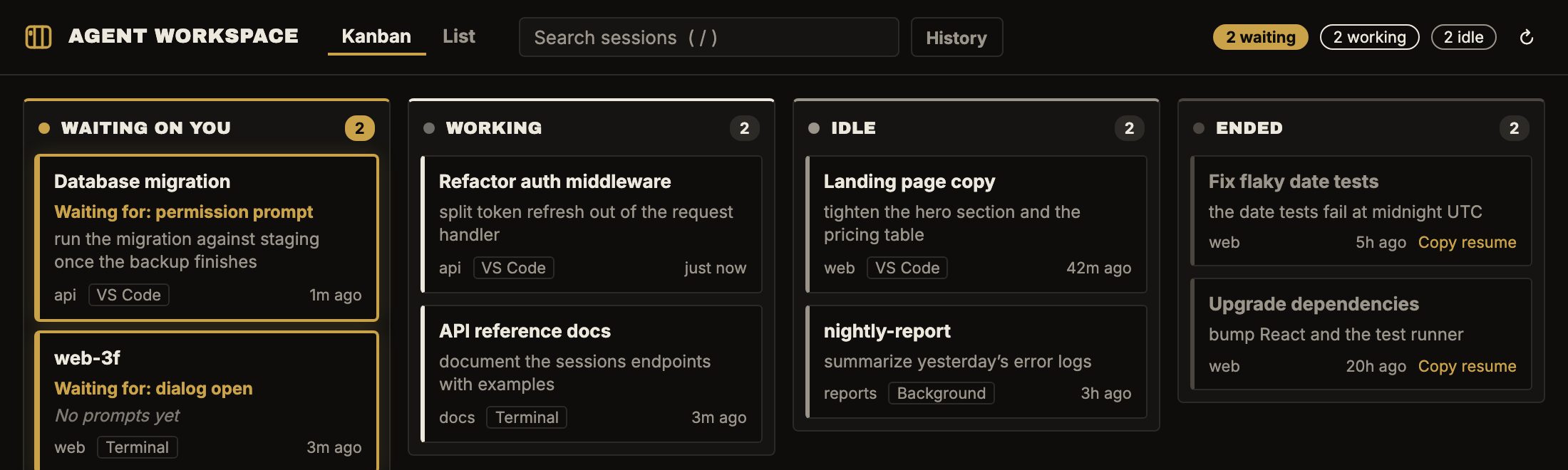
What's changed
- New colors. Warm ink replaces black, and Old Gold replaces the yellow for sessions waiting on you, the History toggle and search highlights.
- A light version. When VS Code uses a light theme, the dashboard switches to warm paper, with a darker gold for gold text so it stays readable.
- New type. Text is set in Inter; headings stay in Archivo Black. Both are bundled, so nothing loads from the web.
- New icon. The board icon, drawn as one gold line on the ink tile.
- Credit line. A small "Four Ounces" line under the board.
Upgrading
- Nothing to change. If you set
agentWorkspace.appearancetovscode, it still follows your color theme.
Full changelog: v0.5.2...v0.6.0
Install or update
These install the latest release:
Windows (PowerShell):
irm https://raw.githubusercontent.com/kratner/agent-workspace-dashboard/main/scripts/install.ps1 | iexmacOS / Linux:
curl -fsSL https://raw.githubusercontent.com/kratner/agent-workspace-dashboard/main/scripts/install.sh | shThe installer verifies the download's SHA-256 checksum, then installs it with the code command.
This version specifically: download agent-workspace-dashboard-0.6.0.vsix below, then run code --install-extension agent-workspace-dashboard-0.6.0.vsix --force.
After installing or updating, run Developer: Reload Window in VS Code. From 0.5.0 on, the extension checks for new releases itself and offers to update.
v0.5.2
Fixes a board that stopped updating after you clicked a session to open it.
Released 2026-10-24.
What's changed
- The board keeps updating after you open a session. Clicking a session, typically an Ended one, opens it in a Claude Code tab. The dashboard then stopped receiving updates until you closed and reopened it, so a session that started waiting on you didn't appear. It stopped because updates were skipped whenever VS Code reported the dashboard as hidden, even when it was still on screen.
- Updates are now always sent.
- The latest state is also resent whenever the dashboard comes back into view.
- The Agent Workspace log notes when the dashboard is shown or hidden, to make reports like this easier to diagnose.
Full changelog: v0.5.1...v0.5.2
Install or update
These install the latest release:
Windows (PowerShell):
irm https://raw.githubusercontent.com/kratner/agent-workspace-dashboard/main/scripts/install.ps1 | iexmacOS / Linux:
curl -fsSL https://raw.githubusercontent.com/kratner/agent-workspace-dashboard/main/scripts/install.sh | shThe installer verifies the download's SHA-256 checksum, then installs it with the code command.
This version specifically: download agent-workspace-dashboard-0.5.2.vsix below, then run code --install-extension agent-workspace-dashboard-0.5.2.vsix --force.
After installing or updating, run Developer: Reload Window in VS Code. From 0.5.0 on, the extension checks for new releases itself and offers to update.
v0.5.1
Waiting cards now say what the session is waiting for, and clicking a session running in a terminal takes you to that terminal. Sessions can no longer look alive just because Windows gave their old process ID to another program.
Released 2026-10-23.
What's changed
- What a session is waiting for. Waiting cards and list rows show Claude Code's reason, such as "Waiting for: permission prompt" or "Waiting for: dialog open". The reason is searchable too.
- "No prompts yet" on sessions that have been opened but never used. They used to show only a placeholder name like
my-project-3f. - Clicking a terminal session goes to its terminal. For a Claude Code CLI session running in one of the window's terminals, clicking the card brings that terminal to the front. For a session in a terminal outside VS Code, the message says so and gives its process ID.
- Reused process IDs are caught. Windows recycles process IDs, so an old session file could point at an unrelated program and keep a long-finished session on the board. The dashboard now compares each process's start time with the one Claude Code recorded. A mismatch counts as ended. Each process ID is checked once.
Full changelog: v0.5.0...v0.5.1
Install or update
These install the latest release:
Windows (PowerShell):
irm https://raw.githubusercontent.com/kratner/agent-workspace-dashboard/main/scripts/install.ps1 | iexmacOS / Linux:
curl -fsSL https://raw.githubusercontent.com/kratner/agent-workspace-dashboard/main/scripts/install.sh | shThe installer verifies the download's SHA-256 checksum, then installs it with the code command.
This version specifically: download agent-workspace-dashboard-0.5.1.vsix below, then run code --install-extension agent-workspace-dashboard-0.5.1.vsix --force.
After installing or updating, run Developer: Reload Window in VS Code. From 0.5.0 on, the extension checks for new releases itself and offers to update.