Repository navigation
Releases: kromossomom-debug/decky-ps5-dashboard
Release list
PS5 Dashboard 1.10.0

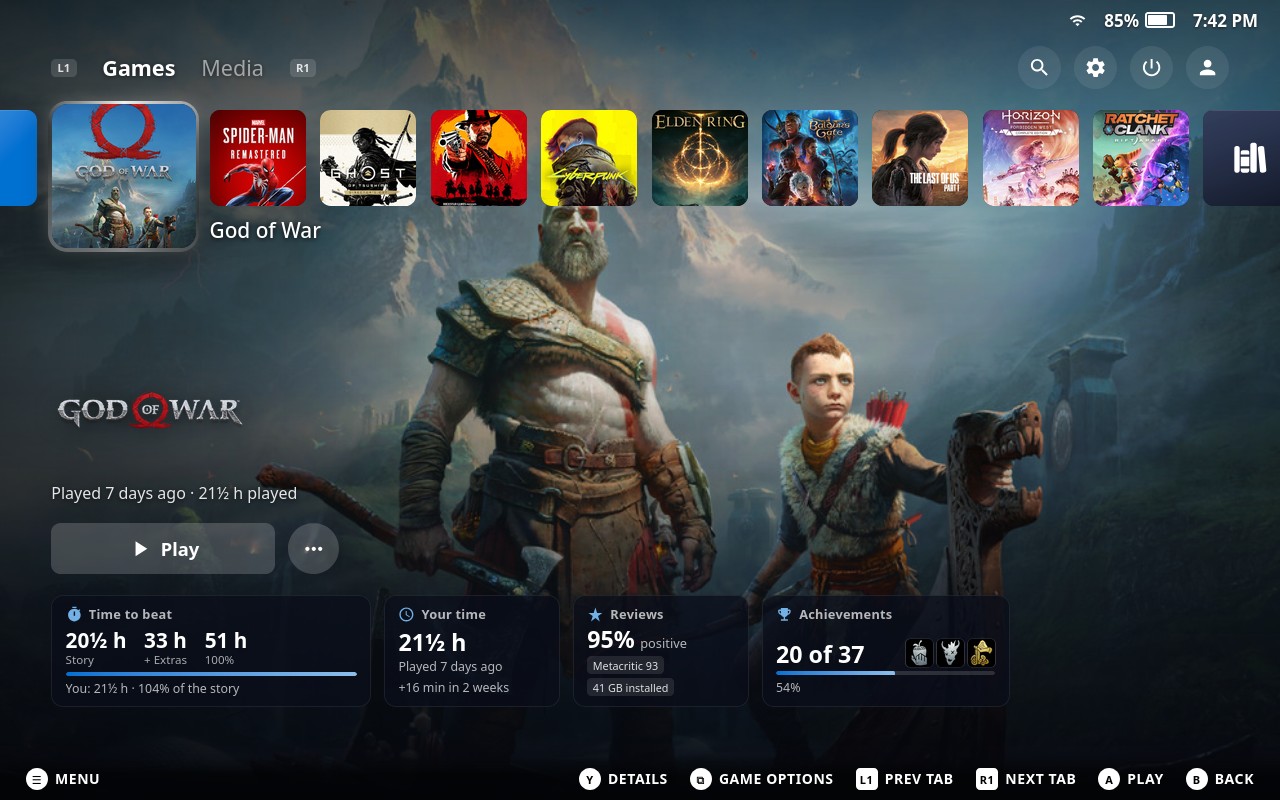
What's new in 1.10.0
🌍 The plugin speaks your language
PS5 Dashboard now follows the language you picked in Steam on each device, in 14 languages:
English · Português · Español · Français · Deutsch · Italiano · Polski · Русский · Українська · Türkçe · 日本語 · 한국어 · 简体中文 · 繁體中文
- Any other Steam language gets English, never the operating system's language.
- Plurals follow each language's rules ("2 дня" / "5 дней", "2 miesiące" / "5 miesięcy"…).
- Translations live in
src/locales/, one file per language. Spotted something off in your language? Issues and pull requests are welcome!
🟦 Rounded corners actually work now
Steam registers a CSS property called --r as an angle, and the plugin used that same name for its corner radius, so Steam threw the value away and every tile, card and button came out square. The Tile corner radius setting (0–24 px) now rounds the game covers on the home row, the lower rows, the Game Library, the info cards and the buttons.
✨ The glass aura follows the corners
The animated edge around the focused game curves with the tile, and its light now shades through grey and the accent blue as well as white and translucent black.
Also includes everything from 1.9.0 (Hide bottom bar setting, header spacing). See the changelog.
Install
- Download
ps5-dashboard.zipbelow. - In Game Mode: Quick Access (
…) → Decky → ⚙ Settings → General, turn on Developer mode. - Developer → Install plugin from ZIP, pick
ps5-dashboard.zip.
Updating? Install the new ZIP the same way; your settings are kept. The plugin panel should then show v1.10.0 at the bottom. If it still shows an older version, restart Steam.

PS5 Dashboard 1.9.0
Image: PS5 Dashboard → https://raw.githubusercontent.com/kromossomom-debug/decky-ps5-dashboard/main/docs/screenshots/home.jpg
What's new in 1.9.0
• New setting: Hide bottom bar (Ocultar barra inferior). Located in the plugin's panel under Layout. When toggled on, it hides the gamepad button hint footer bar (A, B, X, Y button labels, Legion Go, Xbox, or Steam controller glyphs) at the bottom of the screen.
• Native language auto-detection: Fixed SteamOS language matching by mapping all Steam internal language names (e.g. brazilian, portuguese, etc.) directly to standard ISO locales. The plugin automatically matches your SteamOS language (Portuguese if SteamOS is in Portuguese, English otherwise).
• Header & game row spacing: Enhanced vertical spacing between the top-right header options (Search, Settings, Power, Avatar) and the main home game tiles to prevent overlapping when focusing tiles or viewing avatar labels.
See the changelog for earlier versions.
Install
- Download
ps5-dashboard.zipbelow. - In Game Mode: Quick Access (
…) → Decky → ⚙ Settings → General, turn on Developer mode. - Developer → Install plugin from ZIP, pick
ps5-dashboard.zip.
Updating? Install the new ZIP the same way; your settings are kept. The plugin panel should then show v1.9.0 at the bottom. If it still shows an older version, restart Steam.
PS5 Dashboard 1.8.0
What's new in 1.8.0
- New setting: Open Steam's library. You'll find it in the plugin's panel under PS5 screens. When it's on, these open Steam's own library instead of the PS5 Game Library, so your TabMaster tabs and sorting are right there:
- the Game Library tile at the end of the home row,
- its shortcut cards (Installed, Games, Apps),
- the Game Library shortcut in the lower rows,
- the Apps card in the Media tab.
- With the setting on, the tile reads Steam Library and shows the Steam icon.
- It's off by default, so the PS5 Game Library stays the default for everyone else.
Pairs well with Style Steam's library (added in 1.7.0): turn that off too to keep Steam's own library look.
Thanks again to the Reddit user who suggested this! 🙌
See the changelog for earlier versions.
Install
- Download
ps5-dashboard.zipbelow. - In Game Mode: Quick Access (
…) → Decky → ⚙ Settings → General, turn on Developer mode. - Developer → Install plugin from ZIP, pick
ps5-dashboard.zip.
Updating? Install the new ZIP the same way; your settings are kept. The plugin panel should then show v1.8.0 at the bottom. If it still shows an older version, restart Steam.
PS5 Dashboard 1.7.0
What's new in 1.7.0
- New setting: Style Steam's library. You'll find it in the plugin's panel under Layout. Turn it off to leave Steam's own library exactly as Steam draws it: capsule corners, focus, tabs and page background. This is handy if you use TabMaster to organize your library tabs and sorting.
- The PS5 home screen, the Steam menu, Quick Access and the plugin's own Game Library are not affected by this setting.
- It's on by default, so nothing changes unless you turn it off.
Tip: PS5 colors everywhere is a separate setting. If you also want Steam's original colors back (blue instead of PlayStation blue), turn that one off too.
Thanks to the Reddit user who suggested this! 🙌
See the changelog for earlier versions.
Install
- Download
ps5-dashboard.zipbelow. - In Game Mode: Quick Access (
…) → Decky → ⚙ Settings → General, turn on Developer mode. - Developer → Install plugin from ZIP, pick
ps5-dashboard.zip.
Updating? Install the new ZIP the same way; your settings are kept. The plugin panel should then show v1.7.0 at the bottom. If it still shows an older version, restart Steam.
PS5 Dashboard 1.6.0
This release brings PS5 styling to Steam's own menus and library, and includes the changes from 1.5.0.
What's new in 1.6.0
- Steam menu pills fixed. Steam scaled the focused and the current item to 110%, pushing the pill past the panel's edge, where it lost its right corners. Items now stay inside the panel, the focus gets a gentle 2% lift, and its glow is no longer cut into a hard band.
- Long labels fit. "Friends & Chat" and similar labels fit instead of turning into Steam's scrolling marquee, and the focused label is always black on white.
- Quick Access tabs are real circles. The tabs are 48 × 64 px, so rounding them gave stretched ovals; a fixed circle behind the icon is the highlight now.
- Steam's library looks like the PS5. A navy gradient page, pill tabs in sentence case with dimmed counts, and a crisp white edge with a soft lift on the focused capsule instead of a wide white bloom.
From 1.5.0
- Steam menu (left side) in PS5 style: a dark navy glass panel, rounded items, a white focused item with black text, and the current page in bold with a small PlayStation-blue dot.
- The theme now reaches the Steam menu and Quick Access windows. In Game Mode they don't always appear in Steam's popup list, so the plugin also finds them through Steam's controller navigation.
- Your time card: non-Steam games show when you last played them instead of "Not played yet".
- The plugin panel shows its version, so you can check which build Steam has loaded.
See the changelog for earlier versions.
Install
- Download
ps5-dashboard.zipbelow. - In Game Mode: Quick Access (
…) → Decky → ⚙ Settings → General, turn on Developer mode. - Developer → Install plugin from ZIP, pick
ps5-dashboard.zip.
Updating? Install the new ZIP the same way; your settings are kept. The plugin panel should then show v1.6.0 at the bottom. If it still shows an older version, restart Steam.
PS5 Dashboard 1.4.0
What's new in 1.4.0
- Home row like the PS5. The next games now sit right after the selected one instead of leaving a wide gap, and the game's name moves under them. The tile before the selected one peeks in at the left edge.
- Lift and glass aura. The focused game lifts slightly with a drop shadow, and a glass light band keeps circling its edge, blending white, grey and translucent black.
- Still light on performance. The aura only rotates (a GPU transform), so nothing is repainted per frame, and only the focused tile has it.
See the changelog for earlier versions.
Install
- Download
ps5-dashboard.zipbelow. - In Game Mode: Quick Access (
…) → Decky → ⚙ Settings → General, turn on Developer mode. - Developer → Install plugin from ZIP, pick
ps5-dashboard.zip.
Updating? Install the new ZIP the same way; your settings are kept.
PS5 Dashboard 1.3.0
The first public release of PS5 Dashboard, a Decky Loader plugin that makes SteamOS Game Mode look and feel like the PlayStation 5 home screen.
Highlights
- PS5 home screen: a row of square tiles on top (Steam Store, your recent games, Game Library). The selected game stays big on the left and its art fills the screen, with a white Play button and a ⋯ options button.
- Info cards under Play: Time to beat (HowLongToBeat), Your time, Reviews and Achievements.
- Game options on Select: press Select (View) or ≡ on any game, or pick ⋯, to open Steam's own game menu, including SteamGridDB's Change artwork….
- Games and Media tabs (L1 / R1), plus a Game Library with filter pills.
- PS5 colors everywhere and Control Center-style menus: Steam's own menus, Quick Access and the Power menu turn PlayStation blue and white.
- GPU-only animations and cached lookups, so Game Mode stays smooth.
What's new in 1.3.0
- Press Select (View) or ≡ on any game tile, on Home, in the lower rows or in the Game Library, to open Steam's own game menu, with whatever other plugins add to it, such as SteamGridDB's "Change artwork…".
- The round ⋯ button next to Play opens the same game menu, like on the PS5.
- If Steam's game menu can't be found after a client update, these buttons open the game's page instead.
See the changelog for 1.0 – 1.2.
Install
- Download
ps5-dashboard.zipbelow. - In Game Mode: Quick Access (
…) → Decky → ⚙ Settings → General, turn on Developer mode. - Developer → Install plugin from ZIP, pick
ps5-dashboard.zip.
Updating? Install the new ZIP the same way; your settings are kept. Use one dashboard theme at a time: turn off Xbox Dashboard or any CSS Loader home theme first.