Repository navigation
Releases: l00nix/ELKSWeb
Release list
ELKSWeb 0.3 — experimental beta

ELKSWeb 0.3 is an experimental beta of the native graphical HTTP browser for IBM PCs and compatibles running ELKS, including the HP 200LX. The executable remains elksweb.
This release has been tested on Amstrad PPC 512 and HP 200LX DS hardware using the 0.3-dev1 candidate.
What changed
- The requested address stays visible while a new page loads. Successful redirects show the final address; failed loads restore the current page's address.
- Backspace works in the startup display selector, and clearing the choice then pressing Enter selects CGA.
- A guarded console fallback handles a related missing-controlling-terminal case. The intermittent upstream console issue remains under investigation.
- Updated welcome/help page with 68k news mirror, FrogFind and HTTPedia links.
Thank you to @ghaerr for the URL-display, display-selector and console feedback. The rendering, font and mouse improvements introduced in 0.2 remain, with thanks to @sammothxc and @djohanse for their earlier feedback.
Downloads
ELKSWeb-0.3-runtime.tar.gz— browser, welcome page, GIF logo and notices.elksweb— standalone executable for an existing installation.ELKSWeb-0.3-source.tar.gz— matching browser and ELKS/libc sources.SHA256SUMSand individual.sha256files — exact download identities.
Install /bin/elksweb and the support files under /lib/elksweb. Run chmod 755 /bin/elksweb, check elksweb --version, then start elksweb from the graphics console. Configure ELKS networking and run net start before visiting HTTP sites. The lightweight external builder and separate audited developer build are retained. This release does not include an ELKS disk image.
Validation
The release source passes 316 host browser tests and 18 platform tests. The final executable passes the native 8086 instruction/memory audit and QEMU CGA/EGA/VGA normal/inverted welcome, GIF and shell-restoration checks. The audited and lightweight external builds produce the same executable. QEMU uses a 486 CPU; it does not establish physical 8088 timing or adapter compatibility.
The 0.3-dev1 candidate passed user hardware checks on the Amstrad PPC 512 with PicoMEM 2 and HP 200LX DS, including live browsing, GIFs, keyboard navigation, exit restoration and serial-mouse movement/clicking. The checklist records 16 passes on the PPC and 17 on the HP; address editing remains partly open on both, and the HP cooked-key test is N/A on the PPC. No controlled timing measurements were recorded. The final executable has a new version string and checksum and has not had a separate hardware retest.
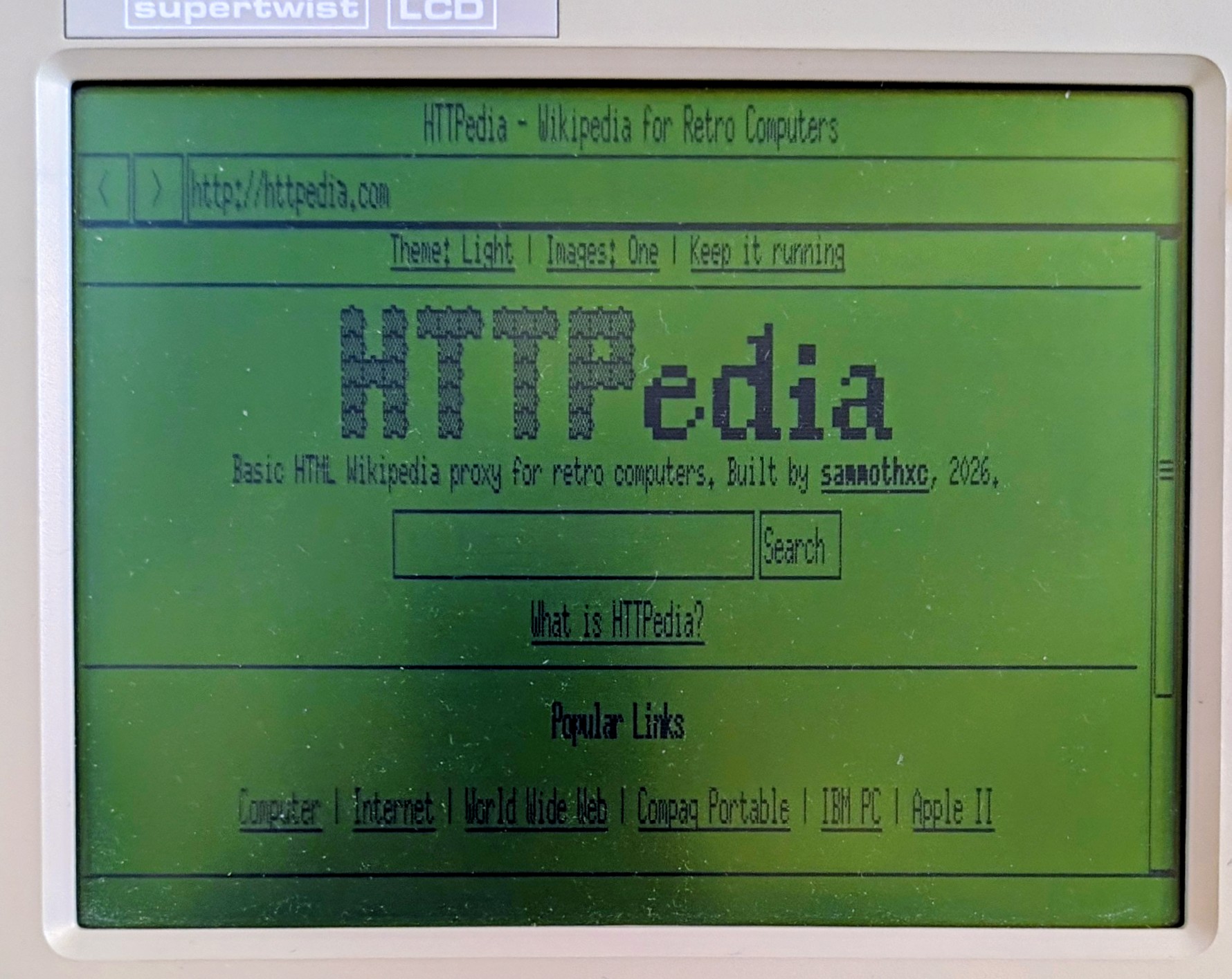
HTTPedia on the PPC 512 during 0.3-dev1 testing. Photograph by l00nix:
Known limits
The intermittent upstream controlling-console issue and earlier 86Box cold-boot exit anomaly remain open. Large pages can be slow and exceed memory or filesystem-space limits. HTTP only: no TLS, CSS or JavaScript. GIFs display their first frame in monochrome; JPEG/PNG pixels are not decoded.
Contributors


Assets 9
ELKSWeb 0.3-dev1 — development test
Development test candidate for feedback from @ghaerr in ELKS discussion #2185. This is not the 0.3 beta; 0.2 remains the published beta.
Changes
- Keep the requested URL visible while receiving the page, then show the final URL after redirects. Failed requests restore the previous address.
- Allow Backspace to correct the startup CGA/EGA/VGA selection using ELKS canonical line editing.
- When
/dev/ttyis unavailable, allow read/write terminal standard input as a fallback only after verifying that it supports the graphics-console ioctl. Restore terminal settings and shared file flags on exit.
Testing this candidate
Download elksweb-0.3-dev1-test.tar.gz and extract it into a separate directory. It contains the executable named elksweb, TESTING.txt, the license and file checksums. Use your existing 0.2 welcome page and assets; those assets will still display 0.2. Keep your original executable for comparison.
Please compare both executables on the same disk image and login method with qemu.sh and qs. Record tty, ps, and ls -l /dev/tty /dev/tty1 /dev/console before launching. Check startup, keyboard input, Escape back to a usable shell, corrected display selection and the address bar during a slow request. Full instructions are in TESTING.txt.
Validation and limitations
- 316 browser host tests and 18 platform tests passed.
- Native 8086 instruction and memory audits passed; audited and lightweight external builds produced identical executables.
- QEMU checks passed for display selection, pending URLs and console restoration. A deliberately detached-session startup failure reproduced with 0.2 passed with this candidate.
- The exact reported
qs/MINIX failure is not yet reproduced. The detached-session test does not establish its cause. - No real-hardware validation of this candidate is recorded. The 86Box cold-boot anomaly remains open.
Source commit: 6d4022fe9f1111ba57304769d0d2c535941fb531.
Executable: 78,352 bytes. SHA-256: 5a6ed7e4662a0caac05fe1d005fd8dc1f5db03e106076098d0fb70e33a488856. MD5 for comparison on ELKS: e7455d87c96e1a2a04fa98637e670f39.
The separate source archive is built from that exact commit. SHA256SUMS verifies both archives.
Contributors
Assets 5
ELKSWeb 0.2 — experimental beta
ELKSWeb 0.2 — experimental beta
ELKSWeb 0.2 is a native graphical HTTP browser for IBM PC compatibles running ELKS, including the HP 200LX. This beta focuses on usability and rendering on early PCs. The executable is named elksweb.
Changes and thanks
- Clearer fonts: public-domain X.Org fixed fonts, including 6x13 body text, with taller controls and corrected clipping. Suggested by @ghaerr; @sammothxc also reported CGA legibility problems. @l00nix checked the font on the PPC 512 LCD.
- Less redraw work: reduce startup/address/focus redraws, repaint image regions when dimensions are already known, and avoid repainting the old page before following a clicked link. Thanks to @ghaerr, @sammothxc and @l00nix for identifying these issues and checking the changes.
- GIF decoding: skip redundant background initialization for full-canvas first frames, retaining the existing behavior for partial frames. @sammothxc's slow-GIF report helped focus this work. It applies to qualifying GIFs on any page; no controlled hardware speedup factor is claimed.
- Serial mice: honor ELKS mouse environment conventions, improve Microsoft packet handling, enlarge the pointer, and coalesce queued movement while preserving button transitions. @ghaerr suggested the conventions; @l00nix tested Microsoft Serial Mouse 2.0A and E6QMOUSE X31 mice on the PPC 512.
- Easier addresses: automatically prefix bare address-field entries with
http://, following @ghaerr's suggestion. - Updated installation/help: put assets under
/lib/elksweb, with the legacy/root/welcome.htmfallback. Thanks to @ghaerr for the layout suggestion and @djohanse for networking-startup feedback. The welcome page now includes HTTPedia alongside FrogFind and 68k.news.
Downloads
ELKSWeb-0.2-runtime.tar.gz: recommended first installation; compiled browser, welcome HTML, GIF logo and consolidated notices.elksweb: the same compiled executable separately, for existing installations.ELKSWeb-0.2-source.tar.gz: corresponding browser and ELKS/libc source..sha256sidecars andSHA256SUMS: verify the exact downloads.
Download and verify on a modern computer. Install the executable as /bin/elksweb with mode 755; create /lib/elksweb and copy the runtime's lib/elksweb/ files there. Run elksweb --version (it should report 0.2), then elksweb from the ELKS console. Configure networking and run net start before browsing HTTP sites. Keep notices and corresponding source available with redistribution.
This is an application package for an existing compatible ELKS installation; no new operating-system image is included. Installation instructions. The lightweight external builder and separate audited developer builder are both retained.
Validation and remaining limits
- Automated: 303 browser tests, six font tests, 18 platform tests; GIF differential checks covering 32 images, minimal-file truncations and 1,000 mutations.
- Native build: matching audited/external binaries, passing 8086 ISA and memory audits. Code 64,192 bytes leaves 1,344 bytes of code-segment headroom. Near allocation is 60,544 of 65,520 bytes before arguments/environment.
- Emulator: exact release executable, updated default welcome page and fixed FrogFind GIF fixture reviewed in QEMU CGA/EGA/VGA, normal and inverted, with a usable console after exit. QEMU uses a 486 CPU; this is not physical 8088 certification.
- Hardware: @l00nix reported improved mouse movement, readable fonts and much better link-click behavior in PPC 512 development candidates. The PicoMEM 2 setup reported 735 KiB RAM, not an unexpanded 512 KiB minimum. The newly versioned release binary has not received a separate hardware retest. HP 200LX and community Compaq Portable Plus results remain historical 0.1 evidence.
Large-page parsing and some loading/input delays remain. The 86Box cold-boot exit anomaly is unresolved, and broader hardware/flicker coverage is still needed. HTTP only; no TLS, CSS or JavaScript. GIFs display their first frame; JPEG/PNG pixels are not decoded. HTTPedia DNS/site availability was not established in recent development checks. Feedback with machine details, version, checksum and reproduction steps is welcome.
Source commit: 42430864279d554f805fcf1f861294932f8b3697. Executable: 78,080 bytes. SHA256: 77d8bef423f030e78cf76c17c052984ab84a0af41a2bb7b3b27d663ce9786519.
Contributors

Assets 9
ELKSWeb 0.1 — experimental beta
ELKSWeb 0.1 — experimental beta
An original C graphical web browser for ELKS, built with the native IA16 toolchain and an 8088-compatible instruction target. Inspired by the ELKS graphical-browser discussion and MicroWeb; no MicroWeb C++ code or assets are included. Native ELKS networking and direct graphics avoid mTCP and Microwindows/Nano-X dependencies.
This is a public experimental prerelease. Testers and feedback are welcome. The unresolved cold-boot 86Box exit anomaly remains documented below.
What is included
- Detected-mode selection before graphics: CGA 640×200, EGA 640×350 and VGA 640×480. All modes are monochrome in 0.1.
- A stable application frame and incremental vertical scrolling.
- HTTP/local HTML and text, links, history, forms, tables, GIF images and binary downloads.
- Default local welcome/help HTML and a monochrome GIF logo.
The normal runtime package excludes offline website fixtures and webfrog/webnews launchers. Corresponding source and the optional generic ELKS/QEMU test image are separate downloads. The test image includes attributed fixed FrogFind samples; it is not an HP installer.
Standalone compiled executable
elksweb is the ready-to-run native ELKS executable (77,024 bytes), with its own .sha256 sidecar. It is the same tested executable as in the runtime archive; no compilation or emulator image is required to install it on an existing compatible ELKS system.
Copy it to /bin/elksweb and run chmod 755 /bin/elksweb. For a first installation, use the runtime archive to also install the default welcome page, GIF logo and required notices. The standalone executable can otherwise open a supplied HTTP URL or local page. The matching corresponding-source archive remains available alongside it. This executable runs under ELKS, not directly under DOS, Windows, macOS or modern Linux.
Downloads
Each archive has a .sha256 sidecar and an internal SHA256SUMS manifest. Install bin/elksweb as /bin/elksweb, share/welcome.htm as /root/welcome.htm and share/elksweb.gif as /root/elksweb.gif; retain the notices and follow the included README. A graphics-capable ELKS console and writable /tmp are required; HTTP needs configured ELKS networking.
| Archive | SHA256 |
|---|---|
ELKSWeb-0.1-runtime.tar.gz |
67755c92124d14dcdce8cbca2b06a4302635d0ce639c59717386f4ccf3b01db0 |
ELKSWeb-0.1-source.tar.gz |
d224f1e12c3d6c29489728851d71a0e342506b8313cf3cb86343789d4d83afe4 |
ELKSWeb-0.1-test-image.tar.gz |
c48c01768feaddb3d320db6c277f2a1755d15061a96731171b1cc2e14e2d32f5 |
Source/documentation revision: 9f60c14793c69d282acc92358b94d4efc71e9483. The tested executable is unchanged: 77,024 bytes, SHA256 5c652079e7cc27884091c9e3b1730fea5d37fa3cbeb690535fed94af16dcfce2. This refresh changes documentation and packaging, not browser code or installed welcome assets.
How to install
No compiler is needed. Download on a modern computer, then transfer to an existing compatible ELKS system; GitHub requires HTTPS and ELKSWeb supports HTTP only.
- For a first installation, download
ELKSWeb-0.1-runtime.tar.gzand its.sha256sidecar. Verify and extract on the modern computer. Linux:sha256sum -c ELKSWeb-0.1-runtime.tar.gz.sha256; macOS:shasum -a 256 -c ELKSWeb-0.1-runtime.tar.gz.sha256. Windows: compareGet-FileHashoutput with the sidecar. Extract usingtar -xzf ELKSWeb-0.1-runtime.tar.gz. - Transfer
bin/elkswebfrom the extracted package to/root/elkswebon ELKS. Transfershare/welcome.htmto/root/welcome.htm,share/elksweb.gifto/root/elksweb.gif, andshare/logo-source.txtto/root/logo-src.txt. Retain all notices. Use a binary-safe transfer method. - Exit any running browser. On ELKS as root, run:
cp /root/elksweb /bin/elksweb
chmod 755 /bin/elksweb
elksweb --version
elksweb
The version should report 0.1. Choose a detected mode; the local welcome page opens without networking. For online browsing, configure native ELKS networking first, then try elksweb http://68k.news/.
For an upgrade using only elksweb, verify its .sha256, transfer it to /root/elksweb, and use the same install commands. Save the previous binary first with cp /bin/elksweb /bin/ew-old. The standalone executable does not include the welcome page or logo; existing copies can remain in place.
On the tested HP 200LX ELKS 3.8 beta 1 setup, run export ELKSWEB_COOKED_KEYS=1 before launch.
Full installation guide: Windows/macOS/Linux checksums, file transfer, notices and troubleshooting.
Validation and limits
Native QEMU checks cover all three display modes, 39 fixture scenarios, 12 history/cancellation checks, and 54 exact incremental/full-redraw comparisons. Owner feedback confirms use on standard and DS HP 200LX systems. Exact-0.1 Windows 86Box welcome/scroll/normal-shell exit passed, including a working shell command afterward. However, the first cold-boot autorun exit produced a floppy BIOS initialization banner; its cause remains unresolved. The later pass does not close that QA gate. Exact-version live-site checks in 86Box also remain incomplete. No new blind preference vote or physical Intel 8088 certification is claimed.
HTTP only; no native TLS, CSS or JavaScript. JPEG/PNG dimensions inform layout but their pixels are not decoded. Fixed document/form limits and slow operations remain; speed and responsiveness are excluded from the first-beta decision.
Future enhancements
EGA/VGA colour GIF rendering is deferred beyond 0.1, while preserving monochrome CGA/HP support. Other possible work includes page-load efficiency, HTML/input improvements and broader hardware coverage. These are directions without promised dates; JPEG decoding remains outside the planned scope.
Full release notes · Validation scope · Future enhancements · 68k.news screenshot · Discussion announcement
