Repository navigation
TWFC-VR 1.0

English · Русский ниже
First release of the VR mod for Transformers: War for Cybertron (PC, 2010). Early version.
Install
- Download TWFC-VR-Setup.exe below and run it.
- It finds the game folder by itself (Steam, the usual folders); otherwise pick the folder that holds
Binaries\TWFC.exewith Browse. Press Install. - Start your OpenXR runtime (Virtual Desktop, Quest Link / Air Link, SteamVR...) and connect the headset.
- Start the game with the Transformers WFC VR desktop shortcut (or
Launch VR.batin the game folder). - In the headset, hold Menu for 1.5 s for the VR settings (language, height, sizes...).
The installer creates BinariesVR\ next to the game's Binaries\ (the mod, the OpenXR loader, dgVoodoo 2, a copy of the game's exe with the Large Address Aware flag). The original Binaries\ folder is not touched, so the normal game still starts as before. Uninstall in the same window removes everything it added. Reinstalling keeps your settings unless Reset settings is ticked.
Requirements: the PC version of the game, Windows 10/11, a PC VR headset with an OpenXR runtime (tested with Quest + Virtual Desktop).
Controls
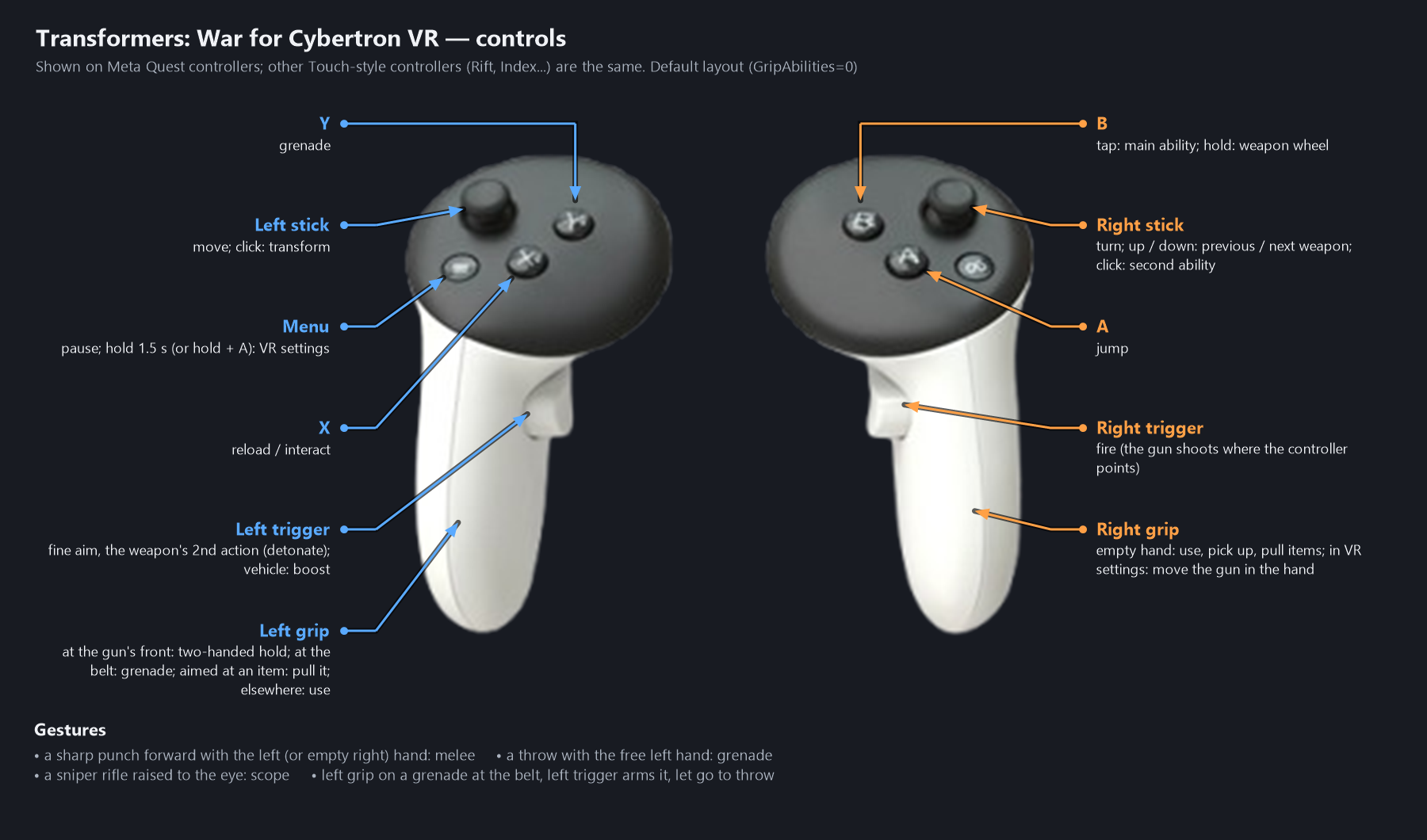
The full guide is installed into the game folder as VR mod - instructions.txt.
Русский
Первый релиз VR-мода для Transformers: War for Cybertron (PC, 2010). Ранняя версия.
Установка
- Скачайте TWFC-VR-Setup.exe ниже и запустите.
- Папку игры он найдёт сам (Steam, обычные папки); если нет — укажите кнопкой Обзор папку, где лежит
Binaries\TWFC.exe. Нажмите Установить. - Запустите OpenXR-рантайм (Virtual Desktop, Quest Link / Air Link, SteamVR...) и подключите шлем.
- Запускайте игру ярлыком Transformers WFC VR на рабочем столе (или
Запуск VR.batв папке игры). - В шлеме: Menu удерживать 1.5 с — настройки VR (язык, рост, размеры...).
Установщик создаёт BinariesVR\ рядом с Binaries\ игры (мод, загрузчик OpenXR, dgVoodoo 2, копия exe игры с флагом Large Address Aware). Оригинальная папка Binaries\ не меняется, обычная игра запускается как раньше. Кнопка Удалить в том же окне убирает всё, что было добавлено. Переустановка сохраняет ваши настройки, если не отмечено Сбросить настройки.
Нужно: PC-версия игры, Windows 10/11, ПК-VR-шлем с OpenXR-рантаймом (проверено на Quest + Virtual Desktop).
Управление
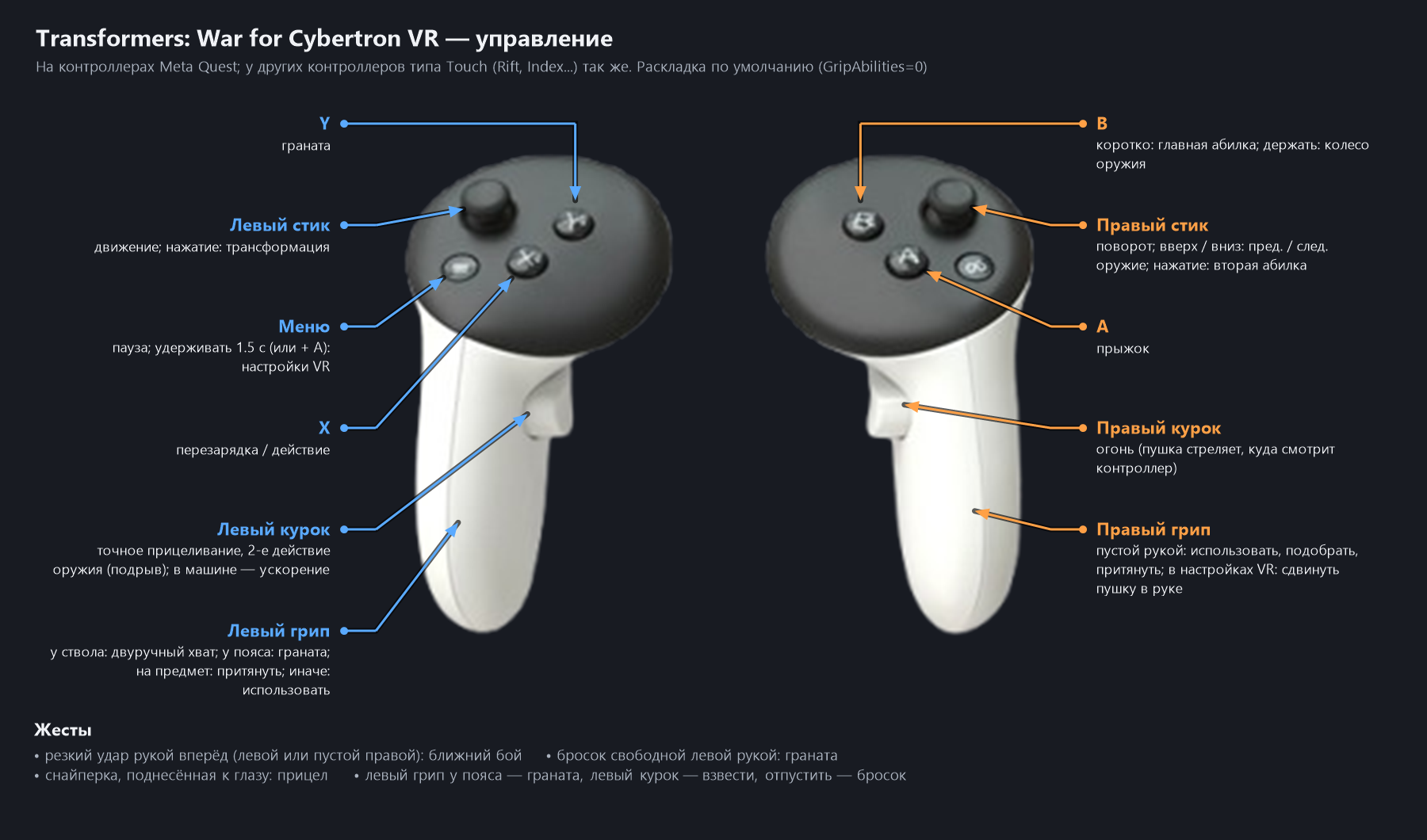
Полная инструкция ставится в папку игры: VR-мод — инструкция.txt.