Repository navigation
Releases
elementary Mobile v1.2.0

Follow-up to #6: these commits landed on its branch after it was merged.
sudo,suandpasswdwork for the desktop user: they get their setuid bit back, with a one-time repair on existing installs.- A mouse plugged into the phone moves the cursor on the external display, not on the phone, and clicks and scrolls there.
- The mouse wheel and two-finger scrolling work in X apps (the compositor now reports relative pointer motion, so Xwayland keeps one pointer device).
- The logo sits in the top left of the trackpad, with the same gap to the border as the buttons in the top right.
- Connecting a keyboard offers the keyboard shortcuts service, so Alt+Tab goes to the desktop instead of switching phone apps. The prompt is shorter and opens Settings with our entry highlighted.
- Black instead of red behind the desktop while the screen rotates.
Same changes in Local Desktop: localdesktop/localdesktop.github.io#348
elementary Mobile v1.1.1
- Installers that write to your home folder work:
chmodin/homeused to be ignored, so a downloaded binary such as the Claude CLI stayed non-executable. - Phones that showed Device Unsupported on newer kernels can start: PRoot is built for API 23, so it reads guest memory with
process_vm_readv(localdesktop/localdesktop.github.io#331, #137 there). - Faster GPU apps: PRoot no longer stops every GPU
ioctl(from localdesktop/localdesktop.github.io#328). - The PRoot source and
libproot.soare now the same as in Local Desktop, built with./build.shand NDK r26d (localdesktop/localdesktop.github.io#347).
Tested on a OnePlus Open (Android 16): sudo id gives root, a script written to ~ and chmod 755'd runs, and Xwayland and Gala start (the phone locked before I could see the whole desktop).
elementary Mobile v1.1.0
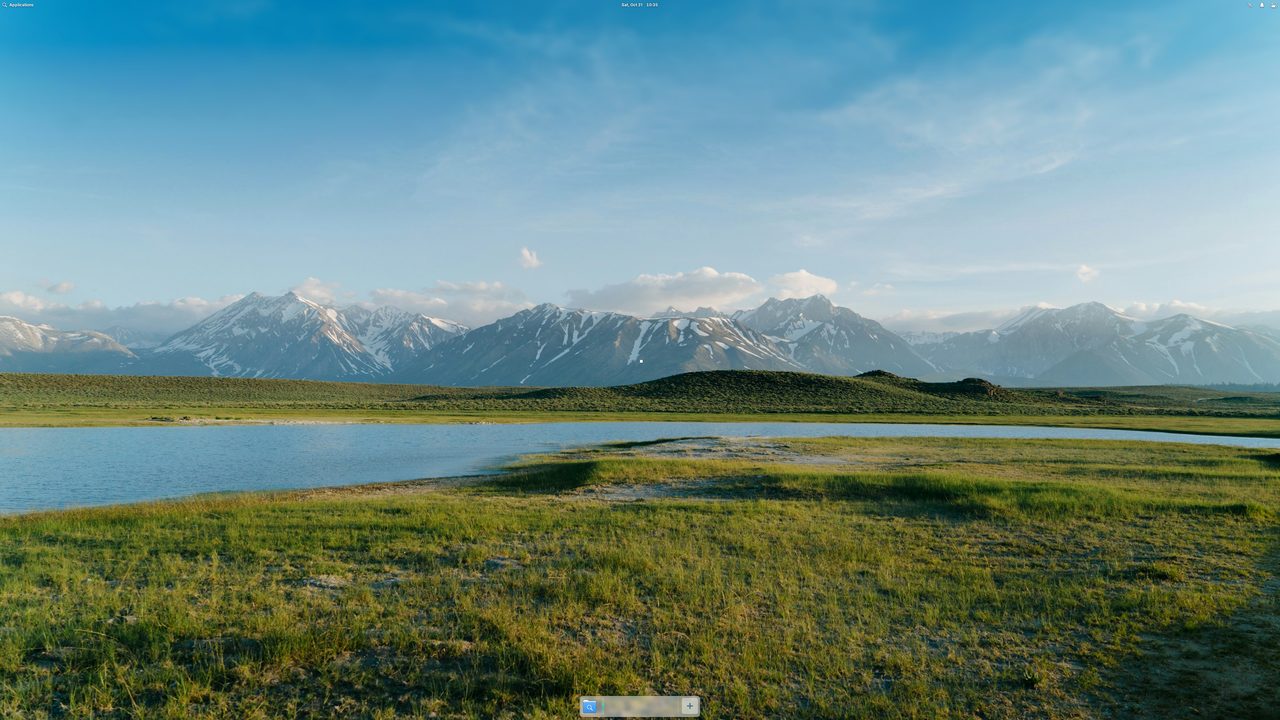
- Connect a monitor (USB-C to HDMI, a dock, or a wireless display) and the desktop moves to it at the monitor's resolution and density
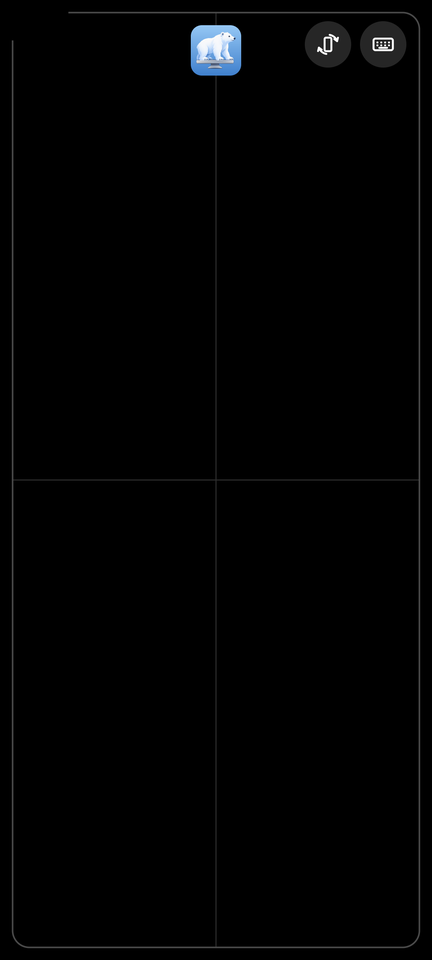
- The phone becomes a trackpad drawn like Samsung DeX, with the app's icon at the top to show which way is up: slide to move, tap to click, two-finger tap to right click, two fingers to scroll, touch and hold then slide to drag
- Rotate turns the phone's screen a quarter per tap, trackpad and Android keyboard included, for a phone lying sideways while auto-rotate keeps it upright
- Keyboard opens the Android keyboard on the phone and types into the desktop
- The desktop draws the cursor Xwayland asks for
- Switching to another app keeps the desktop on the monitor, and a mouse or keyboard used on the monitor goes to it
- Unplugging the monitor brings the desktop back to the phone
- The launcher icon shows the whole logo instead of having its edges cut off by round icon masks
- Fixes the black screen on phones whose firmware turns SVE off (OnePlus Open, Snapdragon 8 Gen 2): Gala kept dying with SIGILL even with the CPU model hidden from /proc/cpuinfo, until llvmpipe stopped running LLVM's optimisation passes (
GALLIVM_PERF=nopt, Gala idles at about 1% of a core) - Port of localdesktop/localdesktop.github.io#343
elementary OS on a 4K monitor, and the phone as its trackpad:
elementary Mobile v1.0.4
New App Icon for elementary OS flavor:
Before:

After:

elementary Mobile v1.0.3
- With a physical keyboard attached, the app now asks once whether to forward the keyboard shortcuts Android keeps for itself (Alt+Tab, Meta). Turn on opens Android's accessibility settings, No thanks never asks again.
- The prompt says what the accessibility service does and doesn't do, which Google Play requires before an app can use it. The Google Play build includes the keyboard service again.
- The service shows up as "Local Desktop: Pantheon" in Android's accessibility settings instead of "elementary Mobile".
- Same change as localdesktop/localdesktop.github.io#340.
Video: Android 15 emulator with a hardware keyboard: the prompt, Turn on, then enabling the service in Android's settings.
pantheon-keyboard-shortcuts-disclosure.mp4
elementary Mobile v1.0.2
- The Google Play build no longer includes the keyboard accessibility service, so Play users can't forward the shortcuts Android intercepts (Alt+Tab, Meta). Normal typing is unchanged.
- Play only accepts that service with an in-app disclosure screen and a video of it, which the app doesn't have yet. The GitHub APK keeps the service.
elementary Mobile v1.0.1
- Targets Android 16 (API 36). Google Play now rejects releases that target API 35: "Your app currently targets API level 35 and must target at least API level 36".
- Nothing else changes; the minimum stays Android 7.
elementary Mobile v1.0.0
- The app is now Local Desktop: Pantheon (
io.github.localdesktop.pantheon), the name it will have on Google Play. elementary's brand guidelines don't allow "elementary" in a third-party product name. It installs as a new app next toapp.elementarymobile. - Releases also build an AAB. The bundled OS goes into an install-time asset pack (203 MB, limit 1 GB), keeping the base module at 15 MB under Play's 200 MB limit. Install-time packs are read through the normal asset manager, so first launch is unchanged and still offline.
- xbuild learned
asset_pack:on asset entries, used only for AABs; the APK still carries everything. - Targets Android 15 (API 35) and requires Android 7 (API 24), as Google Play requires. xbuild links native code against the minimum SDK, like Local Desktop.
- Published releases upload the AAB to Google Play's closed testing track as a draft, signing in to Google Cloud through GitHub's OIDC token (Workload Identity Federation), so no key is stored.
- CI uses Java 17, since
ubuntu-latestmoved to Java 25, which Gradle 8.14.3 can't run.
Related: localdesktop/localdesktop.github.io#335 (the same SDK and xbuild changes for Local Desktop).
elementary Mobile v0.1.0
 mister-teddy
Nguyen Hong Phat
ca19b1f
mister-teddy
Nguyen Hong Phat
First release of elementary Mobile: elementary OS on Android, powered by Local Desktop.
Install the APK and tap the icon: the bundled elementary OS 8 (Pantheon) desktop unpacks on first launch and opens, with no download and no internet connection needed. Updates come only as newer APKs.
Included: Files, Terminal, Code, Web (Epiphany), Document Viewer, File Roller, System Settings.
Known limits:
- Rendering is done on the CPU, so it is not fast.
- Apps elementary ships only as Flatpaks (Calculator, Music, Videos, Photos, AppCenter) are not available.
- Android 12+ kills apps with more than 32 child processes. The desktop uses about 23; to open more apps at once, enable "Disable child process restrictions" in Developer options.
- Sound is not reliable yet, the desktop is English only, and the panel and dock sometimes appear only after the first tap.
- Tested on an Android 15 tablet emulator so far.
elementary OS and Pantheon are made by elementary, Inc. and their contributors. This project is not affiliated with or endorsed by elementary, Inc.
-----BEGIN PGP SIGNATURE-----
iJEEABYKADkWIQTT4jJfu3QlCis+XT+ynbAe+vyutwUCatPpzRsUgAAAAAAEAA5t
YW51MiwyLjUrMS4xMiwwLDMACgkQsp2wHvr8rrcbZQEA+XzHyMa/9v3v99a+Txqp
1pR5BhqmC9Q+23C9GdOFn40A+wTcCF1i6bWy/T44JnZKpgm7jaTLFD5pqOOWaDjO
1XAP
=auHN
-----END PGP SIGNATURE-----