Repository navigation
Releases
v.1.0.0

☀️ SunTrace
A local Windows application for monitoring software installation, updates, and removal.
🇬🇧 English
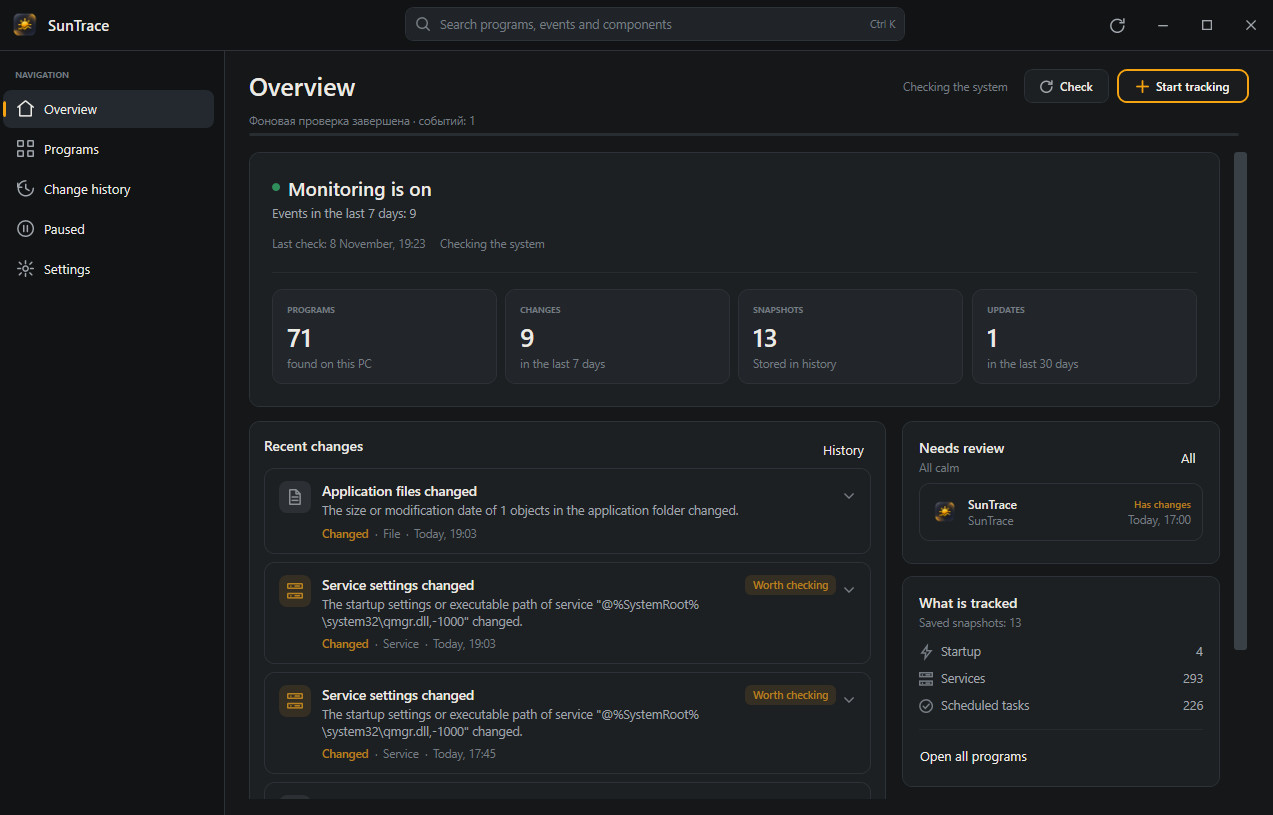
SunTrace is a local Windows application for monitoring software installation, updates, and removal. It saves system snapshots, displays an understandable history of changes, links components to applications, and allows you to safely pause supported startup items.
The application does not use network connections, telemetry, registration, or cloud services. All data stays on the user's computer.
✨ Features
- 📸 System snapshots — installed applications, startup items, services, scheduled tasks, and files in application folders.
- 📜 Change history — filters, search, grouping by day, and a timeline.
- 🔍 Event explanations — what changed, what it affects, and how reliable the association with an application is.
- 📦 Installation tracking — initial snapshot, user-initiated application installation, and result comparison.
- 🛡️ Safe Pause — pause startup items and scheduled tasks belonging to third-party applications while preserving their original state and checking for conflicts.
- 🎨 Themes and interface — light, dark, and system themes, a responsive interface for different monitor widths, and keyboard navigation.
- 💾 Backup and recovery — backups, restoration, report exports, and logs.
- 🌐 Localization — interface, events, and exports available in English and Russian.
🖥️ Two Versions
The project is built in two variants from a shared codebase.
| Windows 10 / 11 | Windows 7 / 8.1 | |
|---|---|---|
| Installer | SunTrace-Setup-Windows10-11-x64.exe |
SunTrace-Setup-Windows7-8.1-x64.exe |
| Systems | Windows 10 1809+ and Windows 11, x64 | Windows 7 SP1, Windows 8 and Windows 8.1, x64 |
| Runtime | .NET 10, self-contained | .NET 6, self-contained |
| Runtime installation | Not required | Not required |
| Notifications | Windows toast and Action Center | Tray balloon notifications |
| Notification navigation | Yes | No |
| System theme | Yes | No, theme selected manually |
| Scaling | PerMonitorV2 | System-based |
| Core monitoring features | Full | Full |
| History, search, Safe Pause | Full | Full |
| HTML / JSON export | Full | Full |
| System tray and startup | Yes | Yes |
Windows 8.1 is the target system for the legacy version. Windows 8 works in compatibility mode and is not a primary supported system. Windows 7 requires Service Pack 1 and system updates.
🕰️ Legacy Version Differences
The legacy build uses .NET 6, the last .NET branch supporting Windows 7 and Windows 8.1. The runtime is bundled with the application, so a separate .NET installation is not required.
The following features are unavailable or limited on Windows 7 / 8.1:
- ❕ Windows toast notifications, Action Center, notification buttons, and notification navigation. Instead,
NotifyIcon.ShowBalloonTipis used. - ❕ Automatic system theme detection and Windows 10 / 11 visual effects.
- ❕ PerMonitorV2 and related behavior when using monitors with different DPI settings.
🧰 Technology Stack
- C#, WPF
- .NET 10 for Windows 10 / 11
- .NET 6 for Windows 7 / 8.1
- MVVM, CommunityToolkit.Mvvm
- Microsoft.Data.Sqlite
- Microsoft.Extensions.Logging and DependencyInjection
- Inno Setup 6
- xUnit
⚙️ Build Requirements
- Windows 10 / 11 x64
- .NET SDK 10
- Inno Setup 6
- NuGet access to restore .NET 6 targeting packs
🔨 Build
powershell -ExecutionPolicy Bypass -File scripts\build.ps1What the Build Script Does
- Cleans
artifactsandrelease. - Builds both target frameworks.
- Runs tests for
net10.0-windowsandnet6.0-windows. - Publishes self-contained
win-x64builds for both versions. - Builds two Inno Setup installers.
- Signs and verifies both versions if a certificate is available.
- Generates a README and SHA-256 hash for each version.
Skip tests or installers:
powershell -ExecutionPolicy Bypass -File scripts\build.ps1 -SkipTests
powershell -ExecutionPolicy Bypass -File scripts\build.ps1 -SkipInstaller
Separate Publishing
powershell -ExecutionPolicy Bypass -File scripts\publish.ps1 -TargetFramework net10.0-windows10.0.17763.0
powershell -ExecutionPolicy Bypass -File scripts\publish.ps1 -TargetFramework net6.0-windows -OutputDirectory artifacts\publish-legacy
🔏 Code Signing
If no certificate is configured, fully functional unsigned installers are created. Their signing status is explicitly indicated in the generated README and build output.
A self-signed certificate is never substituted automatically.
Signing uses environment variables only:
$env:SUNTRACE_CERT_PATH = "C:\secure\publisher.pfx"
$env:SUNTRACE_CERT_PASSWORD = "password"
powershell -ExecutionPolicy Bypass -File scripts\build.ps1
⚠️ Data Storage
All application data is stored locally:
%LOCALAPPDATA%\SunTrace\
  database.db
  backups\
  logs\
  exports\
  settings.json
If an incompatible database from a previous version is detected during an update, SunTrace saves it alongside the new database as database.legacy-*.db and creates a new database.
🧪 Tests
dotnet test SunTrace.slnTests run for net10.0-windows and net6.0-windows.
They use temporary directories and synthetic data and do not modify Windows settings.
Test coverage includes:
- Detection of newly installed, updated, and removed applications.
- Component changes.
- Incomplete scans.
- Event deduplication.
- SQLite operations.
- Backup and restoration.
- Settings.
- Safe Pause.
- Restoration conflicts.
- Scan cancellation.
⚡ Performance
- Changes to startup items, installed applications, services, scheduled tasks, and startup folders are monitored through system events. An additional check is triggered a few seconds after a change, while periodic checks remain as a fallback.
- Scanning sections run in parallel with reduced priority. If the system state has not changed, no new snapshot is created; only the check timestamp is updated.
- When running on battery power or in battery saver mode, the checking interval is doubled. When the window is minimized to the system tray, the process switches to a power-saving mode.
- Windows 10 / 11 and Windows 7 / 8.1 use the same monitoring code.
🛡️ Additional Notes
- The application runs with standard user privileges.
- Elevated privileges are requested only for operations that actually require them, through a separate process with explicit UAC confirmation.
- Services and drivers are read-only.
- System and protected components are not modified.
- The original Safe Pause state is protected using DPAPI.
- Before restoration, SunTrace checks whether a component has changed since it was disabled.
🇷🇺 Русская версия
☀️ SunTrace
SunTrace — локальное Windows-приложение для наблюдения за установкой, обновлением и удалением программ. Оно сохраняет снимки системы, показывает понятную историю изменений, связывает компоненты с приложениями и позволяет безопасно приостанавливать поддерживаемые элементы автозагрузки.
Приложение не использует сеть, телеметрию, регистрацию и облачные сервисы. Все данные остаются на компьютере пользователя.
✨ Возможности
- 📸 Снимки системы — установленные программы, автозагрузка, службы, задания планировщика и файлы в папках программ.
- 📜 История изменений — фильтры, поиск, группировка по дням и временная шкала.
- 🔍 Пояснения к событиям — что изменилось, на что это влияет и насколько достоверна связь с программой.
- 📦 Отслеживание установки — исходный снимок, установка программы пользователем и сравнение результата.
- 🛡️ Safe Pause — приостановка элементов автозагрузки и заданий сторонних программ с сохранением исходного состояния и проверкой конфликтов.
- 🎨 Темы и интерфейс — светлая, тёмная и системная темы, адаптивная оболочка для разной ширины мониторов и клавиатурная навигация.
- 💾 Резервное копирование и восстановление — резервные копии, восстановление, экспорт отчётов и журналы.
- 🌐 Локализация — интерфейс, события и экспорт на русском и английском языках.
🖥️ Две версии
Проект собирается в двух вариантах из общего кода.
| Windows 10 / 11 | Windows 7 / 8.1 | |
|---|---|---|
| Установщик | SunTrace-Setup-Windows10-11-x64.exe |
SunTrace-Setup-Windows7-8.1-x64.exe |
| Системы | Windows 10 1809+ и Windows 11, x64 | Windows 7 SP1, Windows 8 и Windows 8.1, x64 |
| Среда | .NET 10, self-contained | .NET 6, self-contained |
| Установка runtime | Не требуется | Не требуется |
| Уведомления | Windows toast и Action Center | Всплывающая подсказка в трее |
| Переход по уведомлению | Да | Нет |
| Системная тема | Да | Нет, тема выбирается вручную |
| Масштабирование | PerMonitorV2 | Системное |
| Основные функции мониторинга | Полные | Полные |
| История, поиск, Safe Pause | Полные | Полные |
| HTML / JSON-экспорт | Полный | Полный |
| Работа в трее и запуск с Windows | Да | Да |
Windows 8.1 является целевой системой legacy-версии. Windows 8 работает в режиме совместимости и не является основной поддерживаемой системой. Для Windows 7 требуется Service Pack 1 и обновления системы.
🕰️ Чем отличается legacy-версия
Legacy-сборка использует .NET 6, последнюю ветку .NET с поддержкой Windows 7 и Windows 8.1. Runtime поставляется вместе с приложением, поэ...