Repository navigation
CloudLink 1.2.0

First public release. CloudLink downloads shared OneDrive and Google Drive folders to your PC: paste the link, press Download, and get every file, checked and complete.
Download
| File | What it is |
|---|---|
CloudLink.exe |
The program, for Windows 10 or 11, 64-bit (59 MB). One file; nothing to install. |
SHA256SUMS.txt |
The checksum of the exe. |
CloudLink-signing.cer |
The public certificate the exe is signed with. Optional; not needed to run CloudLink. |
Before you run it
The exe is signed and timestamped, but with a self-signed certificate. Windows therefore does not know the publisher: on first start it shows Windows protected your PC (choose More info → Run anyway) and lists the publisher as unknown. Your browser may also ask you to confirm keeping the download, and if Smart App Control is switched on in Windows 11 it may block the program without offering that choice.
What the signature and checksum do give you is a way to confirm that the file is the one published here and has not been altered. In the folder you downloaded to:
(Get-FileHash .\CloudLink.exe -Algorithm SHA256).Hash -eq '4f8d8991dc80f40f6fc6261b0f26ffbd2d67163c912864e0e63ab79392c659a3'   # True
Get-AuthenticodeSignature .\CloudLink.exe | Format-List Status, StatusMessage, SignerCertificate, TimeStamperCertificateStatusreadsUnknownError, with a message about a root certificate that is not trusted. That is expected for a self-signed certificate.HashMismatchwould mean the file was changed after signing.- SHA-256:
4f8d8991dc80f40f6fc6261b0f26ffbd2d67163c912864e0e63ab79392c659a3 - Signed by
CN=AMG Cloud Engineering (self-signed), certificate thumbprintD77F3CAD3670BBA09F7FEB24FE2D92E422DAE3CE
More in Verifying and signing.
Getting started
- Run
CloudLink.exe, paste a share link, choose where to save, press Download. - OneDrive: the first download opens your browser to sign in with the Microsoft account you already have. There is nothing to set up in Azure. Microsoft's permission page says the app can edit your files and calls it unverified: Microsoft opens share links only for apps holding a read-write permission, and "unverified" refers to a Microsoft programme for businesses. CloudLink only downloads. See what the permission page asks for. Work and school accounts usually need their administrator to approve CloudLink once; see work and school accounts.
- Google Drive: needs a one-time setup with a Google API key or OAuth client that you create yourself; the user guide walks through it step by step, with pictures.
What it does
- Downloads whole shared folders with all their subfolders, and single files.
- Continues interrupted files from where they stopped: after a dropped connection, Stop, a restart of the program or a reboot. (Exported Google documents start again.)
- Checks each file against the size and, where the service reports one, the checksum, and downloads it again on a mismatch.
- Retries network errors, stalls, throttling and server errors by itself, waits when the network is away, and gives files that failed for a temporary reason a second round.
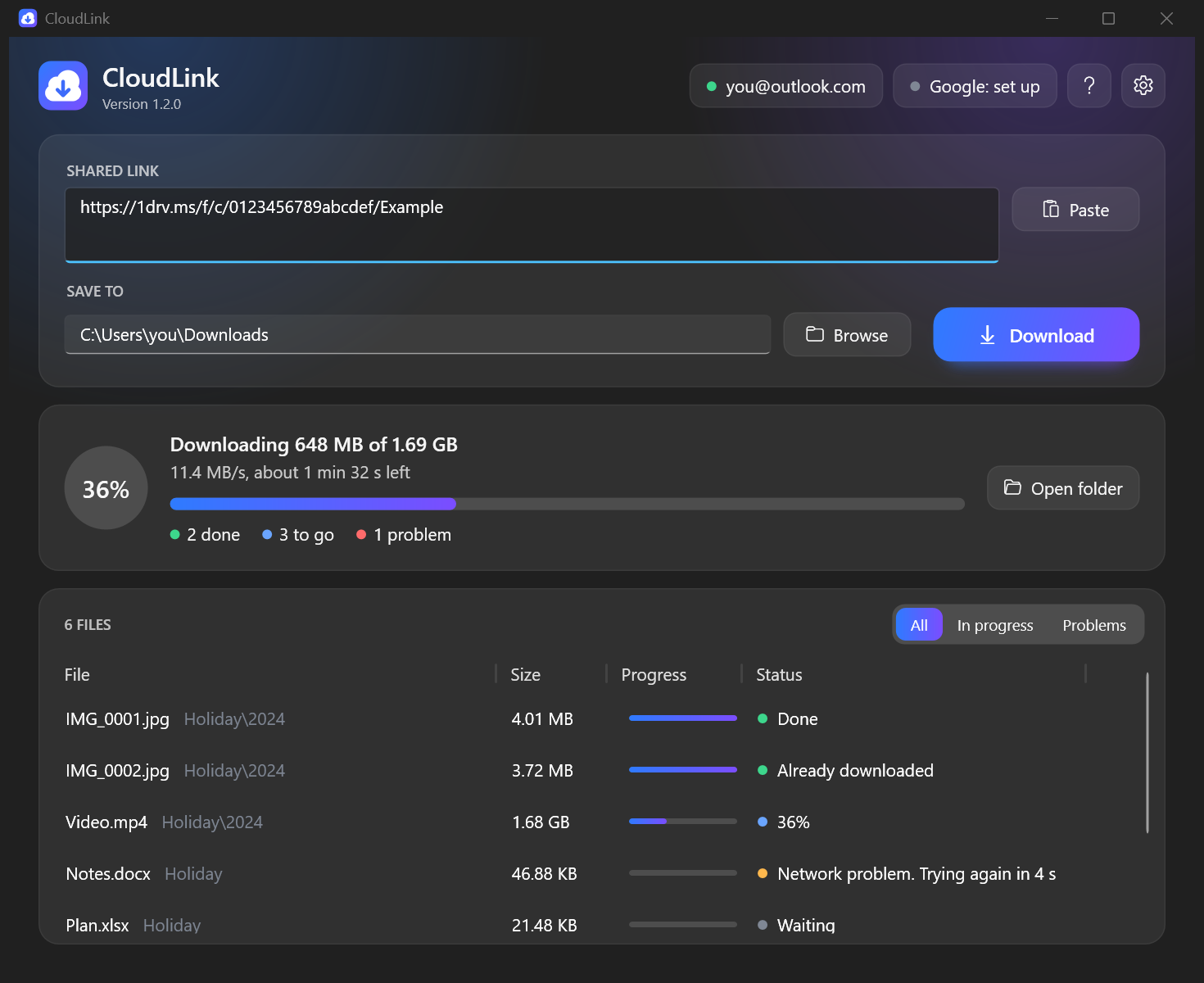
- Shows one progress bar for the whole job with speed and time left, a status for every file, and a filter for what needs attention.
- Exports Google Docs, Sheets and Slides to
.docx,.xlsxand.pptx. - Follows the Windows light or dark theme. Help is under ? or F1.
Good to know
- CloudLink only downloads. It never uploads, changes or deletes files in the cloud, never runs what it downloads, and has no telemetry. Opening a OneDrive link records your account as having opened it, exactly as opening it in a browser does. See the privacy statement and security notes.
- What has been tested: OneDrive sign-in and download with a personal Microsoft account, and Google Drive links that anyone can open, with an API key. Not tested: work and school accounts, and opening a link with the other kind of account (a personal account on a
sharepoint.comlink, or the reverse). Google sign-in for private links is covered by automated tests against a local stand-in server and has not yet been run against Google itself. - Google Forms, Sites and My Maps have no file content and are listed as skipped. A Google document larger than 10 MB can only be exported when signed in, not with an API key.
- To remove CloudLink, delete the exe and the folder
%LOCALAPPDATA%\CloudLink. - Questions and problems: open an issue. For a security problem, see SECURITY.md.
Full list of changes: CHANGELOG.md. Licence: MIT.