Repository navigation
Releases
1.8.3


Roll for Initiative 1.8.3
Fights on Atlas VTT maps can now run entirely in Roll for Initiative: start them from the map, see whose turn it is, and apply damage without leaving the map.
Start a fight from the map
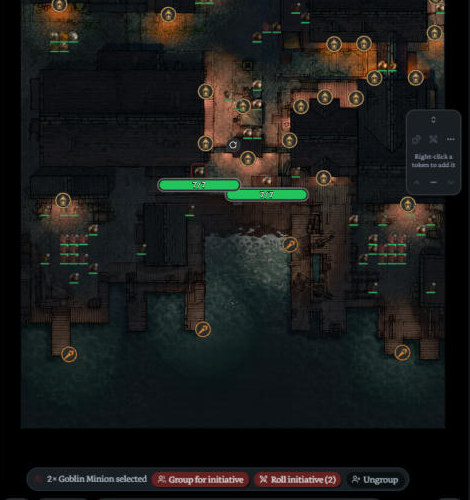
- Select tokens on an Atlas map (Shift-click or drag a box) and press Roll initiative on the bar at the bottom of the map. A marked group comes in whole.
- While a fight runs, selected tokens that aren't in it get Add to fight.
- The fight runs in Roll for Initiative's own tracker and stays linked to exactly the tokens you picked. HP and conditions still sync to the tokens; Atlas's own initiative tracker isn't needed.
- Want Atlas's tracker filled too? Settings → Atlas VTT → Use Atlas's initiative tracker too.
- Also as a command: Atlas: roll initiative for the selected tokens.
Groups on the map
- Select tokens of one creature and press Group for initiative: they fight as one row with a shared HP pool (Goblin Warrior A, Goblin Warrior B…). Unmarked tokens stay one by one.
- Marked groups stay on the map for the next fights.
- Select one grouped token for Select group / Remove from group, or a whole group for Ungroup.
Whose turn it is
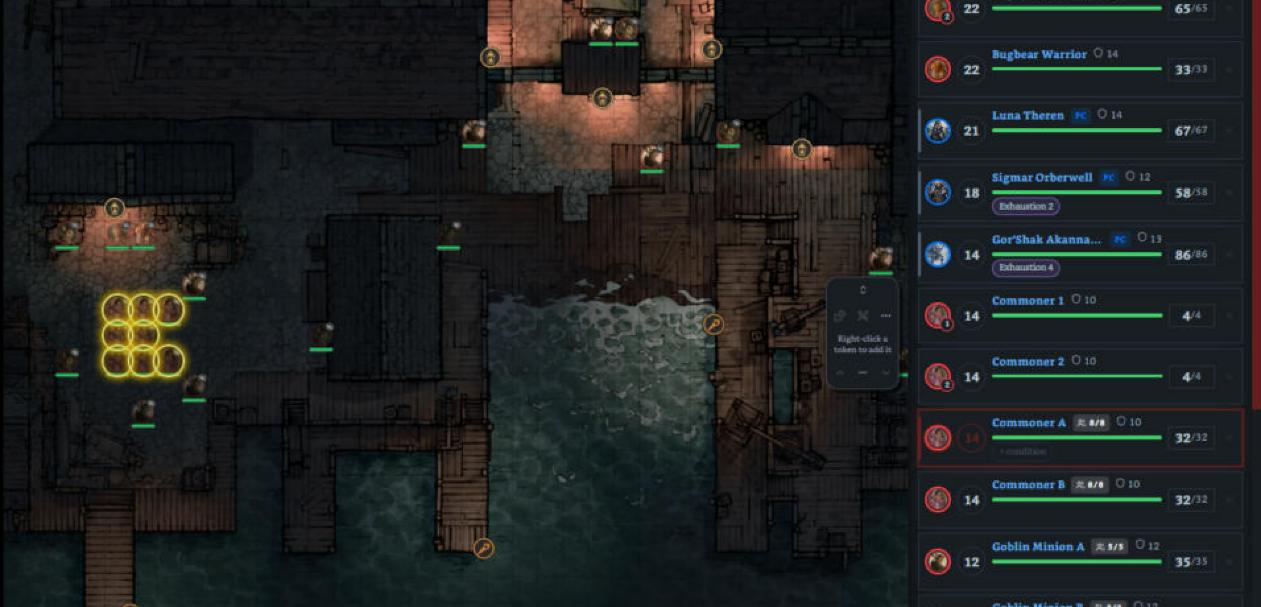
- A yellow ring stays around the token whose turn it is for the whole turn. On a group's turn, every standing token of the group gets one.
- The tokens can still be selected, moved and used one by one.
- The map pans to whose turn it is (the middle of a group).
- Settings → Atlas VTT: Mark whose turn it is and Center the map on whose turn it is.
Damage on the map
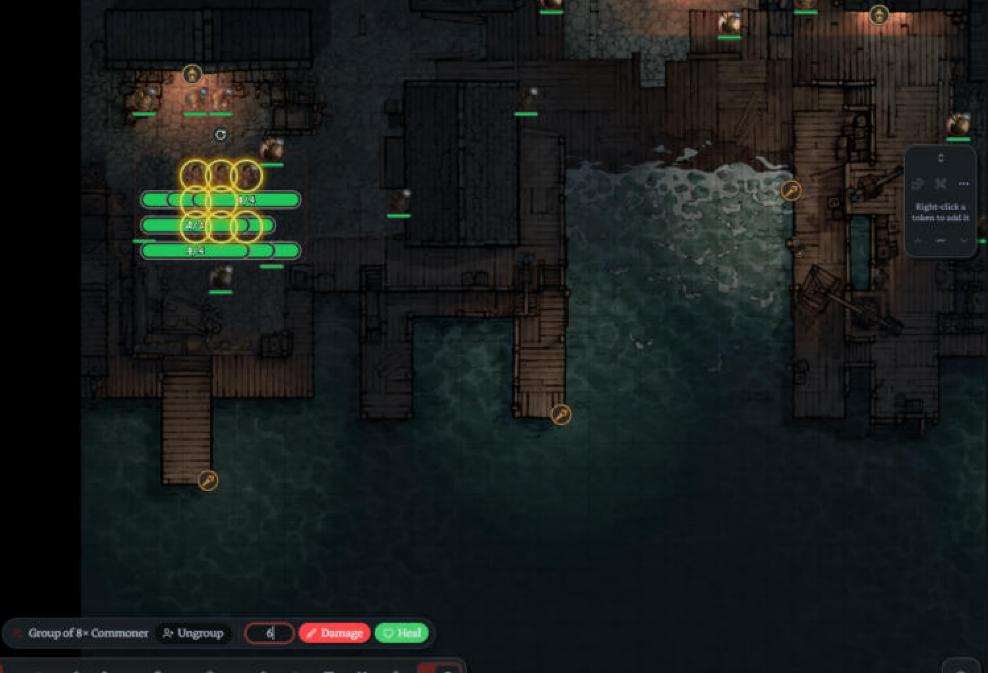
- Physical dice: select fighters' tokens and the bar gets an amount box with Damage and Heal (Enter = damage, Shift+Enter = heal). A group takes it once, from its pool.
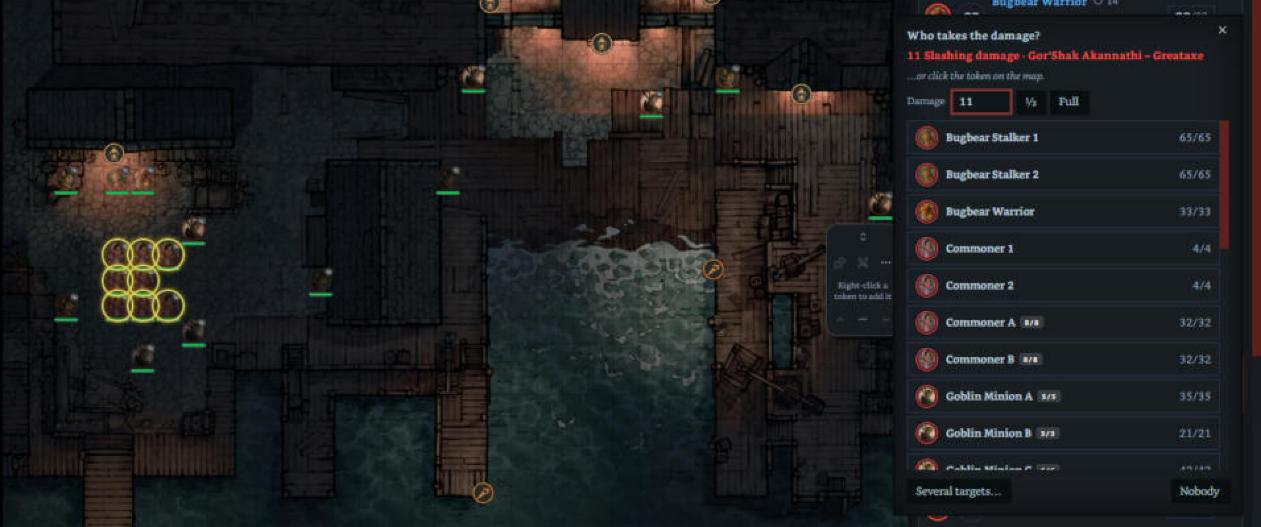
- Rolls made in Atlas (a monster's statblock or a character's card on the map) now open Who takes the damage?. Attack rolls and checks are ignored.
- Click the token: with a map open, the damage window lets clicks through to the map. Click a fighter's token to apply the damage or healing.
Fixes
- Two rows of the same creature (a group and a single one) no longer get the same name.
- The bar over the map stays centred when sidebars open or the window is resized.
Install / update
Update from Settings → Community plugins → Check for updates, or download main.js, manifest.json and styles.css below into .obsidian/plugins/roll-initiative/.
1.8.2
1.8.2
Groups on Atlas VTT maps: a group (army) is now linked to as many tokens of its creature on the open Atlas map as it has members.
- The tokens share the group's initiative, so they sit and act together in Atlas's tracker.
- The HP pool is spread over them: goblins fall one by one, and healing brings them back.
- Damage or healing on any of the group's tokens on the map comes off, or goes back into, the pool.
- The group's conditions go onto every token.
- Atlas's own tracker still lists each token on its own row.
1.8.1
- Character cards in the statblock pane: clicking a character’s name in the tracker now opens their character card in the pane under the tracker, where monster statblocks open.
- With Atlas VTT on, it’s their Atlas card: the same layout Atlas shows when you Ctrl-hover their token on a map.
- Without Atlas (or on mobile), it’s the compact card from One DnD Character Sheet 1.10.0+, with the same look.
- Checkboxes (spell slots, uses, death saves, inspiration) can be ticked right in the card.
- Ctrl/Cmd-click still opens the full character sheet.
- Link previews in the statblock pane: hovering a link inside a statblock (a condition, a spell…) now shows Obsidian’s page preview, like in a note.
1.8.0
Several initiatives at once
For when the party splits up, like a city attack where each group fights its own enemies.
- Run alongside: while an initiative is running, a Run alongside button shows next to Roll initiative, on encounter cards and on a fight in its own note before it's rolled. Roll Initiative on an encounter card also asks: Run alongside or Overwrite.
- Switch between them: ‹ › arrows at the top of the sidebar, with one dot per initiative. The highlighted dot shows which one has the turn, and Turn: … jumps straight to it.
- One shared turn order: turns go by initiative across all of them, so none are skipped. A player on 20 in one fight is followed by a monster on 19 in the other, and the sidebar follows the turn there by itself. Next and Previous work from any of them, and the round is shared.
- Waiting initiatives say so (Waiting: the turn is in …). Their dashed marker shows who acts next there.
- Joining mid-round: a new initiative joins the current round. Its creatures act this round if their initiative is still to come; the rest wait for the next round.
- Ending one passes the turn on to whoever is next. The last one left becomes a normal fight again.
- Player screen shows the initiative whose turn it is.
- Who takes the damage? offers targets from the roller's own fight.
Stop and go back to setup
- New ↺ button next to ■ (also in the ⋮ menu and as a command). It puts the initiative back to how it was before rolling: no round, no turn, no initiative values. HP and conditions stay.
- Press Roll initiative to start it again. A stopped initiative that ran alongside others passes the turn on, and rejoins their turn order when rolled again.
A player can turn against the party
- A character's token menu has an Enemy (red) item to tick or untick, the same way monsters have Enemy / Neutral / Ally.
- A ticked character gets a red border and an ENEMY tag. They stay synced with their character sheet and count as an enemy for damage targets and auto-end.
For other plugins
- The state from
getState()androll-initiative:changegainswaiting(the turn is in another initiative) andinitiatives(how many run together).
1.7.5
1.7.5
Health bar: a fourth colour, orange, when a creature is bloodied (half its max HP or less). The full scale is now: green at full HP, yellow when damaged, orange at half or less, red at a quarter or less (critical). This applies in the tracker and on the player screen.
Also includes 1.7.3 and 1.7.4:
Fix (Atlas VTT): with One DnD Character Sheet 1.8, starting a fight from Atlas turned every character into a creature called “Atlas”. Characters are matched correctly again, and the live map sync finds their tokens.
Health bar colours by HP (green / yellow / red), in the tracker and on the player screen.
1.7.2
🔮 Concentration at a glance
- Badge: anyone with the Concentrating condition gets a purple Concentrating badge on their row. Click it to end concentration.
- List: a strip at the top of the tracker lists everyone who's concentrating.
- Save card: when someone concentrating loses HP, a card shows the Constitution save DC (half the damage, at least 10, at most 30) and a Roll CON save (+X) button.
- The card then says whether they keep or lose concentration. A lost save removes the condition, on the character sheet too.
- The roll goes through the dice hook, so it shows up in the Game Master Interactive Screen's dice tray.
- CON bonus: from the character sheet's saving throws, or the monster statblock's saves / CON score.
- At 0 HP concentration ends by itself.
- Works with the sheet: the character sheet's new Cast button puts Concentrating on the character, and the tracker picks it up straight away.
- Player screen: players see their own characters' concentration. Monsters' concentration stays hidden, because in the fiction concentrating is silent and only the spell's effect is visible. You can show it with Settings → Player screen → Show monsters' concentration on the player screen.
- Settings: turn the feature off under Settings → Combat → Concentration at a glance.
🐛 Fixes
- "Who takes the damage?" works with One DnD Character Sheet 1.8: healing spells ask Who takes the heal?, damage spells show their type (Fire, Thunder…), and the spell or weapon name is shown correctly.
- If a spell roll arrives without a type, Roll for Initiative reads the spell note's Damage / Effect to tell healing from damage.
🔌 API
getState()combatants now includeconcentratingandconSave.
Install / update
- BRAT: run BRAT: Check for updates, or restart Obsidian.
- By hand: replace
main.js,manifest.jsonandstyles.cssin.obsidian/plugins/roll-initiative/with the files below, then reload Obsidian.
Full changelog: CHANGELOG.md
1.6.0
🎯 "Who takes the damage?"
During a fight, when someone rolls damage or healing, a window asks Who takes the damage? (or Who takes the heal?). One click and the HP is taken off or added.
Where the rolls come from
- the dice tray of the Game Master Interactive Screen;
- the roll buttons on One DnD Character Sheet;
- Fantasy Statblocks actions (through the Dice Roller plugin).
How it works
- Click a creature to apply the roll straight away. This works for character sheets, army groups and Cyberpunk RED armour too.
- Several targets… lets you tick everyone caught in a Fireball and apply it to all of them at once.
- ½ halves the damage for a successful save or resistance. You can also type any amount.
- Nobody closes the window without changing anything.
- The likely targets come first: a monster's damage lists the party first, and a player's damage lists the enemies first. The attacker and anyone already down go to the bottom. Healing lists the healer's own side first.
- Attack rolls, checks and initiative rolls are ignored. If two rolls come in quickly, the second window waits for the first.
- With the GM screen installed, rolls are taken from its roll event. Without it, Roll for Initiative reads the Dice Roller plugin itself. You never get the question twice.
New setting: Settings → Rolled damage and healing → Ask who takes rolled damage / healing (on by default).
🔌 API
New call ri.applyRoll({ total, kind: "damage" | "healing", damageType?, who?, action? }). It opens the window from another plugin or script. See API for other plugins in the README.
🐛 Fixes
- The New combat window now shows its accent colours (hover outline and player chips).
Install / update
- BRAT: run BRAT: Check for updates, or restart Obsidian.
- By hand: replace
main.js,manifest.jsonandstyles.cssin.obsidian/plugins/roll-initiative/with the files below, then reload Obsidian.
Full changelog: CHANGELOG.md
1.5.0
🔌 API for other plugins
Roll for Initiative now has a public API, so other plugins (like a GM screen) can work with it:
const ri = app.plugins.plugins["roll-initiative"]?.api;ri.version: the plugin version ("1.5.0")ri.getState(sourcePath?, id?): the full state of the active fight, or of a given fight:- round,
running/ended, the current combatant and who acts next; - every combatant's initiative, HP, AC, conditions, side, hidden / disabled status and group info
- round,
ri.newCombat({ kind?, players? }): opens the New combat window. It resolves with the new encounter note's path and block id, or with the initiative text, ornullif the window was closed.ri.addCombatant("3x [[Imp]]", target?): adds creatures with the normal block syntax. In a running fight, they're rolled and sorted into the order.ri.rollInitiative(),ri.endCombat(),ri.showOnPlayerScreen(): the same as the buttons and commandsri.getActive(),ri.next(),ri.previous(): unchanged
🎲 Dice hook
ri.setRoller({ rollMany }) lets another plugin make the tracker's dice rolls, so they can show up in its own dice tray.
- Initiative rolls: Roll initiative, the single Roll +X button, the dice button in the player-initiative window, and creatures joining a running fight.
- Rolled HP: the Roll monster HP setting and the encounter card's Roll for HP.
- One batch: rolling for everyone sends a single
rollManycall, so all the dice are thrown together. Group initiative is respected. - Safe fallback: if the other plugin fails, returns bad values or takes longer than 15 seconds, the built-in dice take over. A fight never gets stuck.
📣 Events
roll-initiative:changenow carries the full fight state. It also fires when a fight ends and when the active fight switches.- New
roll-initiative:createdevent when the New combat window creates an encounter note or initiative
1.4.0
Everything new since 1.1.0.
🖥️ Player screen (new)
Show the initiative to your players on a second screen with TTRPG Tools – Player Screen.
- Click the monitor button in the tracker header, use ⋮ → Show on player screen, or run the command Show initiative on player screen.
- Players see: round, order, current turn, tokens, names, PC / ally / neutral tags, group counts with casualties, health bars, conditions and death saves.
- Players never see: HP numbers, AC / SP, buttons, or creatures you've marked hidden. Revealing a creature puts it on their screen.
- The view updates live with every change you make in the tracker.
- New setting Health bars on the player screen: everyone / player characters only / nobody.
⚔️ New combat window (left ribbon)
The swords icon in the left ribbon now opens a two-step window:
- Choose what to prepare:
- Combat encounter: a full encounter note in your encounters folder, with the whole initiative order ready to roll and run.
- Initiative tracker: a compact prepared encounter with a Roll Initiative button, given as text with Copy and Close so you can paste it into any note (adventure, location, session plan).
- Set it up:
- name and players (party, chosen characters, or none);
- creatures with suggestions and − / +;
- army grouping;
- Roll for HP and the difficulty word.
New commands: New combat, New encounter note, New initiative (text to paste). The sidebar still opens from the window or with Open initiative sidebar.
🛡️ Armies: groups of N and casualties
- Split armies into several groups: the 👥 button on an encounter card opens a menu (one by one / one group / groups of 5, 10, 20, 25, 50 / custom size). 50 goblins in groups of 10 = 5 group rows.
- YAML:
- 50: [[Goblin]], group 10
- YAML:
- Casualties: a red −N pops up above a group's 👥 count, and the tag flashes red, when members go down. A green +N shows when healing brings them back.
- Right-click a group → Split into smaller groups…
- The group tag is now plain white, so it's readable in every theme.
⚙️ New settings
- Armies & minions:
- Group size: default size for each group;
- Group automatically from: counts at least this big start as a group;
- Show casualties.
- Encounters folder: where new combat encounter notes are created.
- Player screen: Health bars on the player screen.
🐛 Fixes
- Folder settings written with Windows backslashes (
Dungeons & Dragons\04. Kniha příšer) now work. Before, monster suggestions came up empty. - A hand-typed group line with an HP pool (
group 20 hp 155/200) now reads 200 as the pool, not as HP each. - Full creature names show
1.1.0
Armies and minions: groups
Large battles are now manageable. A group is one row for many identical creatures. They share one initiative and one HP pool (HP each × how many). The tag next to the name shows how many are still standing (👥 27/40).
Making a group
- Encounter card: click the 👥 button next to a creature with a count above 1
- Add box: type
40 gob group - Block:
40x [[Goblin Warrior]] group - During a fight: right-click a creature → Fight as one group (merges all creatures of that kind and keeps their remaining HP)
Hitting a group
- Damage comes off the shared pool
- Area deals the amount to each of × targets (empty = everyone standing). Fireball for 28 on 6 goblins = 6 goblins down. One member never loses more than its own HP.
- −1 drops members (type a number to drop several)
- Heal puts HP back into the pool
- Each sets HP per member and refills the group
Also
- Right-click → Split into individual creatures turns the survivors back into normal rows
- Difficulty counts every member of the group
- Combat auto-ends when the pool hits 0
- Cyberpunk RED: hits go through the group's SP before coming off the pool; Area hits each target through body SP
- Atlas VTT live sync skips group rows (a group has no single token on the map)
Block syntax
group 40, each 10 (also mob, minions, horde)
Encounter YAML: - 40: [[Goblin Warrior]], group
Fixes
- README screenshots show HP bars again
Install / update
- BRAT: run BRAT: Check for updates, or restart Obsidian.
- By hand: replace
main.js,manifest.jsonandstyles.cssin.obsidian/plugins/roll-initiative/with the files below, then reload Obsidian.
Full changelog: CHANGELOG.md