Repository navigation
Releases
Dropall 0.4.2

This program was written with the help of Claude, Anthropic's AI assistant.
Dropall — one app to download everything
Videos, music, files and torrents: paste a link, press a button, and Dropall does the rest. It works on Windows, Linux and macOS.
What's new
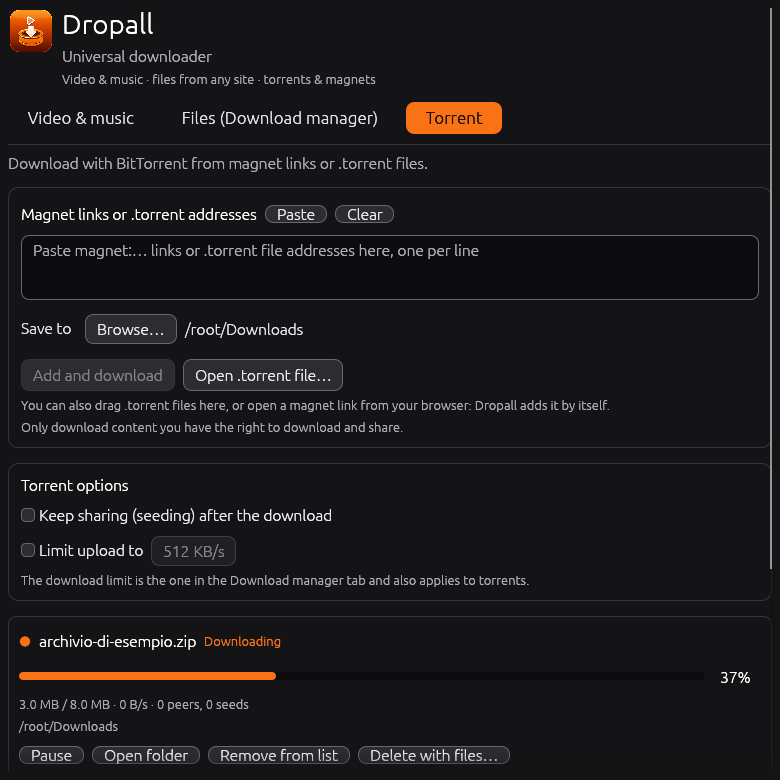
- Torrents are here. There's a new “Torrent” tab. Paste a magnet link or a
.torrentaddress, open a.torrentfile from your computer (or drag it onto the window), or just click a magnet link in your browser. Dropall opens, or comes to the front if it's already running, and starts it. Torrents pick up where they left off after a restart, and you can keep sharing them afterwards. On Windows the installer can set Dropall as the app for magnet links and.torrentfiles; on Linux the menu entry does it. On macOS, use paste, the open button or drag and drop. - Keep downloading while it's out of the way. Minimize Dropall and it tucks itself into the system tray; videos, files and torrents keep downloading. Click the icon to bring it back. You can turn this off at the bottom of the window.
- See how far along you are. Every progress bar now shows its percentage.
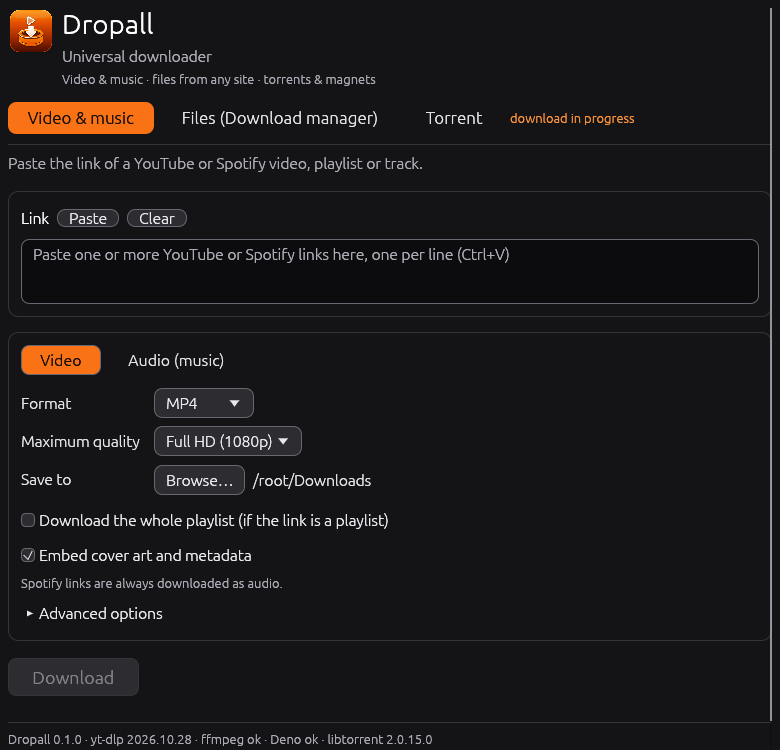
- Easier to understand. Three tabs (“Video & music”, “Files”, “Torrent”), each with a short line saying what it's for.
- New name, new icon. The program is now called Dropall.
- Windows installer.
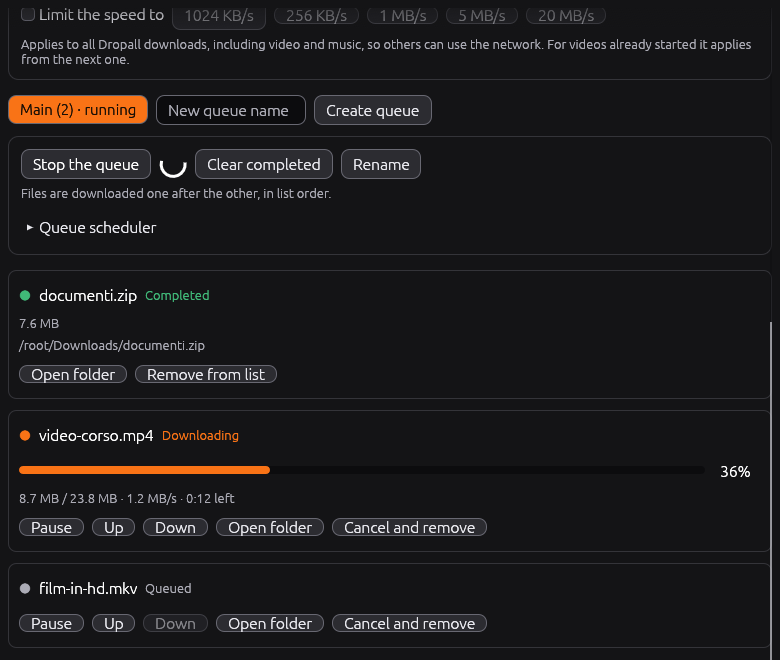
Dropall-Setup-windows-x86_64.exeinstalls just for you, with no administrator rights, adds a Start menu entry and an uninstaller. The portable.exeis still there. - A real download manager. Download any file from a web link with up to 16 connections at once, line files up in queues, schedule when each queue runs, and set one speed limit for everything. You can pause and resume even after closing the app.
- Tidier playlists. A YouTube playlist goes into a folder with the playlist's name.
- Updates on its own. Dropall checks for a new version as soon as it opens, installs it and restarts, and tells you how the check went.
- Italian or English, following your system language.
- Screen reader support on Windows, macOS and Linux, a title bar that follows your system theme, and easier-to-read selected text.
- Free software, released under the GPL-3.0-or-later license. The libraries it uses (libtorrent, Boost, OpenSSL) are credited in the app under “Licenses & credits” and in every download.
 |
|
 |
Downloads
- Windows:
Dropall-Setup-windows-x86_64.exe(installer) ordropall-windows-x86_64.exe(portable) - Linux:
dropall-linux-x86_64.AppImage - macOS:
Dropall-macos-*.app.zip
Use Dropall only for content you have the right to download and share. Installed copies update themselves.
Changes in this version
Full Changelog: v0.4.1...v0.4.2
Dropall 0.4.1
This program was written with the help of Claude, Anthropic's AI assistant.
Dropall — universal downloader
Download video and music from YouTube and Spotify, any file with the built-in download manager, and torrents (magnet links and .torrent files).
What's new
- Torrents (new tab, powered by libtorrent): paste magnet links or
.torrentaddresses, open.torrentfiles from your computer (button or drag and drop), or click a magnet link in your browser: Dropall opens, or comes to the front if it is already running, and adds it. Torrents resume after a restart; you can keep seeding after the download and limit the upload speed. On Windows the installer registers Dropall formagnet:links and.torrentfiles (optional); on Linux the AppImage menu entry does the same. On macOS use paste, open or drag and drop. - System tray: minimize Dropall to the notification area and downloads (videos, files and torrents) keep going; closing the window while something is downloading does the same. Use the tray icon to show the window or quit. Can be turned off at the bottom of the window.
- Percentage next to every progress bar, in all three tabs.
- Clearer interface: three tabs (Video & music, Files, Torrent), each with a one-line explanation, and a new description under the title.
- Third-party licenses (libtorrent BSD-3-Clause, Boost, OpenSSL) are shown in the app (Licenses & credits) and included in every download.
- Windows installer:
Dropall-Setup-windows-x86_64.exeinstalls for your user only (no administrator rights), adds a Start menu entry and an uninstaller, and the app keeps updating itself. The portable.exeis still available. - Download manager (new tab): files from any http(s) link, with multiple connections per file (up to 16), queues downloaded one after the other, a scheduler that starts and stops each queue by itself, and a speed limit shared by all downloads, video and music included. Pause and resume survive closing the app.
- Playlists: a YouTube playlist is saved in a folder named after the playlist; file names no longer repeat the playlist name.
- Automatic updates at startup: Dropall checks for a new release as soon as it opens, installs it and restarts; a status line tells you how the check went.
- Italian and English: the interface follows your system language (Italian, otherwise English).
- Screen reader support on Windows, macOS and Linux (Narrator, NVDA, VoiceOver, Orca).
- Window title bar fixed: on Windows it no longer appears light and without buttons at first launch, and on Linux it follows the system theme.
- More readable text: selected text now has a clear contrast (it was unreadable on orange); text size can be increased.
- Universal downloader: the app now presents itself as such, with video and music, the download manager and torrents in separate tabs.
- Free software: released under the GPL-3.0-or-later license.
Downloads
Dropall-Setup-windows-x86_64.exe (Windows installer) or dropall-windows-x86_64.exe (Windows portable), dropall-linux-x86_64.AppImage (Linux), Dropall-macos-*.app.zip (macOS). Use Dropall only for content you have the right to download and share. Installed copies update themselves.
Changes in this version
Full Changelog: v0.4.0...v0.4.1
Grabbit 0.3.0
This program was written with the help of Claude, Anthropic's AI assistant.
Grabbit — universal downloader
Download video and music from YouTube and Spotify, any file with the built-in download manager, and torrents (magnet links and .torrent files).
What's new
- Torrents (new tab, powered by libtorrent): paste magnet links or
.torrentaddresses, open.torrentfiles from your computer (button or drag and drop), or click a magnet link in your browser: Grabbit opens, or comes to the front if it is already running, and adds it. Torrents resume after a restart; you can keep seeding after the download and limit the upload speed. On Windows the installer registers Grabbit formagnet:links and.torrentfiles (optional); on Linux the AppImage menu entry does the same. On macOS use paste, open or drag and drop. - System tray: minimize Grabbit to the notification area and downloads (videos, files and torrents) keep going; closing the window while something is downloading does the same. Use the tray icon to show the window or quit. Can be turned off at the bottom of the window.
- Percentage next to every progress bar, in all three tabs.
- Clearer interface: three tabs (Video & music, Files, Torrent), each with a one-line explanation, and a new description under the title.
- Third-party licenses (libtorrent BSD-3-Clause, Boost, OpenSSL) are shown in the app (Licenses & credits) and included in every download.
- Windows installer:
Grabbit-Setup-windows-x86_64.exeinstalls for your user only (no administrator rights), adds a Start menu entry and an uninstaller, and the app keeps updating itself. The portable.exeis still available. - Download manager (new tab): files from any http(s) link, with multiple connections per file (up to 16), queues downloaded one after the other, a scheduler that starts and stops each queue by itself, and a speed limit shared by all downloads, video and music included. Pause and resume survive closing the app.
- Playlists: a YouTube playlist is saved in a folder named after the playlist; file names no longer repeat the playlist name.
- Automatic updates at startup: Grabbit checks for a new release as soon as it opens, installs it and restarts; a status line tells you how the check went.
- Italian and English: the interface follows your system language (Italian, otherwise English).
- Screen reader support on Windows, macOS and Linux (Narrator, NVDA, VoiceOver, Orca).
- Window title bar fixed: on Windows it no longer appears light and without buttons at first launch, and on Linux it follows the system theme.
- More readable text: selected text now has a clear contrast (it was unreadable on orange); text size can be increased.
- Universal downloader: the app now presents itself as such, with video and music, the download manager and torrents in separate tabs.
- Free software: released under the GPL-3.0-or-later license.
Downloads
Grabbit-Setup-windows-x86_64.exe (Windows installer) or grabbit-windows-x86_64.exe (Windows portable), grabbit-linux-x86_64.AppImage (Linux), Grabbit-macos-*.app.zip (macOS). Use Grabbit only for content you have the right to download and share. Installed copies update themselves.
Changes in this version
Full Changelog: v0.2.3...v0.3.0
Grabbit 0.2.3
This program was written with the help of Claude, Anthropic's AI assistant.
Grabbit — universal downloader
Download video and music from YouTube and Spotify, and any file with the built-in download manager.
What's new
- Windows installer:
Grabbit-Setup-windows-x86_64.exeinstalls for your user only (no administrator rights), adds a Start menu entry and an uninstaller, and the app keeps updating itself. The portable.exeis still available. - Download manager (new tab): files from any http(s) link, with multiple connections per file (up to 16), queues downloaded one after the other, a scheduler that starts and stops each queue by itself, and a speed limit shared by all downloads, video and music included. Pause and resume survive closing the app.
- Playlists: a YouTube playlist is saved in a folder named after the playlist; file names no longer repeat the playlist name.
- Automatic updates at startup: Grabbit checks for a new release as soon as it opens, installs it and restarts; a status line tells you how the check went.
- Italian and English: the interface follows your system language (Italian, otherwise English).
- Screen reader support on Windows, macOS and Linux (Narrator, NVDA, VoiceOver, Orca).
- Window title bar fixed: on Windows it no longer appears light and without buttons at first launch, and on Linux it follows the system theme.
- More readable text: selected text now has a clear contrast (it was unreadable on orange); text size can be increased.
- Universal downloader: the app now presents itself as such, with video and music and the download manager in two separate tabs.
- Free software: released under the GPL-3.0-or-later license.
Downloads
Grabbit-Setup-windows-x86_64.exe (Windows installer) or grabbit-windows-x86_64.exe (Windows portable), grabbit-linux-x86_64.AppImage (Linux), Grabbit-macos-*.app.zip (macOS). Installed copies update themselves.
Changes in this version
Full Changelog: v0.2.2...v0.2.3
Grabbit 0.2.2
This program was written with the help of Claude, Anthropic's AI assistant.
Grabbit — universal downloader
Download video and music from YouTube and Spotify, and any file with the built-in download manager.
What's new
- Download manager (new tab): files from any http(s) link, with multiple connections per file (up to 16), queues downloaded one after the other, a scheduler that starts and stops each queue by itself, and a speed limit shared by all downloads. Pause and resume survive closing the app.
- Playlists: a YouTube playlist is saved in a folder named after the playlist; file names no longer repeat the playlist name.
- Automatic updates at startup: Grabbit checks for a new release as soon as it opens, installs it and restarts; a status line tells you how the check went.
- Italian and English: the interface follows your system language (Italian, otherwise English).
- Screen reader support on Windows, macOS and Linux, and a better window title bar.
- More readable text: selected text now has a clear contrast; text size can be increased.
- Free software: released under the GPL-3.0-or-later license.
Downloads
grabbit-windows-x86_64.exe (Windows), grabbit-linux-x86_64.AppImage (Linux), Grabbit-macos-*.app.zip (macOS). Installed copies update themselves.
Changes in this version
Full Changelog: v0.2.1...v0.2.2
Grabbit 0.2.0
This program was written with the help of Claude, Anthropic's AI assistant.
Full Changelog: v0.1.5...v0.2.0
Grabbit 0.1.5
This program was written with the help of Claude, Anthropic's AI assistant.
Full Changelog: v0.1.4...v0.1.5
Grabbit 0.1.4
This program was written with the help of Claude, Anthropic's AI assistant.
Full Changelog: v0.1.3...v0.1.4
Grabbit 0.1.3
Questo programma è stato scritto con l'aiuto di Claude, l'assistente AI di Anthropic.
Full Changelog: v0.1.2...v0.1.3
Grabbit 0.1.2
Questo programma è stato scritto con l'aiuto di Claude, l'assistente AI di Anthropic.
Full Changelog: v0.1.1...v0.1.2