Repository navigation
Releases
AwayTeamEF 1.5.0

AwayTeamEF 1.5.0: Star Trek: Voyager – Elite Force for Mac, Windows and Linux (Steam Deck too), with co-op for the single-player campaign, Holomatch multiplayer and the full single-player game. Formerly "Elite Force for Mac (Marino's Build)".
No game data is included. You need your own copy of the game (GOG, Steam, or CD + 1.2 patch).
Downloads
| Platform | File | How to start |
|---|---|---|
| Mac (Apple Silicon) | EliteForce-MacOS-Marino-1.5.0-arm64.dmg (or the .zip) | Drag the app to Applications and open it. Signed and notarized by Apple. |
| Windows (64-bit) | EliteForce-Marino-1.5.0-setup.exe (installer) or EliteForce-Marino-1.5.0-windows-x64.zip | Run the installer, or unzip anywhere and run EliteForce.exe. Not code-signed yet: if SmartScreen warns, choose "More info", then "Run anyway". |
| Linux (x86_64, Steam Deck too) | EliteForce-Marino-1.5.0-x86_64.AppImage | chmod +x it and run it. |
Windows: if Windows reports "Bad Image … 0xc0e90002", Smart App Control is blocking the unsigned build. Code signing will be in a future build. You may have to search for how to work around this.
The launcher on each platform helps you point the game at your data. Every platform plays co-op with every other: a Mac can host a Windows PC or a Steam Deck, and the other way round. Both players need 1.5.0.
What's new in 1.5.0
Highlights
- Cross-platform co-op for the single-player campaign. It's no longer experimental. A friend joins your campaign as a second Hazard Team member, on your network or over the internet, from a Mac, a Windows PC or a Linux PC / Steam Deck.
- Co-op on Windows and Linux. The Co-op sheet is in all three launchers, with the same features.
- A new name: AwayTeamEF. The launcher header has Star Trek lettering.
- Smoother player 2. The guest moves on their own clock, so walking stays smooth even on Wi-Fi.
- Big game folders work. A BaseEF with thousands of .pk3 files loads.
Co-op
- Auto-detects games on your network. Click one to check it and join.
- Copy Invite makes a link that opens the Co-op sheet on your friend's computer, on any platform.
- Player 2 can choose from a large number of character models, including experimental ones from Holomatch. The voice stays the Munro you chose.
- Team attack: the host chooses whether players can hurt each other: Off (the default), Half or On.
- Hold Use to bring player 2 to you, and double-tap Use to ping a spot for your partner.
Co-op fixes from Experimental
- Player 2 feels like single player:
- Movement is predicted on the guest's own clock, so the view no longer freezes and jumps when the network delivers frames late.
- The view bob is smooth.
- Shots leave from the eye, not the hip.
- More weapons fire at once on the guest.
- Crouching holds even when the network is late.
- Player 2 sees everything: some effects were not playing on player 2's screen.
- Reviving a partner while standing on top of them no longer leaves you stuck inside each other.
- Saving works while a player is down.
- After a death, the game reloads the save you loaded last.
- Levels fixed include the Borg missions, the Forge and the Dreadnought: space walks, gravity zones, crawlspaces, sealed doors and scripted moves.
- Player 2 follows player 1 through scripted moves and teleports, keeps the health, armor and bolt-ons that scripts give, and rejoins in cover.
Windows
- Check finds the host again, instead of saying "This address can't be used".
- The Co-op sheet's text is no longer cut off by the Host button.
- More stable:
- The launchers' background tasks no longer touch closed windows.
- A name with an accented character (such as "é") no longer crashes the game.
- Fonts stay right when you move a window to another monitor.
- A
stvef://link during a data copy no longer freezes the launcher. - Server window Kick picks the right player.
- The launcher's server summary shows "Server name" and "Internet games" correctly. The gear menu opens under its button.
Linux & Steam Deck
- The Steam Deck touch screen works in the menus.
- The Co-op sheet's network list shows each game's host.
- The window title reads correctly.
- The launcher looks right in dark desktop themes and at 2× scaling.
Mac
- Choosing the game folder: selecting BaseEF (or the game folder) and clicking Choose accepts it, instead of opening the folder.
- Text fields: Cmd+A, Cmd+Z and cut/copy/paste work in the launcher's text fields.
- Joining: leaving the host's address field no longer starts a Check, and Connect is the default button once a game is found.
Single player & everyone
- Big BaseEF folders: thousands of .pk3 files load. There's no more file-list, memory or open-file limit, and a clear message appears if the system's open-file limit is reached.
- The brig cutscene no longer restarts its opening shot.
- No crash when attacking with a melee weapon while the game is slowed down.
- After a death, the reload goes back to the save you loaded last.
- The player model preview in the menus has the right field of view.
Thanks to Noah Metzger (Chomenor) for cMod's game modules, used by Holomatch.
Elite Force (Marino's Build) 1.4.1 for Windows
A small update for Elite Force (Marino's Build) on Windows. It changes only the update check, so that this copy is told about future versions.
From now on every version is published as one release with the Mac, Windows and Linux builds together. 1.4.0 on Windows only looked for Windows-only releases, so it would never have seen them. 1.4.1 finds the combined releases and offers one only when it has a Windows build.
Everything else is exactly 1.4.0. If you skip this update, download the next version by hand from the releases page.
Download: EliteForce-Marino-1.4.1-setup.exe (installer) or EliteForce-Marino-1.4.1-windows-x64.zip
No game data is included. You still need your own copy of Star Trek: Voyager – Elite Force.
Elite Force (Marino's Build) 1.4.1 for Linux
A small update for Elite Force (Marino's Build) on Linux. It changes only the update check, so that this copy is told about future versions.
From now on every version is published as one release with the Mac, Windows and Linux builds together. 1.4.0 on Linux only looked for Linux-only releases, so it would never have seen them. 1.4.1 finds the combined releases and offers one only when it has a Linux build.
Everything else is exactly 1.4.0. If you skip this update, download the next version by hand from the releases page.
Download: EliteForce-Marino-1.4.1-x86_64.AppImage
No game data is included. You still need your own copy of Star Trek: Voyager – Elite Force.
Elite Force (Marino's Build) 1.4.0
Elite Force (Marino's Build) 1.4.0. Star Trek: Voyager – Elite Force, single player, Holomatch multiplayer and (on Mac) experimental co-op. A native app for Apple Silicon Macs, plus new experimental builds for Windows and Linux.
No game data is included. You need your own copy of the game (GOG, Steam, or CD + 1.2 patch).
Downloads
| Platform | File | How to start |
|---|---|---|
| Mac (Apple Silicon) | EliteForce-MacOS-Marino-1.4.0-arm64.dmg (or the .zip) | Drag the app to Applications and open it. Signed and notarized by Apple. |
| Windows (64-bit, experimental) | EliteForce-Marino-1.4.0-setup.exe (installer) or EliteForce-Marino-1.4.0-windows-x64.zip | Run the installer, or unzip anywhere and run EliteForce.exe. Not code-signed yet: if SmartScreen warns, choose "More info", then "Run anyway". |
| Linux (x86_64, experimental, Steam Deck too) | EliteForce-Marino-1.4.0-x86_64.AppImage | chmod +x it and run it. |
The launcher on each platform helps you point the game at your data.
What's new in 1.4.0
Highlights
- Co-op for the single-player campaign (EXPERIMENTAL, Mac only). A second player can join over a LAN or the internet and play the campaign as a second Hazard Team member.
- Holomatch with cMod's game modules. The app now includes cMod's game code by Noah Metzger (Chomenor). Servers you host and non-pure servers you join use it, for a widescreen HUD and lag compensation.
- Windows and Linux builds (EXPERIMENTAL). The same game with its own launchers: a native one on Windows, a Qt one on Linux (AppImage, with Steam Deck defaults). Co-op is not included on these platforms.
- Single-player fixes. Doors are saved properly. Ambient hums stay behind closed doors. Lips move with what is said. Voice lines are no longer lost. Lift, door and ambience sounds play again.
Mac
- The launcher fits small screens (13" MacBook Air): its settings scroll between the mode cards and Quit/Play, and the window can be resized. The Co-op sheet scrolls too.
- Cmd+W and the window's close button now ask before quitting, so a stray Cmd+W no longer ends your game.
- Two copies on the same data folder: a second copy no longer removes the first copy's crash marker. A real crash is still reported on the next start.
- The update check now looks through more releases on GitHub, so it finds a newer version reliably.
- Plays well alongside the new Windows and Linux builds: same settings defaults, same data-folder lookup (GOG installer, game folder or CD).
Windows & Linux (EXPERIMENTAL)
- New: Elite Force for Windows (64-bit zip and installer) and for Linux (AppImage, built on the Steam Runtime so it also runs on Steam Deck).
- Single player and Holomatch, with the same engine, fixes and cMod game modules as the Mac app.
- Launchers:
- Windows has a native launcher.
- Linux has a Qt launcher.
- Both offer game-data setup (game folder, GOG installer or CD), presets, brightness, the Holomatch server browser, Host a Server with router port opening, and update checks.
- Steam Deck: controller defaults, and a "Steam Deck Controls…" button in the Linux launcher.
- Not included: co-op. The Co-op button is hidden.
- Note: the Windows build is not code-signed yet, so Windows SmartScreen may warn the first time you run it ("More info" then "Run anyway").
Co-op (EXPERIMENTAL, Mac only)
- Co-op… in the launcher. Host a game, or Join with Check and Connect. Set your name, and choose whether the guest plays a male or female Munro.
- The guest plays player 2 in the host's game:
- It sees the host's world live: enemies, doors, lifts, breakables exploding, cutscenes and movies.
- It hears the host's voice lines, door sounds and messages.
- It follows level changes.
- It sees when the host pauses.
- Enemies fight both players. NPCs, triggers, pickups and weapons work for either player.
- Downed, not dead:
- A player who goes down can be revived by the partner (hold Use nearby for 3 seconds; you can't revive through walls or forcefields).
- Both down, or bleeding out, means game over for both.
- Falling into a pit or being hit by the level puts you back next to your partner.
- Saves: only the host saves. A normal save stays a normal single-player save, and player 2's state goes in a
.coopfile next to it. Player 2 keeps health and weapons across levels. - Internet play:
- "Open the port on my router" in the Host section.
- "Copy Invite" makes an invite link that opens the Co-op sheet on the guest's Mac.
- Lag compensation for the guest's shots.
- The guest's own rifle and I-MOD fire shows at once.
- Updates are about 3 to 5 KB/s.
- Background play: hosting or joined, the game keeps running when its window isn't in front (you can turn this off with "Keep playing in the background").
- Without a guest, a computer-controlled player 2 follows you. You can turn co-op off by simply not using Host or Join: the normal New Game is plain single player.
Holomatch / cMod
- cMod's game modules are included (thanks to Noah Metzger, Chomenor).
- Servers you host (listen and dedicated) run cMod's server game code, with lag compensation settings. Host a Server has a new cMod tab.
- On non-pure servers the client uses cMod's cgame and UI. That gives a widescreen HUD and menus, adjustable in the launcher's HUD settings (widescreen stays the default).
- Pure servers work as before.
- Server browser: a new cMod column shows which servers run cMod, and its version.
- Fixes:
- The game's own packs now come first for game code and menu text, so a downloaded mod pack (such as tfgpak.pk3) no longer replaces the stock menus. This removes the stray "WINNER OF A ROUND IN WEAPONRY" line in the main menu.
- The widescreen HUD stays on even after visiting a mod server whose saved settings turned it off. The launcher's HUD choice always wins.
Fixes
- Doors in saves: open and closed doors are now saved and restored correctly. Loading a save from the original PC game with doors open works.
- Ambient sound:
- Hums and machinery behind closed doors stay silent until the door opens.
- Lift, door and room ambience sound sets load again: lifts, Borg alcoves and the Dreadnought hum are back.
- Lip sync: mouths move with the speech, without blinking or frowning mid-line.
- Voice lines:
- The line right after a skipped cutscene is no longer dropped.
- Voice lines can no longer be cut off by other sounds.
- The first captain's log plays again after quitting to the menu and starting a New Game.
- No crash on a ladder or in water when the game is slowed down (e.g.
timescalebelow 1). - Explosions no longer flash back to their first frame just before they disappear: one-shot model animations now hold their last frame.
Known issues
- Co-op is experimental:
- Host and guest need the same app version and the same pak0.pk3-pak2.pk3.
- The game can't be saved while a player is down.
- A player downed behind a barrier that later closes can't be reached, which ends in game over.
- The computer-controlled player 2 (no guest) can't climb ladders or crouch through low gaps. It is teleported to you when it gets stuck.
- Only the rifle and I-MOD shots are shown ahead of the host on the guest.
- Mostly tested with two copies on one Mac; only lightly tested between two Macs on a home network, and not yet over the internet.
- Some maps may still have co-op glitches (turbolifts, transporters, scripted sequences): please report them.
- Windows/Linux are experimental:
- The Windows build is unsigned (SmartScreen warning).
- There has been little testing on real Windows PCs and Linux distributions.
- Lip sync uses a simpler mouth cycle when the OpenAL sound backend is selected.
Credits
- Noah Metzger (Chomenor): cMod, whose game modules are included, and whose lag-compensation and weapon-prediction ideas shaped co-op's netcode. Thank you.
- Built on VoyagerSP-Android, lilium-voyager, ioquake3, Quake3e and cMod.
- Star Trek and related marks are trademarks of Paramount. This is an unofficial fan project.
Elite Force for Mac 1.3.0

Elite Force for Mac 1.3.0, Marino's Build (EliteForce-MacOS-Marino). Star Trek: Voyager – Elite Force, single player and Holomatch multiplayer, in one native app for Apple Silicon Macs.
No game data is included. You need your own copy of the game (GOG, Steam, or CD + 1.2 patch).
What's new in 1.3.0
Holomatch, with fixes from cMod. Many of this release's Holomatch fixes come from cMod by Noah Metzger (Chomenor). Huge thanks to him.
- Faster map downloads over HTTP from servers that offer it, falling back to the normal in-game download.
- Downloaded maps stay in their lane. New downloads go to a
downloadsfolder and only override the game's own files while you're on a server that uses them. A mod you picked up on one server no longer changes the stock game elsewhere. - Smoother connections. On a lossy connection, each packet carries extra copies of your recent input automatically, so a dropped packet doesn't lose your moves or shots.
- Hosting: a new Tick Rate setting (High = 40 updates a second), older clients get full update rates, bots join passworded servers and use alt-fire, map rotations no longer get stuck, and smoother
map_restarts and multi-map downloads. - Stability: fixes for oversized game states, message overflows and a modded-server crash; music in custom maps whose MP3s didn't play before.
- Brightness presets in the launcher (Plain, Full Contrast, Extra Bright, Full Bright), and automatic lighting correction for maps ported from Quake 3.
- Light Flares are now on by default.
Single player
- Skip cutscenes with Enter, as in the original: the scene fast-forwards so everything still happens.
- Sound keeps going. Opening the console or the pause menu, saving, or an in-game movie no longer cuts off music and dialogue for good. Missing music in the Voyager bridge scenes is fixed, and movie sound is back in sync with the picture.
- Cleaner level starts: no more falling feeling, odd camera angles or the bridge crew "beaming in" when you arrive.
- Widescreen: cutscenes and gameplay are no longer cropped at the top and bottom on wide displays (Janeway's opening briefing shows the whole picture). In-game movies play with black bars instead of over the frozen level.
- No more debug text over subtitles, lip sync only moves while someone is speaking, and the holodeck forcefield's hum stops when the simulation ends.
Install
- Download EliteForce-MacOS-Marino-1.3.0-arm64.dmg below, open it, and drag Elite Force.app onto the Applications shortcut. (Or use the .zip: unzip it and move the app to Applications.) To update, replace the old app. Your settings and saves are kept.
- Open it. The app is signed and notarized by Apple, so macOS opens it without warnings.
- In the launcher, click Choose… under Game Files and pick your Elite Force folder (the one containing
BaseEF), or GOG's setup.exe.
Updating with downloaded maps: maps downloaded by earlier versions stay where they are. To get the new protection for them, move downloaded .pk3 files (not pak0–pak3 or ones you added yourself) from baseEF into baseEF/downloads in the app's data folder (Show Saves Folder in the app menu opens baseEF/saves; baseEF is one level up).
Requires an Apple Silicon Mac (M1 or later) and macOS 12 Monterey or later. For LAN parties, allow "find devices on your local network" when macOS asks.
Versions
Elite Force for Mac 1.3.0 (build 234), Elite Force 1.2 network protocol. Bundled libraries: SDL 3.4.18, sdl2-compat 2.32.74, Vulkan loader 1.4.363, MoltenVK 1.4.2, FFmpeg 9.0.2 (minimal LGPL build, Bink only).
Licenses
The engine is GPLv2 (ioquake3, lilium-voyager, Quake3e, cMod). The single-player game code is Raven Software's, under its Limited Use Software License: free, non-commercial, for owners of the retail game only. License texts are inside the app. Star Trek and related marks are trademarks of Paramount. This is an unofficial fan project, not affiliated with or endorsed by Paramount, Raven Software or Activision. Built on VoyagerSP-Android, lilium-voyager, ioquake3, Quake3e and cMod.
Elite Force for Mac 1.2.3
Elite Force for Mac 1.2.3, Marino's Build (EliteForce-MacOS-Marino). Star Trek: Voyager – Elite Force, single player and Holomatch multiplayer, in one native app for Apple Silicon Macs.
No game data is included. You need your own copy of the game (GOG, Steam, or CD + 1.2 patch).
What's new: a better server browser
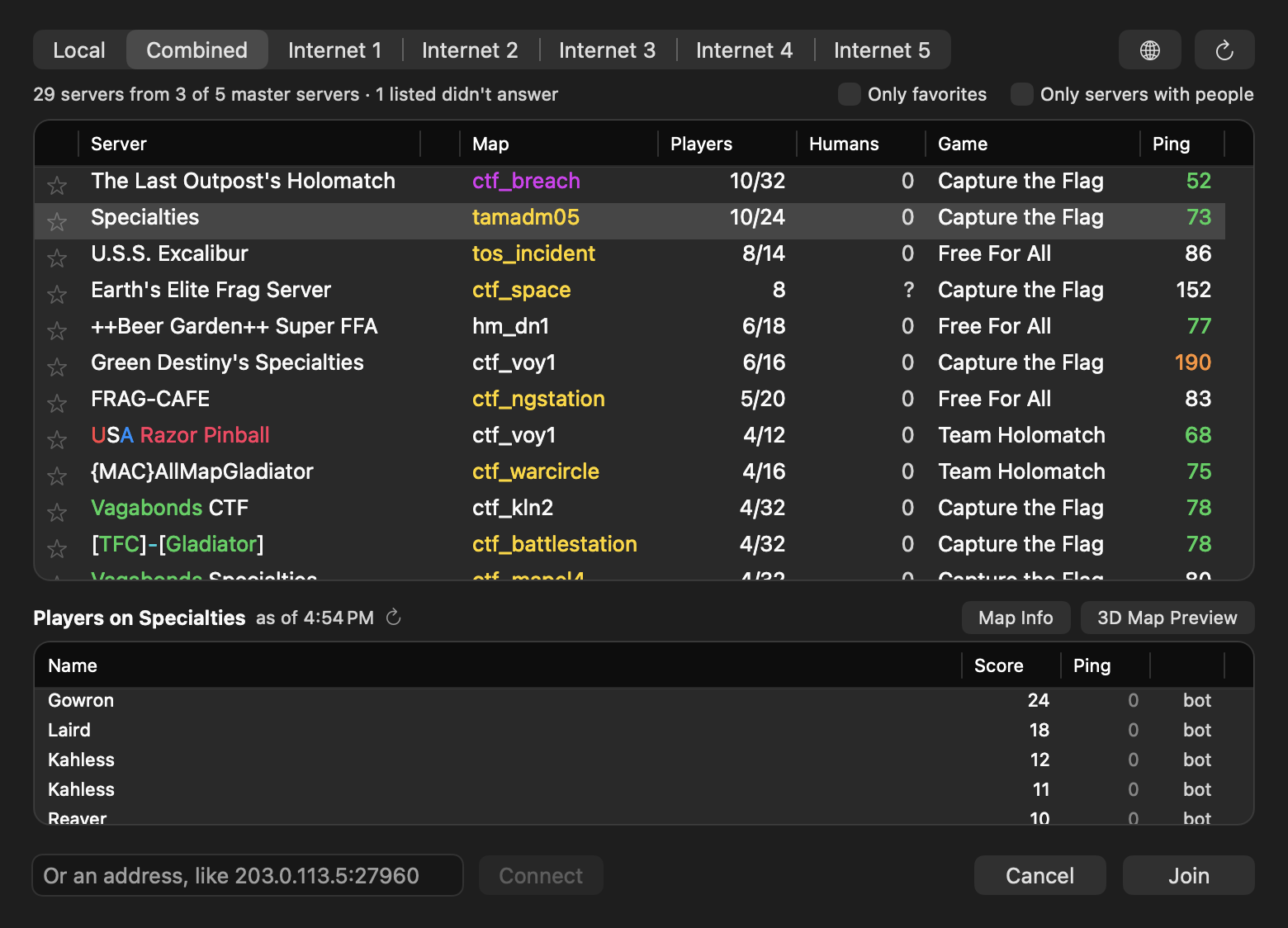
- Players and Humans. Players counts everyone on a server, bots included, and Humans only the people (? when a server doesn't say). Servers with people come first, then the fullest, then the closest.
- See who's playing. Select a server to see its players, scores and pings, people first and bots tagged. Only the server you select is asked.
- Favorites and filters. Star servers to keep them at the top, and narrow the list to Only favorites or Only servers with people.
- Map Info and 3D Map Preview. For custom maps, see the map's page on efservers.com (screenshots and its files), or walk around it in 3D when efservers has a 3D view. The globe button opens efservers.com.
- Join links.
stvef://links on websites like efservers.com open the app and join that server, or switch to it from a Holomatch game. If another app (such as cMod) opens these links, Browse… offers Open Join Links with Elite Force. - Server names in their colors, as the game shows them (no more stray
^7). - Tidier lists when macOS is set to always show scroll bars.
Install
- Download EliteForce-MacOS-Marino-1.2.3-arm64.dmg below, open it, and drag Elite Force.app onto the Applications shortcut. (Or use the .zip: unzip it and move the app to Applications.) To update, replace the old app. Your settings and saves are kept.
- Open it. The app is signed and notarized by Apple, so macOS opens it without warnings.
- In the launcher, click Choose… under Game Files and pick your Elite Force folder (the one containing
BaseEF), or GOG's setup.exe.
Requires an Apple Silicon Mac (M1 or later) and macOS 12 Monterey or later. For LAN parties, allow "find devices on your local network" when macOS asks.
Versions
Elite Force for Mac 1.2.3 (build 200), Elite Force 1.2 network protocol. Bundled libraries: SDL 3.4.18, sdl2-compat 2.32.74, Vulkan loader 1.4.363, MoltenVK 1.4.2, FFmpeg 9.0.2 (minimal LGPL build, Bink only).
Licenses
The engine is GPLv2 (ioquake3, lilium-voyager, Quake3e). The single-player game code is Raven Software's, under its Limited Use Software License: free, non-commercial, for owners of the retail game only. License texts are inside the app. Star Trek and related marks are trademarks of Paramount. This is an unofficial fan project, not affiliated with or endorsed by Paramount, Raven Software or Activision. Built on VoyagerSP-Android, lilium-voyager, ioquake3 and Quake3e.
Elite Force for Mac 1.2.2
Elite Force for Mac 1.2.2, Marino's Build (EliteForce-MacOS-Marino). Star Trek: Voyager – Elite Force, single player and Holomatch multiplayer, in one native app for Apple Silicon Macs.
No game data is included. You need your own copy of the game (GOG, Steam, or CD + 1.2 patch).
What's new
- GOG's installer works on a Mac. Bought the game on GOG? Download the offline Windows installer (the setup
.exe), then click Choose… in the launcher and pick the.exeitself. The app unpacks the game files (including the 1.2 patch and the Expansion Pack) in a few seconds, checking each one against the installer's own checksums. No Windows PC needed. If an installer can't be read, the app tells you and asks for aBaseEFfolder from a Windows install instead. - Missing patch warning. If your game files are from the CD alone (only
pak0.pk3, without the 1.2 patch'spak1.pk3andpak2.pk3), the launcher now says Patch 1.2 missing and keeps Play off until you add them with Add Game Files…, instead of the game stopping with an error.
Install
- Download EliteForce-MacOS-Marino-1.2.2-arm64.dmg below, open it, and drag Elite Force.app onto the Applications shortcut. (Or use the .zip: unzip it and move the app to Applications.) To update, replace the old app. Your settings and saves are kept.
- Open it. The app is signed and notarized by Apple, so macOS opens it without warnings.
- In the launcher, click Choose… under Game Files and pick your Elite Force folder (the one containing
BaseEF), or GOG's setup.exe.
Requires an Apple Silicon Mac (M1 or later) and macOS 12 Monterey or later. For LAN parties, allow "find devices on your local network" when macOS asks.
Versions
Elite Force for Mac 1.2.2 (build 191), Elite Force 1.2 network protocol. Bundled libraries: SDL 3.4.18, sdl2-compat 2.32.74, Vulkan loader 1.4.363, MoltenVK 1.4.2, FFmpeg 9.0.2 (minimal LGPL build, Bink only).
Licenses
The engine is GPLv2 (ioquake3, lilium-voyager, Quake3e). The single-player game code is Raven Software's, under its Limited Use Software License: free, non-commercial, for owners of the retail game only. License texts are inside the app. Star Trek and related marks are trademarks of Paramount. This is an unofficial fan project, not affiliated with or endorsed by Paramount, Raven Software or Activision. Built on VoyagerSP-Android, lilium-voyager, ioquake3 and Quake3e.
Elite Force for Mac 1.2.1
Elite Force for Mac 1.2.1, Marino's Build (EliteForce-MacOS-Marino). Star Trek: Voyager – Elite Force, single player and Holomatch multiplayer, in one native app for Apple Silicon Macs.
No game data is included. You need your own copy of the game (GOG, Steam, or CD + 1.2 patch).
What's new
- Combined server list. The Server Browser (Browse…) opens on a new Combined tab that asks every master server at once and lists each server once, so you see every internet game in one place. Hover over a server's name to see which masters list it. The Local and Internet 1–5 tabs are still there.

- Update notices. The launcher now tells you when a newer version is out, with a Download… button that opens its release page. It checks GitHub at most once a day. Check for Updates… and Check for Updates Automatically (to turn it off) are in the app menu.

- Better master server order. Internet 1 is now master.stef1.daggolin.de, the most complete and up-to-date list. master.stvef.org moves to Internet 3. This applies to the game's own Join menu too. If you changed the list in Servers…, yours is kept.
Install
- Download EliteForce-MacOS-Marino-1.2.1-arm64.dmg below, open it, and drag Elite Force.app onto the Applications shortcut. (Or use the .zip: unzip it and move the app to Applications.) To update, replace the old app. Your settings and saves are kept.
- Open it. The app is signed and notarized by Apple, so macOS opens it without warnings.
- In the launcher, click Choose… under Game Files and pick your Elite Force folder (the one containing
BaseEF).
Requires an Apple Silicon Mac (M1 or later) and macOS 12 Monterey or later. For LAN parties, allow "find devices on your local network" when macOS asks.
Versions
Elite Force for Mac 1.2.1 (build 188), Elite Force 1.2 network protocol. Bundled libraries: SDL 3.4.18, sdl2-compat 2.32.74, Vulkan loader 1.4.363, MoltenVK 1.4.2, FFmpeg 9.0.2 (minimal LGPL build, Bink only).
Licenses
The engine is GPLv2 (ioquake3, lilium-voyager, Quake3e). The single-player game code is Raven Software's, under its Limited Use Software License: free, non-commercial, for owners of the retail game only. License texts are inside the app. Star Trek and related marks are trademarks of Paramount. This is an unofficial fan project, not affiliated with or endorsed by Paramount, Raven Software or Activision. Built on VoyagerSP-Android, lilium-voyager, ioquake3 and Quake3e.
Elite Force for Mac 1.2.0
Elite Force for Mac 1.2.0, Marino's Build (EliteForce-MacOS-Marino). Star Trek: Voyager – Elite Force, single player and Holomatch multiplayer, in one native app for Apple Silicon Macs.
No game data is included. You need your own copy of the game (GOG, Steam, or CD + 1.2 patch).
What's new
-
Server Browser. The Holomatch card in the launcher has a Browse… button. It lists servers on your network and on each internet master (Internet 1–5), with map, players, game type and ping, and joins with one click, asking for a password when a server needs one.
- Maps you don't have are shown in amber. They download when you join.
- Maps from the Expansion Pack are shown in purple if you don't own it. Those can't download, so you're warned before joining.
- Bot counts appear where the server reports them, for example "10/32 (10 bots)".

- Host while you play. Start Server opens the server in its own window, so you can play single player (or join another game) while friends play on your server. If a server is already running, you're asked whether to show it or start another.
- Loopback Host Fix (on by default). A server you host on this Mac now appears in your own internet lists, and joining it works even when your router doesn't support connecting to its own public address.
- Clearer internet listing. The server window shows one line per master server: ✓ listed, ✗ not listed, or ! no answer.
- Quit brings back the launcher. Quitting from the game's menu returns to the launcher, and ⌘Q quits everything.
Fixes
- Clicking Cancel in Browse… no longer starts Holomatch.
- A server window now quits properly from the Dock or when you log out.
- The internet listing no longer counts a different server at the same address as yours.
Install
- Download EliteForce-MacOS-Marino-1.2.0-arm64.dmg below, open it, and drag Elite Force.app onto the Applications shortcut. (Or use the .zip: unzip it and move the app to Applications.) To update, replace the old app. Your settings and saves are kept.
- Open it. The app is signed and notarized by Apple, so macOS opens it without warnings.
- In the launcher, click Choose… under Game Files and pick your Elite Force folder (the one containing
BaseEF).
Requires an Apple Silicon Mac (M1 or later) and macOS 12 Monterey or later. For LAN parties, allow "find devices on your local network" when macOS asks.
Known issues
- Internet 1 (master.stvef.org) doesn't accept new servers directly; it copies them from Internet 3, so a new server can take a while to appear there. Internet 4 (Raven's original master) is offline, and Internet 5 is IPv6-only.
Versions
Elite Force for Mac 1.2.0 (build 186), Elite Force 1.2 network protocol. Bundled libraries: SDL 3.4.18, sdl2-compat 2.32.74, Vulkan loader 1.4.363, MoltenVK 1.4.2, FFmpeg 9.0.2 (minimal LGPL build, Bink only).
Licenses
The engine is GPLv2 (ioquake3, lilium-voyager, Quake3e). The single-player game code is Raven Software's, under its Limited Use Software License: free, non-commercial, for owners of the retail game only. License texts are inside the app. Star Trek and related marks are trademarks of Paramount. This is an unofficial fan project, not affiliated with or endorsed by Paramount, Raven Software or Activision. Built on VoyagerSP-Android, lilium-voyager, ioquake3 and Quake3e.
Elite Force for Mac 1.1.0
Elite Force for Mac 1.1.0, Marino's Build (EliteForce-MacOS-Marino). Star Trek: Voyager – Elite Force, single player and Holomatch multiplayer, in one native app for Apple Silicon Macs.
No game data is included. You need your own copy of the game (GOG, Steam, or CD + 1.2 patch).
What's new
- One app, two games. A launcher lets you pick Single Player or Holomatch, set graphics (quality presets, window or full screen, window size, Retina, anti-aliasing, texture detail, V-Sync), set your player name, and manage your game files (with Add Game Files… and Expansion Pack detection).
- Holomatch multiplayer, using the original Elite Force 1.2 network protocol: LAN games appear in the Join menu, servers' custom maps download automatically, widescreen view, and brightness changes live.
- Host a Server from the launcher, with Config… for the map rotation (with previews), game type, Holomatch modifiers, limits, bots, password, and LAN or internet. It runs a standalone server with a status window: address, players (with Kick), console, Play on This Mac, and buttons for Next / Restart / Change Map, Add Bot, Remove Bots and messages. For internet servers it can open the port on your router automatically (NAT-PMP / UPnP) and checks that the server made it onto the internet list.
- Internet games that work out of the box. The Join menu's Internet 1–5 now point at the live community master servers first (Internet 1 used Raven's, offline for years), and Servers… in the launcher lets you add up to 16 master servers, drag them into order, and see which ones answer. A server you host announces itself to all of them.
- New "EF" app icon. Fixes for mouse capture, leaving full screen, controls, and sound in Holomatch.
Install
- Download EliteForce-MacOS-Marino-1.1.0-arm64.dmg below, open it, and drag Elite Force.app onto the Applications shortcut. (Or use the .zip: unzip it and move the app to Applications.)
- Open it. The app is signed and notarized by Apple, so macOS opens it without warnings.
- In the launcher, click Choose… under Game Files and pick your Elite Force folder (the one containing
BaseEF).
Requires an Apple Silicon Mac (M1 or later) and macOS 12 Monterey or later. For LAN parties, allow "find devices on your local network" when macOS asks.
Versions
Elite Force for Mac 1.1.0 (build 177), Elite Force 1.2 network protocol. Bundled libraries: SDL 3.4.18, sdl2-compat 2.32.74, Vulkan loader 1.4.363, MoltenVK 1.4.2, FFmpeg 9.0.2 (minimal LGPL build, Bink only).
Licenses
The engine is GPLv2 (ioquake3, lilium-voyager, Quake3e). The single-player game code is Raven Software's, under its Limited Use Software License: free, non-commercial, for owners of the retail game only. License texts are inside the app. Star Trek and related marks are trademarks of Paramount. This is an unofficial fan project, not affiliated with or endorsed by Paramount, Raven Software or Activision. Built on VoyagerSP-Android, lilium-voyager, ioquake3 and Quake3e.