Repository navigation
Calendar
Any calendar in Home Assistant (Google, CalDAV, Local calendar, a work calendar over iCal) can be shown on a tag, and so can several calendars together. The automation gets the day's events with calendar.get_events and sends them with openesl.send. Nothing extra is needed in the integration.
Put your calendars in the calendars list at the top of each automation, and add a start and an end trigger for each of them. Pick your tag in the visual editor (the device_id line), or write its MAC instead:
mac: "00000123456789A8" # the tag's 16 digits (on its device page), in quotesdevice_id is Home Assistant's own id for the tag's device (a long string of letters and digits), not the MAC. Writing the MAC there stops the automation with "… is not an OpenESL tag"; the automation's trace shows that message.
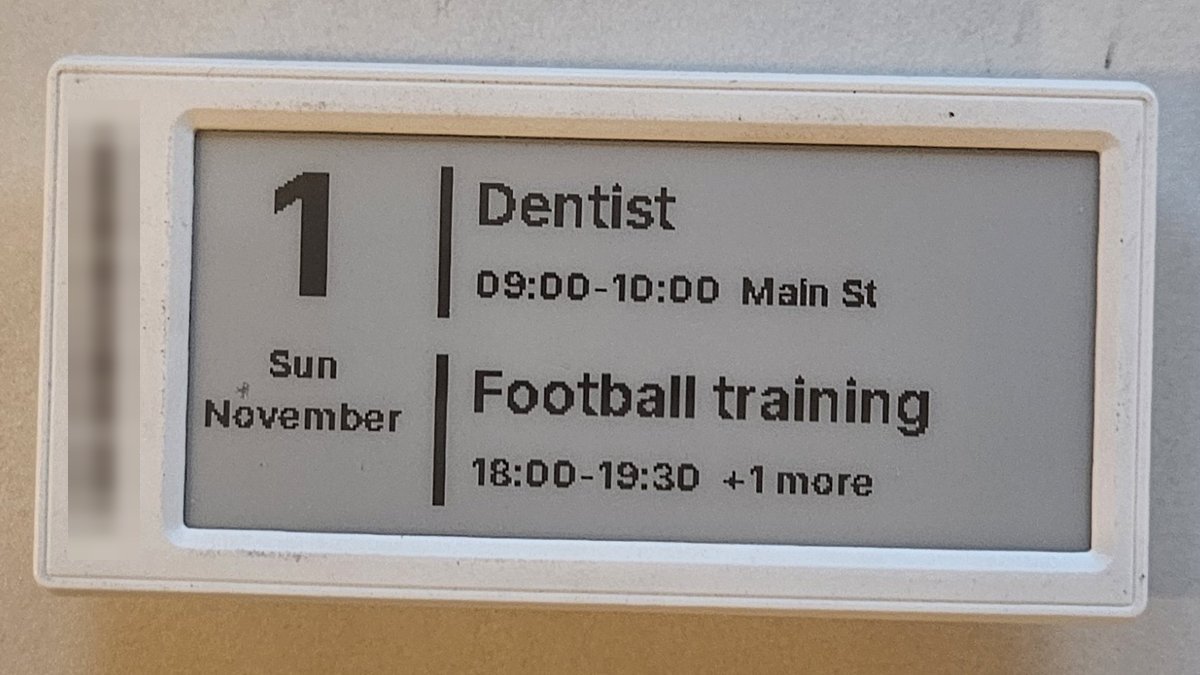
The date in a column on the left and the next two events of the day on the right, each with its title large, its time and place under it, and a bar before it. It is inspired by the look of Calendar Card Pro.
The layout comes from the designer's template library: in the designer, pick the tag's model, then + From template → Home → Calendar, and Send to your AP. The template is in the library from the openESL release after 0.9.2.
alias: Calendar on a tag
mode: queued
max: 2
variables:
  calendars:
    - calendar.family
    - calendar.work
  # The tag shows these words; change them to your language
  weekdays: [Mon, Tue, Wed, Thu, Fri, Sat, Sun]
  months: [January, February, March, April, May, June, July, August, September, October, November, December]
triggers:
  # When an event starts or ends, and just after midnight for the new day
  - trigger: calendar
    event: start
    entity_id: calendar.family
  - trigger: calendar
    event: end
    entity_id: calendar.family
  - trigger: calendar
    event: start
    entity_id: calendar.work
  - trigger: calendar
    event: end
    entity_id: calendar.work
  - trigger: time
    at: "00:05:00"
  - trigger: homeassistant
    event: start
actions:
  - action: calendar.get_events
    target:
      entity_id: "{{ calendars }}"
    data:
      start_date_time: "{{ now() }}"
      end_date_time: "{{ today_at() + timedelta(days=1) }}"
    response_variable: cal
  - variables:
      events: >-
        {%- set ns = namespace(all=[]) -%}
        {%- for c in calendars -%}
          {%- set ns.all = ns.all + cal.get(c, {}).get('events', []) -%}
        {%- endfor -%}
        {{ ns.all | sort(attribute='start') }}
  - action: openesl.send
    data:
      device_id: 4f0c6a...   # the tag
      layout: calendar
      fields: >-
        {%- set ns = namespace(out=[]) -%}
        {%- for e in events[:2] -%}
          {%- if 'T' in e.start -%}
            {%- set when = (as_datetime(e.start) | as_local).strftime('%H:%M') ~ '-' ~ (as_datetime(e.end) | as_local).strftime('%H:%M') -%}
          {%- else -%}
            {%- set when = 'All day' -%}
          {%- endif -%}
          {%- set where = ('  ' ~ e.get('location', '')[:8]) if e.get('location') else '' -%}
          {%- set ns.out = ns.out + [e.summary[:16], when ~ where] -%}
        {%- endfor -%}
        {%- if events | count > 2 -%}
          {%- set ns.out = ns.out[:3] + [ns.out[3].split('  ')[0] ~ '  +' ~ (events | count - 2) ~ ' more'] -%}
        {%- endif -%}
        {%- if not events -%}
          {%- set ns.out = ['No appointments', ''] -%}
        {%- endif -%}
        {{ [now().day | string, weekdays[now().weekday()] ~ ' ' ~ months[now().month - 1]] + ns.out }}
The designer's preview of the template shows the look. With two events and more to come, the fields are, for example, 1, Sun November, Dentist, 09:00-10:00 Main St, Football match and 18:00-19:30 +1 more.
Events that are over drop off the list, so each start and end trigger moves it on. All-day events come first. When there are more than two events, the second one's place gives way to "+1 more". Titles are cut to 16 characters and places to 8, so that all six fields stay inside the text limit of about 90 characters. If you translate weekdays and months, keep the weekday and month together at 13 characters or less (for example ons september), or cut the titles shorter.
The heading and the next three events of the day (the one going on now included), on four lines. It works on every AP, since text is built in. Use the same variables, triggers, calendar.get_events and events as above, and this openesl.send:
  - action: openesl.send
    data:
      device_id: 4f0c6a...   # the tag
      layout: text
      fields: >-
        {%- set ns = namespace(lines=[]) -%}
        {%- for e in events[:3] -%}
          {%- set time = (as_datetime(e.start) | as_local).strftime('%H:%M') if 'T' in e.start else 'All day' -%}
          {%- set ns.lines = ns.lines + [time ~ ' ' ~ e.summary[:15]] -%}
        {%- endfor -%}
        {{ ['Today ' ~ now().strftime('%d.%m')] + (ns.lines if ns.lines else ['No appointments']) }}
The tag shows, for example:
Today 30.10
All day Birthday party
08:30 Dentist
18:00 Football match
Titles are cut to 15 characters to stay inside the text limit.
A sign for a meeting room door, or for "what is on now" at home: the room's name, BUSY or FREE in large inverted letters, the event that is on now, and the next one.
The layout comes from the designer's template library: in the designer, pick the tag's model, then + From template → Signs → Meeting room, and Send to your AP.
Use the same variables, triggers, calendar.get_events and events as in the first example, and this openesl.send:
  - action: openesl.send
    data:
      device_id: 4f0c6a...
      layout: meeting-room
      fields: >-
        {%- set timed = events | selectattr('start', 'search', 'T') | list -%}
        {%- set now_on = timed | selectattr('start', 'le', now().isoformat()) | selectattr('end', 'gt', now().isoformat()) | list -%}
        {%- set later = timed | selectattr('start', 'gt', now().isoformat()) | list -%}
        {{ ['Office',
            'BUSY' if now_on else 'FREE',
            ('Now: ' ~ now_on[0].summary[:18]) if now_on else '',
            ('Next: ' ~ (as_datetime(later[0].start) | as_local).strftime('%H:%M') ~ ' ' ~ later[0].summary[:12]) if later else 'Nothing more today'] }}
All-day events are left out here (search 'T' keeps only events with a time), so a birthday does not make the room busy.
The calendar gives the times as text with a time zone, and the comparison with now().isoformat() works when the calendar and Home Assistant are in the same time zone, which is the usual case.
The tag only gets a new picture when the text changes. These triggers send when an event starts or ends, once a night and when Home Assistant starts, so the tag is redrawn a few times a day. Do not add a trigger every minute with a clock in the text: that redraws the tag every minute.