Repository navigation
Releases
Chomp 0.1.2

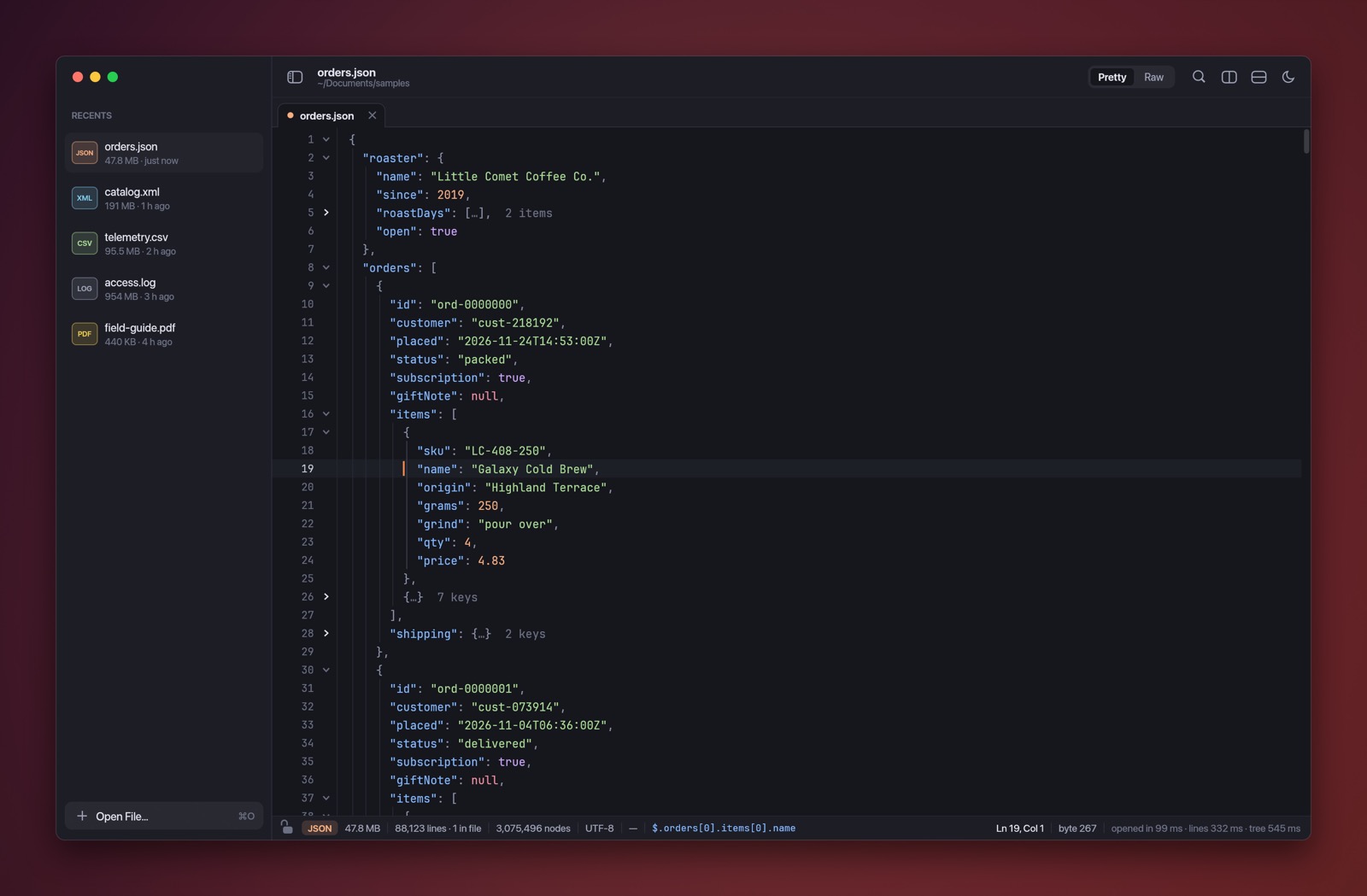
A small update that makes staying current easier and installing nicer.
Improved
- Check for updates from Settings. Settings now has a Check for Updates button next to your Chomp version. It's still in the Chomp menu and the command palette too.
- A better installer window. The disk image now shows its full design on every Mac, the Applications folder shows its real icon, and the artwork keeps going if you make the window bigger.
If you're on 0.1.0 or 0.1.1, Chomp will offer this update on its own. Choose Install and Relaunch and you're done.
Install
- Download Chomp-0.1.2.dmg below.
- Open it and drag Chomp into your Applications folder.
Requires macOS 13 Ventura or later, on Apple silicon or Intel. Signed and notarized by Apple.
SHA-256 (Chomp-0.1.2.dmg): 19660b7508c92b2dcae00b5aa688782dd2566b02dbeccb41fcc6151273e85a6b
SHA-256 (Chomp-0.1.2.zip): f9f242da389f16a0808facffcfff42c344d85f0e5856b0bdec29cb5d081abd5f
Chomp 0.1.1
A small, friendly update: fresh sample data and a little polish.
Improved
- Tidier status bar. A long JSON path or XPath now shortens itself from the front instead of running under the cursor position, selection size or match count, so everything stays readable in narrower windows.
- A nicer installer. The disk image opens to a designed window that shows exactly where to drag Chomp.
- Fresh sample data. The built-in screenshots and sample files now use made-up coffee orders, a fantasy library catalog, space-probe telemetry and a web server log.
If you're on 0.1.0, Chomp will offer this update on its own. Choose Install and Relaunch and you're done.
Install
- Download Chomp-0.1.1.dmg below.
- Open it and drag Chomp into your Applications folder.
Requires macOS 13 Ventura or later, on Apple silicon or Intel. Signed and notarized by Apple.
SHA-256 (Chomp-0.1.1.dmg): 0d1b5c3a46de7915410dc7bd66756437e510607072705d23214a77a690fcffbf
SHA-256 (Chomp-0.1.1.zip): 862166c686a19a7d678177effe194e7abebcde38194cd9acc3ce3626a259b62a
Chomp 0.1.0
Meet Chomp: a fast, friendly Mac app for the files other editors choke on. Open a 1 GB log, a 50 MB single-line JSON export or a 200 MB XML feed, and start reading right away.
Highlights
- Opens anything, instantly. The first screen appears straight away while Chomp indexes the rest in the background, and scrolling stays smooth at any size.
- JSON and XML as a tree. Even minified files open formatted and foldable, with summaries like
{…} 12 keys, bracket matching, parse errors marked in place, and the JSON path or XPath of the caret. - YAML, TOML, JSONC and config files. Folding, syntax highlighting, paths and errors, line for line as written.
- CSV and TSV as a grid. A sticky header, right-aligned numbers, rainbow columns, and delimiters detected for you.
- Logs that are easy on the eyes. Timestamps, levels, numbers, URLs and
key=valuepairs highlighted. - PDFs too. Smooth scrolling through any number of pages, zoom, find, text selection and working links.
- Edit with confidence. Type right into the formatted view with unlimited undo, Format Document and Minify, and saves that never leave a half-written file.
- Search everything. Plain text or regular expressions, a live match count, and Replace All.
- Work side by side. Tabs, splits in any direction, linked scrolling, recent and pinned files, and your layout restored next time.
- At home on your Mac. Light and dark, a command palette, keyboard shortcuts for everything, Open With from Finder, and an optional
chompterminal command. - Stays up to date. Chomp lets you know when a new version is out and installs it for you after checking its checksum and signature. You can turn this off in Settings.
Install
- Download Chomp-0.1.0.dmg below.
- Open it and drag Chomp into your Applications folder.
- Open Chomp and drop in a file, or press ⌘O.
Requires macOS 13 Ventura or later, on Apple silicon or Intel. Signed and notarized by Apple.
SHA-256 (Chomp-0.1.0.dmg): 3c274a8ad3e4c848c73382dc27b637ca4afedf9c5dd58ae6a32fb9cd71eaee68
SHA-256 (Chomp-0.1.0.zip): 7e7a54db80b14997ff12add6a4a62db8622831befcb8333ccac0aaece19c72ab