Repository navigation
Releases
WDM 2.5.0

WDM 2.5.0
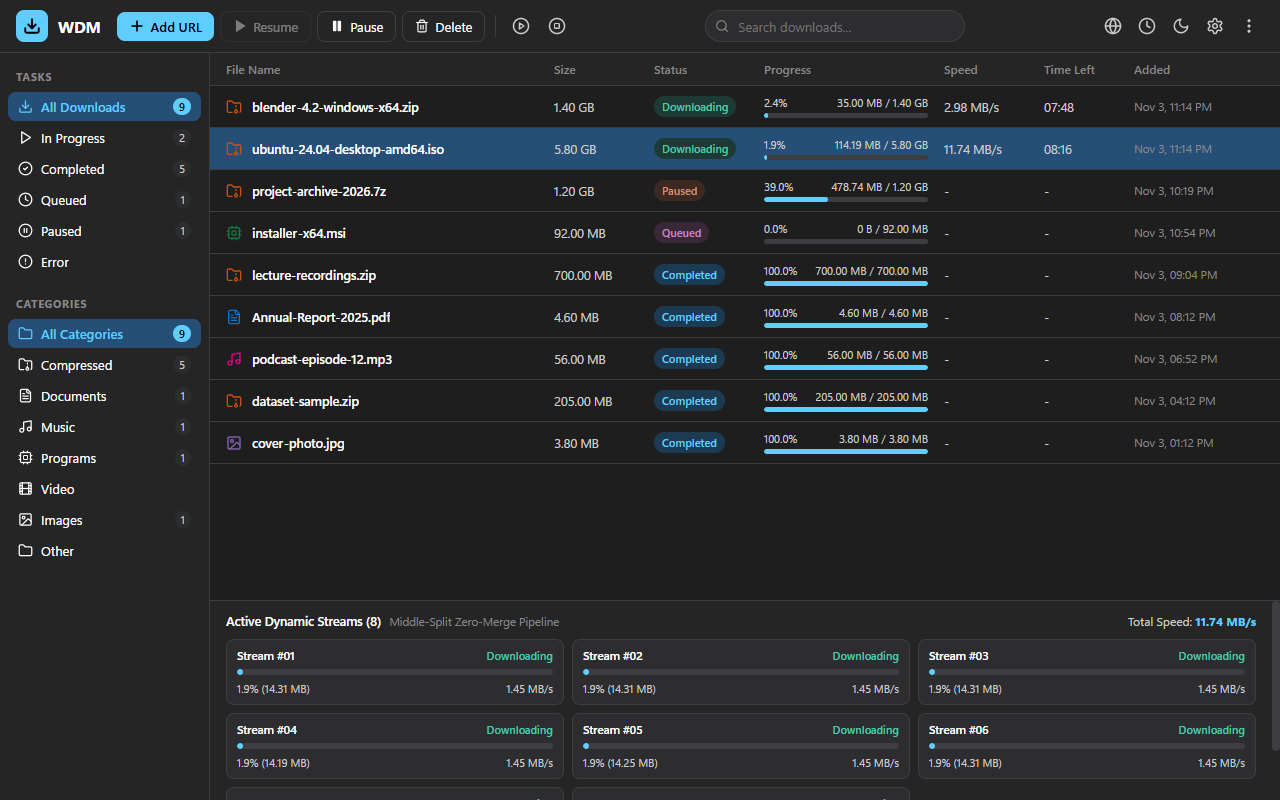
WDM now runs on a native stack: a Rust download engine, native-messaging host and command-line tool, with a Tauri v2 window (React + TypeScript) in place of the .NET/WPF app. Install over 2.0.x: your download list, settings and saved (encrypted) cookies carry over unchanged, and the installer removes the old .NET files.
What is new
- Native engine, same behaviour as 2.0.x: up to 32 connections with middle-split, zero-merge writes, resume with ETag/Last-Modified checks, SHA-256 verification, speed limiter, DPAPI-protected cookies, site grabber,
yt-dlppages. - Connections per download are honoured from the Add dialog.
- Auto-retry for network and disk errors: up to 5 attempts, 30 seconds apart. A failed download shows its reason in the row.
- Shut down when finished triggers when the whole queue is done (not at the stop time) and shows a Windows 60-second countdown with a Cancel button.
- Single instance: a second launch (shortcut, browser, command line) brings the running window forward and hands over its download.
- Accessibility: every button, field and dialog has an accessible name, rows are keyboard-focusable, progress bars are announced.
Fixed during the migration QA
- Downloads started from the Add dialog now start (with the default settings they were only listed).
- Status, speed and per-stream details reach the window correctly (they were sent as numbers or left out).
- A file name sent by a website or the command line can no longer move a download out of the chosen folder.
- A browser batch keeps every address (only the first was kept); several addresses are queued when the dialog is enabled.
- The same address is reused instead of listed twice; pause, resume and delete no longer race.
- Downloads that were running when WDM stopped or crashed come back as Paused and can be resumed.
- Start queue honours "simultaneous downloads"; the network timeout, user agent and dynamic split settings are applied.
- Open file and Open folder only work for files in the list; the window runs with a content security policy and the minimum permissions.
- A release build now shows its interface (a plain
cargo buildlooked for a development server).
Known differences from 2.0.x
- No balloon notification the first time WDM is minimised to the tray; the tray menu is unchanged.
Extension 2.5.0
Same behaviour and permissions as 2.0.3; the version only matches the app. It works with WDM 2.5.0 and with older versions of WDM.
Files
| File | Purpose |
|---|---|
WDM-Setup-2.5.0.exe |
Installer (no .NET install needed) |
WDM-Extension-2.5.0.zip |
Browser extension for manual install |
SHA256SUMS.txt |
Checksums |
Verify with Get-FileHash .\WDM-Setup-2.5.0.exe -Algorithm SHA256 and compare with SHA256SUMS.txt.
Builds are not code-signed yet, so Windows SmartScreen may warn about an unknown publisher.
WDM 2.0.3
WDM 2.0.3
A fixes release. Install over 2.0.x; nothing to migrate.
Fixed
- Save failures are no longer silent. If the disk refuses to save your download list or settings (full disk, read-only folder, antivirus lock), the status bar says "Could not save your download list" (or settings) until a later save works.
- Keyboard focus is visible on the sidebar items, filter chips and check boxes. The ring appears for keyboard navigation only.
Release process
- The installer is built with a pinned Inno Setup (6.7.1).
Extension 2.0.3
Same behaviour and permissions as the 2.0.1 build on the Chrome Web Store. The version only matches the app.
Files
| File | Purpose |
|---|---|
WDM-Setup-2.0.3.exe |
Installer (self-contained, no .NET install needed) |
WDM-Extension-2.0.3.zip |
Browser extension for manual install |
SHA256SUMS.txt |
Checksums |
Verify with Get-FileHash .\WDM-Setup-2.0.3.exe -Algorithm SHA256 and compare with SHA256SUMS.txt.
Builds are not code-signed yet, so Windows SmartScreen may warn about an unknown publisher.
WDM 2.0.2
WDM 2.0.2
A fixes release. Nothing to migrate: install over 2.0.x.
Fixed
- Screen readers. The toolbar buttons Add URL, Resume, Pause and Delete, the speed-limit button and every input control (search, folders, connection sliders, speed limit, user agent, scheduler times, site grabber address, batch addresses, download list) now have accessible names. A test fails if a button or input in the main window has none.
- Queue status. The sidebar showed a doubled bullet while the queue ran ("● ● Queue Active").
Extension 2.0.2
Same behaviour and permissions as the 2.0.1 build on the Chrome Web Store (popup wraps long site names). The version only matches the app.
Files
| File | Purpose |
|---|---|
WDM-Setup-2.0.2.exe |
Installer (self-contained, no .NET install needed) |
WDM-Extension-2.0.2.zip |
Browser extension for manual install |
SHA256SUMS.txt |
Checksums |
Verify with Get-FileHash .\WDM-Setup-2.0.2.exe -Algorithm SHA256 and compare with SHA256SUMS.txt.
Builds are not code-signed yet, so Windows SmartScreen may warn about an unknown publisher.
WDM 2.0.0
WDM 2.0.0
A major release: verify what you download, understand why browser integration does or does not work, and control exactly which browser downloads WDM takes over. Everything from 1.0.x keeps working: your download list, settings and half-finished downloads are read as they are.
New
- SHA-256 verification. Paste the checksum a website publishes into Add download (new optional field), or use
wdm <url> --sha256 <hex>//sha256 <hex>. WDM checks the finished file before it gets its real name. A mismatch never publishes the file: it is kept asname.wdm-part, the download shows an error with both hashes, and the command line exits with code 2. A malformed checksum is refused before any data is downloaded. - Browser integration diagnostics. Run
Wdm.NativeHost.exe --diagnosefor a plain-language check of every browser: is the host registered, does the manifest point to an existingWdm.NativeHost.exe, is your extension allowed, is WDM running, and the exact command that fixes what is wrong. - Takeover rules in the extension (2.0.0). In the extension popup, Takeover rules lets you add file types WDM should take over, file types it should leave to the browser, sites it should never take over (subdomains included), and the size above which unrecognised files are taken over. One click on Never take over downloads from this site does it for the page you are on.
- Screen reader labels. Icon-only buttons (queue, site grabber, scheduler, theme, options, more, dialog close) and the new fields have accessible names.
Upgrading
- Install over 1.0.x; nothing to migrate. Downloads paused in 1.0.x resume.
- The Chrome Web Store extension updates itself to 2.0.0. It works with WDM 1.0.2 or newer; install 2.0.0 to get
--diagnose. - Downgrading to 1.0.x later is safe; the new checksum field is simply ignored there.
Known limitations
- No system tray yet (planned for 2.1).
- The download is not verified while it is running, only when complete; very large files take a few seconds to hash at the end.
- Firefox is not yet tested.
Files
| File | Purpose |
|---|---|
WDM-Setup-2.0.0.exe |
Installer (self-contained, no .NET install needed) |
WDM-Extension-2.0.0.zip |
Browser extension for manual install |
SHA256SUMS.txt |
Checksums |
Verify with the feature above: Get-FileHash .\WDM-Setup-2.0.0.exe -Algorithm SHA256 and compare with SHA256SUMS.txt.
Builds are not code-signed yet, so Windows SmartScreen may warn about an unknown publisher.
WDM 1.0.2
WDM 1.0.2
Fixed
- Browser extension from the Chrome Web Store now connects to WDM (previously only the manually loaded copy was authorized, so the store version said "WDM not found").
- Resuming a download whose partial file was deleted or damaged no longer produces a corrupt file reported as complete.
- Servers that send the wrong byte range are detected instead of corrupting the file; servers that advertise but ignore ranges now fall back to a single connection; empty files download.
- Expired or forbidden links (HTTP 401/403/404/410) fail immediately instead of retrying for ~45 seconds.
- Progress is saved only after the data is on disk, so a power loss cannot resume over missing data.
- The scheduler no longer misses its start/stop time after sleep, hibernate or a daylight-saving change.
- Hardened browser/IPC input handling (control characters in headers, stalled clients, non-http links).
- Extension 1.0.1: a download paused by WDM's takeover can no longer stay paused if the browser suspends the extension.
Security and reliability
- Cookies and passwords are encrypted (Windows DPAPI) in
downloads.jsonand resume files, and removed when a download finishes. Existing plaintext entries are converted the first time WDM 1.0.2 starts. - Unfinished downloads are saved as
name.ext.wdm-partand renamed when complete, so an interrupted download can no longer be mistaken for a finished file. Downloads paused in 1.0.1 resume normally. - Bundled yt-dlp and FFmpeg are now pinned to specific versions and checked against SHA-256 hashes at build time (yt-dlp 2026.10.26, FFmpeg n8.1.3 LGPL). See
THIRD_PARTY_NOTICES.md. - Command line: exit code 130 when paused with Ctrl+C.
Files
| File | Purpose |
|---|---|
WDM-Setup-1.0.2.exe |
Installer (self-contained) |
WDM-Extension-1.0.2.zip |
Browser extension for manual install |
SHA256SUMS.txt |
Checksums |
Builds are not code-signed yet, so Windows SmartScreen may warn about an unknown publisher.
WDM 1.0.1
WDM 1.0.1
Fixed
- YouTube and other video-site downloads with non-English titles (for example Bengali) finished but were reported as "output file was not found". They now complete normally.
- A failed download now shows its reason in the details panel instead of only in a tooltip on the status badge.
- Selected-row text was unreadable in the dark theme, the "Downloading" badge was clipped, and the connection count read "1 connections".
Changed
- Browser extension: it no longer asks for access to all websites at install. The popup and right-click menus work from your click alone; "Allow access" in the popup turns on automatic download takeover and the on-page video button, and can be turned off again. The same version is under review for the Chrome Web Store.
- Internal cleanup of the main view model (no behaviour change).
Files
| File | Purpose |
|---|---|
WDM-Setup-1.0.1.exe |
Installer (self-contained, no .NET install needed) |
WDM-Extension-1.0.1.zip |
Browser extension for manual install: chrome://extensions > Developer mode > Load unpacked |
SHA256SUMS.txt |
Checksums for the files above |
Verify a download: Get-FileHash .\WDM-Setup-1.0.1.exe -Algorithm SHA256 and compare with SHA256SUMS.txt.
Builds are not code-signed yet, so Windows SmartScreen may warn about an unknown publisher.
Full list of changes: CHANGELOG.md.
WDM 1.0.0
WDM 1.0.0
A free, open-source, multi-connection download manager for Windows 10/11 (64-bit), with browser integration.
Highlights
- Splits a download across up to 32 connections and resumes interrupted ones.
- Queue, scheduler, speed limit shared by all downloads, batch links and site grabber.
- Chrome / Edge / Brave extension that takes over a download only after WDM confirms it.
- Video-site pages through bundled
yt-dlpandffmpeg. - No telemetry, no update check. MIT license.
Files
| File | Purpose |
|---|---|
WDM-Setup-1.0.0.exe |
Installer (self-contained, no .NET install needed) |
WDM-Extension-1.0.0.zip |
Browser extension for manual install: chrome://extensions > Developer mode > Load unpacked |
SHA256SUMS.txt |
Checksums for the files above |
Verify a download: Get-FileHash .\WDM-Setup-1.0.0.exe -Algorithm SHA256 and compare with SHA256SUMS.txt.
Install
- Run the installer and keep "Enable browser integration" ticked.
- Load the extension from the install folder's
extensiondirectory, or from the zip.
Full list of changes: CHANGELOG.md.