Repository navigation
Releases
Lichii OOT v2.2


v2.2
On v2.1 or older? Download this release manually once. Older builds checked the wrong repository for updates and kept offering builds from another fork. From v2.2 on, Lichii only offers releases from this repository, and the in-app updater can install them.
Fixes
- The update checker now uses this repository's releases (mja00/Lichii) and compares release versions, so it no longer tells you to update when you are already on the latest version.
Linux
Linux packages come as an AppImage (self-contained, needs glibc 2.39 or newer: Ubuntu 24.04, Fedora 40, Debian 13, Arch) and a tar.gz (uses your system libraries, so Qt 6 and the usual libraries must be installed).
| Build Type | Standard | PGO (Recommended) | Notes |
|---|---|---|---|
| amd64 | AppImage · tar.gz | AppImage · tar.gz | Make the AppImage executable (chmod +x) and run it |
| ARM (aarch64) | AppImage · tar.gz | AppImage · tar.gz |
Windows
Windows packages are in-place zip files: extract and run lichii.exe, or eden-cli.exe from a terminal.
| Build Type | Standard | PGO (Recommended) | Notes |
|---|---|---|---|
| amd64 / x86_64 (MSVC) | MSVC zip | Use if you run into graphical issues on other builds | |
| amd64 / x86_64 (MinGW) | PGO zip | Built with MinGW clang; bundles its own DLLs, no Visual C++ redistributable needed |
macOS
| Build Type | Standard | PGO (Recommended) | Notes |
|---|---|---|---|
| arm64 (Apple Silicon) | zip | macOS 15 or newer. Not notarized: right-click and choose Open the first time, or run xattr -dr com.apple.quarantine lichii.app. eden-cli is inside the app, in Contents/MacOS |
The PGO builds are the same programs compiled with profile-guided optimization (clang plus Eglantine's profile); prefer them when your CPU supports it.
Known issues
- The first launch after updating takes longer while shaders rebuild.
- The frame pacer is Windows only; Linux and macOS present as before.
- Terrain is still checkerboarded in places.
- Swinging the sword makes the grass disappear for a few frames.
Lichii OOT v2.1
v2.1
Shader fixes from chuppatricky's v13 test build, plus an optional fog setting. Thanks to chuppatricky, Frizti, vouion and zortos293.
Fixes
- Mesh shaders that draw points or lines (used for the garden hedges) now build their pipelines instead of failing with "Mesh output topology 0 is not implemented" every frame (Frizti). The hedge leaves themselves may still be missing.
- Shaders that read the gradient or global atomic registers no longer read the wrong value (vouion, zortos293#189).
- With these fixes Hyrule Field looked noticeably less washed out in testing.
- Shaders that reference a texture past the end of the game's texture table now build with an empty texture instead of a random format, which could crash or lose the GPU.
- Fixed a GPU memory leak in gathered multi-range buffers.
New
-
Optional fog and exposure setting (
EDEN_NX2_OOT_FOG), off by default. Add one of these lines tonx2_switches.txtnext tolichii.exe:EDEN_NX2_OOT_FOG=reduced: thinner fog and a darker, less washed-out image.EDEN_NX2_OOT_FOG=off: no fog, darker image.EDEN_NX2_OOT_FOG=on: the game's fog, darker image.
This edits two of the game's shaders; it is a visual preference, not an emulator fix, and it also thins the fog indoors.
Linux
Linux packages come as an AppImage (self-contained, needs glibc 2.39 or newer: Ubuntu 24.04, Fedora 40, Debian 13, Arch) and a tar.gz (uses your system libraries, so Qt 6 and the usual libraries must be installed).
| Build Type | Standard | PGO (Recommended) | Notes |
|---|---|---|---|
| amd64 | AppImage · tar.gz | AppImage · tar.gz | Make the AppImage executable (chmod +x) and run it |
| ARM (aarch64) | AppImage · tar.gz | AppImage · tar.gz |
Windows
Windows packages are in-place zip files: extract and run lichii.exe, or eden-cli.exe from a terminal.
| Build Type | Standard | PGO (Recommended) | Notes |
|---|---|---|---|
| amd64 / x86_64 (MSVC) | MSVC zip | Use if you run into graphical issues on other builds | |
| amd64 / x86_64 (MinGW) | PGO zip | Built with MinGW clang; bundles its own DLLs, no Visual C++ redistributable needed |
macOS
| Build Type | Standard | PGO (Recommended) | Notes |
|---|---|---|---|
| arm64 (Apple Silicon) | zip | macOS 15 or newer. Not notarized: right-click and choose Open the first time, or run xattr -dr com.apple.quarantine lichii.app. eden-cli is inside the app, in Contents/MacOS |
The PGO builds are the same programs compiled with profile-guided optimization (clang plus Eglantine's profile); prefer them when your CPU supports it.
Known issues
- The first launch after updating takes longer while shaders rebuild.
- The frame pacer is Windows only; Linux and macOS present as before.
- Terrain is still checkerboarded in places.
- Swinging the sword makes the grass disappear for a few frames.
Lichii OOT v2

v2
Most of this release comes from Frizti v3 and recent fixes from zortos293/Lichii. Thanks to Frizti, Evil (EvilOOT), Dark, thibaut, wroyca, guideahon, Duck912, Hydro74000, MateusAugustoBrito, PantACRO4life, vouion, Weslie, Frysix, Jay, zortos293 and everyone testing.
New
- 60 FPS / 30 FPS button at the bottom of the window, next to DOCKED. One click switches Ocarina of Time between 60 and 30 FPS, even in game. The first launch asks which one you want; pick 30 FPS on lower-end PCs.
- Dynamic FPS by Dark is built in, so the game keeps its normal speed at 30 FPS or when frames drop. If you already installed it as a mod, your copy is used instead.
- Ocarina of Time starts in Docked mode unless you picked a mode yourself.
Performance
- The GPU threads get their own CPU cores (Windows and Linux, 6 or more cores), so the game's CPU threads can't slow them down. On Linux, GameMode's core pinning undoes this; set
pin_cores=nounder[cpu]in~/.config/gamemode.inito keep it. - Far fewer GPU thread stalls on occlusion checks (Evil's DMA snapshot fix): most of Ocarina's ~35,000 occlusion reads a second no longer wait for the GPU thread.
- Frame pacer (Windows): each frame stays on screen for the same time instead of alternating short and long frames, and the game's frame clock follows the display's real refresh rate.
- Less shader stutter:
- compiled shaders are no longer thrown away after a few minutes, so going back to a place doesn't recompile them;
- objects whose shader is still compiling are skipped for a frame instead of freezing the game;
- after a restart, the newest cached shaders are rebuilt first.
- Smaller savings on the GPU thread: fewer lock waits, one pipeline lookup per draw, no GPU wait when the quad index buffer grows, and skipped no-op bookkeeping.
- Hybrid Intel CPUs (Windows): time-critical threads stay on the performance cores.
Fixes
- White flashes around the sword boulder and elsewhere: occlusion results are written out (and waited for) before the game reads them, and Ocarina no longer batches GPU fence flushes.
- Tree leaves near Link no longer disappear.
- Distant rock formations (Gerudo Valley canyon walls, river and rocks) render.
- Terrain layer drawn over the scene (blotches).
- Z-target reticle no longer uses values from two frames before.
- Gathers from a second texture buffer no longer reject their shader.
Downloads
- Windows (recommended):
lichii-windows-x86_64-pgo-*.zip, built with MinGW clang and profile-guided optimization. Bundles its own DLLs. - Windows (MSVC):
lichii-windows-x86_64-msvc-*.zip. Use it if you run into graphical issues on the PGO build. - Linux:
lichii-*-linux-x86_64-pgo.AppImage. Self-contained, needs glibc 2.39 or newer. Make it executable (chmod +x) and run it.
Windows zips: extract and run lichii.exe, or eden-cli.exe from a terminal.
Known issues
- The first launch takes longer while shaders rebuild.
- The frame pacer is Windows only; Linux and macOS present as before.
- Terrain is still checkerboarded in places.
- Swinging the sword makes the grass disappear for a few frames.
Lichii OOT v1.2
v1.2
Fixes
- White fog in Hyrule Field on AMD: the fog shader reads past the end of its buffers, and robust buffer access was turned off, so those reads returned garbage instead of zero. It is now kept on. No FPS cost in local testing.
Downloads
- Windows (recommended):
lichii-windows-x86_64-pgo-*.zip, built with MinGW clang and profile-guided optimization. Bundles its own DLLs. - Windows (MSVC):
lichii-windows-x86_64-msvc-*.zip. Use it if you run into graphical issues on the PGO build. - Linux:
lichii-*-linux-x86_64-pgo.AppImage. Self-contained, needs glibc 2.39 or newer. Make it executable (chmod +x) and run it.
Windows zips: extract and run lichii.exe, or eden-cli.exe from a terminal.
Known issues
- The first launch takes longer while shaders rebuild.
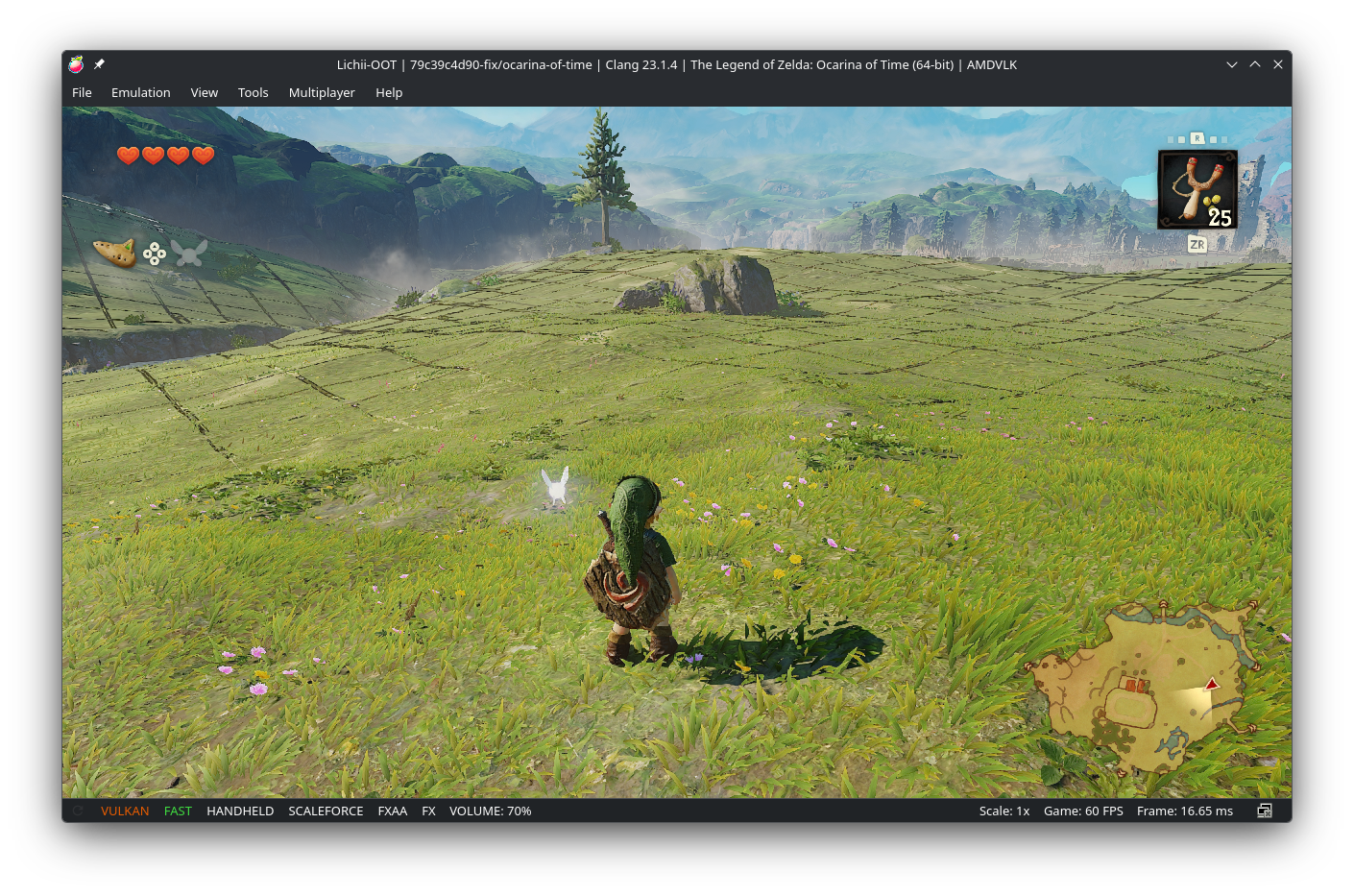
- Terrain is checkerboarded
Lichii OOT v1.1
v1.1
Fixes
- Green, overbright lighting on AMD: fixed misaligned 8- and 16-byte buffer reads and writes that shifted light colours. Thanks to sharkiix, and to Selevet's fix 36 for the second path.
- Minimap and button prompts missing or flickering on AMD: added the missing synchronization between compute work and the draws after it.
- Dark, shimmering outline around Hyrule Castle on AMD: colour targets a shader never writes are now left untouched instead of filled with garbage.
- Min, max and clamp now handle NaN the way the Switch 2 GPU does.
- Samplers drop depth comparison when a shader samples them as a regular texture. Blend state is always rebuilt on GPUs without dynamic blend state. Both are from sharkiix.
Performance
- Much faster on AMD drivers: occlusion query results no longer wait on each query one at a time. In local testing on AMD's driver, the forest went from about 36 to 51 FPS. Not yet confirmed on Windows.
- Native GPU work is submitted earlier, about 2 FPS faster on all GPUs. Thanks to Frizti (zortos293#194).
Known issues
- White fog in Hyrule Field and parts of the Deku Tree cutscene on AMD: under investigation. The cause is a fog shader that AMD's shader compiler builds differently.
- The first launch takes longer while shaders rebuild.
Lichii OOT v1
Lichii for Ocarina of Time, v1
An unofficial build of zortos293/Lichii with fixes for The Legend of Zelda: Ocarina of Time (Switch 2). It's tested on AMD (RX 9070 XT on Windows, RX 7900 XT on Linux). All credit for the emulator goes to zortos293 and the Lichii, Eden and yuzu contributors.
Fixes for AMD GPUs
- No more crash when loading a save. A fog compute shader could make AMD's driver hang the GPU, which then reported "out of memory".
- Correct colours. Lighting is no longer green and the sky no longer cyan. Lighting data was read one step off because of how AMD aligns buffers. (Ported from sharkiix's version.)
- The HUD stays on screen. The minimap and button prompts no longer flicker or disappear. Draws now wait for the compute work they depend on.
- Fog no longer turns black, and blending state no longer goes stale. (Ported from sharkiix's version.)
Fixes for all GPUs
- The intro and other movies play on the MinGW/PGO builds. These builds previously had no AV1 decoder and showed a black screen with no intro.
- No white flash on water, and no flickering tree leaves.
- Lichii keeps its own mesh shader cache file, so a cache shared with another Lichii build no longer crashes it.
Performance
- Work is sent to the GPU sooner: about +2 FPS. (From Frizti's work, via zortos293#194.)
Known issues
- FPS on AMD Windows is still well below NVIDIA and Linux RADV. I've found the main cause and a fix is in progress for the next release.
- Black blocks can appear briefly at the top of the screen while a save loads.
- The first launch after updating is slow while shaders rebuild, and there are stutters the first time you enter a new area.
- The emulator can take up to 10 seconds to close.
Notes
- The Dynamic FPS patch is not included. Install it as an addon if you want it.
- If you report a problem, include
%APPDATA%\eden\log\eden_log.txt.
Requirements
You need your own keys, firmware and game, dumped from your own console. None are included. The release log for this build warns about outdated keys (keys for gen 0x17+ required), so use current keys.