Repository navigation
Releases
v0.7.0

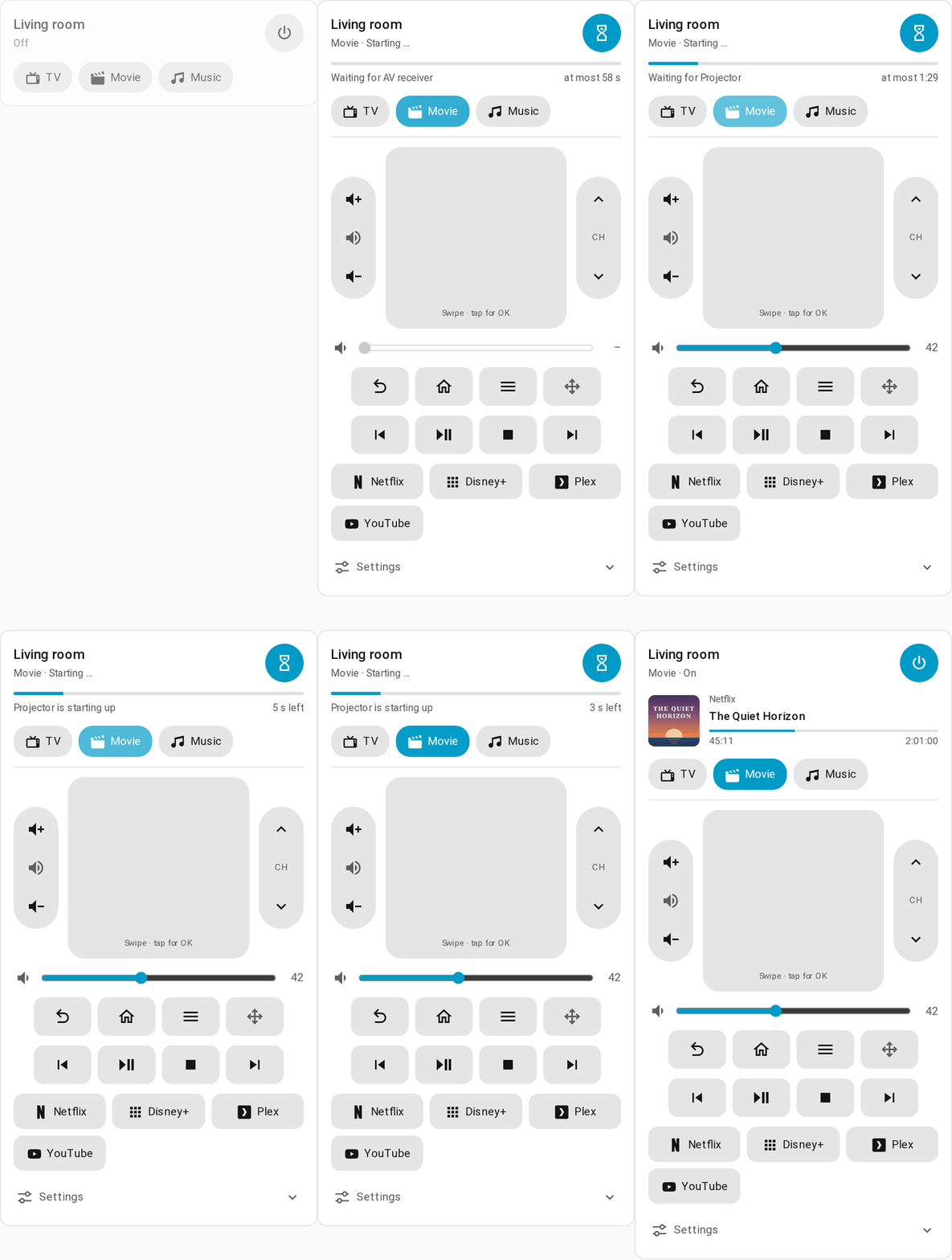
AV Scenes 0.7.0 is a rework of the whole integration. Rooms are now built from devices that know their power outlet, how long they boot and how to tell that they are ready, and activities only say which devices they use and what to set. A configuration panel replaces the click flows, and a remote control card brings the running activity to any dashboard.
Before you update
- Make a backup. The configuration is migrated automatically and without data loss, but a migrated configuration cannot be loaded by older versions.
- Check automations that compare the room's select. Its state values are now stable keys:
idle(was—),startingandstopping(were the German labels with a symbol in front) anderror. The labels shown in the UI are translated. - The room's switch is now named "Active" ("Aktiv"), and its
turn_onstarts the room's default activity, else the last used one. Existing entity IDs are kept. - Scenes are named like the other entities of a room, e.g. "AV: Wohnzimmer TV". Entity IDs and names you set yourself stay.
on_stopactions run on a full stop only, not when switching to another activity, and all devices are switched on before the settings steps run. Lights that 0.6 switched off on stop keep doing so as migratedon_stopactions.- AV Scenes is set up once and holds all rooms. The click flows of the options are replaced by a YAML editor; the custom debug log file is gone, use "Enable debug logging" on the integration instead.
Requires Home Assistant 2024.11 or newer. The card's suggestion in the card picker needs 2026.6.
Highlights
Starts that do not depend on guessed delays
- Devices are switched on once their entity is actually available. An integration that gave up while its device had no power is reloaded, again every few seconds while the device does not answer yet, instead of waiting minutes for its retry.
- Readiness can check another entity or state, for example an Apple TV's remote being
on. Remote buttons run the same check and reconnect a device that lost its connection. - Power outlets are switched on at once so devices boot in parallel, shared outlets stay on while any device needs them, and outlets are cut last.
- A stop is done as soon as the devices are off. Cool-downs, such as 180 s for a projector, run in the background, so a wall button's LED does not stay in "stopping" for minutes.
- A stop during a running start takes effect immediately, an aborted start is reported as
errorwith its reason and in Repairs, and the running activity survives a restart.
Configuration panel
- Rooms, devices and activities in the sidebar, each edited on its own page with Home Assistant's own pickers and action editor, plus a YAML view per room.
- The flow of an activity shows what a start, a switch or a stop does with the configuration you are editing, with the earliest and latest time of each row.
- The remote control preview shows the card as it will look, and a tap tells which device gets a button and what runs there.
Remote control card
- Power, activities, start progress with what the room is busy with, cool-down countdown and now playing with artwork and position.
- Volume rocker and slider, d-pad or touch surface (for an Apple TV), channels, playback, own buttons and quick select for inputs and apps. Only what the running activity offers is shown.
- Device settings in the card: source, sound mode and the number, select or switch entities of a device, such as a receiver's tone controls, set once per device and automatic without configuration.
- The integration registers the card itself and updates its version on every update, so no cached old card is loaded.
Automations
toggle_activityfor push buttons,default_activityper room, andsend_commandto send a remote button to whichever device the running activity uses for it.- Actions report an unknown room, activity or command as an error instead of only logging it.
Fixed
- Color temperature steps failed since Home Assistant removed mireds from
light.turn_on. - The room's device ignored the room's area and created a new area named like the room.
- A start could hang when reloading a device's integration never finished.
- The room's select could start the wrong activity when two activities had the same name.
Upgrading
- Make a backup.
- Update AV Scenes in HACS and restart Home Assistant. The configuration is migrated on the first start.
- Open AV Scenes in the sidebar and check your rooms; the flow of each activity shows what it will do.
- Add the AV Scenes Remote card to a dashboard.
The full list of changes is in the changelog, and the README has a section on upgrading from 0.6 and earlier.
v0.7.0-beta.24
v0.7.0 Beta 24 – card settings set once per device and shown in every activity that uses it, automatic by default (source, sound mode and the numbers and selects of the same device)
v0.6.0
v0.5.4
v0.5.3
v0.5.2
v0.5.1
v0.5.0
Contributors

Assets 2
v0.3.1
[0.3.1] - 2025-12-17
🇩🇪 Deutsch
Behoben
- 🔧 HACS Compliance - Repository-Struktur für HACS korrigiert
custom_componentsVerzeichnis in Repository-Root verschobenhacs.jsonhinzugefügt für bessere HACS-Integration- Stellt sicher, dass die Integration korrekt über HACS installiert werden kann
🇬🇧 English
Fixed
- 🔧 HACS Compliance - Fixed repository structure for HACS
- Moved
custom_componentsdirectory to repository root - Added
hacs.jsonfor better HACS integration - Ensures the integration can be properly installed via HACS
- Moved
v0.3.0
🇩🇪 Deutsch
Hinzugefügt
- 🚀 Schritt-für-Schritt-Konfiguration - Vollständige Neuentwicklung des Aktivitätssystems
- Jede Aktivität besteht aus einzelnen, konfigurierbaren Schritten
- Granulare Kontrolle: Gerät einschalten, Eingang wählen, Lautstärke setzen - alles separate Schritte
- Beispiel: "1. AV Receiver einschalten → 2. 5 Sek. warten → 3. Eingang auf HDMI 1 → 4. Beamer einschalten"
- ⏱️ Flexible Delays - Individuelle Wartezeit nach jedem Schritt
- Kein globales
power_on_delaymehr - Jeder Schritt hat eigenes
delay_after(0-60 Sekunden) - Ideal für Geräte, die Zeit zum Aufwärmen brauchen
- Kein globales
- 🎯 11 Schritt-Typen für maximale Flexibilität
power_on- Gerät einschaltenpower_off- Gerät ausschaltenset_source- Eingang wählen (Media Player)set_volume- Lautstärke setzen (Media Player)set_sound_mode- Tonmodus setzen (Media Player) 🆕set_brightness- Helligkeit/Farbe setzen (Light)set_color_temp- Farbtemperatur setzen (Light)set_position- Position setzen (Cover)set_tilt- Neigung setzen (Cover)call_action- Beliebige Home Assistant Action aufrufen 🆕delay- Nur warten (kein Gerät)
- 🔊 Sound Mode Support - Tonmodus für AV Receiver konfigurieren
- Auswahl aus verfügbaren Sound Modes des Geräts
- Ideal für verschiedene Audio-Szenarien (Movie, Music, Direct, etc.)
- ⚡ Call Action Support - Beliebige Home Assistant Services aufrufen
- Format:
domain.service(z.B.light.turn_on,script.activate) - Optionale Service-Daten als JSON
- Maximale Flexibilität für komplexe Automationen
- Format:
- ✏️ Edit Step Funktionalität - Bearbeitung bestehender Schritte
- Alle Parameter können nachträglich angepasst werden
- Geräte-Auswahl bleibt erhalten
- Vollständige Übersetzungen (DE/EN)
- 🔄 Move Up/Down für Schritte - Einfache Neuanordnung der Schritte
- Ähnlich wie bei Geräten
- Schritte werden von oben nach unten ausgeführt
- 🔄 Automatische Migration - Alte Konfigurationen werden automatisch konvertiert
- Device-basierte Aktivitäten → Step-basierte Aktivitäten
- Läuft transparent beim Öffnen der Config
- Keine Daten gehen verloren
- 🎯 Intelligentes Aktivitätswechsel-Management - Automatisches Ausschalten ungenutzter Geräte
- Beim Wechsel zwischen Aktivitäten werden nicht mehr benötigte Geräte ausgeschaltet
- Beispiel: Wechsel von "Apple TV" (Beamer + AV Receiver + Apple TV) zu "Sonos" (AV Receiver + Sonos)
- ✅ Beamer wird ausgeschaltet (nicht mehr benötigt)
- ✅ Apple TV wird ausgeschaltet (nicht mehr benötigt)
- ✅ AV Receiver bleibt an (wird in beiden verwendet)
- Geräte werden in umgekehrter Reihenfolge ausgeschaltet
- 📊 Verbesserte Step-Anzeige - Übersichtliche Liste aller Schritte mit Details
- "1. Turn on AV Receiver (then wait 5s)"
- "2. Set AV Receiver source to 'HDMI 1'"
- "3. Set AV Receiver sound mode to 'Movie'"
- "4. Turn on Beamer (then wait 2s)"
Geändert
- 🏗️ Komplett neue Datenstruktur - Von
device_stateszusteps- Alte Struktur: Gerät mit allen Einstellungen
- Neue Struktur: Liste von einzelnen Schritten
- Viel flexibler und erweiterbar
- 🎛️ Coordinator umgebaut - Schrittweise Ausführung statt gerätebasiert
- Führt Schritte sequenziell aus
- Wartet nach jedem Schritt gemäß
delay_after - Besseres Logging für jeden Schritt
- Intelligente Geräteverwaltung beim Aktivitätswechsel
- 🔄 async_stop_activity aktualisiert - Verwendet jetzt step-basiertes System
- Schaltet alle Geräte aus der Aktivität aus
- Respektiert Geräte-Reihenfolge (umgekehrt)
Behoben
- 🐛 CONF_ENTITY_ID Import - Fehlender Import in coordinator.py hinzugefügt
- 🐛 Edit Step Übersetzungen - Fehlende Übersetzungen für Edit-Formular ergänzt
🇬🇧 English
Added
- 🚀 Step-by-Step Configuration - Complete redesign of the activity system
- Each activity consists of individual, configurable steps
- Granular control: Turn on device, select input, set volume - all separate steps
- Example: "1. Turn on AV Receiver → 2. Wait 5 sec → 3. Input to HDMI 1 → 4. Turn on Projector"
- ⏱️ Flexible Delays - Individual wait time after each step
- No more global
power_on_delay - Each step has its own
delay_after(0-60 seconds) - Perfect for devices that need warm-up time
- No more global
- 🎯 11 Step Types for maximum flexibility
power_on- Turn on devicepower_off- Turn off deviceset_source- Select input (Media Player)set_volume- Set volume (Media Player)set_sound_mode- Set sound mode (Media Player) 🆕set_brightness- Set brightness/color (Light)set_color_temp- Set color temperature (Light)set_position- Set position (Cover)set_tilt- Set tilt (Cover)call_action- Call any Home Assistant action 🆕delay- Just wait (no device)
- 🔊 Sound Mode Support - Configure sound mode for AV receivers
- Selection from available sound modes of the device
- Ideal for different audio scenarios (Movie, Music, Direct, etc.)
- ⚡ Call Action Support - Call any Home Assistant service
- Format:
domain.service(e.g.,light.turn_on,script.activate) - Optional service data as JSON
- Maximum flexibility for complex automations
- Format:
- ✏️ Edit Step Functionality - Edit existing steps
- All parameters can be adjusted afterwards
- Device selection is preserved
- Complete translations (DE/EN)
- 🔄 Move Up/Down for Steps - Easy step reordering
- Similar to devices
- Steps execute from top to bottom
- 🔄 Automatic Migration - Old configurations automatically converted
- Device-based activities → Step-based activities
- Runs transparently when opening config
- No data loss
- 🎯 Intelligent Activity Switching Management - Automatic shutdown of unused devices
- When switching between activities, devices no longer needed are turned off
- Example: Switch from "Apple TV" (Projector + AV Receiver + Apple TV) to "Sonos" (AV Receiver + Sonos)
- ✅ Projector turns off (no longer needed)
- ✅ Apple TV turns off (no longer needed)
- ✅ AV Receiver stays on (used in both)
- Devices turn off in reverse order
- 📊 Improved Step Display - Clear list of all steps with details
- "1. Turn on AV Receiver (then wait 5s)"
- "2. Set AV Receiver source to 'HDMI 1'"
- "3. Set AV Receiver sound mode to 'Movie'"
- "4. Turn on Projector (then wait 2s)"
Changed
- 🏗️ Completely New Data Structure - From
device_statestosteps- Old structure: Device with all settings
- New structure: List of individual steps
- Much more flexible and extensible
- 🎛️ Coordinator Rebuilt - Step-by-step execution instead of device-based
- Executes steps sequentially
- Waits after each step according to
delay_after - Better logging for each step
- Intelligent device management during activity switching
- 🔄 async_stop_activity updated - Now uses step-based system
- Turns off all devices from the activity
- Respects device order (reversed)
Fixed
- 🐛 CONF_ENTITY_ID Import - Added missing import in coordinator.py
- 🐛 Edit Step Translations - Added missing translations for edit form