Repository navigation
Releases
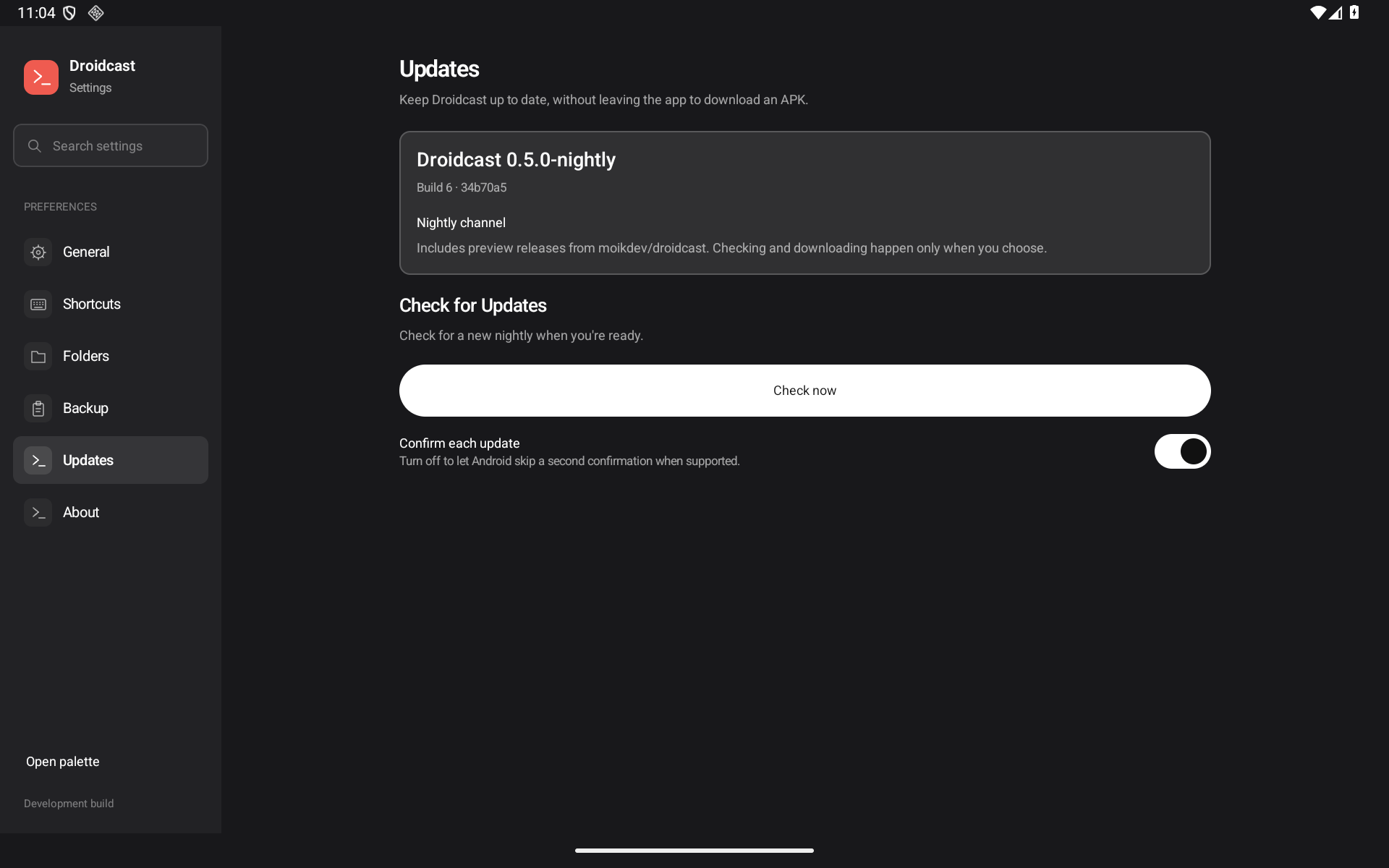
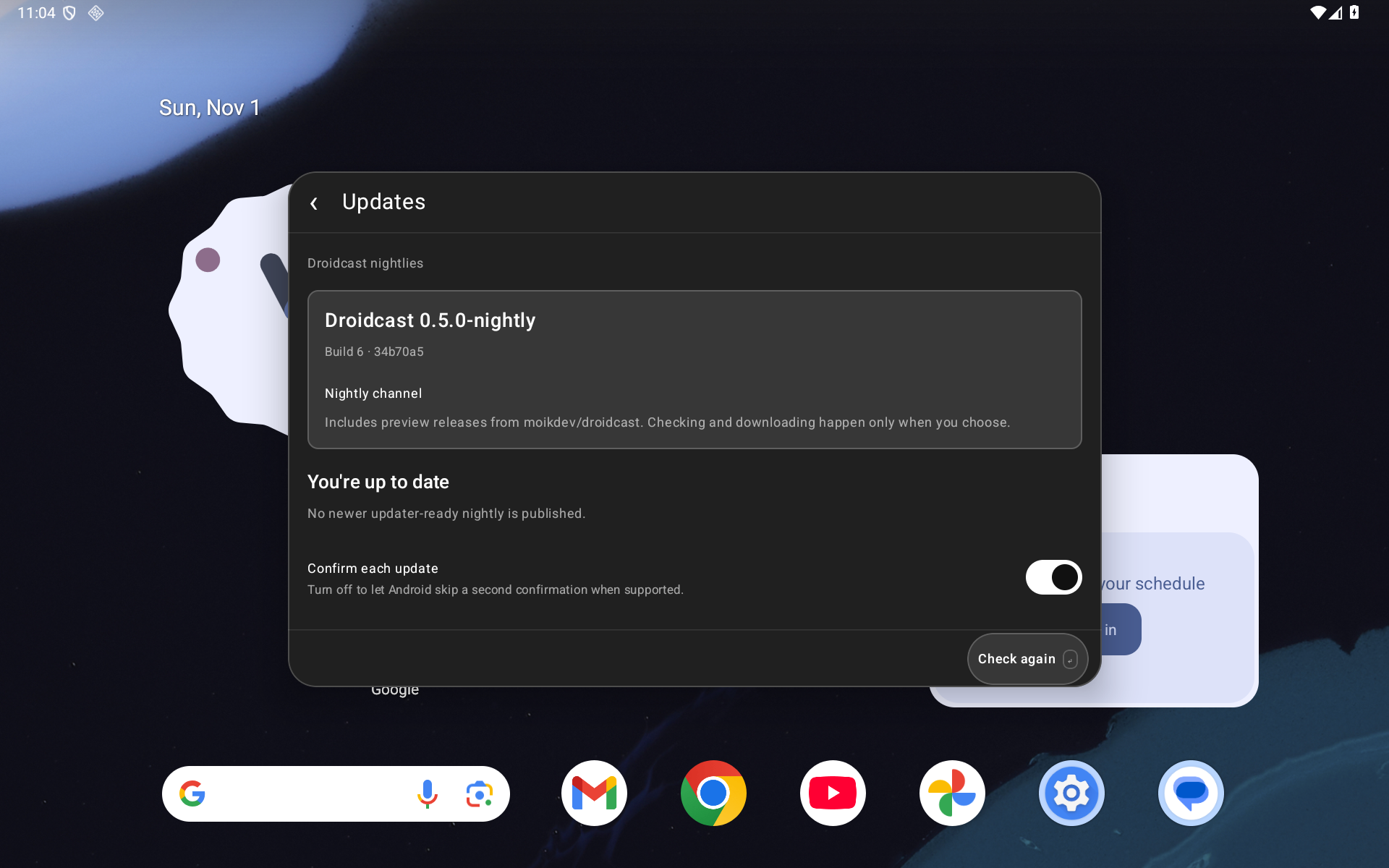
Droidcast Nightly r10 - verified in-app updates

Adds verified in-app nightly updates to Droidcast.
Existing r9 users: install the attached APK once to gain the updater. Install over the existing app. Future eligible nightlies can be checked, downloaded and installed from Settings → Updates or the Check for Updates palette command.
- Manual public GitHub discovery, release notes, download progress, cancel/retry and private verified staging.
- Checksum, package, newer-version and signing-certificate checks before Android installation.
- Android per-source approval and installer confirmation remain explicit. Confirmation is on by default; an accessible switch offers best-effort skipping when Android supports it.
- Updates stay in Settings/the floating palette. No GitHub account, keyboard Accessibility service or overlay is needed.
Reviewed PR: #64. Both independent gpt-6.1-sol/high audits cleared exact head 209c5d5. Merge ddeb0fd has the identical tree. Embedded implementation checkpoint: 34b70a5.
Local validation: 138 JVM cases; 18 updater +14 existing cases per tablet/phone layout; two r9 baseline cases; four real self-updates with controlled signed test payloads, scoped data/grant/shortcut/extension retention and restoration; four cleanup-helper cases. Lint: 0 errors/50 warnings. CI is inactive. The test-only code7 payload is not included in this release.
Tested on one API36 arm64 emulator with tablet/phone viewports. Physical Lenovo/OEM, API26 runtime, comprehensive TalkBack/keyboard/large-font, latency/endurance/process-death and full Tinycast/Raycast parity are not certified. Historical tile timeout #37 remains unexplained; later passes establish no cause or fix. See the PR's validation record for scope and excluded attempts.
VersionCode: 6 · Version: 0.5.0-nightly · SHA-256: e68b7e7c4a3771c18128221f7d31b71e144db0d64947ae0ee08f91bddccf3f00
The attached droidcast-update.json and SHA256SUMS.txt describe the exact tested APK; no rebuild or re-signing was performed.
Droidcast nightly r9 — inline palette and native extension grids
App-owned editors, reviews and extension screens now stay inside the floating palette. The shared Raycast-style action area supports searchable contextual actions, keyboard navigation and focus restoration. Settings remains fullscreen; Android document pickers and permission prompts remain native.
Native extension Grid now renders raster images, color swatches and symbols, with sections, dropdowns, explicit pagination and stable selection. Initial and deferred selectedItemId requests are respected. Back restores caller query/caret/scroll, and failed List/Grid commands retain native Back/Close. Queued callbacks are blocked after failure publication.
Real Palette Colors Grid and OKLCH List Store commands were exercised. This is partial extension/API compatibility: Detail still displays Markdown source, Tailwind retains an expanded-file-size rejection, and complete Forms, SVG/icons and arbitrary extension action shortcuts remain unfinished.
Validation: 132 JVM tests, 74 tablet cases, 71 phone cases, three connected-keyboard cases and four cleanup tests; lint 0 errors/44 warnings. Both independent gpt-6.1-sol/high audits cleared af12a718b28129138d4d00aaf7bf29e32ee78fb1. PR #61 contains 89 real Android screenshots, before/after controls and full evidence. CI is inactive; these are local emulator checks. Physical Lenovo/OEM, accessibility, process-death and performance certification remain unclaimed; historical input/capture/picker observations remain documented.
The APK is the exact tested debug-signed nightly build, with the same signing certificate as r8. Package dev.tinycast.android, version 0.4.0-preview / code 5, Android 8.0+ (API26). Source merge b2aa1d1401d600a5b4ee4b1653085311f8625502 has the same tree as the reviewed head. SHA-256 is supplied in SHA256SUMS.txt.
Download the APK asset below to try this checkpoint. In-app OTA updates are queued in #55 and are not included yet.
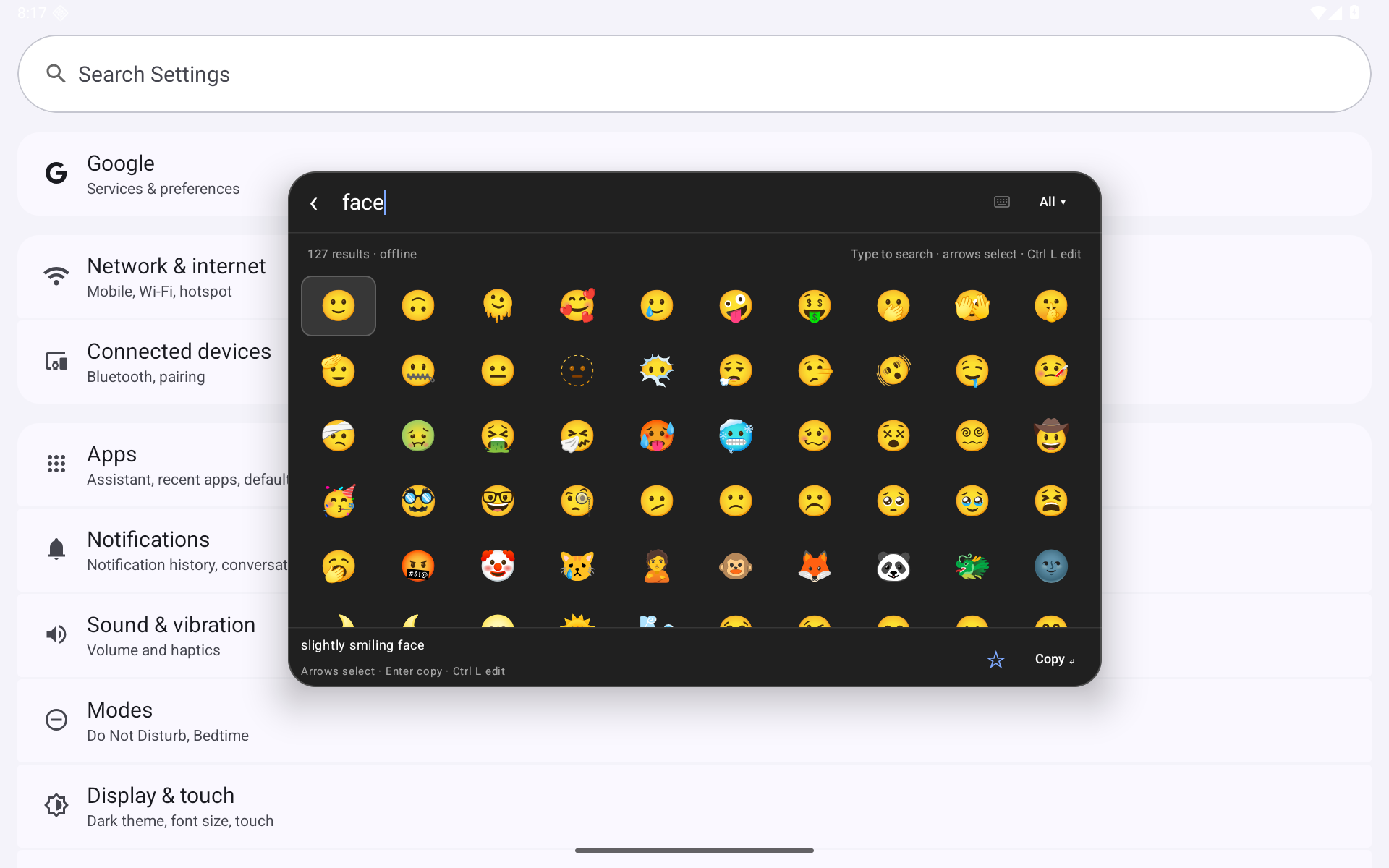
Droidcast nightly r8 — fixed Emoji search row
Emoji now keeps Back · Search · Category on one fixed row, aligned with launcher Search. Long category names preserve editing space; the Back button retains a full Android touch target. The removed title row gives results more room.
Install this APK over the existing Droidcast nightly; keep your app data. Android 8.0+; this is a debug-signed prerelease using the same certificate as r7.
- Reviewed source:
3e446dbd1713441c101954270811b4756a02f1f4; merge/tag target227d5100f8a4eec0e99cf3f3a369e02a0b89d801has the identical tree. - PR #58: nine real Android screenshots; both independent gpt-6.1-sol/high audits clear.
- Local checks: successful build, 113 JVM tests, 15/15 tablet, 15/15 phone, four cleanup tests, lint 0 errors/42 warnings. CI is inactive.
- APK SHA-256:
de93f1dbbf4eed0253679df842166b2716aab1a80c9b6ba2993dfa9c6d3f7569.
Validation and limitations · Build and screenshot provenance
The historical caret assertion miss remains unexplained; eventual-state tests do not establish a typing/latency fix. Physical Lenovo/OEM, TalkBack, large fonts, performance and full parity remain unverified. The broader inline popup migration (#56), extension Grid (#6) and in-app updater (#55) are not included in this checkpoint.
Droidcast nightly r7 — double-modifier shortcuts
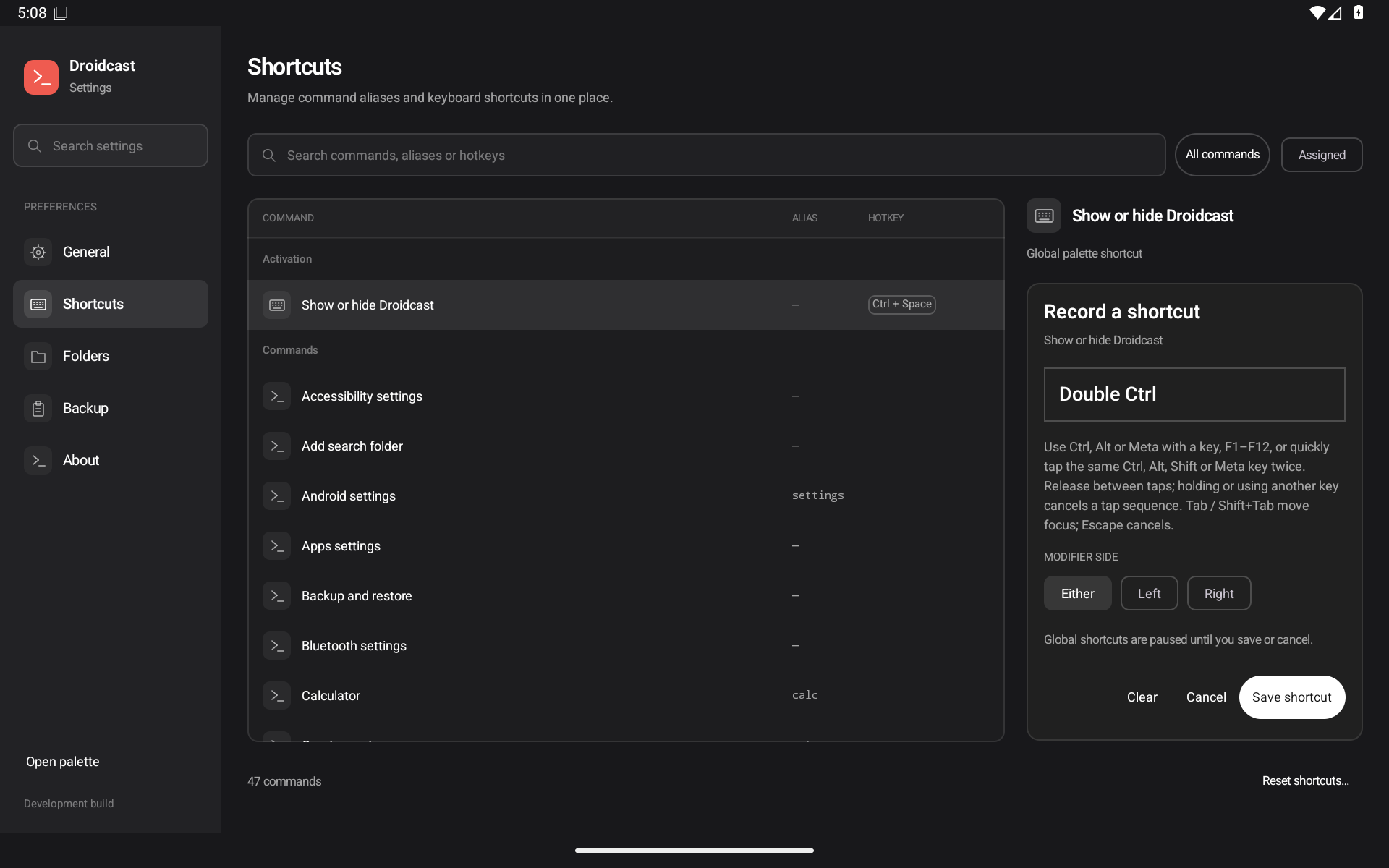
Droidcast nightly r7 adds double-modifier shortcuts with Either / Left / Right choices for the palette and individual commands.
To configure Double Ctrl: Settings → General → Change, quickly press and release the same Ctrl key twice, choose a side and Save shortcut. Global keyboard activation uses the optional Android-approved keyboard service. The assistant corner-swipe/Home-hold route remains available independently.
- Named conflicts, keyboard-only side selection/Save, Clear/Reset and versioned backup support.
- Fixed a reproduced race where a delayed old window notification cancelled newer taps; recording also resets on input-device changes.
- Ordinary Ctrl+A/C/V passes through. No diagnostic logging is included in this APK.
Validated locally on the owned Android 16 / API 36 arm64 emulator: 113 JVM, 41 tablet, 41 phone, 12 hardware core cases + 8 modifier probes, four cleanup tests, build success and lint 0 errors / 42 warnings. Both Ctrl, Alt and Shift sides invoked; Meta did not. Two independent gpt-6.1-sol/high implementation audits and documentation follow-ups clear the reviewed head. CI is inactive.
The controlled 500ms diagnostic experiment is distinct from production 100ms behavior. The historical untraced miss remains unattributed. Six service-rebind/Home repetitions opened MainActivity during setup and do not certify activation after process kill. Physical/OEM/Lenovo, TalkBack, large fonts, latency/endurance, single taps, pointer-only cancellation, Fn/Globe and Hyper remain uncertified or incomplete. This is partial Tinycast/Raycast parity.
This is the same tested debug APK, signed with the same certificate as previous nightlies; no rebuild followed the documentation-only correction. Package dev.tinycast.android, version 0.4.0-preview / code 5. See build-info.json to identify this nightly.
APK SHA-256: 8ff881ce95ec90669105a3859ffeda2bdc675c265c9ea5faf2e26ed625324c0c.
PR #54 and all 42 real screenshots · Validation and exclusions
Reviewed head: 5419c697a7d35f362561d05ea759b9b9fb2f158b; merge: d6fccdc4989d4d6e2203f8fa331872a9c11d7105 (identical tree).
Droidcast nightly 2026-10-31 r6 — touch assistant setup
Nightly checkpoint from independently reviewed source 876761b7c90f8dca516b47c38519edb5f25e2d26, merged in #53 as 8a6476aad7e7f02a439f85575378fcf61e7c52cb (identical source tree).
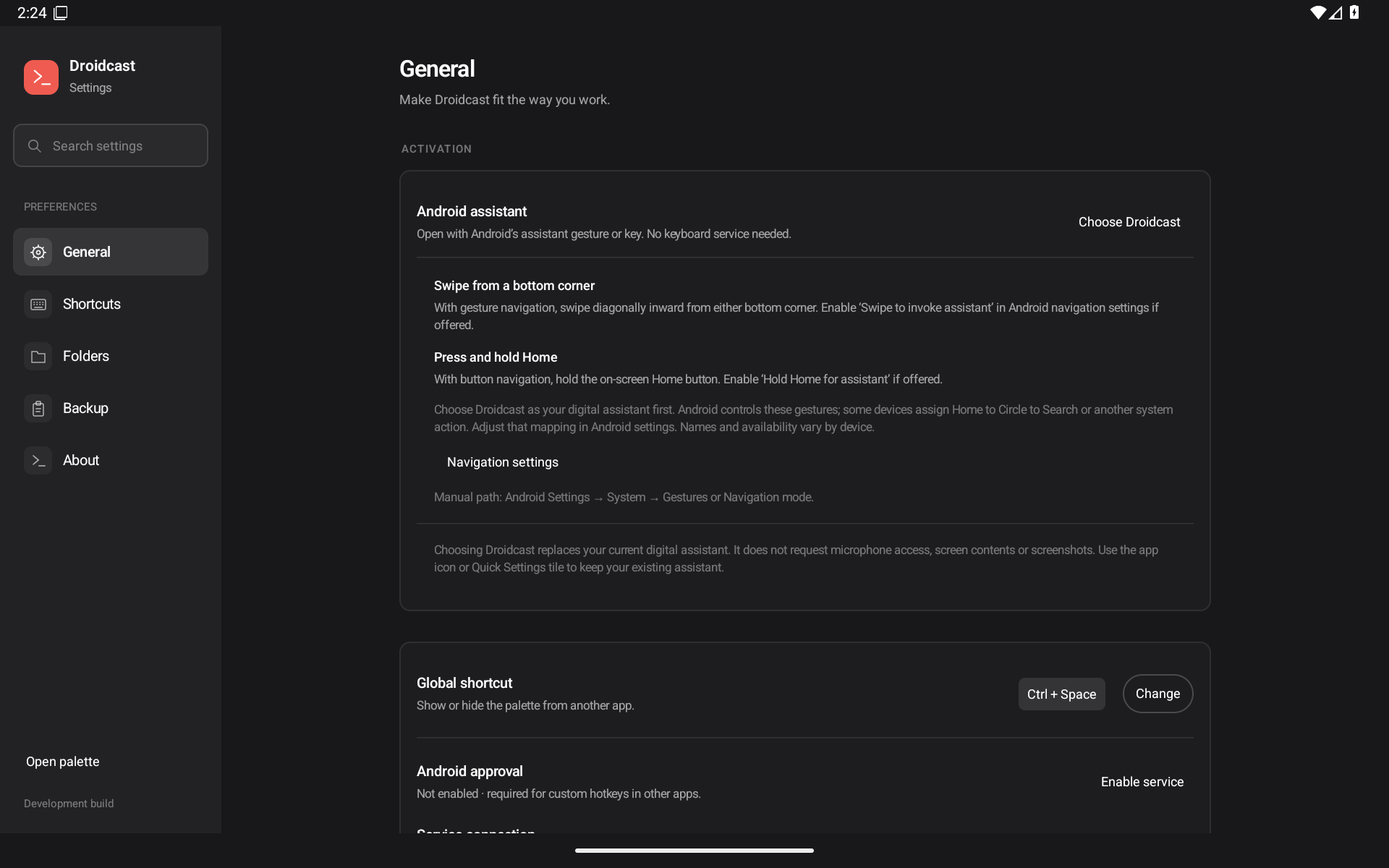
- Touch invocation setup: General now explains bottom-corner swipes and holding the on-screen Home button, with a Navigation settings link and manual recovery. Choose Droidcast as Android's default digital assistant first. Android/OEM navigation mappings control availability; some Home mappings use Circle to Search.
- The assistant route does not require Droidcast's keyboard Accessibility service, microphone access or overlay permission. Existing assistant launch code is unchanged; this checkpoint adds explicit setup and real touch verification.
- Verified emulator behavior: actual diagonal swipes from both corners, from Home and Android Settings; actual touchscreen Home holds from both destinations. Local checks: 89 JVM, 26/26 tablet, 26/26 phone, successful build, lint 0 errors/42 warnings, 28 real screenshots, and two independent gpt-6.1-sol/high audits clear.
- Includes the prior calculator refinement: bare numbers stay searchable; x/X/*/× multiplication calculates and displays ×. Double-Ctrl remains queued under #26.
Setup: Droidcast Settings → General → Android assistant → Choose Droidcast. Select it in Android's default digital assistant picker. Return and open Navigation settings: gesture navigation uses a diagonal bottom-corner swipe; button navigation uses a Home-button hold. Enable the corresponding assistant gesture if your device offers it. This replaces the selected digital assistant; app icon and Quick Settings tile remain alternatives.
Tested on one owned Android 16/API36 arm64 emulator in 1920×1200/240dpi tablet and 1080×2340/420dpi phone layouts. Seven saved post-gesture XML dumps omit the pictured palette; pre-capture native/focus checks, real PNGs and saved activity records support the bounded invocation claim. Those XMLs do not independently prove app state. Physical Lenovo/ZUXOS/OEM, TalkBack, large fonts, latency and endurance remain unverified. CI is inactive; checks are local. This is not full Tinycast/Raycast parity.
Install the APK below. Debug-signed prerelease, same package and debug certificate as prior nightlies, version0.4.0-preview/code5, declared minimum Android8/API26. Only the stated API36 emulator scope is verified. No Android consent is enabled automatically.
APK SHA-256: a4870145a7f21ec52f28adc02a76aabadac73da16b423bbdddbc80f456f69025
Change and all 28 screenshots · Validation · Manifest
Inline touch setup on tablet
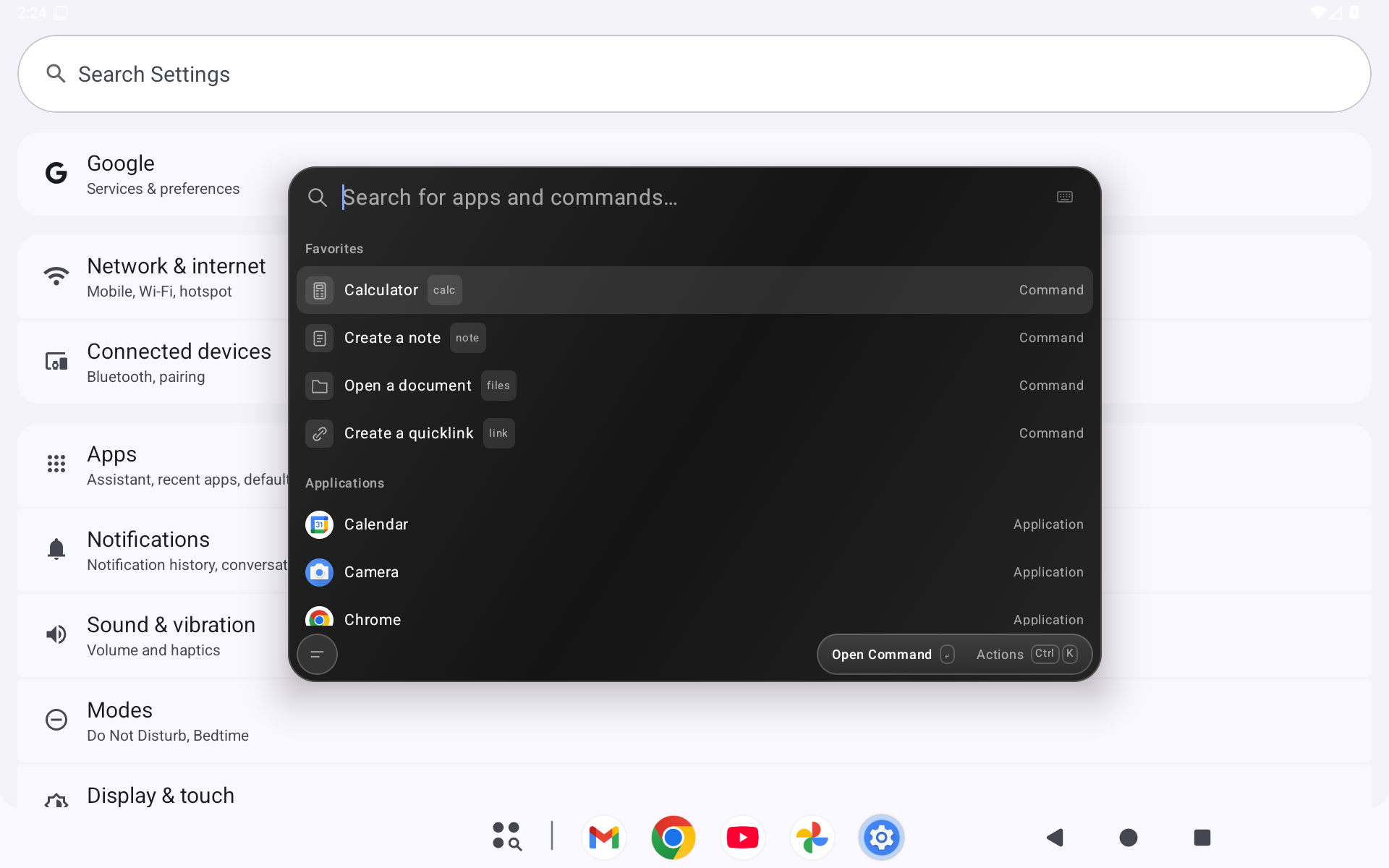
Palette opened by holding Home from Android Settings
Droidcast Nightly — 2026-10-31 r5
Nightly preview checkpoint from independently reviewed source 7f8dea50d5a367dd1c4d64c7cd073826b9b72d4e (merged in #52 as 48e33d0ca1462dd0639bdec0d8058e3bfb8ea7cd; identical source tree).
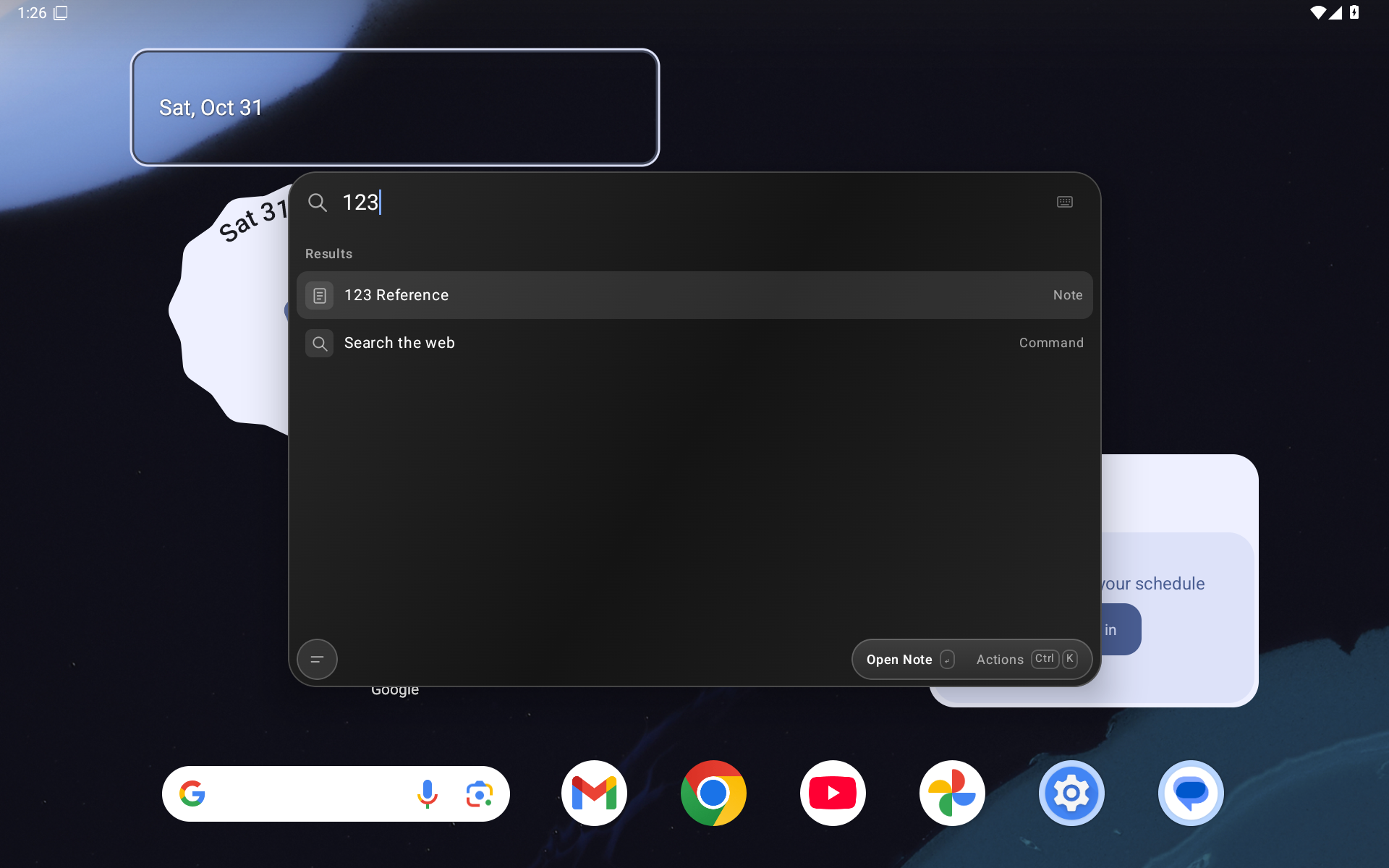
- Plain numbers stay in search.
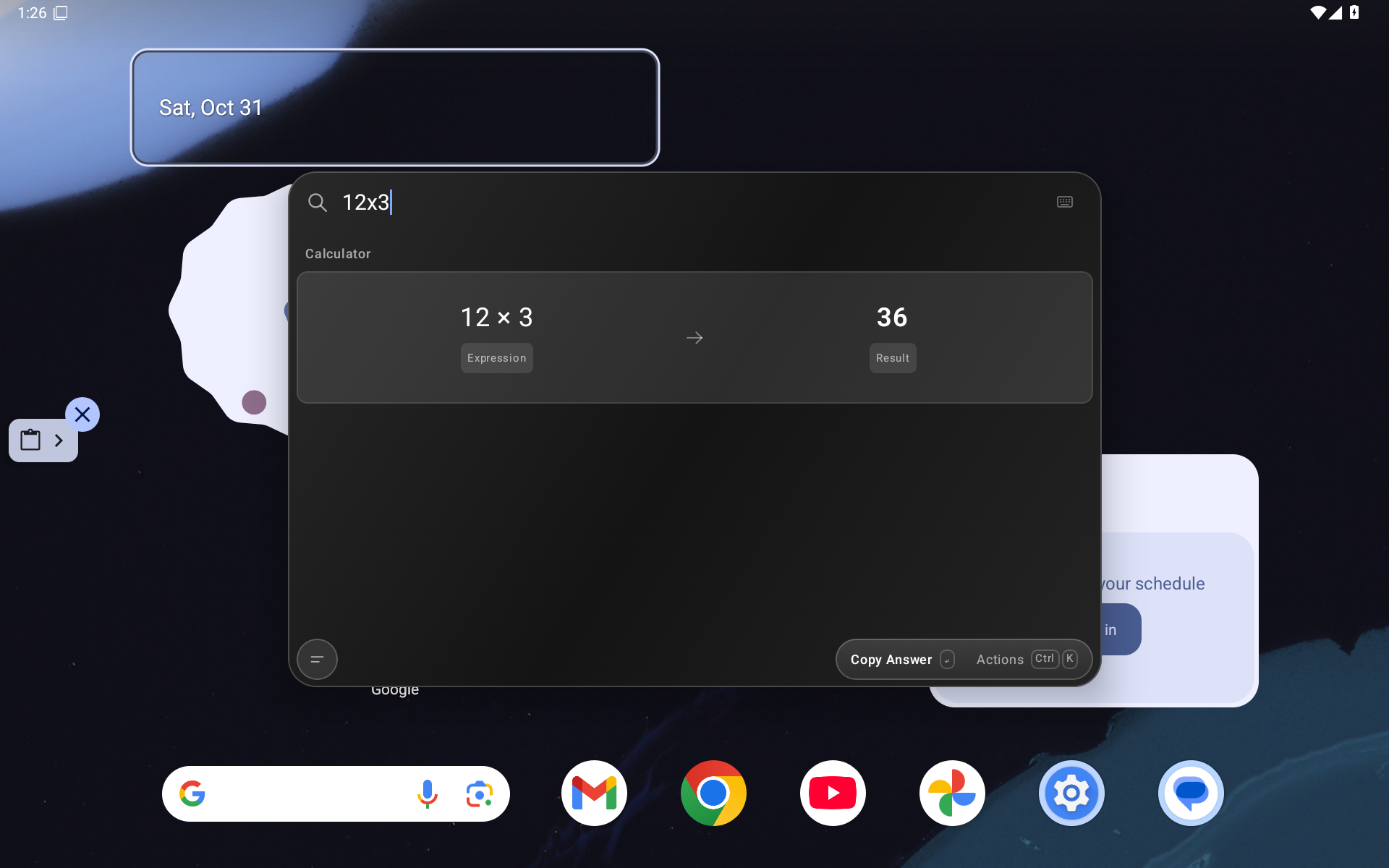
12x3,12*3and12×3calculate and display 12 × 3 → 36. Enter copies only the answer. Existing explicit Calculator mode, functions and unit conversions remain available. - Includes merged #50 keyboard-readiness setup: distinguish saved shortcut, Android approval and live connection; setup help and an inline delivery check. This does not automatically enable Android consent.
- Local final calculator checks: 89 JVM tests, 14 tablet +14 phone native cases, successful build, lint 0 errors/42 warnings, 29 real screenshot/XML pairs, and two clear independent gpt-6.1-sol/high audits. #50 has separate evidence: 80 JVM, 37 tablet, 37 phone, 11 hardware cases and 35 screenshots on its own binary; these are not claimed as full-binary tests of this APK.
- Tested on an owned Android 16/API 36 arm64 emulator in tablet and phone layouts. CI remains inactive; results are local checks. This is an early preview, not full Tinycast/Raycast parity or physical Lenovo/OEM/accessibility/performance certification.
- Corner-swipe/Home-hold setup improvements (#47) and double-modifier shortcuts (#26) are still in progress/queued. The existing selected-assistant route is included; this nightly does not certify those pending gesture cases.
Install the APK below. It uses the same package and debug signing certificate as prior nightly checkpoints. Existing keyboard activation still requires user-approved Accessibility; app-icon/Quick Settings activation and selecting Droidcast as the digital assistant are alternatives.
Debug-signed prerelease, version 0.4.0-preview/code 5, declared minimum Android 8.0/API 26. Only API 36 emulator behavior above is certified.
APK SHA-256: ee9a4d7822666ee717ef2fb5babacc4db7f2a8797fbc586e0754af54432a8294
Change and 29 real screenshots · Validation · Build/screenshot manifest.
Number search
Multiplication
Droidcast nightly 2026-10-31 r4 — rigid typing and immediate emoji navigation
Nightly preview: steadier palette typing and immediate Emoji & Symbols keyboard navigation.
Try it
Install the APK below over your existing Droidcast nightly. The package and signing certificate are unchanged; keep the app installed to retain local collections. The in-app version remains 0.4.0-preview (code5); this tag identifies the checkpoint.
- Search stays in place while typing and showing/hiding the keyboard. Only the result space resizes; already visible selections stay in place. Selected commands and emoji remain visible when the keyboard reduces that space.
- Open Search Emoji & Symbols and type immediately. All four arrows and Home/End browse results without Tab; Enter copies the highlighted glyph. Ctrl+L enters caret editing, Up/Down return to browsing, and active composition keeps IME navigation. Ctrl+D still toggles a favorite once per press. Paste into your destination app manually.
- Tablet Show on-screen keyboard requests persist during edits; copy feedback remains above the keyboard.
- Cached blank All/Pinned results drop indexed files when folder access expires, while preserving their pins for future reauthorization.
Source and validation
- Reviewed source/tag:
a101671ba5ee23ddb5085910f2eaf2689ec8ea30. - Squash merge:
703ddb0849addc2df55e1c8e00ec925eea182a57. Source trees match exactly (7769b02330035dd8defd43a31a80b13847efcb5d). The asset is the tested APK, without a post-audit rebuild. - PR #48 contains42 real Android screenshots with exact-source image pins. Two independent gpt-6.1-sol/high audits cleared correctness/security and UX/test coverage at this head.
- Local checks: successful build, 71 JVM, 27 tablet, 24 phone targeted native tests; lint 0 errors/41 warnings; matching installed APK bytes. Auditors inspected saved evidence read-only; they did not execute fresh tests. CI is inactive.
- API36 arm64 isolated emulator, tablet1920×1200/240dpi and phone1080×2340/420dpi. Original keyboard preference and physical geometry restored; app/adbd unprivileged. Real-SAF negative controls and corrected runs validate expiry handling. Historical failed setup, fixture and shared-emulator runs are excluded from passing results.
- Validation and scope · APK/image hashes and native evidence manifest.
Limits
Debug-signed prerelease for Android8.0+ (API26), tested on Android16/API36 arm64. Tinycast/Raycast parity remains partial. Stills and geometry tests do not establish continuous-animation or end-to-end latency certification. Android's keyboard retains its own animation. Physical Lenovo/ZUXOS/OEM devices, other API/IME combinations, large fonts/TalkBack, small landscape multiwindow and extension-webview motion are not certified.
Keyboard readiness #39, explicit assistant corner/Home gesture setup #47 and double-tap modifiers #26 remain separate follow-ups. Advanced emoji #44 and folder/provider/lifecycle gaps #5 remain partial; #35/#37/#41 remain unresolved. This checkpoint does not add double-Ctrl or certify OEM gesture delivery.
AGPL-3.0-or-later and upstream Tinycast/React notices retained; gemoji data retains MIT attribution. Upstream runtime assets are unchanged and this slice adds no Android permissions.
APK SHA256: 8c426dbab06bca09c053c1522b362e8261a311e918702a944a1a978278de1c57. Check against the attached SHA256SUMS.
DroidCast 0.4.0 — Android Preview
First public DroidCast Android preview, an unofficial native adaptation of Tinycast.
Included
- Kotlin/Compose floating command palette with clear surroundings and dark panel.
- App search, aliases, favorites, calculator/unit conversion, notes, quicklinks, saved text and recent chosen files.
- Ctrl+Space, keyboard navigation, Android assistant entry point and Quick Settings tile.
- Real Raycast Store browse/install/update/uninstall with a partial Android host.
- Full source, upstream attribution, parity audit and prioritized roadmap.
Compatibility
This is an early preview, not full Tinycast/Raycast parity. Window-snapping commands, automatic clipboard history, folder search, snippets and backup/import are not implemented. Only UUID Generator and OKLCH Color Converter have real Store end-to-end coverage. Desktop/native helpers, OAuth and many other APIs are unavailable.
Validation
This branded build passed 18 unit tests, 20 Android tablet device regression tests, local build/lint, and global Ctrl+Space from Settings and Home. The earlier 0.3.1 implementation also completed a 308-second/21-round endurance run, three cold-restart document workflows and 20 global shortcut activations; that is recorded separately in docs/TESTING.md.
Install and source
Android 8.0+; tested on an Android 16 tablet emulator. The APK is debug signed, not production signed. Package ID remains dev.tinycast.android to preserve upgrade continuity with earlier previews. CI debug artifacts can use a different certificate. Uninstalling removes local collections; backup/import is not yet available.
AGPL-3.0-or-later. Corresponding source is attached by GitHub for this tag, including runtime sources and licenses. See NOTICE.md for attribution and PARITY.md / ROADMAP.md for scope and next improvements.
CI activation
A pinned, actionlint-checked workflow is provided at ci/android.yml. It is not active because the publishing OAuth credential lacks workflow scope. See ci/README.md to enable it with an authorized credential.
Droidcast nightly — 2026-10-31 r3 · Emoji & Symbols
Nightly preview checkpoint: offline Emoji & Symbols in the floating palette. Includes the previous fullscreen tablet Settings, assistant activation and immediate search work.
Try it
Download the APK below and install it over your existing Droidcast nightly. The package and signing certificate are unchanged; do not uninstall if you want to retain local collections. The in-app version remains 0.4.0-preview (code 5); this tag identifies the checkpoint.
Open Droidcast, search emoji, and run Search Emoji & Symbols. Browse 1,870 emoji and 70 common text symbols offline, search English names/keywords/shortcodes, and keep favorites and recent copies. Use arrows to navigate; Tab into the grid for left/right and Home/End. Enter or keypad Enter copies the complete Unicode sequence. Ctrl+D toggles a favorite once per press; Ctrl+L focuses search; Escape clears/goes back. Paste into your destination app yourself. The tablet keyboard button opens the on-screen keyboard when needed.
Source and evidence
- Reviewed source/tag:
679c69ec61cf3d9f46e228883655fdbc4bd4271e. - Merged as
b974ff0a5eff13d18314fb6667440c1682588e54; source trees match exactly. - PR #45 embeds 25 real Android screenshots. Two independent gpt-6.1-sol/high correctness/security and UX/test audits cleared this exact source head.
- Local validation: build; 71 JVM tests; 11 tablet +11 phone targeted checks; airplane-mode force-stop/restart persistence; installed APK equality; lint 0 errors/41 warnings. CI is inactive; this is local validation, not GitHub runner certification.
- Dedicated API36 arm64 emulator: tablet 1920×1200/240 dpi; phone 1080×2340/420 dpi. Viewport, airplane mode and unprivileged state restored. This is not a physical Lenovo/OEM certification.
- Validation and limitations · machine-readable manifest.
Scope
This is a debug-signed prerelease for Android 8.0+ (API26), tested on Android16/API36 arm64. It is partial Tinycast/Raycast parity. Copy is manual delivery, not automatic cross-app insertion. The licensed catalog is a pinned English snapshot; device fonts determine appearance. Tones, multilingual/custom keywords, density and portable emoji preferences remain #44. Emoji favorites/recents stay local and are not included in portable backups.
Meta+D delivery is unverified: an additional synthetic initial-down attempt did not activate the action, with cause unestablished under #26. The advertised Ctrl+D sequence is verified. TalkBack, large fonts, physical/OEM devices and wider endurance remain uncertified. Folder search stays partial (#5); #35/#37/#41 remain unresolved. The disclosed historical failed/interrupted harness runs are not final passing evidence.
License: AGPL-3.0-or-later; Tinycast/React notices retained. gemoji data is MIT-licensed with bundled attribution. No new Android permissions are added by this slice.
APK SHA-256: b323330a4a373b561f0679e4801e0bd8bbc59c39058690aab8fcfb5e085d0c03. Verify against the attached SHA256SUMS.
Droidcast nightly — 2026-10-31 r2 (fullscreen Settings)
Fullscreen tablet Settings update. Install the APK below as an update to the previous nightly; the package/signing certificate are unchanged.
What changed
- Settings fills the tablet screen, including portrait. The outer inset, width cap, rounded frame and shadow are removed. The sidebar, command table and inline inspector remain.
- The command palette stays compact and floating, with transparent surroundings and immediate search updates.
- Phone navigation, keyboard/IME handling, backup review and Android assistant setup remain available. System bars and keyboard safe insets are respected; this is not immersive mode.
Includes the previous nightly's assistant activation without keyboard-service approval: Settings → General → Android assistant → Choose Droidcast. Selecting it replaces your current assistant; use the system assistant gesture/key (Meta+A on stock Android, OEM mappings may differ). Arbitrary custom global chords such as Alt+Q still use the optional keyboard service. The app icon and Quick Settings tile work independently.
Source, audits and checks
- Audited source
0ac6689253c0d15c95c014bd72cd56a8829ef144, merged as34dd0cd4e1f1ee7fbe836d8475ee92f0b6f4797e. Source trees match. - PR #43 includes 8 real, commit-pinned screenshots. Two independent gpt-6.1-sol/high audits cleared this exact revision.
- Build success, 66 JVM tests, lint 0 errors/39 warnings, 16 targeted tablet + 16 phone tests, plus landscape → portrait → landscape validation. Geometry tests require full-width Settings, and palette tests retain compactness, translucency, outside-tap dismissal and immediate-search assertions.
- Installed/local APK equality, unprivileged device/app state, assistant/keyboard-service consent and viewport restoration are recorded.
- CI is inactive. These are local emulator checks. Broader hardware/endurance/provider results are not newly certified and retain their original APK scope. Physical/OEM, TalkBack and large fonts remain unverified. Existing #35/#37/#41 validation limits remain open; full Tinycast/Raycast parity is not complete.
- Detailed validation
APK identity
Package dev.tinycast.android; minimum Android 8/API 26. Tested on Android 16/API 36 arm64 tablet and phone emulator layouts. In-app version remains 0.4.0-preview (code 5); this release date/r2/commit identifies the checkpoint.
APK SHA-256: fe44ce5611ccb22e8634baaddfd19dcdc6a155aafb5a3117695d58ae9eded04c
Signing certificate SHA-256: e7bee2db540fcbb0633d82870b2c4e3d14ecc0c18474b1a7c73d47eb0bf92c08.
Debug-signed prerelease, with no private signing key distributed. Verify the download using SHA256SUMS.