Repository navigation
Releases
Salat 1.1.0 · صلاة

This release is about the Azan. You can now add your own recordings and keep a separate Fajr Azan. Prayer times are now calculated with the well-tested Adhan library.
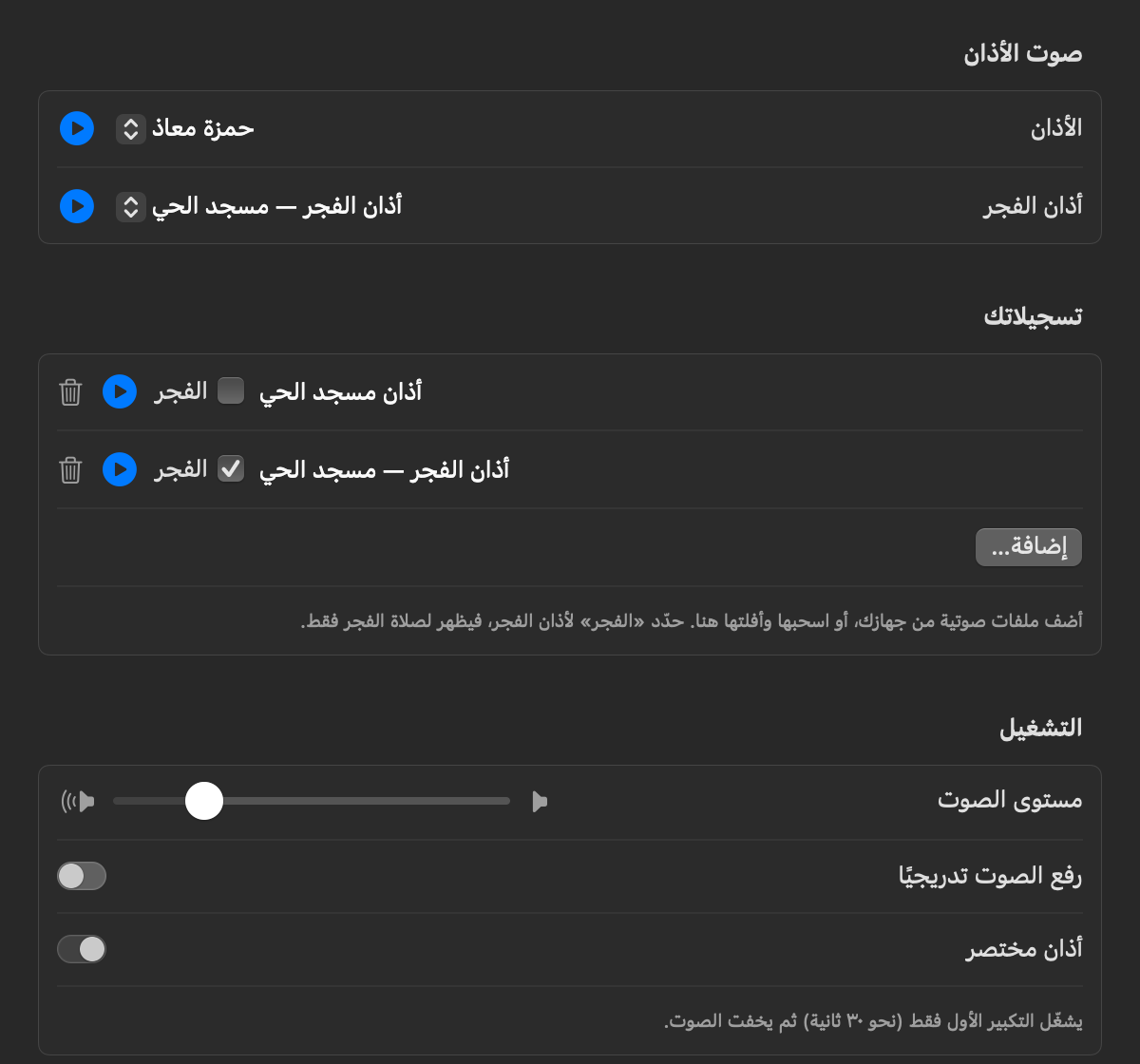
New
- Your own recordings. In Settings → Azan → Your recordings, click Add… to pick audio files, or drop them onto the window. Salat checks that each file plays and keeps its own copy, so moving or deleting the original won't break anything. You can rename, preview or remove each recording, and pick it for any prayer.
- A proper Fajr Azan. The Fajr Azan includes الصلاة خير من النوم, so recordings can now be marked as Fajr. A Fajr recording is offered only in the Fajr picker. This works for your own recordings too: tick Fajr next to one.
- New recordings. Hamza Moaz (حمزة معاذ) is the default Azan for Dhuhr, Asr, Maghrib and Isha. Mishary Alafasy's Fajr Azan in maqam Sikah (العفاسي — الفجر سيكاه) is the default for Fajr.
Changed
- Bundled recordings. The five recordings from 1.0 (Sabah Fakhri, Aaqib Azeez, Serene, Classic and Hassan II Mosque) have been removed. If you'd picked one of them, Salat switches to the new default. You can add any of them back as your own recording.
- Your custom file carries over. If you'd chosen your own audio file in 1.0, it moves into Your recordings and stays selected.
- Prayer times come from Adhan. All prayer times, the Qibla bearing, the calculation methods' official offsets, the Moonsighting Committee seasonal model and the high-latitude rules now come from Adhan (MIT License, © Batoul Apps). Salat still adds what Adhan doesn't cover: Imsak, the 120-minute Isha in Ramadan for Umm al-Qura, extra methods, polar day and night, and the distance to Makkah. Times match published reference timetables within 2 minutes. Two small differences:
- Midnight and the last third of the night are measured from Maghrib to the next Fajr.
- The "None" high-latitude option is gone, because Adhan always applies a safe limit. If you'd chosen it, Salat uses Automatic.
Fixed
- Azan stuck as "playing" after sleep. If a prayer time passed while the Mac was asleep, the Azan could start during a brief maintenance wake with no audio output. The app then showed it as playing until you stopped it. Salat now skips the Azan while the Mac sleeps, stops it when the Mac goes to sleep, and resets playback if it stops advancing.
- Lower CPU use when idle. The Timetable and the Hijri preview in Settings were redrawing every second, even when their windows were closed. Idle CPU drops from about 4–6% to about 1.7%.
Install / update
- Quit Salat if it's running. Open
Salat-1.1.0.dmgand drag Salat to Applications, replacing the old copy. Your settings are kept. - The app isn't notarized, so the first launch needs System Settings → Privacy & Security → Open Anyway, or run
xattr -dr com.apple.quarantine /Applications/Salat.app.
Requires macOS 14 or later. Universal binary (Apple silicon + Intel).
SHA-256: da385d2e93d431fb569224ad3624826d97f2b5ec3cf4150083490f8a608b77f5
Full changelog: v1.0.1...v1.1.0
Salat 1.0.1 · صلاة
Fixed
- The desktop widget can be dragged again on macOS 27. On macOS 27, SwiftUI keeps the click, so the widget no longer moved on its own. Salat now starts the drag explicitly. Control-click still opens the widget's context menu. Thanks to @Balaal for the fix (#1) 🙏
Install / update
- Quit Salat if it's running, open
Salat-1.0.1.dmg, and drag Salat to Applications, replacing the old copy. Your settings are kept. - The app isn't notarized, so the first launch needs System Settings → Privacy & Security → Open Anyway, or run
xattr -dr com.apple.quarantine /Applications/Salat.app.
Requires macOS 14 or later. Universal binary (Apple silicon + Intel).
SHA-256: db1779ae49c64236283d0af875d103c28b4ecf9bbc0a8517e25788a761bf1876
Full changelog: v1.0.0...v1.0.1
Contributors

Assets 3
Salat 1.0.0 · صلاة
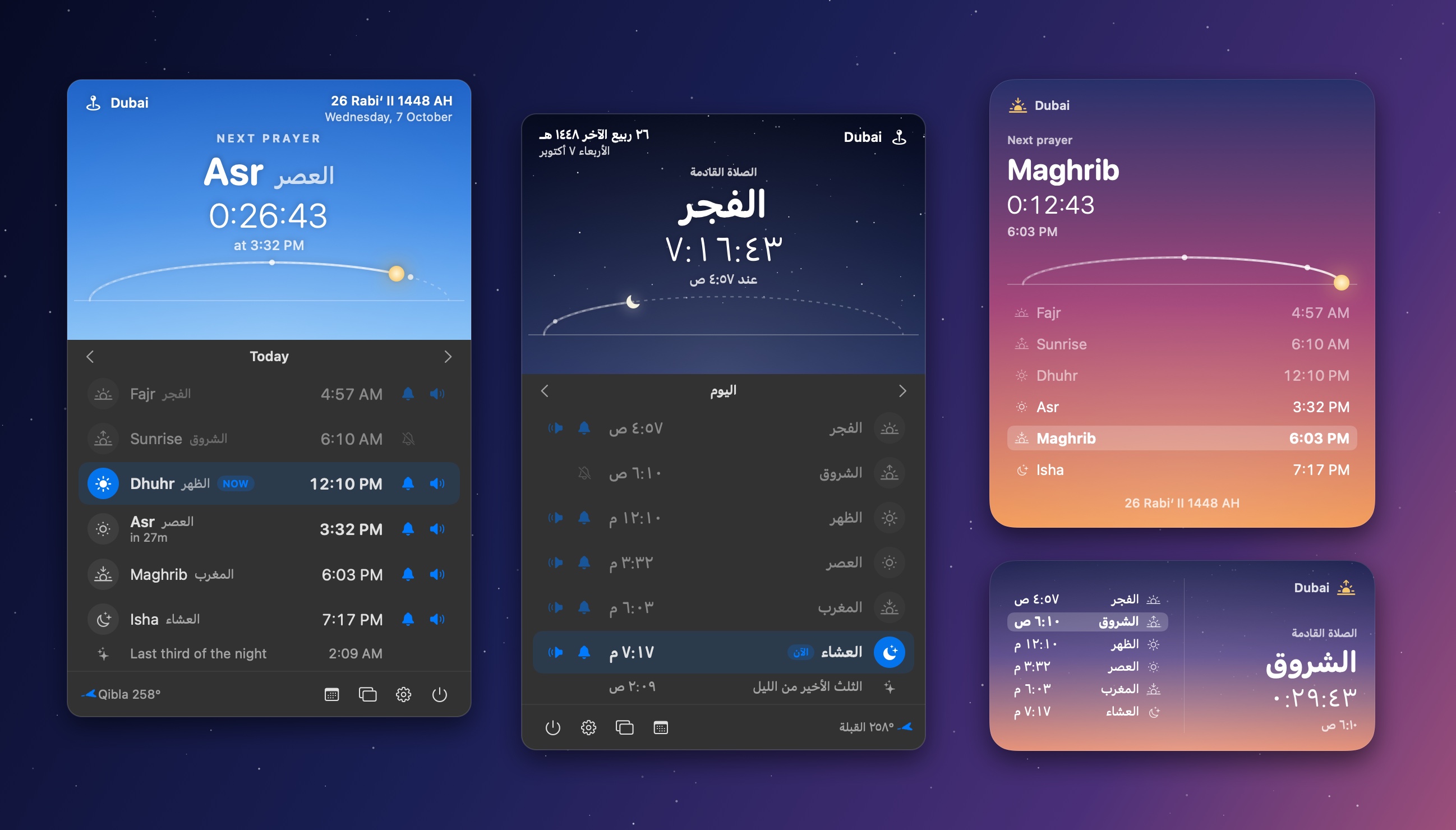
The first release of Salat, a native macOS menu bar app and desktop widget for prayer times, with Azan, in English and العربية.
Highlights
- Live countdown to the next prayer in the menu bar, with a sky that follows the time of day
- Desktop widget in 3 sizes and 2 styles (living sky / glass)
- Azan with 5 recordings (including Sabah Fakhri) or your own audio, plus a separate Fajr sound
- Notification, Azan and reminder toggles for each prayer
- 22 calculation methods, picked automatically by country; Hanafi/Standard Asr; high-latitude rules; manual adjustments
- Automatic location (follows you when you travel) or worldwide city search; Qibla bearing
- Full Arabic interface with right-to-left layout and Arabic-Indic numerals
- Monthly timetable with CSV export
Install
- Open
Salat-1.0.0.dmgand drag Salat to Applications. - The app isn't notarized, so allow it once: System Settings → Privacy & Security → Open Anyway, or run
xattr -dr com.apple.quarantine /Applications/Salat.app. - Keep Open at login on so the Azan always plays.
Requires macOS 14 or later. Universal binary (Apple silicon + Intel).
SHA-256: 1f5a29a580a9a0283d5a1a9af821889c83edc9e9bdbc254b3d5a186cb9c2942b
🤖 Designed, written, tested and released entirely by Claude.