Repository navigation
ATA-GUI v4.0.0
Pre-release
ATA-GUI 4.0.0
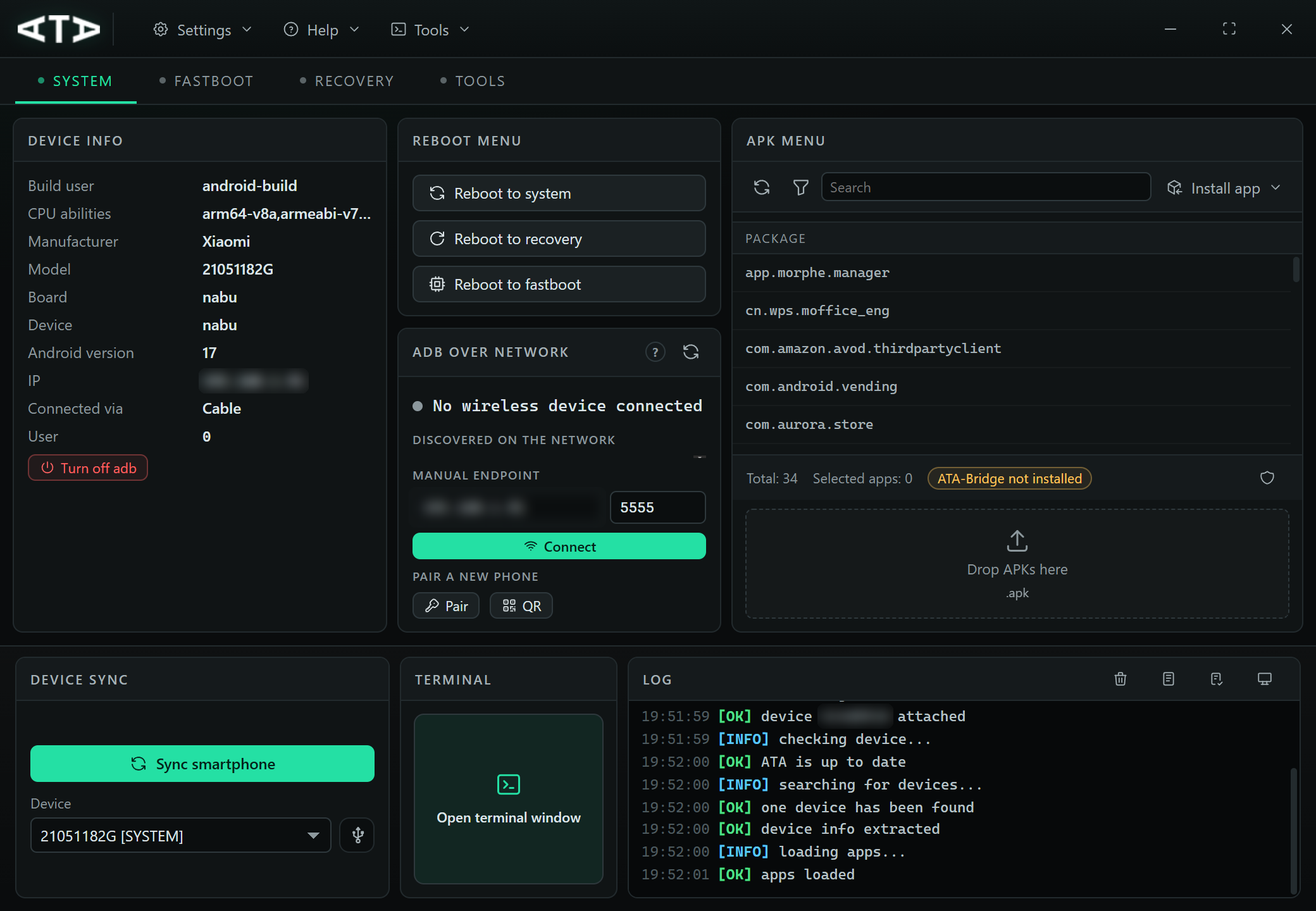
The ADB and fastboot desktop app, rebuilt from scratch on Tauri 2, Rust and React.
Same job — connect a phone, look at it, install and remove apps, flash images, read the
log — in a ~2.5 MB installer instead of a .NET WinForms binary, and now on Windows,
Linux and macOS from one code base.
⚠️ Breaking changes
Read this before upgrading.
- The 3.x application is retired. 4.0.0 is not an update of the C# code base, it is a
rewrite with a different runtime (WebView2 / WebKitGTK / WKWebView instead of WinForms).
The 3.x sources remain on thelegacybranch for reference and no longer receive fixes. - This release is published as a pre-release on purpose.
/releases/lateststill
points at the last 3.x build, so the in-app 3.x updater will not offer 4.0.0 and
nobody is moved onto the rewrite automatically. Upgrading is a manual download from
this page. - Two workflows changed shape. The device log no longer has "copy to clipboard" —
it saves to a file through the native dialog. The terminal is now a real shell surface
instead of a card with an input field and a Run button, so scripts that were pasted one
command at a time can be typed or pasted as a sequence.
What's new
A real terminal
Detached window, inline prompt (ata@<host>:~$), scrollback, ↑/↓ history, Tab completion
for adb and fastboot verbs and their closed argument sets, Ctrl+L to clear, Ctrl+C to kill
the running command and get the prompt back. Output streams as it is printed, so logcat
and long pushes report live instead of freezing the window until exit.
Flashing you can watch
Fastboot queues several images at once (partition type and slot per row, all expands to
both slots, type guessed from the file name). Recovery sideloads an OTA zip. Both report
the milestone the tool actually announces — Sending 'boot_a' (65536 KB), Writing,
installing — plus transfer size, elapsed time, raw tool output, and a Cancel that kills
the child process rather than just hiding it.
Logcat that keeps up
Batched IPC (up to 300 lines or 60 ms per event) and a window that draws the last 400 lines
of a 6 000-line buffer. A device printing 45 000 lines/s stays at ~56 fps. The level letter
is printed once, wrapped entries hang under their message, and the toolbar saves the buffer
to logcat-<serial>-<date>.txt.
Wireless debugging that works on Android 11+
mDNS discovery of _adb-tls-connect._tcp, a manual ip:port field with history, and QR
pairing: the dialog shows WIFI:T:ADB;S:<service>;P:<password>;;, the phone scans it from
Pair device with QR code, and the dialog follows the whole handshake — waiting, paired,
connected, device appears in the list.
One row per phone
adb reports the same device as a cable serial, as ip:port and as an mDNS name; the list is
merged by ro.serialno, preferring the cable transport. "Kill ADB" now really stops it —
the watcher pauses instead of respawning the daemon two seconds later.
Eight languages, themes, and a UI that holds
English, Italian, Spanish, German, French, Portuguese (BR), Russian and Chinese, loaded at
runtime; files dropped into locales/ overlay the bundled ones, so a translation can be
fixed without a rebuild. Dark, light and follow-system themes with no flash on start.
Everything survives the 1040×720 minimum.
Downloads that report, operations that cancel
SDK Platform Tools and scrcpy show resolving, download percentage, unpacking and installing
separately; connect/read deadlines instead of one global timeout, and one retry. Installs,
pushes, flashes and image extraction all run off the UI thread with a timeout and a working
Cancel.
Download
| Platform | Recommended | Also |
|---|---|---|
| Windows x64 | ATA-GUI_4.0.0_x64-setup.exe |
ATA-GUI_4.0.0_x64_en-US.msi, ATA-GUI-4.0.0-portable-windows-x64.zip |
| Linux x64 | ATA-GUI_4.0.0_amd64.deb / .rpm |
*.AppImage, ATA-GUI-4.0.0-portable-linux-x64.tar.gz |
| macOS 10.15+ | ATA-GUI_4.0.0_aarch64.dmg (Apple silicon only) |
ATA-GUI-4.0.0-portable-darwin-arm64.zip |
The portable archives need no installation and write config.json next to the executable
while that folder is writable. SDK Platform Tools (adb, fastboot) and scrcpy are downloaded
on first use.
Upgrading from 3.x
- Portable: unpack the 4.x archive over the 3.x folder.
ATA-GUI.exestays at the root,
so the oldATAUpdater.batflow still works, andlocales/is seeded on first start
becausemove /ydoes not copy directories. - Installed: run the new installer; settings are migrated from the 3.x
InfoCache.xml
andIPList.txton first start. - Expect the interface to look different: same panels, finer chrome, a new icon set, and the
licence agreement is shown again once because the acceptance flag lives in the new config.
Known limitations
- Update checks are disabled on macOS (no signed updater feed).
- CI builds Linux and macOS; the release page is the only place those binaries are exercised.
Full details: CHANGELOG.md ·
Feature tour: docs/FEATURES.md ·
Issues: https://github.com/msartore/ATA-GUI/issues