Repository navigation
Releases
Phantom Co. 1.9.1

What's new in 1.9.1
A small fix for chats.
💬 Unsent messages are kept
- A message you started writing to a ghost but did not send stays in the box when you switch to another tab or another chat, and even after reloading the window.
- Each chat keeps its own draft, separately for every person. The draft is cleared when you send the message.
Update
Quit Phantom Co. from the tray icon, replace phantom_co.exe with the one below and start it again. Your Vault and settings stay as they are.
Phantom Co. 1.9.0
What's new in 1.9
This version lets your own AI assistant use Phantom Co.: it talks to your ghosts, gives them tasks and runs visual scripts for you.
🔑 API keys (Settings > Personal)
- Create a named key for each of your own programs. The key is shown once; the list shows its last 4 characters and when it was last used. Delete it any time.
- A key works with your rights, but never above an editor's: it can use ghosts, chats, tasks, scripts, projects, runs, search and files. It can never change accounts, keys, skills, rules, secrets, MCP servers or settings.
- Only a hash of the key is stored. Changing your password ends all your keys.
🤖 MCP server for your AI assistant
- Any MCP client (for example an app built with the Claude Agent SDK) connects to
http://127.0.0.1:7777/mcpwithAuthorization: Bearer <key>(Streamable HTTP). - 20 tools: list ghosts and projects, ask a ghost and wait for its answer (or go on in the same chat), read chats, create and run tasks with wake-ups, write, check, run and follow visual scripts, answer their Ask blocks, and search.
- Everything goes through the same checks as the app, so the assistant sees only what you may see. Tool approvals of ghosts still wait for a person.
Update
Quit Phantom Co. from the tray icon, replace phantom_co.exe with the one below and start it again. Your Vault and settings stay as they are.
Phantom Co. 1.8.0
What's new in 1.8
This version lets you give a project folders from anywhere on your PC, read only or editable.
📂 Folders on this PC (per project)
- On a project's page, the new Folders on this PC card lists folders outside the Vault. Each one is Read only (ghosts can open and read files) or Can edit (they can also create, change and delete files). "Browse…" picks a folder.
- Only the owner changes the list. Editors see it, viewers do not. It needs a ghost with a file skill, and it is never given to a friend's lent AI.
- Read only is enforced for Claude and Codex ghosts (a Claude ghost that also has the shell skill can still write there). Gemini and OpenCode ghosts are only told not to change those folders.
- Refused for safety: Phantom Co.'s own sign-in data and any folder around it, the Vault itself and its ruling parts (Skills, Rules, Agents). Another project's folder can be added to read.
- Turkish interface included.
🔧 Also
Codex ghosts that continue an earlier conversation now get their writable folders too.
Update
Quit Phantom Co. from the tray icon, replace phantom_co.exe with the one below and start it again. Your Vault and settings stay as they are.
Phantom Co. 1.7.0
What's new in 1.7
This version adds ready-made prompts, reminders that reach you while your PC is off, and a tidier sidebar.
⚡ Shortcuts (ready-made prompts)
- Save a prompt once, for example
/restaurant= "Research restaurants near {args} and recommend three", then use it with/restaurant Kadıköy. - In chats: type
/and the list opens. Tab completes, Enter sends. The ghost gets the full text, and the chat shows it too. - In Telegram:
/restaurant Kadıköygoes to the shortcut's own ghost, or to the one you are talking to. Shortcuts appear in the bot's command menu and in/agents. - One list for the whole team. Editors and the owner make shortcuts, everybody who can chat uses them, and only the maker or the owner changes or deletes one.
- A ghost's command always wins over a shortcut with the same word. The new Shortcuts page is in the sidebar.
⏰ Reminders while your PC is off
A new ready-made server in Settings > MCP. Ghosts can schedule, list and cancel reminders that arrive in your Telegram even when Phantom Co. and your PC are off. It uses a small Cloudflare Worker that you deploy yourself on Cloudflare's free plan (setup steps in Project/Cloudflare_Worker/README.md). Each scheduling call waits for your approval in the chat.
🧹 Sidebar
The Claude / Codex / Gemini / OpenCode labels at the bottom of the sidebar are gone, so the menu fits smaller screens. Settings > Secrets still shows what is installed and signed in.
Update
Quit Phantom Co. from the tray icon, replace phantom_co.exe with the one below and start it again. Your Vault and settings stay as they are.
Phantom Co. 1.6.0
What's new in 1.6
This version makes scripts easier to draw, and tidies up Settings.
🧩 Drawing scripts
- Reroute points: a tiny block that does nothing except lead an arrow around other blocks. Right-click an arrow to put one on it, or add one like any other block.
- Arrows in both directions: drag from a block's top dot up to the block it should come from. If that block has two outputs, you pick which one.
- Drop an arrow on empty space and the blocks that fit appear. Pick one and it is added already connected.
⚙️ Settings in tabs
- Settings is split into Personal, Company, Sharing, Secrets, MCP, Notifications, Backup and About.
- Colour theme, language, your own Telegram connection and "Lend my AI" moved from the profile to Settings > Personal.
- Everybody now has Settings: people who are not the owner see only Personal.
👽 Reddit for your ghosts
A new ready-made server in Settings > MCP. Ghosts can list, search and read public posts with nothing to set up, within the limits Reddit puts on reading. Publishing posts and comments needs an API app approved by Reddit and an account, and each one waits for your approval in the chat.
Gemini CLI
The "Auto" brain is gone for Gemini CLI, because Google no longer lets the CLI use its own sign-in. Add a Gemini API key in Settings > Secrets and pick it as the ghost's brain. A ghost still set to Auto uses your first Gemini key, or says clearly that it needs one.
Update
Quit Phantom Co. from the tray icon, replace phantom_co.exe with the one below and start it again. Your Vault and settings stay as they are.
Phantom Co. 1.5.0
What's new in 1.5
This version is about leaving your ghosts alone safely: they stay within a budget, tell you when something needs you, and keep working through small failures.
💰 Budgets and the Overview page
- Overview shows tokens, cost and runs per day, per ghost, per person and per brain.
- The owner sets daily or monthly limits in tokens or dollars for the whole company, a person or a ghost. When one is used up, new ghost work is refused until the period ends. A run that is already going is finished.
🔔 Notifications
- A bell in the sidebar tells you when a script, task or wake-up failed, a ghost or a script is waiting for you, a budget ran out, or long work finished.
- Settings > Notifications chooses what also comes as a Windows notification or a Telegram message.
🧩 Scripts that cope
- Retries: a Prompt block can try again up to 5 times, with a wait between tries.
- A "failed" output: a Prompt that keeps failing can go on through its own path instead of ending the whole run.
- Ask block: the run stops and asks a person to approve, reject or give a value. Answer in the run view or from Telegram with
/yes,/noand/answer. It can give up after a set time and it survives a restart. - Wake-ups for scripts: ⏰ runs a script by itself every few minutes or every day at a set time.
🔎 Search
Find words in every chat, task, project note and run error you are allowed to read (Ctrl+K). Capital letters and Turkish letters do not matter.
🗄️ Backup and export
- Settings > Backup makes a zip of your Vault, with or without the work files. Sign-ins and API keys are never in it.
- ⬇ Export saves a chat or task conversation as a Markdown file.
🧠 Ghost memory
Switch on "Long-term memory" in a ghost's editor and it keeps short notes between chats. The notes are separate for each person, a line in the chat shows every note it saves, and you can read, add or delete yours in the editor. Memory is not used on a friend's lent AI.
Smaller things
- OpenCode ghosts have a thinking level, say when a model service is slow, and show cached tokens.
Update
Quit Phantom Co. from the tray icon, replace phantom_co.exe with the one below and start it again. Your Vault and settings stay as they are.
v1.4.0
What's new in 1.4
🟩 Every NVIDIA model through OpenCode
Until now an OpenCode ghost ran only the models OpenCode itself already knew. Newer models such as MiniMax M3.1 Flash stopped with a bare "Unexpected server error". Now every chat model of the service works, whatever OpenCode version is installed.
- Pick from the list: the ghost editor's Model field lists NVIDIA's models (and OpenRouter's models with tool support) for the ghost's API key account. Models that cannot chat (embeddings, image, speech) are left out.
- Short names work:
nvidia/minimax-m3.1-flashis completed tonvidia/minimaxai/minimax-m3.1-flash. - Clear errors: a model the service does not know now says so, instead of "Unexpected server error".
Smaller things
- Turkish interface: the live "is working…" / "is waiting in line…" bubble, its Stop button and the default "New chat with …" title are now translated.
Update
Quit Phantom Co. from the tray icon, replace phantom_co.exe with the one below and start it again. Your Vault and settings stay as they are. Friends who lend their AI need the same version.
Phantom Co. 1.3
What's new in 1.3
🧩 Visual scripts: you decide who works when
A new Scripts tab lets you join ghost prompts like code blocks on a canvas, top to bottom, and run them as one flow.
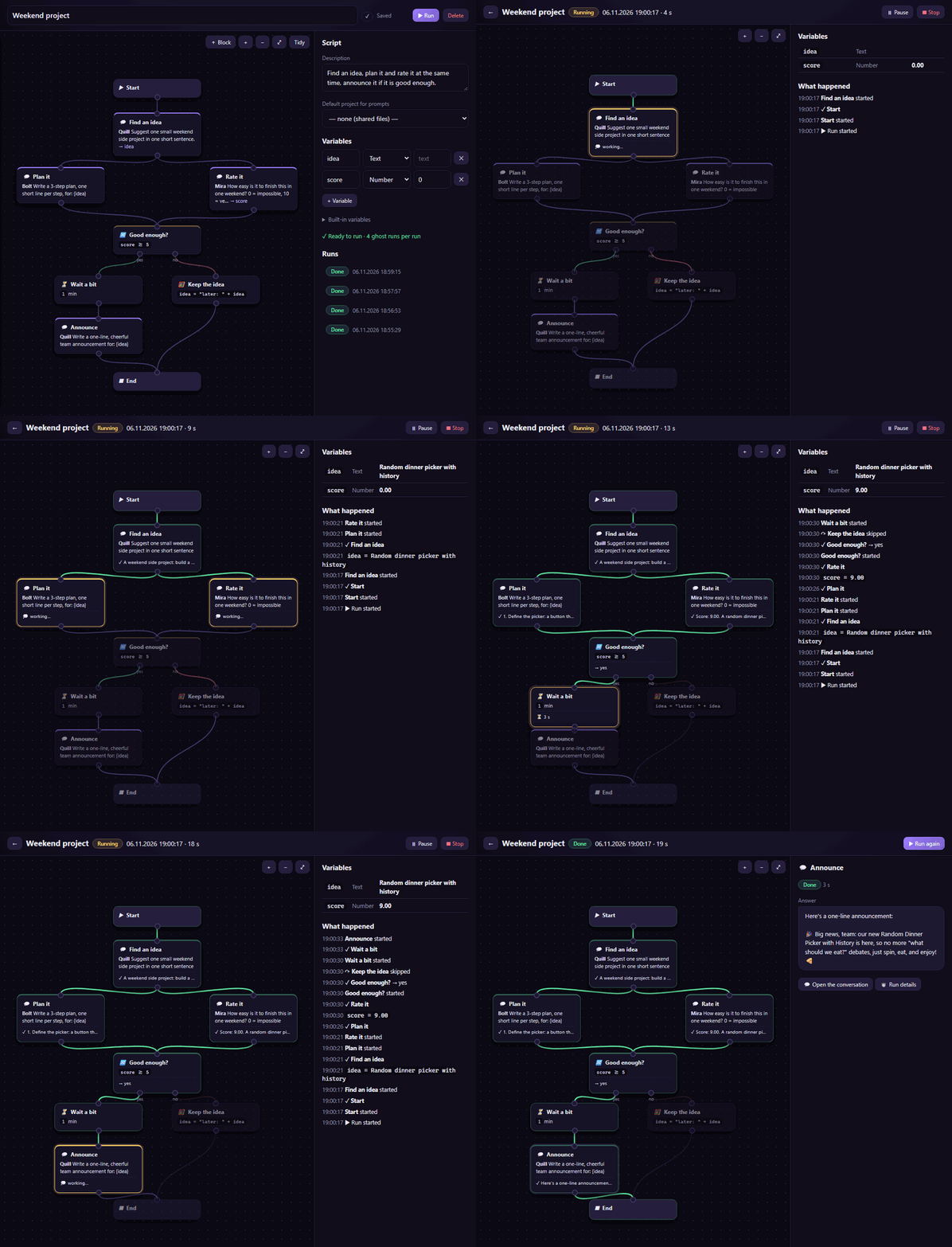
- Blocks: Start, Prompt (a ghost does a job), Set variable, If (yes / no), Delay (some minutes, or until a time of day), Do N (repeat the "loop" part N times, then go on through "then") and End (the run is done at once, like return, also inside a loop).
- Parallel work: one block can lead to several, which run at the same time. A block with several arrows coming in waits for all of them.
- Variables with types: Number (two decimals, exact:
0.1 + 0.2is0.30), Time (16:00), Date (2026-11-16), Bool and Text. Conditions likescore >= 7 and now_time < 18:00. Built-ins:now_time,today,tokens_today, andclaude_left_5h,claude_left_week,codex_left(how much of your subscription limit is left, read from what Claude Code and Codex report). - Values from answers: a prompt block can save a value from the ghost's answer into a variable, and
{variable}puts values into prompts. - Checked before it runs: problems are shown on the blocks and listed, and a script runs only without them. Changes save by themselves.
- Live run view: the working block pulses, delays count down, the arrows that were taken light up, the variables and an event log are on the right. Click a block for its answer, its conversation and its run details. Pause, step one block at a time, resume or stop. A run carries on after the program restarts.
- Phones: swipe from the left edge for the blocks, hold a finger still for the menu, tap a block's dot and then another block to connect them.
🤖 Ghosts write scripts for you
Give a ghost the new Visual scripts skill (Skills > "Add a skill from a template" in an existing Vault) and describe the flow in plain words. The ghost writes the script as a draft in your name. A draft never runs by itself: check it and press Run. If the script has problems, the ghost gets them back and fixes its draft.
Smaller things
- Quitting from the tray icon now also asks while a script is still running, for example while it waits in a Delay block.
Update
Quit Phantom Co. from the tray icon, replace phantom_co.exe with the one below and start it again. Your Vault and settings stay as they are. Friends who lend their AI need the same version.
Phantom Co. 1.2
What's new in 1.2
🧠 OpenCode: a fourth brain for other models
Install OpenCode (npm install -g opencode-ai) and your ghosts can run on many more models:
- API key services: NVIDIA (free key with rate limits from build.nvidia.com), OpenRouter (has free models), Groq, Cerebras, DeepSeek and Mistral. In Settings > Secrets pick OpenCode, choose the service and paste the key. A ghost with an empty Model field uses the service's default model.
- Local models, no account and no cost: start LM Studio's server or Ollama on your PC, give a ghost the brain "OpenCode" and pick
lmstudio/<model>orollama/<model>in its Model field. The field suggests the models those servers offer right now. - Ghosts get only the tools their skills allow, and your own OpenCode settings stay out of the runs.
- Free and small local models are fine for chat and short jobs. For file work a local model must support tool calls (LM Studio marks them with a hammer icon).
📁 Drag & drop on the Files page
Drag files or whole folders from Windows Explorer anywhere onto the Files page. Drop them on a folder to put them there. If a file exists already you can Replace, Skip, Replace all or Skip all.
Smaller things
- Settings > Secrets: the "add account" row is now set apart from the list.
Update
Quit Phantom Co. from the tray icon, replace phantom_co.exe with the one below and start it again. Your Vault and settings stay as they are. Friends who lend their AI need the same version.
Phantom Co. 1.1
What's new in 1.1
🧩 MCP: tools from outside (Settings > MCP)
- Browser: a real Chrome your ghosts can click and type in (Playwright MCP; needs Node.js and Google Chrome).
- YouTube: upload videos from the work folder to your channel (needs a free Google Cloud OAuth client; Google keeps uploads private until you publish them).
- Telegram: send messages and files through your own bot.
- Your own MCP servers (any stdio server), and an MCP builder skill that lets a ghost write one for you.
- Secrets stay encrypted on your PC, never in the Vault. MCP never runs on a friend's lent AI.
- Ask before it acts: a tool call can wait for Approve / Decline in the chat (optional per server and per tool).
✈️ Talk to your ghosts from Telegram
Switch on "Let people talk to ghosts from Telegram", connect your Telegram in Profile > Telegram, then:
/agents lists the ghosts, /<ghost> message writes to one, plain messages go to the current ghost, /new makes it forget the chat, /yes / /no answer approval requests.
🎨 Look
- Colour themes in your profile: Midnight, Daylight, Swamp, Deep sea, Pumpkin, Sakura, or Same as Windows.
- 12 new ghost forms (23 in total): vampire, witch, astronaut, viking, cowboy, artist, DJ, angel, imp, graduate, mummy, sprout.
Update
Quit Phantom Co. from the tray icon, replace phantom_co.exe with the one below and start it again. Your Vault and settings stay as they are. Friends who lend their AI need the same version.