Repository navigation
Releases
Releases · naborajs/CloudDrive
NS Cloud Drive v1.0.0 — High-Performance Windows Virtual Drive Manager

NS Cloud Drive v1.0.0 ??


NS Cloud Drive is an enterprise-grade Windows virtual drive manager that seamlessly mounts remote cloud storage providers (Google Drive, TeraBox, and upcoming Proton Drive) as native, high-performance local disk letters (e.g., G:, I:, T:).
Designed with a modern Glassmorphism / Liquid Glass WPF interface, hardware-accelerated fluid motion, enterprise DPAPI credential security, and intelligent LRU cache eviction.
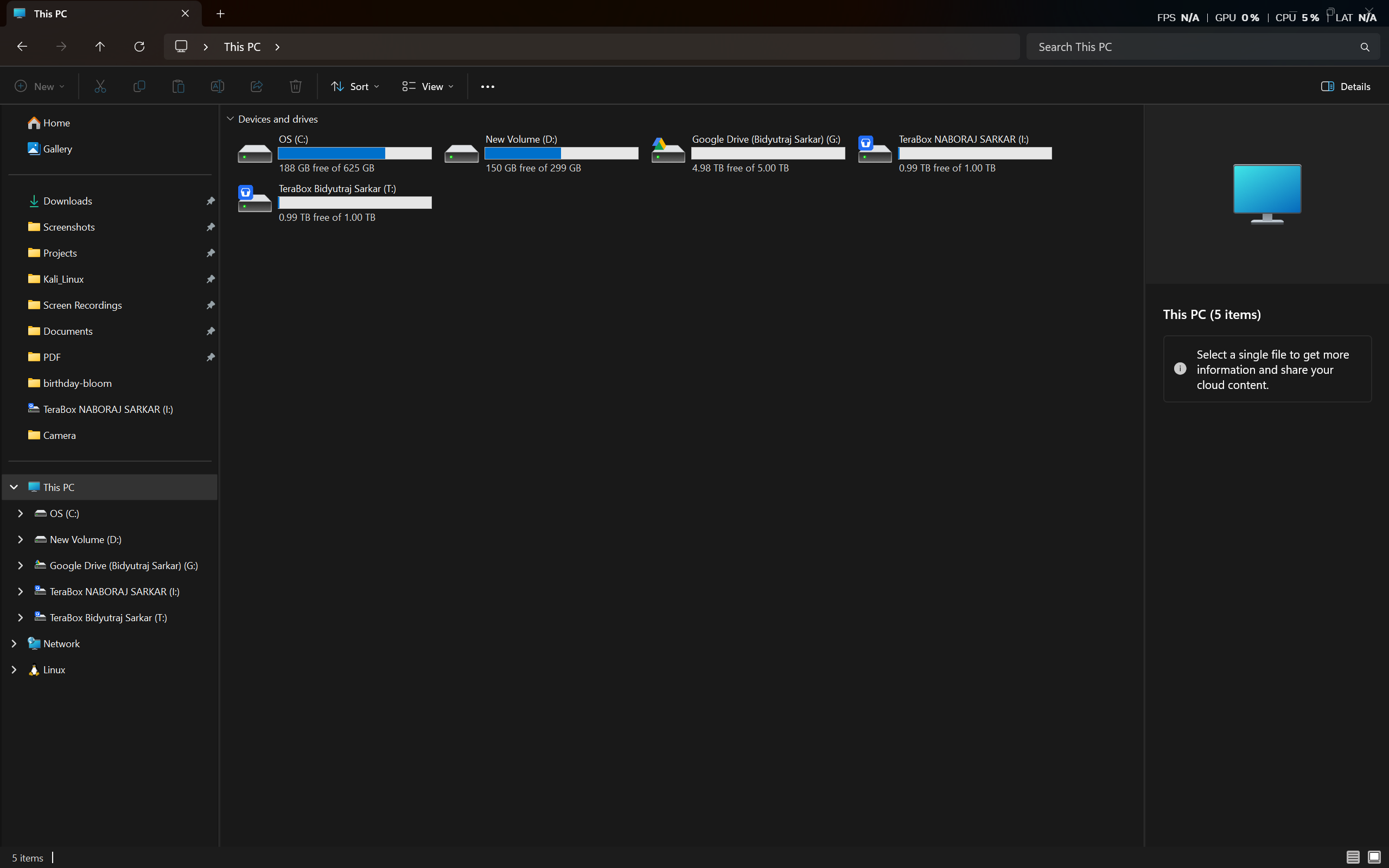
?? Real-World Windows 11 Explorer Integration
Google Drive (G:) (4.98 TB) and dual TeraBox accounts (I:, T:) (1.00 TB each) mounted simultaneously as native Windows hard drives in File Explorer - with real-time capacity meters and authentic cloud icons:
? Direct Downloads (Assets)
| Download | Description | Direct Link |
|---|---|---|
| NSCloudDrive.exe | 64-bit Standalone Executable Launcher | ?? Download EXE (188 KB) |
| NSCloudDrive-v1.0.0-Windows-x64.zip | Complete Portable Package (Launcher, WebView2 DLLs, icons, configs, and docs) | ?? Download Release ZIP (2.1 MB) |
| NSCloudDrive.exe.sha256 | SHA-256 Checksum for Launcher | ?? Download Checksum |
| NSCloudDrive-v1.0.0-Windows-x64.zip.sha256 | SHA-256 Checksum for Zip Archive | ?? Download Checksum |
? Highlights & Key Features
?? Native Virtual Drive Mounting
- Mounts remote cloud buckets directly as native Windows drives with user-selectable drive letters.
- Powered by high-speed WinFsp virtual file systems and optimized
clone VFS read/write chunking. - Windows Explorer integration with live disk capacity, custom labels, and drive-type badges.
?? Multi-Cloud Provider Ecosystem
- Google Drive: Full OAuth 2.0 PKCE authentication with local loopback listener; zero manual tokens needed.
- TeraBox: Embedded WebView2 interactive session bridge supporting multi-factor and captcha challenges.
- Extensible Architecture: Pre-wired provider contract ready for Phase 15 Proton Drive SRP integration.
?? Fluent Glassmorphism & Liquid Glass UI
- Ultra-modern dark palette with dynamic mica glass effects, smooth hover transitions, and animated tab switches.
- High-DPI PerMonitorV2 native launcher (NSCloudDrive.exe) with dedicated taskbar branding (NaborajSarkar.NSCloudDrive.App).
- Real-time disk capacity meters, read/write I/O graphs, transfer speeds, and live system log feeds.
? Smart Cache & Resource Optimization
- High-performance, thread-safe LRU cache manager preventing disk space bloat.
- Concurrency-safe eviction with active file locking checks (Test-FileInUse).
- Automated background memory trimming using low-overhead Windows working set controls.
?? Enterprise Security & Privacy
- Zero plaintext credentials: All OAuth tokens and session states are encrypted on disk via Windows Data Protection API (DPAPI).
- Read-only independent security review and automated test suite verifying strict mode safety.
?? Verified Release Checksums (SHA-256)
| Asset | Size | SHA-256 Checksum |
|---|---|---|
| NSCloudDrive.exe | 192,512 B | �DE503E5671C66DBC5BABBD18960F13BA879DA5A233429B04395C97F860E87EE |
| NSCloudDrive-v1.0.0-Windows-x64.zip | 2,130,419 B | 86DD90CD224B6F684E837B39FDFAC4CD5D5CDA4BF6E5FCC784319C4A2094F37D |
?? Quick Start Guide
Prerequisites
- Windows 10 / 11 (64-bit).
- WinFsp (Required for virtual filesystem mounting).
- rclone in your system PATH (or configured via settings).
- Microsoft Edge WebView2 Runtime (Pre-installed on Windows 11; required for TeraBox login).
Installation
- Download NSCloudDrive-v1.0.0-Windows-x64.zip from the Assets section below.
- Extract the archive to any folder (e.g., C:\Tools\NSCloudDrive).
- Run NSCloudDrive.exe to launch the dashboard.
- Click + Add Cloud Disk, select your cloud provider (Google Drive or TeraBox), complete the login prompt, and choose your preferred drive letter!
?? License & Attribution
NS Cloud Drive is distributed under the NS Cloud Drive Source-Available, Non-Commercial Redistribution License.
- Free to download, inspect, study, learn from, and use for personal, educational, research, and internal company operations.
- Permitted community modifications and non-commercial forks are welcomed under the license's attribution terms.
- Commercial sale, charging for access, or commercial redistribution requires prior written permission from Naboraj Sarkar.
?? Community & Feedback
- Official Community Discussion Hub: #1
- Repository: https://github.com/naborajs/CloudDrive
- Issues & Suggestions: https://github.com/naborajs/CloudDrive/issues
- Author: Naboraj Sarkar (
ishant.ns.business@gmail.com)