Repository navigation
Releases: nanocenti/NookCapture
Release list
Nook Capture 0.4.0

Download NookCapture.dmg below, open it, and drag Nook Capture into Applications (replace the old version if asked).
New install? On first launch go to System Settings → Privacy & Security → Open Anyway once. See the README.
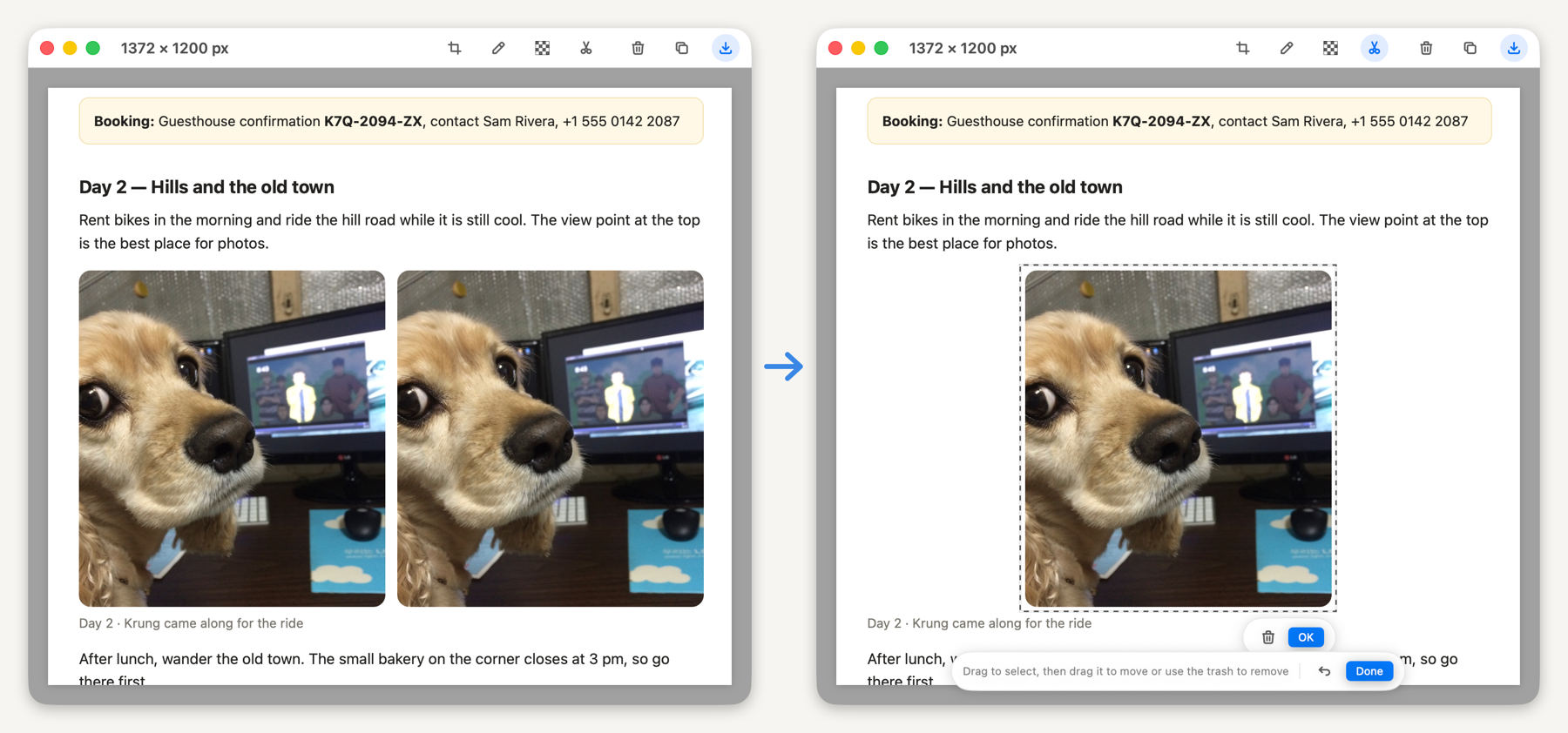
New: Cut Out
A new scissors tool in the preview toolbar.
- Drag to select any part of the capture. The selection shows a moving dashed border.
- Move: drag the selection somewhere else, then click OK (or press ↩).
- Remove: click the trash button next to the selection (or press ⌫).
- The spot left behind is filled with the surrounding background color, so the content disappears and the background stays.
- Esc clears the selection, and ⌘Z undoes a move or removal in one step.
아래 NookCapture.dmg 를 받아 열고 Nook Capture를 Applications로 끌어 놓으세요(기존 버전을 대치하겠냐고 물으면 대치).
처음 설치라면 첫 실행 때 한 번 시스템 설정 → 개인정보 보호 및 보안 → "그래도 열기" 가 필요합니다.
새 기능: 오려내기
미리보기 툴바에 가위 아이콘이 생겼습니다.
- 캡처 안의 원하는 부분을 드래그로 고르면 테두리에 점선이 흐릅니다.
- 옮기기: 고른 영역을 끌어 다른 곳에 놓고 확인(또는 ↩)을 누릅니다.
- 지우기: 영역 옆의 휴지통(또는 ⌫)을 누릅니다.
- 빈자리는 주변 바탕색으로 채워져, 내용만 빠지고 바탕은 그대로 남습니다.
- Esc는 선택만 풀고, ⌘Z는 옮기기·지우기를 한 번에 되돌립니다.
Nook Capture 0.3.1
Download NookCapture.dmg below, open it, and drag Nook Capture into Applications (replace the old version if asked).
New install? On first launch go to System Settings → Privacy & Security → Open Anyway once. See the README.
Fixed
- Closed preview windows were kept in memory, so memory use grew a little with every capture while the app stayed in the menu bar. They are now released when closed.
아래 NookCapture.dmg 를 받아 열고 Nook Capture를 Applications로 끌어 놓으세요(기존 버전을 대치하겠냐고 물으면 대치).
처음 설치라면 첫 실행 때 한 번 시스템 설정 → 개인정보 보호 및 보안 → "그래도 열기" 가 필요합니다.
수정
- 닫은 미리보기 창이 메모리에 남아, 메뉴바에 켜 둔 채 캡처할수록 메모리 사용량이 조금씩 늘던 문제를 고쳤습니다.
Nook Capture 0.3.0
Download NookCapture.dmg below, open it, and drag Nook Capture into Applications.
On first launch, macOS blocks the app once: go to System Settings → Privacy & Security → Open Anyway. See the README for details.
What's in 0.3.0
- Scroll-capture just the part you choose, even on pages with several scrolling areas or overlapping windows
- Region Capture with a magnifier, preview editing (crop, draw, mosaic), PNG / JPEG / HEIC
- Menu bar app with global shortcuts ⌘⇧1 / ⌘⇧2, optional launch at login
- English · 한국어 · 中文 · 日本語 (starts in English)
Requires macOS 13 or later on an Apple Silicon Mac.
아래 NookCapture.dmg 를 받아 열고 Nook Capture를 Applications로 끌어 놓으세요.
처음 실행할 때 한 번 시스템 설정 → 개인정보 보호 및 보안 → "그래도 열기" 가 필요합니다. 자세한 내용은 README를 보세요.