Repository navigation
Releases
v1.0.8

v1.0.7
Works in Progress: articles, header, menu and cards on glass. Changelog: https://github.com/nazzacode/glass-mode/blob/release/CHANGELOG.md
v1.0.6
No more sharp text behind bars and menus. A header, toolbar or side panel that the page scrolls under now turns to\nfrosted glass instead of staying clear, so whatever passes beneath it blurs out of the way of its own labels. Menus,\ndropdowns and dialogs that open over the page get the same treatment, a little thicker. This works on every styled\nsite, not just the ones fixed by hand: it showed up on YouTube, Reddit, YouTube Music, Gmail, X, Substack and GitHub.\n\nReadwise Reader\n- The top bar of an open document no longer shows the article through it.\n- The sidebar that slides over the article is frosted glass, not clear.\n- The library list sits on the content tint, so its text has the same backing as the reader pane.\n\nNew popup, in Glass Mode's own glass colours and system font, light and dark. What you use every day is on top:\non/off, opacity, Auto/Dark/Light, this site on/off, and one button to report a problem or request the site. Everything\nelse is under "More".\n\n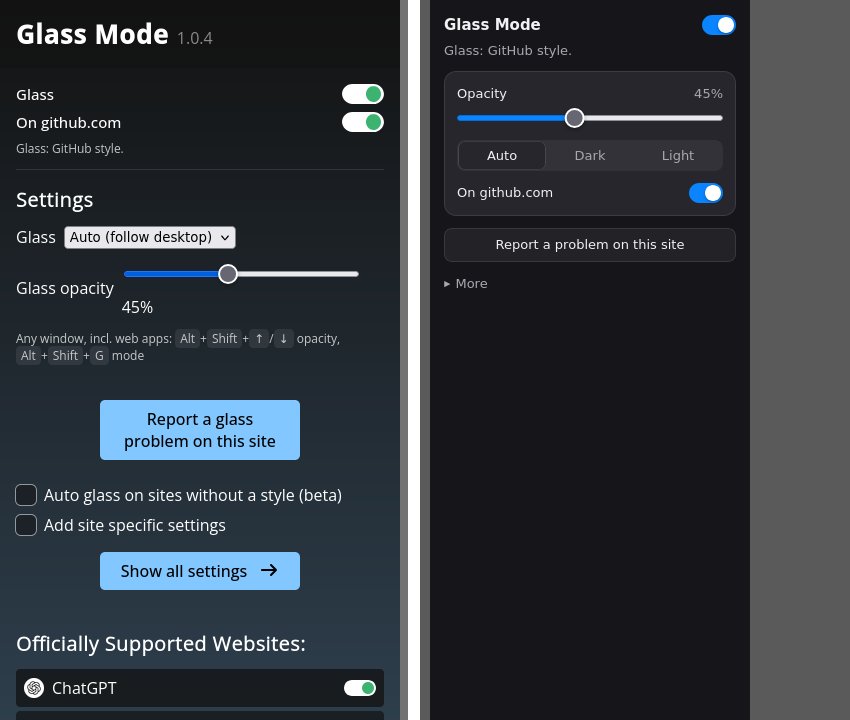
v1.0.5
v1.0.4
v1.0.3
Glass Mode 1.0.2
First signed release of Glass Mode (formerly Transparent Web): websites as frosted glass over your desktop, with readable text.
Install: download glass-mode.xpi below and open it in Zen Browser (signed by Mozilla). Then the two about:config settings in the README.
- Hand-tuned glass for 24 sites, automatic glass (beta) for the rest
- One opacity slider (Alt+Shift+Up/Down), light and dark glass, glass panel on Alt+Shift+G
- Every site's screens and menus checked for readable text by the test lab
Something unreadable? Open the panel → Report a problem.
Glass Mode 1.0.1
First signed release of Glass Mode: websites as frosted glass over your desktop, with readable text.
Install: download glass-mode.xpi below and open it in Zen Browser (signed by Mozilla). Then the two about:config settings in the README.
- Hand-tuned glass for 24 sites, automatic glass (beta) for the rest
- One opacity slider (Alt+Shift+Up/Down), light and dark glass, glass panel on Alt+Shift+G
- Every site's screens and menus checked for readable text by the test lab
Something unreadable? Open the panel → Report a problem.
Note: this build was signed before the rename, so the add-on still calls itself "Transparent Web" inside the browser. The next release fixes it.
1.0.0 beta 1
First release of the glass rebuild.
Unsigned for now. In Zen, open about:config, set xpinstall.signatures.required to false, then open the .xpi. Setup and screenshots: see the README.