Repository navigation
Releases
AX330G 0.12.0 (build 25)

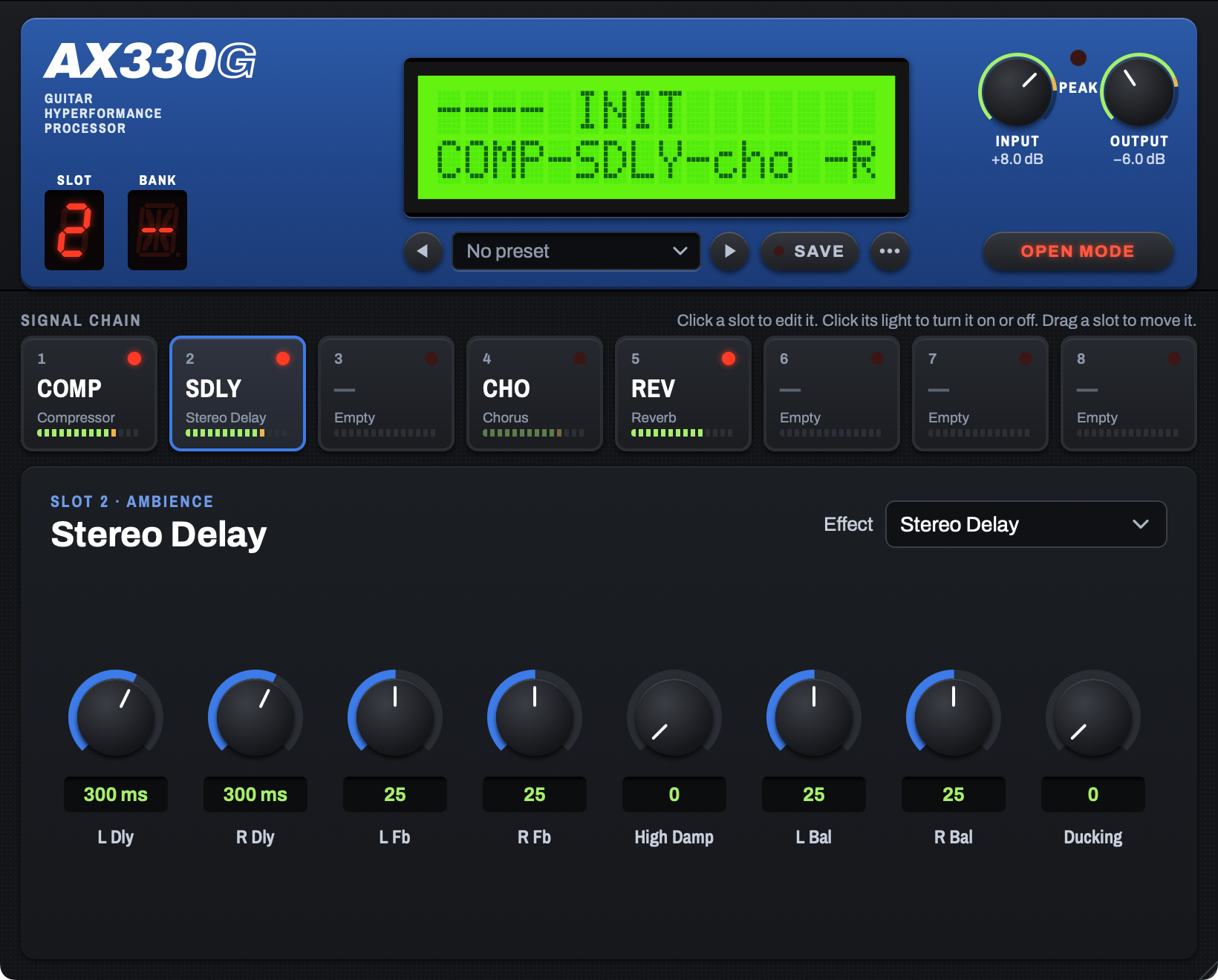
AX330G 0.12.0 adds level meters: a ring around the Input and Output knobs, and a meter in each slot tile. It also adds an update notice: the plugin can tell you when a newer build is ready. It is an AI-authored, human-directed project: Mark O'Brien directed the work and made every measurement on his AX300G, and Claude (Anthropic) wrote the software and the models.
Install
- macOS (AU and VST3): download
AX330G-0.12.0.25.pkgand open it. The installer is not signed. If macOS stops it, Control-click the file and select Open. - Windows (VST3, 64-bit): download the Windows zip file, unzip it, and read
INSTALL-Windows.txt. One tester installed version 0.8.6 on a Windows computer. The plugin loaded and its sound was correct. Nobody has tested version 0.9.0 or later on Windows yet. Please report what occurs.
In the plug-in menu of your host, find Neglectware > AX330G.
Changes in this version
Level meters
- A thin ring around the Input knob shows the level after the Input control. Its 0 dB is the clip level of the converter, the same signal the Peak LED reads. The LED comes on at −1 dB on this ring.
- A ring around the Output knob shows the level that the host receives. Its 0 dB is 0 dBFS.
- The row of cells at the bottom of each slot tile is now a meter of the signal that leaves that slot. It includes every slot before it, so a delay's meter shows the echoes and a reverb's meter shows the tail.
- An empty slot's meter is dark. A slot whose block is off shows the level that goes through it, dimmed.
- All meters show 48 dB: green below −12 dB, amber from −12 to −3 dB, red above −3 dB. They are peak meters: they rise at once and fall 20 dB in 1.7 seconds.
- Meter Peak Hold in the ⋯ menu adds a mark that holds the highest level for 1.5 seconds. It is off by default. The setting applies to every instance and every project.
- The meters redraw with the display (60 or 120 times a second) and redraw only the rings and the tile meters.
Update notice
- The editing panel shows a notice at its lower right when a newer build is ready, with Download and Skip this version.
- The check runs at most once a day, and only while the plugin is open in a host. It shares one check across every plugin instance in that host.
- Turn the check off with Check for Updates in the ⋯ menu.
- The check sends one HTTPS request to
api.github.com. It sends no settings, no presets and no audio — only the plugin's own version, in the request's User-Agent.
Compatibility
- The sound of every block does not change. Saved sessions and preset files from version 0.11.0 load as before.
Read the manual.
AX330G 0.11.0 (build 23)
AX330G 0.11.0 puts presets in lettered banks with numbers, as the unit does. It also moves the face controls to their positions on the unit. It is an AI-authored, human-directed project: Mark O'Brien directed the work and made every measurement on his AX300G, and Claude (Anthropic) wrote the software and the models.
Install
- macOS (AU and VST3): download
AX330G-0.11.0.23.pkgand open it. The installer is not signed. If macOS stops it, Control-click the file and select Open. - Windows (VST3, 64-bit): download the Windows zip file, unzip it, and read
INSTALL-Windows.txt. One tester installed version 0.8.6 on a Windows computer. The plugin loaded and its sound was correct. Nobody has tested version 0.9.0 or later on Windows yet. Please report what occurs.
In the plug-in menu of your host, find Neglectware > AX330G.
Changes in this version
- Each preset folder is now a bank with a letter from A to Z. Each preset in a bank has a number from 001 to 999. There can be 26 banks.
- Line 1 of the LCD shows the bank letter, the number and the name, for example "A001 CLEAN ROOM". With no preset, it shows "---- INIT".
- A new BANK display at the left of the face shows the letter of the current preset. It is a 14-segment LED display, so each letter has a different shape. The SLOT display moved next to it.
- The Input and Output knobs moved to the right of the face, as on the unit. The Peak LED is between them, level with the top of the knobs.
- One OPEN MODE key replaces the two Mode keys. Its legend is lit red when Open mode is on, and dull red when it is off.
- The G of the logo is an outline, as on the unit.
- At the end of a bank, ◀ and ▶ continue into the preceding or the next bank. After the last bank, ▶ goes back to bank A.
- Save As shows the first free number in the bank. If a different preset has the number you type, the plugin asks before it replaces that preset.
- New Bank asks for a name and a letter. Rename Bank can change the letter. Rename can change the number of a preset.
- Folders from version 0.10.0 get a letter the first time the plugin reads them. Their presets without a number show "---" and get a number when you save them.
- Preset files directly in the
Presetsfolder show in "Unfiled". When you save one, the plugin moves it into a bank. - The sound of each block does not change. Saved sessions and preset files from version 0.10.0 load as before.
Read the manual.
AX330G 0.10.0 (build 22)
AX330G 0.10.0 adds presets, in folders. It is an AI-authored, human-directed project: Mark O'Brien directed the work and made every measurement on his AX300G, and Claude (Anthropic) wrote the software and the models.
Install
- macOS (AU and VST3): download
AX330G-0.10.0.22.pkgand open it. The installer is not signed. If macOS stops it, Control-click the file and select Open. - Windows (VST3, 64-bit): download the Windows zip file, unzip it, and read
INSTALL-Windows.txt. One tester installed version 0.8.6 on a Windows computer. The plugin loaded and its sound was correct. Nobody has tested version 0.9.0 or later on Windows yet. Please report what occurs.
In the plug-in menu of your host, find Neglectware > AX330G.
Changes in this version
- A preset keeps the blocks of the eight slots, their on or off state, every parameter value and the Mode. It does not keep Input and Output.
- A preset bar is below the LCD: ◀ and ▶ step through the presets in a folder, the name field opens the browser, SAVE saves, and ⋯ opens a menu. The light of SAVE comes on when the preset has changes.
- The browser shows folders at the left and presets at the right. Click a preset to load it. You can make, rename and delete folders, and rename, duplicate and delete presets. Delete moves the file to the Trash or the Recycle Bin.
- Factory folders show a lock and cannot be changed. This version has no factory presets yet.
- Your presets are
.ax330gfiles inDocuments/Neglectware/AX330G/Presets. Each folder there is a folder in the browser. To share a preset, send its file. - Line 1 of the LCD shows the preset number and name, for example "012 ETHERBUNNY", with "*" when the preset has changes. Click the LCD to open the browser.
- A preset from a later version can contain a block that this version does not have. That slot loads empty and shows the block name. Saving the preset keeps the block.
- A project saves the name of its preset. Projects from earlier versions load as before and show "--- INIT".
- The LCD moved up by 11 units to make space for the preset bar.
- The sound of each block does not change. Saved sessions load with the same settings.
Read the manual.
AX330G 0.9.1 (build 21)
AX330G 0.9.1 adds drag-to-reorder of the signal chain. It is an AI-authored, human-directed project: Mark O'Brien directed the work and made every measurement on his AX300G, and Claude (Anthropic) wrote the software and the models.
Install
- macOS (AU and VST3): download
AX330G-0.9.1.21.pkgand open it. The installer is not signed. If macOS stops it, Control-click the file and select Open. - Windows (VST3, 64-bit): download the Windows zip file, unzip it, and read
INSTALL-Windows.txt. One tester installed version 0.8.6 on a Windows computer. The plugin loaded and its sound was correct. Nobody has tested version 0.9.0 or later on Windows yet. Please report what occurs.
In the plug-in menu of your host, find Neglectware > AX330G.
Changes in this version
- Drag a slot tile to the left or to the right to move its block to a different slot. The move inserts the block. It does not exchange two blocks. The block keeps its type, its on or off state and all its parameter values.
- While you drag, the other tiles move to show the new order, and a dashed outline shows the new slot. Push Escape to cancel.
- With a tile in focus, hold Option and push the Left Arrow or the Right Arrow to move its block by one slot.
- After a move, the editor selects the block at its new slot, and the LCD shows the new chain order.
- Host automation stays with the slot number, not with the block. Automation for slot 2 controls the block that is in slot 2 after the move.
- The host records a move as changes to many parameters. The host cannot undo a move in one step.
- The sound of each block does not change. Saved sessions load with the same settings.
Read the manual.
AX330G 0.9.0 (build 20)
AX330G 0.9.0 has a new editor. It is an AI-authored, human-directed project: Mark O'Brien directed the work and made every measurement on his AX300G, and Claude (Anthropic) wrote the software and the models.
Install
- macOS (AU and VST3): download
AX330G-0.9.0.20.pkgand open it. The installer is not signed. If macOS stops it, Control-click the file and select Open. - Windows (VST3, 64-bit): download the Windows zip file, unzip it, and read
INSTALL-Windows.txt. One tester installed version 0.8.6 on a Windows computer. The plugin loaded and its sound was correct. Nobody has tested version 0.9.0 (the new editor) on Windows yet. Please report what occurs.
In the plug-in menu of your host, find Neglectware > AX330G.
Changes in this version
- A new editor in the style of the unit: a blue label plate with the LCD, the Input and Output knobs, the Peak LED and a 7-segment slot number; the signal chain as eight footswitch-style slots; one large panel with the knobs of the selected slot, in the order of the unit.
- The editor scales as one piece. Drag the corner of the window, or right-click an empty area and select a size from 75 % to 200 %. The plug-in keeps the size and the selected slot with the session.
- Double-click a knob to reset it to the default of its block. Double-click a value to type it.
- The sound does not change. Saved sessions load with the same settings.
Read the manual.
AX330G 0.8.6 (build 19)
This is the first public release of AX330G. AX330G is an unofficial emulation of the Korg Toneworks AX30G and AX300G guitar multi-effects units. It is an AI-authored, human-directed project: Mark O'Brien directed the work and made every measurement on his AX300G, and Claude (Anthropic) wrote the software and the models.
Install
- macOS (AU and VST3): download
AX330G-0.8.6.19.pkgand open it. The installer is not signed. If macOS stops it, Control-click the file and select Open. - Windows (VST3, 64-bit): download the Windows zip file, unzip it, and read
INSTALL-Windows.txt. WARNING: Nobody has tested the Windows version on a Windows computer yet. Please report what occurs.
In the plug-in menu of your host, find Neglectware > AX330G.
Blocks in this release
Stereo Delay (with Ducking), Mod Delay, Stereo Mod Delay, Chorus, Stereo Chorus (a "what if" block), 3-Band EQ, Reverb and Compressor. The Hyper Resonator is measured but it is not in the plug-in yet.
Changes in this build
- The manufacturer name is now Neglectware. Saved sessions still find the plug-in.
- Speed moves in the steps of the unit's dial: 0.02 Hz steps to 0.20 Hz, then 0.1 Hz steps to 9.5 Hz.
- Mid Freq, Reverb Type and Stereo Chorus Mode are now lists with names.
- All four 3-Band EQ gains move in 0.5 dB steps, as on the unit. New captures confirm the model at these steps.
- Mod Delay, Reverb and Stereo Mod Delay now follow the stereo routing of the unit. With a mono source, the sound does not change.
- New "Stereo In" option on the six blocks that have a mono input on the unit. The default, Mono, is the behavior of the unit.
- The LCD shows the start-up sequence of the unit. Double-click the LCD to see it again.
NOTE: Sessions that used Speed or Mid Freq in an earlier test build must have these two controls set again.
Read the manual for all parameters and for the known differences from the unit.