Repository navigation
Releases
NeoDesk Client 1.5.0-rc.8

This pre-release brings the support chat to the computer: a chat window, and a tray that keeps the person reachable for support from the moment they sign in. On Windows the computer's key and passwords stay in NeoDesk's service. Saved sign-in works without the password reaching the browser, the console gets real CPU and network numbers, and a computer the server knows can join again with an invite. It goes with the NeoDesk server 3.6.0-rc.6.
Updating from 1.5.0-rc.7
- Install rc.8 over rc.7 with the exe, the MSI or the Linux package. The computer keeps its ID, key and server. The exe now offers to update an older NeoDesk that is installed, instead of running next to it.
- The Linux packages carry the version
1.5.0~rc.8, so rc.8 installs as a normal update, from the file or from thetestingsuite at pkg.neode.sk. - On Windows, the first start moves the computer's key pair, the stored permanent password and the two-factor secret out of the person's profile into NeoDesk's service, once. See Security fixes.
- On Windows, NeoDesk's service now starts the tray in the session of the person who is signed in, with normal rights, also after a quiet install or update over SSH or a management tool. No installer starts the tray any more, and the MSI property
LAUNCH_TRAY_APPno longer does anything. - A computer the server already knows can join again with an invite: this client proves the computer's key, which the server 3.6.0-rc.6 asks for. The client 1.5.0-rc.7 got "This computer's ID is already enrolled on this server. Update NeoDesk on this computer and open the invite again" there.
- The German texts say "du".
- Coming from rc.6 or older, the updating notes of rc.7 apply too.
What's new
Chat with support
The person at the computer can now write to the support team, and the support team can reach them outside a remote session.
- Home shows Chat with support, with the number of new messages. The chat opens in the main window: who is helping, replies, editing your own messages for 24 hours, deleting them, reactions, and files through the attach button, up to 10 at once and 50 MB each. Pictures show as thumbnails. Enter sends, Shift+Enter adds a line. While the chat is not connected, what you type stays and goes out when the chat is back, once.
- The tray holds the chat from sign-in, so the console can reach the computer without NeoDesk's window being open. The tray menu has Chat with support, with "(2 new)" when there are new messages, the tooltip counts them, and a notification shows a new message unless the chat is in front.
- NeoDesk's service keeps the connection. The computer's device token never leaves it: the window and the tray talk to the chat through it, on one connection to the server's API port, the port the computer already uses. After a restart of the server or the service, the chat is back within seconds.
The chat needs the server 3.6.0-rc.6 or later with Chat with computers on, which is the default. When an admin turns it off, the button and the tray entry go away, and the client asks again after the time the server names. Against an older server there is no chat button, and the client asks again every 10 minutes.
On Linux a click on a notification doesn't open the chat; use the tray entry. On macOS the tray entry and the count are there, but no notifications.
Saved sign-in without the password in the browser
With saved sign-in in the console (server 3.6.0-rc.5 or later), this client signs in at the Windows lock or sign-in screen itself. It tells the server that it can, and tells the browser viewer whether the computer shows its lock or sign-in screen. The server seals the details for this computer, and NeoDesk's service opens them, presses Ctrl+Alt+Del and types them, once. The password never reaches the browser. It signs in only while nobody is signed in or the session is locked, never on an open desktop. Once a computer has reported this, the server hands out no readable details for it any more.
Real CPU and network numbers
The client measures the CPU load and the network traffic over the time since its last heartbeat, without the loopback interface, and sends network rates per second. The console of the server 3.6.0-rc.6 shows them and draws them as graphs. The client 1.5.0-rc.7 sent 100 % CPU on Windows and 0 % on Linux, and no network traffic.
Icons and the title bar
- Every icon comes from Material Symbols, the icon set of the console. Empty lists say in plain words that they are empty and what to do, without an icon.
- The whole height of the free part of the title bar moves the window, and a double-click maximises it.
- About links the NeoDesk Discord, except in branded builds, and copies the address when no browser opens.
Fixes
- Joining after the console moved to port 3375: Join a server keeps a moved console of the same server instead of asking to leave it, and a bare code whose stored console doesn't answer is tried once more on port 3375, unless you typed the address.
- A typed address that doesn't answer: Join a server says Can't reach within seconds instead of waiting for ever. Joining again with the same code works.
neodesk.exe --joinon Windows prints its result, naming the console that answered, and exits. Before, it waited on a message box nobody could see, in an SSH or management session.- Signing in to an account on Linux and macOS keeps you signed in. Before, the dialog closed and the client stayed signed out.
- The Devices tab loads through the service. When the service isn't running, it says so with Retry, instead of a signing error.
- Start the service on Home starts the stopped service instead of installing it again, and Home shows nothing that needs the service while it isn't running.
- Installing and updating: the exe offers to update an older installed NeoDesk and never sets up the service of an older binary. An install or update on a paused computer keeps the service and the tray. An install that takes a portable run's settings keeps the service's ID, key and settings.
- Plain HTTP: Join a server and Set up by hand warn about an
http://address, since the invite code travels unencrypted, and ask before they continue. - Settings, Server shows the current connection after a join, and redraws only when the status changes. Before, it redrew every second, which kept a lab computer without a graphics card about 10 % busy.
- The settings search lists only the settings this system shows, and says when a permanent password is set.
- Names: the command line's result box and the authenticator entry carry the client's name, and the English ID hint says that public servers are off in NeoDesk.
- German: every text says "du", the Pair with code dialog and the activity switch are translated, and the German settings search placeholder fits its field.
- The connection window says "Connected for 1 min" instead of "1 minutes".
Security fixes
- Windows: the computer's secrets stay in the service. The key pair, the stored permanent password and the two-factor secret live in NeoDesk's service, in a folder only SYSTEM and Administrators can open. Before, the window of the signed-in person held copies, and other programs of that person could read them. A join's or pairing's device token no longer reaches the window either.
- Windows: the service's pipes have names only administrators can take, and no other account can create instances of them, also while the service is stopped.
- The join proof: a join is signed with the computer's key, by the service, so the server can refuse someone who uses this computer's ID. The window of an installed client takes the proof only from the service.
- Requests to the server are sealed only by the process that holds the computer's keys. The window asks it for its few calls, such as the device list and the account sign-in.
- The tray never runs elevated. An interactive MSI install started the tray with administrator rights, and so did the exe install. Now the service starts it with normal rights.
Known issues
- On Linux, 30 to 60 seconds after an incoming session ends, NeoDesk starts its process for the signed-in person again. A connection that comes in at that moment fails, and the chat drops for a few seconds.
- On Linux and macOS, the computer's key, the stored permanent password and the two-factor secret are still in the signed-in person's own config file, where that person's programs can read them. Windows is fixed in this release; Linux and macOS follow after 1.5.0.
- On Linux, changing a setting in the window can write older values of other settings back over what NeoDesk's service changed meanwhile.
- A copy made in Notepad on a Windows computer reaches the console's browser viewer one copy late.
- Nothing in this release was tried on a Mac. The chat, the tray and saved sign-in have only been tested on Windows and Linux.
- On macOS, switching off Allow connections to this computer in Settings still removes NeoDesk's service instead of pausing.
- The tray menu keeps the language it started with until it starts again.
- After a join from Join a server, Home shows its "This computer is now connected" page only when you go back to Home, which can be much later.
- Pair with code on a computer that is already joined leaves the Server page showing the address with port 2111...
NeoDesk Client 1.5.0-rc.7
This pre-release lets you pause connections without removing NeoDesk's service, makes typing work in Settings and on the Set up NeoDesk screen, and shows the server's reason when it refuses a join. It goes with the NeoDesk server 3.6.0-rc.4.
What's new
Pausing connections keeps NeoDesk running
On Windows and Linux, Stop accepting connections in the tray now pauses connections. NeoDesk stays installed and running, no permission prompt comes up, and the window stays open. Open sessions end, and nobody can connect until you click Accept connections in the tray or on Home, which asks for no permission either. The pause holds when the computer restarts.
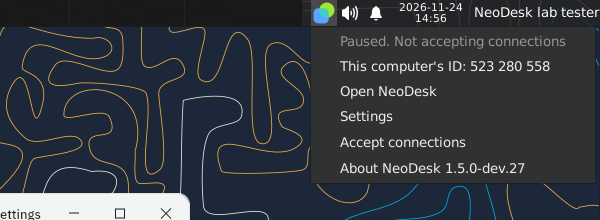
Home says "Paused. This computer does not accept connections right now." with Accept connections under it.
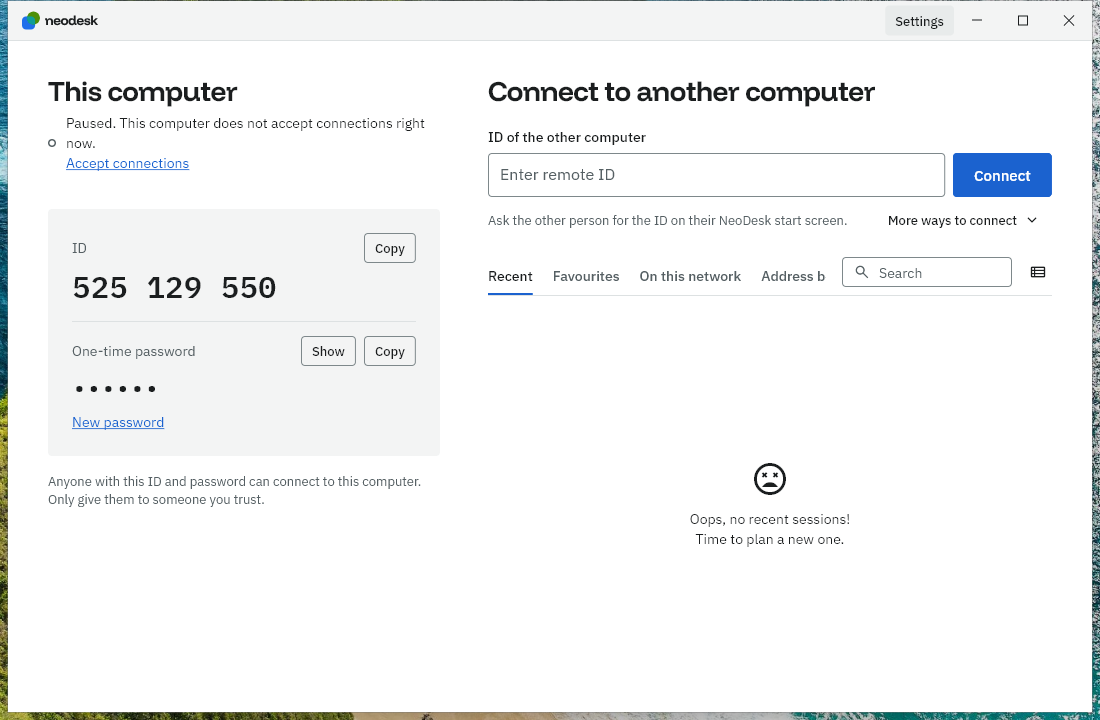
In rc.6 on Windows, Stop accepting connections asked Windows for permission, removed NeoDesk's service and its tray icon and closed the window. Opened again, the window showed the Set up NeoDesk screen, although the computer was still joined.
Allow connections to this computer in Settings, Security pauses and accepts the same way. Only Unlock asks for permission.
Typing works in Settings and on the Set up NeoDesk screen
In rc.6, text typed into Settings and its dialogs often never arrived, while pasting worked. Typed text now arrives in the settings search, Join a server, Set up by hand, Pair with code, Set permanent password, Set PIN, and the invite and server address fields of the Set up NeoDesk screen. Join a server takes typing as soon as it opens, Tab moves through the fields and buttons, and Escape closes a dialog without saving.
Join a server says why the server refused
When the server refuses a join, Join a server in Settings, Server now shows the server's answer and what to do next, such as "This computer's ID is already enrolled with another key. Ask your administrator to approve the new key or to delete the device in the console." The dialog stays open with the invite filled in, so Continue tries the same invite again once the administrator has done that. In rc.6 both dialogs closed without a message, and the reason showed only on Home.
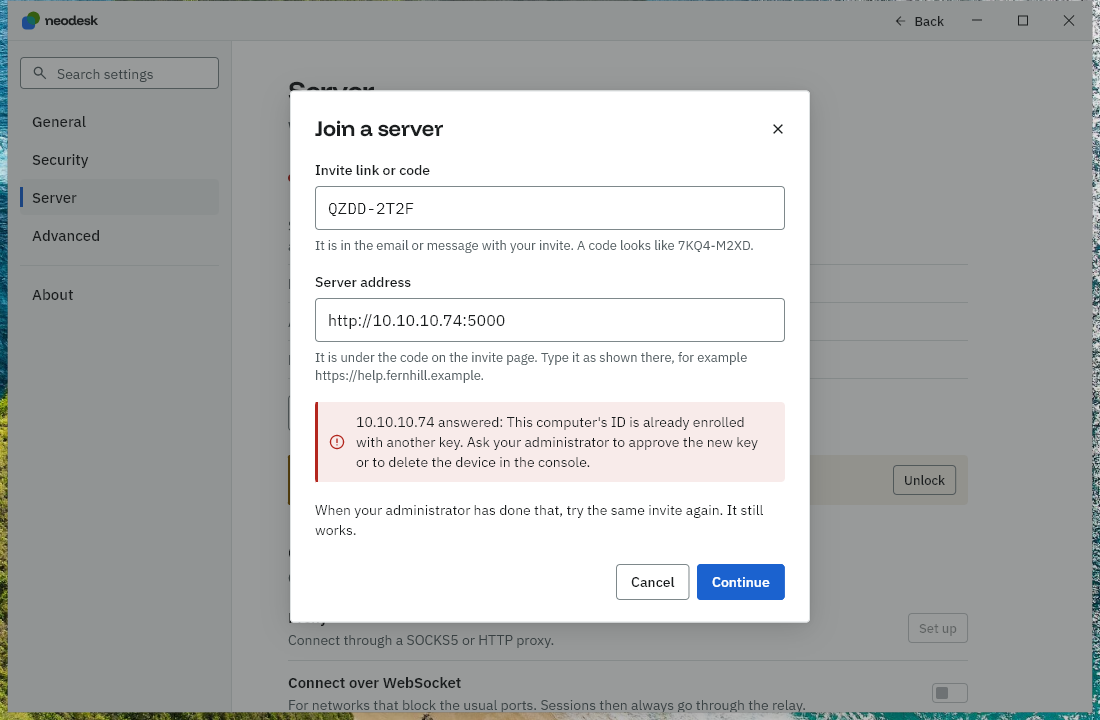
While the join runs, the dialog stays open and says that it is connecting this computer to the server.
Back online when the new key is approved
When the server refuses this computer's key, the client now offers its key again each time it registers. When the administrator clicks Approve new key in the console, the computer is online again within seconds, and Home and the tray say Ready without a restart of NeoDesk. The service log says that the server refused this device's key, once every ten minutes, instead of "unknown RegisterPkResponse" at every answer.
The settings search uses the Security page's names
The settings search finds the Security settings under the names the page shows, such as Accept sessions via password, Use permanent password, Enable two-factor authentication and Direct IP access, and a hit opens the Security page. In rc.6 it listed names such as "How someone gets in" that the page doesn't have.
Updating
- Install rc.7 over rc.6 with the MSI or the Linux package. The exe can't update an installed NeoDesk: uninstall rc.6 first, then run the rc.7 exe and click Install. Nothing in this release changes the computer's ID, key, password or server, also on that way.
- The Linux packages carry the version
1.5.0~rc.7, which apt and dnf sort after rc.6's1.5.0~rc.6, so rc.7 installs as a normal update, from the file or from thetestingsuite at pkg.neode.sk. - If you used Stop accepting connections in rc.6 on Windows, it removed NeoDesk's service. Update with the MSI, open NeoDesk from the Start menu and click Accept connections on Home once. Windows asks for permission to set up the service again, and its prompt names Windows Command Processor. If the window shows the Set up NeoDesk screen instead of Home, the computer is still joined: open Settings, Security, click Unlock and switch on Allow connections to this computer. From then on, pausing and accepting ask for no permission, as long as no update is installed while NeoDesk is paused.
- Coming from rc.4, the upgrade notes of rc.6 apply too: the computer gets a new ID once, and the rc.4 packages for Linux need the downgrade options given there, with rc.7's file names.
Known issues
- A computer whose key the server refuses still shows Online in the console of the server 3.6.0-rc.4. Sessions to it are refused, and its client's Home and tray say that the server refuses its key.
- The console can't tell a paused computer from one that is turned off. It lists the computer as offline, and a browser session to it says to turn it on or wake it up.
- On macOS, switching off Allow connections to this computer in Settings still removes NeoDesk's service instead of pausing.
- Windows' permission prompt for installing, updating or removing the exe install names Windows Command Processor by Microsoft, not NeoDesk. 1.5.0 will still ask this way.
- After a successful join from Join a server, the Server page in Settings keeps saying "Not connected to" the server in red, while Home and the tray say Ready. Leave Settings and open it again to see the new state.
- On Linux the settings search also lists Windows-only settings, such as Share Windows remote desktop sessions and NeoDesk printer, which the Linux pages don't have. The search hit Set permanent password always says "Not set.", also when a permanent password is set. A few entries for General and Advanced still use names those pages don't show.
- Uninstalling the exe install shows a console window with service commands for a few seconds.
- Right after the console approves a computer, Home and the tray can keep saying "Can't reach" or "Waiting for an administrator to approve this computer" for about two minutes, while sessions to it already work.
- Updating with the MSI while the service runs shows Windows Installer's message that a reboot will be required. Click OK; no restart is needed.
- Installing an MSI update while NeoDesk is paused leaves it without its service. Accept connections then asks Windows for permission once and sets the service up again.
- The exe can't update an installed NeoDesk. Started next to an installed rc.6 it runs as a portable app or only brings the installed window forward.
- The MSI is in English only.
- The tray menu hasn't been tried on macOS.
- After an upgrade from the rc.4 rpm, rc.4's
rustdesk.servicestays on the system. - The NeoDesk Support Agent and the NeoDesk Client on one computer share an ID.
- The console's links that open a device in the app use
rustdesk://, so on Linux and macOS they open stock RustDesk or nothing. - "Join another server?" also asks when the invite is for the server the client already uses.
- A second quick support app started while the first is open stays offline once the first one closes.
- On a Linux desktop without a compositor, the quick support bar has a black frame.
- The bar lists a file transfer when it starts, without progress and without saying when it is done.
- Texts that are new in this release are in English in every language but English and German.
Downloads
- Commit:
976649198295b549389d856a8906612e19abdc9b - Tag:
desktop-v1.5.0-rc.7
Full Client (NeoDesk Desktop)
Type: full remote-desktop client (product_sku=neodesk-desktop). Can connect outbound and accept inbound. Configure the server in Settings → Network (or via a deploy string from the NeoDesk panel).
| Architecture | Windows | Ubuntu / Linux | Mac |
|---|---|---|---|
| x86-64 (64-bit) | EXE MSI Portable | [DEB](https://github.com/neodeskapp/neodesk-client/releases/download... |
NeoDesk Client 1.5.0-rc.6
This pre-release installs on Windows, runs next to stock RustDesk on the same computer, and keeps a joined computer reachable after a restart. It covers everything since 1.5.0-rc.4, because 1.5.0-rc.5 was never published. It goes with the NeoDesk server 3.6.0-rc.4.
What's new
A joined computer keeps its key
A Windows computer that joined with an invite lost its key at the next restart. The server kept showing it online, but every session to it ended with "could not be secured". The join now asks the NeoDesk service for its key, so the server holds the key the service signs with, and the computer stays reachable after a restart. A computer set up by hand with a pairing code gets the service's key too.
With the server 3.6.0-rc.4, a computer that comes back with another key anyway is refused, and Home and the tray say that the server refuses this computer's key. Running its invite again then offers Approve new key on its device page in the console.
The Windows installer installs
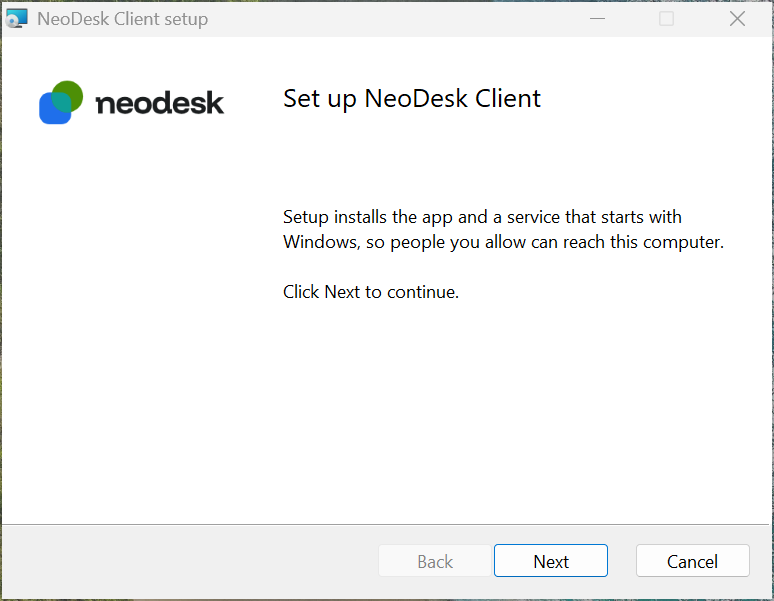
In rc.4, Install closed the setup window and installed nothing. Now Install asks Windows for permission, puts NeoDesk Client into C:\Program Files\NeoDesk Client and starts its service. The setup file from an invite does the same, then joins the computer to the server.
The installers' new look
The exe opens with a loading window that shows what it does and how far it is, and keeps it on screen until the app's window is up.
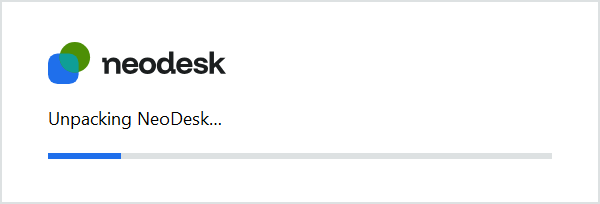
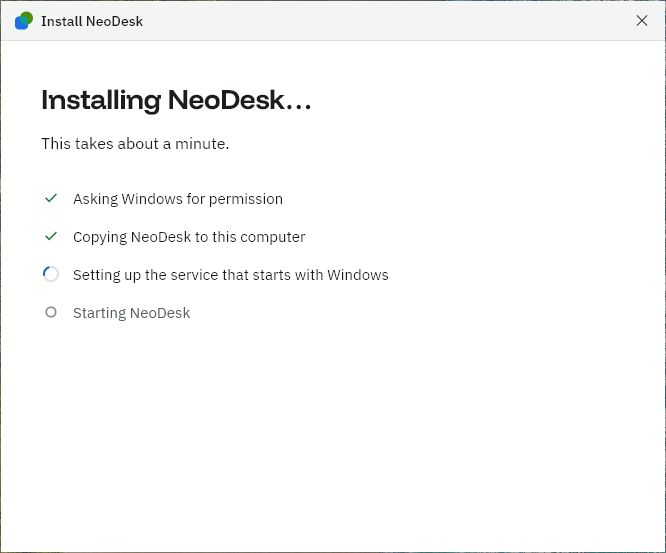
Install names each step while it runs: asking Windows for permission, copying NeoDesk to this computer, setting up the service that starts with Windows, and starting NeoDesk. When Windows doesn't get permission, the page says that nothing was installed and how to try again.
The MSI has pages of its own instead of WiX's red artwork. They say in plain words what setup does, the progress page names each step, and the last page says that NeoDesk runs, where its icon is, and offers to open it. After a removal the last page says the app is removed, and an MSI started over an install from the exe says so and what to do. The licence page shows the AGPL, and Windows names NeoDesk Client when it asks for permission.
The tray menu
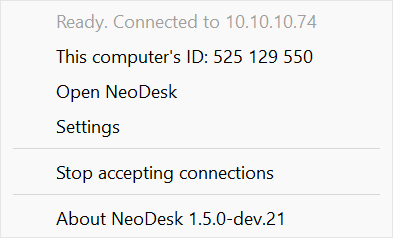
The tray menu shows whether the computer is ready and which server it is connected to, the computer's ID, which a click copies, and Open NeoDesk, Settings, Stop accepting connections and About NeoDesk with the version. Before, it had Open and Stop service.
Next to stock RustDesk
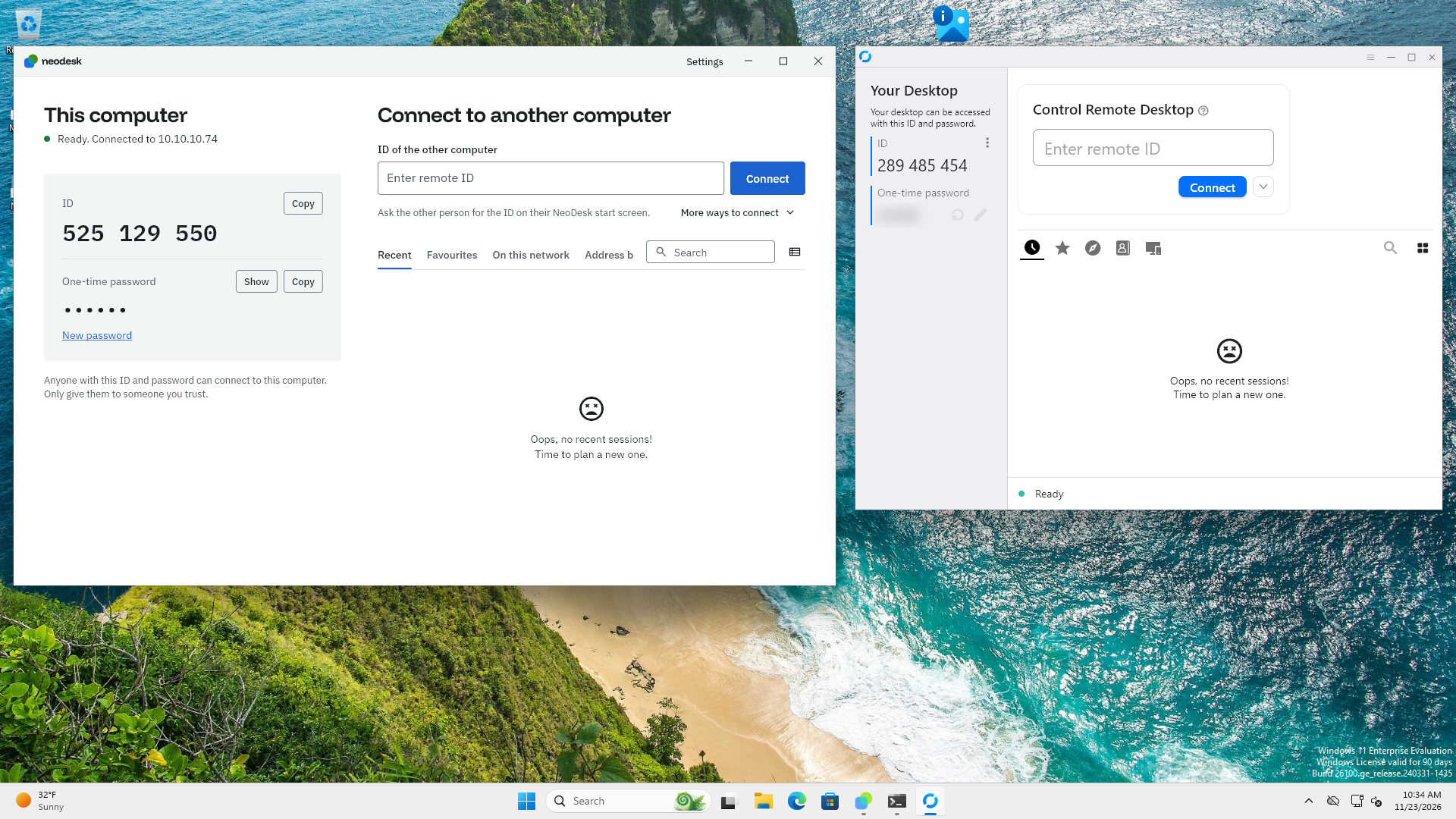
NeoDesk and stock RustDesk run on the same computer, each with its own ID, and both stay online. Before, both took the same ID, and only the one that registered first could be reached.
On Linux the package installs as neodesk.service next to RustDesk's own rustdesk.service, and no longer removes an installed RustDesk.
neodesk:// links open NeoDesk on Windows, macOS and Linux. rustdesk:// links stay with stock RustDesk: on Windows NeoDesk takes them only on a computer without stock RustDesk and gives them back when it is removed, and on Linux and macOS it never takes them. See Links that open the app.
Quick support says what it allows
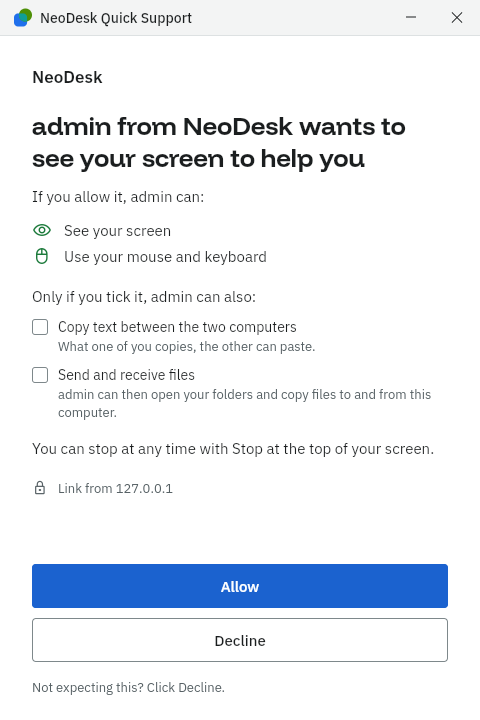
The consent screen lists what the supporter can do after Allow: see the screen and use the mouse and keyboard. Copying text and sending files are two more choices, off until the person ticks them, and the session gets only what the person allowed.
During the session the bar at the top of the screen says that the supporter is viewing and controlling the computer, with Chat and Stop.
Home says why it isn't connected
Home says when the computer is waiting for approval, and when the server refuses this computer's new key, instead of "Can't reach". A refused invite shows the server's reason, such as "Ask your administrator to approve the new key or to delete the device in the console.", and the same invite works again once the admin has done that.
Set up by hand opens the server settings, and Home shows as soon as the server is saved. When you enter an invite code, the client asks for the server address that is under the code on the invite page.
Packages for Linux
- The packages carry the release candidate in their version,
1.5.0~rc.6, and the client reports 1.5.0-rc.6 to the server. - The package metadata names NeoDesk and neode.sk.
- The rpm finishes without an error on systems without systemd or desktop-file-utils.
- The Linux packages also come from the signed package repository at pkg.neode.sk. Its
testingsuite gets this release candidate,stablegets the first release. See Install from the package repository.
Fixes
- An invite link that starts the client asks once whether to join the server, not twice.
- An invite file's install page names the server once.
- The password step names no product: it asks for the password shown or set on the other computer.
- About credits RustDesk and Purslane Ltd. by their own names.
- A custom client stages its update in NeoDesk's own folder under ProgramData, apart from stock RustDesk's.
Upgrade notes
- Computers that joined with an invite on a build from CI before this release don't get their key back by updating. After the update the server refuses the computer's key. Join the computer again with a new invite, click Approve new key on its device page in the console, and run the same invite once more.
- Every computer that runs rc.4 gets a new ID once, when rc.6 first starts. rc.4 took the ID that stock RustDesk uses on that computer; rc.6 moves to an ID of its own and keeps it from then on, also after a reinstall. To the server it is a new computer with the new ID, and the entry with the old ID stays offline until you delete it. Give the new ID to everyone who connects by ID.
- The rc.4 packages for Linux say 1.5.0 without a suffix, so apt and dnf take rc.6 for an older version. Install it over rc.4 with
sudo apt-get install --allow-downgrades ./neodesk-1.5.0-rc.6-linux-x86_64.deborsudo dnf downgrade ./neodesk-1.5.0-rc.6-linux-x86_64.rpm. - Quick support with choices and Approve new key need the server 3.6.0-rc.3 or later. The key check after a restart needs 3.6.0-rc.4.
Known issues
- A computer whose key the server refuses still shows Online in the console of the server 3.6.0-rc.4. Sessions to it are refused, and its client's Home and tray say that the server refuses its key.
- Windows' permission prompt for the exe install names Windows Command Processor by Microsoft, not NeoDesk.
- Uninstalling the exe install shows a console window with service commands for a few seconds.
- Right after the console approves a computer, Home and the tray say "Can't reach" until the service connects again.
- After Stop accepting connections the tray icon goes away with the service, so connections can be turned on again only from the app's window.
- Updating with the MSI while the service runs can end with Windows Installer's message that a restart may be needed.
- The MSI is in English only.
- The tray menu has only been tried on Windows.
- After an upgrade from the rc.4 rpm, rc.4's `rustd...
NeoDesk Client 1.5.0-rc.4
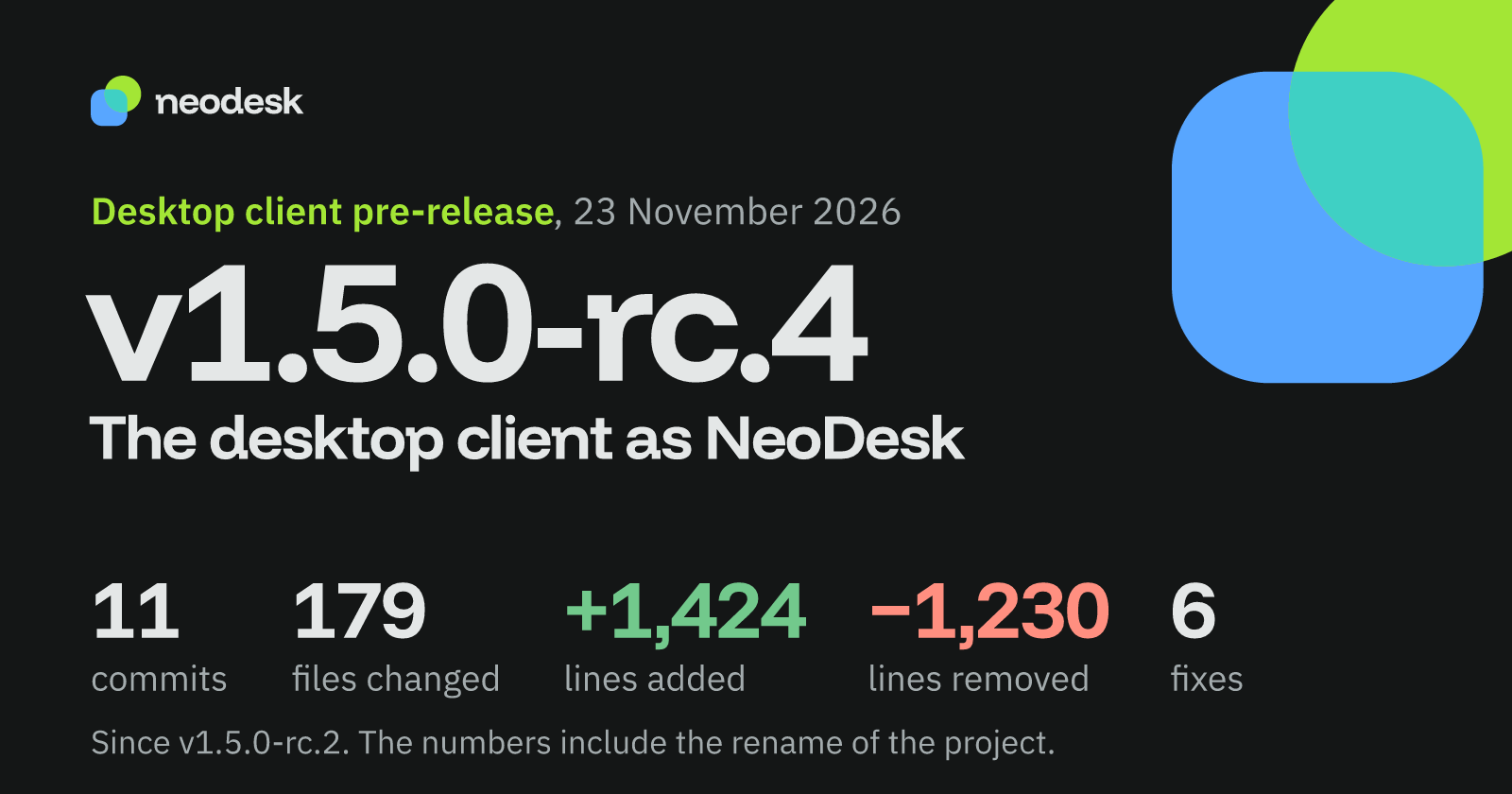
This pre-release is the desktop client as NeoDesk. It goes with the NeoDesk server 3.6.0-rc.2: both use the new nd names for enrollment, and neither keeps the old ones.
What's new
The client is NeoDesk
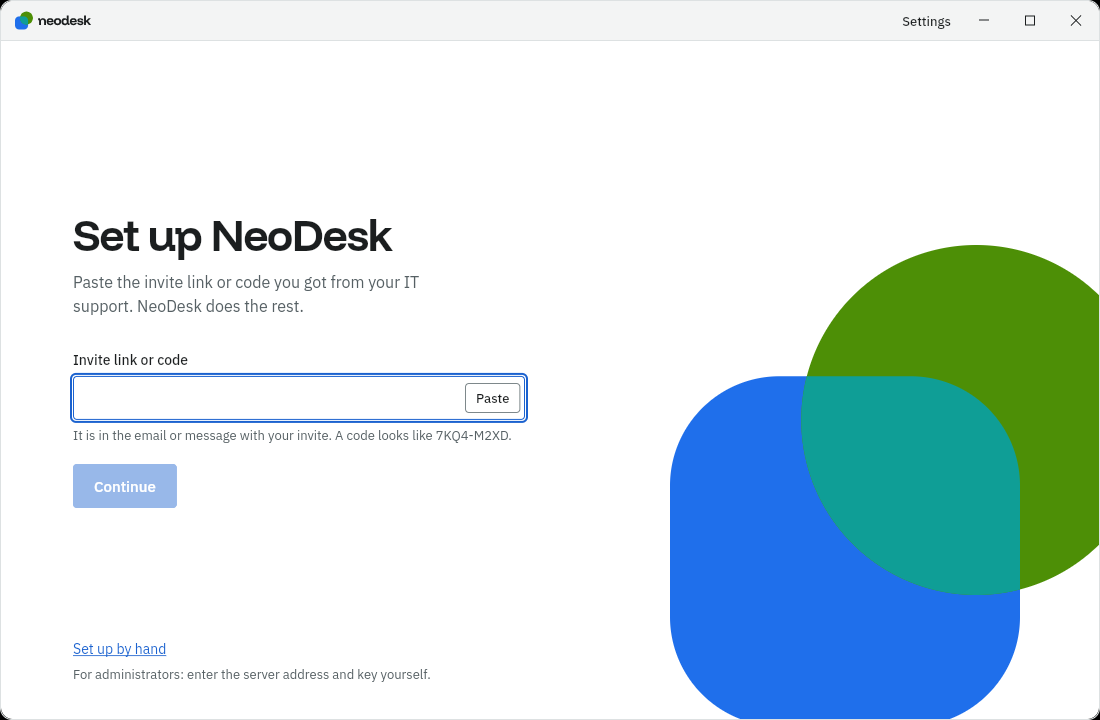
The client is called NeoDesk and shows the NeoDesk logo. It points at the renamed neodeskapp organization, is published as NeoDesk, and the portable download says NeoDesk Client in its file properties. On first start it asks for the invite link or code from your IT support, or for the server address and key under Set up by hand.
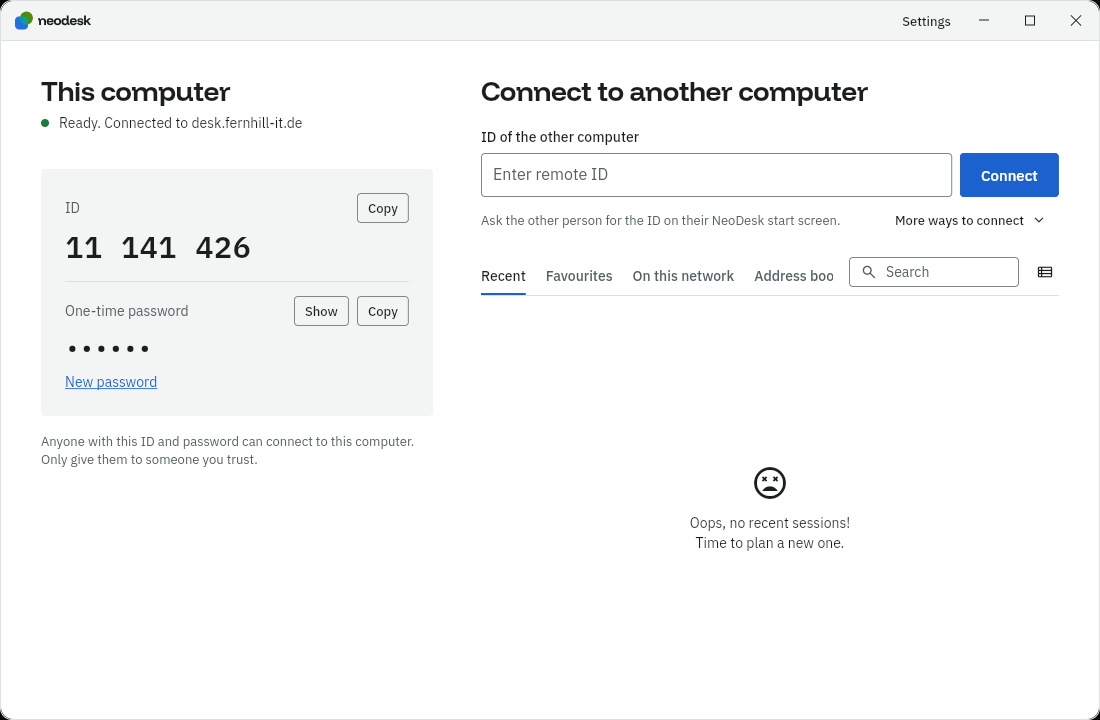
Once it is set up, the main window shows this computer's ID and one-time password next to the field for connecting to another computer.
Settings open in place
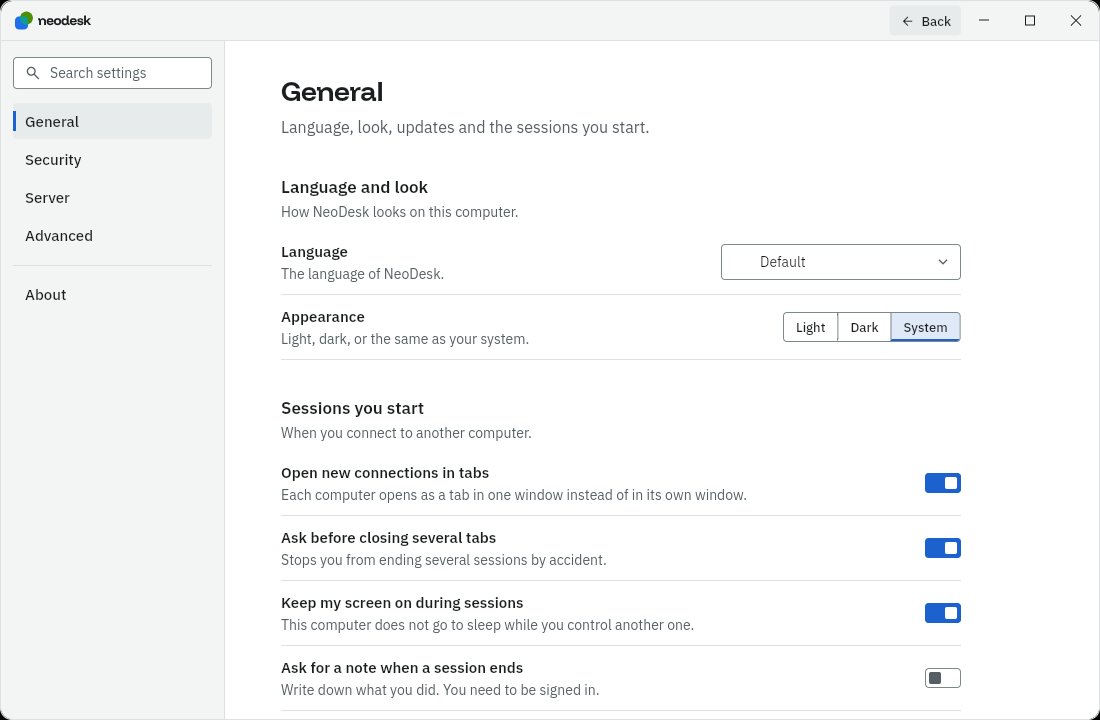
Settings opens in place of Home, with a Back button, instead of in a second tab. The window buttons are line glyphs of one size and weight.
Enrollment with the new names
The client signs enrollment as nd-enrollment-v1 with the X-ND-Enrollment headers, as NeoDesk servers from 3.6.0-rc.2 on expect.
Fixes in the release builds
- A support release no longer becomes the latest release of this repository.
- The server can pass build targets to the support build.
Downloads
- Commit:
6853e068f3fbd559803cb76ae4609b8c6bcf41c9 - Tag:
desktop-v1.5.0-rc.4
Full Client (NeoDesk Desktop)
Type: full remote-desktop client (product_sku=neodesk-desktop). Can connect outbound and accept inbound. Configure the server in Settings → Network (or via a deploy string from the NeoDesk panel).
| Architecture | Windows | Ubuntu / Linux | Mac |
|---|---|---|---|
| x86-64 (64-bit) | EXE MSI Portable | DEB RPM SUSE Portable | DMG Portable |
| AArch64 (ARM64) | EXE MSI Portable | DEB RPM SUSE Portable | DMG Portable |
Other assets
- SHA256SUMS — checksums of every file in this release
- generator-templates-1.5.0-rc.4.tar.gz — clean Generator templates
- generator-templates-1.5.0-rc.4.tar.gz.sha256 — clean Generator templates
- neodesk-1.5.0-rc.4-generator-manifest.json — clean Generator templates
- neodesk-desktop-manifest.json — desktop release manifest
Also available: Support Agent
Incoming-only Support Agent packages are published as separate support-v* releases on this repository (see Releases tagged support-v*).
Development changes
- fix: keep a support release from becoming the latest release [L292] (6853e06)
- fix: let the server pass build targets to the support build [L291] (a34fe16)
- feat: sign enrollment as nd-enrollment-v1 with X-ND-Enrollment headers (26177ef)
- fix: name the portable download NeoDesk Client in its file properties (461bbe1)
- feat: publish the client as NeoDesk instead of UNITRONIX (4086420)
- feat: show the NeoDesk logo (25d3219)
- feat: rename the project to NeoDesk (a917957)
- refactor: move files to their NeoDesk names (c829b01)
- fix: point the client at the renamed neodeskapp organization (f2564d2)
Notes
- Windows: portable EXE and installed MSI for x86_64 and ARM64.
- Configure servers in Settings → Network, or import a deploy string from the NeoDesk panel.
- Workflow run: https://github.com/neodeskapp/neodesk-client/actions/runs/45114280630