Repository navigation
Releases
NetTimeSyncTool-v1.0.8

版本更新:现已发布到Microsoft Store 应用商店
自V1.0.4.6以来的更新日志
- 程序现已对ARM64架构提供了的支持。
- 程序现在已发布到Microsoft Store应用商店。你需要安装Windows 10周年更新或更新版本的Windows 操作系统才能在Microsoft Store安装并运行此应用。你的电脑可能需要安装 Microsoft Visual C++ Redistributable 2015-2022才能运行此软件。
P.S. 如果你运行的是旧版本的Windows,请下载Assets的链接
系统要求*: Windows Vista Service Pack 2**, Windows 7 Service Pack 1, Windows 8.1, Windows Server 2012, Windows Server 2012 R2 with Update, Windows Server 2008, Service Pack 2, Windows Server 2008 R2, Service Pack 1, Windows 10 or greater.
* Windows Vista Service Pack 2具有有限支持,你必须安装Microsoft Visual C++ Redistributable 2015-2019来运行软件
** 你的电脑需要安装 Microsoft Visual C++ Redistributable 2015-2022才能运行此软件

Version Update: Now available in Microsoft Store!!
Update log from V1.0.4.6
- Now the program has provided for ARM64 architecture.
- Now the program has released to Microsoft Store, to download and use it in Microsoft Store, your PC should running at least in Windows 10, Anniversary Update (Version 1607). Your PC should installed with Microsoft Visual C++ Redistributable 2015-2022 to running this program.
P.S. If you are running older version for Windows, you can download from Assets.
OS Requirement*: Windows Vista Service Pack 2**, Windows 7 Service Pack 1, Windows 8.1, Windows Server 2012, Windows Server 2012 R2 with Update, Windows Server 2008, Service Pack 2, Windows Server 2008 R2, Service Pack 1, Windows 10 or greater.
* Your PC should installed with Microsoft Visual C++ Redistributable 2015-2022 to running this program
** Windows Vista support has a limited support for Windows, you should installing Microsoft Visual C++ Redistributable 2015-2019 to running this program

NetTimeSyncTool-v1.0.4.7-beta
Release Note
For Windows 11 on ARM64, we have added ARM64 release supporting.
更新日志
对于Windows 11 on ARM64, 我们已经添加了ARM64发布版本
NetTimeSyncTool-v1.0.4.6
Version Update Description:
- Fixed some bugs.
- Fixed the translation bug
- change copyright year.
版本更新说明
- 修复一些bug;
- 修正部分翻译问题;
- 更改版本更新时间。
NetTimeSyncTool-v1.0.4.5
Release Notes
This update which based on version 1.0.4.0 has added these following information:
- Add supports to IPv6
- We supported the clock source ASCII code when statum = 1. which defined as RFC 5905 write
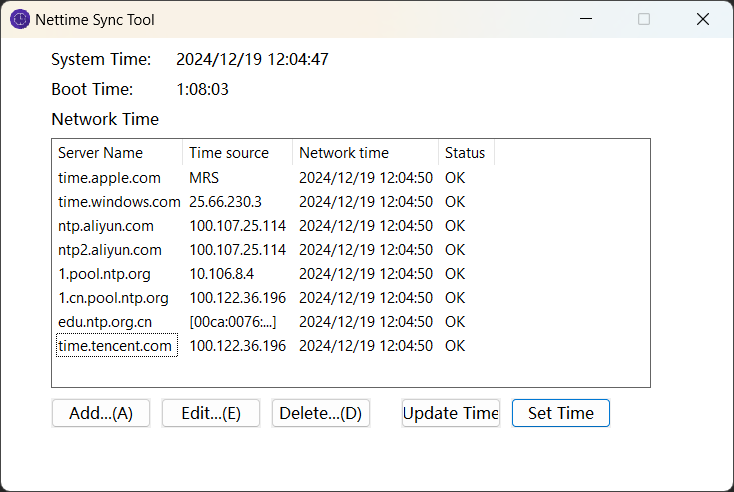
更新内容
本次更新在v1.0.4.0更新的基础上,添加了以下内容
- IPv6支持
- 我们基于RFC5905的文档定义,添加在statum值为1时时钟位置的ASCII代码
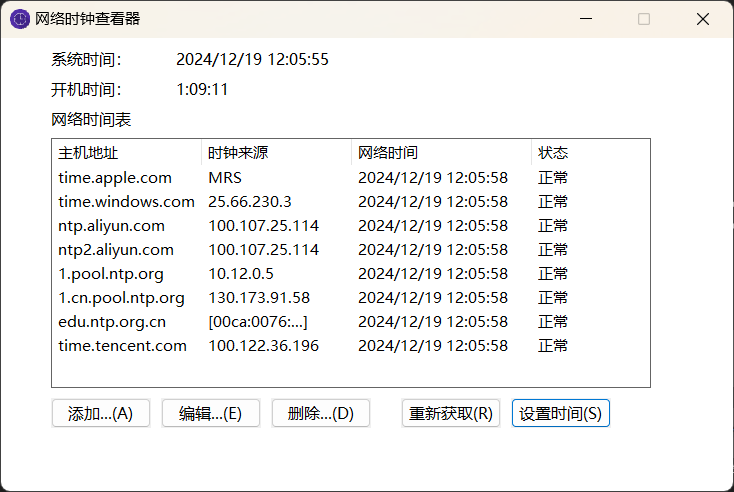
Based on v1.0.4.4 Bug fix
- Fixed the IPv6 Show bug
- FIxed the Window Display bug.
基于v1.0.4.4版本的bug修正
- 修复IPv6的展示问题
- 修复了窗口显示问题
NetTimeSyncTool-v1.0.4.4
Release Notes
This update which based on version 1.0.4.0 has added these following information:
- Add supports to IPv6
- We supported the clock source ASCII code when statum = 1. which defined as RFC 5905 write
更新内容
本次更新在v1.0.4.0更新的基础上,添加了以下内容
- IPv6支持
- 我们基于RFC5905的文档定义,添加在statum值为1时时钟位置的ASCII代码
NetTimeSyncTool-v1.0.4.0
修复
控件双缓冲问题
Fix:
Controls flickering issues
NetTimeSyncTool-v0.0.3.10-beta
Changelog
Because of the Microsoft Defender Antivirus, v1.413.209.0, which released on 2024/6/10 12:53 has reported the file built in x86 as the virus, so we republished the file to avoid it.
更新日志
由于2024/6/10 12:53发布的Microsoft Defender Antivirus, 版本1.413.209.0导致本软件32位版本报毒,需要重新修改,故重新发布,未作任何功能性更新
NetTimeSyncTool-v0.0.3.9-beta
fixed an bug, which Updated Set time logic.
修复一个问题,可能导致时间设置错误
NetTimeSyncTool-v0.0.2.8-beta
ChangeLog:
- fix a issue, something which support Windows 8 or later does not support Windows 7, we updated this file
更新日志
- 修复了一个问题,Windows 8支持但是Windows 7不支持的问题。我们更新了这个文件。
NetTimeSyncTool-'v0.0.2.7-beta'
Change Log
-
Fixed a bug, which make the program crushed.
-
Updated Resources, which make the description more stable.
-
Fixed the date 2036-02-08 bug, which will not worked properly. Before the date 2036-02-08 or earlier, you must update this Program to this version!
-
From the date 2036-02-08 to the following 78 years, we will release an update. After that day we recommend you update this program or remove the old version.
P.S. because of the NTP Protocol definition, we recommend you to update the tool in every 78 years. When the repository be archived, you can use the tool at least in following 78 years, but we recommend you to give up the tool when the repository change back to archived state.
-
Updated autosync /nowarn option. After Updated Windows Time. There's no warnning to update, just return the code, to see if the time setted correctly.
-
Fixed autosync logics.
更新日志
-
修复一个问题,可能导致程序崩溃
-
更新资源,使得描述更准确
-
我们修复了2036-02-08日的时钟同步bug,因此我们强烈建议在2036-02-08前,必须更新此应用程序至更新版本!
-
从2036-02-08起至未来的78年内,可能会发布更新,在那一天后我们建议将此小工具更新到最新版本,或弃用这个旧版本
P.S.鉴于NTP协议的定义,我们建议每78年更新此小程序。当此项目被弃用时或转为存档状态时,您仍然可以在至少未来78年内使用此小程序,但我们建议您尽快弃用此小程序
-
添加了autosync /nowarn选项,在更新完时间后,不会提示,您可以查看返回值,确认是否更新成功
-
修改了autosync选项的更新逻辑。