Repository navigation

ILoveNotch 2.0 redraws every tab and adds ten themes that reach into each one, a teleprompter, and a Home tab you arrange yourself.
See it
Added
- A Home tab you arrange. Music, what's next today, your tasks, your AI plan, a timer, and your script as tiles, each opening its tab, with buttons that work right on the tile. Edit it from the pencil in the corner or a tile's menu: remove tiles, drag one onto another to reorder, and add your latest note, recent copies, favorite shortcuts, or network speed. More tiles than fit go on pages you swipe through. It starts off: turn it on in Settings or the app drawer.
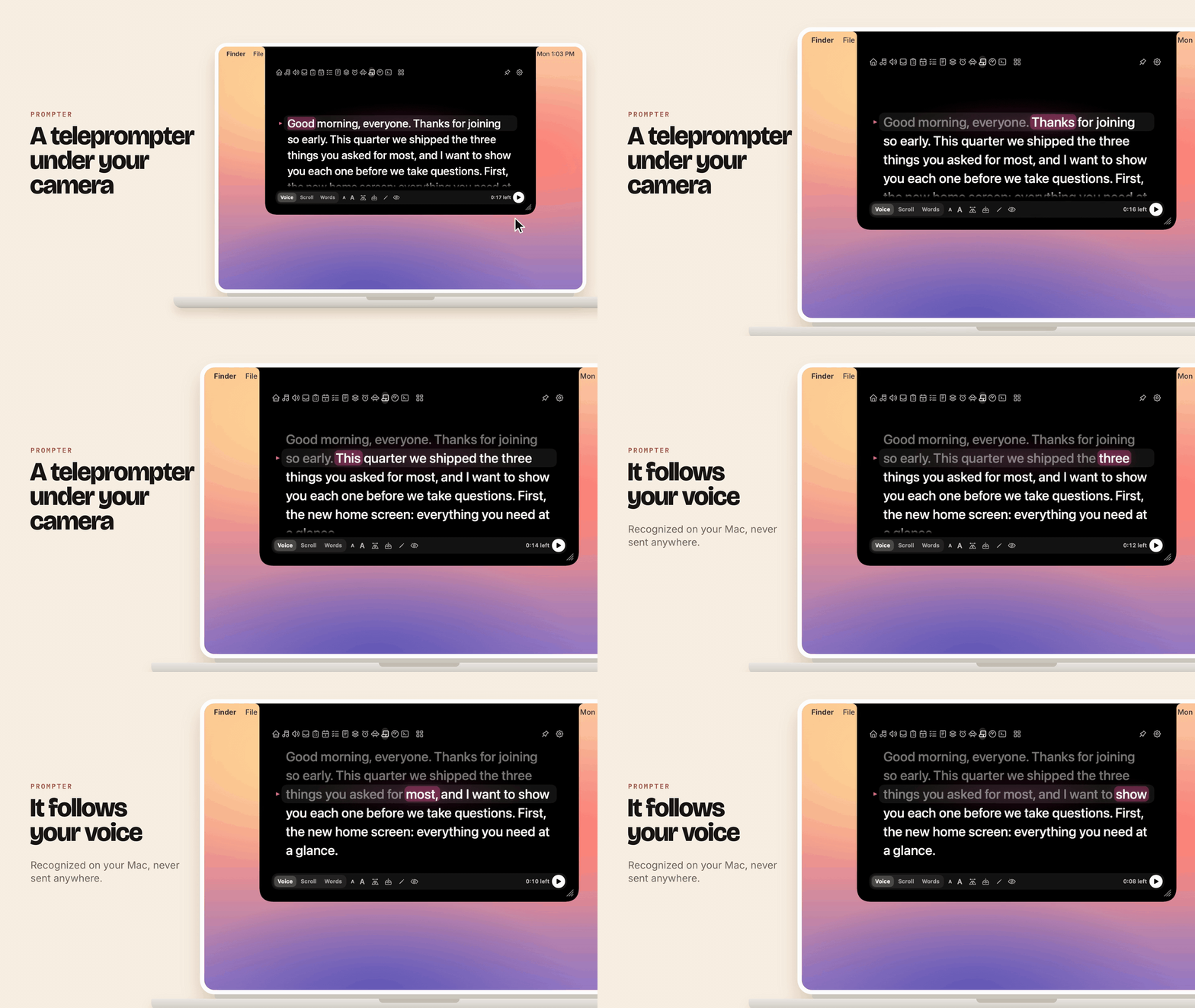
- A teleprompter in the notch. The new Prompter tab puts your script just under the camera, with what you've read dimmed and the next word lit. It can follow your voice, recognized on your Mac and never sent anywhere, scroll at a steady 0.5× to 3×, or move on only while you speak. Paste your script, or import a text or Markdown file or a PowerPoint deck's speaker notes. Flip it for teleprompter glass, and pause from any app with Control-Option-P. While a script is up, the notch stays out of screen sharing, and the closed notch shows how long is left. Turn it on in Settings › Prompter. The microphone is asked for the first time you need it.
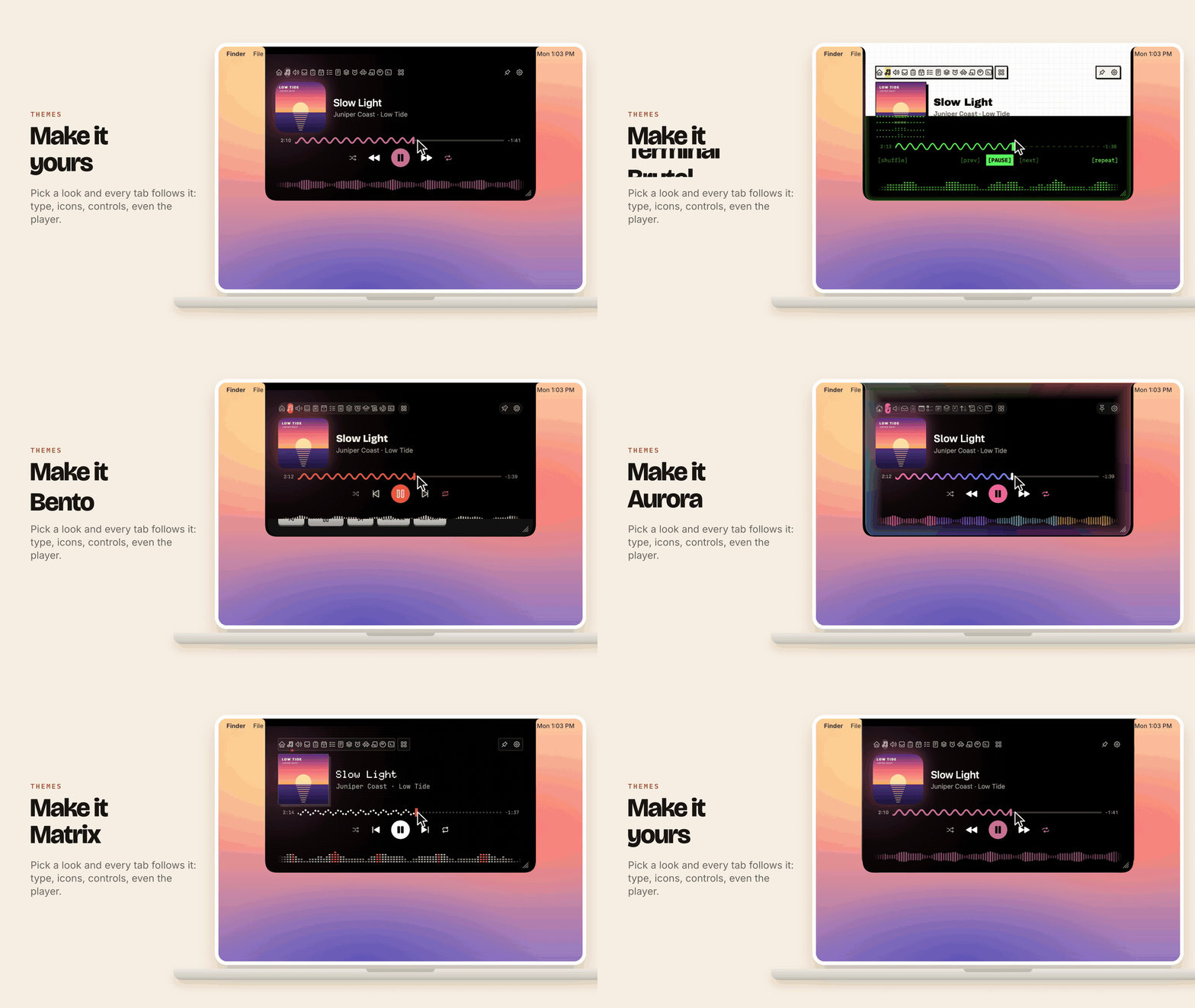
- Themes reach every tab. Each look now draws the icons inside the tabs from its own set, and its own buttons, fields, cards, and selection: ink outlines and an underline in Paper, hard shadows in Brutal, green brackets in Terminal, dark wells and a lit dot in Hi-Fi. Pick one in Settings › Appearance from previews drawn in each theme's own look.
- Hi-Fi. A black faceplate with an amber display in VT323: the track, the seek line, and an LED waveform glowing behind glass, silver keys, and two VU meters whose needles swing with the music. Pick amber, green, red, or ice blue in Settings › Appearance.
- Terminal. Phosphor green on black in IBM Plex Mono, pixel icons, tabs numbered like a shell's windows, and a text-mode player: the cover drawn in characters, the track as key and value lines, and bracketed buttons over a dashed seek line and an LED waveform.
- Bento. Bold Bricolage Grotesque titles over Inter, two-tone Phosphor icons, a tomato accent, and Home's cards in peach, butter, mint, and lilac.
- Island. All black like the camera housing, with rounder corners, Apple's own symbols in the tab row, and an orange accent. The player still glows with the album's colors.
- Glass, refreshed. Liquid Glass below a black band across the camera, thin line icons, rounder corners, and white for the accent. Tabs show their names when they all fit.
- Aurora. A black notch lit from its edges in pink, violet, cyan, and amber, with the same colors running along the seek wave and the waveform, and Geist type. Settings › Appearance sets how strong the glow is.
- Cozy. Warm cocoa with cream text in rounded Nunito, soft rounded icons, a coral wave, and a little heart-eyed notch at the head of the tabs.
- Brutal. A white sheet of graph paper with heavy black outlines and hard shadows, Archivo Black for titles, bold line icons, a dashed seek line with a yellow head, and square black bars.
- Matrix. Dot-matrix type, a faint grid of dots, a seek line and waveform made of dots and lit segments, and one red accent.
- Paper, a light theme. Pick it in Settings › Appearance: dark ink on a cream sheet that fills the open notch, track names in the Newsreader serif, and four accents to choose from. The prompter marks the word you're on with a highlighter. Closed, the notch stays black.
Changed
- Music leads with the cover, with Up next, lyrics, and the output a click away, and a live waveform that moves with the sound.
- Clipboard is a board of cards that scrolls down, each sized by what it holds: images fill their card, links show their site, colors show a swatch. Give any card a color of its own.
- Calendar puts the week across the top with a dot for each busy day. Pick a day to see its events, the next one with its countdown and Join, and your tasks beside them on every day. Click a task to open it in Tasks.
- Tasks are three columns, Today, Upcoming, and Done, with the task due now grown, Done and Snooze 10 min on it. Drag a card to finish it, move it to another day, or reorder. Click a card to see all of it: the whole title, its notes, and the full due date.
- Notes list beside the open note, which reads as formatted Markdown with checkboxes you tick. On macOS 26 the formatting shows as you type.
- Timer is a dial, with the presets around it like the hours on a clock. Pick another to swap a running timer, and ⌘Z brings the old one back.
- Shelf shows your files as thumbnail tiles over one bar: pick some to send by AirDrop or Quick Share, copy, or preview with Space.
- Shortcuts keeps four favorites as pads beside a log of recent runs, with Stop for a running shortcut, Retry for a failed one, and a click to copy what it returned.
- Network keeps a ledger of today, this week, and this month beside a page of bars for any day, week, month, or year, with the live speed in one strip on top.
- Sound is a mixer desk: a fader for each app playing sound, beside the master and the outputs, each saying how it connects.
- Mirror is a round mirror in a ring light you can brighten and warm, with framing guides. Or show the camera across the whole notch.
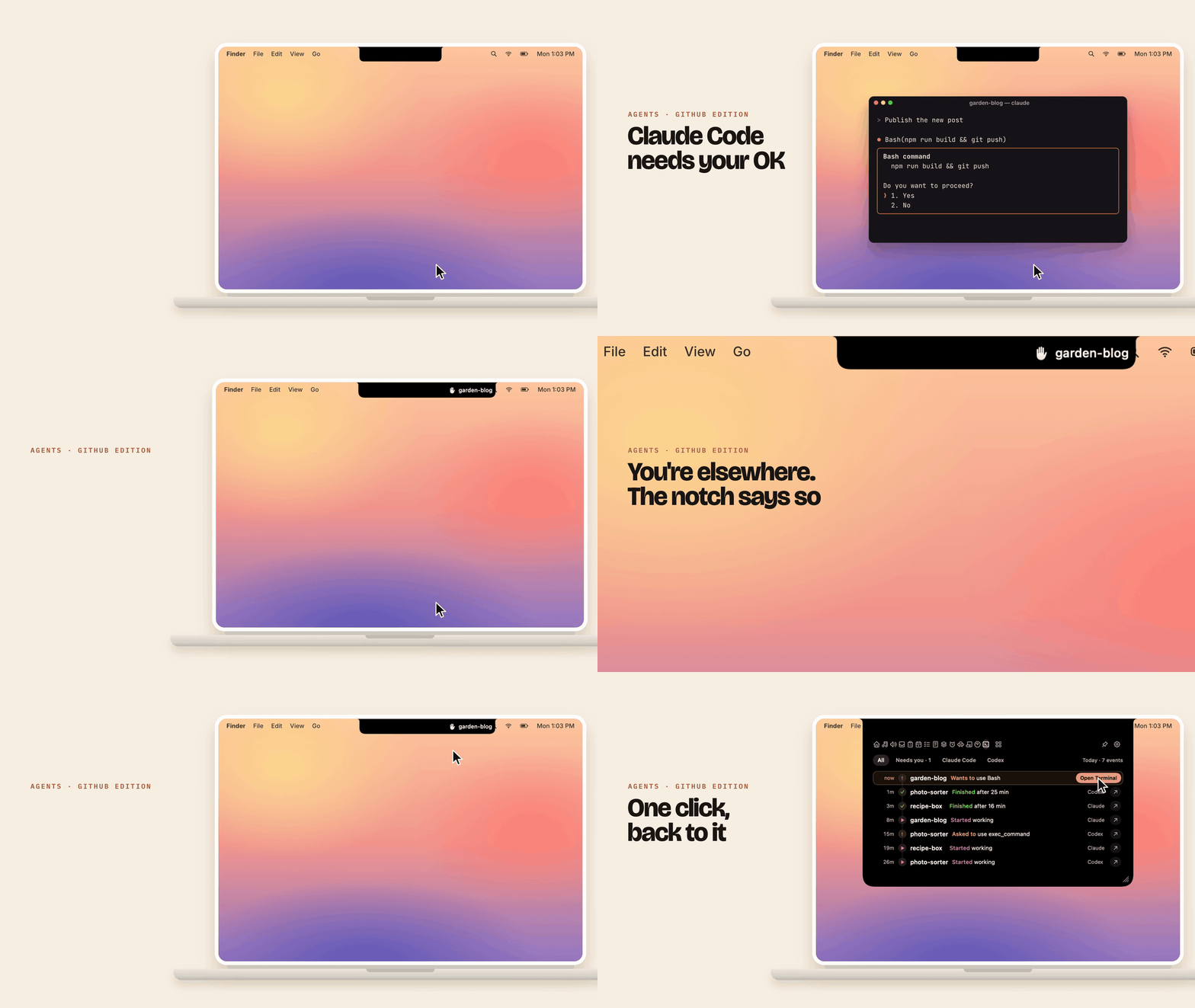
- Agents is a timeline of what Claude Code and Codex did, newest first, with Open Terminal on an agent that needs you. Project names show in full.
- Prompter reads in a band under the camera, the word you're on lit in the theme's own style, and you can click any word to carry on from there.
Fixed
- The now-playing tab beside the camera hides after 10 seconds. A film playing in a browser kept its name over the notch the whole time, even in full screen. It now comes back for 10 seconds when the track, cover, or play/pause changes.
Removed
- Tasks' Completed section. Done now shows what you finished today; your older completed tasks stay in Reminders.
Install
Download ILoveNotch-2.0.0.dmg below, open it, and drag ILoveNotch into Applications. It updates itself from then on; if you already have it, choose Check for Updates… from its menu bar item. Or with Homebrew: brew install --cask niyamvora/tap/ilovenotch.
Needs macOS 14.6 or later. Signed and notarized by Apple. SHA256SUMS has the checksums.
What's Changed
- Appcast for v1.5.1 by @niyamvora in #50
- fix(media): hide the now-playing tab 10 seconds after it appears by @niyamvora in #51
- ILoveNotch 2.0: every tab redrawn, ten themes, a teleprompter, and a Home you arrange by @niyamvora in #53
- 2.0: README and App Store listing with the new screenshots by @niyamvora in #54
Full Changelog: v1.5.1...v2.0.0
Contributors

niyamvora