Repository navigation
Releases
v3.0.1

Changelog
- b26742a: Bilingual README (English and Persian) with a Powered by badge (@Emadhabibnia1385)
Install
- Windows:
irm https://raw.githubusercontent.com/nyxon-tech/claude-switcher/main/install.ps1 | iex - macOS and Linux:
curl -fsSL https://raw.githubusercontent.com/nyxon-tech/claude-switcher/main/install.sh | sh
Verify a download: gh attestation verify <file> -R nyxon-tech/claude-switcher
Contributors

Assets 14
- 918 Bytes
2026-11-04T07:25:01Z - 4.95 MB
2026-11-04T07:25:01Z - 5.08 MB
2026-11-04T07:24:59Z - 4.5 MB
2026-11-04T07:24:59Z - 4.6 MB
2026-11-04T07:24:59Z - 9.69 MB
2026-11-04T07:24:59Z - 4.95 MB
2026-11-04T07:24:58Z - 4.5 MB
2026-11-04T07:24:58Z - 5.15 MB
2026-11-04T07:24:58Z - 4.61 MB
2026-11-04T07:24:58Z -
2026-11-04T07:22:28Z -
2026-11-04T07:22:28Z - Loading
Claude Switcher 3.0.0
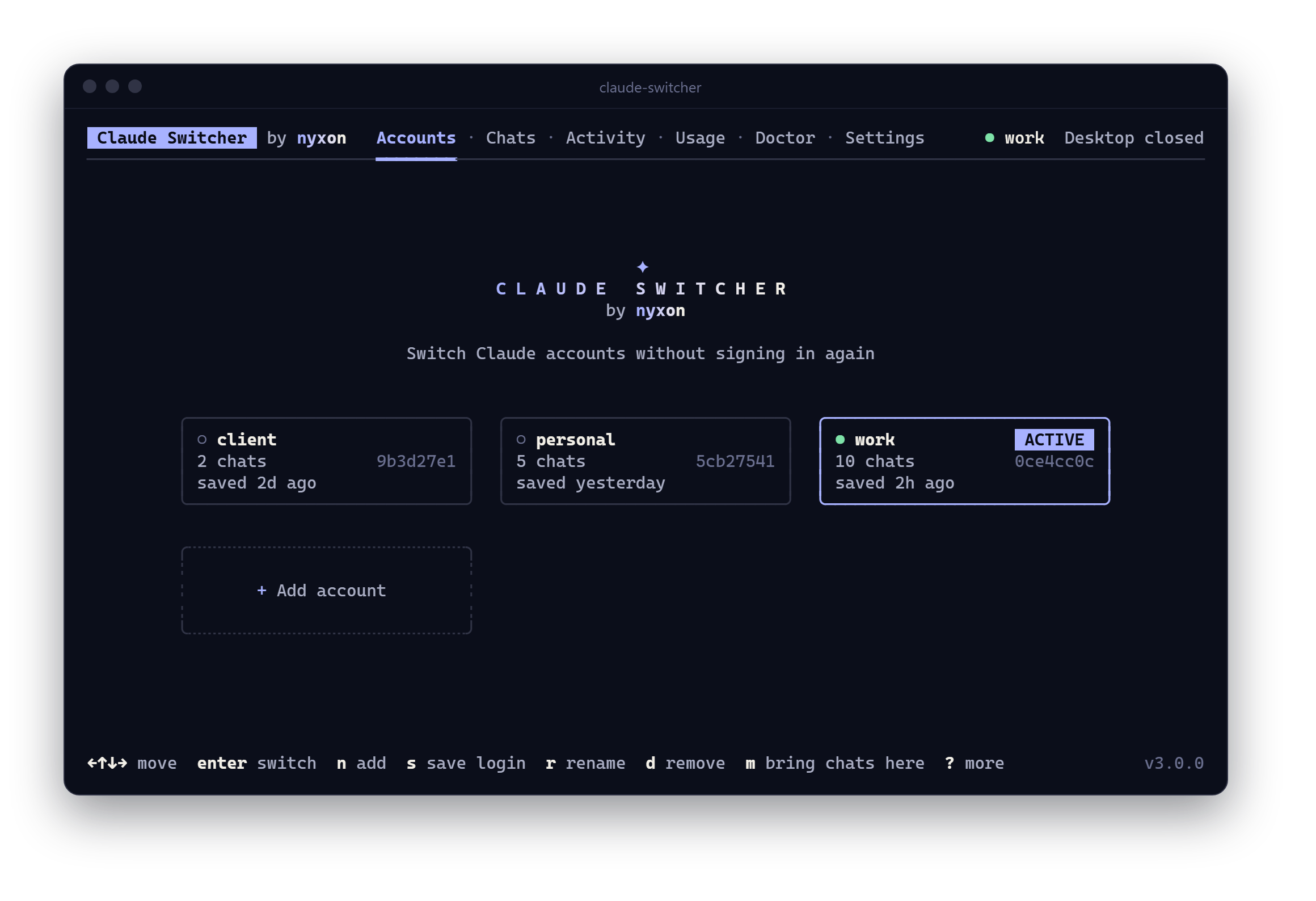
Claude Switcher 3 is a rewrite from scratch: one binary for Windows, macOS and Linux, with a full-screen app and a command line for everything.
Install or upgrade
Windows (PowerShell)
irm https://raw.githubusercontent.com/nyxon-tech/claude-switcher/main/install.ps1 | iexmacOS and Linux
curl -fsSL https://raw.githubusercontent.com/nyxon-tech/claude-switcher/main/install.sh | shThe installers check the download against checksums.txt before installing, for your user only. On v2? Run the same line: your saved logins in ~/.claude-instances and the undo history carry over unchanged. Debian/Ubuntu and Fedora packages are attached below too.
New
- macOS and Linux, next to Windows (both the current installer and the older
.exeone). Claude Desktop is asked to quit where the OS allows it; on Windows you quit it from the tray and the app waits for it. - A full-screen app with tabs for Accounts, Chats, Activity, Usage, Doctor and Settings, mouse support, and a step-by-step view of every change.
- Chats from every account in one list, with search as you type, a preview of any chat, copy and move between accounts (newest copy wins), recovery of chats no sidebar lists, and export to a web page or Markdown.
- Usage: tokens by model, the last 30 days and the top projects, counted from your local transcripts.
- Commands for everything, with
--json, stable exit codes, shell completions and a man page;claude-switcher updateinstalls new releases after checking their checksum.
Fixed
- Chat titles in Persian or Arabic showed as
????. They now display correctly, letters joined and right to left, even in terminals that cannot lay out right-to-left text themselves, such as Windows Terminal. - Recover reads which older transcripts belong to a chat from Desktop's own records, so a part of a chat you still have is never offered as a lost chat.
- Undo always reverses the change you just made, and skips empty entries.
- Switching refuses when Desktop is signed into an account no profile has saved, instead of losing that login.
Full list in the changelog.
Verify a download: gh attestation verify <file> -R nyxon-tech/claude-switcher
Unofficial, not affiliated with Anthropic. Started as a fork of claude-profile-switcher by @NeezerGu; thank you.
Contributors

Assets 14
Claude Switcher 2.0.3

Copying a chat to an account that already had it did nothing, even when your copy was newer: it said the chat was already there and kept the old one. Update by running the installer again:
irm https://raw.githubusercontent.com/nyxon-tech/claude-switcher/main/install.ps1 | iexWhen you keep working on a chat in one account, Desktop points its sidebar record at a newer history file. Copy and merge now compare when each copy was last used and replace the older one, and undo puts it back. A copy that is newer in the target is still left alone.
| File | SHA-256 |
|---|---|
claude-switcher.ps1 |
b57d062afd914bfe5e25eae08525f7aaed48d52e02dd5a1aa4fd845602c4d8ee |
install.ps1 |
95e7aa6dd58a69be2ee8b1bd9c2c863d4b52e41f7300d6f2af66822d6b0f86d6 |
Claude Switcher 2.0.2
Fixes a crash in 2.0.1: the menu stopped as soon as it opened with Cannot convert value " " to type "System.ConsoleColor". Update by running the installer again:
irm https://raw.githubusercontent.com/nyxon-tech/claude-switcher/main/install.ps1 | iexRows of the menu that hold a single coloured segment were unrolled by PowerShell into that segment's text and colour, so a character of the text was read as a colour. The fixture tests could not catch it because drawing needs a real console, so tests/console.ps1 now draws the menu, a held arrow key, search and selection in a real console window. It reproduced the crash before the fix and passes in PowerShell 7 and Windows PowerShell 5.1 after it.
All fixes from 2.0.1 are included.
| File | SHA-256 |
|---|---|
claude-switcher.ps1 |
098c4bc9a3b52abadbc6ee4d644dacf035bbfb9a5c18eff11edea45d109060d4 |
install.ps1 |
95e7aa6dd58a69be2ee8b1bd9c2c863d4b52e41f7300d6f2af66822d6b0f86d6 |
Claude Switcher 2.0.1
Bug fixes for 2.0.0. If you installed 2.0.0, run the installer again to update:
irm https://raw.githubusercontent.com/nyxon-tech/claude-switcher/main/install.ps1 | iexFixed
- Recover offered duplicates. A Claude Desktop chat is usually several history files: a
/clear, a restart or a resume starts a new file under the same title, and the sidebar record points only at the newest one. 2.0.0 offered every older file as a separate lost chat, so recovering everything filled a chat list with copies. Recover now leaves out files whose title and project match a chat you still have, files that another file continues, and chats you deleted in the app, and offers each lost chat once, at its newest file. On the machine that reported it, 54 offers became 6. - Typing selected everything. In multi-select lists the
Akey selected all items, so typing a title that contained an "a" picked every chat. Letters now start a search, and Ctrl+A selects all. - Bulk changes now confirm. Every move, copy and recovery asks you to confirm the number of chats before anything is written.
- Holding an arrow key froze the menu. The picker now redraws only the rows that change, applies queued key presses together, and reads the status line once per screen.
If 2.0.0 recovered duplicates for you
Run claude-switcher undo (or pick Undo the last chat change in the menu). It removes exactly the records that recovery added and nothing else.
Files
| File | SHA-256 |
|---|---|
claude-switcher.ps1 |
f99b23cc117d1bf1493f516d15b0b40ac29013efd39737e4e4f2159e2d155696 |
install.ps1 |
95e7aa6dd58a69be2ee8b1bd9c2c863d4b52e41f7300d6f2af66822d6b0f86d6 |
Claude Switcher 2.0.0
The first release of Claude Switcher by Nyxon: switch Claude Desktop accounts on Windows without signing in again, and take your Claude Code chats with you.
irm https://raw.githubusercontent.com/nyxon-tech/claude-switcher/main/install.ps1 | iexThen open a new terminal and run claude-switcher. To install exactly this release instead of the latest main:
& ([scriptblock]::Create((irm https://raw.githubusercontent.com/nyxon-tech/claude-switcher/v2.0.0/install.ps1))) -Ref v2.0.0What's new
- Interactive menu when run with no arguments: arrow keys,
/to search, Space to pick several, Esc to go back. Every item is also a command. - Move or copy chats between accounts, one by one or all at once.
- Merge every chat an account is missing from all the others.
- Recover chats whose history is on disk but that no sidebar lists, with their real title, project, model and dates. Terminal sessions show up too.
- Undo for every chat change, restored byte for byte from a journal.
doctorchecks the install, the signed-in account and every chat list, flags junctioned chat lists, and warns about Claude Code's 30-day history cleanup.new <name>adds an account without logging out of the saved one. Plusrename,remove,accounts,chatsandversion.- One-line installer with a
claude-switchercommand and a Start menu shortcut. No admin rights.
Fixed and changed since claude-profile-switcher 1.0
- Finds the Microsoft Store install under
%LOCALAPPDATA%\Packages\Claude_*\LocalCache, where%APPDATA%\Claudedoes not exist. - Waits only for Claude Desktop itself. A Claude Code CLI in a terminal is also called
claude.exe, andvmwpbelongs to every Hyper-V VM (WSL2, Docker), so either could stall the wait forever. - Swaps
buddy-tokens.jsonandplan-usage-history.json, which Desktop 2.x keeps per account, and clears every login file before loading a profile so nothing from the previous account survives. - Refuses to save over a profile when Desktop was signed into a different account by hand.
- Non-Latin profile names and chat titles survive Windows PowerShell 5.1.
Profiles saved by 1.0 in %USERPROFILE%\.claude-instances keep working.
Tested on
Windows 11 26200, Claude Desktop 2.2553.1 (Microsoft Store), Claude Code 2.1.275, PowerShell 7.6 and Windows PowerShell 5.1. CI runs the full test suite in both shells and a real install on windows-latest.
Files
| File | SHA-256 |
|---|---|
claude-switcher.ps1 |
73d42b3c2b0706673ce4a3adb867eebf6d4b75f7a37a8472d2be3b5d31ff7a59 |
install.ps1 |
95e7aa6dd58a69be2ee8b1bd9c2c863d4b52e41f7300d6f2af66822d6b0f86d6 |
Check a download with Get-FileHash .\claude-switcher.ps1.
Thanks
Built on claude-profile-switcher by @NeezerGu, who worked out which of Desktop's files make up a login. The research in claude-transplant by @vitaliyhayda on Desktop's per-account records shaped the chat features.
Unofficial and not affiliated with Anthropic.
